Yes! You can use AI to fill out Account Reduction Loan Application 403(b) Plan
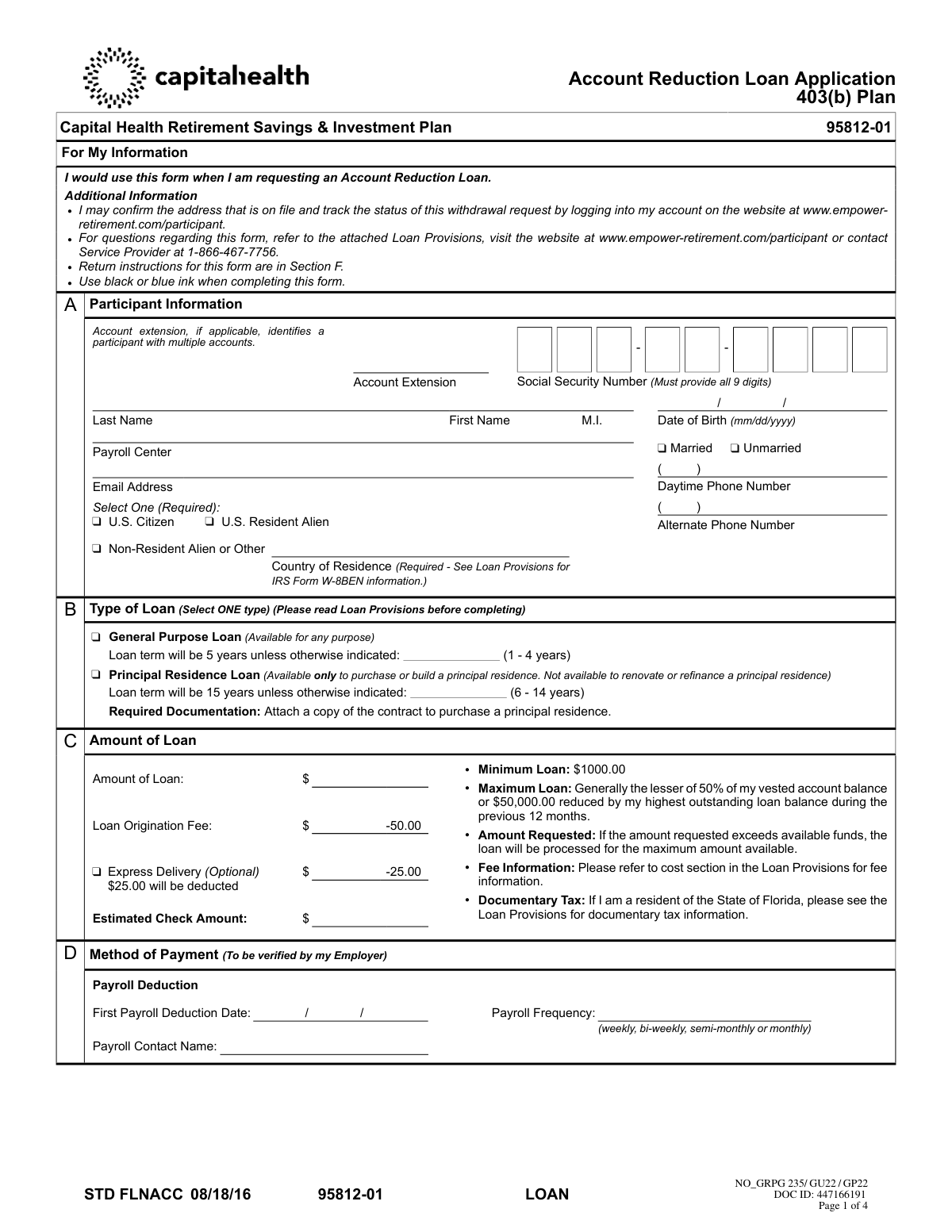
This form is an application for participants of a 403(b) retirement plan, such as the Capital Health Retirement Savings & Investment Plan, to borrow money from their vested account balance. It is important for accessing funds for general purposes or for the purchase of a principal residence, subject to plan rules and regulations. Today, this form can be filled out quickly and accurately using AI-powered services like Instafill.ai, which can also convert non-fillable PDF versions into interactive fillable forms.
95812-01LOAN is part of the
loan application forms, loan forms, 403(b) forms and account application forms categories on Instafill.
Rather not fill this in by hand? Instafill is an online form filler that completes PDF forms automatically — upload the blank form, answer a few questions, and the AI fills every field.
Form specifications
| Form name: | Account Reduction Loan Application 403(b) Plan |
| Number of pages: | 1 |
| Language: | English |
Our AI automatically handles information lookup, data retrieval, formatting, and form filling.
It takes less than a minute to fill out 95812-01LOAN using our AI form filling.
Securely upload your data. Information is encrypted in transit and deleted immediately after the form is filled out.
Instafill Demo: How to fill out PDF forms in seconds with AI
How to Fill Out 95812-01LOAN Online for Free in 2026
Are you looking to fill out a 95812-01LOAN form online quickly and accurately? Instafill.ai offers the #1 AI-powered PDF filling software of 2026, allowing you to complete your 95812-01LOAN form in just 37 seconds or less.
Follow these steps to fill out your 95812-01LOAN form online using Instafill.ai:
- 1 Navigate to Instafill.ai and upload or select the Account Reduction Loan Application form.
- 2 Use the AI assistant to automatically fill in your personal details in Section A, including your name, Social Security Number, and contact information.
- 3 In Section B, select the type of loan you are applying for (General Purpose or Principal Residence) and specify the desired loan term.
- 4 Enter the requested loan amount in Section C, reviewing the associated origination and optional express delivery fees.
- 5 Complete Section D to confirm the method of payment will be via payroll deduction and provide any required payroll details.
- 6 Carefully review all sections for accuracy, then proceed to Section E to provide your legally binding signature and the date. Note any notarization requirements if using an alternate mailing address.
- 7 Download the completed, signed form and submit it to Empower Retirement via fax or mail as instructed in Section F.
Our AI-powered system ensures each field is filled out correctly, reducing errors and saving you time.
Why Choose Instafill.ai for Your Fillable 95812-01LOAN Form?
Speed
Complete your 95812-01LOAN in as little as 37 seconds.
Up-to-Date
Always use the latest 2026 95812-01LOAN form version.
Cost-effective
No need to hire expensive lawyers.
Accuracy
Our AI performs 10 compliance checks to ensure your form is error-free.
Security
Your personal information is protected with bank-level encryption.
Frequently Asked Questions About 95812-01LOAN
This form is used to request a loan from your Capital Health Retirement Savings & Investment Plan 403(b) account, which is administered by Empower Retirement.
You can apply for a General Purpose Loan for any reason, or a Principal Residence Loan, which is available only for the purchase or construction of your primary home.
Yes, if you are applying for a Principal Residence Loan, you must attach a copy of the signed contract to purchase the residence. Non-resident aliens must also attach a signed IRS Form W-8BEN.
The minimum loan amount is $1,000. The maximum is generally the lesser of 50% of your vested account balance or $50,000, reduced by your highest outstanding loan balance from the previous 12 months.
Yes, a $50.00 loan origination fee is deducted from the loan amount, and a $25.00 annual administration fee is charged to your account. An optional $25.00 fee applies for express delivery.
Loan repayments are made automatically through after-tax payroll deductions. Empower Retirement will notify your employer's payroll department of the repayment amount and schedule.
Notarization is only required if you want the loan check sent to an alternate mailing address that is different from the one on file. In that case, you must sign the form in the presence of a Notary Public.
After signing, you can fax the form to 1-866-745-5766 or mail it to the Empower Retirement address provided in Section F of the application.
You can track the status of your loan request by logging into your account on the Empower Retirement participant website or by calling the service center at 1-866-467-7756.
If you miss payments and do not catch up by the end of the following calendar quarter, the loan will go into default. The entire outstanding balance will then be treated as a taxable distribution, which could result in taxes and penalties.
Yes, services like Instafill.ai use AI to accurately auto-fill form fields, which can save you time and help prevent errors on your application.
Simply upload the form's PDF to the Instafill.ai platform. The AI will make the fields interactive, allowing you to type your information directly before downloading the completed, ready-to-print document.
You can use a service like Instafill.ai, which can convert flat, non-fillable PDFs into interactive, fillable forms that you can easily complete on your computer.
The interest rate is fixed for the life of the loan and is set at the Prime Rate published in the Wall Street Journal on the first business day of the month the loan is originated, plus 2%.
Compliance 95812-01LOAN
Validation Checks by Instafill.ai
1
Social Security Number Format and Completeness
This check ensures that the Social Security Number field in Section A contains exactly nine digits. It is a mandatory field for participant identification and tax reporting purposes. Failure to provide a complete and valid SSN will result in the rejection of the application, as it is essential for compliance with IRS regulations and correct account processing.
2
Required Participant Information Completeness
Verifies that all mandatory fields in Section A, including First Name, Last Name, Date of Birth, and Country of Residence, are filled out. It also confirms that a selection has been made for both 'Citizenship Status' and 'Marital Status'. Incomplete personal information can delay processing or lead to incorrect record-keeping, so the form will be returned if any of these fields are blank.
3
Loan Type Selection Requirement
Ensures that the participant has selected exactly one loan type in Section B, either 'General Purpose Loan' or 'Principal Residence Loan'. The type of loan dictates the loan term, documentation requirements, and purpose. If no option or more than one option is selected, the application is considered ambiguous and cannot be processed.
4
Loan Term Consistency with Loan Type
This is a logical check that validates the user-entered loan term against the selected loan type in Section B. If 'General Purpose Loan' is chosen, the term must be between 1 and 4 years; if 'Principal Residence Loan' is chosen, the term must be between 6 and 14 years. An invalid term for the selected loan type will cause the application to be rejected for correction.
5
Principal Residence Documentation Attachment
Conditionally validates that if 'Principal Residence Loan' is selected in Section B, a copy of the contract to purchase a principal residence is attached to the application. This documentation is required by the plan to substantiate the loan's purpose. Failure to provide the required contract will prevent the loan from being approved as a principal residence loan.
6
Minimum Loan Amount Threshold
Checks that the 'Amount of Loan' requested in Section C is equal to or greater than the plan's minimum of $1,000.00. This rule is in place to ensure administrative costs are justified by the loan amount. Requests for less than the minimum will be rejected, and the participant will need to submit a new form with a valid amount.
7
Maximum Loan Amount Calculation
Validates the requested loan amount against the maximum available to the participant, which is calculated based on plan rules (lesser of 50% of vested balance or $50,000, reduced by prior loan balances). This check requires querying the participant's account data. While the form states the loan may be processed for the maximum available if the request is too high, this validation serves to flag such discrepancies for review or automatic adjustment.
8
Payroll Deduction Information Completeness
Verifies that all fields related to payroll deduction in Section D are completed, including 'First Payroll Deduction Date', 'Payroll Frequency', and 'Payroll Contact Name'. This information is critical for the employer to set up timely loan repayments. An incomplete Section D will halt the loan process until the missing information is provided.
9
Participant Signature and Date Presence
Confirms that the participant has provided a handwritten signature and a corresponding date in Section E. A signature is a legal requirement acknowledging the terms and conditions of the loan. An unsigned or undated form is not legally binding and will be returned immediately, causing significant delays.
10
Non-Resident Alien W-8BEN Form Requirement
This check is triggered if the participant selects 'Non-Resident Alien or Other' in Section A. It verifies that a current, physically signed IRS Form W-8BEN is attached to the application and was submitted via mail, not fax. This is a strict IRS compliance requirement for tax withholding on non-U.S. persons, and its absence will prevent the loan from being processed.
11
Alternate Address Notarization Completeness
Conditionally validates that if the 'Alternate Mailing Address' checkbox is selected in Section E, the entire 'Statement of Notary' section is properly filled out. This includes the notary's signature, seal, and commission expiration date. Notarization is a security measure to prevent fraud, and an incomplete notary section will result in the rejection of the alternate address request.
12
Signature and Notary Date Consistency
Performs a logical check to ensure the date next to the 'Participant Signature' in Section E is identical to the date of notarization sworn by the Notary Public. A mismatch in dates invalidates the notarization, suggesting the signature was not witnessed as required. This discrepancy will cause the form to be rejected for correction to ensure procedural integrity.
13
Date of Birth Logical Validity
Ensures the 'Date of Birth' in Section A is a valid, past date in MM/DD/YYYY format. This check prevents data entry errors such as future dates or impossible dates (e.g., 02/30/2000). A valid date of birth is essential for verifying the participant's identity and eligibility for plan services.
14
Payroll Frequency Value Check
Validates that the 'Payroll Frequency' entered in Section D is one of the expected values listed on the form: 'weekly', 'bi-weekly', 'semi-monthly', or 'monthly'. Using a non-standard value would cause the payroll deduction setup to fail. This check ensures the repayment schedule can be correctly configured by the employer's payroll system.
Common Mistakes in Completing 95812-01LOAN
Applicants often make typos or accidentally omit a digit when entering their 9-digit Social Security Number. Since the SSN is the primary identifier for the account, any error will cause the application to be rejected, leading to significant processing delays. To avoid this, carefully double-check the number before signing. AI-powered tools like Instafill.ai can help by validating that the entry is in the correct 9-digit format.
When applying for a Principal Residence Loan, applicants frequently focus on filling out the form fields and forget to include the required supporting documentation. The form explicitly states that a copy of the contract to purchase the residence must be attached. Failure to provide this document will prevent the loan from being processed until the contract is received.
A very common error occurs when an applicant signs the form on one day but has it notarized on a different day. The form requires that the participant's signature date and the notary's signature date must be identical if an alternate mailing address is used. A mismatch will invalidate the notarization and cause the form to be rejected, delaying the loan check.
Applicants often request their loan check be sent to an alternate address without getting the form notarized, or the notary's seal is missing or illegible. The form clearly states that any request for an alternate mailing address requires a valid notary signature and seal. Submitting the form without proper notarization in this case will result in the check being sent to the address on file or the form being returned.
In an increasingly digital world, many people assume an electronic or typed signature is acceptable. However, this form explicitly states 'A handwritten signature is required' and that electronic signatures will cause a significant delay. To avoid rejection, you must print the form and physically sign it with a pen. If the form is a non-fillable PDF, a tool like Instafill.ai can convert it into a fillable version to type in your information before printing for signature.
Applicants sometimes overlook the required checkbox for citizenship status in Section A. Furthermore, those who select 'Non-Resident Alien' often forget to attach the required IRS Form W-8BEN, which must be mailed with an original signature. An incomplete status or missing form will halt the application process until all required information and documents are provided correctly.
For both General Purpose and Principal Residence loans, the form provides a default term (5 or 15 years) and a field to enter a shorter term within a specific range (e.g., 1-4 years). Applicants mistakenly enter the default term in this field or write a number outside the allowed range. This creates ambiguity and may result in the loan being processed for the default term, not the applicant's desired term.
When an error is made, applicants may use correction fluid or simply cross out the mistake without initialing the change. The loan provisions specify that all changes must be crossed out and initialed by the applicant. Failure to follow this instruction can lead to the form being returned for verification, delaying the loan process.
Applicants sometimes request a loan for less than the stated $1,000.00 minimum, which is not permissible. They may also fail to consider that the $50 loan origination fee and optional $25 express delivery fee are deducted from the requested amount, resulting in a smaller final check. To avoid surprises, ensure your request meets the minimum and account for all fees when determining the amount you need.
Section D asks for payroll details like 'Payroll Contact Name' and 'First Payroll Deduction Date,' which the applicant may not know. Leaving this section blank or guessing can cause delays and errors in setting up the automatic loan repayments. It is best to contact your employer's HR or payroll department to obtain this information before completing the form.
Saved over 80 hours a year
“I was never sure if my IRS forms like W-9 were filled correctly. Now, I can complete the forms accurately without any external help.”
Kevin Martin Green
Your data stays secure with advanced protection from Instafill and our subprocessors




Robust compliance program
Transparent business model
You’re not the product. You always know where your data is and what it is processed for.
ISO 27001, HIPAA, and GDPR
Our subprocesses adhere to multiple compliance standards, including but not limited to ISO 27001, HIPAA, and GDPR.
Security & privacy by design
We consider security and privacy from the initial design phase of any new service or functionality. It’s not an afterthought, it’s built-in, including support for two-factor authentication (2FA) to further protect your account.
Fill out 95812-01LOAN with Instafill.ai
Worried about filling PDFs wrong? Instafill securely fills account-reduction-loan-application-403b-plan forms, ensuring each field is accurate.
