Yes! You can use AI to fill out Account Reduction Loan Application 401(a) Plan, Electrical Workers Local Union No. 369 Retirement Plan
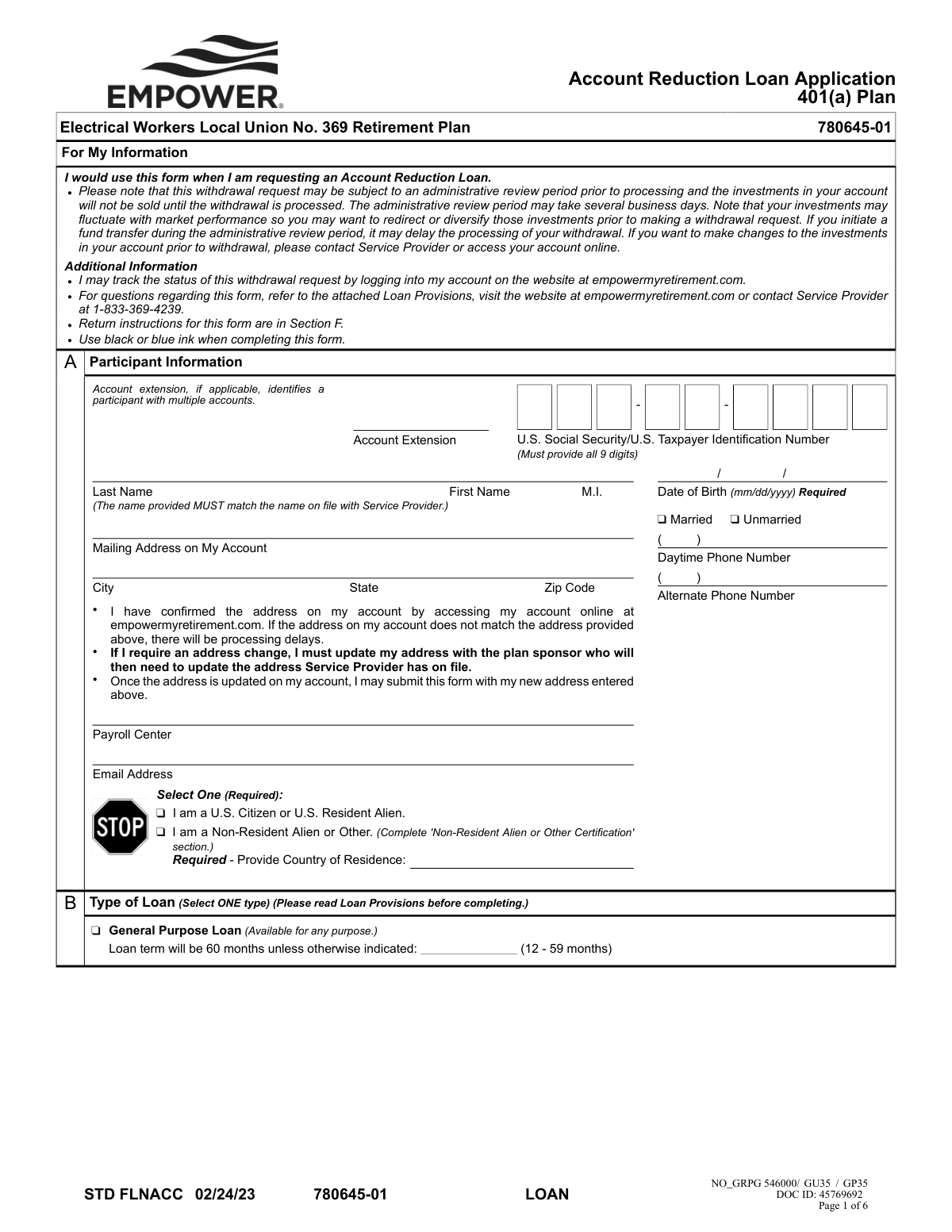
This form is an application for participants in the Electrical Workers Local Union No. 369 Retirement Plan to request an Account Reduction Loan from their 401(a) plan. It requires detailed personal information, loan amount specifics, and spousal consent if applicable, outlining the terms, fees, and repayment obligations. Today, this form can be filled out quickly and accurately using AI-powered services like Instafill.ai, which can also convert non-fillable PDF versions into interactive fillable forms.
STD FLNACC is part of the
retirement forms, loan application forms, retirement plan forms, union forms, loan forms, retirement account forms, account application forms and union retirement forms categories on Instafill.
Rather not fill this in by hand? Instafill is an online form filler that completes PDF forms automatically — upload the blank form, answer a few questions, and the AI fills every field.
Form specifications
| Form name: | Account Reduction Loan Application 401(a) Plan, Electrical Workers Local Union No. 369 Retirement Plan |
| Number of pages: | 1 |
| Language: | English |
Our AI automatically handles information lookup, data retrieval, formatting, and form filling.
It takes less than a minute to fill out STD FLNACC using our AI form filling.
Securely upload your data. Information is encrypted in transit and deleted immediately after the form is filled out.
Instafill Demo: How to fill out PDF forms in seconds with AI
How to Fill Out STD FLNACC Online for Free in 2026
Are you looking to fill out a STD FLNACC form online quickly and accurately? Instafill.ai offers the #1 AI-powered PDF filling software of 2026, allowing you to complete your STD FLNACC form in just 37 seconds or less.
Follow these steps to fill out your STD FLNACC form online using Instafill.ai:
- 1 Navigate to Instafill.ai and upload or select the Account Reduction Loan Application form.
- 2 Use the AI assistant to accurately fill in your personal details in Section A, including your name, Social Security Number, address, and residency status.
- 3 In Section B, select the type of loan you are applying for (General Purpose) and specify the desired loan term.
- 4 Enter the requested loan amount in Section C, reviewing the associated origination and optional express delivery fees.
- 5 Complete Section D if you are a non-resident alien; otherwise, proceed to the next step.
- 6 Carefully review all entered information, then provide your handwritten signature and the date in Section E. If you are married, ensure your spouse provides their consent, signature, and notarization as required.
- 7 Submit the fully completed and signed form following the delivery instructions in Section F, either by uploading it electronically or sending it via mail.
Our AI-powered system ensures each field is filled out correctly, reducing errors and saving you time.
Why Choose Instafill.ai for Your Fillable STD FLNACC Form?
Speed
Complete your STD FLNACC in as little as 37 seconds.
Up-to-Date
Always use the latest 2026 STD FLNACC form version.
Cost-effective
No need to hire expensive lawyers.
Accuracy
Our AI performs 10 compliance checks to ensure your form is error-free.
Security
Your personal information is protected with bank-level encryption.
Frequently Asked Questions About STD FLNACC
This form is used by participants in the Electrical Workers Local Union No. 369 Retirement Plan to apply for a loan against their 401(a) retirement account balance.
You can generally borrow the lesser of 50% of your vested account balance or $50,000, reduced by your highest outstanding loan balance from the past 12 months. The minimum loan amount you can request is $1,000.
Yes, a $25.00 loan origination fee is deducted from the loan amount. You can also choose to pay an optional $30.00 fee for express delivery of your check.
Yes, if you are married, your spouse must sign the consent section, and their signature must be notarized or witnessed by a Plan Administrator. Spousal consent is not required if your vested account balance is less than $5,000.
No, a handwritten signature in blue or black ink is required. The form explicitly states that electronic signatures will not be accepted and will cause significant processing delays.
You can submit the form by uploading it electronically to your account at empowermyretirement.com, or by sending it via regular or express mail to the addresses listed in Section F.
Your loan application will be delayed. You must first update your address with your plan sponsor, wait for it to be updated with the service provider, and then submit this form.
The standard repayment term for a General Purpose Loan is 60 months. However, you have the option to select a shorter term, from 12 to 59 months, in Section B of the form.
You can track the status of your loan request by logging into your account on the website at empowermyretirement.com.
Yes, if you are a non-resident alien, you must indicate this in Section A and fully complete the 'Non-Resident Alien or Other Certification' in Section D.
If you miss payments and do not catch up by the end of the following calendar quarter, your loan will default. The entire outstanding balance will be treated as a taxable distribution, and you may face additional IRS penalties.
Yes, services like Instafill.ai use AI to accurately auto-fill form fields with your information, which can save you time and help prevent errors.
Simply upload the form to Instafill.ai, and its AI will identify the fields. You can then type your information once, and the tool will populate it across the entire document before you print it for the required handwritten signature.
You can use a service like Instafill.ai, which can convert flat, non-fillable PDFs into interactive, fillable forms. This allows you to easily type your information into the fields before printing.
Compliance STD FLNACC
Validation Checks by Instafill.ai
1
SSN/TIN Format and Completeness
This check ensures the 'U.S. Social Security/U.S. Taxpayer Identification Number' field in Section A is not empty and contains exactly 9 digits. This is critical for uniquely identifying the participant for tax reporting and account lookup. If the field is blank or contains an incorrect number of digits, the form submission will be rejected for correction.
2
Participant Name Matches Account Record
Validates that the 'First Name' and 'Last Name' provided in Section A match the legal name on file with the Service Provider. This is crucial for security and to prevent fraud. A mismatch will cause processing delays and require the participant to verify their identity or update their records before the loan can be processed.
3
Date of Birth Format and Logic
This check verifies that the 'Date of Birth' in Section A is in the required 'mm/dd/yyyy' format and represents a plausible date. It ensures the date is not in the future and that the participant is of a legal age to enter into a contract. An invalid format or illogical date will halt processing until a valid date is provided.
4
Residency Status Selection
Ensures that one of the two residency status options in Section A ('I am a U.S. Citizen or U.S. Resident Alien' or 'I am a Non-Resident Alien or Other') has been selected. This selection is mandatory as it determines tax withholding requirements and which subsequent sections of the form must be completed. Failure to select a status will result in an incomplete application.
5
Conditional Non-Resident Alien Certification
This validation is triggered if the participant selects 'I am a Non-Resident Alien or Other' in Section A. It checks that all required fields within the 'Non-Resident Alien or Other Certification' (Section D), such as Country of Citizenship and Foreign Tax ID, are completed. Omitting this information when required will prevent the loan from being processed due to non-compliance with tax regulations.
6
Minimum Loan Amount
Verifies that the 'Amount of Loan' requested in Section C is a numeric value and is equal to or greater than the plan's minimum of $1000.00. This rule ensures that the administrative costs of processing a loan are justified by the loan amount. Requests for less than the minimum will be rejected or require adjustment.
7
General Purpose Loan Term Range
This check validates the 'Loan term' field in Section B. If a participant enters a custom term, this check ensures the value is a whole number between 12 and 59, inclusive. An entry outside this range is invalid per the form's instructions and would need to be corrected or left blank to default to 60 months.
8
Marital Status and Spousal Consent Logic
This is a critical logical check that verifies if the participant selected 'Married' in Section A. If they are married and the loan is subject to spousal consent rules (e.g., vested balance over $5,000), this validation ensures the 'My Spouse's Consent' section (Section E) is fully completed. Missing spousal consent when required is a legal compliance failure and will block the loan.
9
Participant Signature and Date Presence
Confirms that the 'Participant Signature' line and the adjacent 'Date' field in Section E have been completed. The signature affirms the participant's agreement to the loan terms, and the date establishes when the consent was given. An unsigned or undated form is legally invalid and will be returned immediately.
10
Spousal Consent Witness/Notarization Requirement
If spousal consent is provided in Section E, this validation ensures that the signature is properly witnessed. It checks that either the 'Statement of Notary' section is completed OR the 'Plan Administrator Witnessing' signature is present. A spouse's signature without one of these two forms of validation is insufficient and will cause the application to be rejected.
11
Notary and Spouse Signature Date Consistency
When spousal consent is notarized, this check ensures the date entered by the spouse on the 'Spouse's Signature' line matches the date of notarization recorded by the Notary Public. This is a legal requirement to confirm the signature was witnessed on that specific day. A mismatch in dates will invalidate the notarization and require correction.
12
Notary Commission Expiration Date Validity
If the 'Statement of Notary' is used, this validation confirms that the notary's commission expiration date is a valid future date. An expired commission invalidates the notarization, making the spousal consent void. The form would be rejected pending a new, valid notarization.
13
Email Address Format Validation
This check inspects the 'Email Address' field in Section A to ensure it conforms to a standard email format (e.g., '[email protected]'). While not always mandatory for processing, a valid email is crucial for communication regarding the loan status. An invalid format could lead to the participant missing important notifications.
14
Conditional Country of Residence for Non-Resident Aliens
This check is linked to the residency status in Section A. If 'I am a Non-Resident Alien or Other' is selected, this validation ensures the 'Required - Provide Country of Residence' field is not blank. This information is essential for determining tax treaty benefits and compliance, and its absence will halt the application.
Common Mistakes in Completing STD FLNACC
Applicants often use digital or typed signatures out of habit, but this form explicitly requires a handwritten 'wet' signature for the participant, spouse, and notary. The system will reject any form with an electronic signature, causing significant processing delays and requiring the applicant to print, re-sign, and resubmit the entire application. To avoid this, always print the form and sign it by hand with a blue or black ink pen as instructed.
The spousal consent section requires the spouse's signature to be notarized, and the form specifies that the date the spouse signs must be the exact same date the notary signs and dates the document. People often make the mistake of having their spouse sign on one day and visiting the notary on another, which invalidates the consent. To prevent rejection, ensure the spouse signs the form in the presence of the notary on the same day the notarization is completed.
The notary instructions are complex and state-dependent, leading to frequent errors. A notary might fill out the on-form notary block when their state requires a separate jurat, or a separate jurat might be attached without the required plan name, plan number, and participant/spouse names. This mistake leads to rejection and delays. Applicants should review the notary instructions carefully with the Notary Public to ensure the correct procedure and all required information are included.
Applicants frequently enter their current mailing address on the form, assuming it will update their records. However, the form clearly states the address provided must match the one already on file with the service provider to prevent delays. If an address change is needed, it must be done with the plan sponsor *before* submitting the loan application. Always verify the address on file via the online portal before filling out the form.
When spousal consent is required (for married participants with over $5,000 vested), two common errors occur: the spouse signs but forgets to print their name in the sentence 'I, (name of spouse)...', or the participant forgets to get the signature altogether. Both mistakes render the consent invalid and will halt the loan process until a correctly completed form is received. Married applicants must ensure their spouse both prints their name and signs in the designated areas.
An applicant might use a nickname, a maiden name when their record is a married name, or omit a middle initial that is part of their official record. The form requires the name to 'MUST match the name on file with Service Provider.' A mismatch can trigger an identity verification failure, causing processing delays or rejection. To avoid this, use the exact full legal name as it appears on your plan statements or online account portal.
Participants who correctly indicate they are a 'Non-Resident Alien' in Section A often overlook the requirement to then complete the detailed 'Non-Resident Alien or Other Certification' in Section D. Leaving Section D blank will cause the form to be returned as incomplete. It is critical for non-resident aliens to fill out both sections, providing their country of citizenship, foreign tax ID, and permanent residence information as required.
When correcting a mistake, people often cross out the error and write in the new information without adding their initials. The loan provisions state that any changes must be crossed out and initialed, and failure to do so may result in the form being returned for verification. To ensure your corrections are accepted, neatly cross out the error, write the correction, and place your initials next to the change.
Since this is a non-fillable PDF requiring handwritten signatures, applicants must print, complete, and then scan or mail the form. Often, the resulting scan is low-resolution, skewed, or has shadows that make critical information like the notary seal or signatures illegible. An unreadable form will be rejected. Ensure you use a high-quality scanner and review the resulting digital file for clarity before uploading or sending.
The form contains several required checkboxes, such as 'Marital Status' and 'Citizenship Status' in Section A, which are easy to overlook. Skipping these fields makes the application incomplete and can have significant downstream effects, such as determining whether spousal consent is needed. AI-powered form filling tools like Instafill.ai can help prevent this by highlighting all required fields and ensuring none are missed before submission.
Saved over 80 hours a year
“I was never sure if my IRS forms like W-9 were filled correctly. Now, I can complete the forms accurately without any external help.”
Kevin Martin Green
Your data stays secure with advanced protection from Instafill and our subprocessors




Robust compliance program
Transparent business model
You’re not the product. You always know where your data is and what it is processed for.
ISO 27001, HIPAA, and GDPR
Our subprocesses adhere to multiple compliance standards, including but not limited to ISO 27001, HIPAA, and GDPR.
Security & privacy by design
We consider security and privacy from the initial design phase of any new service or functionality. It’s not an afterthought, it’s built-in, including support for two-factor authentication (2FA) to further protect your account.
Fill out STD FLNACC with Instafill.ai
Worried about filling PDFs wrong? Instafill securely fills account-reduction-loan-application-401a-plan-electrical-workers-local-union-no-369-retirement-plan forms, ensuring each field is accurate.
