Yes! You can use AI to fill out Account Reduction Loan Application 401(a) Plan
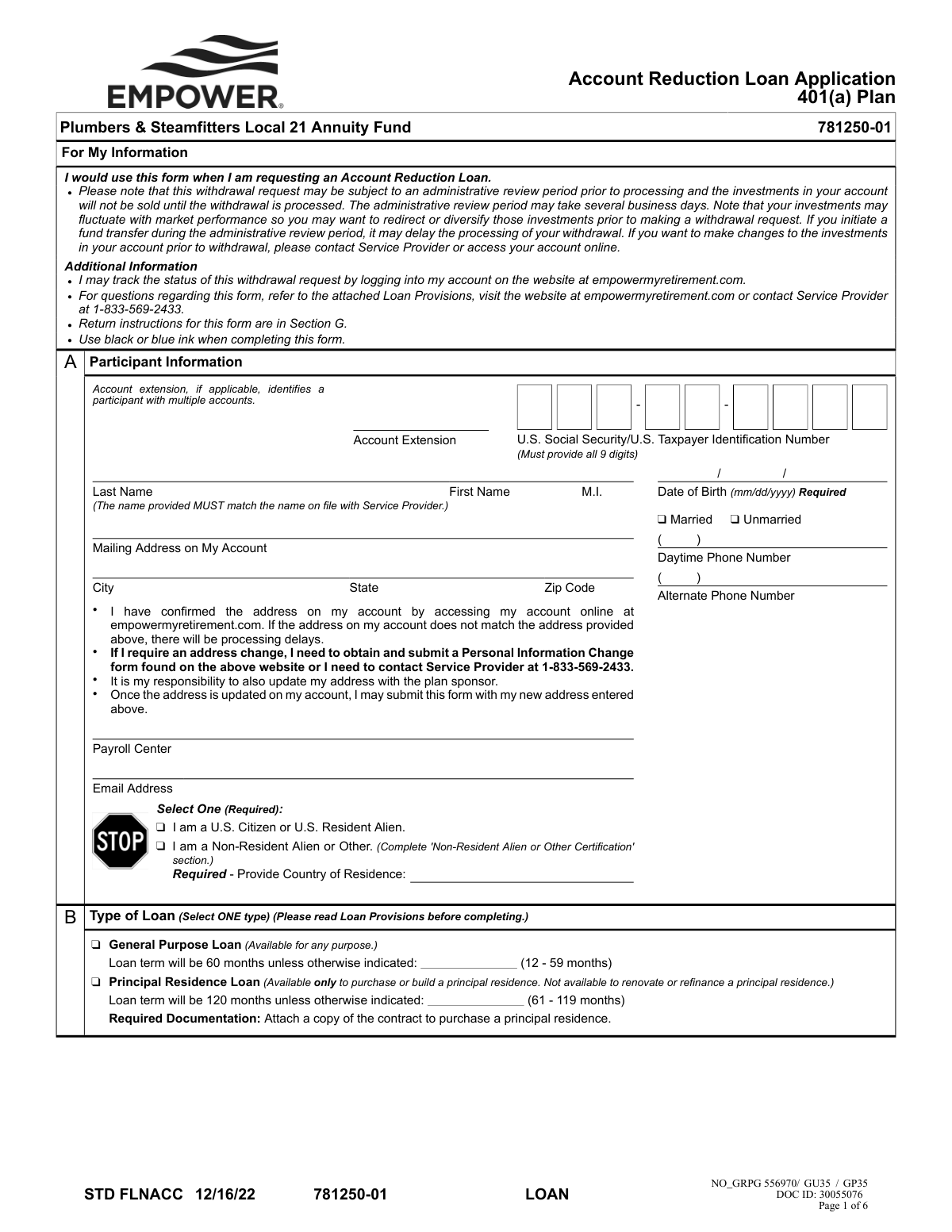
This form is an application for participants in a 401(a) retirement plan, such as the Plumbers & Steamfitters Local 21 Annuity Fund, to request an Account Reduction Loan. It details the terms, conditions, and requirements for obtaining a loan, including participant information, loan type, amount, and repayment methods. Today, this form can be filled out quickly and accurately using AI-powered services like Instafill.ai, which can also convert non-fillable PDF versions into interactive fillable forms.
Account Reduction Loan Application is part of the
loan application forms, loan forms and account application forms categories on Instafill.
Rather not fill this in by hand? Instafill is an online form filler that completes PDF forms automatically — upload the blank form, answer a few questions, and the AI fills every field.
Form specifications
| Form name: | Account Reduction Loan Application 401(a) Plan |
| Number of pages: | 1 |
| Language: | English |
Our AI automatically handles information lookup, data retrieval, formatting, and form filling.
It takes less than a minute to fill out Account Reduction Loan Application using our AI form filling.
Securely upload your data. Information is encrypted in transit and deleted immediately after the form is filled out.
Instafill Demo: How to fill out PDF forms in seconds with AI
How to Fill Out Account Reduction Loan Application Online for Free in 2026
Are you looking to fill out a ACCOUNT REDUCTION LOAN APPLICATION form online quickly and accurately? Instafill.ai offers the #1 AI-powered PDF filling software of 2026, allowing you to complete your ACCOUNT REDUCTION LOAN APPLICATION form in just 37 seconds or less.
Follow these steps to fill out your ACCOUNT REDUCTION LOAN APPLICATION form online using Instafill.ai:
- 1 Navigate to Instafill.ai and upload or select the Account Reduction Loan Application form.
- 2 Use the AI assistant to accurately fill in your personal details in Section A, including your name, Social Security Number, address, and contact information.
- 3 In Section B, select the type of loan you are applying for (General Purpose or Principal Residence) and specify the desired loan term.
- 4 Enter the requested loan amount in Section C and choose your payment method in Section D, providing banking details if selecting ACH.
- 5 Complete the Non-Resident Alien Certification in Section E if it applies to your status.
- 6 Carefully review all entered information, then obtain all required handwritten signatures in Section F, including your own, your spouse's (if applicable), and a notary or plan administrator.
- 7 Submit the fully completed and signed form by uploading it electronically or mailing it to the address provided in Section G.
Our AI-powered system ensures each field is filled out correctly, reducing errors and saving you time.
Why Choose Instafill.ai for Your Fillable Account Reduction Loan Application Form?
Speed
Complete your Account Reduction Loan Application in as little as 37 seconds.
Up-to-Date
Always use the latest 2026 Account Reduction Loan Application form version.
Cost-effective
No need to hire expensive lawyers.
Accuracy
Our AI performs 10 compliance checks to ensure your form is error-free.
Security
Your personal information is protected with bank-level encryption.
Frequently Asked Questions About Account Reduction Loan Application
This form is used by participants of the Plumbers & Steamfitters Local 21 Annuity Fund 401(a) Plan to request a loan against their account balance.
You can apply for a General Purpose Loan for any reason, or a Principal Residence Loan, which is specifically for purchasing or building a primary home.
The maximum loan amount is generally the lesser of 50% of your vested account balance or $50,000, reduced by your highest outstanding loan balance during the previous 12 months.
For a Principal Residence Loan, you must attach a copy of the signed contract to purchase the principal residence along with your application.
Yes, if you are married and your vested account balance is $5,000 or more, your spouse must sign the consent section. The spouse's signature must be notarized or witnessed by the Plan Administrator.
No, a handwritten signature is required on this form. The form explicitly states that electronic signatures will not be accepted and will result in significant processing delays.
You can set up automatic monthly payments from your checking account via Automated Clearing House (ACH). You must attach a voided check or a letter from your financial institution to set this up.
If you miss a payment, your loan becomes delinquent, and if it is not paid by the end of the following calendar quarter, the loan will default. A defaulted loan is considered a taxable distribution and may incur penalties.
You can upload the signed form to your account at empowermyretirement.com or send it via regular or express mail to the addresses provided in Section G.
You must update your address before submitting this loan application by using a Personal Information Change form or contacting the Service Provider. Submitting the form with a non-matching address will cause processing delays.
You can track the status of your withdrawal request by logging into your account on the website at empowermyretirement.com.
Yes, services like Instafill.ai use AI to accurately auto-fill form fields, which can help you complete the application quickly and reduce errors.
Simply upload the PDF to the Instafill.ai platform. The AI will identify the fields, allowing you to fill them out online, and then you can download the completed form for printing and signing.
If you have a non-fillable PDF, you can use a service like Instafill.ai. It can convert flat, non-interactive PDFs into fillable forms that you can easily complete on your computer before printing.
Compliance Account Reduction Loan Application
Validation Checks by Instafill.ai
1
Validates Social Security Number Format and Presence
This check ensures the 'U.S. Social Security/U.S. Taxpayer Identification Number' field in Section A is not empty and contains exactly 9 digits. This is a fundamental requirement for uniquely identifying the participant's account and for mandatory tax reporting. A failure will prevent the system from locating the correct account and will halt the application process immediately.
2
Verifies Participant Name Matches Account on File
This validation cross-references the participant's First Name and Last Name provided in Section A against the name associated with the provided Social Security Number in the service provider's database. The form explicitly states the name must match the one on file. This check is critical to prevent fraud and ensure the loan is processed for the correct individual, and a mismatch will result in rejection.
3
Ensures Date of Birth is a Valid Date
Validates that the 'Date of Birth' in Section A is provided in the 'mm/dd/yyyy' format and represents a plausible date (e.g., is not a future date, participant is over 18). This information is used for identity verification and to confirm eligibility under plan rules. An invalid or improperly formatted date will cause a processing error and require the applicant to resubmit the form.
4
Conditional Non-Resident Alien Certification
This check enforces a conditional rule based on the citizenship status selected in Section A. If the participant selects 'I am a Non-Resident Alien or Other', the system verifies that the 'Non-Resident Alien or Other Certification' in Section E is fully completed. This is a legal requirement for correct tax withholding, and failure to complete the required section will render the application incomplete.
5
Ensures a Single Loan Type is Selected
Verifies that the applicant has selected exactly one option in Section B, either 'General Purpose Loan' or 'Principal Residence Loan'. Selecting neither or both options creates ambiguity, making it impossible to determine the correct loan term, interest rate, and documentation requirements. The form will be returned for clarification if this validation fails.
6
Confirms Attachment for Principal Residence Loan
If the 'Principal Residence Loan' type is selected in Section B, this validation confirms that a supporting document, such as a copy of the purchase contract, has been attached to the submission. This documentation is required by the plan to justify the specific terms of a principal residence loan. The application will be considered incomplete and will not be processed without this required attachment.
7
Validates Minimum Loan Amount
This check ensures that the requested 'Amount of Loan' in Section C is equal to or greater than the plan's stated minimum of $1000.00. This rule is in place to ensure that the administrative costs of originating and servicing a loan are justified by its size. Loan requests for less than the minimum amount will be rejected.
8
Validates Maximum Loan Amount Eligibility
This is a critical business rule that calculates the maximum allowable loan amount based on federal regulations (the lesser of 50% of the vested account balance or $50,000, adjusted for prior loans). It compares the requested amount against this calculated ceiling. This check prevents the plan from issuing a non-compliant loan, which would have severe tax consequences for the participant.
9
Verifies Documentation for ACH Payment Method
If the participant elects to make repayments via Automated Clearing House (ACH) in Section D, this check ensures a voided check or an official bank letter is attached. This documentation is necessary to verify the bank account and routing numbers to set up automatic debits correctly. Without this proof, the ACH setup cannot be completed, and the loan may not be approved with that repayment method.
10
Confirms Participant Signature and Date
Verifies that the participant's signature and the date of signature are both present and handwritten in Section F. A signature is a legal attestation that the applicant agrees to the loan terms, and the date is required to establish when consent was given. An unsigned, undated, or electronically signed form is legally invalid and will be immediately rejected as per the form's instructions.
11
Determines and Validates Spousal Consent Requirement
This check uses conditional logic to enforce spousal rights. It verifies if the participant is 'Married' (Section A) and if their vested account balance exceeds $5,000. If both are true, it then validates that the spouse's signature, date, and notarization are complete in Section F. This is a crucial step to protect spousal rights under the plan, and failure to provide required consent will halt the loan process.
12
Ensures Spousal and Notary Dates Match
When spousal consent is provided and notarized, this validation compares the date next to the spouse's signature with the date entered by the Notary Public. The form explicitly states these dates must match, ensuring the notarization was performed at the same time the consent was signed. A mismatch can invalidate the notarization and will cause the form to be rejected for correction.
13
Validates Plan Administrator Authorization
Confirms that an 'Authorized Plan Administrator' has signed and dated the form in Section F. This signature certifies that the request complies with all plan provisions and authorizes the service provider to process the loan. Without this final authorization, the service provider cannot disburse the funds, making it a mandatory final check before processing.
Common Mistakes in Completing Account Reduction Loan Application
Married participants often overlook the requirement for their spouse's signature, which must also be notarized or witnessed by a Plan Administrator. This happens due to not reading Section F carefully. Failure to provide a properly signed and notarized spousal consent will result in an automatic rejection of the application, as it is a legal requirement for many plans to protect spousal rights.
Applicants select the Automated Clearing House (ACH) payment option in Section D but forget to attach the required documentation, such as a preprinted voided check or a signed letter from their financial institution. This oversight leads to the rejection of the ACH setup, delaying the loan processing until the documentation is received. To avoid this, double-check that you have attached the correct document before submitting the form.
The form explicitly states that the name and address in Section A must match what is on file with the Service Provider. Applicants often enter a new address or use a different name variation (e.g., nickname, maiden name) without first officially updating their records. This mismatch triggers a verification process that significantly delays the loan, as the provider cannot proceed until the identity and address are confirmed through their official change process.
When selecting a 'Principal Residence Loan' in Section B, applicants must attach a copy of the purchase contract. It is common for this document to be forgotten, rendering the application incomplete. The loan cannot be processed for this purpose without the required proof, leading to rejection and the need to resubmit the entire package.
The form repeatedly specifies that a 'handwritten signature is required' and 'an electronic signature will not be accepted'. In an increasingly digital world, applicants may mistakenly use a digital signature tool or a font that looks like a signature. This will cause the form to be rejected, as it fails to meet the legal requirement for a wet signature, forcing the applicant to print, re-sign, and resubmit the form.
Participants sometimes complete their sections of the form and submit it directly to Empower, bypassing the 'Authorized Plan Administrator Signature' required in Section F. The Plan Administrator must first verify the request's compliance with plan rules. Submitting without this signature will cause the form to be returned, as Empower cannot process a loan without authorization from the plan sponsor.
In Section A, applicants may forget to check a citizenship status box, or they check 'Non-Resident Alien' but then fail to complete the mandatory 'Non-Resident Alien or Other Certification' in Section E. Both errors will halt the application. An incomplete Section A makes the form invalid, while a missing Section E for a non-resident alien fails to meet tax reporting requirements, causing an automatic rejection.
The spousal consent notarization in Section F is a frequent point of failure, with common errors including an illegible notary seal, a missing signature, or a notary date that does not match the spouse's signature date. The form has very specific rules, and any deviation will cause the legal validity of the consent to be questioned. This results in the form being sent back for proper notarization, causing significant delays.
The U.S. Social Security Number in Section A is the primary identifier for the account, but applicants may write it illegibly, transpose digits, or accidentally omit a number. Any error in this nine-digit number will prevent the system from matching the application to the correct account, leading to immediate rejection. AI-powered tools like Instafill.ai can help prevent this by validating the format and ensuring all digits are present.
In Section B, the form specifies loan term limits, such as 60 months for a General Purpose loan and 120 months for a Principal Residence loan, with options to select shorter terms. Applicants sometimes enter a term that is outside the allowed range (e.g., 72 months for a general loan). This indicates a misunderstanding of the plan rules and may cause the application to be returned for correction.
The form specifies in Section D that ACH payments can only be drawn from a checking account and explicitly prohibits using Money Market or Brokerage accounts. Applicants may not notice this fine print and provide details for an ineligible account. This will cause the ACH setup to fail, resulting in payment delinquencies and potential loan default if not corrected promptly.
When correcting a mistake, applicants often cross out the error and write in the new information without adding their initials next to the change. The 'Loan Provisions' section states that any changes must be initialed. Uninitialed changes can be viewed as unauthorized alterations, which may cause the Service Provider to return the form for verification to ensure the applicant made the change, thereby delaying the loan.
Saved over 80 hours a year
“I was never sure if my IRS forms like W-9 were filled correctly. Now, I can complete the forms accurately without any external help.”
Kevin Martin Green
Your data stays secure with advanced protection from Instafill and our subprocessors




Robust compliance program
Transparent business model
You’re not the product. You always know where your data is and what it is processed for.
ISO 27001, HIPAA, and GDPR
Our subprocesses adhere to multiple compliance standards, including but not limited to ISO 27001, HIPAA, and GDPR.
Security & privacy by design
We consider security and privacy from the initial design phase of any new service or functionality. It’s not an afterthought, it’s built-in, including support for two-factor authentication (2FA) to further protect your account.
Fill out Account Reduction Loan Application with Instafill.ai
Worried about filling PDFs wrong? Instafill securely fills account-reduction-loan-application-401a-plan forms, ensuring each field is accurate.
