Yes! You can use AI to fill out Brokerage Corestone Account Application

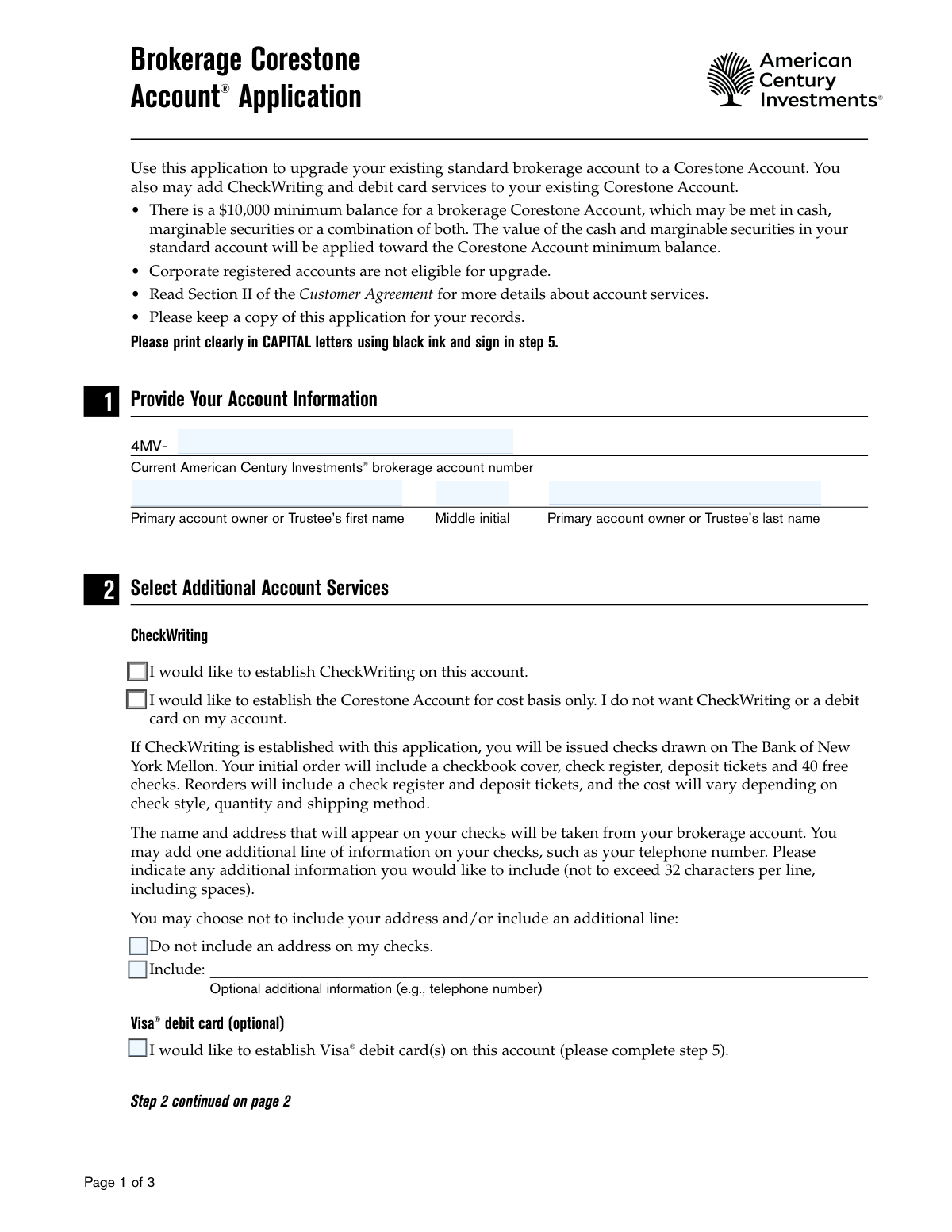
The Brokerage Corestone Account Application is a form for current American Century Investments clients to upgrade their standard brokerage account to a premium Corestone Account. This upgrade allows account holders to add enhanced features such as CheckWriting, Visa debit cards, and the BillSuite online bill management service, centralizing their financial activities. Completing this application is the necessary step to access these integrated banking and investment services. Today, this form can be filled out quickly and accurately using AI-powered services like Instafill.ai, which can also convert non-fillable PDF versions into interactive fillable forms.
Our AI automatically handles information lookup, data retrieval, formatting, and form filling.
It takes less than a minute to fill out BK-APP-97951 using our AI form filling.
Securely upload your data. Information is encrypted in transit and deleted immediately after the form is filled out.

Form specifications

Form name: Brokerage Corestone Account Application
Number of pages: 1
Language: English
Categories: brokerage forms, broker forms
main-image

Instafill Demo: How to fill out PDF forms in seconds with AI

How to Fill Out BK-APP-97951 Online for Free in 2026

Are you looking to fill out a BK-APP-97951 form online quickly and accurately? Instafill.ai offers the #1 AI-powered PDF filling software of 2026, allowing you to complete your BK-APP-97951 form in just 37 seconds or less.
Follow these steps to fill out your BK-APP-97951 form online using Instafill.ai:
  1. 1 Navigate to Instafill.ai and upload or select the Brokerage Corestone Account Application.
  2. 2 In Step 1, provide your current American Century Investments brokerage account number and the primary account owner's name.
  3. 3 Use Step 2 to select the additional account services you want, such as CheckWriting, a Visa debit card, or the BillSuite program.
  4. 4 If applicable, complete Step 4 to authorize additional signatories for checks by providing their information and obtaining their signatures.
  5. 5 Carefully review the fee information in Step 3 and the terms and agreements in Step 5, including the pre-dispute arbitration clause.
  6. 6 In Step 5, all account owners or authorized persons must provide their personal details and electronically sign and date the application to agree to the terms.
  7. 7 Download, print, or submit your completed and signed application as instructed by American Century Investments.

Our AI-powered system ensures each field is filled out correctly, reducing errors and saving you time.

Why Choose Instafill.ai for Your Fillable BK-APP-97951 Form?

Speed

Complete your BK-APP-97951 in as little as 37 seconds.

Up-to-Date

Always use the latest 2026 BK-APP-97951 form version.

Cost-effective

No need to hire expensive lawyers.

Accuracy

Our AI performs 10 compliance checks to ensure your form is error-free.

Security

Your personal information is protected with bank-level encryption.

Frequently Asked Questions About Form BK-APP-97951

This form is used to upgrade an existing standard brokerage account to a Corestone Account. You can also use it to add services like CheckWriting and a Visa debit card to a new or existing Corestone Account.

You must have an existing standard brokerage account with American Century Investments to use this application. Corporate registered accounts are not eligible for this upgrade.

Yes, a minimum balance of $10,000 is required, which can be met with cash, marginable securities, or a combination of both. The value in your existing standard account will be applied toward this minimum.

You will need your current American Century Investments brokerage account number and the personal details of all account owners. If adding check signatories, you'll also need their Tax ID/SSN and date of birth.

Yes, you can select the option to establish the Corestone Account for cost basis only. This option ensures you will not receive CheckWriting services or a debit card.

Your initial order includes 40 free checks, a checkbook cover, a check register, and deposit tickets. The cost of reordering checks will vary depending on the style and quantity you choose.

BillSuite is an online service that allows you to view, pay, and manage your bills. It is available at no additional charge for U.S.-domiciled Corestone Accounts that have the CheckWriting feature.

Use Step 4 of the application to add other signatories for checks. You must provide their personal information and signature, and the primary account owner must also sign in that section to grant authorization.

All account owners for individual and joint accounts, or the authorized person(s) for trusts, must sign in Step 5. Your signature confirms you agree to the terms, including the pre-dispute arbitration clause.

Mail your completed and signed application to American Century Investments, P.O. Box 419146, Kansas City, MO 64141-6146. Remember to keep a copy for your personal records.

Your account may be subject to fees based on the services you select and your account balance. Refer to the Brokerage Fees and Commissions flyer for details about fees and how they can be waived.

Yes, services like Instafill.ai use AI to accurately auto-fill form fields with your information, which can save you time and help prevent errors.

You can use a service like Instafill.ai to complete this application online. Simply upload the PDF, and the tool will allow you to type your information directly into the fields before printing it for signature.

If you have a non-fillable or 'flat' PDF, you can upload it to a service like Instafill.ai. The platform can convert it into an interactive, fillable form that you can complete on your computer.

Compliance BK-APP-97951
Validation Checks by Instafill.ai

1
Brokerage Account Number Validation
This check ensures the 'Current American Century Investments brokerage account number' is provided and matches the expected format, such as starting with '4MV-'. It is critical for identifying the correct account to upgrade. A backend validation should also confirm the account exists, is in good standing, and is not an ineligible type like a corporate account.
2
Primary Account Owner Name Verification
Validates that the 'Primary account owner or Trustee’s first name' and 'last name' fields are not empty. These names should be cross-referenced against the provided account number to ensure they match the owner on record. This is a crucial security measure to prevent unauthorized changes to an account.
3
Mutually Exclusive CheckWriting Selection
In Section 2, the user can select either 'establish CheckWriting' or 'establish the Corestone Account for cost basis only'. This validation ensures that only one of these two checkboxes is selected. If both or neither are checked, the form is considered incomplete as the user's intent for account services is unclear.
4
BillSuite Service Dependency Check
This check enforces the rule that BillSuite is only available for accounts with CheckWriting. If the 'I would like to establish BillSuite' checkbox is selected, the system must verify that the 'I would like to establish CheckWriting' option is also selected. An error should be triggered if a user attempts to select BillSuite without also opting for CheckWriting services.
5
Additional Signatory Section Completeness
If any information is entered in the 'To Add Additional Signatures' section (Section 4), this validation ensures all required fields for that signatory are completed. This includes Printed name, Tax ID/SSN, Mother's maiden name/Code name, date of birth, signature, and date. Incomplete entries would prevent the legal addition of an authorized signatory.
6
Primary Owner Authorization for Additional Signatories
This validation makes the 'Primary Account Owner's Authorization' signature and date in Section 4 mandatory if the section has been filled out to add other signatories. The absence of this signature would invalidate the request to add signatories, as it signifies a lack of consent from the account owner. The form cannot be processed without this authorization if signatories are being added.
7
SSN/Tax ID Format Validation
Ensures that all 'Tax ID/SSN' fields in both Section 4 and Section 5 adhere to the standard 9-digit format. The validation should check for numeric characters and the correct length, stripping any hyphens or spaces before counting. An invalid SSN/Tax ID will lead to processing failure and potential tax reporting issues.
8
Date of Birth and Minimum Age Verification
This check validates that all 'date of birth' fields contain a valid calendar date in the correct format (e.g., MM/DD/YYYY). It also calculates the individual's age to ensure they meet the minimum legal age requirement (e.g., 18 years) to be an account owner or authorized signatory. Submissions for underage individuals must be rejected.
9
Mandatory Account Owner Signature
Verifies that all required signatures and dates are present in Section 5. For an individual account, one signature is required; for joint accounts, all owners must sign. This signature legally binds the owner(s) to the terms of the agreement, including the arbitration clause, making it one of the most critical checks for application validity.
10
Debit Card Request Consistency
This check ensures consistency between the debit card request in Section 2 and the authorization in Section 5. If the 'I would like to establish Visa debit card(s)' box is checked, at least one account owner must select 'Yes' for the debit card option in Section 5. If the initial box is checked but no owner selects 'Yes', an error should be flagged to resolve the conflicting information.
11
Character Limit Enforcement for Code Name
Validates that the 'Code name' fields in Section 4 and Section 5 do not exceed the specified maximum of 13 characters. This is important for ensuring the data fits within the system's database fields without truncation. Exceeding the limit would result in an incomplete or incorrect code name being stored.
12
Signature Date Logical Check
This validation ensures that all 'Date' fields next to signatures are not in the future and represent a plausible date of signing. The date must be a valid calendar date and should be on or before the date the form is submitted for processing. A future date would render the signature and the agreement legally invalid.

Common Mistakes in Completing BK-APP-97951

Incorrect or Incomplete Account Number

Applicants often mistype their existing brokerage account number or forget to include the '4MV-' prefix. This happens due to simple data entry errors or not reading the field label carefully. An incorrect account number is a critical error that will prevent the upgrade from being processed, as the system cannot identify the account to be modified, leading to immediate rejection and delays.

Missing Signatures from All Account Owners

For joint accounts, it is mandatory that all registered owners sign the application in Section 5. This is often missed when one person fills out the form on behalf of all owners and forgets to have the other parties sign. An application with missing signatures is legally incomplete and will be returned, halting the account upgrade process until all required signatures are collected.

Forgetting to Date Signatures

A signature is often accompanied by a date field, which applicants frequently leave blank in both Section 4 and Section 5. This oversight can render the legal authorizations on the form invalid or cause compliance issues, as the date establishes when the agreement was made. To avoid this, always double-check for a date field next to every signature line before submitting the form.

Missing Primary Owner Authorization for Additional Signatories

In Section 4, after an applicant lists information for an additional check signatory, they often forget to sign in the 'Primary Account Owner's Authorization' box. This signature is a separate, required authorization step. Without it, the request to add other signatories is invalid and will be ignored, even if the additional signatories have signed themselves.

Incomplete Information for Debit Card Issuance

Applicants who request a Visa debit card in Section 2 must provide the full name, Tax ID/SSN, and date of birth for each cardholder in Section 5. People often check the box for the card but then fail to fill out this corresponding information. This omission will result in the debit card not being issued, requiring follow-up communication and delaying access to the service.

Ambiguous Selection of Account Services

In Section 2, applicants may mistakenly check conflicting options, such as requesting both 'CheckWriting' and 'cost basis only' (which explicitly excludes CheckWriting). This ambiguity forces the processing agent to guess the applicant's intent, potentially leading to the wrong services being set up or the application being delayed for clarification. Carefully read and select only one of these mutually exclusive options.

Exceeding Character Limits

The form specifies character limits for certain fields, such as the optional information on checks (32 characters) and the printed name for debit cards (21 characters). Applicants often ignore these limits and write longer text, which can result in awkwardly truncated information on official documents like checks or cards. Always adhere to the specified limits to ensure information appears as intended.

Ignoring Formatting Instructions

The form explicitly instructs applicants to 'print clearly in CAPITAL letters using black ink'. This is often overlooked, with people using lowercase letters or blue ink. These formatting errors can cause issues with automated document scanning (OCR) and may lead to the form being rejected and requiring a complete do-over, causing significant delays.

Name on Application Mismatches Account Record

The name provided in Section 1 must exactly match the name registered to the existing brokerage account, including middle initials or suffixes. Applicants sometimes use a nickname or a slightly different version of their name, causing a data mismatch. This will prevent the system from locating the correct account and will result in the application being rejected until the name is corrected.

Requesting BillSuite without CheckWriting

The form states that BillSuite is available for Corestone Accounts that have CheckWriting. An applicant might select the BillSuite option without also selecting the CheckWriting service in Section 2. Because CheckWriting is a prerequisite, this request cannot be fulfilled and will be ignored, leading to confusion when the applicant tries to access the service.

Incomplete Information for Additional Signatories

When adding an additional signatory in Section 4, all fields including Printed Name, Tax ID/SSN, and Date of Birth are required. It's common for applicants to leave one or more of these fields blank, assuming they are optional. This incomplete data makes it impossible to properly add the signatory to the account, and the request will be denied.
Saved over 80 hours a year

“I was never sure if my IRS forms like W-9 were filled correctly. Now, I can complete the forms accurately without any external help.”

Kevin Martin Green

Your data stays secure with advanced protection from Instafill and our subprocessors

Robust compliance program

Transparent business model

You’re not the product. You always know where your data is and what it is processed for.

ISO 27001, HIPAA, and GDPR

Our subprocesses adhere to multiple compliance standards, including but not limited to ISO 27001, HIPAA, and GDPR.

Security & privacy by design

We consider security and privacy from the initial design phase of any new service or functionality. It’s not an afterthought, it’s built-in, including support for two-factor authentication (2FA) to further protect your account.

Fill out BK-APP-97951 with Instafill.ai

Worried about filling PDFs wrong? Instafill securely fills brokerage-corestone-account-application forms, ensuring each field is accurate.