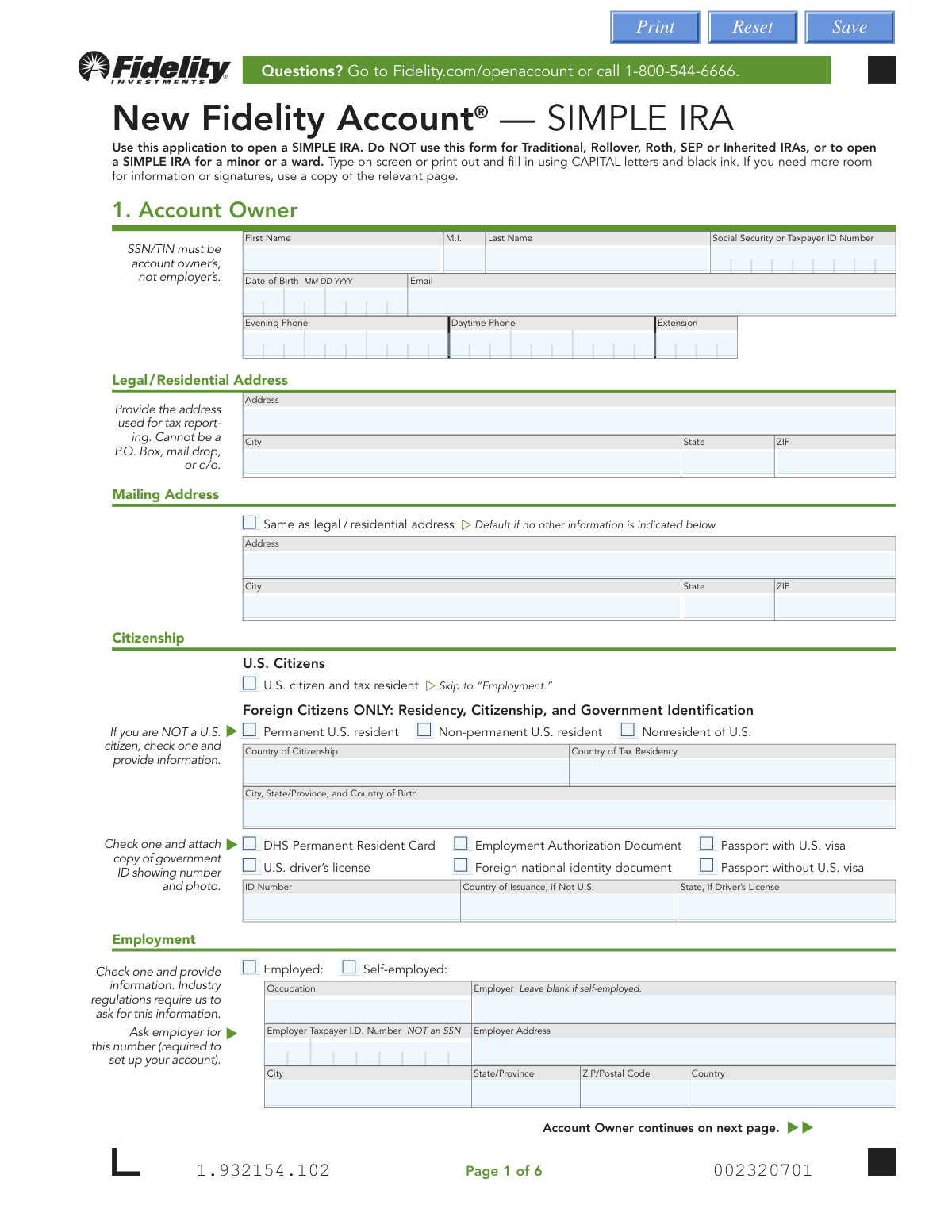
Yes! You can use AI to fill out New Fidelity Account Application — SIMPLE IRA
This application is used by self-employed individuals and employees of small businesses (100 or fewer employees) to open a SIMPLE IRA with Fidelity. The form collects essential personal information, employment details, contribution allocations, and beneficiary designations to establish the retirement account. Today, this form can be filled out quickly and accurately using AI-powered services like Instafill.ai, which can also convert non-fillable PDF versions into interactive fillable forms.
Our AI automatically handles information lookup, data retrieval, formatting, and form filling.
It takes less than a minute to fill out Fidelity SIMPLE IRA Application using our AI form filling.
Securely upload your data. Information is encrypted in transit and deleted immediately after the form is filled out.
Form specifications
| Form name: | New Fidelity Account Application — SIMPLE IRA |
| Number of pages: | 1 |
| Language: | English |
| Categories: | IRA forms, Fidelity forms |
Instafill Demo: How to fill out PDF forms in seconds with AI
How to Fill Out Fidelity SIMPLE IRA Application Online for Free in 2026
Are you looking to fill out a FIDELITY SIMPLE IRA APPLICATION form online quickly and accurately? Instafill.ai offers the #1 AI-powered PDF filling software of 2026, allowing you to complete your FIDELITY SIMPLE IRA APPLICATION form in just 37 seconds or less.
Follow these steps to fill out your FIDELITY SIMPLE IRA APPLICATION form online using Instafill.ai:
- 1 Navigate to Instafill.ai and upload or select the Fidelity SIMPLE IRA Application form.
- 2 Use the AI assistant to accurately fill in your personal information in Section 1, including your name, Taxpayer ID number, date of birth, and contact details.
- 3 Complete the required fields for citizenship, employment status, and any associations with financial institutions as prompted.
- 4 Review the default Core Position in Section 2 and specify your contribution allocation in Section 3, detailing how you want your contributions invested across different funds.
- 5 Designate your primary and contingent beneficiaries in Section 4, providing their names, relationship, and the percentage of assets they should receive.
- 6 Carefully review all the information you've entered for accuracy, then proceed to Section 5 to electronically sign and date the application.
- 7 Download your completed, signed application from Instafill.ai and submit it to Fidelity via their digital upload portal or by mail as instructed on the form.
Our AI-powered system ensures each field is filled out correctly, reducing errors and saving you time.
Why Choose Instafill.ai for Your Fillable Fidelity SIMPLE IRA Application Form?
Speed
Complete your Fidelity SIMPLE IRA Application in as little as 37 seconds.
Up-to-Date
Always use the latest 2026 Fidelity SIMPLE IRA Application form version.
Cost-effective
No need to hire expensive lawyers.
Accuracy
Our AI performs 10 compliance checks to ensure your form is error-free.
Security
Your personal information is protected with bank-level encryption.
Frequently Asked Questions About Form Fidelity SIMPLE IRA Application
This form is used to open a Fidelity SIMPLE IRA, which is a retirement savings plan designed for self-employed individuals and employees of small businesses with 100 or fewer employees.
No, this application is exclusively for opening a SIMPLE IRA. You must use a different application for Traditional, Rollover, Roth, SEP, or Inherited IRAs.
Yes, you must confirm that your employer has already established their SIMPLE IRA Plan with Fidelity before you submit this individual account application.
You will need to provide your full legal name, Social Security Number (SSN), date of birth, contact information, and residential address. You also need to provide your employment details, including your employer's Taxpayer Number.
This number is required to set up your account and is different from your personal SSN. You should ask your employer or HR department for this number.
The Core Position is an account, typically a money market fund, used to hold uninvested cash in your SIMPLE IRA before you invest it. By default, this form uses the Fidelity Government Money Market Fund (SPAXX).
Designating beneficiaries is optional. If you leave this section blank, any assets remaining in your account upon your death will be distributed according to the rules of succession in the Fidelity SIMPLE IRA Custodial Agreement.
Checking 'per stirpes' means that if a beneficiary passes away before you, their designated share will be passed down to their direct descendants (e.g., their children). If left unchecked, their share would be divided among the other surviving primary beneficiaries.
Existing Fidelity customers can scan the QR code on the form or use the provided URL to upload the completed application digitally. New customers or those funding with a check should visit Fidelity's website for mailing instructions.
If you are not a U.S. citizen, you must attach a copy of your unexpired government-issued ID (like a passport) and may need to submit an IRS Form W-8 BEN to certify your foreign status.
After Fidelity processes your application, you will receive a 'New Account Profile' document confirming that your SIMPLE IRA has been opened. You can then view and manage your account online.
Yes, services like Instafill.ai use AI to accurately auto-fill form fields, which can save you time and help reduce errors. This is especially helpful for multi-page forms with detailed information.
Simply upload the Fidelity SIMPLE IRA application PDF to the Instafill.ai platform. The AI will make the form fillable online, allowing you to enter your information once and have it populate securely across the document.
If you have a non-fillable or 'flat' PDF, you can use a service like Instafill.ai. It can instantly convert the static PDF into an interactive, fillable form that you can easily complete and save on your computer.
Compliance Fidelity SIMPLE IRA Application
Validation Checks by Instafill.ai
1
Account Owner Age Verification
This check validates that the applicant is at least 18 years of age based on the 'Date of Birth' provided. This is required to legally enter into the agreements associated with the account, as affirmed in the Terms and Conditions. If the applicant is under 18, the application cannot be processed as this form is not for minors.
2
Taxpayer ID Number (SSN/ITIN) Format
Verifies that the 'Taxpayer ID Number' in Section 1 is provided and follows the correct format for a U.S. Social Security Number (XXX-XX-XXXX) or Individual Taxpayer Identification Number (9XX-XX-XXXX). This number is critical for tax reporting and identity verification as required by federal law. An invalid or missing number will prevent the account from being opened.
3
Required Contact Information Presence and Format
Ensures that both the 'Mobile Phone' and 'Email' fields are filled out with validly formatted data. The form explicitly states these are required for account security, transactional alerts, and electronic delivery of documents. Failure to provide valid contact information will halt the application process as it is essential for account servicing and security.
4
Conditional Mailing Address Requirement
Checks if the 'Mailing Address' fields are completed when the 'Same as legal / residential address' checkbox is left unchecked. If the mailing address is different from the residential address, it must be fully specified for proper delivery of mail. An incomplete mailing address after opting out of using the residential address will result in a processing error.
5
Foreign Citizen Identification Completeness
This validation triggers if the 'Foreign citizen' option is selected in the Citizenship section. It ensures that all subsequent fields, including Country of Citizenship, residency status, ID Type, ID Number, Country of Issuance, and ID dates, are completed. This information is mandatory under federal regulations for non-U.S. persons to open an account, and missing data will cause the application to be rejected.
6
Government ID Expiration Date Check
Validates that the 'ID Expiration Date' provided for a foreign citizen's government ID is a future date. The form requires an 'unexpired' government-issued ID for identity verification. An expired ID is not a valid form of identification and will cause the application to be rejected pending submission of current documentation.
7
Conditional Employer Information for Employed Applicants
Verifies that if the 'Employed' checkbox is selected, the 'Employer', 'Employer Taxpayer Number', and 'Employer Address' fields are filled out. This information is required by industry regulations and for Fidelity to properly set up the SIMPLE IRA account in conjunction with the employer's plan. If this information is missing for an employed applicant, the account cannot be established.
8
Employer Taxpayer Number (EIN) Validation
Checks that the 'Employer Taxpayer Number' is in a valid Employer Identification Number (EIN) format (XX-XXXXXXX) and is not an SSN, as explicitly stated on the form. Using an incorrect format or an SSN in this field can cause significant issues with linking the employee's IRA to the employer's SIMPLE IRA plan. The application will be returned for correction if the number is invalid.
9
Contribution Allocation Total Percentage
Calculates the sum of all percentages entered in the 'Contribution Allocation' section and ensures the total is exactly 100%. This is critical to ensure that 100% of the employee's contributions are invested according to their instructions. If the total is not 100%, the allocation is ambiguous and the application will be rejected until the percentages are corrected.
10
Minimum Contribution Allocation Percentage
Ensures that if any fund is listed in the 'Contribution Allocation' section, its corresponding percentage is at least 10%, as specified by the form's instructions. This rule prevents minuscule, potentially problematic allocations. An entry with a percentage below 10% would be flagged for correction.
11
Beneficiary Self-Designation Check
Compares the names listed in the 'Beneficiaries' section against the 'Account Owner's' name from Section 1. The form explicitly states 'Do not name yourself as the beneficiary.' Designating oneself as a beneficiary is legally nonsensical and would cause the designation to be invalid, so the system must prevent this error.
12
Primary Beneficiary Share Percentage Total
Validates that the sum of 'Share Percentage' for all listed Primary Beneficiaries equals 100%. This ensures that the entire account balance is designated to be distributed upon the owner's death, leaving no portion unassigned. An incorrect total will cause the beneficiary designation to be rejected for correction.
13
Contingent Beneficiary Share Percentage Total
Validates that the sum of 'Share Percentage' for all listed Contingent Beneficiaries equals 100%. Contingent beneficiaries only inherit if all primary beneficiaries predecease the account owner, and their shares must also account for the entire balance. An incorrect total will cause the contingent beneficiary designation to be rejected.
14
Signature Date Presence and Validity
Ensures the 'TODAY'S DATE' field next to the owner's signature in Section 5 is filled out with a valid date. The signature date legally attests to the information being accurate as of that day and marks the execution of the agreement. A missing or invalid date makes the legal standing of the document questionable and will prevent processing.
Common Mistakes in Completing Fidelity SIMPLE IRA Application
Applicants often leave the 'Employer Taxpayer Number' field blank or mistakenly enter their own Social Security Number. This number (an EIN) is required for Fidelity to link the employee's SIMPLE IRA to the employer's plan, and its absence will halt the account setup process. To avoid this, employees must ask their employer for the correct Employer Identification Number (EIN) before filling out the form.
A frequent error is designating beneficiary shares that do not add up to exactly 100% for each section (Primary and Contingent). This happens due to simple math errors or misunderstanding the requirement. An incorrect total will cause the application to be rejected, delaying account opening and potentially leaving assets without a clear designation. Always double-check that the percentages for all primary beneficiaries total 100%, and do the same for contingent beneficiaries.
Applicants often fail to provide all the required information for each beneficiary, such as their Taxpayer ID Number (SSN) and full date of birth. This information is critical for verifying the beneficiary's identity upon the account owner's death. Missing details can lead to significant delays and legal complications for heirs trying to claim the assets. Ensure every field is completed for each listed beneficiary.
In Section 3, applicants make mistakes like entering allocation percentages that do not sum to 100%, providing allocations below the 10% minimum per fund, or listing a fund symbol without the name. These errors prevent the automatic investment of contributions, leaving funds in the default cash position instead of the desired investments. To prevent this, verify that all percentages are 10% or greater and that the total is exactly 100%.
The most common and critical mistake is failing to sign and date the application in Section 5. An unsigned application is legally invalid and will be immediately rejected, stopping the entire account opening process. Applicants must physically sign and date the form in the designated spaces before submission. Using an AI-powered form filler like Instafill.ai can highlight required signature fields to ensure they are not missed.
The form explicitly requests printing in CAPITAL letters with black ink, but many applicants use cursive or messy handwriting. This can lead to data entry errors by Fidelity staff, resulting in a misspelled name, incorrect address, or wrong SSN, which causes significant processing delays and future account issues. To avoid this, type directly on the screen if possible or print very clearly in all caps. Tools like Instafill.ai can convert this PDF into a fillable version, eliminating handwriting issues entirely.
Non-U.S. citizens or residents often fail to complete the required fields for their government ID, including number, country of issuance, and expiration date, or forget to attach a copy of the ID. Federal regulations require this information for identity verification, and its absence will prevent the account from being opened. Foreign persons must fill out this section completely and remember to submit a copy of their unexpired ID and a W-8 BEN form.
Applicants sometimes enter a P.O. Box as their residential address, but this field must be a physical street address for legal and tax reporting purposes. Using a P.O. Box in this section will lead to the application's rejection, as it does not meet federal 'Know Your Customer' (KYC) requirements. A P.O. Box is only permissible in the separate 'Mailing Address' section.
Many people incorrectly assume the 'Associations' section does not apply to them and skip it without careful reading. This section is a regulatory requirement for individuals (or their immediate family) associated with a broker-dealer or other financial institution. Failure to disclose this information can lead to compliance violations and potential restrictions on the account. Carefully read the criteria and complete the section if it applies to you or a household family member.
In the beneficiary section, some account owners mistakenly list themselves as a primary or contingent beneficiary. An individual cannot inherit an account from themselves, so this designation is invalid and will be disregarded. This mistake means the account would have no valid beneficiary, and assets would pass to the estate according to the custodial agreement, potentially creating probate delays. Always name another person, trust, or entity as the beneficiary.
Saved over 80 hours a year
“I was never sure if my IRS forms like W-9 were filled correctly. Now, I can complete the forms accurately without any external help.”
Kevin Martin Green
Your data stays secure with advanced protection from Instafill and our subprocessors

Robust compliance program
Transparent business model
You’re not the product. You always know where your data is and what it is processed for.
ISO 27001, HIPAA, and GDPR
Our subprocesses adhere to multiple compliance standards, including but not limited to ISO 27001, HIPAA, and GDPR.
Security & privacy by design
We consider security and privacy from the initial design phase of any new service or functionality. It’s not an afterthought, it’s built-in, including support for two-factor authentication (2FA) to further protect your account.
Fill out Fidelity SIMPLE IRA Application with Instafill.ai
Worried about filling PDFs wrong? Instafill securely fills new-fidelity-account-application-simple-ira forms, ensuring each field is accurate.