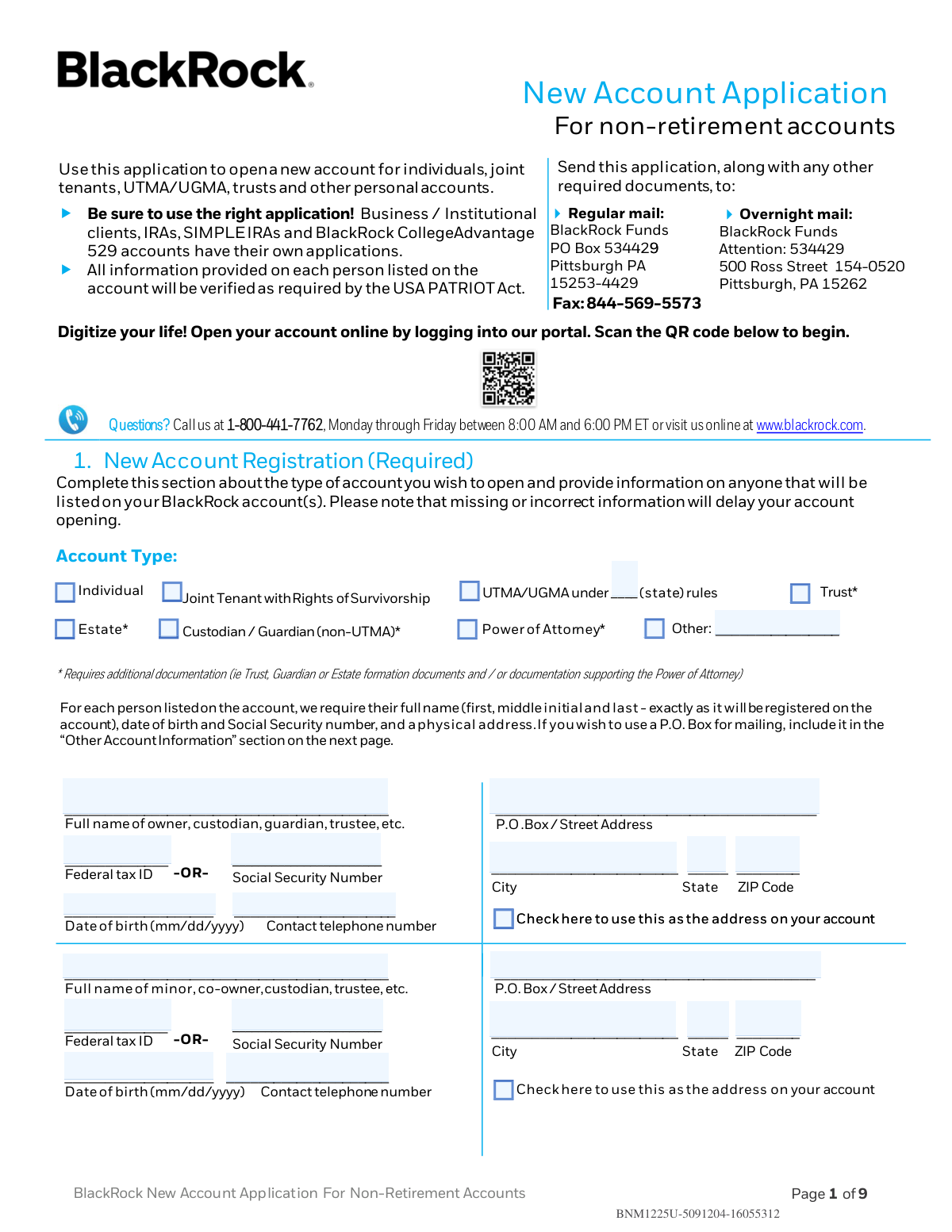
Yes! You can use AI to fill out BlackRock New Account Application For Non-Retirement Accounts

This form is an application used by individuals to open a new non-retirement investment account with BlackRock, covering types like individual, joint tenant, UTMA/UGMA, and trusts. It is essential for providing all necessary personal and financial information required to establish the account, comply with federal regulations like the USA PATRIOT Act, and direct initial investments. Today, this form can be filled out quickly and accurately using AI-powered services like Instafill.ai, which can also convert non-fillable PDF versions into interactive fillable forms.
Our AI automatically handles information lookup, data retrieval, formatting, and form filling.
It takes less than a minute to fill out APP-NA-INV-0126 using our AI form filling.
Securely upload your data. Information is encrypted in transit and deleted immediately after the form is filled out.

Form specifications

Form name: BlackRock New Account Application For Non-Retirement Accounts
Number of pages: 1
Language: English
Categories: retirement forms, financial account forms, investment account forms, retirement account forms
main-image

Instafill Demo: How to fill out PDF forms in seconds with AI

How to Fill Out APP-NA-INV-0126 Online for Free in 2026

Are you looking to fill out a APP-NA-INV-0126 form online quickly and accurately? Instafill.ai offers the #1 AI-powered PDF filling software of 2026, allowing you to complete your APP-NA-INV-0126 form in just 37 seconds or less.
Follow these steps to fill out your APP-NA-INV-0126 form online using Instafill.ai:
  1. 1 Navigate to Instafill.ai and upload the BlackRock New Account Application or select it from their template library.
  2. 2 Use the AI assistant to complete Section 1 with your personal details, including account type, owner information, date of birth, and Social Security number.
  3. 3 Provide information for your investment dealer or financial professional in Section 2, if applicable.
  4. 4 In Section 3, specify your investment direction by indicating the funding method, investment amount, and allocation across different BlackRock funds.
  5. 5 Complete Section 4 to choose your account service options, such as how dividends are handled, your cost basis election, and bank instructions for ACH transfers.
  6. 6 Electronically sign and date the form in Section 5, certifying your taxpayer ID and authorizing the account opening.
  7. 7 Review all the auto-filled information for accuracy, make any necessary corrections, and then download or print your completed application.

Our AI-powered system ensures each field is filled out correctly, reducing errors and saving you time.

Why Choose Instafill.ai for Your Fillable APP-NA-INV-0126 Form?

Speed

Complete your APP-NA-INV-0126 in as little as 37 seconds.

Up-to-Date

Always use the latest 2026 APP-NA-INV-0126 form version.

Cost-effective

No need to hire expensive lawyers.

Accuracy

Our AI performs 10 compliance checks to ensure your form is error-free.

Security

Your personal information is protected with bank-level encryption.

Frequently Asked Questions About Form APP-NA-INV-0126

This form is the BlackRock New Account Application for Non-Retirement Accounts. You should use it to open personal accounts such as individual, joint tenant, UTMA/UGMA, trust, or estate accounts. It is not for retirement accounts (like IRAs), business accounts, or 529 plans, which have separate applications.

For each person listed on the account, you must provide their full name, date of birth, Social Security number (or Federal Tax ID), and a physical address. This information is required by the USA PATRIOT Act to verify your identity and missing information will delay your account opening.

Yes, for trust, estate, power of attorney, or guardian accounts, you must submit additional supporting documentation. This typically includes the trust or estate formation documents or documentation supporting the power of attorney.

You can submit your application and any required documents by fax to 844-569-5573, by regular mail to the Pittsburgh, PA P.O. Box, or by overnight mail to the Ross Street address in Pittsburgh, PA. All addresses are listed on the first page of the form.

The minimum initial investment for Investor A & C Shares is generally $1,000 per fund. However, this minimum is reduced to $50 per fund if you set up an Automatic Investment Plan (AIP).

To set up an AIP, you must complete Section 3b with your desired investment amounts and frequency, and also fill out the 'Bank Instructions' in Section 4d. You will need to attach a voided check or bank statement to verify your bank account information.

Yes, for Individual and Joint Tenant accounts, you can add a Transfer on Death (TOD) beneficiary in Section 1. You will need to provide the beneficiary's full name, Social Security Number, date of birth, and the percentage of shares they should receive.

If you do not select a cost basis method for your account, BlackRock will default to using the Average Cost method. It is recommended to consult a tax professional to determine the best method for your situation.

Yes, while a physical address is required in Section 1 for identity verification, you can specify a different mailing address, including a P.O. Box. Simply complete the 'Mailing Address' portion of the 'Other Account Information' section on page 3.

You can sign up for eDelivery of prospectuses and reports by providing your email address in the 'Other Account Information' section on page 3. For more sensitive documents like statements and tax forms, you will need to log in to your account online at blackrock.com to complete the setup.

If you have questions, you can call BlackRock at 1-800-441-7762 between 8:00 AM and 6:00 PM ET, Monday through Friday. You can also consult your Financial Professional, especially for Section 2, 'Investment Dealer'.

Yes, you can use services like Instafill.ai to simplify filling out this form. These tools use AI to accurately auto-fill your information into the correct fields, which can save you time and help prevent errors.

To fill this form using Instafill.ai, you would upload the PDF to their platform. The AI will make the form fillable and then you can use your saved profile information to automatically populate the fields in seconds.

If you have a non-fillable or 'flat' PDF, you can use a service like Instafill.ai. Their platform can convert non-fillable PDFs into interactive, fillable forms that you can easily complete and sign online.

Compliance APP-NA-INV-0126
Validation Checks by Instafill.ai

1
SSN and Tax ID Format and Exclusivity
Verifies that for each person listed (owner, co-owner, beneficiary), either a Social Security Number (SSN) or a Federal Tax ID is provided. The SSN must be a 9-digit number, and the Tax ID must also be a 9-digit number. This is a critical requirement for identity verification under the USA PATRIOT Act and for tax reporting purposes, and an invalid or missing number will prevent account opening.
2
Date of Birth and Legal Age Verification
Ensures that all date of birth fields are in a valid 'mm/dd/yyyy' format and do not represent a future date. For primary account owners (excluding UTMA/UGMA accounts), this check also verifies that the individual is of legal age (e.g., 18 years or older). This is necessary to confirm the applicant has the legal capacity to enter into a contract, and failure will halt the application process.
3
Physical Address Requirement
Validates that a physical street address is provided for the primary account owner, as required by the USA PATRIOT Act for identity verification. The system checks that the address field is not a P.O. Box, which is only acceptable for a separate mailing address. Failure to provide a physical address will result in the application being rejected until the information is supplied.
4
TOD Account Type Eligibility
Checks that if the 'Transfer on Death (TOD) Beneficiary' option is selected, the account type is either 'Individual' or 'Joint Tenant with Rights of Survivorship'. The form explicitly limits TOD to these account types. An attempt to add a TOD designation to an ineligible account type, such as a Trust or Estate, must be blocked as it is a logical contradiction.
5
Beneficiary Share Percentage Summation
Validates that the sum of 'Share %' for all Primary Beneficiaries equals exactly 100% if any percentages are provided. The same validation is performed separately for Contingent Beneficiaries. This is crucial for ensuring there is no ambiguity in asset distribution upon the owner's death, and a mismatch will require correction before the application can be finalized.
6
Investment Dealer Presence for Class C Shares
Ensures that if 'Class C' shares are selected in the 'Investment Direction' section, the 'Investment Dealer' section is fully completed. The form states a Financial Professional is required for Class C shares. If this section is incomplete, the application would be flagged for correction or, as the form notes, defaulted to Class A shares, which may not align with the investor's intent.
7
Automatic Investment Plan (AIP) Completeness
Verifies that if the 'Automatic Investment Plan' is chosen as the funding method, the corresponding AIP details (Section 3b) and 'Bank Instructions' (Section 4d) are both completed. The AIP cannot be set up without investment frequency, amounts, and a valid bank account to draw from. Incomplete information will cause the AIP setup to fail.
8
Investment Allocation Total Consistency
Checks that the 'Total Amount to invest' in Section 3a is filled out and is consistent with the sum of individual fund investment amounts. If allocations are made by percentage, it validates that the percentages sum to 100%. This check prevents funding errors and ensures the client's initial investment is allocated precisely as intended.
9
Required Signatures for Account Type
Validates that the number of signatures in Section 5 matches the requirement for the selected account type from Section 1. For example, a 'Joint Tenant' account requires signatures from all listed co-owners. A missing signature makes the application legally non-binding and will prevent the account from being opened.
10
Bank Account Authorization Signature Completeness
Verifies that all owners of the bank account listed in Section 4d have provided a signature. This is critical if the bank account is jointly owned, as it provides legal authorization for BlackRock to perform ACH transactions. Missing signatures from any bank account owner will prevent the bank instructions from being added to the account.
11
Trust or Estate Information Completeness
If the account type is selected as 'Trust' or 'Estate', this check ensures the specific subsection for these entities is filled out, including the full name and date of the trust. This information is fundamental to correctly registering the account. An incomplete section will delay the account opening pending the required details and associated documentation.
12
Cost Basis Election Exclusivity
Ensures that only one cost basis method is selected in Section 4c. Selecting multiple methods would create a conflict for tax-lot accounting and reporting. If more than one box is checked, the application should be rejected for correction to ensure clear and accurate tax processing.
13
ABA Routing Number Structure
Validates that the ABA routing number provided in the 'Bank Instructions' section consists of exactly 9 digits. This is a standard format for all U.S. financial institutions. An incorrect number of digits will cause all electronic fund transfers (ACH or wire) to fail, delaying both investments and redemptions.
14
TOD Minor Beneficiary Documentation Flag
Checks the date of birth for any listed TOD beneficiary to determine if they are a minor. If a minor is identified, the system flags the application for manual review to confirm that the required separate page with custodian/guardian information is attached. This is necessary to establish proper legal ownership for the minor's potential inheritance.

Common Mistakes in Completing APP-NA-INV-0126

Incomplete or Mismatched Personal Information

Applicants often provide a nickname or fail to enter their full legal name, middle initial, and last name exactly as it appears on government-issued identification. This mistake occurs due to oversight or not having documents handy. Mismatched or incomplete information will fail the mandatory USA PATRIOT Act identity verification, causing significant delays or outright rejection of the application.

Forgetting Required Supplemental Documents

The application clearly states that certain account types like Trusts, Estates, or Power of Attorney require additional documentation. A very common error is submitting the application without these essential supporting files, such as the trust agreement or estate formation documents. This immediately halts the account opening process until the required paperwork is received and verified.

Incorrect Use of P.O. Box and Physical Address

The form requires a physical street address for legal and identity verification purposes, with a separate, optional section for a P.O. Box mailing address. Applicants frequently enter a P.O. Box in the primary physical address field, which is not permissible and will cause the application to be returned. Always provide a complete physical street address in Section 1 and use the 'Mailing Address' section on page 3 only if you need mail sent to a different location like a P.O. Box.

Errors in Transfer on Death (TOD) Beneficiary Section

The optional TOD section is prone to several errors, such as beneficiary share percentages not totaling exactly 100%, or missing a beneficiary's Social Security Number or Date of Birth. Furthermore, if a minor is named, applicants often forget the instruction to attach a separate page with custodian details. These errors will invalidate the TOD designation, meaning the instructions cannot be honored upon the account owner's death.

Ambiguous or Incomplete Investment Direction

In Section 3, applicants may write a vague fund name, forget to select a share class, or provide investment amounts that don't add up to the total investment. For example, simply writing 'BlackRock Equity Fund' is insufficient given the dozens of options available. This ambiguity forces the financial institution to either reject the application or contact the applicant for clarification, delaying the investment.

Funding Method and Detail Mismatch

An applicant might check the box to fund the account via an Automatic Investment Plan (AIP) in Section 3 but then fail to complete the 'Bank Instructions' in Section 4d or forget to attach a voided check. The same issue occurs when selecting to purchase via bank withdrawal without providing the necessary bank details. This creates a dead-end where the application is approved but cannot be funded, leaving the account empty.

Incomplete Bank Authorization

When setting up bank instructions for ACH transfers in Section 4d, the form requires a voided check or bank statement and the signature of ALL bank account owners. People often provide the account numbers but forget the physical documentation, or if it's a joint bank account, the second owner fails to sign. Without complete documentation and all required signatures, the bank link cannot be established for purchases or redemptions.

Skipping the Cost Basis Election

Many applicants are unsure what cost basis method to choose in Section 4c and skip it entirely, causing the account to default to 'Average Cost'. While this is a valid method, it may not be the most tax-advantageous strategy for their specific situation. This oversight can lead to a higher tax liability when shares are sold in the future; applicants should consult a tax professional to make an informed decision.

Missing or Incomplete Signatures

Forgetting to sign the application in Section 5 is one of the most common and easily avoidable mistakes. For joint accounts, both owners must sign in their respective fields. An unsigned or partially signed application is legally invalid and will be rejected immediately, requiring the entire process to be restarted.

Using the Wrong Application Form

The form explicitly states it is for 'non-retirement accounts' and that IRAs, business accounts, and 529 plans have their own specific applications. Applicants sometimes grab the first form they find without reading the title, leading them to fill out the entire application only to have it rejected. Always confirm you are using the correct form for your specific financial goal to avoid wasting time and effort. AI-powered tools like Instafill.ai can help guide users to the correct form and can also convert flat, non-fillable PDFs like this one into an interactive, fillable version.
Saved over 80 hours a year

“I was never sure if my IRS forms like W-9 were filled correctly. Now, I can complete the forms accurately without any external help.”

Kevin Martin Green

Your data stays secure with advanced protection from Instafill and our subprocessors

Robust compliance program

Transparent business model

You’re not the product. You always know where your data is and what it is processed for.

ISO 27001, HIPAA, and GDPR

Our subprocesses adhere to multiple compliance standards, including but not limited to ISO 27001, HIPAA, and GDPR.

Security & privacy by design

We consider security and privacy from the initial design phase of any new service or functionality. It’s not an afterthought, it’s built-in, including support for two-factor authentication (2FA) to further protect your account.

Fill out APP-NA-INV-0126 with Instafill.ai

Worried about filling PDFs wrong? Instafill securely fills blackrock-new-account-application-for-non-retirement-accounts forms, ensuring each field is accurate.