Yes! You can use AI to fill out Fidelity Institutional CHET Advisor 529 Plan New Account Application
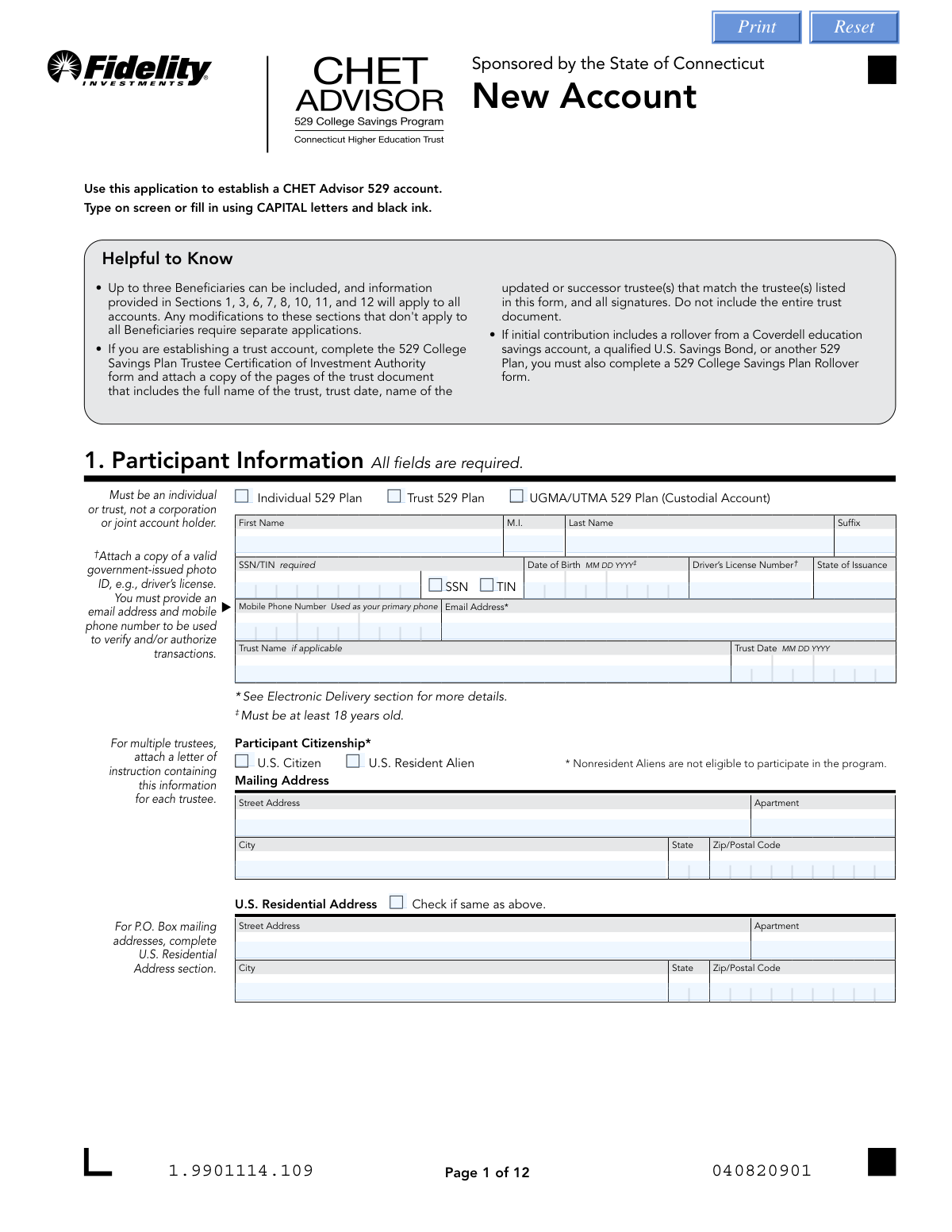
This form is an application to open a new CHET Advisor 529 account, a tax-advantaged savings plan designed to encourage saving for future education costs, managed by Fidelity. Completing this application is the first step for participants to start investing for a beneficiary's qualified education expenses. Today, this form can be filled out quickly and accurately using AI-powered services like Instafill.ai, which can also convert non-fillable PDF versions into interactive fillable forms.
Our AI automatically handles information lookup, data retrieval, formatting, and form filling.
It takes less than a minute to fill out CHET Advisor 529 New Account Application using our AI form filling.
Securely upload your data. Information is encrypted in transit and deleted immediately after the form is filled out.
Form specifications
| Form name: | Fidelity Institutional CHET Advisor 529 Plan New Account Application |
| Number of pages: | 1 |
| Language: | English |
| Categories: | Fidelity forms, 529 plan forms, institutional forms |
Instafill Demo: How to fill out PDF forms in seconds with AI
How to Fill Out CHET Advisor 529 New Account Application Online for Free in 2026
Are you looking to fill out a CHET ADVISOR 529 NEW ACCOUNT APPLICATION form online quickly and accurately? Instafill.ai offers the #1 AI-powered PDF filling software of 2026, allowing you to complete your CHET ADVISOR 529 NEW ACCOUNT APPLICATION form in just 37 seconds or less.
Follow these steps to fill out your CHET ADVISOR 529 NEW ACCOUNT APPLICATION form online using Instafill.ai:
- 1 Navigate to Instafill.ai and upload the CHET Advisor 529 New Account Application form.
- 2 Allow the AI to scan the document and identify all the required fields for participant information, beneficiary details, and investment options.
- 3 Provide your personal details in Section 1 (Participant Information), including your name, SSN/TIN, and contact information.
- 4 Enter the details for each beneficiary in Section 5, and specify your initial investment choices and allocations from the options provided in Section 4.
- 5 Complete the financial representative information (Section 3) if applicable, and provide your bank details in Section 11 for funding the account.
- 6 Carefully review all the entered information for accuracy, then use the platform's tools to securely e-sign and date the application in Section 13.
- 7 Download, print, or submit the completed application as instructed on the form, noting any requirements for notarization or mailing original documents.
Our AI-powered system ensures each field is filled out correctly, reducing errors and saving you time.
Why Choose Instafill.ai for Your Fillable CHET Advisor 529 New Account Application Form?
Speed
Complete your CHET Advisor 529 New Account Application in as little as 37 seconds.
Up-to-Date
Always use the latest 2026 CHET Advisor 529 New Account Application form version.
Cost-effective
No need to hire expensive lawyers.
Accuracy
Our AI performs 10 compliance checks to ensure your form is error-free.
Security
Your personal information is protected with bank-level encryption.
Frequently Asked Questions About Form CHET Advisor 529 New Account Application
This application is used to establish a CHET Advisor 529 account, which is a state-sponsored investment plan managed by Fidelity to help you save for future education expenses.
Any U.S. citizen or U.S. resident alien who is at least 18 years old can open an account as an individual or a trust. Nonresident aliens, corporations, and joint account holders are not eligible to be the participant.
You must attach a copy of a valid government-issued photo ID, such as a driver's license. If you are opening a trust account or rolling over funds from another plan, additional forms and documentation are required.
Yes, you can establish accounts for up to three different beneficiaries on a single application. Note that information in key sections will apply to all accounts, so separate applications are needed for any variations.
Yes, Section 3 requires you to appoint a Financial Representative who will act as your agent for your account. This section must be completed by your representative.
A Successor Participant is an individual or trust you name to take ownership of the account upon your death. Designating one ensures a smooth transition of the account, but this option is not available for custodial (UGMA/UTMA) or trust accounts.
You can fund your account initially via an ACH transfer from your bank account by providing the details in Section 11 and specifying the amount in Section 10. Alternatively, you can submit a check with your application.
Your signature must be notarized if you are setting up electronic bank transfers and the bank account owner is not also an owner on the Fidelity account. The bank account owner(s) must also sign Section 14 and have their signatures notarized.
You can upload the form online via the Fidelity portal, fax it, or mail it to the address provided on the last page. If your form requires a notary seal or an original signature guarantee, you must submit it by mail.
This program allows you to set up automatic, recurring investments from your bank account on a monthly or quarterly basis. A key benefit is that establishing this program will waive the account's annual maintenance fee.
To roll over funds from another 529 plan, a Coverdell ESA, or a qualified U.S. Savings Bond, you must complete and submit a separate '529 College Savings Plan Rollover' form along with this new account application.
Yes, services like Instafill.ai use AI to accurately auto-fill form fields with your information, which can save you significant time and help prevent common errors.
You can use a service like Instafill.ai to fill out the form digitally. Simply upload the PDF, and the tool will allow you to type your information directly into the fields before printing for signature and submission.
If you have a non-fillable or 'flat' PDF, you can upload it to a service like Instafill.ai. The platform can convert it into an interactive, fillable form that you can complete on your computer.
Compliance CHET Advisor 529 New Account Application
Validation Checks by Instafill.ai
1
Ensures Participant is at least 18 years old
This check validates that the Date of Birth (PI_DOB) provided in Section 1 indicates the participant is 18 years of age or older. This is a legal requirement for opening an account, as explicitly stated on the form. If the participant is under 18, the application will be rejected as they are not of legal age to enter into the agreement.
2
Validates SSN/TIN Format and Presence
This check ensures the Social Security Number or Taxpayer Identification Number (PI_SSN) in Section 1 is present and formatted as a 9-digit number. This is critical for tax reporting and identity verification as required by federal law. An invalid format or missing number will prevent account opening and will require the applicant to correct the information.
3
Requires a U.S. Residential Address if Mailing Address is a P.O. Box
This validation checks if the mailing address in Section 1 is a P.O. Box. If it is, the system verifies that the U.S. Residential Address section is completed and is not a P.O. Box. Federal regulations require a physical residential address for identity verification purposes; failure to provide one will halt the application process until the information is supplied.
4
Verifies Participant and Beneficiary Citizenship Eligibility
This check confirms that the citizenship status selected for the Participant (Section 1) and any Beneficiaries (Section 5) is either 'U.S. Citizen' or 'U.S. Resident Alien'. The form explicitly states that Nonresident Aliens are not eligible to participate or be designated as beneficiaries. Selecting 'Nonresident Alien' or leaving the field blank would result in an immediate rejection of the application.
5
Ensures Trust Details are Provided for Trust Accounts
This validation triggers if 'Trust 529 Plan' is selected in Section 1. It verifies that the 'Trust Name' (PI_TrustName) and 'Trust Date' (PI_TrustDate) fields are both completed. These details are essential for correctly registering the account under the trust's legal identity and for verifying attached trust documents. Missing information will cause the application to be flagged as incomplete.
6
Validates Beneficiary Initial Investment Allocation Logic
For each beneficiary in Section 5, this check ensures that the initial investment is allocated using either dollar amounts or percentages, but not both simultaneously. If percentages are used, it verifies that the sum of all percentage fields for that beneficiary equals exactly 100%. This prevents ambiguity and ensures the entire initial contribution is allocated correctly; a mismatch will require correction before processing.
7
Prevents Successor Designation for Ineligible Account Types
This check verifies that if a Successor Participant (Section 6) or Contingent Successor (Section 7) is named, the account type selected in Section 1 is 'Individual 529 Plan'. The form states that UGMA/UTMA and Trust accounts are not eligible for this feature. Attempting to add a successor to an ineligible account type will result in an error and require removal of the successor information.
8
Confirms Successor Participant is at least 18 years old
This validation checks the Date of Birth (SPD_DOB) provided for the Successor Participant in Section 6 to ensure they are at least 18 years of age. This is a stated requirement on the form to ensure the successor is legally able to assume control of the account. An underage successor will be rejected, and the applicant will be asked to name an eligible individual.
9
Validates ABA Routing Number Format
This check ensures the ABA Routing Number (BI_ABARouting) provided in Section 11 is a valid 9-digit number. A correct routing number is absolutely essential for successful ACH transfers and wire transactions. An invalid or incorrectly formatted number will cause all electronic funding attempts to fail and will require the applicant to provide corrected bank information.
10
Requires Notarization for Mismatched Bank Ownership
This check is triggered if the owners listed on the bank account in Section 11 do not include the Fidelity account owner from Section 1. It verifies that the signatures in both Section 13 (Account Owner) and Section 14 (Bank Owners) are present and notarized. This is a critical fraud prevention measure, and missing signatures or notarization will cause the rejection of the electronic funding setup.
11
Ensures Dollar Cost Averaging Exchange Meets Minimum Amount
If Section 12 (Dollar Cost Averaging) is completed, this check validates that the 'Whole Dollar Amount' for each systematic exchange is $50 or greater. This rule is explicitly stated on the form to ensure exchanges are for a meaningful amount and to manage transaction processing load. Any exchange instruction for less than the $50 minimum will be rejected.
12
Verifies Account Owner Signature is Present
This validation confirms that the signature field for the Account Owner/Custodian/Trustee in Section 13 is signed. The form explicitly states it cannot be processed without a signature. An unsigned form is legally non-binding and will be returned to the applicant for completion, delaying the account opening.
13
Validates Initial ACH Purchase Limit
This check verifies that if initial funding is made by ACH (Section 10), the amount specified for any single fund allocation does not exceed the $100,000 daily limit. This rule is stated as a footnote on the form. An attempt to process an initial purchase greater than this limit will be flagged for manual review or rejected, requiring the applicant to adjust the funding amount or method.
14
Cross-references Beneficiary Names for Systematic Investments
This check ensures that the beneficiary names entered in the Systematic Investment Program (Section 9) or Dollar Cost Averaging (Section 12) sections match one of the beneficiaries listed in Section 5. This prevents contributions from being misallocated to a non-existent or misspelled beneficiary. A mismatch would cause the systematic plan setup to fail and require correction.
Common Mistakes in Completing CHET Advisor 529 New Account Application
This error occurs when the bank account for funding (Section 11) is not owned by the 529 account participant, triggering a notarization requirement in Sections 13 and 14 that is often missed. Applicants may not realize notarization is needed, forget to have the separate bank account owners sign Section 14, or the notary may complete the section incorrectly. This critical error will cause the application to be rejected, requiring the applicant to resubmit the signed and notarized pages, significantly delaying account setup.
In Section 5, applicants often make errors when allocating their initial investment. Common mistakes include entering invalid pool numbers from the tables in Section 4, allocating funds using both a dollar amount and a percentage for the same investment, or providing percentages that do not total 100%. These errors create ambiguity and will halt the processing of the application until the applicant provides clear, corrected instructions.
The application requires several attachments under specific circumstances, which are easy to forget. All applicants must attach a copy of a valid government-issued photo ID, while those opening trust accounts or performing rollovers need to include trust documents or rollover forms. Failure to include these necessary documents with the submission will lead to significant processing delays as Fidelity will have to request the missing information.
Applicants often intend to fund the account from a bank account that is not in their name, such as one belonging to a spouse or parent, without realizing the implications. The form requires that if the 529 participant and bank account owners are not the same, all bank account owners must sign Section 14 and have their signatures notarized. This oversight is a primary reason for application rejection, as it fails to provide the necessary legal authorization for ACH transfers.
The form requires a physical U.S. residential address for all participants, a federal requirement for financial institutions. Applicants who list a P.O. Box as their mailing address in Section 1 often overlook the separate, mandatory section for the U.S. Residential Address. Leaving the residential address blank will result in an incomplete application and delay account opening until the information is provided and verified.
In Section 6, applicants may attempt to designate a Successor Participant for an ineligible account type, misunderstanding the rules for different registrations. The form explicitly states that Custodial (UGMA/UTMA) and Trust accounts cannot have a Successor Participant, as their succession is governed by law or the trust document itself. Filling out this section for an ineligible account creates a legal contradiction that must be resolved, delaying the application process.
When setting up electronic payments in Section 11, applicants who manually enter bank details instead of providing a voided check are highly prone to transcription errors. Mistyping a single digit in the 9-digit ABA routing number or the bank account number will cause all ACH transactions to fail, leading to failed contributions and requiring a new form to correct the information. AI-powered form filling tools like Instafill.ai can help prevent this by using validation checks to ensure the routing number format is correct.
Forgetting to sign and date the application in Section 13 is one of the most common yet critical mistakes. An unsigned application is not legally binding and cannot be processed under any circumstances, as it represents the applicant's agreement to the terms. This simple oversight requires the entire form to be sent back to the applicant for completion, restarting the submission process from the beginning.
The instructions specify using CAPITAL letters and black ink, but applicants often use cursive, lowercase letters, or blue ink. Illegible handwriting can lead to data entry errors, resulting in a misspelled name, incorrect address, or wrong SSN. Since this form is a non-fillable PDF, using a tool like Instafill.ai to convert it to a fillable format ensures all entries are typed and legible, preventing these manual entry issues.
When setting up Dollar Cost Averaging in Section 12, applicants may not realize the significant consequence noted in the instructions. The form states that establishing this systematic exchange counts as one of the two exchanges between portfolios allowed per calendar year. This misunderstanding can cause an applicant to inadvertently use up their limited exchange allowance, preventing them from making a different strategic portfolio change later in the year.
Saved over 80 hours a year
“I was never sure if my IRS forms like W-9 were filled correctly. Now, I can complete the forms accurately without any external help.”
Kevin Martin Green
Your data stays secure with advanced protection from Instafill and our subprocessors

Robust compliance program
Transparent business model
You’re not the product. You always know where your data is and what it is processed for.
ISO 27001, HIPAA, and GDPR
Our subprocesses adhere to multiple compliance standards, including but not limited to ISO 27001, HIPAA, and GDPR.
Security & privacy by design
We consider security and privacy from the initial design phase of any new service or functionality. It’s not an afterthought, it’s built-in, including support for two-factor authentication (2FA) to further protect your account.
Fill out CHET Advisor 529 New Account Application with Instafill.ai
Worried about filling PDFs wrong? Instafill securely fills fidelity-institutional-chet-advisor-529-plan-new-account-application forms, ensuring each field is accurate.