Yes! You can use AI to fill out 529 Plan Account Application

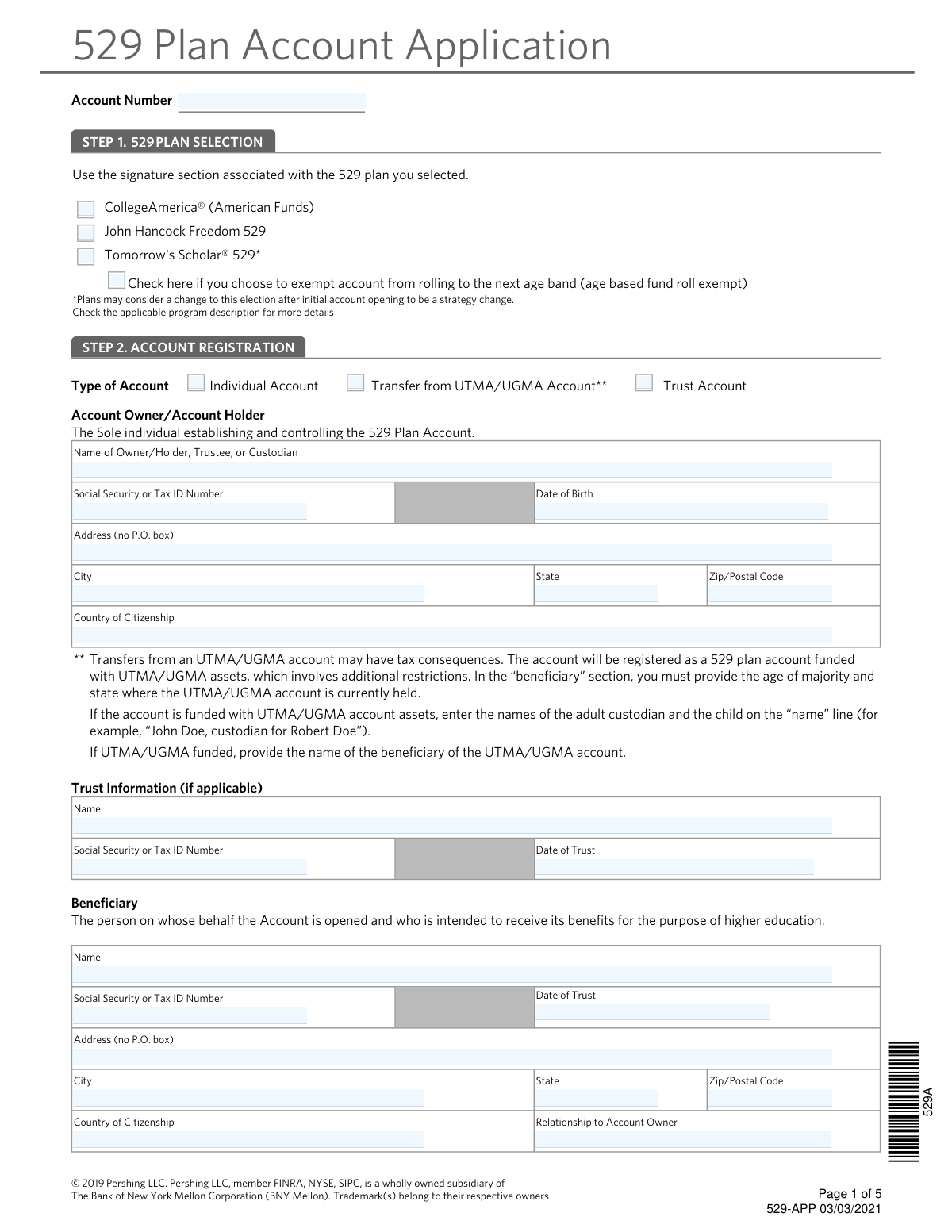
This form is an application to establish a 529 college savings plan, a tax-advantaged investment vehicle designed to encourage saving for future education costs. It requires detailed information about the account owner, the beneficiary, and the source of funding for the new account. Completing this form accurately is the crucial first step in setting up a dedicated fund for higher education. Today, this form can be filled out quickly and accurately using AI-powered services like Instafill.ai, which can also convert non-fillable PDF versions into interactive fillable forms.
Our AI automatically handles information lookup, data retrieval, formatting, and form filling.
It takes less than a minute to fill out 529-APP using our AI form filling.
Securely upload your data. Information is encrypted in transit and deleted immediately after the form is filled out.

Form specifications

Form name: 529 Plan Account Application
Number of pages: 1
Language: English
Categories: 529 plan forms
main-image

Instafill Demo: How to fill out PDF forms in seconds with AI

How to Fill Out 529-APP Online for Free in 2026

Are you looking to fill out a 529-APP form online quickly and accurately? Instafill.ai offers the #1 AI-powered PDF filling software of 2026, allowing you to complete your 529-APP form in just 37 seconds or less.
Follow these steps to fill out your 529-APP form online using Instafill.ai:
  1. 1 Navigate to Instafill.ai and upload or select the 529 Plan Account Application form.
  2. 2 In Step 1, select the specific 529 plan you wish to open, such as CollegeAmerica®, John Hancock Freedom 529, or Tomorrow's Scholar®.
  3. 3 Complete Step 2 by providing account registration details, including the personal information for the account owner and the designated beneficiary.
  4. 4 Designate a successor owner if desired and provide their required personal information.
  5. 5 In Step 3, specify the source of funding for the account, whether it's a check, a rollover from another plan, or a transfer from an UTMA/UGMA account.
  6. 6 Review all the information auto-filled by the AI for accuracy across all sections.
  7. 7 Proceed to Step 4 to electronically sign and date the application in the section corresponding to your chosen plan to finalize the submission.

Our AI-powered system ensures each field is filled out correctly, reducing errors and saving you time.

Why Choose Instafill.ai for Your Fillable 529-APP Form?

Speed

Complete your 529-APP in as little as 37 seconds.

Up-to-Date

Always use the latest 2026 529-APP form version.

Cost-effective

No need to hire expensive lawyers.

Accuracy

Our AI performs 10 compliance checks to ensure your form is error-free.

Security

Your personal information is protected with bank-level encryption.

Frequently Asked Questions About Form 529-APP

This form is used to open a new 529 college savings plan account. It allows you to select a plan, designate an owner and beneficiary, and specify how the account will be funded.

The Account Owner is the person or entity establishing and controlling the account. The Beneficiary is the individual for whom the funds are saved and who will use them for qualified higher education expenses.

You must select one of the three plans listed in Step 1 (CollegeAmerica, John Hancock, or Tomorrow's Scholar). You then sign only on the signature page in Step 4 that corresponds to the plan you chose.

A Successor Owner is the person who will take control of the account if the original owner passes away or becomes legally incompetent. It is highly recommended to name one to ensure a smooth transition of account management.

You can fund the account with a check or by rolling over funds from another 529 plan, a Coverdell Education Savings Account (ESA), a qualified U.S. savings bond, or an UTMA/UGMA account. You must specify the funding source in Step 3.

If you are rolling over funds, you must provide a statement from your prior institution showing the basis (contributions) and earnings. Without this documentation, the entire transferred amount may be treated as earnings for tax purposes.

Transfers from an UTMA/UGMA account may have tax consequences and involve additional restrictions, as the funds remain subject to UTMA/UGMA rules. You must provide the state where the original account was established and the age of majority.

The form instructs you to return the completed and signed application to your investment professional. They will review it and submit it for processing on your behalf.

Federal regulations, such as the USA Patriot Act, require financial institutions to collect and verify personal information to confirm your identity. This helps prevent fraud and money laundering.

Yes, you may miss out on state-specific benefits, such as state income tax deductions for contributions, which are often only available if you invest in your home state's 529 plan.

Yes, services like Instafill.ai use AI to accurately auto-fill form fields with your information. This can save you time and help reduce the chance of making errors.

You can use a service like Instafill.ai to complete the form online. Simply upload the PDF, and the platform will make it interactive, allowing you to type your information directly into the fields.

If you have a non-fillable or 'flat' PDF, you can use a tool like Instafill.ai. It can convert the static document into an interactive, fillable form that you can easily complete on your computer.

Compliance 529-APP
Validation Checks by Instafill.ai

1
Plan Selection and Signature Consistency
This check ensures that the signature section completed in Step 4 corresponds to the 529 plan selected in Step 1. For example, if 'CollegeAmerica' is chosen, only the CollegeAmerica signature block should be signed. This is critical for the legal validity of the application, as each plan has its own specific terms and agreements. A mismatch would render the application invalid and require correction before the account can be opened.
2
SSN and Tax ID Number Format
Validates that all Social Security Number (SSN) and Tax ID Number (TIN) fields for the Account Owner, Beneficiary, and Successor Owner are complete and follow the correct format (XXX-XX-XXXX for SSN or XX-XXXXXXX for TIN). Correct tax identification is mandatory for IRS reporting and account setup. An invalid or missing number will halt the application process until a valid number is provided.
3
Physical Address Requirement (No P.O. Box)
This validation verifies that the address fields for the Account Owner, Beneficiary, and Successor Owner do not contain 'P.O. Box'. The form explicitly requires a physical street address, which is a federal requirement under the USA PATRIOT Act for identity verification. If a P.O. Box is entered, the form submission will be rejected, and the user will be prompted to provide a valid physical address.
4
Successor Owner Uniqueness
Ensures the individual named as the Successor Owner is not the same person as the Account Owner. The validation compares the name and SSN/TIN of the Account Owner against the Successor Owner. The form explicitly states the successor cannot be the same person, as their role is to take over the account upon the owner's death or incapacitation. If the same person is listed, the application is logically inconsistent and must be corrected.
5
Conditional Requirement for Trust Information
If 'Trust Account' is selected as the 'Type of Account' in Step 2, this check confirms that the 'Trust Information' section (Name, Tax ID Number, and Date of Trust) is fully completed. These details are essential for correctly registering the account under the trust's legal identity. Failure to provide this information when 'Trust Account' is selected will result in an incomplete application.
6
Conditional Requirement for UTMA/UGMA Funding
When the 'UTMA/UGMA Account' box is checked in the 'Source of Funding' section (Step 3), this validation ensures that the 'State where established' and 'Age of majority' fields are filled out. This information is critical for managing the account according to the specific state laws governing the original UTMA/UGMA assets. The application cannot be processed without these details if this funding source is indicated.
7
Date of Birth and Date of Trust Validity
This check validates that all date fields, such as 'Date of Birth' and 'Date of Trust', are in a valid format (e.g., MM/DD/YYYY) and represent a plausible date in the past. For example, a Date of Birth cannot be a future date. This ensures data accuracy and is fundamental for identity verification and determining eligibility, such as the owner's age of majority. An invalid date will cause the form to be rejected.
8
Funding Source Completeness
Verifies that at least one funding method is specified in Step 3. The applicant must either enter a dollar amount for an enclosed check or select one of the rollover/transfer options. An application without a specified source of funding is incomplete, as there is no instruction on how the account will be established. The submission will be flagged for correction to indicate how the initial contribution will be made.
9
Account Owner Information Completeness
Ensures all required fields for the Account Owner in Step 2 are filled, including Name, SSN/TIN, Date of Birth, and full physical address. This information is the absolute minimum required to identify the legal owner of the account. An application with missing owner information cannot be processed and will be returned as incomplete.
10
Beneficiary Information Completeness
Confirms that all required fields for the Beneficiary in Step 2 are provided, including Name, SSN/TIN, Date of Birth, and address. A 529 plan is legally established for a specific beneficiary, so this information is non-negotiable. Missing beneficiary details will prevent the account from being opened, as the purpose of the account is tied to this individual.
11
Account Owner Age of Majority
This validation checks if the Account Owner is of legal age by calculating their age from the provided 'Date of Birth'. The signature sections for multiple plans require the owner to certify they are of the age of majority in their state of residence. Submitting an application as a minor (unless in a specific custodial context not applicable here) would be a legal violation, so the system must flag accounts where the owner is under 18.
12
Successor Owner Exclusion for Trust Accounts
This check enforces the rule that a Successor Owner should not be designated if the 'Type of Account' is a 'Trust Account'. The form explicitly states that the Successor Owner section is 'not applicable to trust accounts,' as trusts have their own succession rules defined in the trust document. If a successor is named on a trust application, it indicates a misunderstanding and the application will be flagged for review or correction.

Common Mistakes in Completing 529-APP

Signing in the Incorrect Plan Signature Section

The form has three separate signature pages (pages 3, 4, and 5), each corresponding to a specific 529 plan from Step 1. A frequent and critical error is selecting one plan but signing on the page for a different plan, which invalidates the entire application. To avoid this, applicants must carefully match their plan selection with the correct signature page title before signing. An intelligent form-filling tool could guide the user to the correct signature block based on their initial plan selection.

Incorrectly Filling Out UTMA/UGMA Transfer Information

When transferring from an UTMA/UGMA account, applicants often fail to follow the specific instructions highlighted on the form. Common mistakes include not using the required naming format (e.g., "John Doe, custodian for Robert Doe") in the Account Owner field, or omitting the state where the UTMA/UGMA was established and the age of majority in Step 3. These errors lead to processing delays and potential rejection of the application due to legal and tax compliance requirements.

Failing to Provide Required Rollover Documentation

When funding the account via a rollover from another 529 plan or Coverdell ESA, the form requires a statement from the prior institution detailing the basis and earnings. Applicants frequently overlook this requirement, which has serious tax consequences. Without this documentation, the entire transferred amount is treated as earnings, potentially leading to a much higher tax liability on future qualified withdrawals.

Designating an Invalid Successor Owner

The form explicitly states that the Successor Owner cannot be the same person as the Account Owner. People sometimes mistakenly re-enter their own information or leave this section blank, not realizing the implications. This error can render the successor designation void, which may force the account into probate upon the owner's death or incapacitation, causing significant delays and legal costs.

Providing a P.O. Box for a Physical Address

The form clearly states "no P.O. box" for the Account Owner, Beneficiary, and Successor Owner addresses, a requirement for identity verification under federal law. Despite this, applicants often enter a P.O. Box out of habit. This will cause the application to be rejected, requiring the applicant to resubmit with a valid physical street address. AI-powered tools like Instafill.ai can automatically flag P.O. Boxes in fields requiring a physical address.

Entering an Incorrect or Incomplete SSN/TIN

A single transposed or missing digit in the Social Security Number (SSN) or Tax ID Number (TIN) for the owner, beneficiary, or successor is a frequent data entry error. This mistake is critical as the SSN/TIN is used for identity verification and tax reporting with the IRS. An incorrect number will halt the application process until a corrected form is submitted. AI form-fillers can help by validating the format of the number entered.

Omitting the 529 Plan Selection in Step 1

In their haste to fill out personal details, applicants sometimes forget to check the box for their chosen 529 plan (CollegeAmerica, John Hancock, or Tomorrow's Scholar) at the very beginning. Since all subsequent choices and the required signature depend on this selection, omitting it makes the application impossible to process. The financial institution must return the form, delaying the account opening.

Misunderstanding the 'Age Based Fund Roll Exempt' Option

This checkbox in Step 1 allows an applicant to opt out of automatic investment adjustments as the beneficiary ages. Many applicants either ignore this option or check it without understanding the consequences, potentially leading to an investment strategy that is misaligned with their goals. This mistake can impact the account's growth potential and risk exposure, highlighting the need to read the plan description carefully before making a selection.

Submitting a Poorly Handwritten Application

This form is a non-fillable PDF, forcing many applicants to print and fill it out by hand. This often results in illegible handwriting, smudges, or messy corrections that can lead to data entry errors by the processing agent or outright rejection of the form. Using a tool like Instafill.ai can convert the non-fillable PDF into a fillable one, allowing for clean, typed entries that prevent these issues.

Leaving Beneficiary Relationship Blank

The form requires specifying the beneficiary's relationship to the account owner (e.g., son, daughter, grandchild). Applicants sometimes overlook this field, viewing it as optional. However, this information can be important for the firm's records and for understanding the context of the account, and its absence can cause a processing agent to flag the application for clarification, causing a delay.
Saved over 80 hours a year

“I was never sure if my IRS forms like W-9 were filled correctly. Now, I can complete the forms accurately without any external help.”

Kevin Martin Green

Your data stays secure with advanced protection from Instafill and our subprocessors

Robust compliance program

Transparent business model

You’re not the product. You always know where your data is and what it is processed for.

ISO 27001, HIPAA, and GDPR

Our subprocesses adhere to multiple compliance standards, including but not limited to ISO 27001, HIPAA, and GDPR.

Security & privacy by design

We consider security and privacy from the initial design phase of any new service or functionality. It’s not an afterthought, it’s built-in, including support for two-factor authentication (2FA) to further protect your account.

Fill out 529-APP with Instafill.ai

Worried about filling PDFs wrong? Instafill securely fills 529-plan-account-application forms, ensuring each field is accurate.