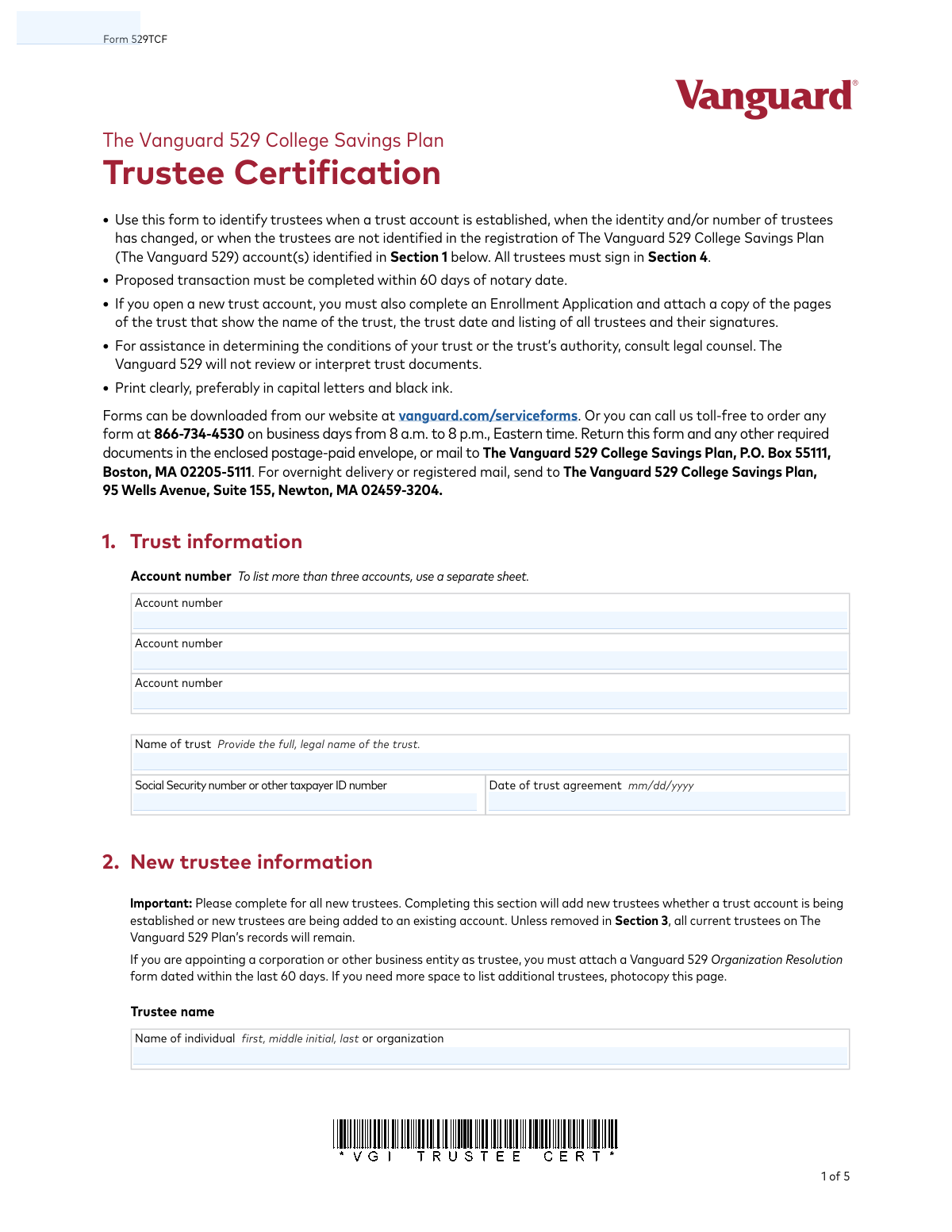
Yes! You can use AI to fill out Form 529TCF, The Vanguard 529 College Savings Plan, Trustee Certification

Form 529TCF is a legal document used to certify the identity and authority of trustees for a trust account established under The Vanguard 529 College Savings Plan. It is required when setting up a new trust account, changing trustees, or when trustee information is not on file for an existing account. This certification ensures that Vanguard has accurate records of who is authorized to act on behalf of the trust. Today, this form can be filled out quickly and accurately using AI-powered services like Instafill.ai, which can also convert non-fillable PDF versions into interactive fillable forms.
Our AI automatically handles information lookup, data retrieval, formatting, and form filling.
It takes less than a minute to fill out 529TCF using our AI form filling.
Securely upload your data. Information is encrypted in transit and deleted immediately after the form is filled out.

Form specifications

Form name: Form 529TCF, The Vanguard 529 College Savings Plan, Trustee Certification
Number of pages: 1
Language: English
Categories: trust forms, college HR forms, 529 plan forms, college savings forms, certification forms, Vanguard forms, savings plan forms, trustee forms
main-image

Instafill Demo: How to fill out PDF forms in seconds with AI

How to Fill Out 529TCF Online for Free in 2026

Are you looking to fill out a 529TCF form online quickly and accurately? Instafill.ai offers the #1 AI-powered PDF filling software of 2026, allowing you to complete your 529TCF form in just 37 seconds or less.
Follow these steps to fill out your 529TCF form online using Instafill.ai:
  1. 1 Navigate to Instafill.ai and upload or select the Vanguard Form 529TCF.
  2. 2 Use the AI assistant to automatically populate Section 1 with the trust's information, including the full legal name, date of the trust agreement, and relevant account numbers.
  3. 3 Complete Section 2 by providing the personal details for all new trustees, such as their name, address, Social Security number, and contact information.
  4. 4 If there are departing trustees, fill out Section 3, indicating their name and the reason for their departure, ensuring you have the required supporting documents (e.g., death certificate, letter of resignation).
  5. 5 Carefully review the certification statements in Section 4. All continuing and new trustees must sign and date the form.
  6. 6 Have all trustee signatures notarized. The platform can guide you on where the notary public needs to sign, date, and place their seal.
  7. 7 Download the completed and notarized form, then submit it to The Vanguard 529 Plan along with any other required attachments, such as copies of the trust agreement pages.

Our AI-powered system ensures each field is filled out correctly, reducing errors and saving you time.

Why Choose Instafill.ai for Your Fillable 529TCF Form?

Speed

Complete your 529TCF in as little as 37 seconds.

Up-to-Date

Always use the latest 2026 529TCF form version.

Cost-effective

No need to hire expensive lawyers.

Accuracy

Our AI performs 10 compliance checks to ensure your form is error-free.

Security

Your personal information is protected with bank-level encryption.

Frequently Asked Questions About Form 529TCF

This form is used to identify the trustees for a Vanguard 529 College Savings Plan account held in a trust. It is required when establishing a new trust account, when the identity or number of trustees changes, or when trustees are not already identified in the account registration.

All current, continuing, and new trustees of the trust must sign and date the form in Section 4. Each signature must be individually notarized.

When opening a new trust account, you must also submit a completed Enrollment Application and a copy of the trust pages that show the trust's name, date, and a list of all trustees and their signatures.

Yes, all trustee signatures must be notarized in Section 4. The form specifies that a signature guarantee cannot be accepted in place of a notary's seal.

Any proposed transaction related to this form must be completed within 60 days of the date your signature is notarized.

If a trustee is deceased, you must attach a certified copy of their death certificate to this form. You may also need to submit an IRS Form W-9 if the deceased trustee's Social Security number was used as the trust's tax ID.

You must attach either a signed letter of resignation from the trustee or other documentary evidence of their removal, such as a certified board resolution.

You should allow up to two weeks for the Trustee Certification to be processed. The trustees will receive confirmation by mail once the transaction is complete.

Mail the form to The Vanguard 529 College Savings Plan, P.O. Box 55111, Boston, MA 02205-5111. For overnight delivery, use the address at 95 Wells Avenue, Suite 155, Newton, MA 02459-3204.

If you do not specify a number in Section 4, the signature of any one trustee will be accepted for written transactions, and any single trustee can make phone requests.

Yes, services like Instafill.ai use AI to accurately auto-fill form fields, which can help you complete this form quickly and save time.

You can use a service like Instafill.ai to fill out this form online. Simply upload the PDF, and the tool will make it interactive, allowing you to type your information directly into the fields before printing for signatures and notarization.

If you have a non-fillable PDF, you can upload it to a service like Instafill.ai. It will automatically convert the flat PDF into an interactive, fillable form that you can complete on your computer.

If you are appointing a corporation or other business entity as a trustee, you must attach a Vanguard 529 Organization Resolution form that has been dated within the last 60 days.

Compliance 529TCF
Validation Checks by Instafill.ai

1
Notary Date Timeliness
Checks that the form submission or processing date is within 60 days of the notary date provided in Section 4. The form explicitly states this requirement for the transaction to be valid. If the form is submitted after this 60-day window, it is considered stale and will be rejected, requiring the client to obtain a new notarization.
2
Comprehensive Trustee Signature Verification
Confirms that all continuing and new trustees have provided a signature in Section 4. The system must cross-reference the names of signatories against the new trustees listed in Section 2 and the existing trustees on record for the account. Missing signatures from any trustee will render the certification incomplete and legally invalid, causing the form to be rejected.
3
Departing Trustee Documentation Requirement
Validates that if Section 3 is filled out for a departing trustee, a 'Reason for departure' is selected and the corresponding required document is attached. For example, selecting 'Death' requires a certified death certificate. This validation is essential for maintaining a clear and legally sound record of trustee changes and will fail if the required proof is missing.
4
SSN/TIN Format Validation
Ensures that the 'Social Security number or other taxpayer ID number' for each new trustee in Section 2 is a valid 9-digit number. This is critical for tax reporting and identity verification purposes as required by law. A malformed, invalid, or missing number will halt the account update and require correction from the applicant.
5
Notary Commission Expiration Date
Validates that the notary's commission expiration date ('My commission expires') in Section 4 is a valid date that has not passed. An expired commission invalidates the notarization, which is a mandatory requirement for this form. The form cannot be accepted with an invalid or expired notary commission, as it fails to meet the legal requirements for certification.
6
Trust Date Validity
Validates that the 'Date of trust agreement' in Section 1 is a valid date in MM/DD/YYYY format and occurs on or before the signature dates in Section 4. This ensures the trust existed before the trustees certified its details. An invalid or future date would indicate a data entry error and prevent the form from being processed correctly.
7
Full Notarization Section Completion
Ensures all fields within the 'Notarization/Affidavit of trustee' block in Section 4 are filled, including the notary's name, state, county, signature, and the presence of a notary seal. A notarization is a legal attestation, and any missing component makes it void. Incomplete notarization is a common reason for rejection and requires the form to be re-signed and re-notarized.
8
Signature Count Logic
Checks that the 'Number of trustee signatures required' in Section 4 is a positive integer and is not greater than the total number of active trustees (continuing plus new). An illogical number, such as requiring three signatures when only two trustees exist, would create an unworkable situation for future transactions. This error would require clarification and correction before the form can be processed.
9
Completeness of New Trustee Information
Verifies that for each new trustee added in Section 2, all required fields (Name, SSN/TIN, and full Street Address) are completed. Incomplete information prevents the proper establishment of the trustee's identity on the account. The form will be considered incomplete and returned for completion, delaying the account setup or update.
10
Conditional Attachment for Corporate Trustee
Verifies that if a new trustee listed in Section 2 is an organization or corporation, a 'Vanguard 529 Organization Resolution form' is attached. This document provides proof that the entity has authorized the action. Failure to include this required form will prevent the corporate trustee from being added to the account and result in an incomplete submission.
11
Signature Date vs. Notary Date Consistency
Ensures the 'Today's date' next to each trustee signature in Section 4 is on or before the date the document was acknowledged by the notary. A signature dated after the notarization is logically impossible and indicates an error. This discrepancy would invalidate the notarization and cause the form to be rejected.
12
Trust Name Completeness
Verifies that the 'Name of trust' field in Section 1 is not empty and contains the full, legal name as instructed. The trust name is the primary identifier for the legal entity being registered. Leaving this field blank or providing an abbreviation would make it impossible to correctly identify and link the account, leading to immediate rejection.
13
New Account Attachment Requirement
Checks that if the form is being used to set up a new trust account (i.e., no existing account number is provided), it is accompanied by a completed Enrollment Application and copies of the trust document pages. This form is a supplement, not a standalone application for new accounts. Missing the primary application or trust documents will result in an incomplete submission that cannot be processed.

Common Mistakes in Completing 529TCF

Incomplete or Missing Trustee Signatures

The form requires all continuing and new trustees to sign in Section 4. Applicants often mistakenly believe only new trustees need to sign, or one trustee signs on behalf of others. This leads to an invalid certification and immediate rejection of the form. To avoid this, carefully identify every current and new trustee and ensure each individual signs the form and has their signature properly notarized.

Forgetting Required Supporting Documents

This form frequently requires attachments, such as trust agreement pages for new accounts, a death certificate for a deceased trustee, or a physician's letter for an incapacitated one. Forgetting to include these documents is a primary cause of processing delays and rejections. Before mailing, create a checklist based on your specific situation (e.g., new account, trustee change) and verify that all necessary paperwork is attached.

Using a Stale Notary Date

The form explicitly states that the transaction must be completed within 60 days of the notary date. Applicants sometimes get the form notarized but then delay in mailing it, causing the notarization to expire. This requires the entire signing and notarization process to be repeated. To prevent this, mail the form immediately after it has been signed and notarized by all parties.

Incorrect Trust Name or Date

In Section 1, applicants may enter an abbreviated or informal name for the trust instead of its full, legal name, or enter the wrong date of the trust agreement. This mismatch with official trust documents will cause rejection or significant delays during verification. Always enter the exact legal name and creation date as they appear on the official trust agreement to ensure the account is set up or updated correctly.

Failing to Specify the Number of Required Signatures

Section 4 contains a small but critical line to specify how many trustee signatures are needed for transactions, which is easily overlooked. If left blank, the account defaults to allowing any single trustee to act, which may contradict the trust's legal provisions. Carefully review the trust document and fill in the required number to ensure proper governance and security for the account.

Incomplete Notarization Section

The notary section must be filled out completely, including the date, names of signers, state, county, commission expiration date, and the official seal. A common error is the notary forgetting to affix their seal or write their commission expiry date, which invalidates the form. Always review the notarization block for completeness before leaving the notary's office to avoid having to return.

Missing Information for Corporate Trustees

When a corporation or other business entity is appointed as a trustee, the form requires an attached 'Vanguard 529 Organization Resolution Form' dated within the last 60 days. This is a specific requirement that is frequently missed, leading to an incomplete application. If appointing an entity, ensure you obtain and attach this separate, correctly dated form to avoid rejection.

Illegible Handwriting

The instructions specify printing clearly in capital letters and black ink, but people often use cursive, messy print, or the wrong ink color. This can lead to critical data entry errors by the processing team, resulting in incorrect names, addresses, or Taxpayer ID numbers on the account. Since this is a non-fillable PDF, using a tool like Instafill.ai to convert it to a fillable version ensures all entries are typed, legible, and accurate.

Using a Signature Guarantee Instead of a Notary

The signature pages explicitly state, 'We cannot accept a signature guarantee in place of a notary’s seal.' Some individuals, particularly those familiar with other financial forms, may mistakenly obtain a signature guarantee from their bank or broker. This will result in immediate rejection, as the form requires the specific legal verification provided only by a commissioned notary public.

Providing Incomplete New Trustee Information

In Section 2, every field for each new trustee must be completed, including their full name, physical street address, and Social Security or Taxpayer ID number. Leaving any of this information blank or providing a P.O. Box instead of a street address will halt the application process. AI-powered form filling tools like Instafill.ai can help prevent this by flagging empty required fields and validating data formats before you print the form for signing.
Saved over 80 hours a year

“I was never sure if my IRS forms like W-9 were filled correctly. Now, I can complete the forms accurately without any external help.”

Kevin Martin Green

Your data stays secure with advanced protection from Instafill and our subprocessors

Robust compliance program

Transparent business model

You’re not the product. You always know where your data is and what it is processed for.

ISO 27001, HIPAA, and GDPR

Our subprocesses adhere to multiple compliance standards, including but not limited to ISO 27001, HIPAA, and GDPR.

Security & privacy by design

We consider security and privacy from the initial design phase of any new service or functionality. It’s not an afterthought, it’s built-in, including support for two-factor authentication (2FA) to further protect your account.

Fill out 529TCF with Instafill.ai

Worried about filling PDFs wrong? Instafill securely fills form-529tcf-the-vanguard-529-college-savings-plan-trustee-certification forms, ensuring each field is accurate.