Yes! You can use AI to fill out 529 Plan Account Transfer Form
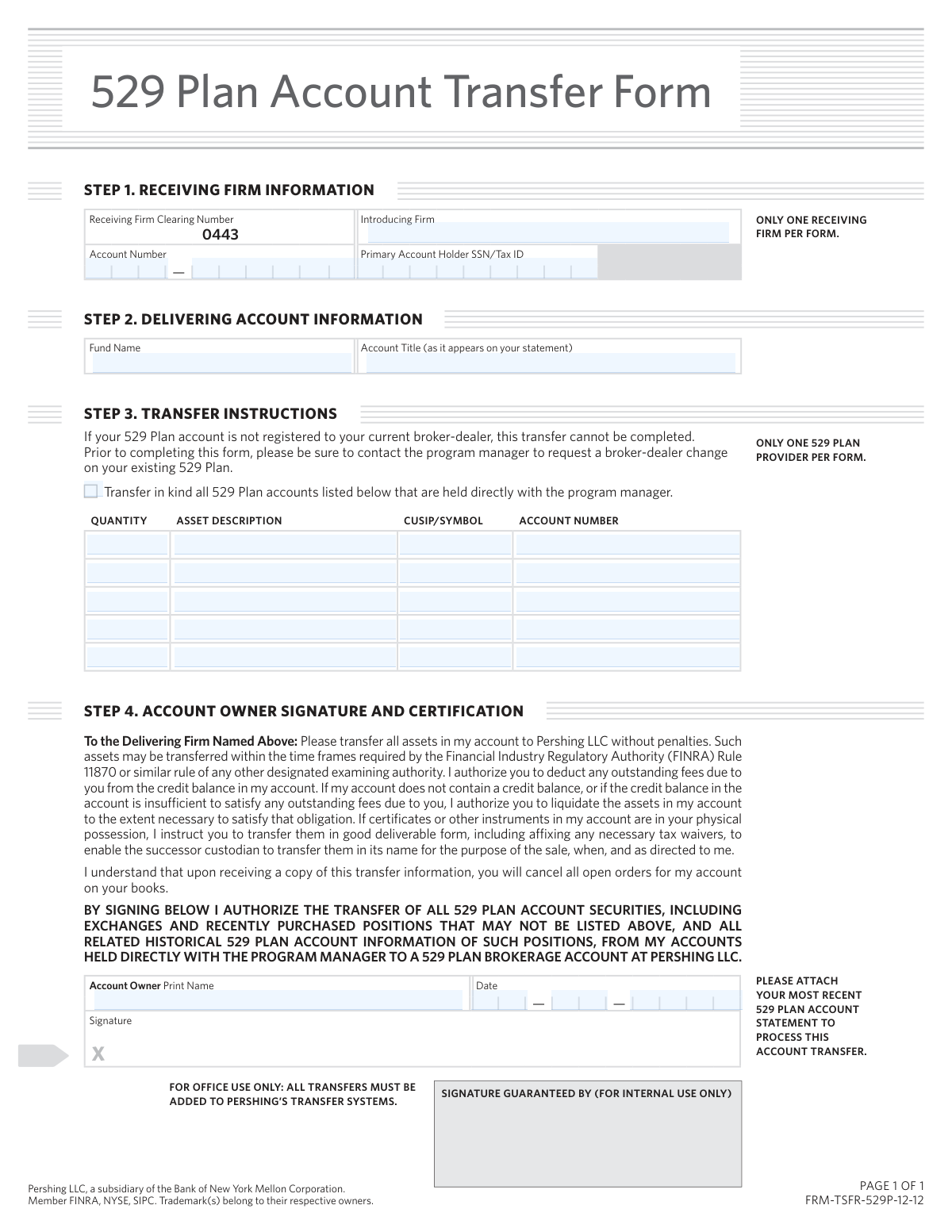
This form is a legal document used to request and authorize the transfer of all assets from an existing 529 college savings plan account to a new 529 plan brokerage account held at Pershing LLC. It is crucial for individuals looking to consolidate their educational savings or switch their investment management to a new firm. Today, this form can be filled out quickly and accurately using AI-powered services like Instafill.ai, which can also convert non-fillable PDF versions into interactive fillable forms.
Our AI automatically handles information lookup, data retrieval, formatting, and form filling.
It takes less than a minute to fill out FRM-TSFR-529P-12-12 using our AI form filling.
Securely upload your data. Information is encrypted in transit and deleted immediately after the form is filled out.
Form specifications
| Form name: | 529 Plan Account Transfer Form |
| Number of pages: | 1 |
| Language: | English |
| Categories: | 529 plan forms, account transfer forms, transfer forms |
Instafill Demo: How to fill out PDF forms in seconds with AI
How to Fill Out FRM-TSFR-529P-12-12 Online for Free in 2026
Are you looking to fill out a FRM-TSFR-529P-12-12 form online quickly and accurately? Instafill.ai offers the #1 AI-powered PDF filling software of 2026, allowing you to complete your FRM-TSFR-529P-12-12 form in just 37 seconds or less.
Follow these steps to fill out your FRM-TSFR-529P-12-12 form online using Instafill.ai:
- 1 Navigate to Instafill.ai and upload or select the 529 Plan Account Transfer Form.
- 2 In Step 1, provide the receiving firm information, including your new account number and SSN/Tax ID.
- 3 In Step 2, enter the delivering account information, specifying the fund name and the account title exactly as it appears on your statement.
- 4 Complete Step 3 by listing the assets to be transferred, including quantity, description, CUSIP/Symbol, and the corresponding account number.
- 5 Carefully read the certification in Step 4, then print your name, sign, and date the form to authorize the transfer.
- 6 Attach a copy of your most recent 529 plan account statement as required by the form.
- 7 Review all entered information for accuracy, then download the completed form for submission to the delivering firm.
Our AI-powered system ensures each field is filled out correctly, reducing errors and saving you time.
Why Choose Instafill.ai for Your Fillable FRM-TSFR-529P-12-12 Form?
Speed
Complete your FRM-TSFR-529P-12-12 in as little as 37 seconds.
Up-to-Date
Always use the latest 2026 FRM-TSFR-529P-12-12 form version.
Cost-effective
No need to hire expensive lawyers.
Accuracy
Our AI performs 10 compliance checks to ensure your form is error-free.
Security
Your personal information is protected with bank-level encryption.
Frequently Asked Questions About Form FRM-TSFR-529P-12-12
This form is used to authorize the transfer of all assets from your existing 529 Plan account, held with another firm, into a new 529 Plan brokerage account at Pershing LLC.
You should use this form if you are a 529 plan owner who wants to move your college savings plan from its current program manager to a brokerage account held at Pershing LLC.
You must attach a copy of your most recent 529 Plan account statement for the transfer to be processed. Failure to include the statement will likely cause delays.
In Step 2, you need to provide the name of the 529 Plan provider you are transferring from (Fund Name) and the account title exactly as it appears on your statement.
Before submitting this form, you must contact your 529 plan's program manager to request a broker-dealer change. The form states the transfer cannot be completed otherwise.
No, you must use a separate form for each 529 plan provider. The form clearly states 'ONLY ONE 529 PLAN PROVIDER PER FORM'.
A 'transfer in kind' means your investments are moved directly to your new account without being sold and converted to cash first. This allows you to remain invested in the market during the transfer.
By signing the form, you authorize the delivering firm to deduct any outstanding fees from your account's credit balance. If the balance is insufficient, assets may be liquidated to cover the fees.
The account owner must print their name, sign, and date the form in Step 4 to provide legal authorization for the transfer.
You should submit the completed form and your recent account statement to your new introducing firm or financial advisor who uses Pershing LLC for clearing services. Contact them directly for the correct submission address or method.
The form notes transfers are processed within FINRA-required time frames, which is typically a few business days after validation. However, the entire process can take one to two weeks depending on the delivering firm.
Yes, services like Instafill.ai use AI to accurately auto-fill form fields from your documents, which can save you time and help prevent common errors.
Simply upload the 529 Plan Account Transfer Form to the Instafill.ai platform. The AI will identify the fields, allowing you to fill them out, sign electronically, and download the completed document.
You can use a service like Instafill.ai, which converts flat, non-fillable PDFs into interactive, fillable forms online. This lets you type your information directly into the fields instead of printing and writing by hand.
Compliance FRM-TSFR-529P-12-12
Validation Checks by Instafill.ai
1
SSN/Tax ID Format Validation
Checks that the 'Primary Account Holder SSN/Tax ID' field contains a valid, 9-digit number formatted as either a Social Security Number (XXX-XX-XXXX) or an Employer Identification Number (XX-XXXXXXX). This is critical for correctly identifying the account owner for tax reporting and legal purposes. A failure to validate will prevent the transfer from being initiated due to an identity mismatch.
2
Required Account Information Completeness
Verifies that all mandatory fields in Step 1 (Introducing Firm, Account Number) and Step 2 (Fund Name, Account Title) are filled out. Missing this core information makes it impossible to identify either the source or destination account for the transfer. The form submission will be rejected as incomplete if any of these fields are blank.
3
Signature Date Validity
Ensures the date provided in Step 4 is a valid calendar date and is not post-dated (in the future) or excessively stale, for example, older than 90 days. Financial institutions require a recent authorization to act on a client's instructions. An invalid or old date will cause the form to be rejected, requiring a new, correctly dated signature.
4
Asset Transfer Instruction Presence
Confirms that at least one complete asset line item is provided in the table in Step 3. A transfer form without any specified assets to transfer is not actionable. If no assets are listed, the form is considered incomplete and cannot be processed, as there are no instructions to execute.
5
Asset Row Data Consistency
For each row in the Step 3 asset table, this check ensures that if any one field (e.g., Quantity) is filled, then all other fields in that same row (Asset Description, CUSIP/Symbol, Account Number) must also be filled. Partial information for an asset is ambiguous and can lead to transfer errors. Incomplete rows will be flagged for correction before the transfer can proceed.
6
CUSIP/Symbol Format Validation
Validates that the entry in the CUSIP/Symbol field follows the standard format for either a CUSIP (a 9-character alphanumeric code) or a stock ticker symbol (typically 1-5 letters). Incorrect identifiers will cause the transfer to fail for that specific asset, as the delivering firm cannot locate it. This check prevents processing delays and rejections from the clearing system.
7
Statement Attachment Verification
Checks for the presence of an attached file corresponding to the 'most recent 529 plan account statement' as required by the form instructions. This statement is used to verify the account details, ownership, and asset positions listed on the form. Without the statement, the transfer request cannot be validated and will be placed on hold until the document is provided.
8
Account Owner Authorization Completeness
Verifies that the Account Owner's printed name and signature are both present in Step 4. The printed name confirms the identity of the signatory, and the signature provides the legal authorization to perform the transfer. A missing name or signature invalidates the entire request, and the form will be returned for completion.
9
Numeric Quantity Validation
Ensures that the 'QUANTITY' field for each listed asset in Step 3 contains a positive numerical value. Non-numeric or negative values are invalid and would cause the transfer instruction to fail. This validation prevents data entry errors from halting the automated transfer process.
10
Account Title and Owner Name Consistency
Compares the 'Account Title' from Step 2 with the 'Account Owner Print Name' from Step 4 to ensure they are reasonably consistent. For example, the printed name should appear within the account title. This check helps prevent fraudulent transfers and ensures the person authorizing the transfer is the actual account holder, triggering a manual review if a mismatch occurs.
11
Single 529 Provider Enforcement
Validates that the form pertains to only one 529 plan provider, as explicitly stated in the instructions ('ONLY ONE 529 PLAN PROVIDER PER FORM'). The system would check that the 'Fund Name' in Step 2 is singular and that all listed 'ACCOUNT NUMBER' fields in Step 3 belong to that same provider. Submitting a form for multiple providers would result in rejection, requiring separate forms for each.
12
Receiving Firm Clearing Number Integrity
Confirms that the pre-filled 'Receiving Firm Clearing Number' in Step 1 remains '0443' and has not been altered. This number uniquely identifies Pershing LLC as the destination and is critical for routing the transfer correctly. Any modification to this field would indicate a form error or tampering and would cause an immediate processing failure.
Common Mistakes in Completing FRM-TSFR-529P-12-12
The form explicitly requires the user to attach their most recent 529 plan account statement for processing. This is one of the most common oversights, leading to immediate processing delays as the firm cannot verify the account details, holdings, and title without it. To avoid this, always make a final check to ensure a complete, current statement is included with your submission before sending.
A critical instruction in Step 3 states the transfer cannot be completed if the 529 account is not registered to the current broker-dealer. Many people miss this and submit the form anyway, resulting in an automatic rejection and significant delays. Before filling out this form, you must first contact the 529 program manager to request this change, which can take several days to complete.
The 'Account Title' in Step 2 must exactly match what is printed on the 529 plan statement, including any middle initials, suffixes (e.g., Jr., Sr.), or trust designations. Users often write a simplified or slightly different version of their name, which causes a name-matching failure and rejection of the transfer. To prevent this, carefully copy the title character-for-character from your statement.
In Step 3, users often struggle to provide the correct 'ASSET DESCRIPTION' and 'CUSIP/SYMBOL' for their holdings, sometimes leaving these fields blank. This forces the processing team to halt the transfer and request clarification, causing delays. To avoid this, locate this specific information on your account statement and transcribe it accurately onto the form for each asset being transferred.
This form requires both the new 'Account Number' at the receiving firm (Step 1) and the old account number from the delivering firm (Step 3). A frequent error is to enter the old account number in the Step 1 field, which makes it impossible to route the assets to the correct destination. Always double-check that the new account number is in Step 1 and the existing 529 account number is listed in Step 3.
Since this is a non-fillable PDF, all information must be handwritten, which often results in illegible numbers and names. Poor handwriting can easily lead to data entry errors by the processing staff, causing failed transfers due to mismatched CUSIPs, account numbers, or names. To prevent this, consider using a tool like Instafill.ai that can convert the PDF into a digitally fillable version, ensuring all your entries are clean, typed, and perfectly legible.
Forgetting to sign and date the form in Step 4 is a simple but critical mistake that completely invalidates the transfer authorization. The transfer cannot proceed without a valid, dated signature from the account owner. Before submitting, always perform a final review of Step 4 to ensure you have signed and dated the form correctly.
The form clearly states 'ONLY ONE 529 PLAN PROVIDER PER FORM.' Users who hold accounts with multiple providers (e.g., one from Virginia's 529 and one from New York's 529) may try to list assets from both on a single form. This will cause the form to be rejected, as each provider must be handled with a separate transfer request. A new form must be completed for each individual 529 plan provider.
In Step 2, the 'Fund Name' field is meant for the name of the 529 Plan Provider itself (e.g., 'Future Scholar 529 College Savings Plan'), not the name of an underlying mutual fund investment. Entering the wrong entity name can cause confusion and routing errors. Refer to your statement to find the official name of the 529 plan administrator and enter it in this field.
A simple typo in the 'Primary Account Holder SSN/Tax ID' field in Step 1 is a common yet fatal error. This number is the primary identifier for verifying your identity across financial institutions. Any mismatch will cause the transfer to fail validation, requiring you to correct the error and resubmit the entire form. Using an AI form-filler like Instafill.ai can help prevent these typos by auto-filling from a verified profile.
Saved over 80 hours a year
“I was never sure if my IRS forms like W-9 were filled correctly. Now, I can complete the forms accurately without any external help.”
Kevin Martin Green
Your data stays secure with advanced protection from Instafill and our subprocessors

Robust compliance program
Transparent business model
You’re not the product. You always know where your data is and what it is processed for.
ISO 27001, HIPAA, and GDPR
Our subprocesses adhere to multiple compliance standards, including but not limited to ISO 27001, HIPAA, and GDPR.
Security & privacy by design
We consider security and privacy from the initial design phase of any new service or functionality. It’s not an afterthought, it’s built-in, including support for two-factor authentication (2FA) to further protect your account.
Fill out FRM-TSFR-529P-12-12 with Instafill.ai
Worried about filling PDFs wrong? Instafill securely fills 529-plan-account-transfer-form forms, ensuring each field is accurate.