Yes! You can use AI to fill out Merrill Lynch 529 College Savings Plan Withdrawal Request Form

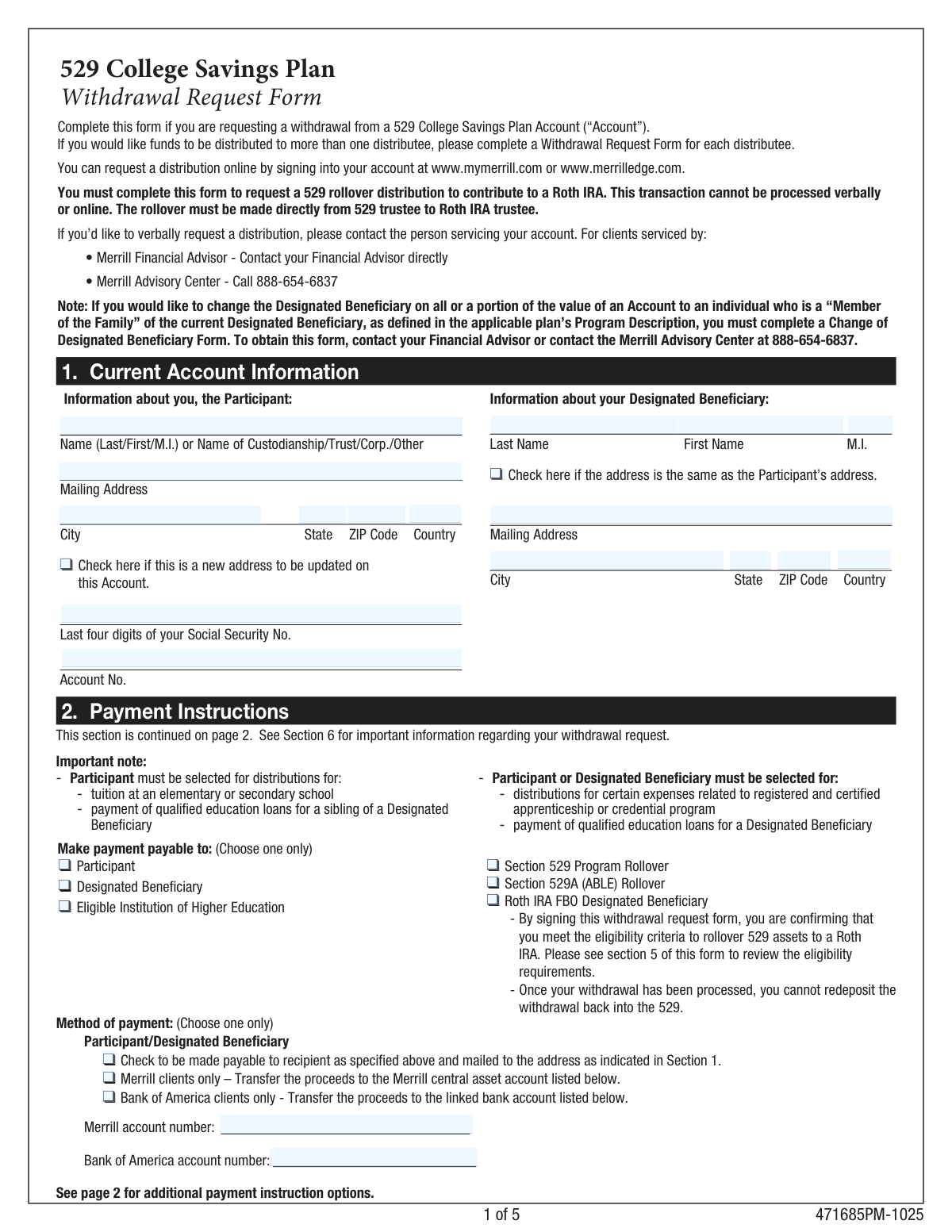
This form is used by a 529 account holder (Participant) to request a withdrawal from their Merrill Lynch 529 College Savings Plan. It allows for distributions to be made for qualified education expenses, rollovers to other 529 or ABLE accounts, or a direct rollover to a Roth IRA for the designated beneficiary. Today, this form can be filled out quickly and accurately using AI-powered services like Instafill.ai, which can also convert non-fillable PDF versions into interactive fillable forms.
Our AI automatically handles information lookup, data retrieval, formatting, and form filling.
It takes less than a minute to fill out Form 471685PM-1025 using our AI form filling.
Securely upload your data. Information is encrypted in transit and deleted immediately after the form is filled out.

Form specifications

Form name: Merrill Lynch 529 College Savings Plan Withdrawal Request Form
Number of pages: 1
Language: English
Categories: college HR forms, withdrawal forms, 529 plan forms, college savings forms, Merrill forms, savings plan forms
main-image

Instafill Demo: How to fill out PDF forms in seconds with AI

How to Fill Out Form 471685PM-1025 Online for Free in 2026

Are you looking to fill out a FORM 471685PM-1025 form online quickly and accurately? Instafill.ai offers the #1 AI-powered PDF filling software of 2026, allowing you to complete your FORM 471685PM-1025 form in just 37 seconds or less.
Follow these steps to fill out your FORM 471685PM-1025 form online using Instafill.ai:
  1. 1 Navigate to Instafill.ai and upload the 529 College Savings Plan Withdrawal Request Form or select it from their template library.
  2. 2 Provide your current account information, including details for both the Participant (account owner) and the Designated Beneficiary.
  3. 3 Complete the Payment Instructions section, specifying who will receive the funds (e.g., Participant, Beneficiary, Educational Institution) and the payment method (e.g., check, bank transfer, wire).
  4. 4 Indicate the source and amount of the withdrawal, choosing between a full liquidation or a partial withdrawal from specific portfolios.
  5. 5 Carefully review all the information auto-filled by the AI to ensure accuracy and completeness, especially account numbers and dollar amounts.
  6. 6 Sign and date the form in the designated signature block.
  7. 7 Download the completed form and submit it to Merrill Lynch following the mailing instructions provided on the document.

Our AI-powered system ensures each field is filled out correctly, reducing errors and saving you time.

Why Choose Instafill.ai for Your Fillable Form 471685PM-1025 Form?

Speed

Complete your Form 471685PM-1025 in as little as 37 seconds.

Up-to-Date

Always use the latest 2026 Form 471685PM-1025 form version.

Cost-effective

No need to hire expensive lawyers.

Accuracy

Our AI performs 10 compliance checks to ensure your form is error-free.

Security

Your personal information is protected with bank-level encryption.

Frequently Asked Questions About Form Form 471685PM-1025

This form is used to request a withdrawal from your Merrill Lynch 529 College Savings Plan. It is mandatory for certain transactions, like rolling over funds to a Roth IRA, which cannot be done online or verbally.

The Participant (the account owner) must complete, sign, and date the form. You will need to provide information for both the Participant and the Designated Beneficiary.

Yes, for many common withdrawals, you can make a request online by logging into your account at mymerrill.com. However, you must use this form to process a rollover from your 529 plan to a Roth IRA.

Once the form is received, it can take up to five business days to process. You should allow approximately two weeks total for mailing and processing time.

To avoid delays, you must mail the completed form to the specific address listed on your account statement, not a general Merrill Lynch address.

No, Merrill does not require you to submit receipts or other documentation with the form. However, you should retain all receipts for qualified expenses with your tax documents for your own records.

The 529 account must be open for at least 15 years, the Roth IRA must be in the beneficiary's name, and the rollover is subject to annual and lifetime limits. This transaction must be requested using this form.

No, you can only have one recipient (distributee) per form. If you need to send funds to multiple recipients, such as the school and yourself, you must fill out a separate form for each one.

Yes, you can withdraw up to $10,000 per year for elementary or secondary school tuition. For this type of expense, the payment must be made to you, the Participant.

Yes, wire transfers are subject to a $30 fee. This fee is deducted from your withdrawal amount, so you should add $30 to your total withdrawal request in Section 3 to cover it.

No, this form is only for requesting withdrawals. To change the Designated Beneficiary, you must obtain and complete a separate 'Change of Designated Beneficiary Form'.

Yes, services like Instafill.ai use AI to accurately auto-fill form fields with your saved information, which helps save time and reduce the chance of errors.

You can upload the PDF to the Instafill.ai platform, where its AI will make the fields fillable and populate them with your information. After reviewing, you can download the completed form to print and mail.

If you have a non-fillable or 'flat' PDF, you can use a service like Instafill.ai. It can convert the document into an interactive, fillable form that you can complete on your computer.

Compliance Form 471685PM-1025
Validation Checks by Instafill.ai

1
Exclusive Withdrawal Type Selection
Ensures that the user selects either 'Full Withdrawal' or 'Partial Withdrawal' in Section 3, but not both. This is critical for preventing ambiguity in processing the withdrawal amount. If both or neither are selected, the form submission should be blocked until the user makes a single, clear choice.
2
Partial Withdrawal Completeness
If 'Partial Withdrawal' is selected, this check verifies that at least one portfolio line item is filled out with a valid dollar amount. It also confirms that the 'Partial Withdrawal Total' correctly sums the individual dollar amounts. This prevents the submission of an incomplete or mathematically incorrect partial withdrawal request, which would require manual follow-up.
3
Exclusive Payee Selection
Validates that only one payee is selected in the first part of Section 2 from the list: Participant, Designated Beneficiary, Eligible Institution, etc. The form specifies 'Choose one only', and selecting multiple payees would create conflicting instructions for payment. A validation failure would require the user to select a single payee before proceeding.
4
Exclusive Payment Method Selection
Verifies that only one 'Method of payment' is chosen in Section 2 (e.g., Check, Merrill Transfer, Wire Transfer). Processing requires a single, unambiguous payment instruction. If multiple methods are selected, the system cannot determine how to disburse the funds, so the submission must be rejected until one option is chosen.
5
Conditional Merrill Account Number Requirement
If the user selects 'Transfer the proceeds to the Merrill central asset account', this check ensures the 'Merrill account number' field is not empty. This is necessary to electronically transfer the funds to the correct destination account. Failure to provide the account number would make the selected payment method impossible to execute.
6
Conditional Wire Transfer Details Requirement
When 'Wire Transfer' is selected as the payment method, this validation confirms that the 'Financial Institution Account Number', 'Name on account', and 'ABA/Routing Number' fields are all completed. Missing any of this information will result in a failed wire transfer. The check ensures all necessary data is captured to successfully process the transaction.
7
ABA Routing Number Format
Validates that the 'ABA/Routing Number of the Financial Institution' field contains exactly 9 digits. This is the standard format for ABA routing numbers in the United States. An incorrect number of digits will cause the wire transfer to be rejected by the banking system, so this check prevents processing errors and delays.
8
Wire Transfer and Rollover Exclusion
Checks that the 'Wire Transfer' option is not selected simultaneously with any rollover option (Section 529, 529A, or Roth IRA). The form explicitly states that wire transfers may not be used for rollover contributions. This validation enforces a critical business rule to ensure compliance and prevent invalid transaction combinations.
9
Conditional Educational Institution Details
If the payment is directed to an 'Eligible Institution of Higher Education', this check ensures the institution's name, mailing address, student's name, and the student's ID or last four SSN digits are provided. This information is essential for the institution to correctly credit the payment to the student's account. An incomplete submission would be rejected to avoid misapplied funds.
10
SSN Last Four Digits Format
Verifies that the 'Last four digits of your Social Security No.' and the 'Last four digits of the Student’s Social Security Number' fields each contain exactly four numeric digits. This is a data integrity check to ensure the identifier is in the correct format for matching and record-keeping. An invalid format would trigger an error, prompting the user for correction.
11
Participant Information Completeness
Ensures that all required fields in the 'Information about you, the Participant' section are filled, including Name, Mailing Address, City, State, ZIP Code, Account No., and the last four digits of the SSN. This information is fundamental for identifying the account holder and processing the request. A missing field would halt the process until all required data is supplied.
12
Signature Date Presence and Format
Validates that the 'Date' field next to the participant's signature is not empty and is in the specified MM/DD/YYYY format. The date of signature is a legal requirement that attests to when the request was authorized. An invalid or missing date can affect the validity of the request, so the form should not be accepted without it.
13
Conditional Roth IRA Rollover Details
If the 'Roth IRA FBO' option is selected, this check ensures that the user has provided either a 'Roth IRA Merrill account number' or the complete details for a non-Merrill IRA (Custodian Name and Mailing Address). This logic prevents an incomplete rollover request from being submitted. The system cannot process the rollover without a valid destination account.
14
Beneficiary Address Logic
This validation checks the 'Address same as the Participant’s address' checkbox. If the box is unchecked, it then verifies that the beneficiary's complete mailing address fields (Address, City, State, ZIP) are filled out. This ensures that if the beneficiary's address is different, it is properly captured for mailing or record-keeping purposes.

Common Mistakes in Completing Form 471685PM-1025

Incomplete or Ambiguous Payment Instructions

Users often select multiple payment methods in Section 2 (e.g., checking both 'Wire Transfer' and 'Transfer to Merrill account') or fail to provide all necessary details for their chosen method, such as a bank account number or custodian address. This ambiguity forces the processor to halt the request and contact the participant for clarification, causing significant delays. To avoid this, carefully read the instructions to 'Choose one only' and double-check that all required fields for your selected payment option are filled in completely.

Incorrectly Calculating Partial Withdrawal Amount with Fees

When requesting a partial withdrawal via wire transfer, many people forget to add the $30 wire fee to their total requested amount. The form states the fee is deducted from the withdrawal, so if you need exactly $1,000, you must request $1,030. Failing to account for this fee results in receiving a lower net amount than intended, which can cause issues if a specific amount is needed for a payment. Always add any applicable fees to your desired withdrawal total in Section 3 to ensure the net proceeds are correct.

Selecting the Wrong Distributee for the Withdrawal Type

The form has strict rules about who can receive funds for specific purposes, such as requiring the 'Participant' to be the recipient for K-12 tuition. Many users incorrectly select the 'Designated Beneficiary' or the 'Eligible Institution' for these withdrawals. This can lead to the request being rejected or creating unintended tax consequences. Carefully review the 'Important note' in Section 2 to ensure you select the correct distributee based on the purpose of your withdrawal.

Missing Signature or Using Incorrect Date Format

A missing signature or an improperly formatted date in Section 4 is one of the most common reasons for immediate rejection of the form. Without a valid signature and a date in the specified MM/DD/YYYY format, the request is not legally binding and cannot be processed. This simple oversight requires you to resubmit the entire form, restarting the processing timeline. Always double-check that you have signed and dated the form correctly before mailing it.

Failing to Specify Partial Withdrawal Sources

When making a partial withdrawal, participants must specify the exact dollar amount to be taken from each specific portfolio or unit class in their account. People often just write a total amount in the 'Partial Withdrawal Total' box without this breakdown, making it impossible for Merrill Lynch to execute the trade. To prevent this delay, have your latest account statement available and fill out the table in Section 3 completely and accurately.

Requesting an Ineligible Roth IRA Rollover

The form allows for a 529-to-Roth IRA rollover, but it is subject to strict eligibility criteria listed in Section 5, such as the 529 account being open for 15+ years and a $35,000 lifetime limit. Participants frequently overlook these rules and submit a request that is ultimately denied after a lengthy review. Before selecting this option, carefully review all eligibility requirements to confirm you qualify, and consult a tax advisor if you are unsure.

Forgetting to Check the 'New Address' Box

If the participant's or beneficiary's address has changed, simply writing the new address on the form is not enough; the 'Check here if this is a new address' box must be ticked. If this box is missed, the address on file may not be updated, and the withdrawal check or important tax documents could be sent to the old, incorrect address. Always check this box if you are providing a new address to ensure your account records are properly updated.

Providing Incomplete Information for Institutional Payments

When directing a payment to an educational institution, users sometimes omit crucial details like the Student's Name, Student ID Number, or the full, correct name and address of the institution. This missing information can cause the payment to be delayed or misapplied by the institution's bursar's office, potentially leading to late fees for the student. To ensure prompt and accurate crediting, fill out all fields in the 'Eligible Institution of Higher Education' section completely and accurately.

Using Illegible Handwriting on a Printed Form

Since this form is a non-fillable PDF, it must often be printed and completed by hand. Illegible handwriting, especially for critical numbers like account numbers and dollar amounts, can lead to data entry errors by the processing team. These errors can result in funds being sent to the wrong account or complete rejection of the form. AI-powered tools like Instafill.ai can convert the PDF into a fillable format, allowing you to type your information clearly and avoid these issues entirely.

Conflicting Withdrawal Amount Selections

In Section 3, participants sometimes check both 'Full Withdrawal' and 'Partial Withdrawal' or fill out the partial withdrawal table while also selecting the full withdrawal option. This creates a direct conflict in instructions, making it impossible for the processor to know the user's true intent. The request will be put on hold until the participant can be contacted for clarification. To avoid this delay, choose only one option—either 'Full Withdrawal' or 'Partial Withdrawal'—and fill out only the corresponding fields.
Saved over 80 hours a year

ā€œI was never sure if my IRS forms like W-9 were filled correctly. Now, I can complete the forms accurately without any external help.ā€

Kevin Martin Green

Your data stays secure with advanced protection from Instafill and our subprocessors

Robust compliance program

Transparent business model

You’re not the product. You always know where your data is and what it is processed for.

ISO 27001, HIPAA, and GDPR

Our subprocesses adhere to multiple compliance standards, including but not limited to ISO 27001, HIPAA, and GDPR.

Security & privacy by design

We consider security and privacy from the initial design phase of any new service or functionality. It’s not an afterthought, it’s built-in, including support for two-factor authentication (2FA) to further protect your account.

Fill out Form 471685PM-1025 with Instafill.ai

Worried about filling PDFs wrong? Instafill securely fills merrill-lynch-529-college-savings-plan-withdrawal-request-form forms, ensuring each field is accurate.