Yes! You can use AI to fill out IAdvisor 529 Plan Certification of Authorized Individual(s)

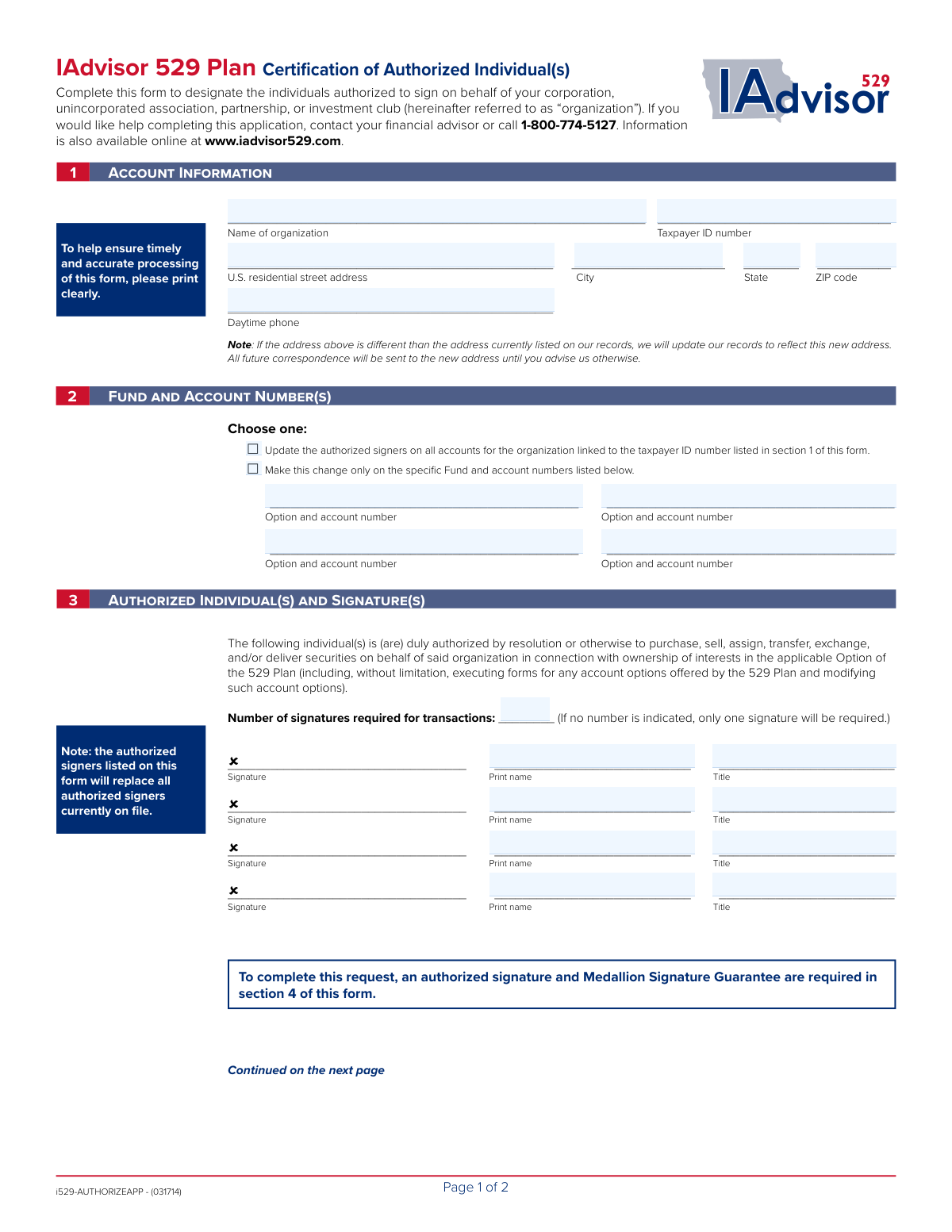
This form is a legal document used by corporations, partnerships, unincorporated associations, or investment clubs to officially appoint individuals who are authorized to manage their IAdvisor 529 Plan account. It is crucial for specifying who can perform transactions such as purchases, sales, and transfers, ensuring proper account governance and security. Today, this form can be filled out quickly and accurately using AI-powered services like Instafill.ai, which can also convert non-fillable PDF versions into interactive fillable forms.
Our AI automatically handles information lookup, data retrieval, formatting, and form filling.
It takes less than a minute to fill out i529-AUTHORIZEAPP using our AI form filling.
Securely upload your data. Information is encrypted in transit and deleted immediately after the form is filled out.

Form specifications

Form name: IAdvisor 529 Plan Certification of Authorized Individual(s)
Number of pages: 1
Language: English
Categories: 529 plan forms, certification forms
main-image

Instafill Demo: How to fill out PDF forms in seconds with AI

How to Fill Out i529-AUTHORIZEAPP Online for Free in 2026

Are you looking to fill out a I529-AUTHORIZEAPP form online quickly and accurately? Instafill.ai offers the #1 AI-powered PDF filling software of 2026, allowing you to complete your I529-AUTHORIZEAPP form in just 37 seconds or less.
Follow these steps to fill out your I529-AUTHORIZEAPP form online using Instafill.ai:
  1. 1 Navigate to Instafill.ai and upload or select the IAdvisor 529 Plan Certification of Authorized Individual(s) form.
  2. 2 Use the AI assistant to fill in Section 1 with your organization's name, Taxpayer ID number, and address.
  3. 3 In Section 2, indicate whether the authorization applies to all accounts under the Taxpayer ID or only to specific accounts listed.
  4. 4 Complete Section 3 by providing the names, titles, and signatures of each individual you wish to authorize.
  5. 5 An authorized officer, partner, or secretary must sign and date the certification in Section 4.
  6. 6 Obtain a Medallion Signature Guarantee from an eligible financial institution as required in Section 4.
  7. 7 Review all the information for accuracy, then download the completed form to mail it to the appropriate address listed in the mailing instructions.

Our AI-powered system ensures each field is filled out correctly, reducing errors and saving you time.

Why Choose Instafill.ai for Your Fillable i529-AUTHORIZEAPP Form?

Speed

Complete your i529-AUTHORIZEAPP in as little as 37 seconds.

Up-to-Date

Always use the latest 2026 i529-AUTHORIZEAPP form version.

Cost-effective

No need to hire expensive lawyers.

Accuracy

Our AI performs 10 compliance checks to ensure your form is error-free.

Security

Your personal information is protected with bank-level encryption.

Frequently Asked Questions About Form i529-AUTHORIZEAPP

This form is used by organizations like corporations, partnerships, or investment clubs to designate or update the individuals who are authorized to sign and make transactions on their IAdvisor 529 Plan account(s).

Any organization, such as a corporation, unincorporated association, or partnership, that holds an IAdvisor 529 Plan account and needs to establish or change its list of authorized signers must complete this form.

You will need your organization's name, Taxpayer ID number, address, and the relevant IAdvisor 529 Plan account numbers. You also need the full names and titles of the individuals you wish to authorize.

No, this form will completely replace all authorized signers currently on file for the account(s). You must list all individuals you want to have signing authority, even if they were previously authorized.

Yes, a Medallion Signature Guarantee is required in Section 4 to certify the authenticity of the officer's signature. You can obtain this special stamp from a bank, credit union, or brokerage firm; a notary public seal is not acceptable.

You have two options: you can either apply the changes to all accounts linked to your organization's Taxpayer ID number, or you can list specific fund and account numbers to be updated.

If you leave this field blank, the plan will default to requiring only one signature from any of the listed authorized individuals to process a transaction.

Yes, if you enter a new address in Section 1, your records will be updated to reflect this change. All future correspondence will be sent to the new address.

Section 5 provides two mailing addresses in Pittsburgh, PA. Use the P.O. Box for regular mail and the street address for overnight or courier services.

Section 4 includes a certification for this situation. By signing, you are certifying that you are the sole officer and that your organization's bylaws grant you sole authority to act on its behalf.

Yes, services like Instafill.ai use AI to accurately auto-fill form fields, which can save you time and help prevent common errors.

Simply upload the PDF to the Instafill.ai platform. The AI will make the form fillable, allowing you to type your information directly into the fields before downloading it for printing and signing.

You can use a service like Instafill.ai, which can convert flat, non-fillable PDFs into interactive forms. This allows you to easily type your information into the correct fields online.

Compliance i529-AUTHORIZEAPP
Validation Checks by Instafill.ai

1
Taxpayer ID Number Format and Presence
This check verifies that the Taxpayer ID Number in Section 1 is provided and adheres to the standard 9-digit Employer Identification Number (EIN) format (XX-XXXXXXX). This number is crucial for uniquely identifying the organization for tax and legal purposes. A missing or malformed TIN will result in the form's rejection, as the organization cannot be correctly identified in the system.
2
Complete U.S. Street Address
This validation ensures that the U.S. residential street address, city, state, and ZIP code fields in Section 1 are all filled out. A complete address is required for all official correspondence and to maintain accurate records, as noted on the form. If any part of the address is missing, the submission will be considered incomplete and the address update cannot be processed.
3
Valid State Abbreviation
This check validates that the 'State' field contains a valid, two-letter U.S. state or territory abbreviation. Using a standardized abbreviation prevents data entry errors and ensures mail can be properly routed. An invalid entry would cause the form to be rejected for correction.
4
Valid ZIP Code Format
This validation ensures the 'ZIP code' provided in Section 1 is in a valid 5-digit or 9-digit (ZIP+4) format. A correct ZIP code is essential for the timely and accurate delivery of mail and official documents. An incorrectly formatted ZIP code will flag the address as invalid and halt processing.
5
Exclusive Account Scope Selection
This check verifies that exactly one of the two options in Section 2 has been selected, either to update all accounts or only specific accounts. This choice is fundamental to the form's purpose, defining the scope of the authorization change. If neither or both options are selected, the intended action is ambiguous and the form must be returned for clarification.
6
Conditional Account Number Requirement
This validation is triggered if the user selects the option to 'make this change only on the specific Fund and account numbers listed below' in Section 2. It ensures that at least one 'Option and account number' field is populated. Failure to provide specific account numbers when this option is chosen makes the request impossible to fulfill, leading to rejection.
7
Minimum Authorized Individual Requirement
This check confirms that at least one authorized individual is designated in Section 3. For each individual listed, it also verifies that the 'Signature', 'Print name', and 'Title' fields are all complete. The entire purpose of the form is to authorize individuals, so a submission without at least one complete entry is invalid and will be rejected.
8
Logical Signature Requirement Count
This validation ensures the 'Number of signatures required for transactions' in Section 3 is a positive integer (e.g., 1, 2). It also cross-references this number to ensure it is not greater than the total number of authorized individuals listed. An illogical number would create ambiguity in transaction processing, so the form would be rejected for correction.
9
Certifying Officer Signature Presence
This check verifies that a signature is present in the 'Signature of secretary, officer, or partner' field in Section 4. This signature legally certifies the accuracy of the information on the form and confirms the authority to make these changes. A missing signature invalidates the entire document and its instructions.
10
Valid Certification Date
This validation ensures the 'Date' field in Section 4 is present, formatted correctly (e.g., MM/DD/YYYY), and is not a future date. The date establishes a legal record of when the certification was made. An invalid or future date would make the document legally questionable and cause the submission to be rejected.
11
Medallion Signature Guarantee Verification
This is a critical check to confirm the presence of a valid Medallion Signature Guarantee stamp in Section 4. This guarantee protects against fraudulent transfers by verifying the identity and authority of the signers. As explicitly stated on the form, a notary stamp is not acceptable, and the absence of a proper Medallion Guarantee will result in immediate rejection of the form.
12
Organization Name Presence
This check ensures the 'Name of organization' field in Section 1 is not left blank. The organization's name is the primary identifier, along with the TIN, for locating the correct master account. A submission without an organization name is unprocessable.
13
Daytime Phone Number Format
This validation checks that the 'Daytime phone' number is in a recognizable 10-digit U.S. phone number format. While not always strictly required for processing, a valid phone number is crucial for contacting the organization to resolve any issues with the form. An invalid format may trigger a warning or flag the form for manual review.
14
Certifying Officer Name and Title Presence
This check verifies that the 'Print name' field is filled out for the certifying officer in Section 4. This printed name must correspond to the signature, providing a clear, legible record of the individual who is certifying the document. A missing printed name creates ambiguity and would require clarification before the form can be accepted.

Common Mistakes in Completing i529-AUTHORIZEAPP

Missing or Incorrect Medallion Signature Guarantee

This form requires a Medallion Signature Guarantee in Section 4, which is a special stamp from a financial institution that guarantees the signature's authenticity. Applicants often confuse this with a standard notary public stamp, which the form explicitly states is not acceptable, or they forget to obtain it altogether. A missing or incorrect guarantee will lead to the immediate rejection of the form, as it is a critical fraud prevention measure.

Unintentionally Replacing All Authorized Signers

A prominent note in Section 3 states that the individuals listed will replace all signers currently on file. Many users overlook this and fill out the form intending only to add a new person, not realizing they are simultaneously removing all existing authorized individuals. This can inadvertently revoke access for key personnel, causing significant operational disruption. To avoid this, you must list every individual who should have signing authority, including both new and existing people.

Ambiguous Account Update Selection

Section 2 requires a choice between updating all accounts linked to the Taxpayer ID or only specific accounts listed. A common error is failing to check either box, leaving the scope of the request unclear. Another mistake is checking the 'specific accounts' option but then failing to list the account numbers, or listing them with transposed digits. These errors will cause processing delays or outright rejection of the form until the ambiguity is resolved.

Omitting the Number of Required Signatures

In Section 3, the form asks for the number of signatures required for transactions, noting that it will default to one if left blank. Organizations with internal controls requiring two or more signatures for financial actions often overlook this field. This mistake can weaken the organization's financial security by allowing single individuals to authorize transactions against company policy. Always verify your organization's signing requirements and explicitly state the number on the form.

Invalid Certifying Signature in Section 4

The certification in Section 4 must be signed by a current officer, secretary, or partner who has the legal authority to make such a change on behalf of the organization. Sometimes, a junior employee or one of the newly authorized individuals (who may not yet have authority) signs this section. This invalidates the entire request, as the change lacks proper corporate authorization, leading to rejection of the form.

Unintentionally Changing the Official Mailing Address

A note in Section 1 warns that if the address provided is different from the one on record, it will become the new official address for all future correspondence. An applicant might enter a personal or temporary address for convenience without realizing this will redirect critical account statements and tax documents. To prevent this, confirm the current address on file and only enter a new one if you are intentionally executing a permanent change of address for the organization.

Using an Incorrect Taxpayer Identification Number

This form is for an organization and requires its specific Taxpayer ID Number (EIN). A frequent mistake is entering a personal Social Security Number (SSN) or an incorrect or transposed EIN. This causes a data mismatch with the account on file, making it impossible for the processor to identify the correct entity. The form will be rejected, and the authorization will fail until the correct EIN is provided.

Incomplete Information for Authorized Individuals

For each person being authorized in Section 3, the form requires a signature, a printed name, and a title. It is common for one of these three fields to be left blank, particularly the 'Title'. The title is essential for verifying the individual's position and authority within the organization. An incomplete entry for any authorized individual will render the form invalid and cause it to be returned for correction.

Illegible Handwriting Leading to Data Entry Errors

Since this is a non-fillable PDF, all information must be handwritten, and the form specifically requests clear printing. Rushed or messy handwriting for names, account numbers, or addresses can be misinterpreted during data entry. This can lead to misspelled names on the account, changes being applied to the wrong accounts, or the form being deemed unprocessable. To prevent this, print slowly and clearly, or use a service like Instafill.ai that can convert the PDF into a fillable version, allowing you to type the information for perfect legibility.
Saved over 80 hours a year

“I was never sure if my IRS forms like W-9 were filled correctly. Now, I can complete the forms accurately without any external help.”

Kevin Martin Green

Your data stays secure with advanced protection from Instafill and our subprocessors

Robust compliance program

Transparent business model

You’re not the product. You always know where your data is and what it is processed for.

ISO 27001, HIPAA, and GDPR

Our subprocesses adhere to multiple compliance standards, including but not limited to ISO 27001, HIPAA, and GDPR.

Security & privacy by design

We consider security and privacy from the initial design phase of any new service or functionality. It’s not an afterthought, it’s built-in, including support for two-factor authentication (2FA) to further protect your account.

Fill out i529-AUTHORIZEAPP with Instafill.ai

Worried about filling PDFs wrong? Instafill securely fills iadvisor-529-plan-certification-of-authorized-individuals forms, ensuring each field is accurate.