
Yes! You can use AI to fill out Fidelity Investments Withdrawals—529 College Savings Plan
Don't type 81 fields by hand. Tell our AI about yourself, or upload a document you already have, and it fills every field in seconds. You check it, then download, print or sign.
The AI does the filling. You just check it.
No typing into boxes, nothing to install.
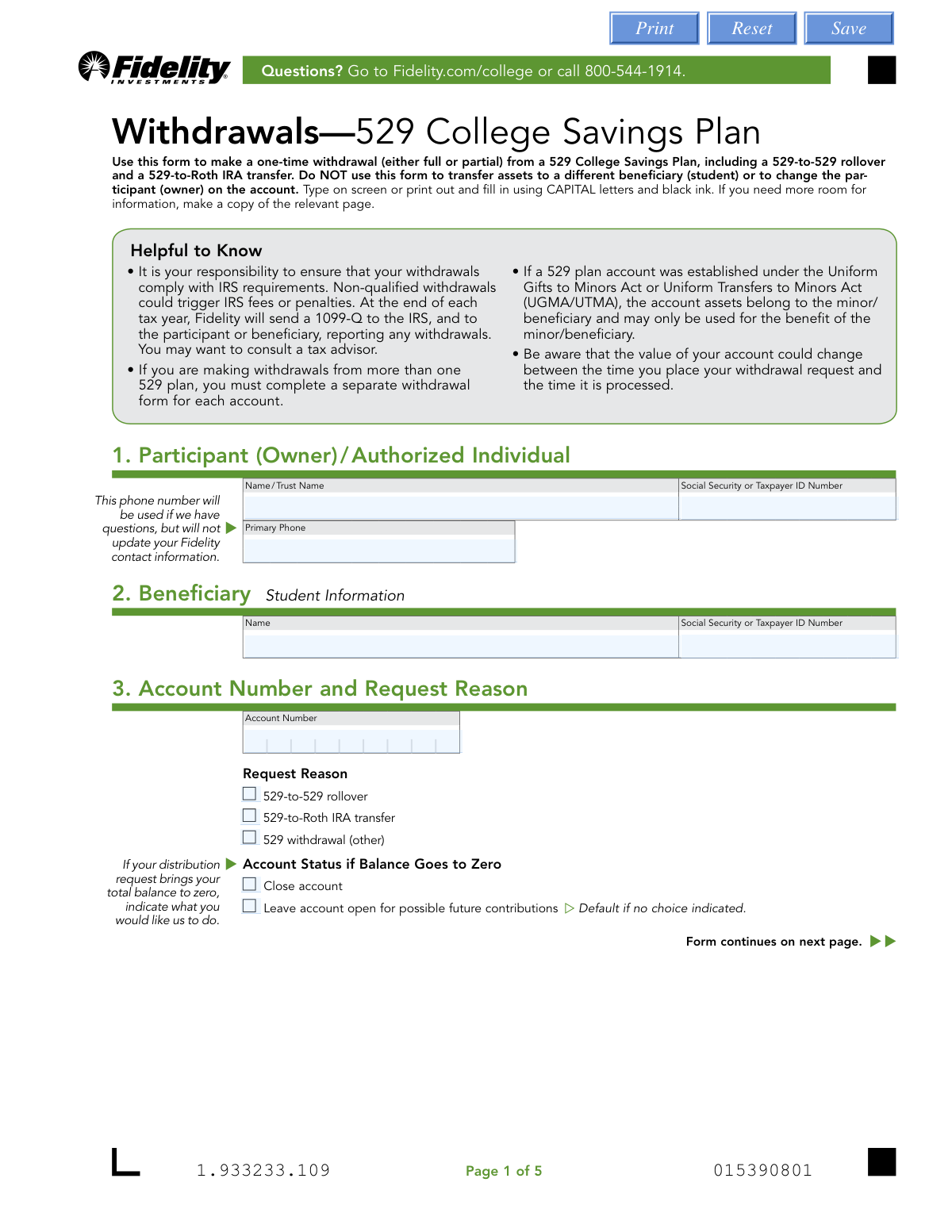
What this form asks for
The AI fills all of it, from your answers or your documents.
The AI checks your answers before you download
15 checks built for this form, so a wrong date or a missing answer is caught before anyone else sees it.
This check verifies that the combination of the Participant's Name, Social Security or Taxpayer ID Number, and the 529 Account Number provided in Sections 1 and 3 correspond to a valid, active account in Fidelity's system. This is a critical first step to prevent fraud and ensure the request is applied to the correct account. If the information does not match an existing account, the form submission will be rejected.
Ensures the Beneficiary's Name and Social Security or Taxpayer ID Number provided in Section 2 are correct for the specified 529 Account Number. This is vital for tax reporting purposes (Form 1099-Q) and for certain transaction types like a 529-to-Roth IRA transfer, which must go to a Roth IRA owned by the beneficiary. An incorrect beneficiary would lead to processing failure and potential tax complications.
Validates that the Social Security Number (SSN) or Taxpayer ID Number (TIN) for both the participant and the beneficiary are entered in a valid format (e.g., XXX-XX-XXXX or XX-XXXXXXX). This check prevents data entry errors that would cause the primary account verification to fail. A malformed ID number will halt processing until it is corrected.
Verifies that exactly one 'Request Reason' checkbox is selected in Section 3 ('529-to-529 rollover', '529-to-Roth IRA transfer', or '529 withdrawal (other)'). Selecting multiple or no options creates ambiguity in how the withdrawal should be processed and reported. If this rule is violated, the form will be considered incomplete and returned for clarification.
This check ensures the distribution amount in Section 4 is specified logically and that funds are available. It validates that either 'ALL assets' is checked or at least one portfolio with a specific dollar amount is listed, but not both. Furthermore, it confirms that the requested dollar amount does not exceed the available balance in the specified portfolio(s). An insufficient funds error will prevent the transaction from being processed.
Confirms that only one primary distribution method is chosen in Section 5 (e.g., Check Payment, Transfer, EFT, Bank Wire). The form's structure with multiple sub-options under different headings can lead to confusion. This validation prevents contradictory instructions, which would force a manual review or rejection of the request.
And 9 more checks
- Conditional Requirement for Student ID
- Roth IRA Transfer Consistency Check
- EFT Pre-Authorization Verification
- Bank Wire Information Completeness
- Bank Routing Number Structure
- Medallion Signature Guarantee Requirement
- Participant Signature and Date Validation
- Rollover Payee Details Completeness
- Zero-Balance Account Status Selection
Let AI fill out your Fidelity 529 Withdrawal Form
No typing. Every field filled in seconds, checked, ready to sign.
How to Fill Out Fidelity 529 Withdrawal Form Online for Free in 2026
What the AI walks you through.
- Navigate to Instafill.ai and upload the Fidelity 529 Withdrawal form or select it from their template library.
- Provide the Participant (Owner) and Beneficiary (Student) details, including names and Social Security or Taxpayer ID numbers.
- Enter the 529 account number and specify the reason for the request, such as a standard withdrawal, a 529-to-529 rollover, or a 529-to-Roth IRA transfer.
- Indicate the distribution amount, choosing to withdraw all assets or specifying dollar amounts from particular portfolios.
- Select the desired distribution method, such as a check, electronic funds transfer (EFT), bank wire, or a direct transfer to another Fidelity account, and provide the necessary details.
- Review all the information auto-filled by the AI for accuracy, ensuring all sections, including payee and bank details, are correct.
- Electronically sign and date the form, then submit it following Fidelity's instructions, paying close attention to any Medallion signature guarantee requirements for your specific transaction.
Common Mistakes in Completing Fidelity 529 Withdrawal Form
The ones the AI is built to catch.
Missing or Incorrect Medallion Signature Guarantee
Misunderstanding 529-to-Roth IRA Transfer Rules
Ambiguous Distribution Amount Instructions
Missing Student ID for Educational Institution Payments
Requesting an Invalid Electronic Funds Transfer (EFT)
Confusing Participant and Beneficiary Information
Omitting the Reason for Withdrawal
Submitting an Illegible or Incomplete Form
Providing Incorrect Bank Wire Details
Forgetting to Close the Account After Full Withdrawal
Frequently Asked Questions About Fidelity 529 Withdrawal Form
Is it really free for 7 days?
Can I fill other forms too?
How do I cancel?
How does the AI fill out Fidelity 529 Withdrawal Form?
What happens to my information?
How complex is Fidelity 529 Withdrawal Form to fill out?
What is the purpose of the Fidelity 529 College Savings Plan Withdrawal form?
Who needs to fill out and sign this form?
I have two different 529 accounts. Can I use one form to withdraw from both?
How do I have the withdrawal sent directly to my child's school?
What happens to my account if I withdraw the entire balance?
What is a Medallion signature guarantee and when is it required?
How do I submit the completed form?
Can I transfer money from this 529 account to a Roth IRA?
Can I use this form to set up electronic payments (EFT) to my bank account?
Are there tax consequences for making a withdrawal?
Can I use an AI tool to help me fill out this form?
How can I fill out this form online using Instafill.ai?
The PDF I downloaded isn't fillable. What can I do?
Get your Fidelity 529 Withdrawal Form filled out by AI
$0 today. Cancel before Nov 3 and you pay nothing.
Other forms like this one
investment forms: Form 3468, Investment Credit, Form 8960, Net Investment Income Tax, How to Transfer Assets from Morgan Stanley to Fidelity Investments (Fidelity Stock Plan Services Guide), Fidelity Investments Transfer/Rollover/Exchange Form, Fidelity Investments Standing Transfer Instructions Form, One-Time Withdrawal – IRA, Fidelity Investments, Fidelity Investments Transfer/Rollover Form, Special Tax Notice: Your Rollover Options - Fidelity Investments, Fidelity Investment-Only (Non-Prototype) Retirement Account Application, Fidelity Investments® Beneficiary Distribution Form, Fidelity Investments Distribution Form, One-Time Withdrawal – Investment-Only (Non-Prototype) Retirement Account, Fidelity Investments Withdrawal — One-Time, Fidelity Investments Change of Account Ownership — Mutual Fund Only Accounts, Fidelity Investments 403(b) Beneficiary Designation, Fidelity Investments Qualified Plan Beneficiary Designation, Fidelity Investments 403(b)/401(a) Beneficiary Designation, Fidelity Investments Qualified Plan Beneficiary Designation, Fidelity Investments Earnings Automatic Withdrawal Plan — IRA, HSA Bank Investment Account Transfer Form
college HR forms: Melbourne City College Australia Education Agent Application Form, South Sydney College International Student Application Form, Sidney Sussex College Cambridge, Application for Employment, Rollover Request — 529 College Savings Plan, The Vanguard 529 College Savings Plan: Power of Attorney, The Vanguard 529 College Savings Plan Agent Authorization/Limited Power of Attorney, The Vanguard 529 College Savings Plan Direct Rollover Out to Roth IRA Form, The Vanguard 529 College Savings Plan Transfer Due to Death of Account Owner Form, The Vanguard 529 College Savings Plan Incoming Direct Rollover Form, The Vanguard 529 College Savings Plan: Withdrawal Request Form, Merrill Lynch 529 College Savings Plan Withdrawal Request Form, Form 529TCF, The Vanguard 529 College Savings Plan, Trustee Certification, Fidelity Institutional 529 College Savings Plan Beneficiary Change, 529 College Savings Plan Beneficiary Change Form, CollegeAdvantage Direct 529 Savings Plan Beneficiary Change Form
withdrawal forms: Empower Disability Withdrawal Request Form, One-Time Withdrawal – IRA, Fidelity Investments, One-Time Withdrawal — Defined Contribution Retirement Plan, Fidelity One-Time Withdrawal Form — Nonretirement, One-Time Withdrawal – Investment-Only (Non-Prototype) Retirement Account, Fidelity Investments Withdrawal — One-Time, Automatic Withdrawals—Defined Contribution Retirement Plan, Fidelity Growth and Guaranteed Income Partial Withdrawal/Full Surrender Form, Fidelity Automatic Withdrawals — Nonretirement, Fidelity Investments Earnings Automatic Withdrawal Plan — IRA, The Vanguard 529 College Savings Plan: Withdrawal Request Form, Vanguard Personal Investor Withdrawal form, Empower Retirement Plan Withdrawal Request Form, Hardship Withdrawal Request - Empower, Hardship Withdrawal Request 401(a) Plan, Separation from Employment Withdrawal Form, MassMutual Application for Hardship Withdrawal, Beneficiary Account Withdrawal Request Governmental 457(b) Plan, Separation from Employment Withdrawal Form for East Bay Regional Park District 457(b) Deferred Compensation Plan, Separation from Employment Withdrawal Kit
Fidelity forms: Fidelity Funds Account Transfer of Assets Form, Fidelity Stock Plan Services (SPS) Transfer Request Form, How to Transfer Assets from Morgan Stanley to Fidelity Investments (Fidelity Stock Plan Services Guide), Fidelity Investments Transfer/Rollover/Exchange Form, Fidelity Investments Standing Transfer Instructions Form, Fidelity Charitable 144/145 Contribution Form, One-Time Withdrawal – IRA, Fidelity Investments, Fidelity Investments Transfer/Rollover Form, Fidelity Advisor 403(b) Distribution Request Form, Fidelity Advisor IRA Distribution Request for Automatic Rollover Accounts, Special Tax Notice: Your Rollover Options - Fidelity Investments, Fidelity Charitable Letter of Authorization, Fidelity Advisor Trading Authorization and Indemnification, Fidelity Investment-Only (Non-Prototype) Retirement Account Application, Fidelity NetBenefits Send a Document Form, Fidelity NetBenefits Auditor's Guide: An Overview of Fidelity's 2024 Plan Year Reporting Package, Fidelity NetBenefits Distribution - Recurring Payments, Fidelity Investments® Beneficiary Distribution Form, Fidelity Investments Distribution Form, Fidelity One-Time Withdrawal Form — Nonretirement
529 plan forms: Rollover Request — 529 College Savings Plan, The Vanguard 529 College Savings Plan: Power of Attorney, The Vanguard 529 College Savings Plan Agent Authorization/Limited Power of Attorney, The Vanguard 529 College Savings Plan Direct Rollover Out to Roth IRA Form, The Vanguard 529 College Savings Plan Transfer Due to Death of Account Owner Form, The Vanguard 529 College Savings Plan Incoming Direct Rollover Form, The Vanguard 529 College Savings Plan: Withdrawal Request Form, IAdvisor 529 Plan Certification of Authorized Individual(s), Merrill Lynch 529 College Savings Plan Withdrawal Request Form, 529 Plan Account Transfer Form, Fidelity Institutional CHET Advisor 529 Plan New Account Application, Form 529TCF, The Vanguard 529 College Savings Plan, Trustee Certification, 529 Plan Account Application, Fidelity Institutional 529 College Savings Plan Beneficiary Change, 529 College Savings Plan Beneficiary Change Form, CollegeAdvantage Direct 529 Savings Plan Beneficiary Change Form, Account Application for Merrill West Virginia Residents - The Hartford SMART529, Nest 529 Beneficiary Change Form, NextGen 529 Client Direct Series Withdrawal Request Form, NextGen 529 Series Change Form
college savings forms: Rollover Request — 529 College Savings Plan, The Vanguard 529 College Savings Plan: Power of Attorney, The Vanguard 529 College Savings Plan Agent Authorization/Limited Power of Attorney, The Vanguard 529 College Savings Plan Direct Rollover Out to Roth IRA Form, The Vanguard 529 College Savings Plan Transfer Due to Death of Account Owner Form, The Vanguard 529 College Savings Plan Incoming Direct Rollover Form, The Vanguard 529 College Savings Plan: Withdrawal Request Form, Merrill Lynch 529 College Savings Plan Withdrawal Request Form, Form 529TCF, The Vanguard 529 College Savings Plan, Trustee Certification, Fidelity Institutional 529 College Savings Plan Beneficiary Change, 529 College Savings Plan Beneficiary Change Form, CollegeAdvantage Direct 529 Savings Plan Beneficiary Change Form, 529 Plan Account Application, 529 Plan Account Transfer Form, Account Application for Merrill West Virginia Residents - The Hartford SMART529, Bright Directions 529 Beneficiary Change Form, Fidelity Institutional CHET Advisor 529 Plan New Account Application, Nest 529 Beneficiary Change Form, NextGen 529 Client Direct Series Incoming Rollover Form, NextGen 529 Client Direct Series Withdrawal Request Form
savings plan forms: Rollover Request — 529 College Savings Plan, The Church of the Nazarene 403(b) Retirement Savings Plan Beneficiary Designation Form, The Vanguard 529 College Savings Plan: Power of Attorney, The Vanguard 529 College Savings Plan Agent Authorization/Limited Power of Attorney, The Vanguard 529 College Savings Plan Direct Rollover Out to Roth IRA Form, The Vanguard 529 College Savings Plan Transfer Due to Death of Account Owner Form, The Vanguard 529 College Savings Plan Incoming Direct Rollover Form, Vanguard Phillips 66 Savings Plan Rollover Contribution Request, The Vanguard 529 College Savings Plan: Withdrawal Request Form, Vanguard Retirement Plan Beneficiary Designation - Phillips 66 Savings Plan, Incoming Rollover Election for The Heritage Group Retirement Savings Plan, AbbVie Savings Plan 401(k) Account Transfer Notice, Incoming Rollover Election Form for International Dairy Queen, Inc. Retirement Savings Plan, TE Connectivity Retirement Savings and Investment Plan (RSIP) Transition Frequently Asked Questions, Principal Life Insurance Company UCTIE INTERNATIONAL UNION 401(K) SAVINGS PLAN Enrollment Form, Principal Financial Group Pre-Approved Basic Savings Plan - Plus, In-Service Withdrawal Request, City of Toledo Savings and Protection Plan, Merrill Lynch 529 College Savings Plan Withdrawal Request Form, XL America, Inc. Employee Savings Plan Rollover Contribution Form, Distribution Request Form Local No. 1 Retirement Savings Plan #241805
investment withdrawal forms: 403(b) Distribution Form - Davis Funds, One-Time Withdrawal – IRA, Fidelity Investments, One-Time Withdrawal – Investment-Only (Non-Prototype) Retirement Account, Fidelity Investments Withdrawal — One-Time, Fidelity Investments Earnings Automatic Withdrawal Plan — IRA, Form F11323, Cash Withdrawal From Your Retirement Investments, Form F11610, Cash Withdrawal from your Retirement Investments for Plans Not Subject to QJSA, Automatic Withdrawals — Inherited IRA - Fidelity Investments, IRA Periodic Distribution Request Form, NextGen 529 Client Direct Series Withdrawal Request Form, IRA/ESA Distribution Request Instructions
529 forms: Bright Directions 529 Beneficiary Change Form, Transfer Due to Divorce — IRA/HSA/529, Rollover Request — 529 College Savings Plan, The Vanguard 529 College Savings Plan: Power of Attorney, The Vanguard 529 College Savings Plan Agent Authorization/Limited Power of Attorney, The Vanguard 529 College Savings Plan Direct Rollover Out to Roth IRA Form, The Vanguard 529 College Savings Plan Transfer Due to Death of Account Owner Form, The Vanguard 529 College Savings Plan Incoming Direct Rollover Form, The Vanguard 529 College Savings Plan: Withdrawal Request Form, IAdvisor 529 Plan Certification of Authorized Individual(s), NextGen 529 Series Change Form, NextGen 529 Client Direct Series Incoming Rollover Form, Merrill Lynch 529 College Savings Plan Withdrawal Request Form, 529 Plan Account Transfer Form, Fidelity Institutional CHET Advisor 529 Plan New Account Application, Form 529TCF, The Vanguard 529 College Savings Plan, Trustee Certification, Account Application for Merrill West Virginia Residents - The Hartford SMART529, 529 Plan Account Application, Fidelity Institutional 529 College Savings Plan Beneficiary Change, 529 College Savings Plan Beneficiary Change Form
529 college savings forms: Form 529TCF, The Vanguard 529 College Savings Plan, Trustee Certification, Rollover Request — 529 College Savings Plan, The Vanguard 529 College Savings Plan: Power of Attorney, The Vanguard 529 College Savings Plan Agent Authorization/Limited Power of Attorney, The Vanguard 529 College Savings Plan Direct Rollover Out to Roth IRA Form, The Vanguard 529 College Savings Plan Transfer Due to Death of Account Owner Form, The Vanguard 529 College Savings Plan Incoming Direct Rollover Form, The Vanguard 529 College Savings Plan: Withdrawal Request Form, Merrill Lynch 529 College Savings Plan Withdrawal Request Form, Fidelity Institutional 529 College Savings Plan Beneficiary Change, 529 College Savings Plan Beneficiary Change Form, CollegeAdvantage Direct 529 Savings Plan Beneficiary Change Form
UK investment forms: Triple Point Venture VCT plc | Investor Application Form, Form 3468, Investment Credit, Form 8960, Net Investment Income Tax, How to Transfer Assets from Morgan Stanley to Fidelity Investments (Fidelity Stock Plan Services Guide), Fidelity Investments Transfer/Rollover/Exchange Form, Fidelity Investments Standing Transfer Instructions Form, One-Time Withdrawal – IRA, Fidelity Investments, Fidelity Investments Transfer/Rollover Form, Special Tax Notice: Your Rollover Options - Fidelity Investments, Fidelity Investment-Only (Non-Prototype) Retirement Account Application, Fidelity Investments® Beneficiary Distribution Form, Fidelity Investments Distribution Form, One-Time Withdrawal – Investment-Only (Non-Prototype) Retirement Account, Fidelity Investments Withdrawal — One-Time, Fidelity Investments Change of Account Ownership — Mutual Fund Only Accounts, Fidelity Investments 403(b) Beneficiary Designation, Fidelity Investments Qualified Plan Beneficiary Designation, Fidelity Investments 403(b)/401(a) Beneficiary Designation, Fidelity Investments Qualified Plan Beneficiary Designation, Fidelity Investments Earnings Automatic Withdrawal Plan — IRA
Let AI fill out your Fidelity 529 Withdrawal Form
Your trial starts once a card is added. You pay nothing before Nov 3.
Our AI already knows this form, all 81 fields of it. Skip the typing: tell it about yourself, or upload what you have, and it fills the whole form in seconds.
- AI fills every field on all 5 pages, checkboxes included
- No typing into boxes: answer a few questions, or upload a document you already have, an old copy of this form, a photo of a document
- The AI checks the answers; you review and change anything before you download
- Download the finished PDF, print it, or sign it online
- Encrypted, and never used to train AI
Cancel before Nov 3 and you pay nothing.
A card is needed to start the trial. Cancel in two clicks from your account.
Terms · Privacy