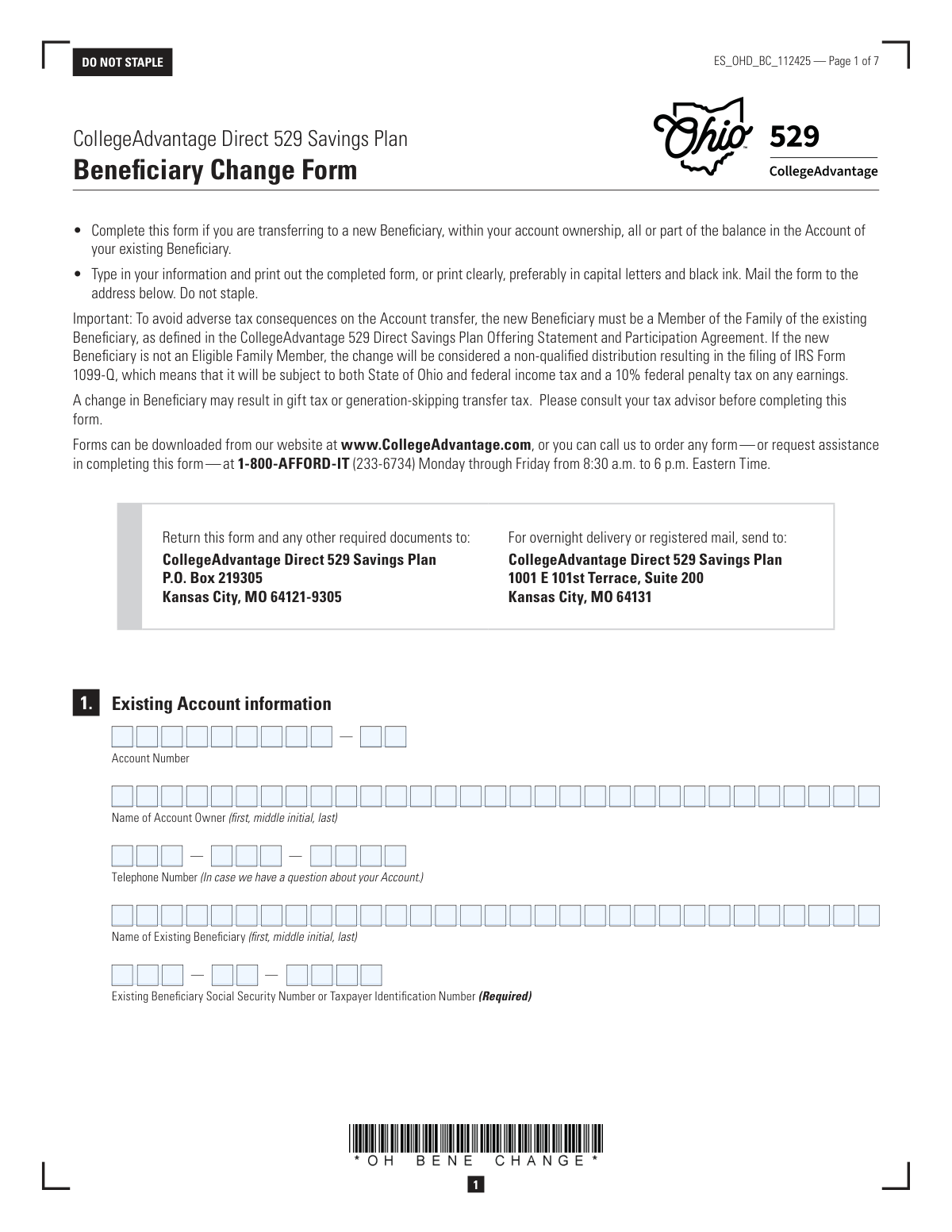
Yes! You can use AI to fill out CollegeAdvantage Direct 529 Savings Plan Beneficiary Change Form
This form is for account owners of the Ohio CollegeAdvantage Direct 529 Savings Plan who wish to change the designated beneficiary on their account. It allows for the transfer of the entire account balance or a partial amount to a new, eligible family member to avoid potential tax penalties. Today, this form can be filled out quickly and accurately using AI-powered services like Instafill.ai, which can also convert non-fillable PDF versions into interactive fillable forms.
Our AI automatically handles information lookup, data retrieval, formatting, and form filling.
It takes less than a minute to fill out ES_OHD_BC_112425 using our AI form filling.
Securely upload your data. Information is encrypted in transit and deleted immediately after the form is filled out.
Form specifications
| Form name: | CollegeAdvantage Direct 529 Savings Plan Beneficiary Change Form |
| Number of pages: | 1 |
| Language: | English |
| Categories: | beneficiary forms, college HR forms, 529 plan forms, college savings forms, savings plan forms |
Instafill Demo: How to fill out PDF forms in seconds with AI
How to Fill Out ES_OHD_BC_112425 Online for Free in 2026
Are you looking to fill out a ES_OHD_BC_112425 form online quickly and accurately? Instafill.ai offers the #1 AI-powered PDF filling software of 2026, allowing you to complete your ES_OHD_BC_112425 form in just 37 seconds or less.
Follow these steps to fill out your ES_OHD_BC_112425 form online using Instafill.ai:
- 1 Navigate to Instafill.ai and upload or select the Ohio 529 Beneficiary Change Form.
- 2 Use the AI assistant to provide your existing account information, including the account number and details for the current account owner and beneficiary.
- 3 Enter the required information for the new beneficiary, such as their full name, Social Security Number, birth date, and relationship to the existing beneficiary.
- 4 Specify the transfer amount by indicating whether you are transferring the entire balance or a partial amount, and provide details for the investment options.
- 5 Indicate your preferences for the successor owner and Automatic Investment Plan (AIP), if applicable.
- 6 Review all the information you've entered for accuracy, then sign and date the form in the designated signature section.
- 7 Have your signature notarized and mail the completed form to the CollegeAdvantage Direct 529 Savings Plan address provided.
Our AI-powered system ensures each field is filled out correctly, reducing errors and saving you time.
Why Choose Instafill.ai for Your Fillable ES_OHD_BC_112425 Form?
Speed
Complete your ES_OHD_BC_112425 in as little as 37 seconds.
Up-to-Date
Always use the latest 2026 ES_OHD_BC_112425 form version.
Cost-effective
No need to hire expensive lawyers.
Accuracy
Our AI performs 10 compliance checks to ensure your form is error-free.
Security
Your personal information is protected with bank-level encryption.
Frequently Asked Questions About Form ES_OHD_BC_112425
This form is used by an account owner to transfer all or part of the balance in an Ohio 529 CollegeAdvantage account from the current beneficiary to a new one.
The Account Owner of the CollegeAdvantage Direct 529 Savings Plan must complete and sign this form to change the beneficiary on their account.
The transfer will be treated as a non-qualified distribution, which is subject to federal and state income tax on earnings, plus a 10% federal penalty tax.
You must provide the new beneficiary's full name, Social Security Number or Taxpayer Identification Number, date of birth, and their relationship to the existing beneficiary.
Yes, Section 3B allows you to specify a partial transfer using either a dollar amount or a percentage. The original account for the existing beneficiary will remain open.
Yes, your signature in Section 7 must be witnessed and signed by a Notary Public. The form cannot be processed without a valid notary seal.
Mail the form to CollegeAdvantage Direct 529 Savings Plan, P.O. Box 219305, Kansas City, MO 64121-9305. An address for overnight delivery is also listed on the form.
You can choose to keep the same investment allocations or select new ones in Section 4. If you are in an Age-Based Option, the allocation may change automatically to fit the new beneficiary's age bracket.
Yes, transferring from a CD before its maturity date will cause it to be liquidated, and an early redemption penalty may be applied. Section 3 provides more details on this process.
If you transfer the entire balance, you can opt to continue your existing AIP for the new beneficiary. For partial transfers, you will need to establish new AIP instructions for the new account.
Yes, in Section 5 you can opt to have the same Successor Owner for the new beneficiary's account. A Successor Owner takes control of the account in the event of your death.
Yes, services like Instafill.ai use AI to accurately auto-fill form fields with your information, which can save you time and help prevent errors.
You can use a service like Instafill.ai to upload the PDF, fill in your information on an interactive web form, and then download the completed document for printing, signing, and mailing.
Services like Instafill.ai can convert non-fillable PDFs into interactive, fillable forms. Simply upload your flat PDF to their platform to make it easy to complete electronically before printing.
Compliance ES_OHD_BC_112425
Validation Checks by Instafill.ai
1
Verifies Existing Account and Beneficiary Information
This check validates that the provided Account Number exists within the system and that the Account Owner and Existing Beneficiary names match the records for that account. This is crucial to ensure the change is applied to the correct account and prevent unauthorized or erroneous modifications. If the information does not match, the form submission will be rejected pending correction.
2
Ensures SSN/TIN Format and Uniqueness
This validation confirms that both the existing and new beneficiary Social Security Numbers (or TINs) are in the correct nine-digit format (XXX-XX-XXXX or XX-XXXXXXX). It also ensures the new beneficiary's SSN is not identical to the existing beneficiary's SSN, as they must be two distinct individuals. An invalid format or duplicate SSN will cause the form to be rejected for data correction.
3
Validates Transfer Amount Selection Logic
This check ensures that the user has selected either Section 3A (Entire balance) or Section 3B (Partial balance), but not both. A selection is mandatory to define the scope of the transfer. Failure to select exactly one of these options results in an incomplete request and will prevent the form from being processed.
4
Validates Partial Transfer Specification
If a partial transfer (Section 3B) is selected, this check verifies that for each investment option listed, either a dollar amount or a percentage is entered, but not both. It also confirms the values are positive numbers. This prevents ambiguity in the transfer instructions and ensures the transaction can be executed as intended.
5
Enforces Conditional Requirement for New Beneficiary Address
This validation checks if the 'address is the same as Account Owner’s' box in Section 2 is unchecked. If it is, the system verifies that the new beneficiary's full residential address fields (address, city, state, zip) are completed. This is necessary for establishing the new beneficiary's record and for future correspondence, and failure to provide it will halt processing.
6
Confirms Investment Allocation Percentages Total 100%
When new investment allocations are chosen in Section 4B, this check sums all entered percentages. The total must equal exactly 100%. This ensures the entire transferred amount is allocated correctly and prevents portions of the funds from being left in an unallocated state, which would require manual intervention.
7
Validates Minimum CD Contribution Amount
According to the form, a Fifth Third 529 Certificate of Deposit (CD) requires a minimum contribution of $500. This check verifies that if a CD is selected in Section 4, the specified dollar amount is equal to or greater than $500. Submissions with a lower amount will be rejected as they do not meet the product's minimum requirements.
8
Verifies CD Term is Within Allowed Range
This check ensures that if a Fifth Third 529 CD is purchased, the specified term is between 3 and 144 months, as stated in the form instructions. An invalid term would prevent the CD from being opened correctly. The form will be returned if the term is outside this required range.
9
Validates AIP Continuation Logic
The option to continue an existing Automatic Investment Plan (AIP) in Section 6 is only available for full account transfers. This check confirms that the 'continue my existing AIP' box is only checked if the 'Entire balance' option (Section 3A) was selected. If checked during a partial transfer, it indicates a logical error and the form will be flagged for review.
10
Ensures Signature and Notarization Date Consistency
The form explicitly requires the Account Owner's signature date to be the same as the date of notarization. This validation compares the date entered next to the owner's signature with the date entered by the notary. A mismatch will invalidate the notarization and cause the legal document to be rejected.
11
Verifies Notary Commission is Active
This check validates that the notary's commission expiration date is a valid future date. An expired commission invalidates the notarization, which is a legal requirement for processing this form. The submission will be rejected if the commission is expired or the date is missing.
12
Validates New Beneficiary Birth Date
This check ensures the new beneficiary's birth date is a complete and valid calendar date in MM/DD/YYYY format. It also verifies that the date is not in the future. This information is critical for account setup and for determining eligibility for certain age-based investment options.
13
Confirms Relationship Field is Completed
This validation ensures the 'Relationship of the new Beneficiary to existing Beneficiary' field is filled out. This information is critical for determining if the transfer qualifies as a tax-free event, as the new beneficiary must be a 'Member of the Family'. An empty field will result in the form being returned for completion.
14
Validates Conditional Section Completion
This check verifies the logic for completing Sections 4 through 6. If the user indicates 'Yes' to having an existing account for the new beneficiary in Section 3, these subsequent sections should be blank as they are ignored. If they are filled out, it creates ambiguity and the form will be flagged for manual review to clarify the user's intent.
Common Mistakes in Completing ES_OHD_BC_112425
The form is frequently submitted without the required notary signature and seal, or the notarization is invalid. This happens because people overlook the requirement in Section 7 or are unfamiliar with the process. A missing or incorrect notarization, such as using a signature guarantee instead, will cause the form to be immediately rejected, leading to significant processing delays.
A common error is for the account owner to sign the form on one day and have it notarized on a different day. The instructions in Section 7 explicitly state that the owner's signature date and the notary's acknowledgement date must be identical. Any discrepancy between these dates will invalidate the form and require the owner to complete and re-submit the entire document.
Users often fail to verify that the new beneficiary is a 'Member of the Family' of the existing beneficiary, as defined by the IRS. This mistake can trigger a non-qualified distribution, resulting in federal and state income taxes plus a 10% federal penalty on the earnings portion of the transfer. To avoid this, carefully review the definition in the Offering Statement or consult a tax advisor before initiating the change.
When selecting new investment allocations in Section 5, many people make simple arithmetic errors, causing the percentages to total more or less than 100%. The form also requires whole percentages only, so using fractions or decimals will cause an error. This mistake prevents the funds from being allocated correctly and will result in the form being returned for correction.
Simple typographical errors when entering the existing account number or the Social Security Numbers for either beneficiary are very common. These numbers are critical for identifying the correct accounts and for tax reporting purposes. An incorrect digit can lead to a processing failure, rejection of the form, or even applying the change to the wrong account, requiring significant effort to correct.
In Section 3B for partial transfers, filers sometimes enter both a dollar amount and a percentage, or they fail to specify either. This creates ambiguity for the processor, who cannot determine the user's intent. This will halt the processing of the transfer and require the plan administrator to contact the account owner for clarification, delaying the beneficiary change.
Users may incorrectly select 'Entire balance' (Section 3A) when they only want to move a portion of the funds, which results in the original account being closed. Conversely, selecting 'Partial balance' (Section 3B) without specifying an amount leaves the transfer incomplete. This fundamental misunderstanding can lead to unintended account closures or unprocessed requests.
When filling out the form by hand, users may use illegible handwriting, non-black ink, or write outside the designated fields. This makes it difficult for processors to accurately enter the data into their system, leading to errors in names, addresses, or financial figures. To prevent this, it is best to type directly into the PDF before printing or use an AI-powered tool like Instafill.ai, which can convert flat PDFs into fillable forms and ensure data is entered clearly.
When transferring funds from a Fifth Third 529 CD, account owners often overlook the detailed warnings about early withdrawal penalties in Section 3. Transferring a CD before its maturity date can result in a loss of accrued interest and potentially part of the principal. Carefully reading this section is crucial to avoid unexpected financial losses during the transfer process.
In Section 6, the form notes that AIP instructions must be re-established for partial transfers, yet people may incorrectly check the box to continue their existing AIP. This leads to the automatic contributions stopping unexpectedly for both the new and existing accounts. To avoid disruption, you must log in to your account online to set up new AIP instructions after a partial transfer is complete.
Saved over 80 hours a year
“I was never sure if my IRS forms like W-9 were filled correctly. Now, I can complete the forms accurately without any external help.”
Kevin Martin Green
Your data stays secure with advanced protection from Instafill and our subprocessors

Robust compliance program
Transparent business model
You’re not the product. You always know where your data is and what it is processed for.
ISO 27001, HIPAA, and GDPR
Our subprocesses adhere to multiple compliance standards, including but not limited to ISO 27001, HIPAA, and GDPR.
Security & privacy by design
We consider security and privacy from the initial design phase of any new service or functionality. It’s not an afterthought, it’s built-in, including support for two-factor authentication (2FA) to further protect your account.
Fill out ES_OHD_BC_112425 with Instafill.ai
Worried about filling PDFs wrong? Instafill securely fills collegeadvantage-direct-529-savings-plan-beneficiary-change-form forms, ensuring each field is accurate.