
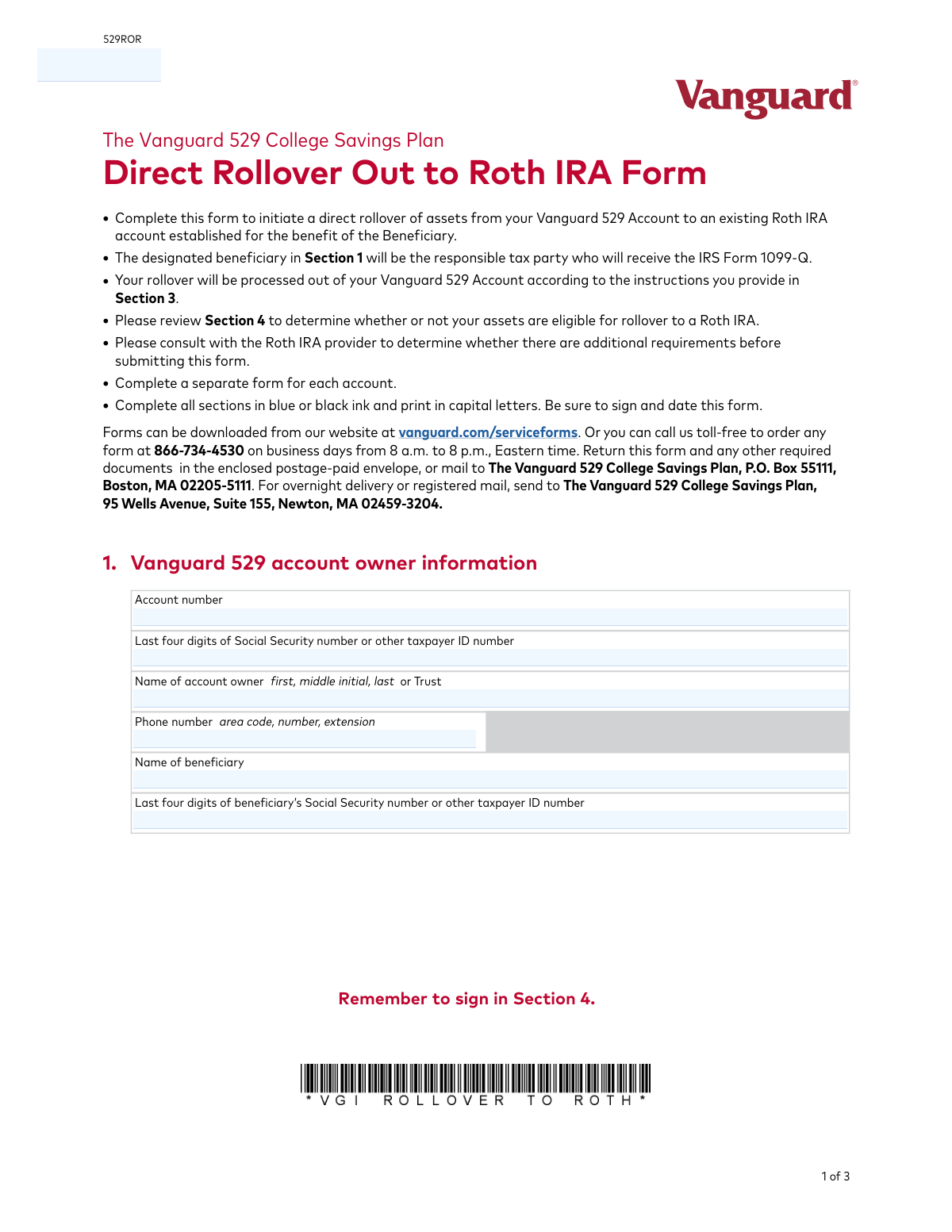
Yes! You can use AI to fill out The Vanguard 529 College Savings Plan Direct Rollover Out to Roth IRA Form
Don't type 43 fields by hand. Tell our AI about yourself, or upload a document you already have, and it fills every field in seconds. You check it, then download, print or sign.
The AI does the filling. You just check it.
No typing into boxes, nothing to install.
What this form asks for
The AI fills all of it, from your answers or your documents.
The AI checks your answers before you download
14 checks built for this form, so a wrong date or a missing answer is caught before anyone else sees it.
This check verifies that the 'Signature of account owner' field in Section 4 has been signed. A signature is a legal requirement to authorize the transaction and certify the correctness of the provided information. If the signature is missing, the form is considered incomplete and cannot be processed, leading to its rejection.
Validates that 'Today’s date' in Section 4 is present and formatted correctly as MM-DD-YYYY. The date must be a real calendar date and should be current, as a stale-dated form may be rejected. This ensures the authorization is recent and accurately reflects the account owner's intent at the time of submission.
Ensures the 'Account number' provided in Section 1 is not empty and matches the expected format for a Vanguard 529 account. The number is then cross-referenced against Vanguard's system to confirm it is a valid, active account. A mismatch or invalid number will halt the process as the source of funds cannot be identified.
This check confirms that the 'Last four digits of Social Security number or other taxpayer ID number' for both the account owner and beneficiary in Section 1 each contain exactly four numeric digits. This is a format validation to prevent data entry errors like entering too few or too many digits. Incorrectly formatted data would cause a failure in subsequent identity verification steps.
Verifies that the combination of account owner name and the last four digits of their SSN/TIN in Section 1 matches the information on file for the provided Vanguard 529 account number. It also performs the same check for the beneficiary's name and SSN/TIN. This is a critical security measure to prevent unauthorized transactions and ensure the rollover is initiated for the correct individuals.
Validates that exactly one option (A, B, or C) has been selected in Section 3, as instructed by 'Please select only one.' Selecting none or more than one option creates ambiguity in how to process the rollover amount. The form will be rejected and returned to the user for clarification if this rule is violated.
And 8 more checks
- Conditional Partial Rollover Amount
- Conditional Fund-Specific Rollover Details
- Required Tax Year Format and Presence
- Exclusive Roth IRA Custodian Selection
- Account Owner Name Consistency
- Partial Rollover Amount vs. Account Balance
- Phone Number Format Validation
- Completeness of External Custodian Address
Let AI fill out your 529ROR
No typing. Every field filled in seconds, checked, ready to sign.
How to Fill Out 529ROR Online for Free in 2026
What the AI walks you through.
- Navigate to Instafill.ai and upload or select the Vanguard Direct Rollover Out to Roth IRA Form (529ROR).
- Use the AI assistant to accurately fill in Section 1 with the Vanguard 529 account owner and beneficiary information.
- Provide the details of the receiving Roth IRA manager or custodian in Section 2.
- In Section 3, specify your rollover instructions, choosing between a full, partial, or fund-specific rollover and indicating the correct tax year.
- Carefully review the certifications and eligibility requirements in Section 4 to ensure you qualify for the rollover.
- Electronically sign and date the form in Section 4 to provide your authorization.
- Download the completed, signed form and submit it to The Vanguard 529 College Savings Plan via mail as instructed on the form.
Common Mistakes in Completing 529ROR
The ones the AI is built to catch.
Missing or Invalid Signature
Incorrect Receiving Institution Details
Conflicting Rollover Amount Instructions
Forgetting to Specify the Tax Year
Certifying Eligibility Without Verification
Confusing Account Owner and Beneficiary Information
Illegible or Improperly Formatted Information
Incorrect Investment Portfolio Names
Exceeding Annual Contribution Limits
Using a Single Form for Multiple Accounts
Frequently Asked Questions About 529ROR
Is it really free for 7 days?
Can I fill other forms too?
How do I cancel?
How does the AI fill out 529ROR?
What happens to my information?
How complex is 529ROR to fill out?
What is the purpose of the Vanguard Direct Rollover Out to Roth IRA Form?
Who needs to fill out and sign this form?
Are there any rules about how long my 529 account must be open to do this rollover?
How much money can I roll over from my 529 account to a Roth IRA?
Who is the responsible party for taxes related to this rollover?
What information do I need for Section 2 about the Roth IRA manager?
How do I specify the amount to roll over in Section 3?
Where do I send the completed form?
I have two 529 accounts for my child. Can I use one form for both?
Can the rollover go into my own Roth IRA if I am the account owner?
What should I do before submitting this form to Vanguard?
Can I use an AI tool to help me fill out this form?
How can I fill out this Vanguard 529 rollover form online?
What should I do if the PDF I downloaded from the website is not fillable?
Get your 529ROR filled out by AI
$0 today. Cancel before Nov 1 and you pay nothing.
Other forms like this one
college HR forms: Melbourne City College Australia Education Agent Application Form, South Sydney College International Student Application Form, Sidney Sussex College Cambridge, Application for Employment, Rollover Request — 529 College Savings Plan, Fidelity Investments Withdrawals—529 College Savings Plan, The Vanguard 529 College Savings Plan: Power of Attorney, The Vanguard 529 College Savings Plan Agent Authorization/Limited Power of Attorney, The Vanguard 529 College Savings Plan Transfer Due to Death of Account Owner Form, The Vanguard 529 College Savings Plan Incoming Direct Rollover Form, The Vanguard 529 College Savings Plan: Withdrawal Request Form, Merrill Lynch 529 College Savings Plan Withdrawal Request Form, Form 529TCF, The Vanguard 529 College Savings Plan, Trustee Certification, Fidelity Institutional 529 College Savings Plan Beneficiary Change, 529 College Savings Plan Beneficiary Change Form, CollegeAdvantage Direct 529 Savings Plan Beneficiary Change Form
rollover forms: Fidelity Investments Transfer/Rollover/Exchange Form, Rollover Request — 529 College Savings Plan, Fidelity Investments Transfer/Rollover Form, Fidelity Advisor IRA Distribution Request for Automatic Rollover Accounts, Special Tax Notice: Your Rollover Options - Fidelity Investments, Rollover Contribution Instructions & Application, A Place for Mom 401(k) Plan Request for Rollover Contribution Form, 401(k) Program Rollover Certification, New York State Deferred Compensation Plan Outgoing Rollover, Rollover Valet™ Request Form, Special Tax Notice: Your Rollover Options, New York State Deferred Compensation Plan Direct Rollover to a Roth IRA, WTIA 401(k) Plan Rollover Contribution Employee Certification, Fidelity Plan-to-Plan Direct Rollover Form, Fidelity Distribution—Rollover, Plan-to-Plan Direct Rollover Form, Rollover/Transfer Request — ABLE Account, Rollover Valet™ Request Form, Vanguard Direct Rollover IRA Adoption Agreement, Your guide to completing a rollover - Vanguard
IRA forms: Form 5498, IRA Contribution Information, SIRA Allied health treatment request (Catalogue no. SIRA09191), Transfer Due to Divorce — IRA/HSA/529, One-Time Withdrawal – IRA, Fidelity Investments, Fidelity Advisor IRA Distribution Request for Automatic Rollover Accounts, Fidelity Beneficiaries — IRA /HSA, Fidelity Advisor IRA Beneficiary Designation, IRA/HSA Beneficiary Designation, Fidelity IRA Beneficiary Distribution — Charity, Foundation, or a University, Form 8606, Nondeductible IRAs, Fidelity Investments Earnings Automatic Withdrawal Plan — IRA, Inherited IRA Application for Individual Beneficiaries, SIMPLE IRA Contribution Transmittal Form, IRA Distribution Form, Open a Schwab IRA, New York State Deferred Compensation Plan Direct Rollover to a Roth IRA, Charles Schwab IRA Distribution Form, Sample IRA Distribution Letter for a Qualified Charitable Distribution (QCD), Beneficiary Designation Form For IRA and 403(b)(7) Accounts, IRA Beneficiary Designation Form
529 plan forms: Fidelity Investments Withdrawals—529 College Savings Plan, Rollover Request — 529 College Savings Plan, The Vanguard 529 College Savings Plan: Power of Attorney, The Vanguard 529 College Savings Plan Agent Authorization/Limited Power of Attorney, The Vanguard 529 College Savings Plan Transfer Due to Death of Account Owner Form, The Vanguard 529 College Savings Plan Incoming Direct Rollover Form, The Vanguard 529 College Savings Plan: Withdrawal Request Form, IAdvisor 529 Plan Certification of Authorized Individual(s), Merrill Lynch 529 College Savings Plan Withdrawal Request Form, 529 Plan Account Transfer Form, Fidelity Institutional CHET Advisor 529 Plan New Account Application, Form 529TCF, The Vanguard 529 College Savings Plan, Trustee Certification, 529 Plan Account Application, Fidelity Institutional 529 College Savings Plan Beneficiary Change, 529 College Savings Plan Beneficiary Change Form, CollegeAdvantage Direct 529 Savings Plan Beneficiary Change Form, Account Application for Merrill West Virginia Residents - The Hartford SMART529, Nest 529 Beneficiary Change Form, NextGen 529 Client Direct Series Withdrawal Request Form, NextGen 529 Series Change Form
college savings forms: Fidelity Investments Withdrawals—529 College Savings Plan, Rollover Request — 529 College Savings Plan, The Vanguard 529 College Savings Plan: Power of Attorney, The Vanguard 529 College Savings Plan Agent Authorization/Limited Power of Attorney, The Vanguard 529 College Savings Plan Transfer Due to Death of Account Owner Form, The Vanguard 529 College Savings Plan Incoming Direct Rollover Form, The Vanguard 529 College Savings Plan: Withdrawal Request Form, Merrill Lynch 529 College Savings Plan Withdrawal Request Form, Form 529TCF, The Vanguard 529 College Savings Plan, Trustee Certification, Fidelity Institutional 529 College Savings Plan Beneficiary Change, 529 College Savings Plan Beneficiary Change Form, CollegeAdvantage Direct 529 Savings Plan Beneficiary Change Form, 529 Plan Account Application, 529 Plan Account Transfer Form, Account Application for Merrill West Virginia Residents - The Hartford SMART529, Bright Directions 529 Beneficiary Change Form, Fidelity Institutional CHET Advisor 529 Plan New Account Application, Nest 529 Beneficiary Change Form, NextGen 529 Client Direct Series Incoming Rollover Form, NextGen 529 Client Direct Series Withdrawal Request Form
Vanguard forms: Gift of Nonretirement Assets to Existing Vanguard Account Form, Vanguard VRPA Transfer Request Form, Vanguard Personal Investor – Transfer form, Vanguard Asset Transfer Authorization Form for the Emory University Retirement Plan, Retirement Transfer Between Existing Vanguard Accounts, Vanguard Personal Investor – Transfer initiation form – Transfer out, Vanguard Asset Transfer Authorization, Moving your Vanguard funds to a Vanguard Brokerage Account Disclosure statement, Make a contribution - Vanguard Charitable, Vanguard Transfer Form, Vanguard Full Agent Authorization, Vanguard Transfer on Death Plan Form, The Vanguard 529 College Savings Plan: Power of Attorney, Vanguard Direct Rollover IRA Adoption Agreement, Vanguard Limited Agent Authorization, The Vanguard 529 College Savings Plan Agent Authorization/Limited Power of Attorney, The Vanguard 529 College Savings Plan Transfer Due to Death of Account Owner Form, Your guide to completing a rollover - Vanguard, Vanguard IRA Distribution Kit (including IRA Distribution Form RRDFT and Form W-4R), The Vanguard 529 College Savings Plan Incoming Direct Rollover Form
savings plan forms: Rollover Request — 529 College Savings Plan, Fidelity Investments Withdrawals—529 College Savings Plan, The Church of the Nazarene 403(b) Retirement Savings Plan Beneficiary Designation Form, The Vanguard 529 College Savings Plan: Power of Attorney, The Vanguard 529 College Savings Plan Agent Authorization/Limited Power of Attorney, The Vanguard 529 College Savings Plan Transfer Due to Death of Account Owner Form, The Vanguard 529 College Savings Plan Incoming Direct Rollover Form, Vanguard Phillips 66 Savings Plan Rollover Contribution Request, The Vanguard 529 College Savings Plan: Withdrawal Request Form, Vanguard Retirement Plan Beneficiary Designation - Phillips 66 Savings Plan, Incoming Rollover Election for The Heritage Group Retirement Savings Plan, AbbVie Savings Plan 401(k) Account Transfer Notice, Incoming Rollover Election Form for International Dairy Queen, Inc. Retirement Savings Plan, TE Connectivity Retirement Savings and Investment Plan (RSIP) Transition Frequently Asked Questions, Principal Life Insurance Company UCTIE INTERNATIONAL UNION 401(K) SAVINGS PLAN Enrollment Form, Principal Financial Group Pre-Approved Basic Savings Plan - Plus, In-Service Withdrawal Request, City of Toledo Savings and Protection Plan, Merrill Lynch 529 College Savings Plan Withdrawal Request Form, XL America, Inc. Employee Savings Plan Rollover Contribution Form, Distribution Request Form Local No. 1 Retirement Savings Plan #241805
IRA rollover forms: BlackRock IRA Rollover Certification Form, Fidelity Advisor IRA Distribution Request for Automatic Rollover Accounts, New York State Deferred Compensation Plan Direct Rollover to a Roth IRA, Vanguard Direct Rollover IRA Adoption Agreement, Transamerica Premier Funds Direct Rollover IRA Application (704-TRS Investor Class), IRA Direct Rollover to QRP - American Century Investments, TIAA IRA Transfer or Rollover Authorization, Form F11260, TIAA IRA 60-Day Rollover Request, TIAA-CREF Funds IRA 60-Day Rollover Request (Retail Class Only), Inherited IRA Transfer of Assets/ Direct Rollover Form, Voya Investment Management Traditional, Roth, Rollover, and SEP Individual Retirement Account (IRA) Application and Adoption Agreement, Inherited IRA Transfer of Assets/Direct Rollover, Fidelity Advisor IRA Application for Automatic Rollover Accounts
529 forms: Bright Directions 529 Beneficiary Change Form, Transfer Due to Divorce — IRA/HSA/529, Rollover Request — 529 College Savings Plan, Fidelity Investments Withdrawals—529 College Savings Plan, The Vanguard 529 College Savings Plan: Power of Attorney, The Vanguard 529 College Savings Plan Agent Authorization/Limited Power of Attorney, The Vanguard 529 College Savings Plan Transfer Due to Death of Account Owner Form, The Vanguard 529 College Savings Plan Incoming Direct Rollover Form, The Vanguard 529 College Savings Plan: Withdrawal Request Form, IAdvisor 529 Plan Certification of Authorized Individual(s), NextGen 529 Series Change Form, NextGen 529 Client Direct Series Incoming Rollover Form, Merrill Lynch 529 College Savings Plan Withdrawal Request Form, 529 Plan Account Transfer Form, Fidelity Institutional CHET Advisor 529 Plan New Account Application, Form 529TCF, The Vanguard 529 College Savings Plan, Trustee Certification, Account Application for Merrill West Virginia Residents - The Hartford SMART529, 529 Plan Account Application, Fidelity Institutional 529 College Savings Plan Beneficiary Change, 529 College Savings Plan Beneficiary Change Form
529 college savings forms: Form 529TCF, The Vanguard 529 College Savings Plan, Trustee Certification, Rollover Request — 529 College Savings Plan, Fidelity Investments Withdrawals—529 College Savings Plan, The Vanguard 529 College Savings Plan: Power of Attorney, The Vanguard 529 College Savings Plan Agent Authorization/Limited Power of Attorney, The Vanguard 529 College Savings Plan Transfer Due to Death of Account Owner Form, The Vanguard 529 College Savings Plan Incoming Direct Rollover Form, The Vanguard 529 College Savings Plan: Withdrawal Request Form, Merrill Lynch 529 College Savings Plan Withdrawal Request Form, Fidelity Institutional 529 College Savings Plan Beneficiary Change, 529 College Savings Plan Beneficiary Change Form, CollegeAdvantage Direct 529 Savings Plan Beneficiary Change Form
Roth IRA forms: Merrill Lynch IRA/IRRA® to Roth IRA Conversion Form, New York State Deferred Compensation Plan Direct Rollover to a Roth IRA, Transamerica Distribution Request (Distribution of Traditional 401(k) to Roth IRA), Voya Investment Management Traditional, Roth, Rollover, and SEP Individual Retirement Account (IRA) Application and Adoption Agreement, Merrill IRA/IRRA®/Roth IRA/SEP/SRA One Time Distribution Form, IRA/IRRA®/Roth IRA/SEP/SRA Distribution Form For Standing Letters, IRA/IRRA®/ROTH IRA/SEP/SRA Beneficiary Distribution Form, IRA/IRRA®/Roth IRA/SEP/SRA Divorce Transfer Instruction Form, Fidelity Roth IRA Conversion Form, Fidelity Advisor IRA Roth Conversion, Conversion Request Form – Traditional IRA to Roth IRA, Premiere Select Roth IRA Conversion, American Funds Traditional and Roth IRA Application, Premiere Select Roth IRA Conversion 1.747921.112
Let AI fill out your 529ROR
Your trial starts once a card is added. You pay nothing before Nov 1.
Our AI already knows this form, all 43 fields of it. Skip the typing: tell it about yourself, or upload what you have, and it fills the whole form in seconds.
- AI fills every field on all 3 pages, checkboxes included
- No typing into boxes: answer a few questions, or upload a document you already have, an old copy of this form, a photo of a document
- The AI checks the answers; you review and change anything before you download
- Download the finished PDF, print it, or sign it online
- Encrypted, and never used to train AI
Cancel before Nov 1 and you pay nothing.
A card is needed to start the trial. Cancel in two clicks from your account.
Terms · Privacy