Yes! You can use AI to fill out IRA Distribution Form
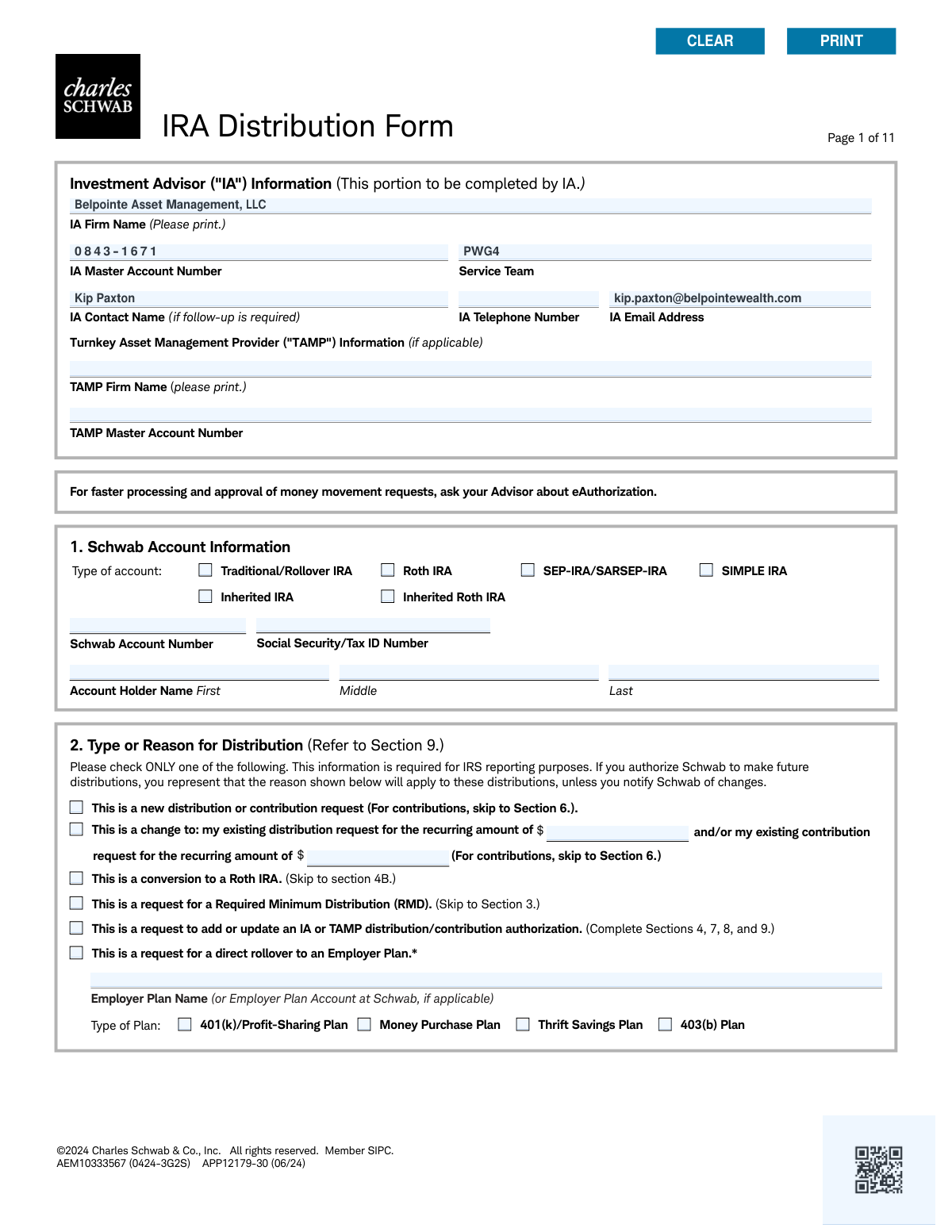
The IRA Distribution Form is a document provided by Charles Schwab for clients to manage withdrawals from their various IRA accounts, such as Traditional, Roth, SEP, or SIMPLE IRAs. It allows account holders to specify the type of distribution (e.g., standard, Required Minimum Distribution [RMD], Roth conversion), the amount, frequency, and delivery method. Today, this form can be filled out quickly and accurately using AI-powered services like Instafill.ai, which can also convert non-fillable PDF versions into interactive fillable forms.
APP12179-30 is part of the
VA forms, HR forms, IRA forms, distribution forms and IRA distribution forms categories on Instafill.
Rather not fill this in by hand? Instafill is an online form filler that completes PDF forms automatically — upload the blank form, answer a few questions, and the AI fills every field.
Form specifications
| Form name: | IRA Distribution Form |
| Number of pages: | 1 |
| Language: | English |
Our AI automatically handles information lookup, data retrieval, formatting, and form filling.
It takes less than a minute to fill out APP12179-30 using our AI form filling.
Securely upload your data. Information is encrypted in transit and deleted immediately after the form is filled out.
Instafill Demo: How to fill out PDF forms in seconds with AI
How to Fill Out APP12179-30 Online for Free in 2026
Are you looking to fill out a APP12179-30 form online quickly and accurately? Instafill.ai offers the #1 AI-powered PDF filling software of 2026, allowing you to complete your APP12179-30 form in just 37 seconds or less.
Follow these steps to fill out your APP12179-30 form online using Instafill.ai:
- 1 Navigate to Instafill.ai and upload or select the Charles Schwab IRA Distribution Form.
- 2 Use the AI assistant to automatically fill in your Schwab account information and personal details in Section 1.
- 3 Specify the reason for your distribution in Section 2, such as a new request, RMD, or Roth conversion.
- 4 Choose your preferred distribution method in Section 4 (e.g., ACH transfer, wire, check) and the frequency in Section 5 (one-time, recurring, or total).
- 5 Complete the tax withholding election in Section 7, indicating your preferences for federal and state income tax.
- 6 If applicable, authorize your Investment Advisor (IA) in Section 8 to initiate distributions on your behalf.
- 7 Carefully review all the information pre-filled by the AI, then provide your electronic signature in Section 9 to finalize and submit the request.
Our AI-powered system ensures each field is filled out correctly, reducing errors and saving you time.
Why Choose Instafill.ai for Your Fillable APP12179-30 Form?
Speed
Complete your APP12179-30 in as little as 37 seconds.
Up-to-Date
Always use the latest 2026 APP12179-30 form version.
Cost-effective
No need to hire expensive lawyers.
Accuracy
Our AI performs 10 compliance checks to ensure your form is error-free.
Security
Your personal information is protected with bank-level encryption.
Frequently Asked Questions About APP12179-30
This form is used to request a one-time or recurring withdrawal (distribution) from your Schwab IRA. You can also use it to request a Required Minimum Distribution (RMD), convert funds to a Roth IRA, or set up contributions via electronic transfer.
Any Schwab IRA account holder who wants to withdraw funds, set up recurring payments, perform a Roth conversion, or manage contributions needs to complete this form. This applies to Traditional, Roth, SEP, SIMPLE, and Inherited IRA account types.
Schwab may take up to three weeks to establish new transfer instructions, particularly for ACH. Once set up, a typical distribution request is generally completed within a few business days after the form is received.
To request your RMD, complete Section 3 of the form. You can ask Schwab to calculate the amount and choose whether to distribute it from this IRA or simply receive the calculation for your records.
Section 4 outlines several distribution methods, including transferring funds to another Schwab account, receiving a check by mail, a wire transfer, or an electronic funds transfer (ACH) to your external bank account.
A 'gross distribution' is the total amount requested before any taxes are withheld. A 'net distribution' is the final amount you will receive after federal and any applicable state income taxes have been deducted.
For non-Roth IRA distributions, federal tax withholding is optional, but a 10% rate is applied by default if you don't make an election in Section 7. You are ultimately responsible for paying any taxes owed, and state withholding rules vary by your state of residence.
To set up an ACH transfer in Section 4E, you must provide your bank's name, ABA transit routing number, and your account number. Schwab may also require a voided check or bank statement to verify the account information.
Yes, you can establish recurring distributions by completing Section 5B. You can specify the dollar amount, frequency (e.g., monthly, quarterly), and the start and end dates for the automatic payments.
You can grant your IA authority to initiate transfers by initialing the authorization in Section 8. This allows them to act on the instructions you have established on this form, but they cannot change the payment destination.
To process a Roth conversion, check the appropriate box in Section 2 and complete Section 4B. You will need to provide the account number of the Schwab Roth IRA that will receive the converted assets.
Yes, services like Instafill.ai use AI to accurately auto-fill form fields with your personal information, which saves time and helps reduce errors on complex forms like this one.
You can use a service like Instafill.ai to complete the form digitally. Simply upload the PDF, and the platform will make it an interactive, fillable form that you can type into and sign electronically.
If you have a non-fillable or 'flat' PDF, you can upload it to a platform like Instafill.ai. The service will automatically convert the document into an interactive form that you can easily fill out on your computer.
Compliance APP12179-30
Validation Checks by Instafill.ai
1
Validate Social Security / Tax ID Number Format
This check ensures that the Social Security/Tax ID Number entered in Section 1 is in a valid format, either as a 9-digit SSN (XXX-XX-XXXX) or a 9-digit EIN/TIN (XX-XXXXXXX). This is critical for correct IRS reporting and account identification. If the format is incorrect, the form submission should be rejected with an error message prompting the user to correct the number.
2
Enforce Single Selection for Reason for Distribution
This validation verifies that only one option is selected in the 'Type or Reason for Distribution' section (Section 2). The form explicitly states to 'Please check ONLY one', and selecting multiple reasons would create ambiguity for IRS reporting and transaction processing. A failure would require the user to de-select options until only one remains.
3
Conditional Requirement for RMD Details
If the user selects 'This is a request for a Required Minimum Distribution (RMD)' in Section 2, this check ensures that the required fields in Section 3, such as 'tax year' and 'Your date of birth', are completed. This information is essential for Schwab to calculate the RMD amount correctly. If these fields are left blank after selecting the RMD option, the form cannot be processed.
4
Validate RMD Age Eligibility
Based on the 'Your date of birth' provided in Section 3, this check verifies that the account holder is of the required age to take a Required Minimum Distribution (RMD) as per current IRS regulations. This prevents processing distributions under the RMD reason for individuals who are not yet eligible, which could have tax implications. If the user is not of RMD age, an alert should be displayed.
5
Conditional Requirement for Joint Life Expectancy Spouse Details
In Section 3, if the user answers 'Yes' to the question 'Is your spouse your sole beneficiary and more than 10 years younger than you?', this validation makes the 'Your spouse's date of birth' and 'Your spouse's name' fields mandatory. This information is required to use the Joint Life Expectancy Table for RMD calculations. Failure to provide this information will result in an incomplete request.
6
Enforce Single Selection for Distribution Method
This check ensures that only one distribution method (A, B, C, D, or E) is selected in Section 4. The form specifies 'Check only one option', as funds can only be disbursed in one manner per request. If multiple methods are selected, the submission should be blocked until the user chooses a single option.
7
Conditional Requirement for Wire Transfer Details
If 'Wire funds' (Option D) is selected in Section 4, this validation confirms that all associated fields, including Bank Name, ABA Transit Routing Number, and Bank Account Number, are filled. It also validates that the ABA number is exactly 9 digits. Missing or invalid information would cause the wire transfer to fail, so the form cannot be submitted without it.
8
Validate ACH Third-Party Authorization Requirements
If 'Electronic funds transfer (ACH)' (Option E) is selected and the user answers 'No' to being an owner on the other financial institution account, this check flags that the signature, contact information, and notarization for the 'Other Financial Institution Account Holder' in Section 9 are mandatory. This is a critical compliance step to prevent unauthorized transfers. The system should prevent submission and clearly indicate that these additional steps are required.
9
Validate Account Type Eligibility for Contributions
This is a cross-sectional check that validates the account type selected in Section 1 against the action requested in Section 6. If the user attempts to set up a contribution in Section 6, this check ensures the account type is not 'SEP-IRA/SARSEP-IRA', 'Inherited IRA', or 'Inherited Roth IRA', as the form states these are ineligible. If an ineligible account type is detected, the contribution request should be blocked.
10
Validate Recurring Distribution Date Sequence
For a recurring distribution in Section 5B, this check ensures the 'Begin my distributions on' date is a valid date that is not in the past. It also validates that if an end date ('and continue until') is provided, it is after the start date. This prevents logical errors in scheduling and ensures the instructions are executable.
11
Validate Combined Tax Withholding Percentage
This check validates the tax withholding elections in Section 7. It ensures that the sum of the 'Federal Income Tax Withholding' percentage and the 'State Income Tax Withholding' percentage does not exceed 100%. This prevents an impossible withholding instruction that would cause processing to fail.
12
Validate Overnight Delivery Address
If 'Send a check by overnight delivery' is selected in Section 4C, this validation checks the specified delivery address to ensure it is not a P.O. Box. The form notes that overnight carriers cannot deliver to P.O. boxes, so this check prevents a failed delivery and associated fees. If a P.O. Box is detected, the user must be prompted to provide a physical street address.
13
Conditional Requirement for Direct Rollover Details
If the user selects 'This is a request for a direct rollover to an Employer Plan' in Section 2, this check ensures that the 'Employer Plan Name' field is filled and one of the 'Type of Plan' checkboxes is selected. This information is legally required to correctly process a direct rollover and ensure the funds are sent to the correct receiving plan. The form should not be submittable without this information.
14
Validate Schwab Account Number Presence and Format
This check ensures the 'Schwab Account Number' field in Section 1 is not empty and conforms to the expected format for Schwab account numbers. This is the primary identifier for the source of the distribution and is absolutely essential for processing. An invalid or missing number would make it impossible to fulfill the request.
Common Mistakes in Completing APP12179-30
In Section 2, users are instructed to check only one box for the reason for distribution, but often select multiple conflicting options (e.g., both 'new distribution' and 'conversion to a Roth IRA'). This happens due to the complexity of options and leads to processing delays or rejection of the form as the firm cannot determine the user's intent. To avoid this, carefully read each option and select only the single choice that accurately reflects your primary goal for this transaction.
When requesting a Required Minimum Distribution (RMD) calculation in Section 3, people frequently forget to include the Fair Market Value (FMV) of IRAs held at other institutions. This results in Schwab calculating an RMD based only on the assets they hold, which is an incorrect and incomplete amount for tax purposes, potentially leading to under-distribution and IRS penalties. Always gather the year-end statements from all IRA custodians and list their FMVs on the form to ensure an accurate calculation.
In Section 4D (Wire) and 4E (ACH), users often transpose digits or mistakenly swap the ABA Routing Number with the Bank Account Number. These simple data entry errors are common when copying from a check or bank statement and will cause the transaction to fail or, in a worst-case scenario, send funds to an incorrect account. To prevent this, carefully double-check the numbers against a voided check or official bank document. AI-powered tools like Instafill.ai can help by validating number formats and reducing manual entry errors.
When setting up an ACH transfer to an account not owned by the IRA holder (Section 4E), the form requires the signature of the other financial institution's account holder, which must be notarized (Section 9). This is one of the most frequently missed steps, causing the entire request to be rejected. It's crucial to identify if the destination account is third-party, secure the necessary signature, and have the form properly notarized before submission.
In Section 5, filers must choose between a 'Gross' or 'Net' distribution amount, but often misunderstand the difference. Selecting 'Gross' means the requested amount is withdrawn before taxes are taken out, while 'Net' means the user receives the requested amount after taxes are withheld. This confusion can result in receiving a smaller-than-expected payment (for Gross) or withdrawing a larger-than-intended amount from the IRA (for Net), impacting financial plans and tax liability. Carefully consider your tax withholding election in Section 7 when making this choice.
Section 7 is complex and often filled out incorrectly. Common mistakes include not understanding the 10% default federal withholding, being unaware of mandatory state withholding laws (detailed in the supplement), or entering a percentage with a decimal when a whole number is required. An incorrect election can lead to significant tax underpayment penalties at the end of the year. It is vital to review the state-specific table and consult a tax advisor to determine the correct federal and state withholding percentages.
Section 8 explicitly requires the account holder to 'initial below' to grant disbursement authority to their Investment Advisor (IA) or TAMP, stating that 'an "X" is not sufficient'. Despite this clear instruction, many people use an 'X' or a checkmark out of habit. This invalidates the authorization, preventing the advisor from acting on the client's behalf and delaying the requested transactions until a corrected form is submitted.
Users sometimes select a distribution method in Section 4 that is incompatible with the frequency chosen in Section 5. A classic example is requesting a 'Recurring distribution' (Section 5B) to be sent via 'Wire funds' (Section 4D), even though a footnote in Section 4D clearly states 'Recurring distributions are not available for wires'. This conflict forces the processor to reject the form, delaying the setup of payments. Always read the fine print associated with your chosen distribution method.
The signature requirements in Section 9 are conditional and often cause confusion, leading to missing or incorrect signatures. For example, the IA may sign only under specific circumstances, otherwise the account holder's signature is mandatory. Forgetting the signature of the 'Other Financial Institution Account Holder' for ACH setups is also a frequent oversight. A missing or incorrect signature is a primary reason for rejection, requiring the entire form to be re-submitted. Since this form is a non-fillable PDF, a tool like Instafill.ai can convert it to a fillable version and guide you through the required signature fields.
When setting up a recurring distribution in Section 5B, people often specify a start date but neglect to enter an end date. The form states that if no end date is provided, the instruction remains in effect until revoked, creating a perpetual payment instruction. This can lead to unintended, continuous withdrawals from the IRA long after they were needed. To avoid this, always specify a clear end date (mm/dd/yyyy) unless you truly intend for the distributions to continue indefinitely.
Saved over 80 hours a year
“I was never sure if my IRS forms like W-9 were filled correctly. Now, I can complete the forms accurately without any external help.”
Kevin Martin Green
Your data stays secure with advanced protection from Instafill and our subprocessors




Robust compliance program
Transparent business model
You’re not the product. You always know where your data is and what it is processed for.
ISO 27001, HIPAA, and GDPR
Our subprocesses adhere to multiple compliance standards, including but not limited to ISO 27001, HIPAA, and GDPR.
Security & privacy by design
We consider security and privacy from the initial design phase of any new service or functionality. It’s not an afterthought, it’s built-in, including support for two-factor authentication (2FA) to further protect your account.
Fill out APP12179-30 with Instafill.ai
Worried about filling PDFs wrong? Instafill securely fills ira-distribution-form forms, ensuring each field is accurate.
