Yes! You can use AI to fill out Fidelity Advisor Transfer Due to Divorce—IRA Form
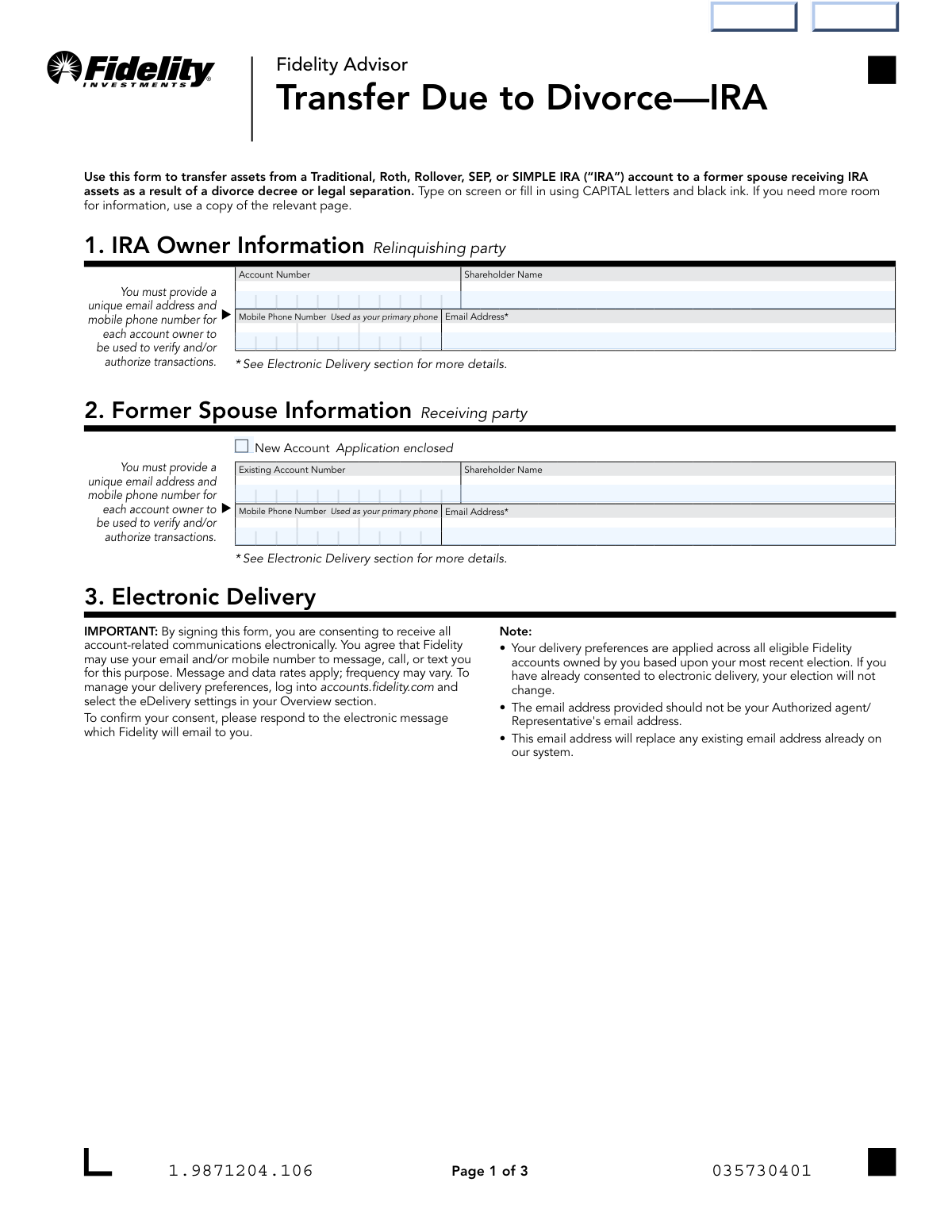
The Fidelity Advisor Transfer Due to Divorce—IRA form is an official Fidelity Investments document that facilitates the transfer of IRA assets (Traditional, Roth, Rollover, SEP, or SIMPLE IRA) from one spouse to a former spouse pursuant to a divorce decree or legal separation order, in compliance with IRS Section 408(d)(6) requirements. The form requires information from both the relinquishing IRA owner and the receiving former spouse, along with certified divorce decree documentation and, if applicable, a new account application or letter of acceptance from a new custodian. Completing this form correctly is critical to ensure the transfer is coded as non-reportable and non-taxable by the IRS. Today, this form can be filled out quickly and accurately using AI-powered services like Instafill.ai, which can also convert non-fillable PDF versions into interactive fillable forms.
Our AI automatically handles information lookup, data retrieval, formatting, and form filling.
It takes less than a minute to fill out Fidelity Advisor Transfer Due to Divorce—IRA using our AI form filling.
Securely upload your data. Information is encrypted in transit and deleted immediately after the form is filled out.
Form specifications
| Form name: | Fidelity Advisor Transfer Due to Divorce—IRA Form |
| Number of pages: | 1 |
| Filled form examples: | Form Fidelity Advisor Transfer Due to Divorce—IRA Examples |
| Language: | English |
Instafill Demo: filling out a legal form in seconds
How to Fill Out Fidelity Advisor Transfer Due to Divorce—IRA Online for Free in 2026
Are you looking to fill out a FIDELITY ADVISOR TRANSFER DUE TO DIVORCE—IRA form online quickly and accurately? Instafill.ai offers the #1 AI-powered PDF filling software of 2026, allowing you to complete your FIDELITY ADVISOR TRANSFER DUE TO DIVORCE—IRA form in just 37 seconds or less.
Follow these steps to fill out your FIDELITY ADVISOR TRANSFER DUE TO DIVORCE—IRA form online using Instafill.ai:
- 1 Navigate to Instafill.ai and upload the Fidelity Advisor Transfer Due to Divorce—IRA form or select it from the available form library to begin filling it out online.
- 2 Enter the IRA Owner (relinquishing party) information in Section 1, including the Fidelity Advisor account number, shareholder name, mobile phone number, and email address.
- 3 Complete the Former Spouse (receiving party) information in Section 2, indicating whether a new account application is enclosed or providing the existing Fidelity Advisor account number, along with the former spouse's name, phone number, and email address.
- 4 Review and acknowledge the Electronic Delivery consent in Section 3, confirming that account-related communications will be received electronically.
- 5 Specify the transfer amount in Section 4 by selecting either a full transfer or a partial transfer, and if partial, detail the specific fund numbers along with the dollar amounts or percentages to be transferred.
- 6 Gather and attach all required supporting documents, including a certified copy of the divorce decree (and marital settlement agreement if needed), a new account application if the former spouse does not have an existing IRA, and a Letter of Acceptance if assets are moving to a new custodian.
- 7 Have both the IRA Owner and the Former Spouse sign and date Section 5, obtaining a signature guarantee stamp for the IRA Owner if the transfer value exceeds $100,000, then submit the completed form to Fidelity via upload through WebFaxMail, fax, or mail.
Our AI-powered system ensures each field is filled out correctly, reducing errors and saving you time.
Why Choose Instafill.ai for Your Fillable Fidelity Advisor Transfer Due to Divorce—IRA Form?
Speed
Complete your Fidelity Advisor Transfer Due to Divorce—IRA in as little as 37 seconds.
Up-to-Date
Always use the latest 2026 Fidelity Advisor Transfer Due to Divorce—IRA form version.
Cost-effective
No need to hire expensive lawyers.
Accuracy
Our AI performs 10 compliance checks to ensure your form is error-free.
Security
Your personal information is protected with bank-level encryption.
Frequently Asked Questions About Form Fidelity Advisor Transfer Due to Divorce—IRA
This form is used to transfer assets from a Traditional, Roth, Rollover, SEP, or SIMPLE IRA to a former spouse who is entitled to receive IRA assets as a result of a divorce decree or legal separation. It ensures the transfer is processed as a non-taxable, non-reportable event in compliance with IRS guidelines under Section 408 of the Internal Revenue Code.
Both the IRA owner (the relinquishing party) and the former spouse (the receiving party) must complete and sign this form. The IRA owner provides their account information and authorizes the transfer, while the former spouse provides their receiving account details and also signs to confirm the transaction.
You must submit a certified original or copy of the divorce decree signed by a judge or court clerk, which clearly specifies the accounts and amounts to be transferred. If the assets are staying at Fidelity and the former spouse doesn't have an account, a new IRA application is also required. If assets are moving to a new custodian, a Letter of Acceptance from that custodian must be included.
The divorce decree must clearly state that assets are to be 'transferred' (not just 'awarded'), include the Fidelity Advisor account number (at least the last 4 digits), and specify the exact funds or percentage of shares to be transferred. If these details are missing from the decree, a marital settlement agreement that is incorporated or referenced in the decree may be used to supplement it.
No, QDROs only apply to qualified retirement plans such as 401(k), 403(b), and 457(b) plans under Sections 401 and 414 of the Internal Revenue Code. IRA transfers incident to divorce are governed by Section 408 of the Code, so Fidelity cannot accept QDROs for IRA transfers.
No, the former spouse does not need an existing account. If they don't already have a compatible Fidelity IRA, they must complete and submit a new Fidelity Advisor IRA application along with this form. If they already have a compatible account type at Fidelity, no new application is needed.
Yes, assets can be transferred to a new custodian outside of Fidelity. However, a Letter of Acceptance from the new custodian must be included with this form. Note that transfers must remain between the same types of IRA accounts (e.g., Traditional IRA to Traditional IRA, Roth IRA to Roth IRA).
A signature guarantee is required for the IRA owner (relinquishing party) if the value of the transfer exceeds $100,000. Eligible guarantors include commercial banks, trust companies, savings associations, credit unions, and member firms of a domestic stock exchange. Note that a Notary Public cannot provide a signature guarantee and notarizations are not accepted as a substitute.
In Section 4 of the form, you can select either a Full Transfer or a Partial Transfer. For a partial transfer, you can specify the fund number along with either a dollar amount or a percentage for up to five funds. If a dollar amount is provided but no specific funds are listed, the transfer will be allocated from all funds in the account on a pro-rata basis.
You can submit the form by uploading it through the Fidelity web portal at Accounts.Fidelity.com under 'Upload Documents,' by faxing it to 888-321-7349, or by mailing it to Fidelity Investments Institutional Operations Company LLC at P.O. Box 770002, Cincinnati, OH 45277-0085 (or via overnight delivery to 100 Crosby Parkway, KC1G, Covington, KY 41015). If an original signature guarantee or notary is required, the form must be mailed.
Yes, if the transfer does not comply with the requirements of IRS Code Section 408(d)(6), it may be treated as a taxable distribution and result in reportable income for the year in which the transfer occurs, along with potential tax liabilities. It is strongly recommended to consult with independent tax or legal counsel before completing the transfer.
No, Fidelity is unable to accept instructions that require interpretation, such as calculations of earnings, interest, penalties, or transfers based on 'as of' specific dates. The transfer instructions must be clear, specific, and straightforward without requiring Fidelity to perform any calculations.
Yes, AI-powered services like Instafill.ai can help you accurately auto-fill form fields, saving time and reducing errors. If you have a flat, non-fillable PDF version of this form, Instafill.ai can also convert it into an interactive fillable form, making the process even easier.
To fill out this form online, visit Instafill.ai and upload the PDF of the Transfer Due to Divorce—IRA form. The AI will guide you through each field, auto-fill information where possible, and help ensure all required sections are completed accurately before you download and submit the form to Fidelity.
Yes, Fidelity strongly recommends reviewing and updating your beneficiary designations after a divorce transfer to ensure they reflect your current wishes. This is especially important given that Massachusetts law (effective March 31, 2012) and other state laws may affect how beneficiary designations are handled following a divorce.
Compliance Fidelity Advisor Transfer Due to Divorce—IRA
Validation Checks by Instafill.ai
1
IRA Owner Account Number Format and Presence Validation
Verifies that the IRA_AccountNumber field is populated and conforms to Fidelity's account number format, which may include partial masking (last 4 digits acceptable per policy). This field is critical because the divorce decree must reference the relinquishing party's Fidelity Advisor account number to satisfy Document 2 requirements. If this field is missing or malformed, the transfer cannot be matched to the correct source account and will be rejected.
2
IRA Owner Shareholder Name Completeness and Print Name Consistency
Checks that IRA_ShareholderName is fully populated with the account owner's legal name and that SD_IRAOwnerName in Section 5a matches exactly. Inconsistencies between the typed name and the printed signature name may indicate an error or unauthorized submission. A mismatch will cause the form to be flagged for manual review or rejection, as both fields must identify the same relinquishing party.
3
Former Spouse Account Number or New Account Application Mutual Exclusivity Check
Validates that either FSI_AccountNumber is populated with an existing compatible IRA account number OR the FSI_NewAccount checkbox is selected and a new account application is enclosed — but not both simultaneously and not neither. Per form instructions, if the former spouse does not have an existing IRA, a new account application must accompany the form. Failure to satisfy one of these two conditions means the receiving party's destination account cannot be identified, blocking the transfer.
4
Former Spouse Shareholder Name and Receiving Party Name Consistency
Ensures that FSI_ShareholderName in Section 2 matches SD_ReceivingPartyName in Section 5b exactly. Both fields must identify the same individual who is the receiving party per the divorce decree. A discrepancy between these fields suggests a data entry error or potential fraud and will result in the form being returned for correction.
5
Mobile Phone Number Format Validation for Both Parties
Verifies that PI_Phone (IRA Owner) and FSI_Phone (Former Spouse) are each populated and conform to a valid 10-digit U.S. mobile phone number format (e.g., XXX-XXX-XXXX). The form explicitly states that a unique mobile phone number is required for each account owner to verify and authorize transactions. Missing or improperly formatted phone numbers will prevent Fidelity from completing identity verification steps required for the transfer.
6
Email Address Format and Uniqueness Validation for Both Parties
Checks that PI_Email and FSI_Email are each populated, follow a valid email address format (e.g., [email protected]), and are not identical to each other. The form requires a unique email address per account owner for electronic delivery consent and transaction authorization. If the same email is used for both parties or either field is blank or malformed, electronic consent cannot be properly established and the transfer may be delayed.
7
Transfer Amount Selection — Full or Partial Transfer Mutual Exclusivity
Validates that exactly one of TA_FullTransfer or the partial transfer option is selected in Section 4, and that both are not simultaneously checked or both left blank. Selecting neither leaves the transfer amount undefined, while selecting both creates an irreconcilable conflict in instructions. Fidelity cannot process a transfer without a clear directive on the scope of assets to be moved.
8
Partial Transfer Fund Details Completeness and Consistency
When a partial transfer is selected, verifies that at least one fund entry (TransferInstructions_Fund01 through Fund05) has a valid fund number populated along with either a dollar amount (TI_DollarAmount + TI_Cents) or a percentage (TI_Percentage), but not both for the same fund row. Per form instructions, if a dollar amount is provided, the specific fund must be identified; if funds are not specified, the transfer is allocated pro rata. Incomplete or contradictory fund-level entries will result in incorrect or failed asset allocation.
9
Partial Transfer Percentage Sum Validation
When percentage-based partial transfers are specified across multiple fund rows, validates that the sum of all TI_Percentage fields does not exceed 100% and is logically consistent with the intended transfer scope. A total exceeding 100% would attempt to transfer more assets than exist in the account, while a total significantly below 100% without explanation may indicate an incomplete form. Either condition will cause the transfer to be rejected or require clarification.
10
Legal Document Section Reference Presence in Transfer Details
Confirms that the TA_Details field is populated with the specific section or page number of the applicable legal document (divorce decree or marital settlement agreement) that references the accounts being transferred. The form explicitly instructs submitters to indicate this reference, and Fidelity requires a copy of the legal document signed by a judge. An empty TA_Details field means Fidelity cannot cross-reference the transfer instructions against the legal document, which is a mandatory compliance step.
11
IRA Owner Signature Date Format and Validity
Validates that the IRA Owner signature date in Section 5a is present and conforms to the MM-DD-YYYY format specified on the form, and that the date is a valid calendar date not in the future. A missing or incorrectly formatted date renders the signature legally insufficient. Additionally, a future-dated signature may indicate fraud or error and will cause the form to be returned.
12
Former Spouse Signature Date Format and Validity
Validates that the Receiving Party signature date in Section 5b is present, conforms to MM-DD-YYYY format, and represents a valid non-future calendar date. Both the IRA Owner and Former Spouse are required to sign and date the form per Section 5 instructions. A missing or invalid date for either party makes the form incomplete and legally unexecutable.
13
Signature Guarantee Requirement Trigger for High-Value Transfers
Checks whether the transfer amount (full or partial) meets or exceeds $100,000, and if so, flags that a Signature Guarantee Stamp is required in Section 5a for the IRA Owner. The form explicitly states this requirement for transfers greater than $100,000. If the transfer value crosses this threshold but no signature guarantee is present, the form must be mailed (not uploaded digitally) and will be rejected without the stamp from an eligible guarantor such as a commercial bank or member firm of a domestic stock exchange.
14
IRA Type Compatibility Between Relinquishing and Receiving Accounts
Verifies that the type of IRA associated with IRA_AccountNumber (e.g., Traditional, Roth, SEP, SIMPLE) is compatible with the type of account identified by FSI_AccountNumber or the new account application. Per form instructions, transfers must be between the same types of IRA — for example, a Roth IRA can only transfer to a Roth IRA. A mismatch in account types would result in a non-compliant transfer that could trigger taxable events and IRS reporting obligations.
15
New Custodian Letter of Acceptance Requirement Flag
Detects whether the former spouse's receiving account is held at a different custodian (i.e., FSI_AccountNumber references a non-Fidelity institution or FSI_NewAccount indicates an external transfer), and if so, flags that a Letter of Acceptance (LOA) from the new custodian must be included with the submission. Without the LOA, Fidelity cannot confirm the receiving institution's willingness and ability to accept the assets. Submission without this document when required will result in the transfer being placed on hold.
16
QDRO Document Rejection Check
Validates that the legal document referenced in TA_Details and submitted with the form is not identified or described as a Qualified Domestic Relations Order (QDRO). Per IRS guidelines and form instructions, QDROs apply only to qualified plans under Code Sections 401 and 414 (e.g., 401(k), 403(b)) and cannot be accepted for IRA transfers, which are governed by Code Section 408. Submission of a QDRO in place of a divorce decree or marital settlement agreement will result in outright rejection of the transfer request.
Common Mistakes in Completing Fidelity Advisor Transfer Due to Divorce—IRA
Many people submit a plain photocopy or a self-certified copy of their divorce decree instead of one certified by a judge or clerk of a court of competent jurisdiction. Fidelity's policy requires the decree to be certified and in full force and effect, and submitting an uncertified document will result in rejection and processing delays. Always obtain a court-certified copy directly from the issuing court before submitting this form. Tools like Instafill.ai can remind you of required supporting documents before submission.
A common error is trying to transfer assets from one IRA type to a different type — for example, from a Traditional IRA to a Roth IRA, or from a SIMPLE IRA to a SEP IRA. Fidelity requires that transfers occur between the same types of IRA accounts (e.g., Traditional IRA to Traditional IRA, Roth IRA to Roth IRA). This mistake often happens because people are unaware of the restriction or assume any IRA can receive the funds. Verify that both the relinquishing and receiving accounts are of the same IRA type before completing the form.
If the former spouse does not already have a compatible Fidelity IRA account, a new account application must be submitted along with this transfer form. People frequently overlook this requirement, assuming the transfer form alone is sufficient, which causes the entire submission to be rejected. Check whether the former spouse has an existing compatible account; if not, complete and attach the appropriate Fidelity Advisor IRA application. Instafill.ai can flag missing required attachments like new account applications during the form completion process.
Fidelity cannot accept instructions that require interpretation, such as calculations of earnings, interest, penalties, or transfers 'as of' a specific date. People often submit decrees that use ambiguous language or reference formulas rather than specific dollar amounts or percentages. This results in the transfer being rejected because Fidelity cannot independently perform or verify such calculations. Ensure the divorce decree or marital settlement agreement clearly states a specific dollar amount, percentage of shares, or that all positions are to be transferred.
The divorce decree must explicitly state that assets are to be 'transferred' — terms like 'awarded to' are not acceptable per IRS guidelines. This mistake is common because people assume any language granting assets to the former spouse is sufficient, but the IRS requires the transaction to be coded as a transfer of assets for it to be non-reportable and non-taxable. Failure to use the correct language can result in a taxable event for the IRA owner. Review the decree carefully with legal counsel to ensure it uses IRS-compliant transfer language.
The divorce decree should reference the specific Fidelity Advisor account number(s) being transferred, though for privacy reasons only the last four digits are acceptable. People often submit decrees that reference assets generally without identifying specific account numbers, which makes it impossible for Fidelity to process the transfer. If the decree lacks this detail, a property settlement agreement referencing the account numbers must be included. Double-check that the decree or accompanying settlement agreement identifies the correct Fidelity account number(s).
Some people mistakenly submit a Qualified Domestic Relations Order (QDRO) when transferring IRA assets, not realizing that QDROs only apply to qualified plans such as 401(k), 403(b), and 457(b) plans. IRA transfers incident to divorce are governed by Section 408 of the Internal Revenue Code, not Sections 401 and 414, and Fidelity cannot accept QDROs for IRA transfers. This error can cause significant delays and potential tax consequences. Ensure you are submitting a certified divorce decree or legal separation agreement, not a QDRO.
When assets are transferring to a new custodian, the Letter of Instruction (LOI) from the original account owner and the Letter of Acceptance (LOA) from the receiving custodian must agree exactly on the division of the account. Discrepancies in amounts, percentages, or fund details between these two documents will cause the transfer to be rejected. People often complete one document without carefully cross-referencing the other. Review both documents side by side before submission to ensure all transfer details match precisely.
A signature guarantee is required for the IRA Owner (relinquishing party) when the value of the transfer exceeds $100,000, and many people either overlook this requirement or confuse it with a notarization. A Notary Public cannot provide a signature guarantee — it must come from an eligible guarantor such as a commercial bank, trust company, savings association, credit union, or member firm of a domestic stock exchange. Submitting the form without the required signature guarantee stamp will result in rejection and require resubmission. Verify the transfer value and obtain the guarantee from an eligible institution before mailing the form.
The form explicitly states that the email address provided should not be an authorized agent's or representative's email address, yet many account owners inadvertently provide their financial advisor's or attorney's contact information. This is problematic because Fidelity uses the email address to send electronic consent confirmations and account communications directly to the account owner. Using a third party's email could result in missed communications or failure to confirm electronic delivery consent. Always provide a personal email address that only you access. Instafill.ai can help flag this common data entry error during form completion.
When selecting a partial transfer, people often enter a dollar amount or percentage without specifying the fund number(s) from which the transfer should be drawn. If fund numbers are not specified, Fidelity will allocate the transfer amount pro rata across all funds in the account, which may not align with the divorce decree's requirements. This can lead to unintended distributions from specific funds and potential disputes. Always specify the exact fund number(s) alongside the corresponding dollar amount or percentage when completing a partial transfer.
After a divorce-related IRA transfer, many account owners neglect to review and update their beneficiary designations on the remaining account. This is particularly important because a former spouse may still be listed as the primary beneficiary, and depending on state law (e.g., Massachusetts adopted the Uniform Probate Code effective March 31, 2012), Fidelity may require additional documentation to process distributions correctly. Failing to update beneficiaries can result in assets passing to an unintended recipient. Review and update all beneficiary designations immediately after the transfer is processed.
Saved over 80 hours a year
“I was never sure if my IRS forms like W-9 were filled correctly. Now, I can complete the forms accurately without any external help.”
Kevin Martin Green
Your data stays secure with advanced protection from Instafill and our subprocessors
Robust compliance program
Transparent business model
You’re not the product. You always know where your data is and what it is processed for.
ISO 27001, HIPAA, and GDPR
Our subprocesses adhere to multiple compliance standards, including but not limited to ISO 27001, HIPAA, and GDPR.
Security & privacy by design
We consider security and privacy from the initial design phase of any new service or functionality. It’s not an afterthought, it’s built-in, including support for two-factor authentication (2FA) to further protect your account.
Fill out Fidelity Advisor Transfer Due to Divorce—IRA with Instafill.ai
Worried about filling PDFs wrong? Instafill securely fills fidelity-advisor-transfer-due-to-divorceira-form forms, ensuring each field is accurate.