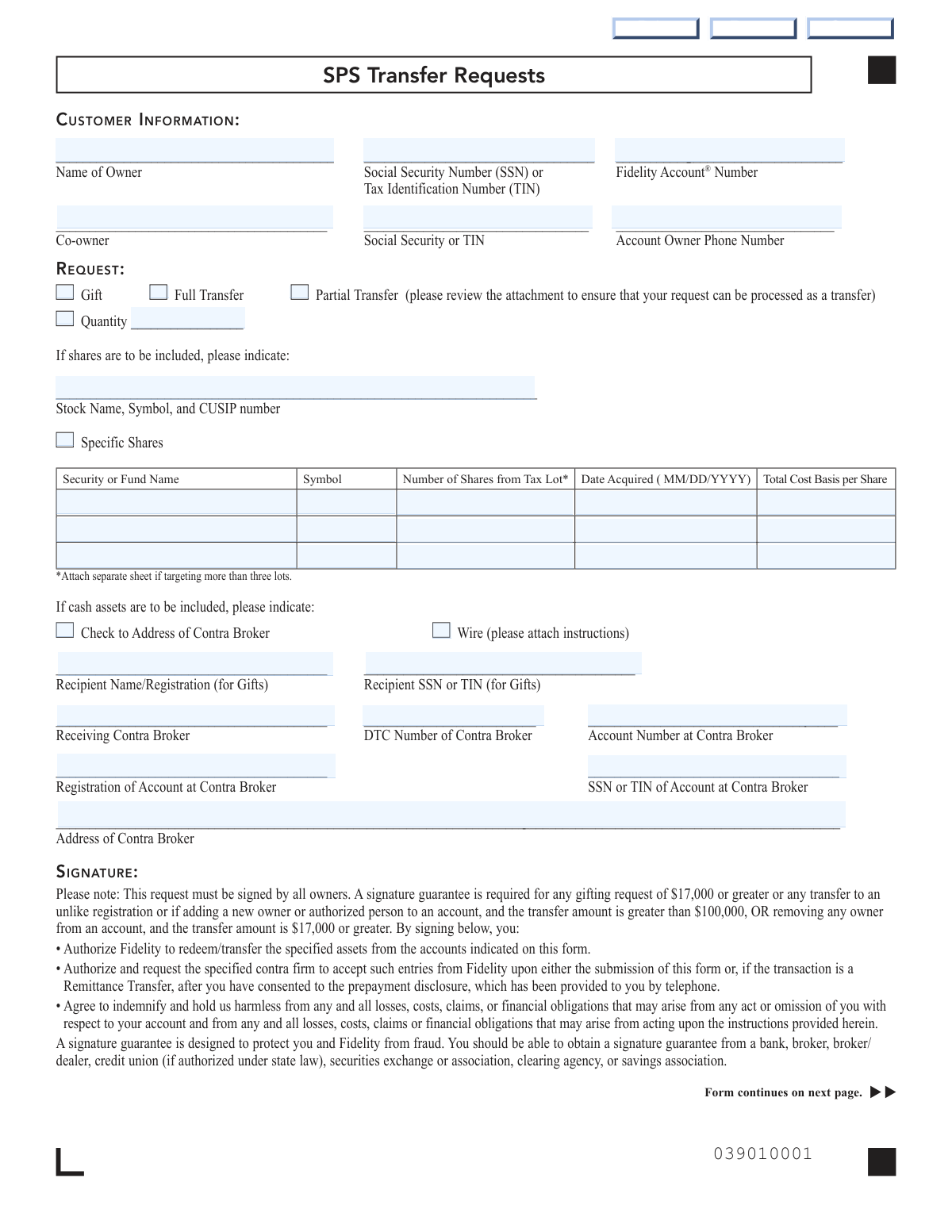
Yes! You can use AI to fill out Fidelity Stock Plan Services (SPS) Transfer Request Form

The Fidelity Stock Plan Services (SPS) Transfer Request Form is an official Fidelity document that allows account holders to authorize the redemption, gifting, or transfer of assets held in Stock Plan Services designated accounts to a contra broker or another individual when the standard ACAT transfer process cannot be used. The form supports various transfer types including individual-to-individual, joint, trust, and custodial account transfers, and requires signature guarantees for certain high-value or registration-changing transactions. It is an important legal document that protects both the account holder and Fidelity by clearly documenting the authorized transfer instructions and indemnification agreements. Today, this form can be filled out quickly and accurately using AI-powered services like Instafill.ai, which can also convert non-fillable PDF versions into interactive fillable forms.
Our AI automatically handles information lookup, data retrieval, formatting, and form filling.
It takes less than a minute to fill out Fidelity SPS Transfer Request using our AI form filling.
Securely upload your data. Information is encrypted in transit and deleted immediately after the form is filled out.

Form specifications

Form name: Fidelity Stock Plan Services (SPS) Transfer Request Form
Number of pages: 1
Filled form examples: Form Fidelity SPS Transfer Request Examples
Language: English
main-image

Instafill Demo: filling out a legal form in seconds

How to Fill Out Fidelity SPS Transfer Request Online for Free in 2026

Are you looking to fill out a FIDELITY SPS TRANSFER REQUEST form online quickly and accurately? Instafill.ai offers the #1 AI-powered PDF filling software of 2026, allowing you to complete your FIDELITY SPS TRANSFER REQUEST form in just 37 seconds or less.
Follow these steps to fill out your FIDELITY SPS TRANSFER REQUEST form online using Instafill.ai:
  1. 1 Navigate to Instafill.ai and upload the Fidelity SPS Transfer Request Form PDF or select it from the available form library to begin filling it out online.
  2. 2 Enter your customer information, including the account owner's full name, Social Security Number (SSN) or Tax Identification Number (TIN), Fidelity account number, co-owner details if applicable, and account owner phone number.
  3. 3 Select the type of request (Gift, Full Transfer, or Partial Transfer) and, if shares are involved, provide the stock name, symbol, CUSIP number, quantity, and specific share lot details including date acquired and cost basis per share.
  4. 4 If cash assets are included, indicate whether a check to the contra broker's address or a wire transfer is preferred, and attach wire instructions if applicable.
  5. 5 Complete the recipient and contra broker information, including the recipient's name and SSN/TIN (for gifts), the receiving contra broker's name, DTC number, account number, account registration, SSN/TIN, and address.
  6. 6 Review all transfer eligibility criteria (individual, joint, custodial account rules) to ensure your request qualifies for the SPS transfer process, and gather any required supporting documents such as a birth certificate for custodial-to-individual transfers.
  7. 7 Sign and date the form as the account owner (and co-owner if applicable), obtain a signature guarantee stamp if required based on the transfer amount or registration change, and submit the completed form to Fidelity via overnight or regular mail at the addresses provided.

Our AI-powered system ensures each field is filled out correctly, reducing errors and saving you time.

Why Choose Instafill.ai for Your Fillable Fidelity SPS Transfer Request Form?

Speed

Complete your Fidelity SPS Transfer Request in as little as 37 seconds.

Up-to-Date

Always use the latest 2026 Fidelity SPS Transfer Request form version.

Cost-effective

No need to hire expensive lawyers.

Accuracy

Our AI performs 10 compliance checks to ensure your form is error-free.

Security

Your personal information is protected with bank-level encryption.

Frequently Asked Questions About Form Fidelity SPS Transfer Request

This form is used exclusively for Stock Plan Services (SPS) designated accounts to facilitate asset transfers or gifts when the standard ACAT (Automated Customer Account Transfer) process is unavailable. It allows account holders to transfer or gift shares and cash assets to another individual, joint account, trust, or broker.

Any Fidelity Stock Plan Services account holder who wants to gift shares, or perform a full or partial transfer of assets when the standard ACAT transfer process cannot be used. All account owners must sign the form for the request to be processed.

You will need your full name, Social Security Number (SSN) or Tax Identification Number (TIN), Fidelity account number, and phone number. For transfers or gifts, you'll also need the recipient's name, SSN/TIN, the receiving broker's name, DTC number, account number, and address, as well as the stock name, symbol, CUSIP number, and quantity of shares being transferred.

A Gift transfers assets to another person as a gift and requires recipient information including their SSN/TIN. A Full Transfer moves all assets from your account to another account, while a Partial Transfer moves only a specified quantity of shares or cash. For partial transfers, you must indicate the exact quantity and, if applicable, specific tax lot details.

A signature guarantee is required for any gifting request valued at $17,000 or more, any transfer to an unlike registration, if adding a new owner or authorized person to an account with a transfer amount greater than $100,000, or if removing any owner from an account with a transfer amount of $17,000 or greater. A notary public cannot provide a signature guarantee — it must come from a bank, broker, credit union, or similar financial institution.

No, transfers related to a Change of Registration — such as those resulting from a divorce — cannot be processed using this form. You must use the Change of Registration form and establish a Fidelity account for the recipient. Contact a Fidelity Representative for guidance on Change of Registration requirements.

Individual-to-individual transfers require the same name and SSN/TIN. For individual-to-joint transfers, the individual owner must be listed on the receiving joint account. For joint-to-trust transfers, both joint owners must be listed as trustees on the receiving trust account. Custodial-to-individual transfers (e.g., when a minor reaches the age of majority) require a signed letter of instruction from the custodian and a copy of the recipient's birth certificate.

In the 'Specific Shares' section, you can enter the Security or Fund Name, Symbol, number of shares from each tax lot, date acquired, and total cost basis per share for up to three tax lots. If you need to target more than three lots, attach a separate sheet with the additional information.

If the recipient has a Fidelity account, complete the contra broker instructions section and enter 'Fidelity' as the contra broker. You must also complete all recipient information fields, including the recipient's name and SSN/TIN.

For regular mail, send the form to: Fidelity Investments, Stock Plan Services, P.O. Box 770001, Cincinnati, OH 45277-0043. For overnight delivery, send it to: Fidelity Investments, Stock Plan Services MZ KC1B-SPS, 100 Crosby Parkway, Covington, KY 41015.

If you are traveling abroad and unable to obtain a signature guarantee, call a Fidelity Representative to discuss available options. You can find international 800 numbers for U.S. customers on Fidelity.com by clicking 'Customer Service' and then 'Contact us.' Note that a notary public or consular seal cannot be accepted as a substitute.

Yes, cash assets can be included in your transfer request. You can choose to have a check sent to the address of the contra broker or arrange a wire transfer by attaching wire instructions to the form.

Yes, AI-powered services like Instafill.ai can help you accurately auto-fill this form's fields, saving you time and reducing the risk of errors. These tools guide you through each required field and ensure all necessary information is entered correctly before submission.

You can upload the Fidelity SPS Transfer Request PDF to Instafill.ai, where the AI will automatically identify and fill in the form fields based on your information. Once completed, you can review, save, and print the filled form for submission to Fidelity.

If you have a flat, non-fillable version of this PDF, Instafill.ai can convert it into an interactive fillable form, allowing you to type directly into the fields digitally. This eliminates the need to print and handwrite your information, making the process faster and more accurate.

Compliance Fidelity SPS Transfer Request
Validation Checks by Instafill.ai

1
Ensures the Name of Owner is Present and Not Left Blank
This check verifies that the 'Name of Owner' field has been completed and is not empty or filled with placeholder characters. The account owner's name is a fundamental identifier required to locate and authorize the correct Fidelity Stock Plan Services account. If this field is missing, the transfer request cannot be processed and will be rejected, potentially delaying time-sensitive transactions.
2
Validates Social Security Number or Tax Identification Number Format
This check ensures that the SSN or TIN entered for the account owner follows the correct numeric format — SSNs must be 9 digits formatted as XXX-XX-XXXX, and TINs must also be 9 digits formatted as XX-XXXXXXX. Incorrectly formatted identification numbers can cause mismatches in account lookup and regulatory compliance failures. If the format is invalid or the field is blank, the form must be returned to the submitter for correction before processing can begin.
3
Validates That a Transfer Request Type Has Been Selected
This check confirms that exactly one of the three request type checkboxes — Gift, Full Transfer, or Partial Transfer — has been selected on the form. Failing to select a request type leaves Fidelity without clear instruction on how to process the transaction, making it impossible to proceed. If no option or multiple conflicting options are selected, the form is considered incomplete and must be resubmitted.
4
Ensures Quantity Field is Populated When Partial Transfer is Selected
When the 'Partial Transfer' option is selected, this check verifies that the 'Quantity' field has been filled in with a valid positive numeric value representing the number of shares or dollar amount to be transferred. A partial transfer without a specified quantity is ambiguous and cannot be executed accurately. If the quantity field is blank or contains a non-numeric or zero value when a partial transfer is indicated, the form must be corrected before processing.
5
Validates Stock Name, Symbol, and CUSIP Number Are All Provided When Shares Are Included
This check ensures that when shares are being transferred or gifted, the stock name, ticker symbol, and CUSIP number fields are all completed together. Each of these identifiers serves a distinct verification purpose — the CUSIP uniquely identifies the security, the symbol confirms the exchange listing, and the name provides a human-readable reference. If any one of these three fields is missing, the security cannot be unambiguously identified and the transfer will be rejected.
6
Validates Date Acquired Format for Specific Share Tax Lots
This check verifies that any 'Date Acquired' field populated in the specific shares section follows the required MM/DD/YYYY format and represents a valid calendar date. Accurate acquisition dates are critical for determining the correct tax lot and cost basis, which have direct tax implications for the account owner. Dates entered in incorrect formats, future dates, or logically impossible dates (e.g., February 30) must be flagged and corrected before the form can be processed.
7
Ensures Total Cost Basis Per Share is a Valid Positive Numeric Value
When specific share tax lots are identified, this check confirms that the 'Total Cost Basis per Share' field contains a valid positive numeric or decimal value for each populated lot row. Cost basis information is essential for accurate tax reporting and must not be zero, negative, or non-numeric. If an invalid or missing cost basis is detected for a completed lot row, the form must be returned for correction to ensure proper tax lot accounting.
8
Validates Recipient Name and SSN or TIN Are Both Provided for Gift Requests
When the 'Gift' checkbox is selected, this check ensures that both the 'Recipient Name/Registration' and 'Recipient SSN or TIN' fields are fully completed. Gift transactions require complete recipient identification to comply with IRS reporting requirements and to ensure the assets are directed to the correct individual or entity. If either field is missing when a gift is indicated, the form is incomplete and cannot be processed.
9
Ensures Contra Broker Information is Complete When a Receiving Broker is Specified
This check verifies that when a receiving contra broker is named, the associated DTC Number, Account Number at Contra Broker, Registration of Account at Contra Broker, SSN or TIN of Account at Contra Broker, and Address of Contra Broker fields are all populated. Incomplete contra broker details prevent Fidelity from routing the transfer correctly through the DTC system. Any missing field within this group will cause the transfer to fail and the form must be returned for completion.
10
Validates DTC Number is Numeric and Within Expected Range
This check confirms that the DTC Number of the Contra Broker is a valid numeric value consistent with known DTC participant numbers, which are typically 4-digit codes. An invalid or non-numeric DTC number will prevent the electronic routing of assets to the receiving broker. If the DTC number is blank, contains letters, or falls outside the expected range, the form must be corrected to ensure successful settlement.
11
Ensures Account Owner Phone Number is in a Valid Format
This check validates that the 'Account Owner Phone Number' field contains a properly formatted U.S. phone number, typically in the format (XXX) XXX-XXXX or XXX-XXX-XXXX with exactly 10 digits. A valid contact number is necessary for Fidelity representatives to reach the account owner if there are questions or issues with the transfer request. If the phone number is missing, contains letters, or has an incorrect digit count, the form should be flagged for correction.
12
Verifies Signature Guarantee Stamp is Present When Required by Transfer Conditions
This check determines whether a signature guarantee stamp is required based on the transaction details — specifically, if the gift value is $17,000 or greater, if the transfer involves an unlike registration, if a new owner or authorized person is being added and the transfer exceeds $100,000, or if an owner is being removed and the transfer is $17,000 or greater. When any of these conditions are met, the signature guarantee stamp field must not be blank. Absence of a required signature guarantee will result in the form being rejected and returned, as it is a critical fraud prevention measure.
13
Ensures All Account Owners Have Signed the Form
This check verifies that all required signature fields are completed, specifically that the primary account owner has signed and, where a co-owner exists on the account, the co-owner's signature is also present. The form explicitly states that all owners must sign to authorize the transfer, and missing signatures invalidate the authorization. If any required signature field is blank, the form cannot be accepted and must be returned to collect all necessary signatures.
14
Validates Consistency Between Specific Share Lot Rows — No Partial Row Entries
This check ensures that for each specific share tax lot row (rows 1 through 3), either all required fields — Security/Fund Name, Symbol, Number of Shares, Date Acquired, and Total Cost Basis per Share — are completed together, or the entire row is left blank. A partially completed row, such as a fund name without a corresponding share count or date, creates ambiguity that prevents accurate tax lot targeting. Any row with some but not all fields populated must be flagged for the submitter to either complete or clear the row entirely.
15
Validates That Joint Account Transfer Includes All Joint Owners' Names and SSNs
When the source account is a joint account and the transfer type is Joint to Joint, this check confirms that all joint account owners' names and SSNs/TINs are present on the form, as required by the form's instructions. Omitting any joint owner's information from a joint-to-joint transfer violates the transfer eligibility criteria and will result in rejection. The form must be returned if co-owner information is incomplete relative to the account registration on file.
16
Ensures Print Name Fields Are Completed for Each Signing Owner
This check verifies that the 'Print Name' field is completed for each account owner who has provided a signature on the form, including both the primary owner and co-owner where applicable. Printed names alongside signatures help confirm the identity of signatories and reduce the risk of fraud or disputes about authorization. If a signature is present but the corresponding print name field is blank, the form should be flagged as incomplete and returned for correction.

Common Mistakes in Completing Fidelity SPS Transfer Request

Providing an incorrect or mismatched SSN/TIN

Many people accidentally transpose digits or enter an outdated TIN when filling out the SSN/TIN fields for both the account owner and the contra broker account. This can cause the transfer to be rejected or flagged for fraud review, significantly delaying the transaction. Always double-check your SSN or TIN against an official document before submitting, and ensure the number matches exactly what Fidelity has on file. AI-powered form filling tools like Instafill.ai can help by auto-populating and validating identification numbers to reduce transcription errors.

Failing to obtain a required signature guarantee

A very common mistake is submitting the form without a signature guarantee when one is legally required — for example, when gifting $17,000 or more, transferring to an unlike registration, adding a new owner, or removing an owner when the transfer amount is $17,000 or greater. Many people confuse a notarization with a signature guarantee, but the form explicitly states that a notary public cannot provide a signature guarantee and a notarization cannot be accepted in lieu of one. To avoid this, carefully review the signature guarantee thresholds before submitting and obtain the stamp from an eligible institution such as a bank, broker, or credit union. Submitting without the required guarantee will result in outright rejection of the form.

Selecting the wrong transfer type (Gift, Full Transfer, or Partial Transfer)

People often check the wrong request type or leave it unchecked entirely, which causes processing delays or incorrect execution of the transaction. For example, selecting 'Full Transfer' when only specific shares or a partial quantity should be moved can result in unintended liquidation of the entire account. Carefully read the definitions of each option and review the attachment referenced on the form to confirm your request qualifies as a transfer before checking 'Partial Transfer.' Tools like Instafill.ai can guide users through selecting the correct option based on their stated intent.

Omitting the CUSIP number or stock symbol for share transfers

When including shares in the transfer, the form requires the stock name, symbol, AND CUSIP number, but many people leave the CUSIP number blank because they are unfamiliar with it or assume the stock name alone is sufficient. Missing CUSIP information can cause the request to be rejected or misrouted, especially for stocks with similar names or symbols. You can find the CUSIP number on your account statement, the company's investor relations page, or by contacting Fidelity directly. Instafill.ai can help by automatically populating known CUSIP numbers based on the stock name or symbol entered.

Incorrectly completing the Specific Shares / Tax Lot section

When targeting specific tax lots, people frequently enter incorrect or incomplete information — such as leaving the 'Date Acquired' field blank, entering the wrong date format (not MM/DD/YYYY), or miscalculating the 'Total Cost Basis per Share.' Errors in this section can result in incorrect tax reporting and unintended tax consequences. If you are targeting more than three lots, the form requires attaching a separate sheet, which many people overlook. Always verify lot details against your official account statements and use the exact MM/DD/YYYY date format as specified.

Entering an incorrect or missing DTC number for the contra broker

The DTC (Depository Trust Company) number is a unique identifier for the receiving brokerage firm, and many people either leave it blank or enter an incorrect number because they are unfamiliar with it. An incorrect DTC number will cause the transfer to fail or be sent to the wrong institution, potentially resulting in significant delays or lost assets. Contact the receiving contra broker directly to confirm their DTC number before completing this field. Instafill.ai can assist by referencing known DTC numbers for major brokerage firms to reduce the risk of error.

Not completing all required recipient information for gift transfers

When making a gift, people often fill in only the recipient's name but forget to include the recipient's SSN or TIN, the contra broker details, or the account registration at the contra broker. The form requires all of these fields to be completed for a gift to be processed, and missing any one of them will result in rejection. If the recipient has a Fidelity account, the form instructs you to note 'Fidelity' as the contra broker and still complete the contra firm instructions section. Review the Gifts section of the instructions carefully to ensure every required field is populated before submitting.

Submitting a transfer that does not meet the eligible registration criteria

Many people attempt to use this SPS Transfer form for transactions that do not qualify — for example, transferring an individual account to a joint account where the individual is not listed on the receiving joint account, or transferring a joint account to a trust where both joint owners are not listed as trustees. This form can only be used when the standard ACAT transfer process is unavailable and the transfer meets specific registration criteria. Any other transfers must use the Change of Registration form. Carefully review the Individual, Joint, and Custodial account transfer rules on the second page before submitting to avoid rejection.

Forgetting to have all account owners sign the form

The form explicitly states that 'this request must be signed by all owners,' but co-owners are frequently overlooked, especially when one owner initiates the process independently. A form submitted with only one signature when multiple owners exist will be rejected, causing delays. For joint accounts, ensure both owners review and sign the form, and for custodial accounts, the custodian must sign the letter of instruction. Always check the account ownership structure before submitting to confirm all required signatures are present.

Using the wrong mailing address for submission

The form provides two different return addresses — one for overnight delivery (Covington, KY) and one for regular mail (Cincinnati, OH P.O. Box) — and people frequently send overnight packages to the P.O. Box or regular mail to the street address, causing delivery failures or significant delays. Overnight carriers cannot deliver to P.O. Boxes, so using the wrong address can result in the form being returned or lost. Always confirm which mailing method you are using before addressing the envelope, and use the exact address specified for that delivery method.

Entering an incorrect quantity or leaving the quantity field blank for partial transfers

When selecting a 'Partial Transfer,' people often forget to fill in the quantity field or enter an ambiguous number (e.g., not specifying whether it refers to shares or a dollar amount). Leaving this field blank or entering an unclear value can result in the wrong amount being transferred or the request being rejected entirely. Be specific and consistent — if you are transferring shares, enter the exact number of shares, and ensure this matches the details in the Specific Shares section if applicable. Instafill.ai can help by cross-validating the quantity field against the specific shares section to flag inconsistencies before submission.

Omitting required documentation for custodial account transfers

For custodial (UTMA/UGMA) account transfers where a minor has reached the age of majority, the form requires both a letter of instruction signed by the custodian AND a copy of the recipient's birth certificate to verify the minor's age. Many people submit the form without these supporting documents, causing the request to be rejected and requiring resubmission. Gather all required documentation before mailing the form, and include it as a complete package to avoid back-and-forth delays. If you are unsure what documents are needed, contact a Fidelity Stock Plan Services Representative before submitting.
Saved over 80 hours a year

“I was never sure if my IRS forms like W-9 were filled correctly. Now, I can complete the forms accurately without any external help.”

Kevin Martin Green

Your data stays secure with advanced protection from Instafill and our subprocessors

Robust compliance program

Transparent business model

You’re not the product. You always know where your data is and what it is processed for.

ISO 27001, HIPAA, and GDPR

Our subprocesses adhere to multiple compliance standards, including but not limited to ISO 27001, HIPAA, and GDPR.

Security & privacy by design

We consider security and privacy from the initial design phase of any new service or functionality. It’s not an afterthought, it’s built-in, including support for two-factor authentication (2FA) to further protect your account.

Fill out Fidelity SPS Transfer Request with Instafill.ai

Worried about filling PDFs wrong? Instafill securely fills fidelity-stock-plan-services-sps-transfer-request-form forms, ensuring each field is accurate.