Yes! You can use AI to fill out Fidelity Funds Account Transfer of Assets Form
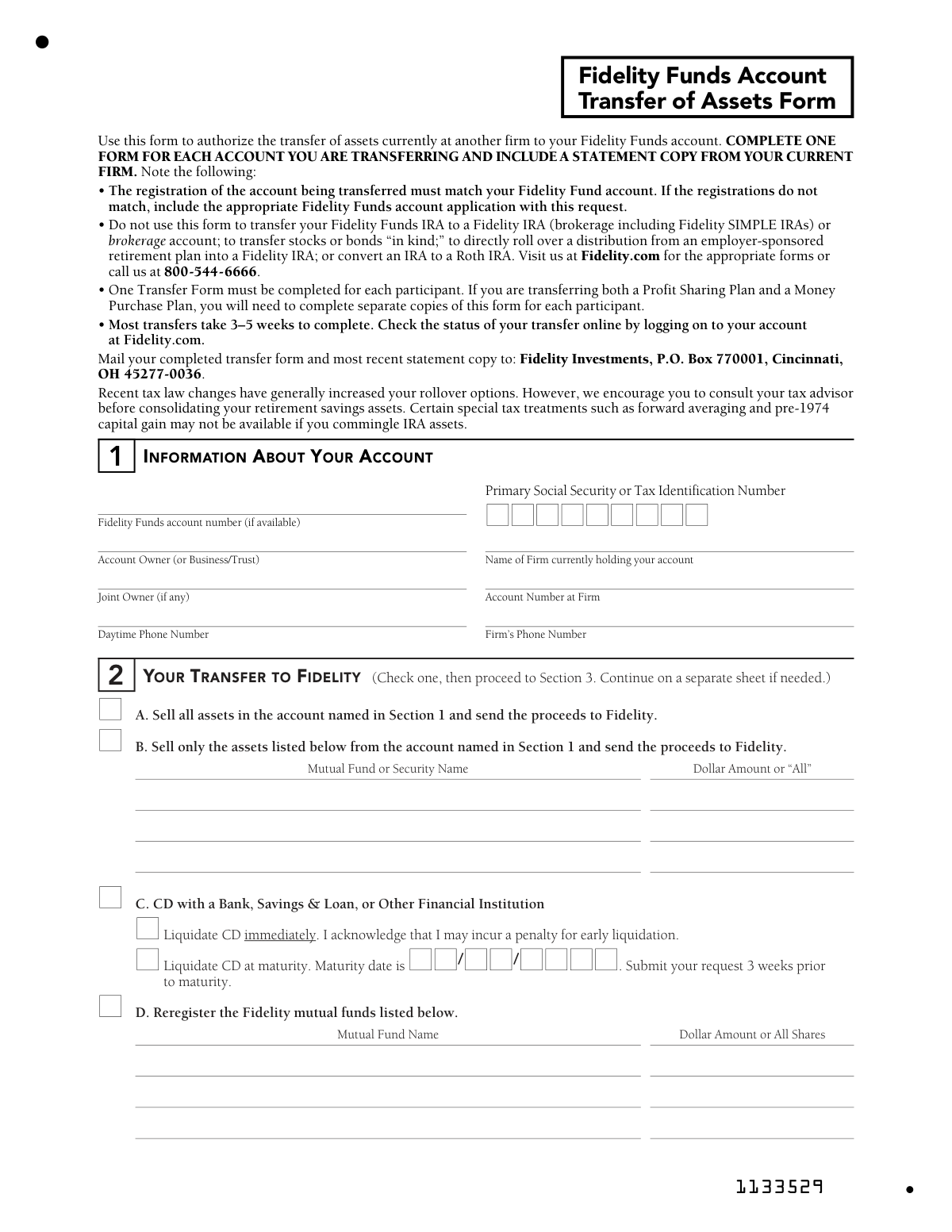
The Fidelity Funds Account Transfer of Assets Form is an official document used to authorize the movement of assets—such as mutual funds, CDs, or other securities—from an external financial firm into a Fidelity Funds account. It is an essential form for investors looking to consolidate their holdings, roll over retirement savings, or reregister Fidelity mutual fund shares under a new account. Completing this form correctly is critical, as the account registration at the transferring firm must match the Fidelity Funds account, and most transfers take 3–5 weeks to process. Today, this form can be filled out quickly and accurately using AI-powered services like Instafill.ai, which can also convert non-fillable PDF versions into interactive fillable forms.
Fidelity Transfer of Assets Form is part of the
asset transfer forms, Fidelity forms, account transfer forms, transfer forms, funds transfer forms and fund transfer forms categories on Instafill.
Rather not fill this in by hand? Instafill is an online form filler that completes PDF forms automatically — upload the blank form, answer a few questions, and the AI fills every field.
Form specifications
| Form name: | Fidelity Funds Account Transfer of Assets Form |
| Number of pages: | 1 |
| Field instructions: | Fidelity Transfer of Assets Form Instructions |
| Language: | English |
Our AI automatically handles information lookup, data retrieval, formatting, and form filling.
It takes less than a minute to fill out Fidelity Transfer of Assets Form using our AI form filling.
Securely upload your data. Information is encrypted in transit and deleted immediately after the form is filled out.
Instafill Demo: How to fill out PDF forms in seconds with AI
How to Fill Out Fidelity Transfer of Assets Form Online for Free in 2026
Are you looking to fill out a FIDELITY TRANSFER OF ASSETS FORM form online quickly and accurately? Instafill.ai offers the #1 AI-powered PDF filling software of 2026, allowing you to complete your FIDELITY TRANSFER OF ASSETS FORM form in just 37 seconds or less.
Follow these steps to fill out your FIDELITY TRANSFER OF ASSETS FORM form online using Instafill.ai:
- 1 Navigate to Instafill.ai and upload the Fidelity Funds Account Transfer of Assets Form PDF or select it from the available form library.
- 2 Complete Section 1 by entering your Fidelity Funds account number, account owner name, joint owner (if applicable), daytime phone number, Social Security or Tax ID number, and the name, account number, and phone number of the firm currently holding your assets.
- 3 Complete Section 2 by selecting your transfer method—choose to sell all assets, sell specific assets, liquidate a CD (immediately or at maturity), or reregister Fidelity mutual fund shares—and provide the relevant fund names and dollar amounts.
- 4 Complete Section 3 by specifying how your transfer proceeds will be invested, listing the Fidelity mutual fund names and the percentage of proceeds to be allocated to each fund, ensuring the total equals 100%.
- 5 Review all entered information for accuracy, ensuring account registrations match and that a recent statement copy from your current firm is ready to include with your submission.
- 6 Sign and date the Owner Authorization section (Section 4), and obtain a signature guarantee if required by the transferring firm.
- 7 Submit the completed form by mailing it along with your most recent account statement to Fidelity Investments, Attn: Transfer of Assets, PO Box 770001, Cincinnati, OH 45277-0036.
Our AI-powered system ensures each field is filled out correctly, reducing errors and saving you time.
Why Choose Instafill.ai for Your Fillable Fidelity Transfer of Assets Form Form?
Speed
Complete your Fidelity Transfer of Assets Form in as little as 37 seconds.
Up-to-Date
Always use the latest 2026 Fidelity Transfer of Assets Form form version.
Cost-effective
No need to hire expensive lawyers.
Accuracy
Our AI performs 10 compliance checks to ensure your form is error-free.
Security
Your personal information is protected with bank-level encryption.
Frequently Asked Questions About Fidelity Transfer of Assets Form
This form is used to authorize the transfer of assets currently held at another financial firm into your Fidelity Funds account. It covers transfers of mutual funds, securities, CDs, and retirement account assets from external institutions to Fidelity.
Yes, you must complete one Transfer of Assets Form for each account you are transferring. If you are transferring both a Profit Sharing Plan and a Money Purchase Plan, you will also need to complete separate copies of this form for each participant.
You must include a copy of your most recent statement from the firm currently holding your account. If the account registrations do not match between the transferring firm and Fidelity, you must also include the appropriate Fidelity Funds account application.
Most transfers take 3–5 weeks to complete. You can check the status of your transfer online by logging into your account at Fidelity.com.
Mail your completed transfer form and most recent statement copy to: Fidelity Investments, Attn: Transfer of Assets, P.O. Box 770001, Cincinnati, OH 45277-0036.
You have four options: (A) sell all assets in the account and send proceeds to Fidelity, (B) sell only specific listed assets and send proceeds to Fidelity, (C) liquidate a CD either immediately or at maturity, or (D) reregister existing Fidelity mutual funds. You must select one option in Section 2 of the form.
If you choose to liquidate a CD immediately, you acknowledge that you may incur an early liquidation penalty. Alternatively, you can choose to liquidate the CD at its maturity date, but you should submit your request at least 3 weeks prior to the maturity date.
If you do not indicate a specific Fidelity mutual fund in Section 3, your transfer proceeds will automatically be invested in Fidelity Cash Reserves, which is a money market fund.
No, this form cannot be used for those purposes. Do not use this form to transfer a Fidelity Funds IRA to a Fidelity brokerage IRA, to transfer stocks or bonds in kind, to directly roll over a distribution from an employer-sponsored retirement plan into a Fidelity IRA, or to convert an IRA to a Roth IRA. Visit Fidelity.com or call 800-544-6666 for the appropriate forms.
It depends on the firm from which you are transferring. You should verify with that firm whether a signature guarantee or other documentation is required before submitting your form.
Yes, if you are over age 70½, you must attest that the transfer amount does not include the required minimum distribution for the current year. Additionally, if transferring assets from a qualified retirement plan to a Fidelity Retirement Plan (Keogh), you should consult your tax advisor to determine if Form 5310-A needs to be filed prior to the transfer.
If the registrations do not match, you must include the appropriate Fidelity Funds account application along with your Transfer of Assets Form. The account registrations must match for the transfer to be processed.
Yes, AI-powered services like Instafill.ai can help you accurately auto-fill the fields on this form, saving you time and reducing the risk of errors. If you have a non-fillable PDF version of the form, Instafill.ai can also convert it into an interactive fillable form so you can complete it digitally.
Simply upload the Fidelity Funds Account Transfer of Assets Form to Instafill.ai, and the AI will guide you through completing each section, auto-filling fields with your information. Once completed, you can download the filled form and mail it to Fidelity at the address provided on the form.
Yes, Fidelity strongly encourages you to consult your tax advisor before consolidating retirement savings assets, as certain special tax treatments such as forward averaging and pre-1974 capital gain may not be available if you commingle IRA assets. Recent tax law changes have also expanded rollover options, making professional guidance especially valuable.
Compliance Fidelity Transfer of Assets Form
Validation Checks by Instafill.ai
1
Fidelity Funds Account Number Format Validation
Validates that the Fidelity Funds account number, if provided, conforms to the expected alphanumeric format and length used by Fidelity's account numbering system. While this field is marked as optional ('if available'), any value entered must not contain special characters or spaces that would render it unprocessable. If an invalid format is detected, the form should flag the field so the submitter can verify the number against their Fidelity account statement before submission.
2
Primary Social Security or Tax Identification Number Format Check
Ensures the Social Security Number (SSN) is entered in the standard 9-digit format (XXX-XX-XXXX) or that a Tax Identification Number (TIN) follows the EIN format (XX-XXXXXXX) for business or trust accounts. This field is critical for identity verification and IRS reporting purposes, and an incorrectly formatted number could delay or invalidate the transfer. If the field is blank or improperly formatted, the form must be rejected and returned to the submitter for correction.
3
Transfer Method Selection Completeness Check
Verifies that exactly one transfer option (A, B, C, or D) has been selected in Section 2, as the form explicitly requires the submitter to 'Check one.' Selecting multiple options or leaving this section blank creates an ambiguous instruction that Fidelity cannot process. If no option is selected or multiple options are checked, the form should be flagged as incomplete and returned to the account owner.
4
Option B Asset List Population Validation
When Option B ('Sell only the assets listed below') is selected in Section 2, this check ensures that at least one Mutual Fund or Security Name and a corresponding Dollar Amount or 'All' designation has been entered in the provided fields. Selecting Option B without listing any assets renders the instruction meaningless and would result in no transfer action being taken. The form should be rejected if Option B is chosen but the asset list is left blank.
5
CD Maturity Date Format and Logic Validation
When Option C ('Liquidate CD at maturity') is selected, this check verifies that the maturity date field is populated and follows a valid MM/DD/YYYY date format with a calendar-valid date. Additionally, it checks that the maturity date is a future date, since a past maturity date would make the 'at maturity' option illogical and potentially result in processing errors. If the date is missing, incorrectly formatted, or in the past, the form should be flagged for correction.
6
CD Liquidation Option Mutual Exclusivity Check
Ensures that for Option C (CD transfer), only one of the two sub-options is selected: either 'Liquidate CD immediately' or 'Liquidate CD at maturity,' but not both simultaneously. Selecting both options creates a contradictory instruction that cannot be executed and would stall the transfer process. The form should be returned to the submitter if both sub-options are checked.
7
CD Maturity Date Advance Submission Timing Warning
When 'Liquidate CD at maturity' is selected under Option C, this check validates that the form submission date is at least 3 weeks prior to the stated maturity date, as explicitly required by the form instructions. Submitting too close to the maturity date risks missing the processing window, which could result in the CD auto-renewing and incurring additional penalties. If the submission date is within 3 weeks of the maturity date, a warning or rejection notice should be issued.
8
Option D Reregistration Fund List Completeness Check
When Option D ('Reregister the Fidelity mutual funds listed below') is selected, this check confirms that at least one Mutual Fund Name and a corresponding Dollar Amount or 'All Shares' value has been entered. Leaving the fund list blank while selecting Option D provides no actionable instruction for Fidelity to process the reregistration. The form should be flagged and returned if Option D is selected without any fund details.
9
Section 3 Investment Allocation Totals to 100% Validation
Verifies that when the submitter lists Fidelity mutual funds for investment of transfer proceeds in Section 3, the sum of all percentage allocations equals exactly 100%. Allocations that total more or less than 100% are mathematically invalid and cannot be executed as written. If the total does not equal 100%, the form must be returned to the submitter to correct the allocation percentages before processing can begin.
10
Section 3 Investment Option Mutual Exclusivity Check
Ensures that the submitter has selected only one of the two options in Section 3: either attaching a completed Fidelity Funds application or providing an existing Fidelity Funds account number. Selecting both options or leaving both blank creates ambiguity about where transfer proceeds should be directed. If neither or both options are indicated, the form should be flagged as incomplete or contradictory.
11
Owner Signature and Date Presence Validation
Confirms that the Owner Signature field in Section 4 contains a signature and that the corresponding Date field is populated with a valid date in MM/DD/YYYY format. The owner's signature is legally required to authorize the transfer of assets, and an unsigned form cannot be legally processed. If either the signature or date is missing, the form must be rejected and returned to the account owner for completion.
12
Joint Owner Signature Consistency Check
Validates that if a Joint Owner is listed in Section 1, the Joint Owner/Custodian/Trustee Signature field in Section 4 is also completed along with its corresponding date. A joint account requires authorization from all registered owners to transfer assets, and a missing co-signature could expose Fidelity to legal liability. If a joint owner is named but their signature is absent, the form should be flagged as incomplete.
13
Transferring Firm Name and Account Number Completeness Check
Ensures that both the 'Name of Firm currently holding your account' and 'Account Number at Firm' fields in Section 1 are populated, as these are essential for Fidelity to identify and contact the delivering institution. Without the firm name and account number, Fidelity has no way to initiate the transfer request with the correct counterparty. If either field is blank, the form should be returned to the submitter as incomplete.
14
Daytime Phone Number Format Validation
Checks that the Daytime Phone Number field in Section 1 is populated and follows a valid 10-digit U.S. phone number format (e.g., XXX-XXX-XXXX or (XXX) XXX-XXXX), excluding invalid entries such as all zeros or placeholder numbers. A valid contact number is necessary for Fidelity or the transferring firm to reach the account owner if questions arise during the transfer process. If the phone number is missing or improperly formatted, the form should be flagged for correction.
15
Retirement Account Age-Based RMD Attestation Check
For retirement account transfers, this check verifies that if the account owner indicates they are over age 70½, the form includes the required attestation that the transferred amount does not include the Required Minimum Distribution (RMD) for the current year, as mandated by Section 401(a)(9) of the Internal Revenue Code. Transferring an RMD amount is prohibited by IRS rules and could result in significant tax penalties for the account owner. If the age condition applies but the attestation is not acknowledged, the form should be flagged before processing.
16
Account Registration Match Warning Validation
Checks whether the submitter has acknowledged the requirement that the registration of the account being transferred must match the Fidelity Funds account registration, and verifies that if registrations do not match, an appropriate Fidelity Funds account application has been attached. A mismatch in account registration without the proper accompanying documentation will cause the transfer to be rejected by the delivering firm or Fidelity. If no application is attached and there is an indication of a registration discrepancy, the form should be flagged for review before submission.
Common Mistakes in Completing Fidelity Transfer of Assets Form
Many people attempt to transfer multiple accounts using a single form, not realizing that a separate form is required for each account being transferred. This causes processing delays or outright rejection of the transfer request. The form explicitly states 'COMPLETE ONE FORM FOR EACH ACCOUNT YOU ARE TRANSFERRING.' Always prepare a distinct form for every account and include a separate statement copy from the current firm for each one. Tools like Instafill.ai can help flag this requirement and guide you through completing multiple forms correctly.
A very common oversight is mailing the completed transfer form without attaching the most recent account statement from the firm currently holding the assets. Without this documentation, Fidelity cannot verify account details and the transfer will be delayed or returned. Always attach the most recent statement copy alongside the completed form when mailing to Fidelity Investments, P.O. Box 770001, Cincinnati, OH 45277-0036. AI-powered form tools like Instafill.ai can include checklist reminders to ensure all required supporting documents are gathered before submission.
People often overlook the requirement that the registration on the account being transferred must exactly match the registration on their Fidelity Funds account. For example, a joint account at the transferring firm cannot be moved to a sole-owner Fidelity account without additional paperwork. If registrations do not match, the appropriate Fidelity Funds account application must be included with the transfer request. Failing to address this mismatch is one of the most common reasons transfers are rejected or significantly delayed.
Many people mistakenly use this form to transfer a Fidelity Funds IRA to a Fidelity brokerage IRA, to transfer stocks or bonds 'in kind,' to directly roll over a distribution from an employer-sponsored retirement plan, or to convert an IRA to a Roth IRA. This form is not designed for those transactions, and submitting it for these purposes will result in rejection and wasted time. For those transactions, visit Fidelity.com or call 800-544-6666 to obtain the correct forms. Always read the exclusions listed in the instructions before proceeding.
Section 2 requires the account holder to check exactly one transfer option (sell all assets, sell only listed assets, liquidate a CD, or reregister Fidelity mutual funds), but people frequently skip this section or fail to check any option. Without a clear transfer instruction, Fidelity cannot process the request. If selecting Option B, all mutual fund or security names and dollar amounts must also be listed. Instafill.ai can help ensure that required selections and associated fields are completed before the form is submitted.
When choosing to liquidate a CD at maturity (Option C), filers often leave the maturity date blank or enter it in the wrong format, causing the request to be unprocessable. The form requires the date in MM/DD/YYYY format, and the instructions specify that the request must be submitted at least 3 weeks prior to the maturity date. Missing this window can result in automatic early liquidation penalties or a missed transfer opportunity. Double-check the exact maturity date on your CD documentation before completing this field.
In Section 3, filers must list the Fidelity mutual funds where transfer proceeds should be deposited, with percentages that must add up to exactly 100%. A common mistake is entering percentages that total more or less than 100%, or leaving the section blank entirely. If no fund is specified, proceeds are automatically invested in Fidelity Cash Reserves, which may not align with the investor's goals. Always verify that all listed percentages sum to exactly 100% before submitting, and note that Instafill.ai can automatically validate percentage totals in real time.
People frequently enter their Social Security Number (SSN) or Tax Identification Number (TIN) incorrectly, transpose digits, or leave this field blank. This is a critical identifier used to match the transfer to the correct account and for tax reporting purposes. An incorrect SSN/TIN can cause the transfer to be applied to the wrong account or trigger compliance issues. Always verify your SSN or TIN against an official document before entering it, and use tools like Instafill.ai to reduce manual data entry errors.
For jointly held accounts, both the account owner and the joint owner must sign and date the form in Section 4. Many filers only provide one signature, assuming the primary owner's authorization is sufficient. This omission will cause the transfer to be rejected or put on hold pending the missing signature. Review the account registration carefully to determine if a joint owner exists, and ensure both parties sign and date the form before submission.
The form notes that a signature guarantee or other documentation may be required by the firm from which assets are being transferred. Many filers skip this step because they are unaware of the requirement or assume it is optional. Submitting the form without a required signature guarantee will result in rejection by the transferring firm. Always contact the current firm before submitting to confirm whether a Medallion Signature Guarantee or other documentation is needed, as requirements vary by institution and account type.
For plan-level transfers to a Fidelity Retirement Plan (Keogh Profit Sharing or Money Purchase Plan), filers must indicate whether the account is for the employer or employee and specify the type of contributions. This section is frequently left blank or completed incorrectly, which can delay the transfer and create tax reporting complications. Additionally, the instructions note that a separate form must be completed for each participant when transferring both a Profit Sharing Plan and a Money Purchase Plan. Consult your tax advisor and plan documents to ensure this section is filled out accurately.
Many filers proceed with transferring retirement savings without consulting a tax advisor, unaware that commingling IRA assets can eliminate special tax treatments such as forward averaging and pre-1974 capital gain treatment. Additionally, those over age 70½ must attest that the required minimum distribution (RMD) for the current year is not included in the transfer amount, and failing to comply can result in significant tax penalties. The form explicitly encourages consulting a tax advisor before consolidating retirement savings. Taking this step before submitting the form can prevent costly and irreversible tax consequences.
Saved over 80 hours a year
“I was never sure if my IRS forms like W-9 were filled correctly. Now, I can complete the forms accurately without any external help.”
Kevin Martin Green
Your data stays secure with advanced protection from Instafill and our subprocessors




Robust compliance program
Transparent business model
You’re not the product. You always know where your data is and what it is processed for.
ISO 27001, HIPAA, and GDPR
Our subprocesses adhere to multiple compliance standards, including but not limited to ISO 27001, HIPAA, and GDPR.
Security & privacy by design
We consider security and privacy from the initial design phase of any new service or functionality. It’s not an afterthought, it’s built-in, including support for two-factor authentication (2FA) to further protect your account.
Fill out Fidelity Transfer of Assets Form with Instafill.ai
Worried about filling PDFs wrong? Instafill securely fills fidelity-funds-account-transfer-of-assets-form forms, ensuring each field is accurate.
