Yes! You can use AI to fill out How to Transfer Assets from Morgan Stanley to Fidelity Investments (Fidelity Stock Plan Services Guide)
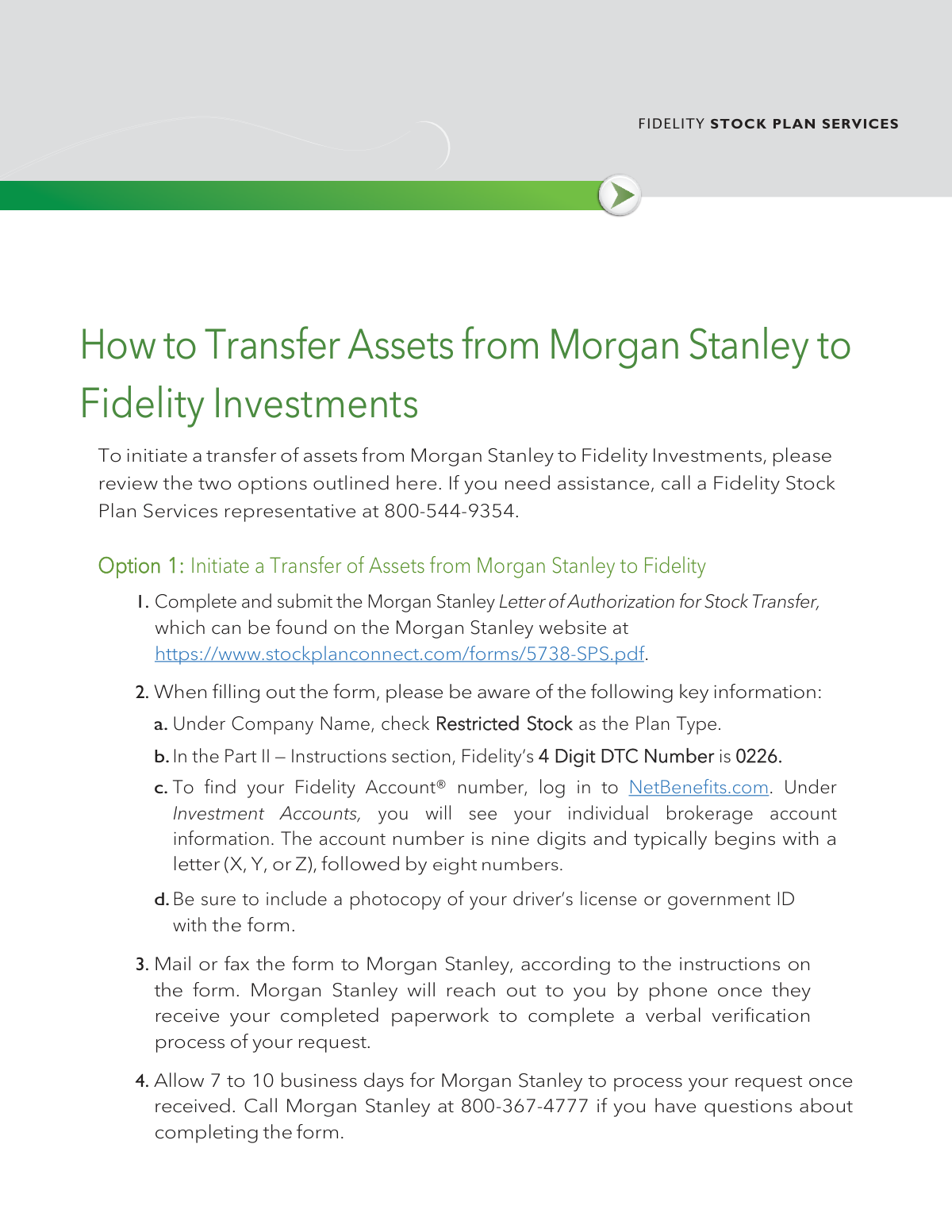
The 'How to Transfer Assets from Morgan Stanley to Fidelity Investments' guide is an official instructional document published by Fidelity Stock Plan Services that outlines two methods for transferring stock plan assets—such as restricted stock awards—from Morgan Stanley Global Stock Plan Services to a Fidelity brokerage account. The guide covers key details including Fidelity's DTC number, account number format, required documentation (such as a government-issued ID), and cost basis considerations for transferred shares. It is an important resource for employees and plan participants who need to consolidate their equity compensation holdings at Fidelity. Today, completing the associated Morgan Stanley Letter of Authorization for Stock Transfer and related forms can be done quickly and accurately using AI-powered services like Instafill.ai, which can also convert non-fillable PDF versions into interactive fillable forms.
Morgan Stanley to Fidelity Asset Transfer Guide is part of the
investment forms, asset transfer forms, investment transfer forms, Fidelity forms, stock transfer forms, transfer forms, J.P. Morgan forms and UK investment forms categories on Instafill.
Rather not fill this in by hand? Instafill is an online form filler that completes PDF forms automatically — upload the blank form, answer a few questions, and the AI fills every field.
Form specifications
| Form name: | How to Transfer Assets from Morgan Stanley to Fidelity Investments (Fidelity Stock Plan Services Guide) |
| Number of pages: | 1 |
| Field instructions: | Morgan Stanley to Fidelity Asset Transfer Guide Instructions |
| Filled form examples: | Morgan Stanley to Fidelity Asset Transfer Guide Examples |
| Language: | English |
Our AI automatically handles information lookup, data retrieval, formatting, and form filling.
It takes less than a minute to fill out Morgan Stanley to Fidelity Asset Transfer Guide using our AI form filling.
Securely upload your data. Information is encrypted in transit and deleted immediately after the form is filled out.
Instafill Demo: How to fill out PDF forms in seconds with AI
How to Fill Out Morgan Stanley to Fidelity Asset Transfer Guide Online for Free in 2026
Are you looking to fill out a MORGAN STANLEY TO FIDELITY ASSET TRANSFER GUIDE form online quickly and accurately? Instafill.ai offers the #1 AI-powered PDF filling software of 2026, allowing you to complete your MORGAN STANLEY TO FIDELITY ASSET TRANSFER GUIDE form in just 37 seconds or less.
Follow these steps to fill out your MORGAN STANLEY TO FIDELITY ASSET TRANSFER GUIDE form online using Instafill.ai:
- 1 Navigate to Instafill.ai and upload the Morgan Stanley Letter of Authorization for Stock Transfer form (available at https://www.stockplanconnect.com/forms/5738-SPS.pdf) or select it from the available form library to begin filling it out online.
- 2 Enter your Company Name and select 'Restricted Stock' as the Plan Type in the appropriate section of the form.
- 3 In the Part II — Instructions section, enter Fidelity's 4-digit DTC Number (0226) and your nine-digit Fidelity Account number, which typically begins with a letter (X, Y, or Z) followed by eight numbers (found by logging into NetBenefits.com).
- 4 Upload or attach a photocopy of your driver's license or government-issued ID as required by the form instructions.
- 5 Review all entered information for accuracy using Instafill.ai's AI-powered validation tools to ensure the form is in good order before submission.
- 6 Download or print the completed form and mail or fax it to Morgan Stanley per the form's instructions, or upload it to Fidelity.com/toa if using Option 2 to initiate the transfer online.
- 7 Monitor the transfer progress—allow 7 to 10 business days for Morgan Stanley to process the request, and 5 to 7 business days for Fidelity to complete the transfer once received in good order.
Our AI-powered system ensures each field is filled out correctly, reducing errors and saving you time.
Why Choose Instafill.ai for Your Fillable Morgan Stanley to Fidelity Asset Transfer Guide Form?
Speed
Complete your Morgan Stanley to Fidelity Asset Transfer Guide in as little as 37 seconds.
Up-to-Date
Always use the latest 2026 Morgan Stanley to Fidelity Asset Transfer Guide form version.
Cost-effective
No need to hire expensive lawyers.
Accuracy
Our AI performs 10 compliance checks to ensure your form is error-free.
Security
Your personal information is protected with bank-level encryption.
Frequently Asked Questions About Morgan Stanley to Fidelity Asset Transfer Guide
This guide is for individuals who want to transfer stock plan assets (such as restricted stock) from Morgan Stanley to a Fidelity Investments brokerage account. It is specifically relevant to participants in employer equity compensation plans who hold shares at Morgan Stanley Global Stock Plan Services.
Option 1 involves completing the Morgan Stanley Letter of Authorization for Stock Transfer and mailing or faxing it directly to Morgan Stanley. Option 2 allows you to initiate the transfer online through Fidelity's website at Fidelity.com/toa, where you will also be prompted to upload the same Morgan Stanley form.
The Morgan Stanley Letter of Authorization for Stock Transfer form can be found on the Morgan Stanley website at https://www.stockplanconnect.com/forms/5738-SPS.pdf. You will need to complete and submit this form regardless of which transfer option you choose.
Fidelity's 4-digit DTC number is 0226. You will need to enter this number in the Part II — Instructions section of the Morgan Stanley Letter of Authorization for Stock Transfer form.
Log in to NetBenefits.com and navigate to Investment Accounts, where you will see your individual brokerage account information. Your Fidelity account number is nine digits and typically begins with a letter (X, Y, or Z) followed by eight numbers.
You must include a photocopy of your driver's license or a government-issued ID along with the completed Morgan Stanley Letter of Authorization for Stock Transfer form. Failing to include these documents will result in your request not being considered 'in good order,' which will delay processing.
Under the Company Name section of the Morgan Stanley Letter of Authorization form, you should check Restricted Stock as the Plan Type. This is a key detail to ensure your transfer is processed correctly.
Once Morgan Stanley receives your completed paperwork, they will take 7 to 10 business days to process your request. After Fidelity receives the transfer and confirms it is in good order, the transfer of assets should take an additional five to seven business days to complete.
After Morgan Stanley receives your completed paperwork, they will contact you by phone to complete a verbal verification process to confirm your transfer request. Make sure your contact information is accurate on the form so they can reach you.
During the online transfer process at Fidelity.com/toa, when asked 'Transfer All Account Assets,' select No. You will then need to provide specific details about the assets you want to transfer, including the Security Type, Position, Symbol, Fund Name, CUSIP, and Quantity.
Morgan Stanley's Stock Plan Services mailing address is: Morgan Stanley, Global Stock Plan Services, PO Box 182616, Columbus, OH 43218-2616. Their Contact Center phone number is 1-800-367-4777.
When you transfer shares purchased before January 1, 2011, the original cost basis information will not be included in the transfer. You can learn how to update your cost basis on transferred shares by visiting the 'How to Change Your Cost Basis Information' page on Fidelity's website.
Yes, AI-powered services like Instafill.ai can help you accurately auto-fill form fields, saving you time and reducing the risk of errors. If the Morgan Stanley PDF is a flat, non-fillable form, Instafill.ai can also convert it into an interactive fillable form so you can complete it digitally.
Simply upload the Morgan Stanley Letter of Authorization for Stock Transfer PDF to Instafill.ai, and the AI will guide you through filling in all required fields — including your Fidelity DTC number, account number, and plan type — quickly and accurately. Once completed, you can download and submit the form as instructed.
For questions about completing the Morgan Stanley form, call Morgan Stanley at 800-367-4777. For assistance with the Fidelity side of the transfer or your Fidelity account, call a Fidelity Stock Plan Services representative at 800-544-9354.
Compliance Morgan Stanley to Fidelity Asset Transfer Guide
Validation Checks by Instafill.ai
1
Fidelity Account Number Format Validation
Validates that the Fidelity Account number entered is exactly nine characters long and begins with a letter X, Y, or Z followed by eight numeric digits. This format is a specific requirement for Fidelity Stock Plan Services individual brokerage accounts. If the account number does not match this pattern, the transfer request will be rejected or routed to the wrong account, causing significant delays.
2
Fidelity DTC Number Accuracy Check
Verifies that the 4-digit DTC number entered in the Part II — Instructions section is exactly '0226', which is Fidelity's designated DTC number. An incorrect DTC number will cause the transfer to be directed to the wrong financial institution, potentially resulting in lost assets or failed transactions. This field should be validated against the known correct value and flagged if any other number is entered.
3
Plan Type Selection Validation
Confirms that 'Restricted Stock' is selected as the Plan Type under the Company Name section of the Morgan Stanley Letter of Authorization form. Selecting an incorrect plan type will result in the form being out of good order and rejected by Morgan Stanley or Fidelity. This is a required checkbox that must be explicitly verified before submission.
4
Government-Issued Photo ID Attachment Check
Validates that a photocopy of a driver's license or government-issued ID has been attached to the form submission. This document is a mandatory requirement for both Option 1 (mail/fax) and Option 2 (online submission), and its absence will render the request 'Not In Good Order.' Without this document, the transfer process cannot proceed and will be returned to the submitter for correction.
5
Morgan Stanley Letter of Authorization Upload Verification
Ensures that the completed Morgan Stanley Letter of Authorization for Stock Transfer form has been uploaded or included with the submission. For Option 2, this document must be uploaded in the step that prompts for an account statement, and failure to include it will result in the request being flagged as Not In Good Order. The form must originate from the official Morgan Stanley URL (https://www.stockplanconnect.com/forms/5738-SPS.pdf) to be considered valid.
6
Morgan Stanley Account Number Presence Check
Validates that the Morgan Stanley Account Number field has been populated and is not left blank during the transfer initiation process. This number is required to identify the source account from which assets will be transferred. An empty or incorrectly formatted account number will prevent Morgan Stanley from locating the account and processing the transfer request.
7
Firm Name Accuracy Validation for Option 2
Checks that the Firm Name field entered on Fidelity.com/toa is exactly 'Morgan Stanley Global Stock Plan Services' and not a variation or abbreviation. An incorrect firm name may result in the transfer being routed to the wrong institution or failing to match Morgan Stanley's records. This field should be validated against the exact required string to ensure accuracy.
8
Transfer All Assets Selection Completeness Check
Validates that when 'No' is selected for 'Transfer All Account Assets,' all required supplementary fields — Security Type, Position, Symbol, Fund Name, CUSIP, and Quantity — are fully completed. Leaving any of these fields blank when a partial transfer is requested will result in an incomplete or rejected submission. Each sub-field must be individually checked for presence and appropriate format when a partial transfer is indicated.
9
Morgan Stanley Mailing Address Accuracy Check
Verifies that the Morgan Stanley Stock Plan Services address entered during Option 2 matches the required address: 'Morgan Stanley, Global Stock Plan Services, PO Box 182616, Columbus, OH 43218-2616.' An incorrect mailing address could result in correspondence or forms being sent to the wrong location, delaying or invalidating the transfer. This field should be validated against the known correct address string.
10
Morgan Stanley Contact Phone Number Format Validation
Confirms that the Morgan Stanley Contact Center phone number entered is '1-800-367-4777' and follows a valid U.S. phone number format. An incorrect phone number could prevent Fidelity or the submitter from reaching Morgan Stanley for verbal verification or follow-up inquiries. The field should be validated for both format (10 digits with proper formatting) and accuracy against the known correct number.
11
Account Type Selection Validation
Ensures that an Account Type has been selected during the transfer initiation process, with 'Brokerage - Individual' being the recommended option for stock plan award transfers. Selecting an incompatible account type may cause the transferred assets to be placed in an account that does not support stock plan holdings. If no account type is selected, the form should be flagged as incomplete before submission.
12
Destination Brokerage Account Selection Check
Validates that a specific individual brokerage account has been selected as the destination for the transferred assets in the 'Choose Your Account' step. Failing to select a destination account will result in the transfer having no valid settlement location, causing the request to fail. The selected account must be an individual brokerage account associated with the user's stock plan awards.
13
Cost Basis Awareness Acknowledgment for Pre-2011 Shares
Checks whether the shares being transferred were purchased before January 1, 2011, which would mean their original cost basis will not be included in the transfer. If such shares are identified, the submitter should be prompted to review the cost basis update process on Fidelity's website to avoid tax reporting complications. Failure to address missing cost basis information can lead to inaccurate tax reporting on future sales of the transferred shares.
14
Submission Completeness Review Before Final Submit
Validates that all required fields and attachments have been reviewed and confirmed before the final 'Submit' action is taken on Fidelity's platform. This includes verifying that the Morgan Stanley Letter of Authorization and driver's license copy have been uploaded on the prior screen, as these cannot be added after submission. Submitting without these documents will result in the request being classified as Not In Good Order, requiring resubmission and restarting the processing timeline.
15
Processing Timeline Expectation Consistency Check
Ensures that the expected processing timelines are clearly communicated and consistent across the submission: Morgan Stanley requires 7–10 business days to process the request after receipt, while Fidelity requires 5–7 business days once the form is received in good order. Any discrepancy in communicated timelines within the form or system should be flagged to avoid user confusion. Misaligned timeline expectations can lead to premature follow-up calls or duplicate submissions.
16
CUSIP Format Validation for Partial Transfers
When a partial transfer is selected and a CUSIP number is required, validates that the entered CUSIP is exactly nine characters long and follows the standard alphanumeric CUSIP format used to identify securities. An invalid or malformed CUSIP will prevent the correct security from being identified and transferred, potentially resulting in the wrong assets being moved or the request being rejected. This field is only required when 'No' is selected for transferring all account assets.
Common Mistakes in Completing Morgan Stanley to Fidelity Asset Transfer Guide
Many people leave the DTC number blank or enter an incorrect number because they are unfamiliar with what a DTC number is or where to find it. The correct 4-digit DTC number for Fidelity is 0226, which must be entered in the Part II — Instructions section of the Morgan Stanley Letter of Authorization for Stock Transfer. Entering the wrong number will cause the transfer to fail or be rejected. Always double-check that you have entered 0226 exactly as specified before submitting the form.
A common error is leaving the Plan Type unchecked or selecting the wrong option, such as Stock Options or ESPP, instead of Restricted Stock. This happens because participants may have multiple plan types and are unsure which applies to this transfer. Selecting the wrong plan type can result in the form being rejected or the wrong assets being transferred. Always check 'Restricted Stock' as the Plan Type under Company Name as explicitly instructed in the form.
People frequently enter an incorrect account number because they confuse their NetBenefits login ID, employee ID, or other account numbers with their actual Fidelity brokerage account number. The correct account number is exactly nine digits, typically beginning with the letter X, Y, or Z followed by eight numbers. An incorrect account number will cause the transfer to be misrouted or rejected. Log in to NetBenefits.com and navigate to Investment Accounts to locate the correct individual brokerage account number before filling out the form.
Many applicants submit the transfer form without attaching a photocopy of their driver's license or government ID, which is a required document for both Option 1 and Option 2. This oversight often happens because people focus on the financial details and overlook the identity verification requirement. Omitting the ID will result in the request being deemed 'Not in Good Order,' causing significant delays. Always attach a clear, legible photocopy of your driver's license or government-issued ID every time you submit the form, regardless of which option you choose.
When using Option 2 at Fidelity.com/toa, users often type 'Morgan Stanley' or 'Morgan Stanley Smith Barney' instead of the exact required name 'Morgan Stanley Global Stock Plan Services.' An incorrect firm name can cause the system to pull up the wrong account type or fail to locate the correct institution, stalling the transfer process. Always enter the firm name exactly as specified: 'Morgan Stanley Global Stock Plan Services,' to ensure the transfer is routed correctly.
During the online transfer process at Fidelity.com/toa, users are prompted to upload a copy of an account statement, and many mistakenly upload a Morgan Stanley brokerage statement instead of the required Morgan Stanley Letter of Authorization for Stock Transfer form. The Letter of Authorization is a specific form found at https://www.stockplanconnect.com/forms/5738-SPS.pdf and is mandatory for the transfer to be processed. Uploading the wrong document will result in the request being 'Not in Good Order.' Ensure you download, complete, and upload the correct Letter of Authorization form along with your driver's license copy.
After mailing or faxing the form under Option 1, Morgan Stanley will contact the applicant by phone to complete a verbal verification of the transfer request. Many people miss this call or are unaware it is required, causing the transfer process to stall indefinitely. If Morgan Stanley cannot reach you, your request will not be processed. Ensure your contact information is current and watch for calls from Morgan Stanley (800-367-4777) after submitting your paperwork so you can complete the required verbal verification promptly.
Applicants often become concerned and contact support prematurely because they confuse the two different processing timelines: Morgan Stanley requires 7 to 10 business days to process the request after receipt, while Fidelity takes an additional 5 to 7 business days to complete the transfer once it receives the assets. Contacting either institution before these windows have passed can create unnecessary confusion. Plan for a total of up to 17 business days from submission to completion, and only follow up if the transfer has not appeared after that full period.
When using Option 2 and prompted to select an Account Type, users sometimes choose 'Retirement' or 'Joint' accounts instead of the recommended 'Brokerage - Individual' account. Choosing the wrong account type can result in the assets being transferred to an incompatible account, potentially triggering tax consequences or requiring the transfer to be reversed. Fidelity explicitly recommends selecting 'Brokerage - Individual,' and you should confirm this matches the individual brokerage account holding your stock plan awards before proceeding.
When selecting 'No' for Transfer All Account Assets in Option 2, users must provide the Security Type, Position, Symbol, Fund Name, CUSIP, and Quantity for each specific asset they wish to transfer. Many people leave one or more of these fields blank or enter approximate quantities, which causes the transfer request to be rejected or processed incorrectly. Gather all required security details from your Morgan Stanley account statement before initiating the transfer to ensure every field is completed accurately. AI-powered form filling tools like Instafill.ai can help validate that all required fields are populated before submission.
In Option 2, users are required to manually enter Morgan Stanley's Stock Plan Services address and phone number, and errors such as wrong ZIP codes or transposed digits are common. The correct address is: Morgan Stanley, Global Stock Plan Services, PO Box 182616, Columbus, OH 43218-2616, and the phone number is 1-800-367-4777. An incorrect address or phone number can cause the transfer request to be undeliverable or unverifiable. Copy the address and phone number directly from the instructions rather than typing from memory to avoid transcription errors.
Many users complete the transfer successfully but fail to update the cost basis information for shares purchased before January 1, 2011, which will not automatically carry over to Fidelity. Without accurate cost basis data, users may face incorrect tax calculations when they eventually sell the transferred shares, potentially resulting in overpayment of taxes. After the transfer is complete, visit Fidelity's 'How to Change Your Cost Basis Information' resource to manually update the cost basis for any applicable shares and ensure accurate tax reporting.
Saved over 80 hours a year
“I was never sure if my IRS forms like W-9 were filled correctly. Now, I can complete the forms accurately without any external help.”
Kevin Martin Green
Your data stays secure with advanced protection from Instafill and our subprocessors




Robust compliance program
Transparent business model
You’re not the product. You always know where your data is and what it is processed for.
ISO 27001, HIPAA, and GDPR
Our subprocesses adhere to multiple compliance standards, including but not limited to ISO 27001, HIPAA, and GDPR.
Security & privacy by design
We consider security and privacy from the initial design phase of any new service or functionality. It’s not an afterthought, it’s built-in, including support for two-factor authentication (2FA) to further protect your account.
Fill out Morgan Stanley to Fidelity Asset Transfer Guide with Instafill.ai
Worried about filling PDFs wrong? Instafill securely fills how-to-transfer-assets-from-morgan-stanley-to-fidelity-investments-fidelity-stock-plan-services-guide forms, ensuring each field is accurate.
