
Yes! You can use AI to fill out IRA/HSA Beneficiary Designation
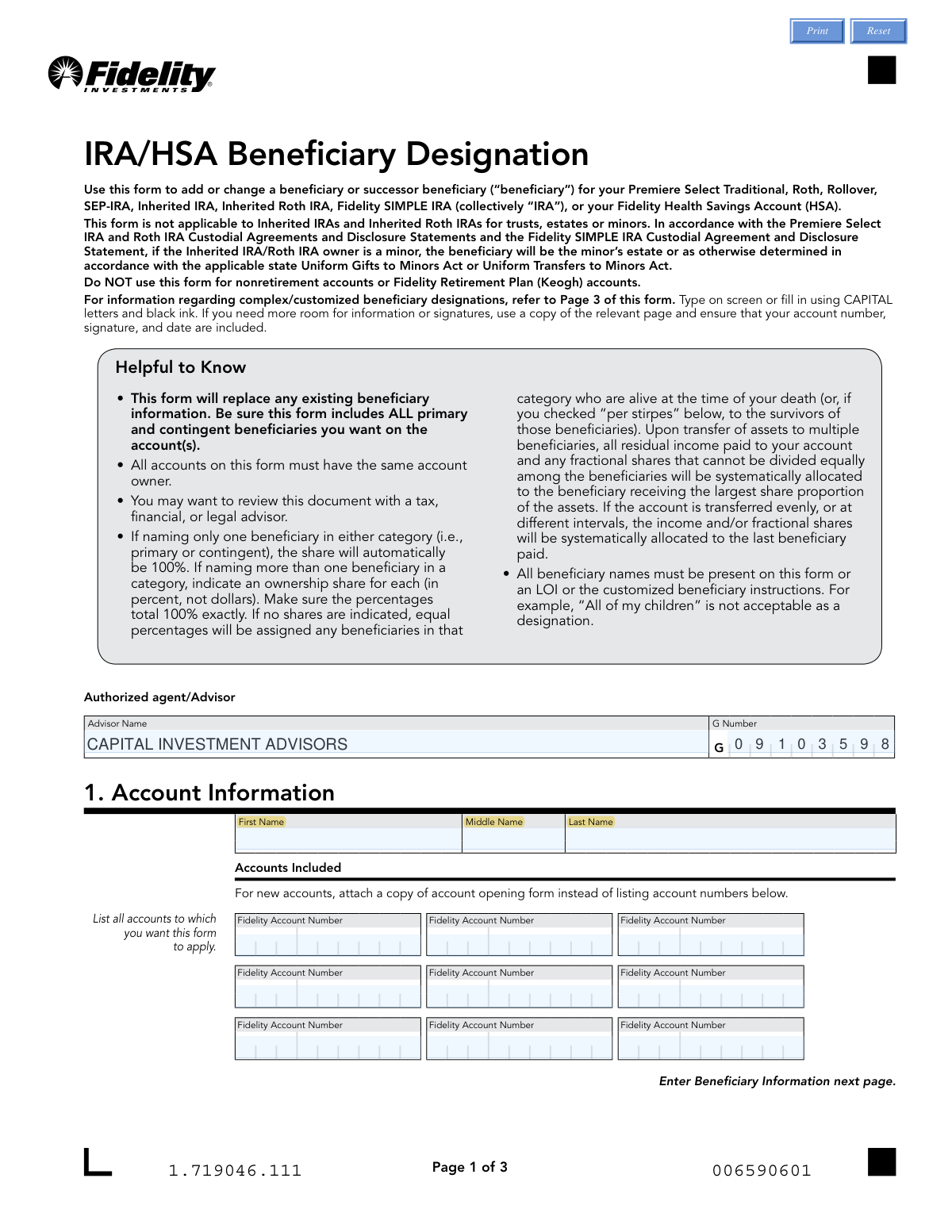
Don't type 107 fields by hand. Tell our AI about yourself, or upload a document you already have, and it fills every field in seconds. You check it, then download, print or sign.
The AI does the filling. You just check it.
No typing into boxes, nothing to install.
What this form asks for
The AI fills all of it, from your answers or your documents.
The AI checks your answers before you download
14 checks built for this form, so a wrong date or a missing answer is caught before anyone else sees it.
This validation checks that the sum of all share percentages entered for primary beneficiaries equals exactly 100%. This is critical for ensuring the account owner's assets are fully and correctly allocated upon their death. If the total is not 100%, the form is considered incomplete and cannot be processed, leading to rejection and requiring the user to correct the allocation.
This validation verifies that the sum of all share percentages for contingent beneficiaries adds up to exactly 100%. Correct allocation is necessary to define how assets are distributed if no primary beneficiaries survive the account owner. A failure to total 100% will result in form rejection, as it creates ambiguity in the distribution instructions.
This check confirms that the account owner's printed name, signature, and the date of signature are all provided in Section 3. These elements are legally required to execute the beneficiary designation and make the document valid. A missing signature or date will render the entire form invalid and it will be rejected without processing.
This validation ensures that the account owner's first and last names are filled out in the 'Account Information' section. This information is essential for correctly identifying the owner and linking the beneficiary designation to the right person's accounts. If the name is missing, the form cannot be associated with an owner and will be rejected.
This check ensures that at least one Fidelity Account Number is listed in Section 1. This is necessary to apply the beneficiary designations to the correct financial account(s). Without an account number, the instructions are orphaned and cannot be acted upon, causing the form to be rejected.
For every listed beneficiary, this check verifies that exactly one type (Spouse, Non-Spouse, Trust, or Entity) has been selected. This classification is crucial for legal and tax purposes, determining how assets are transferred and what rules apply. If no type or multiple types are selected for a single beneficiary, the entry is ambiguous and will cause the form to fail validation.
And 8 more checks
- Validates the Format of Beneficiary SSN or TIN
- Validates Beneficiary Date of Birth or Trust Date Format and Plausibility
- Prevents Listing the Same Beneficiary as Both Primary and Contingent
- Ensures All Required Fields are Filled for Each Listed Beneficiary
- Verifies the Signature Date is Valid and Not in the Future
- Confirms at Least One Primary Beneficiary is Designated
- Ensures Beneficiary Names are Specific and Not General Categories
- Validates 'Per Stirpes' Election is for an Individual Beneficiary
Let AI fill out your IRA/HSA Beneficiary Designation
No typing. Every field filled in seconds, checked, ready to sign.
How to Fill Out IRA/HSA Beneficiary Designation Online for Free in 2026
What the AI walks you through.
- Navigate to Instafill.ai and upload or select the IRA/HSA Beneficiary Designation form.
- Provide your personal account information, including your full name and the specific Fidelity account numbers to which this designation will apply.
- Enter the required details for each primary beneficiary, including their name, relationship, SSN or TIN, date of birth, and the percentage share they will receive. Ensure the total percentage equals 100%.
- Input the information for any contingent beneficiaries, who will inherit if all primary beneficiaries predecease you. Again, ensure their share percentages total 100%.
- Indicate if the 'Per Stirpes' option applies to any beneficiary, which directs their share to their descendants if they are deceased.
- Carefully review all entered information for accuracy, paying close attention to names, identification numbers, and percentage allocations.
- Electronically sign and date the form in the designated section to certify your designations before downloading for submission.
Common Mistakes in Completing IRA/HSA Beneficiary Designation
The ones the AI is built to catch.
Beneficiary Share Percentages Don't Total 100%
Forgetting to List All Existing Beneficiaries on an Update
Omitting Beneficiary's SSN/TIN or Date of Birth
Forgetting to Sign and Date the Form
Misunderstanding the 'Per Stirpes' Election
Failing to List All Applicable Account Numbers
Naming the Same Person as Both Primary and Contingent
Using Vague or General Beneficiary Descriptions
Forgetting to Select the Beneficiary Type
Submitting an Illegible or Improperly Filled Form
Frequently Asked Questions About IRA/HSA Beneficiary Designation
Is it really free for 7 days?
Can I fill other forms too?
How do I cancel?
How does the AI fill out IRA/HSA Beneficiary Designation?
What happens to my information?
How complex is IRA/HSA Beneficiary Designation to fill out?
What is the purpose of the IRA/HSA Beneficiary Designation form?
Which accounts can I use this form for?
I only want to add one new beneficiary. Do I need to list my existing ones again?
What is the difference between a primary and a contingent beneficiary?
What happens if I don't assign percentages to my beneficiaries?
What does checking the 'Per Stirpes' box mean?
What information do I need to provide for each beneficiary?
Can I just write 'all my children' as beneficiaries?
What should I do if I have more beneficiaries than there are spaces on the form?
My beneficiary plan is complex. How do I handle that?
What happens if I don't name any beneficiaries?
When do my new beneficiary designations take effect?
Can AI tools help me fill out this form?
How can I fill this form out online using Instafill.ai?
The PDF form I have is not fillable on my computer. What can I do?
Get your IRA/HSA Beneficiary Designation filled out by AI
$0 today. Cancel before Oct 31 and you pay nothing.
Other forms like this one
beneficiary forms: Form I-130A, Supplemental Info for Spouse Beneficiary, Affidavit and Representations Regarding Next of Kin (Preference Beneficiary Affidavit) (The Hartford) – Form LC-7086-17, VA Form 21-0788, Information Regarding Apportionment of Beneficiary's Award, California Schedule K-1 (541) (2025), Beneficiary’s Share of Income, Deductions, Credits, etc., Form I-130A, Supplemental Information for Spouse Beneficiary, Fidelity Investments® Beneficiary Distribution Form, Fidelity Investments 403(b) Beneficiary Designation, Fidelity Advisor IRA Beneficiary Designation, Fidelity Investments Qualified Plan Beneficiary Designation, Fidelity Investments 403(b)/401(a) Beneficiary Designation, The Church of the Nazarene 403(b) Retirement Savings Plan Beneficiary Designation Form, Fidelity Investments Qualified Plan Beneficiary Designation, Fidelity IRA Beneficiary Distribution — Charity, Foundation, or a University, Designated Beneficiary Plan Agreement, Designated Beneficiary Plan Agreement, Beneficiary Designation Form For IRA and 403(b)(7) Accounts, Designated Beneficiary Plan Agreement, IRA Beneficiary Designation Form, Stock Power Form For transferring shares, changing names, or adding a beneficiary, Distribution Due to Death for Spouse Beneficiary - Elevator Constructors Union Local No. 1 Annuity and 401(k) Fund
IRA forms: Form 5498, IRA Contribution Information, SIRA Allied health treatment request (Catalogue no. SIRA09191), Transfer Due to Divorce — IRA/HSA/529, One-Time Withdrawal – IRA, Fidelity Investments, Fidelity Advisor IRA Distribution Request for Automatic Rollover Accounts, Fidelity Beneficiaries — IRA /HSA, Fidelity Advisor IRA Beneficiary Designation, Fidelity IRA Beneficiary Distribution — Charity, Foundation, or a University, Form 8606, Nondeductible IRAs, Fidelity Investments Earnings Automatic Withdrawal Plan — IRA, Inherited IRA Application for Individual Beneficiaries, SIMPLE IRA Contribution Transmittal Form, IRA Distribution Form, Open a Schwab IRA, New York State Deferred Compensation Plan Direct Rollover to a Roth IRA, Charles Schwab IRA Distribution Form, Sample IRA Distribution Letter for a Qualified Charitable Distribution (QCD), Beneficiary Designation Form For IRA and 403(b)(7) Accounts, IRA Beneficiary Designation Form, Schwab IRA Account Application
beneficiary designation forms: Beneficiary Designation for Seafarers International Union AGLIW 401(k) Plan, Fidelity Investments 403(b) Beneficiary Designation, Fidelity Advisor IRA Beneficiary Designation, Fidelity Investments Qualified Plan Beneficiary Designation, Fidelity Investments 403(b)/401(a) Beneficiary Designation, The Church of the Nazarene 403(b) Retirement Savings Plan Beneficiary Designation Form, Fidelity Investments Qualified Plan Beneficiary Designation, Beneficiary Designation Form For IRA and 403(b)(7) Accounts, IRA Beneficiary Designation Form, Vanguard Retirement Plan Beneficiary Designation - Phillips 66 Savings Plan, Empower Beneficiary Designation Governmental 457(b) Plan, Beneficiary Designation 401(a) Plan, Form RS115, Beneficiary Designation, Beneficiary Designation 401(k) Plan, Empower Beneficiary Designation Form for WoodmenLife 401(k) Plan, Empower SRIP II Beneficiary Designation Form, Beneficiary Designation/Change - Principal Life Insurance Company, UTMA Beneficiary Designation (Uniform Transfers to Minor Act), Principal Retirement Plan Beneficiary Designation, Principal Financial Group Beneficiary Designation Form
HSA forms: Form 1099-SA, Distributions from HSA/MSA, Transfer Due to Divorce — IRA/HSA/529, Group Transfer Form Fidelity Health Savings Account (HSA), Fidelity Beneficiaries — IRA /HSA, HSA Bank Investment Account Transfer Form, Schwab Health Savings Brokerage Account (HSBA) to HSA Invest Choice Account Transfer Form, Health Savings Account (HSA) Transfer Request, Form 8889, Health Savings Accounts (HSAs), Form 1099-SA, Distributions From an HSA, Archer MSA, or Medicare Advantage MSA, Form 8889, Health Savings Accounts
IRA beneficiary forms: IRA/IRRA®/ROTH IRA/SEP/SRA Beneficiary Distribution Form, Fidelity Advisor IRA Beneficiary Designation, Fidelity IRA Beneficiary Distribution — Charity, Foundation, or a University, Beneficiary Designation Form For IRA and 403(b)(7) Accounts, IRA Beneficiary Designation Form, IRA Distribution to Charitable Beneficiary, IRA Distribution to Charitable Beneficiary, TIAA Trust, N.A. IRA Beneficiary Designation, Pershing LLC IRA Designation of Beneficiary
Let AI fill out your IRA/HSA Beneficiary Designation
Your trial starts once a card is added. You pay nothing before Oct 31.
Our AI already knows this form, all 107 fields of it. Skip the typing: tell it about yourself, or upload what you have, and it fills the whole form in seconds.
- AI fills every field on all 3 pages, checkboxes included
- No typing into boxes: answer a few questions, or upload a document you already have, an old copy of this form, a photo of a document
- The AI checks the answers; you review and change anything before you download
- Download the finished PDF, print it, or sign it online
- Encrypted, and never used to train AI
Cancel before Oct 31 and you pay nothing.
A card is needed to start the trial. Cancel in two clicks from your account.
Terms · Privacy