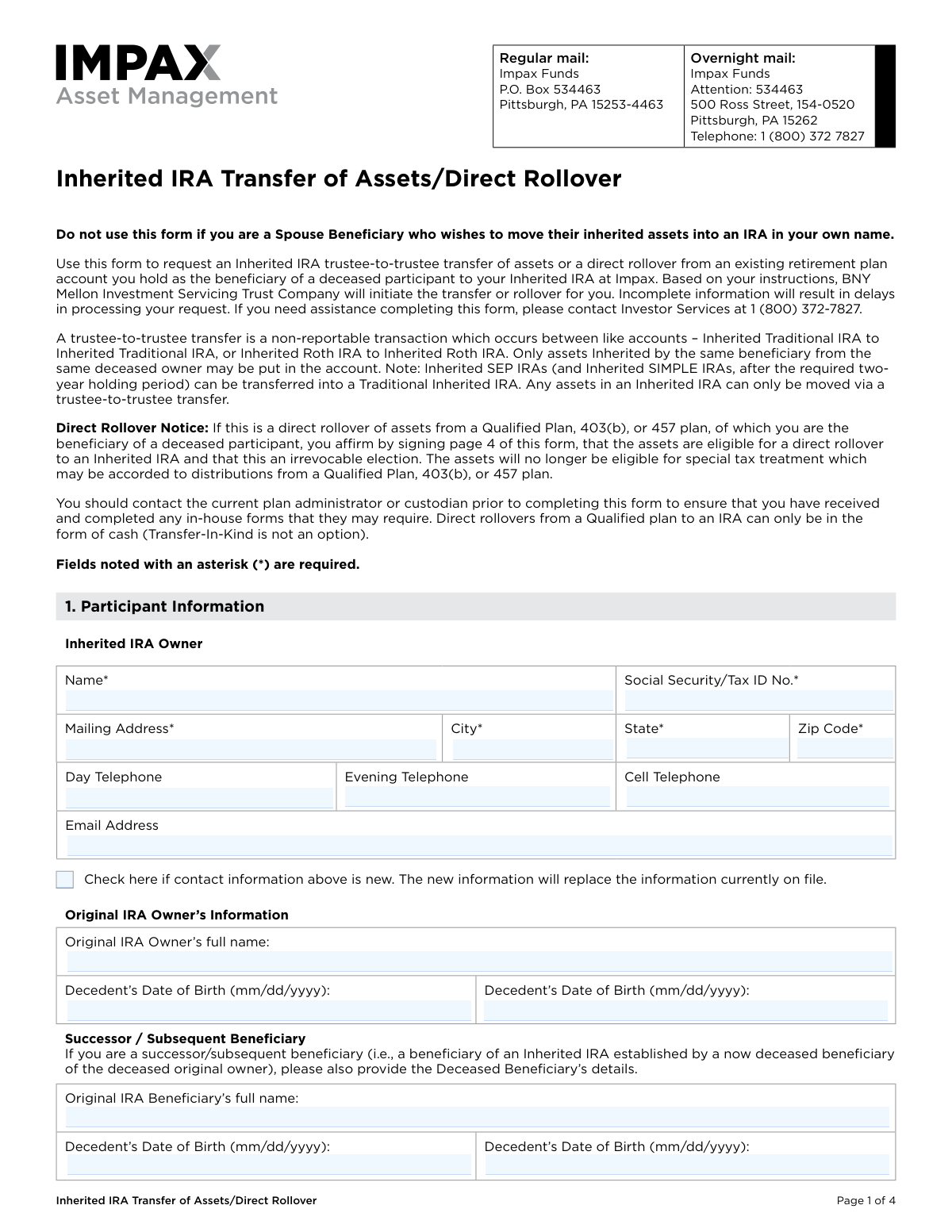
Yes! You can use AI to fill out Inherited IRA Transfer of Assets/Direct Rollover
This form facilitates the movement of assets from a retirement account you hold as a beneficiary of a deceased participant to your Inherited IRA at Impax. It is essential for beneficiaries to properly manage and transfer inherited retirement funds according to legal and financial regulations. Today, this form can be filled out quickly and accurately using AI-powered services like Instafill.ai, which can also convert non-fillable PDF versions into interactive fillable forms.
Our AI automatically handles information lookup, data retrieval, formatting, and form filling.
It takes less than a minute to fill out IMPAX-INH-TOA using our AI form filling.
Securely upload your data. Information is encrypted in transit and deleted immediately after the form is filled out.
Form specifications
| Form name: | Inherited IRA Transfer of Assets/Direct Rollover |
| Number of pages: | 1 |
| Language: | English |
| Categories: | rollover forms, asset transfer forms, IRA forms, transfer forms |
Instafill Demo: How to fill out PDF forms in seconds with AI
How to Fill Out IMPAX-INH-TOA Online for Free in 2026
Are you looking to fill out a IMPAX-INH-TOA form online quickly and accurately? Instafill.ai offers the #1 AI-powered PDF filling software of 2026, allowing you to complete your IMPAX-INH-TOA form in just 37 seconds or less.
Follow these steps to fill out your IMPAX-INH-TOA form online using Instafill.ai:
- 1 Navigate to Instafill.ai and upload the Inherited IRA Transfer of Assets/Direct Rollover form or select it from their template library.
- 2 Provide your personal information as the Inherited IRA Owner in Section 1, along with the required details of the original deceased IRA owner.
- 3 In Section 2, specify your investment instructions, indicating whether you are opening a new account or depositing into an existing one, and select the funds for investment.
- 4 Complete Section 3 with information about the current custodian and the account you are transferring from, including account numbers and transfer instructions (e.g., liquidate or transfer in-kind).
- 5 Carefully read and complete the Participant Authorization in Section 4, providing your signature and obtaining a Medallion Signature Guarantee if required by your current custodian.
- 6 Review all the information you've entered with the AI assistant to ensure accuracy and completeness before downloading, printing, and submitting the form as instructed.
Our AI-powered system ensures each field is filled out correctly, reducing errors and saving you time.
Why Choose Instafill.ai for Your Fillable IMPAX-INH-TOA Form?
Speed
Complete your IMPAX-INH-TOA in as little as 37 seconds.
Up-to-Date
Always use the latest 2026 IMPAX-INH-TOA form version.
Cost-effective
No need to hire expensive lawyers.
Accuracy
Our AI performs 10 compliance checks to ensure your form is error-free.
Security
Your personal information is protected with bank-level encryption.
Frequently Asked Questions About Form IMPAX-INH-TOA
This form is used to request a trustee-to-trustee transfer or a direct rollover of assets from a retirement plan you inherited into an Inherited IRA at Impax Funds.
Spouse beneficiaries who wish to move their inherited assets into an IRA in their own name should not use this form; a different form is required for that transaction.
A trustee-to-trustee transfer moves assets between similar inherited IRAs (e.g., Inherited Roth to Inherited Roth). A direct rollover moves assets from a different type of plan, like a 401(k) or 403(b), into an Inherited IRA.
If you do not have an existing Inherited IRA with Impax, you must complete and attach the Impax Inherited IRA application along with this form.
You should attach a copy of your most recent account statement from your current custodian. If you are opening a new account, you must also attach the Inherited IRA application.
You must provide the full name and date of birth of the deceased original IRA owner in Section 1 of the form.
It is a special signature verification from a financial institution to guarantee its authenticity. Your current custodian may require one to process your transfer request, so you should contact them to confirm.
Send the form via regular mail to Impax Funds, P.O. Box 534463, Pittsburgh, PA 15253-4463, or via overnight mail to their Ross Street address in Pittsburgh.
You can request a 'Transfer In-Kind' for IRA transfers, but direct rollovers from a Qualified Plan to an IRA can only be made in cash.
You should first contact your current plan administrator to ensure you have completed any in-house forms they may require for the distribution.
This information is needed to correctly manage any Required Minimum Distribution (RMD) payments that have been established for the Inherited IRA.
Yes, services like Instafill.ai use AI to accurately auto-fill form fields from your saved profile, which can save you time and help prevent errors.
You can use a service like Instafill.ai to upload the PDF. It will make the form interactive so you can easily type in your information, sign electronically, and download the completed document.
If your PDF is not fillable, you can use a tool like Instafill.ai. It can convert flat, non-interactive PDFs into fillable forms that you can complete on your computer.
Compliance IMPAX-INH-TOA
Validation Checks by Instafill.ai
1
Validates Social Security Number Format
Checks that the Social Security/Tax ID number in Section 1 is provided and follows the standard 9-digit format of XXX-XX-XXXX or XX-XXXXXXX. This is critical for tax reporting and correctly identifying the account owner. A failure to provide a valid number will prevent account setup and cause processing to halt until corrected.
2
Ensures Decedent's Dates are Logically Sound
This validation confirms that the Original IRA Owner's Date of Death is after their Date of Birth, and that both dates are in the past. This check prevents data entry errors that would make the form logically invalid and impossible to process for an inheritance case. An illogical date would require manual correction and cause significant delays.
3
Verifies Mutually Exclusive Investment Destination
In Section 2.A, this check ensures the user selects either 'opening a new Inherited IRA' or 'Deposit into my existing Inherited IRA Account,' but not both. If the 'existing account' option is chosen, it also validates that an account number has been provided. This prevents ambiguity and ensures the funds are directed to the correct destination.
4
Confirms Investment Allocation Totals 100%
This validation applies if the user allocates funds by percentage in Section 2.C. It calculates the sum of all entered percentages and ensures the total is exactly 100%. This is crucial for ensuring the entire transferred amount is invested according to the client's wishes, preventing unallocated funds or over-allocation errors.
5
Cross-Checks Account Type Compatibility for Transfer
This check compares the 'Type of Account Transferring Into' (Section 2.B) with the 'Type of account you are transferring/rolling over from' (Section 3.A). It enforces rules for like-to-like transfers (e.g., Inherited Roth to Inherited Roth) as noted on the form. An incompatibility would result in a rejected transaction and potential tax consequences, so this validation is critical for compliance.
6
Validates Completeness of Current Custodian Information
This check verifies that all required fields in Section 3.B, including the custodian's name, full address, and telephone number, are completed. This information is essential for the new custodian to contact the current custodian and initiate the asset transfer. Missing information will directly lead to processing delays as the request cannot be sent out.
7
Ensures Transfer Instruction is Complete
For each investment listed for transfer in Section 3.C, this validation ensures an account number is provided and one transfer method (e.g., Liquidate Entire Account, Partial Dollar Amount) is selected. This prevents ambiguity in the transfer instructions sent to the current custodian. Incomplete instructions would cause the request to be rejected or delayed until clarification is received.
8
Requires Value for Partial Transfer Selections
If the user selects 'Partial Dollar Amount' or 'Partial Number of Shares' in Section 3.C, this check confirms that a corresponding positive numeric value has been entered in the adjacent field. Without a specified amount, the instruction is incomplete and cannot be acted upon by the current custodian. This validation ensures the transfer request is actionable and precise.
9
Validates CD Maturity Date Constraints
When a user opts to transfer a Certificate of Deposit 'At Maturity' in Section 3.C, this validation checks that the provided date is a valid future date. It also enforces the rule stated on the form that the date cannot be more than 60 days from the current date. This prevents stale requests and ensures compliance with the custodian's processing timeline for maturing assets.
10
Mandates Participant Signature and Date
This check confirms that the 'Participant’s Signature' and 'Date' fields in Section 4 are both completed. The signature provides legal authorization for the transaction, and the date establishes when the authorization was given. Without a signature and date, the form is not legally binding and the transfer request will be rejected.
11
Restricts Qualified Plan Rollover to Cash Only
This is a logical consistency check between Section 2.D and Section 3.C. If the user selects 'Direct Rollover of Inherited Qualified Plan assets,' this validation ensures that 'Transfer In-Kind' is not selected as the transfer method. The form explicitly states these rollovers can only be in cash, so this check prevents an invalid request from being submitted.
12
Verifies Required Information for Successor Beneficiary
This check is triggered if the 'Successor / Subsequent Beneficiary' section is filled out. It ensures that the deceased original beneficiary's full name, date of birth, and date of death are all provided. This information is necessary to establish the chain of inheritance and legally process the transfer for a successor, and its absence would halt the request for legal review.
Common Mistakes in Completing IMPAX-INH-TOA
Users often mistakenly enter their own name and Social Security Number in the 'Original IRA Owner’s Information' section. This section is exclusively for the deceased individual whose account is being transferred. This error invalidates the chain of inheritance and will cause the request to be rejected, leading to significant delays. To avoid this, carefully read the section headers: 'Inherited IRA Owner' refers to you, the beneficiary, while 'Original IRA Owner' refers to the decedent.
The form explicitly states at the top, 'Do not use this form if you are a Spouse Beneficiary who wishes to move their inherited assets into an IRA in your own name.' Spouses have unique options, including treating the IRA as their own, which provides different benefits than an Inherited IRA. Using this form locks them into the less flexible Inherited IRA rules, a significant and often irreversible mistake. Spouse beneficiaries should contact Investor Services to obtain the correct form for their specific situation.
In Section 2, if you check the box for 'I am opening a new Inherited IRA,' you must also submit a separate Impax Inherited IRA application. Many people overlook this requirement, assuming this transfer form is all that's needed. Without the application, a new account cannot be established, and the transfer will be put on hold indefinitely. Always double-check if you are establishing a new account and ensure the corresponding application is completed and attached.
The form specifies that a trustee-to-trustee transfer occurs between 'like accounts' (e.g., Inherited Roth to Inherited Roth). A common error is attempting to transfer assets from an Inherited Traditional IRA into an Inherited Roth IRA using this form, which is not allowed and would be a taxable conversion requiring different paperwork. This mistake leads to rejection and requires the user to restart the process. Before filling, confirm the account type at your current custodian (Section 3) and ensure you select the identical type for the destination account (Section 2).
In Section 2.C, users must specify how the incoming funds should be invested but often provide conflicting information, such as entering both a dollar amount and a percentage for the same fund. Another common error is providing percentages that do not total 100%. This ambiguity forces the processing agent to halt the request and contact the user for clarification, delaying the investment. To prevent this, choose either a specific dollar amount or a percentage for each fund, and ensure percentages total 100% if liquidating the entire source account.
The form requests a copy of the most recent account statement from the current custodian in Section 3. This statement is crucial as it verifies the account number, registration, and assets being transferred. Forgetting to include it is a frequent oversight that causes immediate processing delays, as the receiving firm must pause the request until this verification document is provided. Always locate and attach a complete, recent statement before mailing the form.
In Section 3.C, users must specify exactly how assets should be moved but often provide conflicting instructions, such as checking both 'Liquidate Entire Account' and 'Partial Dollar Amount'. Such contradictions make the request impossible to process and require follow-up, causing delays. Carefully select only one option per investment and ensure it is compatible with the account type being moved. AI-powered form filling tools like Instafill.ai can help prevent these errors by validating selections and ensuring logical consistency.
Many relinquishing custodians require a Medallion Signature Guarantee to authorize a transfer, a fact noted in Section 4. A very common and costly mistake is obtaining a standard notarization instead, which is not an acceptable substitute. This error results in the rejection of the transfer request by the current custodian, forcing the user to get the correct guarantee and resubmit the form. To avoid this, contact your current custodian before signing to confirm if a Medallion Guarantee is needed and obtain one from a qualified financial institution.
This form authorizes Impax to request the transfer, but the current custodian often has its own required 'in-house' forms or procedures to release the funds. Users frequently assume this single form is sufficient, leading to the transfer request being stalled or rejected by their current institution. As advised in multiple sections, you must contact your current plan administrator or custodian first to understand and complete any of their required paperwork in parallel.
The form includes a special section for a 'successor/subsequent beneficiary'—someone inheriting from a beneficiary who has also passed away. Users in this role often miss the requirement to provide the deceased beneficiary's name and dates, in addition to the original owner's. Omitting this information breaks the chain of inheritance and will halt the transfer until the full lineage is documented. If you are inheriting from a beneficiary, you must complete this specific section accurately.
Saved over 80 hours a year
“I was never sure if my IRS forms like W-9 were filled correctly. Now, I can complete the forms accurately without any external help.”
Kevin Martin Green
Your data stays secure with advanced protection from Instafill and our subprocessors

Robust compliance program
Transparent business model
You’re not the product. You always know where your data is and what it is processed for.
ISO 27001, HIPAA, and GDPR
Our subprocesses adhere to multiple compliance standards, including but not limited to ISO 27001, HIPAA, and GDPR.
Security & privacy by design
We consider security and privacy from the initial design phase of any new service or functionality. It’s not an afterthought, it’s built-in, including support for two-factor authentication (2FA) to further protect your account.
Fill out IMPAX-INH-TOA with Instafill.ai
Worried about filling PDFs wrong? Instafill securely fills inherited-ira-transfer-of-assetsdirect-rollover forms, ensuring each field is accurate.