
Yes! You can use AI to fill out Fidelity Investments Standing Transfer Instructions Form
Don't type 19 fields by hand. Tell our AI about yourself, or upload a document you already have, and it fills every field in seconds. You check it, then download, print or sign.
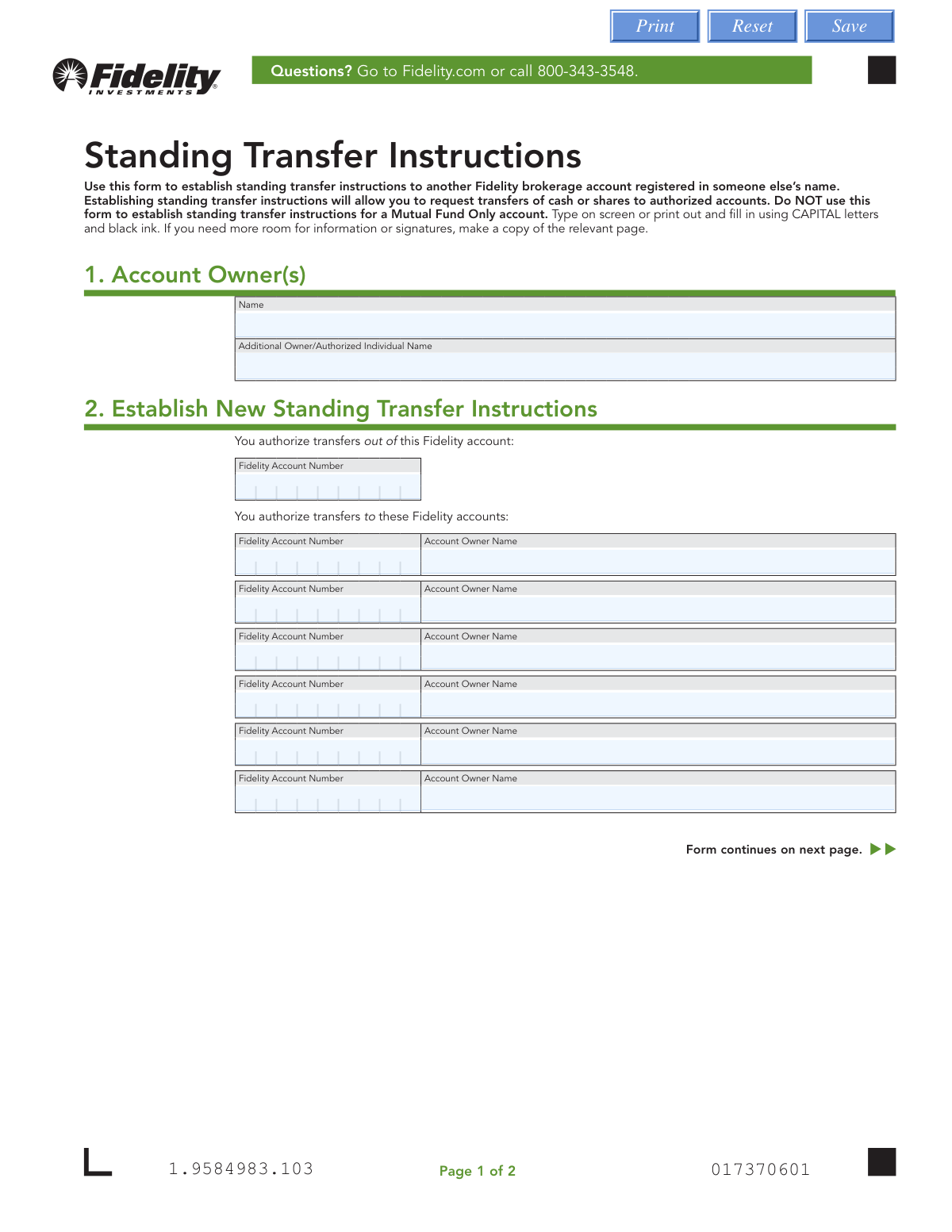
The AI does the filling. You just check it.
No typing into boxes, nothing to install.
What this form asks for
The AI fills all of it, from your answers or your documents.
The AI checks your answers before you download
16 checks built for this form, so a wrong date or a missing answer is caught before anyone else sees it.
Validates that the originating Fidelity account number entered in the 'FidAccount_Number' field conforms to Fidelity's standard account number format, typically a 9-digit numeric string. Account numbers with incorrect lengths, non-numeric characters, or invalid formatting cannot be processed by Fidelity's systems. If this field is missing or improperly formatted, the transfer instructions cannot be established and the form will be rejected.
Ensures that the 'Owner_Name' field in Section 1 is populated with the full legal name of the primary account owner and is not left blank or filled with an abbreviated or informal name. The owner name must match the name on record with Fidelity for the originating account to verify identity and authorization. Failure to provide a complete and accurate name may result in the form being rejected or the transfer being flagged for additional verification.
Checks that at least one receiving Fidelity account number and corresponding account owner name pair (e.g., Account_Number1 and Owner_Name1) has been completed in Section 2. The entire purpose of this form is to establish standing transfer instructions to one or more destination accounts, so leaving all receiving account fields blank renders the form invalid. If no receiving accounts are specified, the form must be returned to the submitter for completion.
Validates that each receiving Fidelity account number entered (Account_Number1 through Account_Number5) conforms to Fidelity's standard account number format and contains only numeric characters of the correct length. Any receiving account number that is improperly formatted, contains letters or special characters, or is an incomplete entry will prevent the corresponding transfer instruction from being established. All populated account number fields must pass this check before the form can be processed.
Ensures that every receiving Fidelity account number field that has been filled in also has a corresponding account owner name populated, and vice versa. An account number without an owner name, or an owner name without an account number, creates an incomplete and unverifiable transfer instruction. Any unpaired entries must be flagged and resolved before the form can be accepted for processing.
Validates that the account owner names listed for the receiving accounts are different from the primary account owner name in Section 1, as the form explicitly states it is intended for transfers to accounts registered in someone else's name. If the receiving account owner name matches the originating account owner name, this may indicate the wrong form is being used, and the submitter should be directed to use the appropriate internal transfer form instead. This check helps ensure the correct form is being used for the intended transaction type.
And 10 more checks
- Originating Account Number Is Not Duplicated in Receiving Accounts
- No Duplicate Receiving Account Numbers
- Owner Signature Presence Validation
- Printed Owner Name Matches Section 1 Owner Name
- Signature Date Format and Validity Check
- Signature Date Is Not Stale
- Medallion Signature Guarantee Presence Validation
- Form Is Not Used for Mutual Fund Only Accounts
- Additional Owner or Authorized Individual Name Format Check
- Receiving Account Owner Names Are Full Legal Names
Let AI fill out your Fidelity Standing Transfer Instructions
No typing. Every field filled in seconds, checked, ready to sign.
How to Fill Out Fidelity Standing Transfer Instructions Online for Free in 2026
What the AI walks you through.
- Navigate to Instafill.ai and upload the Fidelity Standing Transfer Instructions form or select it from the available form library.
- Enter the Account Owner(s) information in Section 1, including the primary owner's name and any additional owner or authorized individual's name.
- In Section 2, provide the Fidelity account number of the originating account from which transfers will be made.
- Enter the Fidelity account numbers and corresponding account owner names for each receiving account (up to six accounts) you wish to authorize for transfers.
- Review all entered information carefully to ensure accuracy, including all account numbers and owner names.
- Print the completed form, sign it in Section 3, and obtain a Medallion signature guarantee from a bank, credit union, or other financial institution (unless completing the form at a Fidelity Investor Center).
- Submit the completed and signed form to Fidelity Investments via regular mail to PO Box 770001, Cincinnati, OH 45277-0035, or via overnight mail to 100 Crosby Parkway KC1D, Covington, KY 41015-4325.
Common Mistakes in Completing Fidelity Standing Transfer Instructions
The ones the AI is built to catch.
Using this form for a Mutual Fund Only account
Entering the wrong or incomplete Fidelity account number for the originating account
Entering incorrect or mismatched receiving account numbers and owner names
Filling out the form in lowercase letters or with non-black ink
Submitting the form without a Medallion Signature Guarantee
Using an incorrect date format in the signature section
Leaving the printed owner name blank above the signature line
Sending only part of the form instead of the entire form
Mailing the form to the wrong address
Entering the name of an account owner that does not exactly match Fidelity's records
Attempting to add more than six receiving accounts without making a copy of the relevant page
Misunderstanding that this form only applies to transfers to other Fidelity brokerage accounts
Frequently Asked Questions About Fidelity Standing Transfer Instructions
Is it really free for 7 days?
Can I fill other forms too?
How do I cancel?
How does the AI fill out Fidelity Standing Transfer Instructions?
What happens to my information?
How complex is Fidelity Standing Transfer Instructions to fill out?
What is the purpose of the Standing Transfer Instructions form?
Who needs to fill out this form?
Can I use this form to transfer to a Mutual Fund Only account?
How many receiving accounts can I add to this form?
Is a Medallion signature guarantee required?
Do all account owners need to sign the form?
How do I submit the completed form to Fidelity?
Can I revoke or cancel the standing transfer instructions after submitting?
Is Fidelity responsible if the value of my assets changes during the transfer?
Can I use AI tools like Instafill.ai to help fill out this form?
How can I fill out this form online using Instafill.ai?
What if my Standing Transfer Instructions PDF is not fillable?
What information do I need to complete this form?
How should I fill out the form — typed or handwritten?
Who can I contact if I have questions about this form?
Get your Fidelity Standing Transfer Instructions filled out by AI
$0 today. Cancel before Oct 30 and you pay nothing.
Other forms like this one
investment forms: Form 3468, Investment Credit, Form 8960, Net Investment Income Tax, How to Transfer Assets from Morgan Stanley to Fidelity Investments (Fidelity Stock Plan Services Guide), Fidelity Investments Transfer/Rollover/Exchange Form, One-Time Withdrawal – IRA, Fidelity Investments, Fidelity Investments Transfer/Rollover Form, Special Tax Notice: Your Rollover Options - Fidelity Investments, Fidelity Investment-Only (Non-Prototype) Retirement Account Application, Fidelity Investments® Beneficiary Distribution Form, Fidelity Investments Distribution Form, One-Time Withdrawal – Investment-Only (Non-Prototype) Retirement Account, Fidelity Investments Withdrawal — One-Time, Fidelity Investments Withdrawals—529 College Savings Plan, Fidelity Investments Change of Account Ownership — Mutual Fund Only Accounts, Fidelity Investments 403(b) Beneficiary Designation, Fidelity Investments Qualified Plan Beneficiary Designation, Fidelity Investments 403(b)/401(a) Beneficiary Designation, Fidelity Investments Qualified Plan Beneficiary Designation, Fidelity Investments Earnings Automatic Withdrawal Plan — IRA, HSA Bank Investment Account Transfer Form
investment transfer forms: How to Transfer Assets from Morgan Stanley to Fidelity Investments (Fidelity Stock Plan Services Guide), Fidelity Investments Transfer/Rollover/Exchange Form, Fidelity Investments Transfer/Rollover Form, HSA Bank Investment Account Transfer Form, TIAA 1035 Exchange Authorization to Alternate Investment Company Transfer Payout Annuity for ATRA, U.S. Bancorp Investments Account Transfer Form, Computershare Alternative Investment Product Transfer Request, Pershing LLC Account Transfer Form, Thrivent Funds Transfer of Assets, Form MF11502, Electronic Funds Transfer (EFT) Authorization, Fidelity Transfer/Rollover/Exchange Form, Fidelity Transfer/Rollover/Exchange Form
Fidelity forms: Fidelity Funds Account Transfer of Assets Form, Fidelity Stock Plan Services (SPS) Transfer Request Form, How to Transfer Assets from Morgan Stanley to Fidelity Investments (Fidelity Stock Plan Services Guide), Fidelity Investments Transfer/Rollover/Exchange Form, Fidelity Charitable 144/145 Contribution Form, One-Time Withdrawal – IRA, Fidelity Investments, Fidelity Investments Transfer/Rollover Form, Fidelity Advisor 403(b) Distribution Request Form, Fidelity Advisor IRA Distribution Request for Automatic Rollover Accounts, Special Tax Notice: Your Rollover Options - Fidelity Investments, Fidelity Charitable Letter of Authorization, Fidelity Advisor Trading Authorization and Indemnification, Fidelity Investment-Only (Non-Prototype) Retirement Account Application, Fidelity NetBenefits Send a Document Form, Fidelity NetBenefits Auditor's Guide: An Overview of Fidelity's 2024 Plan Year Reporting Package, Fidelity NetBenefits Distribution - Recurring Payments, Fidelity Investments® Beneficiary Distribution Form, Fidelity Investments Distribution Form, Fidelity One-Time Withdrawal Form — Nonretirement, Fidelity Investments Withdrawal — One-Time
transfer forms: Form REG 227, Application for Replacement or Transfer of Title, City of Harvey Real Estate Transfer Declaration & Application (with Certificate for Exemption), DBPR ABT-6002 – Application for Transfer of Ownership of an Alcoholic Beverage License, DBPR ABT-6002, Division of Alcoholic Beverages and Tobacco Application for Transfer of Ownership of an Alcoholic Beverage License, Request for Transfer of Records (Adelaide Health Care) – AHC-0013-05-PS (Version 2), DBPR Form ABT-6002, Division of Alcoholic Beverages and Tobacco Application for Transfer of Ownership of an Alcoholic Beverage License, Pfändungs- und Überweisungsbeschluss (Garnishment and Transfer Order) – German Civil Enforcement Court Form, Fidelity Funds Account Transfer of Assets Form, Fidelity Stock Plan Services (SPS) Transfer Request Form, How to Transfer Assets from Morgan Stanley to Fidelity Investments (Fidelity Stock Plan Services Guide), Transfer Due to Divorce — IRA/HSA/529, Fidelity Investments Transfer/Rollover/Exchange Form, Fidelity Investments Transfer/Rollover Form, Group Transfer Form Fidelity Health Savings Account (HSA), Plan–to-Plan Transfer, Plan Exchange, or Service Credit Authorization Form, Beneficiaries — Nonretirement Transfer on Death, Transfer Shares as a Gift — Nonretirement, Form APP13017-29, Transfer Your Account to Schwab, Transfer of Assets Out - Partial Account or Charitable Gift Transfers, Charles Schwab & Co., Inc. Account Transfer Form
standing instruction forms: Standing Letter of Authorization / Instruction Enrollment Form, Outgoing Foreign Currency Wire Standing Instructions
UK investment forms: Triple Point Venture VCT plc | Investor Application Form, Form 3468, Investment Credit, Form 8960, Net Investment Income Tax, How to Transfer Assets from Morgan Stanley to Fidelity Investments (Fidelity Stock Plan Services Guide), Fidelity Investments Transfer/Rollover/Exchange Form, One-Time Withdrawal – IRA, Fidelity Investments, Fidelity Investments Transfer/Rollover Form, Special Tax Notice: Your Rollover Options - Fidelity Investments, Fidelity Investment-Only (Non-Prototype) Retirement Account Application, Fidelity Investments® Beneficiary Distribution Form, Fidelity Investments Distribution Form, One-Time Withdrawal – Investment-Only (Non-Prototype) Retirement Account, Fidelity Investments Withdrawal — One-Time, Fidelity Investments Withdrawals—529 College Savings Plan, Fidelity Investments Change of Account Ownership — Mutual Fund Only Accounts, Fidelity Investments 403(b) Beneficiary Designation, Fidelity Investments Qualified Plan Beneficiary Designation, Fidelity Investments 403(b)/401(a) Beneficiary Designation, Fidelity Investments Qualified Plan Beneficiary Designation, Fidelity Investments Earnings Automatic Withdrawal Plan — IRA
Let AI fill out your Fidelity Standing Transfer Instructions
Your trial starts once a card is added. You pay nothing before Oct 30.
Our AI already knows this form, all 19 fields of it. Skip the typing: tell it about yourself, or upload what you have, and it fills the whole form in seconds.
- AI fills every field on both pages, checkboxes included
- No typing into boxes: answer a few questions, or upload a document you already have, an old copy of this form, a photo of a document
- The AI checks the answers; you review and change anything before you download
- Download the finished PDF, print it, or sign it online
- Encrypted, and never used to train AI
Cancel before Oct 30 and you pay nothing.
A card is needed to start the trial. Cancel in two clicks from your account.
Terms · Privacy