Yes! You can use AI to fill out Fidelity NetBenefits Plan-to-Plan Direct Rollover Form
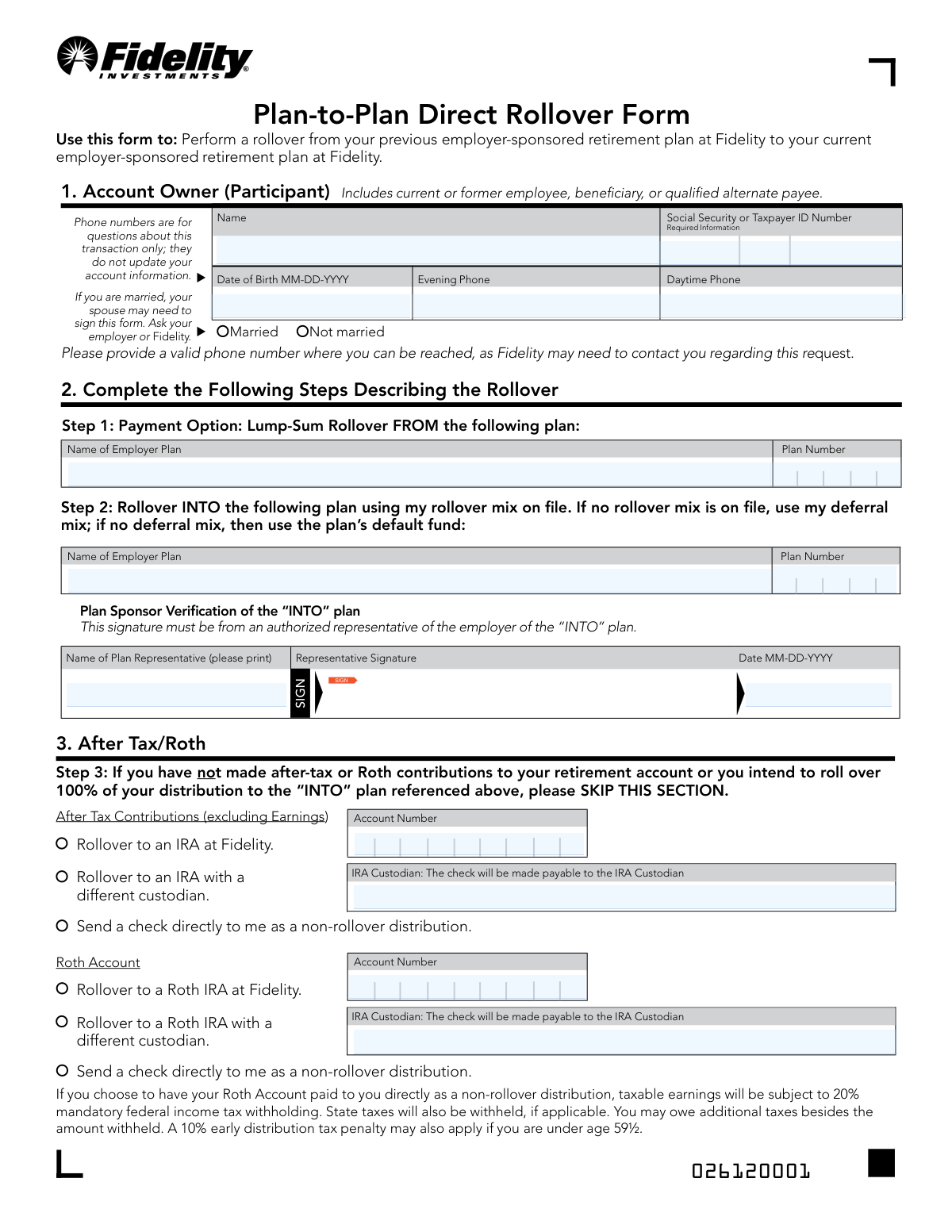
The Fidelity NetBenefits Plan-to-Plan Direct Rollover Form is an official document used by retirement plan participants to initiate a lump-sum direct rollover of vested account balances from one employer-sponsored retirement plan at Fidelity to another. It captures participant information, plan details, rollover instructions for after-tax and Roth contributions, and requires consent signatures from the participant, spouse (if applicable), and a notary or plan representative. This form is critical for preserving the tax-advantaged status of retirement savings during a job transition. Today, this form can be filled out quickly and accurately using AI-powered services like Instafill.ai, which can also convert non-fillable PDF versions into interactive fillable forms.
Our AI automatically handles information lookup, data retrieval, formatting, and form filling.
It takes less than a minute to fill out Fidelity Plan-to-Plan Direct Rollover Form using our AI form filling.
Securely upload your data. Information is encrypted in transit and deleted immediately after the form is filled out.
Form specifications
| Form name: | Fidelity NetBenefits Plan-to-Plan Direct Rollover Form |
| Number of pages: | 1 |
| Filled form examples: | Form Fidelity Plan-to-Plan Direct Rollover Form Examples |
| Language: | English |
Instafill Demo: filling out a legal form in seconds
How to Fill Out Fidelity Plan-to-Plan Direct Rollover Form Online for Free in 2026
Are you looking to fill out a FIDELITY PLAN-TO-PLAN DIRECT ROLLOVER FORM form online quickly and accurately? Instafill.ai offers the #1 AI-powered PDF filling software of 2026, allowing you to complete your FIDELITY PLAN-TO-PLAN DIRECT ROLLOVER FORM form in just 37 seconds or less.
Follow these steps to fill out your FIDELITY PLAN-TO-PLAN DIRECT ROLLOVER FORM form online using Instafill.ai:
- 1 Navigate to Instafill.ai and upload the Fidelity Plan-to-Plan Direct Rollover Form PDF or select it from the available form library.
- 2 Complete Section 1 (Account Owner Information) by entering your full name, Social Security or Taxpayer ID Number, date of birth, daytime and evening phone numbers, and marital status.
- 3 Fill in Step 1 (Payment Option) by providing the name and plan number of the employer plan you are rolling FROM, along with the plan sponsor's verification details including termination date, vesting percentage, and authorized representative signature.
- 4 Complete Step 2 (Rollover INTO Plan) by entering the name and plan number of the current employer-sponsored plan you are rolling your funds INTO.
- 5 Address Step 3 (After-Tax/Roth Contributions) if applicable, by selecting how after-tax contributions and Roth account funds should be handled, including rollover destination or direct distribution options.
- 6 Review and sign Section 4 (Participant Acknowledgement), and if married, obtain your spouse's notarized consent in Section 5, ensuring all required signatures and dates are completed.
- 7 Submit the completed form digitally via the NetBenefits Mobile App, or mail it to the appropriate Fidelity Investments address provided on the form.
Our AI-powered system ensures each field is filled out correctly, reducing errors and saving you time.
Why Choose Instafill.ai for Your Fillable Fidelity Plan-to-Plan Direct Rollover Form Form?
Speed
Complete your Fidelity Plan-to-Plan Direct Rollover Form in as little as 37 seconds.
Up-to-Date
Always use the latest 2026 Fidelity Plan-to-Plan Direct Rollover Form form version.
Cost-effective
No need to hire expensive lawyers.
Accuracy
Our AI performs 10 compliance checks to ensure your form is error-free.
Security
Your personal information is protected with bank-level encryption.
Frequently Asked Questions About Form Fidelity Plan-to-Plan Direct Rollover Form
This form is used to transfer (roll over) funds from your previous employer-sponsored retirement plan at Fidelity to your current employer-sponsored retirement plan, also at Fidelity. It allows you to consolidate your retirement savings without triggering taxes or penalties, as long as the rollover is completed correctly.
This form should be completed by any current or former employee, beneficiary, or qualified alternate payee who wants to roll over funds from a previous employer's Fidelity retirement plan into their current employer's Fidelity retirement plan. Both the participant and an authorized plan sponsor representative must sign the form.
You will need your full name, Social Security or Taxpayer ID Number, date of birth, daytime and evening phone numbers, marital status, and details about both the 'FROM' and 'INTO' employer plans (including plan names and plan numbers). Your employer's plan representative will also need to provide your termination date and vesting percentage.
If you are married, your plan's rules may require your spouse to provide notarized consent. Your spouse's signature must be witnessed by a notary public or a plan representative — a signature guarantee cannot be substituted for a notary. Check with your employer or Fidelity to confirm whether spousal consent is required for your specific plan.
If you have after-tax or Roth contributions, you must complete Step 3 of the form. You can choose to roll over after-tax contributions, roll over your Roth account to a Roth IRA at Fidelity or another custodian, or receive a check directly as a non-rollover distribution. Be aware that choosing a direct distribution of Roth earnings may trigger 20% mandatory federal income tax withholding and a potential 10% early withdrawal penalty if you are under age 59½.
Your rollover funds will be invested using your rollover investment mix on file with the new plan. If no rollover mix is on file, your deferral mix will be used. If neither is available, the funds will be directed into the plan's default fund.
By law, you have a 30-day period to consider your distribution options after receiving the plan's notices. However, by signing this form, you are waiving that 30-day waiting period. Note that the rollover cannot be initiated until at least seven days after you received the explanation of distribution forms and tax consequences.
An authorized representative of your previous employer must sign the Plan Sponsor Verification section, providing your termination date and vesting percentage. This confirms your eligibility and the amount you are entitled to roll over.
You can submit the form digitally using the NetBenefits Mobile App by tapping Actions > Send a Document. Alternatively, you can mail it to Fidelity Investments at PO Box 770002, Cincinnati, OH 45277-0090 via regular mail, or send it overnight to 100 Crosby Pkwy, KC1E, Covington, KY 41015.
If your form is incomplete, it will be returned to you without being processed. Make sure all required fields are filled in, all necessary signatures are obtained, and any required notarization is completed before submitting.
Yes, if the distribution described in the form is not processed within 180 days of the date the notices were provided to you, the spouse's consent expires and a new consent will be required. Make sure to submit the form promptly after obtaining spousal consent.
Yes, AI-powered services like Instafill.ai can help you accurately auto-fill this form, saving you time and reducing the risk of errors. These tools guide you through each field and ensure all required information is entered correctly before submission.
You can upload the Plan-to-Plan Direct Rollover Form to Instafill.ai, where the AI will automatically identify and fill in the form fields based on the information you provide. Once completed, you can review, sign, and download the form for submission via the NetBenefits app or by mail.
If you have a flat, non-fillable PDF version of this form, Instafill.ai can convert it into an interactive fillable form, allowing you to type directly into the fields digitally. This eliminates the need to print and handwrite your information.
A direct plan-to-plan rollover is generally not a taxable event, as the funds move directly between qualified retirement plans. However, if you choose to receive any portion as a direct payment to yourself (non-rollover distribution), that amount may be subject to 20% mandatory federal income tax withholding, applicable state taxes, and a 10% early withdrawal penalty if you are under age 59½.
Compliance Fidelity Plan-to-Plan Direct Rollover Form
Validation Checks by Instafill.ai
1
Ensures the Social Security Number or Taxpayer ID Number is in a valid format
The Social Security Number (SSN) or Taxpayer ID Number must follow the standard 9-digit format (XXX-XX-XXXX for SSN or XX-XXXXXXX for EIN). This field is critical for correctly identifying the participant's account and ensuring tax reporting compliance with the IRS. If the SSN or TIN is missing, incorrectly formatted, or contains non-numeric characters, the rollover cannot be processed and the form must be returned to the participant.
2
Ensures the Date of Birth is in the correct MM-DD-YYYY format and represents a valid date
The participant's Date of Birth must be entered in the MM-DD-YYYY format and must represent a real, logical calendar date (e.g., no month value greater than 12 or day value greater than 31). This field is used to verify participant identity, determine eligibility for the rollover, and assess whether the 10% early distribution penalty applies for participants under age 59½. If the date is missing, improperly formatted, or logically invalid, the form will be considered incomplete and returned.
3
Ensures at least one valid phone number is provided for participant contact
Either the Daytime Phone or Evening Phone field must contain a valid 10-digit U.S. phone number, as Fidelity may need to contact the participant to clarify or confirm details of the rollover request. Phone numbers should not contain letters or special characters beyond standard formatting dashes or parentheses, and must not be placeholder values such as '000-000-0000'. If no valid phone number is provided, Fidelity cannot fulfill its obligation to contact the participant if issues arise, potentially delaying or preventing the transaction.
4
Ensures the Participant's Name is fully provided and not left blank
The participant's full legal name must be entered in the Name field and must match the name associated with the Fidelity account on record. Abbreviated names, nicknames, or partial names are not acceptable, as they may cause identity verification failures. If the name field is blank or does not match account records, the form will be rejected and returned to the participant for correction.
5
Ensures the Marital Status checkbox is selected
The participant must select either 'Married' or 'Not Married' to indicate their current marital status, as this determines whether spousal consent is required under the plan's rules. Marital status directly affects the annuity waiver requirements and the legal validity of the distribution election. If neither option is selected, the form is incomplete and cannot be processed, as the plan administrator cannot determine whether spousal consent obligations apply.
6
Ensures the 'FROM' Plan Name and Plan Number are both provided
Both the Name of Employer Plan and Plan Number for the source ('FROM') plan in Step 1 must be completed, as these fields uniquely identify the retirement plan from which the rollover funds will be distributed. Without both fields, Fidelity cannot locate the correct plan or verify the participant's account balance. If either field is missing or contains an unrecognized plan number, the rollover request cannot be initiated.
7
Ensures the 'INTO' Plan Name and Plan Number are both provided
Both the Name of Employer Plan and Plan Number for the destination ('INTO') plan in Step 2 must be completed to identify the receiving retirement plan. These fields are necessary to correctly route the rollover funds and apply the appropriate investment mix on file. If either field is missing or the plan number does not correspond to an active plan in the Fidelity system, the form will be returned as incomplete.
8
Ensures the Termination Date is in the correct MM-DD-YYYY format and is a valid past date
The Termination Date in the Plan Sponsor Verification section must be formatted as MM-DD-YYYY and must represent a valid calendar date that is not in the future, as it reflects when the participant's employment ended with the previous employer. A future termination date would be logically inconsistent with a rollover request from a prior employer's plan. If the date is missing, improperly formatted, or set to a future date, the Plan Sponsor Verification section is considered invalid.
9
Ensures the Vesting Percentage is a numeric value between 0 and 100
The Vesting Percentage field must contain a numeric value ranging from 0 to 100, representing the percentage of the participant's account balance that is vested and eligible for rollover. Non-numeric entries, values exceeding 100, or negative values are logically invalid and indicate a data entry error. If this field is blank or contains an invalid value, the plan sponsor verification is incomplete and the eligible rollover amount cannot be determined.
10
Ensures the Plan Sponsor Representative Signature and Date are both present
The Plan Sponsor Verification section requires both a signature from an authorized employer representative and a corresponding date in MM-DD-YYYY format to confirm the accuracy of the termination date, vesting percentage, and plan details. Without a valid plan sponsor signature, the rollover request lacks the required employer authorization and cannot be processed. The date must also be a valid calendar date and should not precede the participant's termination date.
11
Ensures the Participant Acknowledgement Signature and Date are both completed
The participant must sign and date the Participant Acknowledgement section in Step 4, confirming they have received required plan notices, understand the tax consequences, and consent to waive the annuity form of payment. Both the signature and the date (in MM-DD-YYYY format) are required fields; an unsigned or undated acknowledgement renders the entire form legally invalid. If either is missing, the form must be returned to the participant before any distribution or rollover can be initiated.
12
Ensures Spouse's Consent section is completed when the participant is married
If the participant has indicated 'Married' in the marital status section, the Spouse's Consent section (Step 5) must be completed, including the spouse's printed name, signature, and date, along with notary or plan representative witnessing. Spousal consent is a legal requirement under ERISA for waiving the qualified joint and survivor annuity, and its absence invalidates the distribution election for married participants. If the participant is married but the spouse's consent section is blank or incomplete, the form cannot be processed.
13
Ensures the Notary or Plan Representative section is completed when Spouse's Consent is required
When spousal consent is provided, the notary public or plan representative must complete their section, including their name, signature, date, commission expiration date, and the state in which they are commissioned, along with affixing a notary seal. A signature guarantee is explicitly not an acceptable substitute for notarization, as stated on the form. If the notary section is incomplete or the notary commission expiration date has passed relative to the date of signing, the spousal consent is legally invalid.
14
Ensures the Roth IRA Account Number is provided when 'Rollover to a Roth IRA at Fidelity' is selected
If the participant selects the option to roll over their Roth Account to a Roth IRA at Fidelity in Step 3, the associated Account Number field must be populated with a valid Fidelity IRA account number. Without a valid account number, Fidelity cannot route the Roth funds to the correct destination account. If this option is selected but the account number is missing or invalid, the after-tax/Roth portion of the rollover cannot be completed.
15
Ensures the IRA Custodian name is provided when 'Rollover to a Roth IRA with a different custodian' is selected
If the participant selects the option to roll over their Roth Account to a Roth IRA held at a different custodian, the IRA Custodian field must be completed with the full legal name of the receiving financial institution. This information is required to make the check payable to the correct custodian and ensure the funds are properly transferred as a direct rollover. If this option is selected but the custodian name is blank or incomplete, the rollover check cannot be issued and the request will be returned.
16
Ensures that mutually exclusive options in Step 3 are not simultaneously selected
Within the Roth Account section of Step 3, the participant may only select one disposition option: rollover to a Roth IRA at Fidelity, rollover to a Roth IRA with a different custodian, or a direct non-rollover distribution check. Selecting more than one option simultaneously creates an ambiguous instruction that Fidelity cannot execute, and the form must be returned for clarification. Similarly, for After-Tax Contributions, only one option should be selected to avoid conflicting instructions.
Common Mistakes in Completing Fidelity Plan-to-Plan Direct Rollover Form
Many participants accidentally transpose digits or enter an ITIN when an SSN is expected (or vice versa), especially when filling out the form quickly. An incorrect ID number can cause the rollover to be rejected, delayed, or applied to the wrong account. Always double-check your SSN or TIN against your Social Security card or official tax documents before submitting. AI-powered tools like Instafill.ai can help auto-populate and validate this field to reduce transcription errors.
The form explicitly requires dates in MM-DD-YYYY format, but many people habitually write dates as MM/DD/YY, YYYY-MM-DD, or spell out the month. Incorrect date formatting can cause the form to be returned as incomplete or trigger processing errors. Always use two-digit month, two-digit day, and four-digit year separated by hyphens (e.g., 01-15-1985). Tools like Instafill.ai automatically format dates correctly, preventing this common error.
Participants often confuse their account number with their plan number, or simply leave the Plan Number field blank because they are unsure where to find it. Since both the 'FROM' and 'INTO' plan numbers are required, an error here can cause the rollover to be misrouted or rejected entirely. Your plan number can typically be found on your benefits statement, your NetBenefits account dashboard, or by contacting your HR department. Instafill.ai can help identify and pre-fill the correct plan numbers based on your account information.
Married participants frequently overlook or underestimate the requirement for a spouse's notarized signature, either because they don't read the instructions carefully or assume it's optional. Without the required spousal consent, the form will be rejected and the rollover cannot be processed, causing significant delays. If you are married, check with your employer or Fidelity to determine whether your plan requires spousal consent, and arrange for notarization well in advance of submitting the form. Note that a signature guarantee cannot be substituted for a notary public.
Some participants check the wrong marital status box (Married vs. Not Married) either by accident or because they are unsure of the legal definition in the context of retirement plans. Misrepresenting marital status is a legal certification on this form and can result in the improper waiver of a spouse's survivor annuity benefits, creating legal and financial complications. Review your current legal marital status carefully before checking either box, as the form explicitly states that your signature certifies the accuracy of this information.
Participants who have made after-tax or Roth contributions to their retirement account often skip Step 3 because the instructions say to skip it only if no such contributions exist or if rolling over 100%. Failing to complete this section when applicable means Fidelity cannot properly handle the tax treatment of those funds, potentially resulting in incorrect tax reporting or unwanted distributions. Review your account statements to confirm whether you have after-tax or Roth balances before deciding to skip this section.
When selecting the option to roll over a Roth account to a Roth IRA at Fidelity, participants frequently leave the Account Number field blank or enter their traditional IRA account number by mistake. This can result in funds being deposited into the wrong account or the rollover being rejected, with potential tax consequences. Locate your exact Roth IRA account number on your Fidelity account statement or online dashboard before completing this field. Instafill.ai can help auto-populate the correct account number to prevent this error.
The vesting percentage field is often left blank or filled in incorrectly because participants are unsure of their current vested percentage, especially if they have not been with the employer for the full vesting period. An incorrect vesting percentage can result in an incorrect rollover amount being processed, which may require correction and cause delays. Contact your HR department or check your most recent benefits statement to confirm your exact vesting percentage before completing this field.
Step 1 requires a signature from an authorized representative of the employer, but participants sometimes submit the form without obtaining this signature, either because they are unaware of the requirement or because they find it inconvenient to coordinate with their former employer. Without the Plan Sponsor's signature, the form is incomplete and will be returned, delaying the rollover. Contact your former employer's HR or benefits department early in the process to ensure they complete and sign the Plan Sponsor Verification section before you submit the form.
Some participants leave the daytime or evening phone number fields blank, enter a number that is no longer active, or enter a number in an incorrect format. Since Fidelity may need to contact you to resolve questions about the transaction, an invalid phone number can cause significant processing delays or result in the form being returned. Provide a current, reachable phone number in each field and note that these numbers are used only for this transaction and do not update your account contact information.
It may seem obvious, but many participants forget to sign and date the Participant Acknowledgement section (Step 4), especially when focused on gathering other required signatures such as the Plan Sponsor's or spouse's. An unsigned form cannot be processed and will be returned, restarting the entire submission process. Before submitting, review every signature line to ensure all required signatures—including your own—are present and dated in the correct MM-DD-YYYY format. Instafill.ai can flag missing signatures before submission.
Participants sometimes mail the form to an incorrect address, use regular mail when overnight delivery is needed for time-sensitive rollovers, or are unaware that the form can be submitted digitally via the NetBenefits Mobile App. Sending to the wrong address or using the wrong submission method can result in lost forms, processing delays, or missed deadlines. Use the NetBenefits app for the fastest processing, or verify whether to use the regular mail address (PO Box 770002, Cincinnati, OH 45277-0090) or the overnight address (100 Crosby Pkwy, KC1E, Covington, KY 41015) based on your timeline.
Saved over 80 hours a year
“I was never sure if my IRS forms like W-9 were filled correctly. Now, I can complete the forms accurately without any external help.”
Kevin Martin Green
Your data stays secure with advanced protection from Instafill and our subprocessors
Robust compliance program
Transparent business model
You’re not the product. You always know where your data is and what it is processed for.
ISO 27001, HIPAA, and GDPR
Our subprocesses adhere to multiple compliance standards, including but not limited to ISO 27001, HIPAA, and GDPR.
Security & privacy by design
We consider security and privacy from the initial design phase of any new service or functionality. It’s not an afterthought, it’s built-in, including support for two-factor authentication (2FA) to further protect your account.
Fill out Fidelity Plan-to-Plan Direct Rollover Form with Instafill.ai
Worried about filling PDFs wrong? Instafill securely fills fidelity-netbenefits-plan-to-plan-direct-rollover-form forms, ensuring each field is accurate.