Fill out NetBenefits forms
with AI.
NetBenefits forms are essential for managing workplace retirement accounts and ensuring that your long-term savings are handled correctly. This category encompasses a variety of financial and retirement forms used to facilitate transitions between employer-sponsored plans, manage distributions, and maintain plan compliance. These documents are vital for preserving the tax-advantaged status of your assets, whether you are consolidating accounts after a job change or setting up a structured withdrawal plan for retirement.
By continuing, you acknowledge Instafill's Privacy Policy and agree to get occasional product update and promotional emails.
About NetBenefits forms
Individuals who typically require these forms include current employees, retirees, and beneficiaries who need to move or access their funds. For instance, a Plan-to-Plan Direct Rollover form is often necessary when moving a balance from one Fidelity-managed plan to another, while distribution forms are used to establish recurring payments for those entering the decumulation phase of their financial journey. Additionally, plan sponsors and auditors use these resources to streamline the reporting and auditing processes required for annual compliance.
Navigating these fidelity forms can be a complex and time-sensitive task. Tools like Instafill.ai use AI to fill these forms in under 30 seconds, providing a secure and accurate way to complete necessary paperwork without the stress of manual data entry. This approach helps ensure that your financial instructions are processed efficiently, allowing you to manage your retirement benefits with greater ease.
Every form on this page can be completed without typing. Instafill is form filling software that reads a PDF and fills it for you — including flat and scanned documents that carry no fillable fields at all.
Forms in This Category
The forms in this category have a median Form Complexity Index of 43/100 (Basic), measured across 6 forms by field count, input difficulty, length, conditional logic and structure. See how it is calculated.
| Form Name | Pages | FCI | |
|---|---|---|---|
| 1. | Fidelity Distribution—Rollover | 4 | Moderate 51 |
| 2. | Fidelity NetBenefits Auditor's Guide: An Overview of Fidelity's 2024 Plan Year Reporting Package | 1 | – |
| 3. | Fidelity NetBenefits Distribution - Recurring Payments | 1 | – |
| 4. | Fidelity NetBenefits Send a Document Form | 1 | – |
| 5. | Fidelity Plan-to-Plan Direct Rollover Form | 2 | Basic 43 |
| 6. | Plan-to-Plan Direct Rollover Form | 2 | Basic 41 |
- Enterprise-grade security & data encryption
- 99%+ accuracy powered by AI
- 1,000+ forms from all industries
- Complete forms in under 60 seconds
How to Choose the Right Form
Navigating retirement plan paperwork can be complex, especially when moving assets or setting up distributions. Selecting the correct Fidelity NetBenefits form ensures your retirement savings maintain their tax-advantaged status and that your requests are processed without delay.
Consolidating or Moving Retirement Assets
If you are changing jobs or consolidating multiple retirement accounts, you will likely need a rollover form. The choice depends on where the money is going:
- Moving between two employer plans at Fidelity: Use the Fidelity NetBenefits Plan-to-Plan Direct Rollover Form (or the similar Plan-to-Plan Direct Rollover Form - Fidelity NetBenefits). This is specifically for moving vested balances from one workplace plan directly into another without moving the funds into an IRA first.
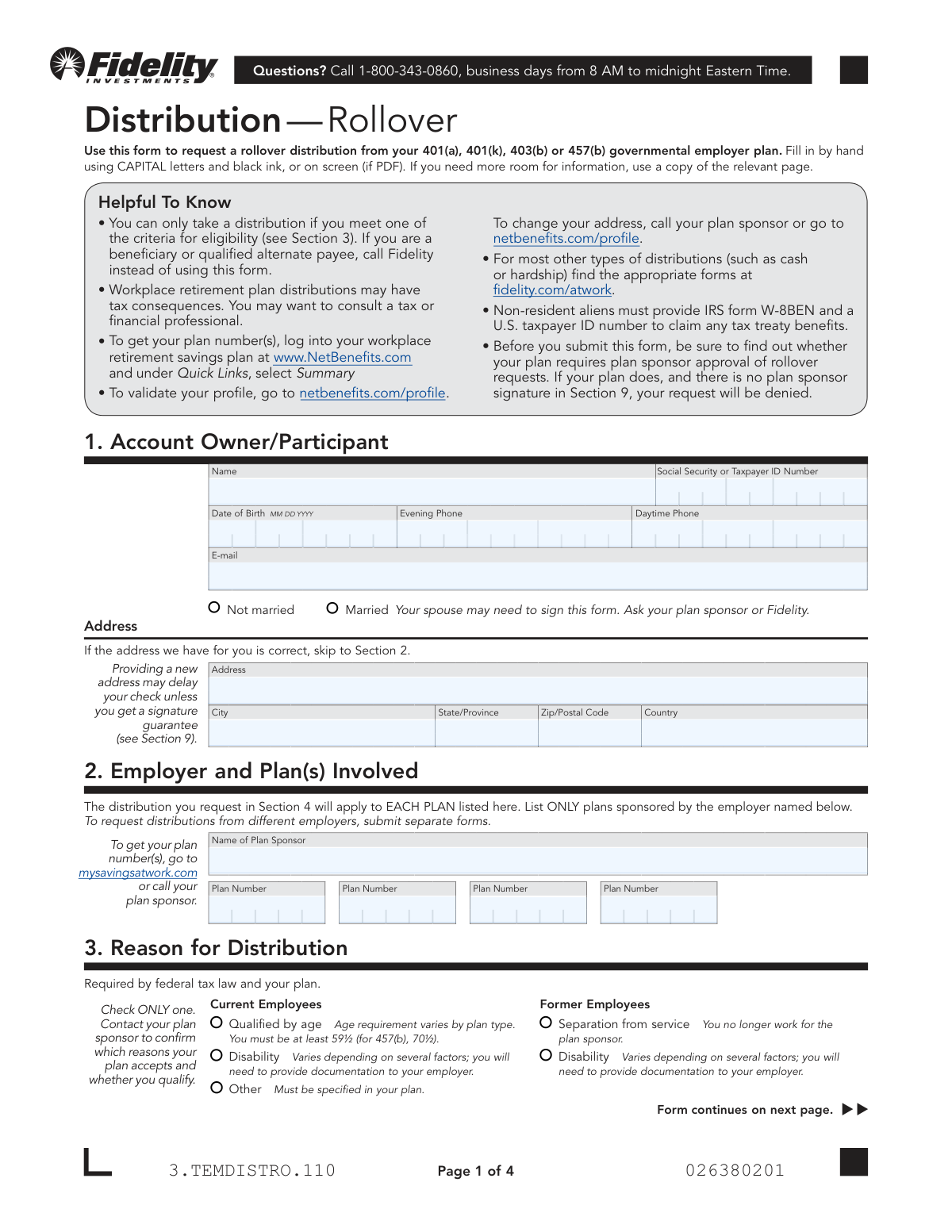
- Moving to an IRA or an external employer plan: Use the Fidelity NetBenefits Distribution—Rollover Form. This is the standard document for participants who have separated from service and want to move their pre-tax, after-tax, or Roth funds into a personal IRA or a plan hosted by a different provider.
Setting Up Ongoing Income
If you have reached retirement age or are otherwise eligible for distributions and prefer a steady stream of income rather than a lump sum:
- Establish regular withdrawals: Use the Fidelity NetBenefits Distribution - Recurring Payments form. This allows you to set up a schedule for automatic payments from your 401(k), 403(b), or 457(b) account directly to your bank.
Document Submission and Compliance
Not every form in this category is for a financial transaction; some are tools to help you manage your account or meet reporting requirements:
- Submitting paperwork via mobile: If you have already completed a paper form and need to get it to Fidelity quickly, use the Fidelity NetBenefits Send a Document Form guide to facilitate a secure digital upload via the mobile app.
- For Plan Sponsors and Auditors: The Fidelity NetBenefits Auditor's Guide is a specialized reference document intended for independent auditors performing annual plan audits (Form 5500). It is not a form for individual participants but rather a roadmap for reconciling plan activity.
Tips for NetBenefits forms
Before you begin, locate your exact Fidelity plan ID and account number on your most recent NetBenefits statement. Entering incorrect identifiers is a common mistake that can lead to significant processing delays or the total rejection of your rollover or distribution request.
Many retirement forms, especially those involving distributions or plan-to-plan rollovers, require a spouse's signature if you are married. Ensure you check if your specific plan requires these signatures to be witnessed by a notary public or an authorized plan representative to be considered valid.
When filling out rollover paperwork, be extremely careful to separate pre-tax, after-tax, and Roth funds into the correct sections. Misclassifying these assets during a transfer can result in unintended tax liabilities and complex accounting errors that are difficult to correct later.
Handling complex financial paperwork is much easier with modern technology. AI-powered tools like Instafill.ai can complete these forms in under 30 seconds with high accuracy, ensuring your data stays secure throughout the process while saving you the hassle of manual data entry.
To keep your retirement savings intact, always select the 'Direct Rollover' option to move funds between institutions. Choosing an indirect rollover often triggers a mandatory 20% federal income tax withholding, which requires you to use personal funds to make up the difference if you want to avoid penalties.
Instead of mailing paper copies, use the 'Send a Document' feature within the NetBenefits portal or mobile app to submit your completed forms. This provides an immediate digital confirmation of receipt and significantly accelerates the processing time for loans and withdrawals.
When setting up recurring distributions, carefully review your federal and state tax withholding preferences rather than accepting the defaults. Failing to withhold enough can lead to an unexpected bill at tax time, while withholding too much reduces your monthly liquid income.
Frequently Asked Questions
NetBenefits forms are official documents used to manage employer-sponsored retirement accounts, such as 401(k), 403(b), or 457(b) plans held at Fidelity. These forms allow participants to initiate rollovers, request distributions, set up recurring payments, and submit required documentation for plan maintenance.
You should use a Plan-to-Plan Direct Rollover form if you are moving your vested account balance from one employer-sponsored retirement plan directly into another plan, where both plans are managed by Fidelity. This is common when changing jobs or consolidating multiple retirement accounts into a single current employer's plan.
A Distribution-Rollover form is generally used for a one-time request to move funds into an IRA or another employer plan, often after leaving a company. The Recurring Payment form is designed for eligible participants who want to establish a schedule for automatic, ongoing income distributions from their retirement savings.
Yes, you can use AI tools like Instafill.ai to complete these financial documents quickly. These tools can accurately extract data from your source documents and place it into the correct fields on the form in under 30 seconds, ensuring high accuracy for critical retirement paperwork.
Many of these forms, especially those involving rollovers or distributions, require spousal consent if you are married. Depending on the specific rules of your employer's plan, these signatures often must be witnessed by a notary public or an authorized plan representative to be valid.
While manual entry for complex financial forms can take 15 to 20 minutes, using an AI-powered service like Instafill.ai allows you to complete the process in less than 30 seconds. The AI automatically maps your information to the required fields, significantly speeding up the preparation time.
The 'Send a Document' feature is a secure way to submit completed paperwork, such as loan applications or consolidation forms, directly to Fidelity without using physical mail. It is an electronic submission tool typically accessed through the mobile app to expedite the processing of your requests.
The Auditor's Guide is specifically designed for plan sponsors and independent auditors who need to perform annual audits for Form 5500 reporting. It provides technical instructions on how to interpret plan reports, reconcile financial data, and verify participant loan or benefit payment information.
You will generally need your participant details, the specific plan numbers for both the sending and receiving accounts, and instructions for how to handle different types of funds, such as pre-tax, after-tax, or Roth contributions. You may also need to specify your tax withholding preferences for any portion of the distribution that is not rolled over.
Yes, several NetBenefits forms, including the Plan-to-Plan Direct Rollover, are designed to be used by beneficiaries or qualified alternate payees (such as an ex-spouse under a QDRO). These individuals use the forms to move or manage retirement assets they have legally acquired from the original account holder.
Glossary
- Form Complexity Index
- Instafill’s 0–100 measure of how much effort a form takes to complete, calculated deterministically from the form’s own structure rather than estimated. It combines the number of fillable fields (the largest factor), how difficult those fields are to complete based on their type, the number of pages that contain fields, the amount of conditional “fill-only-if” logic, and how many sections the form is divided into, then adds modifiers for tables and repeating lists, bundled instruction pages, and dense page layouts. A higher score means the form is harder to fill out by hand. The forms in this category have a median Form Complexity Index of 43/100 (Basic). See exactly how it is calculated.
- Direct Rollover
- The movement of retirement plan assets directly from one tax-advantaged plan or IRA to another, which prevents the funds from being taxed as a premature distribution.
- Vested Account Balance
- The portion of a retirement account, including employer-matching contributions, that an employee legally owns and is entitled to keep after meeting specific service requirements.
- Spousal Consent
- A legal requirement in many retirement plans where a spouse must provide a notarized signature to waive their right to certain plan benefits or survivor annuities.
- Separation from Service
- A formal status indicating an employee has left their employer due to resignation, retirement, or termination, which typically triggers eligibility to move or withdraw retirement funds.
- Qualified Alternate Payee
- A person, such as a former spouse or child, who is designated by a court order (QDRO) to receive a specific portion of a participant's retirement plan assets.
- Plan Sponsor
- The employer or organization that establishes and maintains the retirement plan for its employees and is responsible for its administration.
- Form 5500
- An annual report filed with the Department of Labor that provides details about the financial condition, investments, and operations of an employee benefit plan.
- Roth Contributions
- Retirement plan contributions made with after-tax dollars, which allow for tax-free growth and tax-free withdrawals in retirement if specific conditions are met.