Yes! You can use AI to fill out Fidelity NetBenefits Distribution - Recurring Payments
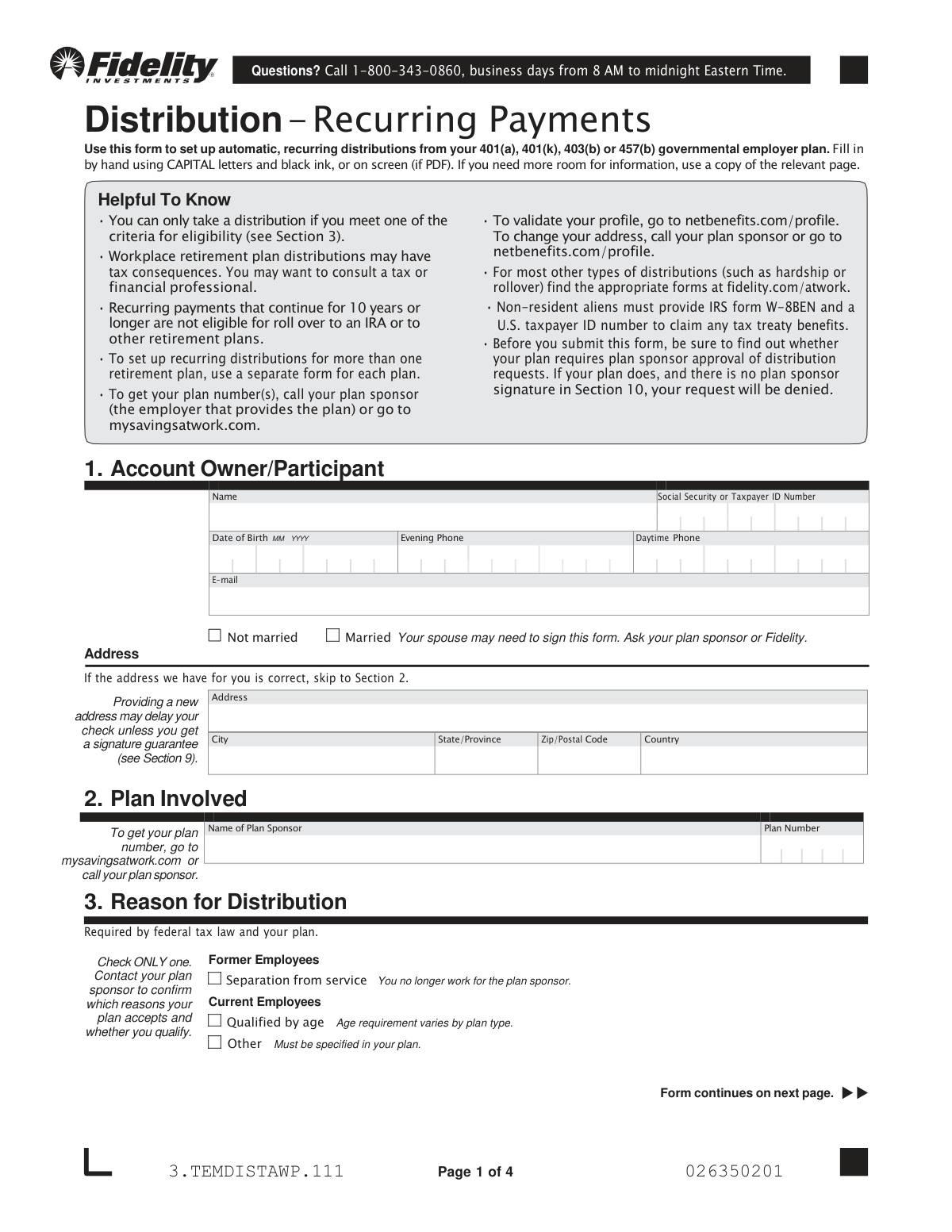
This form allows participants in 401(a), 401(k), 403(b), or 457(b) governmental employer plans to establish a schedule of automatic, recurring distributions. It is essential for individuals who have met eligibility criteria, such as separation from service or reaching a certain age, and wish to start receiving regular income from their retirement savings. Today, this form can be filled out quickly and accurately using AI-powered services like Instafill.ai, which can also convert non-fillable PDF versions into interactive fillable forms.
3.TEMDISTAWP.111 is part of the
benefit forms, payment forms, Fidelity forms, NetBenefits forms, distribution forms and benefit payment forms categories on Instafill.
Rather not fill this in by hand? Instafill is an online form filler that completes PDF forms automatically — upload the blank form, answer a few questions, and the AI fills every field.
Form specifications
| Form name: | Fidelity NetBenefits Distribution - Recurring Payments |
| Number of pages: | 1 |
| Field instructions: | 3.TEMDISTAWP.111 Instructions |
| Filled form examples: | 3.TEMDISTAWP.111 Examples |
| Language: | English |
Our AI automatically handles information lookup, data retrieval, formatting, and form filling.
It takes less than a minute to fill out 3.TEMDISTAWP.111 using our AI form filling.
Securely upload your data. Information is encrypted in transit and deleted immediately after the form is filled out.
Instafill Demo: How to fill out PDF forms in seconds with AI
How to Fill Out 3.TEMDISTAWP.111 Online for Free in 2026
Are you looking to fill out a 3.TEMDISTAWP.111 form online quickly and accurately? Instafill.ai offers the #1 AI-powered PDF filling software of 2026, allowing you to complete your 3.TEMDISTAWP.111 form in just 37 seconds or less.
Follow these steps to fill out your 3.TEMDISTAWP.111 form online using Instafill.ai:
- 1 Navigate to Instafill.ai and upload the Fidelity Distribution - Recurring Payments form or select it from their template library.
- 2 Provide your personal details in the 'Account Owner/Participant' section, including your name, Social Security Number, and contact information.
- 3 Enter the details of the plan you are withdrawing from in the 'Plan Involved' section and select your 'Reason for Distribution'.
- 4 Specify your payment instructions in Sections 4 and 5, including the calculation method (e.g., fixed amount), payment frequency, and the date of the first payment.
- 5 Complete the 'Tax Withholding' section to indicate your preferences for federal and state tax withholding from your distributions.
- 6 Choose your preferred 'Delivery Method' for the funds, such as Electronic Funds Transfer (EFT) or check.
- 7 Review all entered information, then digitally sign the form. If required by your plan, ensure your spouse provides consent and that the signature is notarized or witnessed before submitting the form to Fidelity.
Our AI-powered system ensures each field is filled out correctly, reducing errors and saving you time.
Why Choose Instafill.ai for Your Fillable 3.TEMDISTAWP.111 Form?
Speed
Complete your 3.TEMDISTAWP.111 in as little as 37 seconds.
Up-to-Date
Always use the latest 2026 3.TEMDISTAWP.111 form version.
Cost-effective
No need to hire expensive lawyers.
Accuracy
Our AI performs 10 compliance checks to ensure your form is error-free.
Security
Your personal information is protected with bank-level encryption.
Frequently Asked Questions About 3.TEMDISTAWP.111
This form is used to set up automatic, recurring distributions from your 401(a), 401(k), 403(b), or 457(b) governmental employer plan. You must be eligible for a distribution to use this form.
You can find your plan number by logging into mysavingsatwork.com or by contacting your plan sponsor, which is the employer who provides your retirement plan.
Section 3 lists common reasons like separation from service or reaching a certain age. You should contact your plan sponsor to confirm which distribution reasons your specific plan allows and if you qualify.
Yes, your spouse may need to sign Section 8, 'Spouse's Consent,' if required by your plan's rules. This signature must be witnessed by a notary or a plan representative to be valid.
If you don't complete the tax withholding section, Fidelity will apply a default rate based on federal rules. This is typically 20% for distributions eligible for rollover and 10% for certain other distributions.
To withhold more than the default 20% on a distribution lasting less than 10 years, you must complete and attach IRS Form W-4R. For payments lasting 10 years or more, you would use IRS Form W-4P.
A signature guarantee is required if your distribution is over $100,000, or if it's over $10,000, you've provided a new address, and you want to avoid a processing delay. It is not needed if your plan requires the plan sponsor's signature.
You should contact Fidelity or your plan sponsor directly to determine if their signature is required for your request. Your request will be denied if a required plan sponsor signature is missing.
If you choose Electronic Funds Transfer (EFT), it typically takes 3 business days. If you request a check to be mailed, allow up to 7 business days for delivery.
You can submit the form digitally using the NetBenefits mobile app, or you can mail it to the address provided in the form for either regular or overnight mail.
No, you must complete a separate 'Distribution - Recurring Payments' form for each retirement plan you wish to take distributions from.
Yes, services like Instafill.ai use AI to accurately auto-fill form fields with your information, which can save you time and help prevent errors.
Simply upload the PDF to the Instafill.ai platform. The AI will identify the fields, and you can then provide your information once to have it automatically and accurately filled in throughout the document.
If you have a non-fillable or 'flat' PDF, you can upload it to a service like Instafill.ai. It will convert the document into an interactive, fillable form that you can complete online.
Compliance 3.TEMDISTAWP.111
Validation Checks by Instafill.ai
1
Social Security Number Format and Presence
This check verifies that the Social Security or Taxpayer ID Number field in Section 1 is not empty and follows the standard 9-digit format (XXX-XX-XXXX or XXXXXXXXX). This is critical for correctly identifying the participant's account and for tax reporting purposes. If the number is missing or invalid, the form cannot be processed, and the request will be rejected pending correction.
2
Exclusive Reason for Distribution Selection
Validates that exactly one reason for distribution has been checked in Section 3. Federal tax law and plan rules require a single, specific qualifying reason for any distribution. Selecting zero or multiple options creates ambiguity and prevents the determination of eligibility, causing the request to be denied until a single valid reason is chosen.
3
Payment Calculation Method and Corresponding Value
Ensures that one, and only one, payment calculation method is selected in Section 4, and that the corresponding data field (Fixed Amount, Fixed Percentage, or Fixed Timeframe) is filled with a valid, positive number. This prevents ambiguity in how payments should be calculated. A failure in this check, such as selecting two methods or leaving the amount blank, will result in the request being returned for clarification.
4
First Payment Date is in the Future
This check confirms that the 'Date of FIRST Payment' provided in Section 4 is a complete, valid date (MM DD YYYY) and that this date is in the future. It is impossible to schedule a payment for a past date. If the date is invalid, in the past, or missing, the system will reject the form and require the participant to provide a valid future date.
5
Conditional Spousal Consent Requirement
Verifies that if the participant is marked as 'Married' in Section 1 and their specific plan rules require spousal consent, then Section 8 ('Spouse's Consent') is fully completed. This includes the spouse's signature, date, and a valid notarization or plan representative witness signature. This is a legal requirement to protect spousal rights to retirement assets, and its absence will cause the distribution request to be denied.
6
Plan Number Validation
This check validates that the 'Plan Number' entered in Section 2 exists and is associated with the participant's Social Security Number in Fidelity's system. An incorrect or missing plan number means Fidelity cannot identify which account to draw the funds from. A mismatch or invalid number will halt the process until the correct plan number is provided.
7
Participant Signature and Date Presence
Confirms that the account owner has provided a signature and a valid date in Section 9. The signature legally authorizes Fidelity to act on the instructions, and the date establishes when the authorization was given. A missing signature or date invalidates the entire request, and the form will be returned unprocessed.
8
Conditional Plan Sponsor Approval
Determines if the participant's plan requires sponsor approval for distributions and, if so, verifies that Section 10 is completed and signed by an authorized plan representative. Many employer plans retain oversight of distributions to ensure they comply with plan terms. If required approval is missing, the request is considered incomplete and will be denied by the system.
9
State-Specific Tax Withholding Logic
If the participant selects the special state tax withholding option in Section 6 (for residents of NY, NM, NJ, ND, PA, IN, OH), this check verifies that the participant's address of record is in one of those states and that the marital status and number of exemptions are provided. This ensures state taxes are withheld correctly according to specific state regulations. An error here would lead to incorrect withholding and potential rejection of the form for correction.
10
Conditional Delivery Account Number
Validates that if 'Deposit into Fidelity non-retirement account' is selected as the delivery method in Section 7, a valid account number is provided in the corresponding field. Without the destination account number, the funds transfer cannot be executed. If this field is blank or contains an invalid format, the request will be put on hold until the correct information is supplied.
11
Date of Birth Plausibility Check
This check ensures the 'Date of Birth' in Section 1 is in the correct MM YYYY format and represents a plausible age for a retirement plan participant. It validates that the year is not in the future and is within a reasonable historical range (e.g., not more than 120 years ago). This helps catch data entry errors and confirms eligibility for age-based distributions, and a failure would require correction.
12
External Form Requirement for Withholding
The system checks if the participant's withholding request requires an accompanying IRS Form W-4R or W-4P (e.g., withholding more than 20% on a short-term distribution). If the conditions are met but the required form is not attached to the submission, the request will be flagged as incomplete. The withholding will either default to the standard rate or the entire request will be rejected until the proper IRS form is provided.
13
Exclusive Frequency of Payments Selection
Verifies that the participant has selected exactly one option in Section 5 for the 'Frequency of Payments'. This information is fundamental to setting up the recurring payment schedule correctly. If no option or multiple options are selected, the system cannot proceed and will reject the form, requiring the participant to clarify their desired payment frequency.
14
Vesting Percentage Range Validation
When Section 10 ('Plan Sponsor Approval') is completed, this check ensures the 'Employer-Source Vesting %' is a numerical value between 0 and 100, inclusive. This percentage is critical for calculating the distributable amount from employer contributions. An invalid or out-of-range value would indicate a data entry error by the plan sponsor and would prevent accurate processing.
Common Mistakes in Completing 3.TEMDISTAWP.111
Many retirement plans legally require a spouse's signed and notarized consent to process a distribution, which protects the spouse's potential survivor benefits. Participants often overlook this requirement or are unaware if it applies to their plan, resulting in an invalid application. Always verify with your plan sponsor if spousal consent is needed and ensure the signature in Section 8 is properly witnessed by a notary or plan representative.
The form requires a Medallion Signature Guarantee for large distributions (over $100k) or those involving an address change, but people frequently get a simple notarization instead. A signature guarantee is a higher level of verification from a financial institution that protects against fraud, whereas a notary only verifies identity. Submitting a notary seal in Section 9 instead of a required signature guarantee will cause significant processing delays or rejection.
Participants, especially former employees, often submit the form directly to Fidelity without realizing their specific plan requires an authorized signature from their employer in Section 10. The form clearly states that if this approval is required and missing, the request will be denied. Before submitting, you must contact your plan sponsor or Fidelity to confirm if this signature is necessary to prevent your request from being rejected.
The tax withholding section is complex, and filers often either leave it blank or make incorrect assumptions, leading to unwanted financial consequences. Failing to make an election results in a default withholding (e.g., 20% for eligible rollovers), which may be more or less than your actual tax liability. To prevent a smaller-than-expected payment or a future tax bill, carefully review the options in Section 6 and consult a tax advisor.
Participants often forget to include their specific plan number in Section 2 or enter it incorrectly, as it's not information they use daily. Without the correct plan number, Fidelity cannot identify which retirement account to process the distribution from, leading to an immediate rejection of the form. To avoid this, locate the number on your account statement or by logging into the NetBenefits portal as instructed.
The instructions require submitting the 'ENTIRE form' and any 'necessary documents,' but people sometimes only send the pages they filled out or forget required attachments like an IRS Form W-4R. For example, if you want more than 20% withheld, you must attach a separate IRS form. Submitting an incomplete packet will halt the process until all required pages and documents are received by Fidelity.
In Section 3, individuals sometimes check a reason for distribution, such as 'Separation from service,' without confirming their eligibility with the plan administrator. Each plan has specific rules defining who qualifies for a distribution and under what circumstances. Selecting a reason for which you are not eligible will cause the plan sponsor to deny the request, wasting time and effort.
It is a surprisingly common mistake for the account owner to complete the entire multi-page form but forget to provide their signature and date in Section 9. An unsigned form is legally invalid and cannot be processed under any circumstances. This simple oversight will result in the form being returned to you, delaying your distribution request until a properly signed copy is received.
When completing Section 4, filers may select more than one calculation method or provide unclear information, such as requesting a 'Fixed Amount' without specifying the dollar value. This ambiguity makes it impossible for Fidelity to process the payment as intended. This leads to processing delays while the firm contacts you for clarification, delaying your first payment.
While the form can be filled on-screen, many people print it and fill it out by hand, often with illegible writing that doesn't follow the 'CAPITAL letters' instruction. Poor handwriting can lead to critical data entry errors for your name, address, or Social Security Number, causing processing delays or even misdirected payments. To prevent this, either fill the form out on-screen or use a tool like Instafill.ai, which can convert even flat, non-fillable PDFs into easily typable versions.
Saved over 80 hours a year
“I was never sure if my IRS forms like W-9 were filled correctly. Now, I can complete the forms accurately without any external help.”
Kevin Martin Green
Your data stays secure with advanced protection from Instafill and our subprocessors




Robust compliance program
Transparent business model
You’re not the product. You always know where your data is and what it is processed for.
ISO 27001, HIPAA, and GDPR
Our subprocesses adhere to multiple compliance standards, including but not limited to ISO 27001, HIPAA, and GDPR.
Security & privacy by design
We consider security and privacy from the initial design phase of any new service or functionality. It’s not an afterthought, it’s built-in, including support for two-factor authentication (2FA) to further protect your account.
Fill out 3.TEMDISTAWP.111 with Instafill.ai
Worried about filling PDFs wrong? Instafill securely fills fidelity-netbenefits-distribution-recurring-payments forms, ensuring each field is accurate.
