Yes! You can use AI to fill out Plan-to-Plan Direct Rollover Form - Fidelity NetBenefits

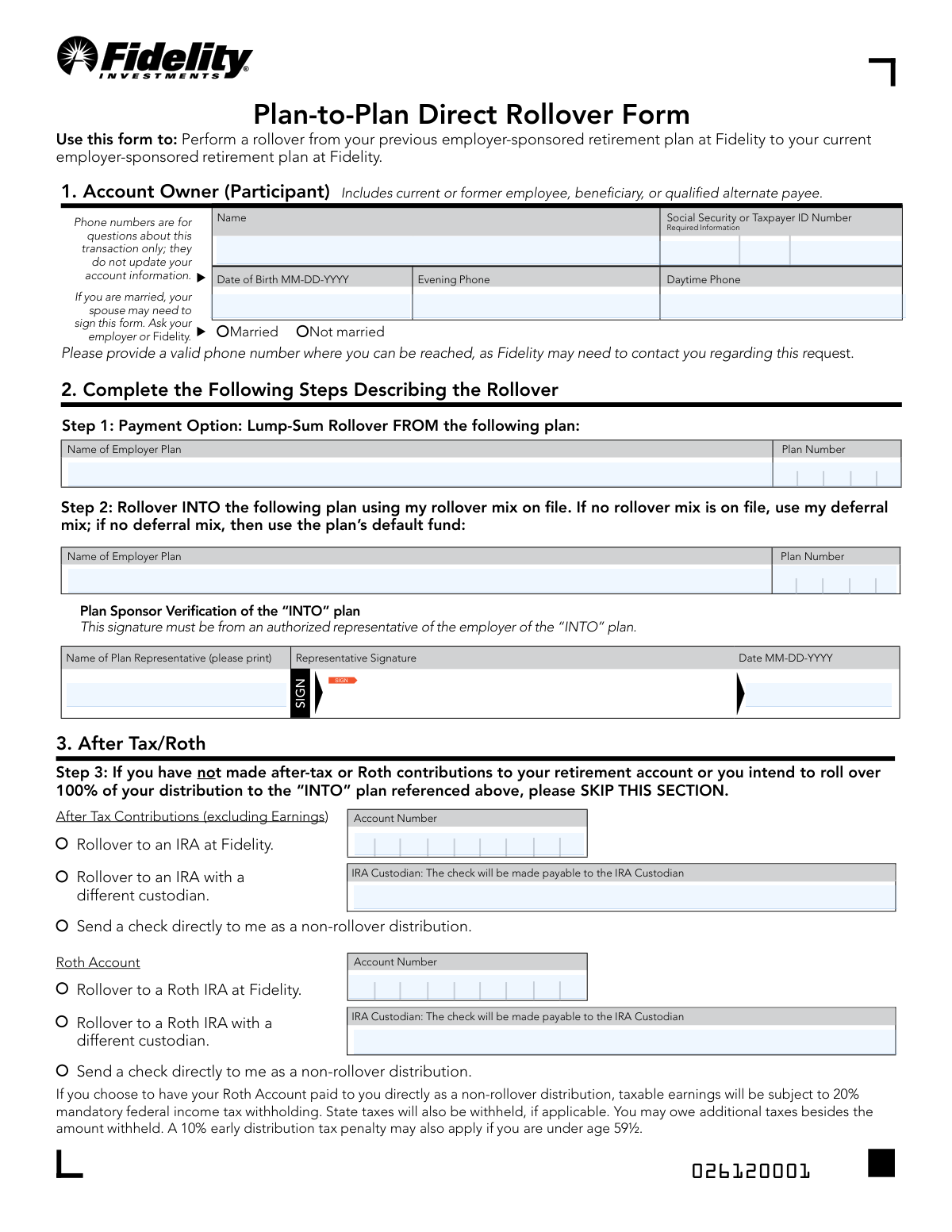
The Fidelity Plan-to-Plan Direct Rollover Form is an official document that allows participants—including current or former employees, beneficiaries, or qualified alternate payees—to perform a lump-sum rollover from one employer-sponsored retirement plan to another, both held at Fidelity NetBenefits. The form covers key details such as account owner information, rollover plan specifics, after-tax or Roth contribution handling, spousal consent (if required), and participant authorization. It is an important tool for consolidating retirement savings without triggering immediate tax consequences. Today, this form can be filled out quickly and accurately using AI-powered services like Instafill.ai, which can also convert non-fillable PDF versions into interactive fillable forms.
Our AI automatically handles information lookup, data retrieval, formatting, and form filling.
It takes less than a minute to fill out Fidelity Plan-to-Plan Direct Rollover Form using our AI form filling.
Securely upload your data. Information is encrypted in transit and deleted immediately after the form is filled out.

Form specifications

Form name: Plan-to-Plan Direct Rollover Form - Fidelity NetBenefits
Number of pages: 1
Filled form examples: Form Fidelity Plan-to-Plan Direct Rollover Form Examples
Language: English
main-image

Instafill Demo: filling out a legal form in seconds

How to Fill Out Fidelity Plan-to-Plan Direct Rollover Form Online for Free in 2026

Are you looking to fill out a FIDELITY PLAN-TO-PLAN DIRECT ROLLOVER FORM form online quickly and accurately? Instafill.ai offers the #1 AI-powered PDF filling software of 2026, allowing you to complete your FIDELITY PLAN-TO-PLAN DIRECT ROLLOVER FORM form in just 37 seconds or less.
Follow these steps to fill out your FIDELITY PLAN-TO-PLAN DIRECT ROLLOVER FORM form online using Instafill.ai:
  1. 1 Navigate to Instafill.ai and upload the Fidelity Plan-to-Plan Direct Rollover Form PDF or select it from the available form library to begin filling it out online.
  2. 2 Enter your personal information in Section 1, including your full name, Social Security or Taxpayer ID Number, date of birth, daytime phone, evening phone, and marital status.
  3. 3 Complete Section 2 by providing the name and plan number of the employer plan you are rolling FROM (Step 1) and the name and plan number of the employer plan you are rolling INTO (Step 2), then have an authorized plan representative sign and date the 'INTO' plan verification.
  4. 4 If applicable, complete Section 3 (After Tax/Roth) by selecting how you want after-tax contributions and/or Roth account funds handled—such as rolling over to a Fidelity IRA, a different custodian's IRA, or receiving a direct distribution—and provide the relevant account numbers and IRA custodian information.
  5. 5 If you are married and your plan requires it, complete Section 4 (Spouse's Consent) by having your spouse print their name, sign, and date the form, and ensure the signature is either notarized or witnessed by a plan representative.
  6. 6 Review all information for accuracy, then complete Section 5 by printing your name, signing, and dating the form to authorize Fidelity to process the rollover.
  7. 7 Submit the completed form digitally via the NetBenefits Mobile App, or send it by regular mail or overnight mail to the appropriate Fidelity Investments address provided on the form.

Our AI-powered system ensures each field is filled out correctly, reducing errors and saving you time.

Why Choose Instafill.ai for Your Fillable Fidelity Plan-to-Plan Direct Rollover Form Form?

Speed

Complete your Fidelity Plan-to-Plan Direct Rollover Form in as little as 37 seconds.

Up-to-Date

Always use the latest 2026 Fidelity Plan-to-Plan Direct Rollover Form form version.

Cost-effective

No need to hire expensive lawyers.

Accuracy

Our AI performs 10 compliance checks to ensure your form is error-free.

Security

Your personal information is protected with bank-level encryption.

Frequently Asked Questions About Form Fidelity Plan-to-Plan Direct Rollover Form

This form is used to transfer (roll over) funds from a previous employer-sponsored retirement plan held at Fidelity to your current employer-sponsored retirement plan, also at Fidelity. It is designed for current or former employees, beneficiaries, or qualified alternate payees.

This form can be used by current or former employees, beneficiaries, or qualified alternate payees who have a retirement plan at Fidelity from a previous employer and want to roll those funds into a current employer-sponsored plan also managed at Fidelity. Both the 'FROM' and 'INTO' plans must be held at Fidelity.

You will need your full name, Social Security or Taxpayer ID Number, date of birth, daytime and evening phone numbers, marital status, and the names and plan numbers of both the 'FROM' and 'INTO' employer plans. You will also need an authorized plan representative from the 'INTO' plan to sign the form.

If you are married, your spouse may be required to sign the form depending on your plan's rules. The spouse's signature must be either notarized or witnessed by a plan representative — a signature guarantee is not acceptable. The spouse's consent expires 180 days after signing if the distribution has not been processed.

If you have after-tax or Roth contributions, you must complete Section 3 of the form. You can choose to roll them over to an IRA at Fidelity, roll them over to an IRA with a different custodian, or receive a check directly as a non-rollover distribution. Be aware that taking a direct distribution of Roth earnings may trigger a 20% mandatory federal tax withholding and a potential 10% early withdrawal penalty if you are under age 59½.

Plan Sponsor Verification is required for the 'INTO' plan and must be signed by an authorized representative of the employer sponsoring that plan. This confirms that the receiving plan accepts rollover contributions and authorizes the transaction.

Your rollover funds will be invested according to your rollover mix on file. If no rollover mix is on file, your deferral mix will be used. If neither is available, the funds will be placed in the plan's default fund.

You can submit the completed form digitally through the NetBenefits Mobile App by tapping Actions > Send a Document. Alternatively, you can mail it to Fidelity Investments, PO Box 770002, Cincinnati, OH 45277-0090, or send it via overnight mail to 100 Crosby Pkwy, KC1E, Covington, KY 41015.

No, the phone numbers you provide on this form are used only for questions related to this specific transaction. They will not update your account contact information on file with Fidelity.

By signing the form, you acknowledge that you have received the Special Tax Notice and, if applicable, the Forms of Benefit Notice and the Notice of the Waiver of the Qualified Joint and Survivor Annuity. It is important to review these documents before proceeding with the rollover.

Yes, AI-powered services like Instafill.ai can help you accurately auto-fill the form fields, saving you time and reducing the risk of errors. These tools guide you through each section and ensure all required information is entered correctly before submission.

You can visit Instafill.ai, upload the Plan-to-Plan Direct Rollover Form PDF, and the AI will help you fill in all required fields — including personal information, plan details, and rollover instructions — quickly and accurately. Once completed, you can download and submit the form using one of Fidelity's accepted methods.

If you have a flat, non-fillable PDF version of this form, Instafill.ai can convert it into an interactive fillable form, allowing you to type directly into the fields digitally. This eliminates the need to print and handwrite your information.

Yes, if you choose to receive your Roth account as a direct non-rollover distribution, taxable earnings will be subject to 20% mandatory federal income tax withholding, applicable state taxes, and potentially a 10% early distribution penalty if you are under age 59½. Rolling over to a Roth IRA avoids these immediate tax consequences.

A spouse's consent is valid for 180 days from the date they sign the form. If the distribution is not processed within that period, the consent expires and a new form must be filed. Additionally, a spouse cannot revoke their consent unless the participant allows it and files a new form with Fidelity.

Compliance Fidelity Plan-to-Plan Direct Rollover Form
Validation Checks by Instafill.ai

1
Social Security or Taxpayer ID Number Format Validation
Validates that the SSN/Taxpayer ID field contains exactly 9 digits in the standard format (XXX-XX-XXXX) with no letters or special characters other than hyphens. This is critical for correctly identifying the account owner and ensuring the rollover is applied to the correct retirement account. If the SSN is malformed or missing, Fidelity cannot process the transaction and the rollover request will be rejected.
2
Date of Birth Format and Logical Range Check
Ensures the Date of Birth is entered in the required MM-DD-YYYY format and falls within a logically valid range (e.g., the participant must be at least 18 years old and no older than 120 years). This field is essential for age-related tax determinations, such as whether the 10% early distribution penalty applies for participants under age 59½. An invalid or missing date of birth will prevent accurate tax withholding calculations and may cause the form to be returned.
3
Phone Number Format Validation for Daytime and Evening Phone
Checks that both the Daytime Phone and Evening Phone fields, if provided, contain exactly 10 digits in a standard U.S. format (e.g., XXX-XXX-XXXX), with no letters or invalid special characters. At least one valid phone number must be present, as Fidelity explicitly states they may need to contact the participant regarding the rollover request. If no valid phone number is provided, Fidelity may be unable to resolve issues that arise during processing, potentially delaying or canceling the transaction.
4
Marital Status Selection Completeness Check
Verifies that the participant has selected exactly one of the two marital status options: 'Married' or 'Not Married.' This selection determines whether the Spouse's Consent section (Section 4) is required to be completed, as many retirement plans legally require spousal consent for distributions. Leaving this field blank creates an ambiguous submission that cannot be processed, and selecting 'Married' without completing Section 4 may render the form legally invalid.
5
FROM Plan Name and Plan Number Completeness Check
Ensures that both the 'Name of Employer Plan' and 'Plan Number' fields in Step 1 (the rollover FROM plan) are populated and non-empty. These fields uniquely identify the source retirement plan from which funds will be transferred, and without both pieces of information, Fidelity cannot locate the correct account to initiate the rollover. If either field is missing, the form must be returned to the participant for correction before any funds can be moved.
6
INTO Plan Name and Plan Number Completeness Check
Validates that both the 'Name of Employer Plan' and 'Plan Number' fields in Step 2 (the rollover INTO plan) are fully completed and non-empty. The destination plan information is required to correctly route the rollover funds to the participant's current employer-sponsored retirement plan. Missing or incorrect destination plan details could result in funds being sent to the wrong account or the transaction being rejected entirely.
7
Plan Representative Signature and Date Consistency Check
Confirms that the Plan Sponsor Verification section contains a printed Name of Plan Representative, a Representative Signature, and a corresponding Date in MM-DD-YYYY format, and that all three fields are present together. This signature must come from an authorized representative of the 'INTO' plan employer, serving as verification that the receiving plan accepts the rollover. If any of these three fields are missing or the date is not in the correct format, the plan sponsor verification is incomplete and the form cannot be processed.
8
After-Tax and Roth Section Mutual Exclusivity and Completeness Check
Validates that if the participant completes the After-Tax Contributions or Roth Account subsections in Section 3, exactly one distribution option is selected per subsection (rollover to Fidelity IRA, rollover to external IRA, or direct check). Additionally, if 'Rollover to an IRA with a different custodian' is selected, the Account Number and IRA Custodian fields must be populated. Selecting multiple options or leaving required sub-fields blank when an external rollover is chosen will result in an ambiguous or incomplete instruction that Fidelity cannot execute.
9
Spouse Consent Section Completeness When Married Status is Selected
Checks that when the participant has indicated 'Married' in Section 1, the Spouse's Consent section (Section 4) is fully completed, including the printed Spouse Name, Spouse Signature, and a valid Date in MM-DD-YYYY format. Many employer-sponsored retirement plans legally require spousal consent for distributions, and an incomplete Section 4 when the participant is married may render the entire form legally invalid. If this section is incomplete, the rollover cannot proceed until proper spousal consent is obtained and documented.
10
Spouse Consent Date Within 180-Day Validity Window
Validates that the date entered in the Spouse Signature Date field (Date 1) is not more than 180 days prior to the expected processing date, as the form explicitly states that spousal consent expires after 180 days. If the spouse's consent date has lapsed, the form must be resubmitted with a fresh spousal signature and notarization. Processing a rollover with an expired spousal consent could expose Fidelity and the plan sponsor to legal liability.
11
Notarization or Plan Representative Witness Completeness Check
Ensures that when Section 4 (Spouse's Consent) is completed, the notarization or plan representative witness subsection is also fully filled out, including the State, County, printed Notary/Plan Representative Name, Notary/Plan Representative Signature, and the witness Date in MM-DD-YYYY format. The form explicitly states that the spouse's signature must be either notarized or witnessed by a plan representative, and a signature guarantee is not acceptable as a substitute. An incomplete or missing notarization invalidates the spousal consent and prevents the form from being legally processed.
12
Notary Commission Expiration Date Validity Check
Verifies that the 'My commission ends on' date provided by the notary is in a valid date format and falls on or after the date the spouse signed the form, confirming that the notary's commission was active at the time of notarization. A notarization performed by a notary with an expired commission is legally invalid and would render the spousal consent unenforceable. If the commission end date precedes the signing date, the form must be returned for re-notarization by a currently commissioned notary.
13
Participant Signature, Printed Name, and Date Completeness Check
Confirms that Section 5 contains all three required elements: a printed Participant Name, a Participant Signature, and a Date in MM-DD-YYYY format, and that the printed name matches the Account Owner Name provided in Section 1. The participant's signature authorizes Fidelity to act on the instructions in the form and certifies the accuracy of all information provided. If any of these elements are missing or the names do not match, the authorization is incomplete and the rollover cannot be initiated.
14
All Date Fields Format Consistency Validation
Performs a global check across all date fields on the form (DOB, Representative Date, Spouse Consent Date, Notary Date, Participant Signature Date, and Notary Commission End Date) to ensure each follows the required MM-DD-YYYY format with valid calendar values (e.g., month between 01-12, day appropriate for the given month, and a four-digit year). Inconsistent or invalid date formats across the form can cause processing errors and may require the form to be returned. All dates should also be logically consistent with one another (e.g., the participant's signature date should not precede the plan representative's verification date).
15
FROM and INTO Plan Numbers Are Not Identical
Validates that the Plan Number entered for the 'FROM' plan in Step 1 is different from the Plan Number entered for the 'INTO' plan in Step 2, ensuring the participant is not attempting to roll funds from a plan into itself. A plan-to-plan direct rollover by definition involves two distinct plans, and identical plan numbers would indicate a data entry error that could result in an invalid or circular transaction. If the plan numbers match, the form should be flagged for review and returned to the participant for clarification.
16
Account Owner Name Field Non-Empty and Format Check
Ensures the Account Owner Name field is populated with a full name containing at least a first and last name, with no numeric characters or invalid special characters that would indicate a data entry error. The account owner's name is used to match the submission to the correct Fidelity account and must be consistent with the name on record. A missing, incomplete, or clearly erroneous name (such as a string of numbers) will prevent account matching and cause the form to be rejected.

Common Mistakes in Completing Fidelity Plan-to-Plan Direct Rollover Form

Entering incorrect or mismatched plan numbers

Many people confuse the plan numbers for the 'FROM' and 'INTO' employer plans, or leave one of them blank entirely. Plan numbers are unique identifiers assigned by Fidelity and must match exactly what is on file; an incorrect number can cause the rollover to be rejected or directed to the wrong account. Always verify both plan numbers with your current and former employers or by logging into your Fidelity NetBenefits account before completing the form. AI-powered tools like Instafill.ai can help validate that plan numbers are correctly formatted and matched to the right employer plan fields.

Using incorrect date format (MM-DD-YYYY)

The form explicitly requires dates in MM-DD-YYYY format for fields such as Date of Birth, Representative Date, Spouse Consent Date, and Participant Signature Date, yet many people enter dates in other formats like YYYY-MM-DD or MM/DD/YY. Incorrect date formatting can cause the form to be rejected or returned for correction, delaying the rollover process. Always double-check that every date field follows the MM-DD-YYYY format exactly as specified. Instafill.ai can automatically format dates correctly across all date fields, preventing this common error.

Failing to obtain Plan Sponsor Verification for the 'INTO' plan

Section 2 requires a signature from an authorized representative of the employer sponsoring the 'INTO' plan, but many participants overlook this requirement or submit the form without it. Without this verification, Fidelity cannot confirm that the receiving plan accepts rollovers, and the form will be rejected. Participants should contact their current employer's HR or benefits department well in advance to obtain the representative's printed name, signature, and date before submitting the form.

Incorrectly handling after-tax or Roth contribution sections

Many participants skip Section 3 (After Tax/Roth) without carefully reading the instructions, or they fill it out when they should skip it, or vice versa. If you have after-tax or Roth contributions and fail to specify how they should be handled, Fidelity may default to rolling over 100% to the 'INTO' plan, which may not align with your intentions. Carefully review your account statements to determine whether you have after-tax or Roth contributions before deciding whether to complete or skip this section.

Providing an incorrect or missing IRA account number for after-tax/Roth rollovers

When electing to roll over after-tax contributions or Roth funds to an IRA at a different custodian, many people leave the account number field blank or enter an incorrect account number. This can result in the check being made payable to the wrong custodian or the transaction being delayed. Always verify your IRA account number directly from your IRA statement or by contacting the receiving custodian before completing this section.

Omitting or incorrectly completing Spouse Consent (Section 4)

Married participants often skip Section 4 entirely, not realizing that their plan may require spousal consent for a rollover distribution. Failing to include a properly notarized or plan-representative-witnessed spouse signature when required will result in the form being rejected. Additionally, some people confuse a signature guarantee with a notary seal, which the form explicitly states is not acceptable. Check with your employer or Fidelity to determine if spousal consent is required, and ensure the spouse's signature is properly notarized or witnessed.

Missing or invalid notarization for spouse's consent

Even when participants do complete the Spouse Consent section, they often fail to have it properly notarized or witnessed by a plan representative, or they use a signature guarantee instead of a notary seal. The form clearly states that a signature guarantee is NOT a notary seal, and using one will invalidate the consent. Ensure that a licensed notary public completes all required fields including the state, county, identification type, notary name, signature, date, and commission expiration date.

Entering an incorrect or incomplete Social Security Number

Participants sometimes transpose digits, omit digits, or enter their Taxpayer ID Number in the wrong format in the SSN/Taxpayer ID field. An incorrect SSN can cause the rollover to be applied to the wrong account or trigger identity verification issues, significantly delaying the transaction. Always double-check your SSN or Taxpayer ID against an official document before entering it. Instafill.ai can help validate the format of SSN entries to reduce transcription errors.

Providing an invalid or missing phone number

Many participants leave the daytime or evening phone number fields blank or enter incomplete numbers, not realizing that Fidelity may need to contact them to verify or clarify the rollover request. Without a valid contact number, Fidelity may be unable to process the transaction and will have to send written correspondence, causing significant delays. Provide a current, reachable phone number in both fields and note that these numbers are used only for this transaction and do not update your account contact information.

Failing to indicate marital status

The marital status checkbox (Married / Not Married) is frequently left unchecked by participants who may not realize its importance to the form's processing. Marital status determines whether spousal consent is potentially required, and leaving it blank can cause the form to be returned for clarification. Always check the appropriate box to indicate your current marital status, and if married, consult your employer or Fidelity to determine whether Section 4 must be completed.

Submitting the form without the participant's printed name and signature

Some participants sign Section 5 but forget to also print their name in the 'Print Participant Name' field, or they date the form incorrectly. Both the printed name and the signature are required for the form to be valid, and an unsigned or undated form will be rejected outright. Review Section 5 carefully before submission to ensure both the printed name and signature fields are completed and the date is in MM-DD-YYYY format.

Sending the form to the wrong address or using the wrong submission method

Participants often send the completed form to a general Fidelity address rather than the specific mailing addresses listed on the form, or they fail to use the NetBenefits Mobile App option when it would be faster. Using the wrong address can result in the form being lost or significantly delayed. Use the NetBenefits app for the fastest processing, or if mailing, distinguish between the regular mail address (PO Box 770002, Cincinnati, OH 45277-0090) and the overnight mail address (100 Crosby Pkwy, KC1E, Covington, KY 41015) to ensure timely delivery.
Saved over 80 hours a year

“I was never sure if my IRS forms like W-9 were filled correctly. Now, I can complete the forms accurately without any external help.”

Kevin Martin Green

Your data stays secure with advanced protection from Instafill and our subprocessors

Robust compliance program

Transparent business model

You’re not the product. You always know where your data is and what it is processed for.

ISO 27001, HIPAA, and GDPR

Our subprocesses adhere to multiple compliance standards, including but not limited to ISO 27001, HIPAA, and GDPR.

Security & privacy by design

We consider security and privacy from the initial design phase of any new service or functionality. It’s not an afterthought, it’s built-in, including support for two-factor authentication (2FA) to further protect your account.

Fill out Fidelity Plan-to-Plan Direct Rollover Form with Instafill.ai

Worried about filling PDFs wrong? Instafill securely fills plan-to-plan-direct-rollover-form-fidelity-netbenefits forms, ensuring each field is accurate.