Yes! You can use AI to fill out DBPR ABT-6002 – Application for Transfer of Ownership of an Alcoholic Beverage License

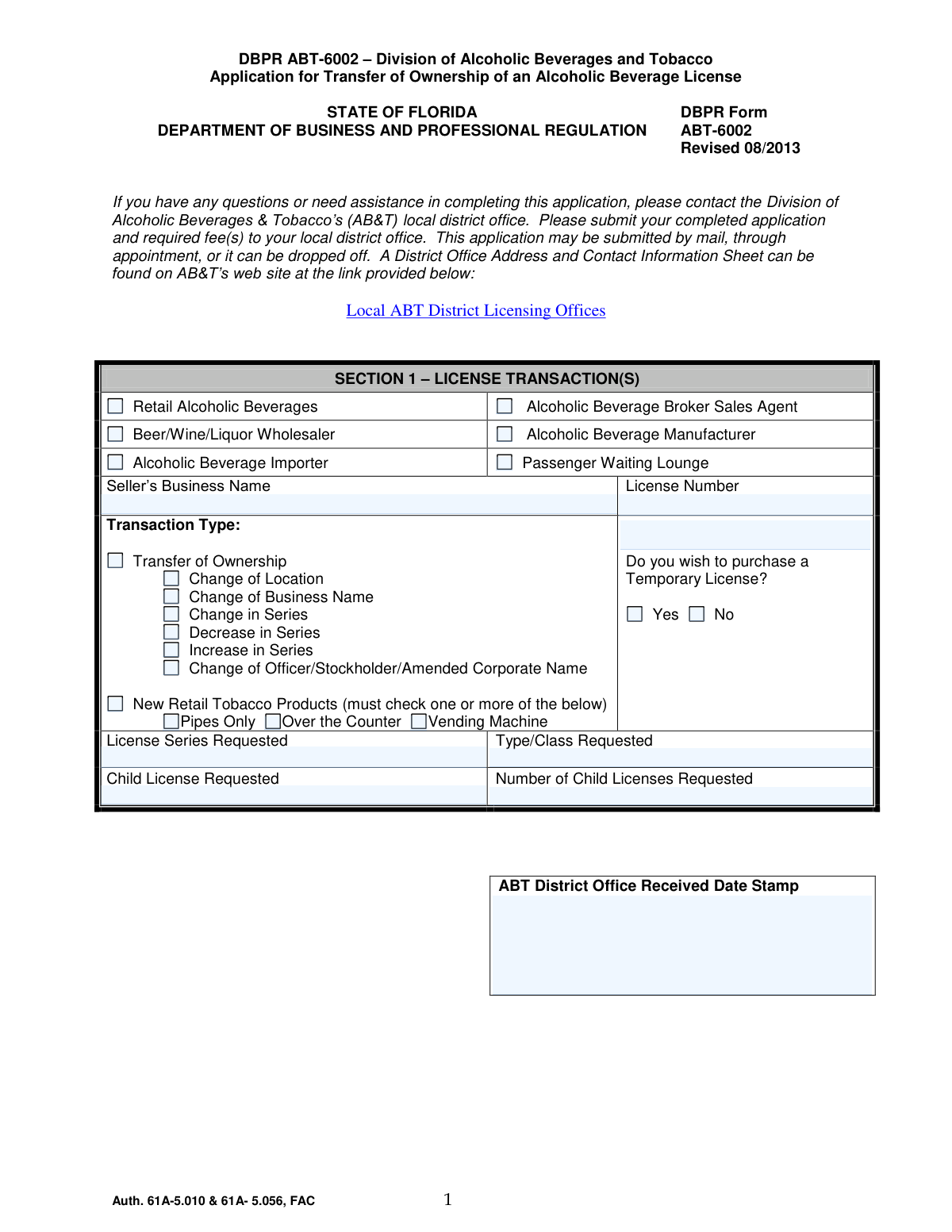
DBPR ABT-6002 is an official Florida Department of Business and Professional Regulation (DBPR) Division of Alcoholic Beverages and Tobacco application used to process ownership transfers of alcoholic beverage licenses and certain related license changes (e.g., location, business name, series changes, and officer/stockholder updates). The form identifies the license and transaction type, captures the applicant’s legal entity and location details, and requires personal background disclosures for individuals directly connected with the business. It is important because DBPR uses it to determine eligibility, ensure regulatory compliance (including moral character and enforcement history), and document the transfer through a sworn, notarized statement.
Our AI automatically handles information lookup, data retrieval, formatting, and form filling.
It takes less than a minute to fill out DBPR ABT-6002 using our AI form filling.
Securely upload your data. Information is encrypted in transit and deleted immediately after the form is filled out.

Form specifications

Form name: DBPR ABT-6002 – Application for Transfer of Ownership of an Alcoholic Beverage License
Number of pages: 4
Language: English
Categories: DBPR forms, alcohol permit forms, alcohol license forms
main-image

Instafill Demo: filling out a legal form in seconds

How to Fill Out DBPR ABT-6002 Online for Free in 2026

Are you looking to fill out a DBPR ABT-6002 form online quickly and accurately? Instafill.ai offers the #1 AI-powered PDF filling software of 2026, allowing you to complete your DBPR ABT-6002 form in just 37 seconds or less.
Follow these steps to fill out your DBPR ABT-6002 form online using Instafill.ai:
  1. 1 Select the license transaction(s) in Section 1 (e.g., Transfer of Ownership, Change of Location/Business Name/Series, officer/stockholder changes) and enter the seller’s business name, license number, and any requested series/type/class/child license details (including whether a temporary license is requested).
  2. 2 Complete Section 2 with applicant and business information: legal name(s) the license will be issued in, FEIN, Florida Department of State document number (if a legal entity), DBA, business phone/email, and the licensed location and mailing addresses.
  3. 3 Answer the transfer-related questions in Section 2 (whether the transfer is due to revocation proceedings and whether there is a personal relationship to the transferor), providing an explanation if required.
  4. 4 For each person directly connected with the business (unless a current licensee), complete Section 3 with personal identifiers and demographics, citizenship/immigration information, and home address.
  5. 5 Complete the Section 3 disclosure questions regarding other alcohol/tobacco interests, prior license refusals/revocations/suspensions, felony convictions, alcohol/tobacco-related offenses, and arrests/notices to appear; attach additional sheets and arrest disposition documents where required.
  6. 6 Review the moral character and law-enforcement/ABT employment questions, then sign the notarization statement and have the signature properly notarized (including identification details and notary commission information).
  7. 7 Assemble required attachments and fees per the application requirements checklist/instructions, then submit the completed package to the appropriate local ABT district office by mail, appointment, or drop-off.

Our AI-powered system ensures each field is filled out correctly, reducing errors and saving you time.

Why Choose Instafill.ai for Your Fillable DBPR ABT-6002 Form?

Speed

Complete your DBPR ABT-6002 in as little as 37 seconds.

Up-to-Date

Always use the latest 2026 DBPR ABT-6002 form version.

Cost-effective

No need to hire expensive lawyers.

Accuracy

Our AI performs 10 compliance checks to ensure your form is error-free.

Security

Your personal information is protected with bank-level encryption.

Frequently Asked Questions About Form DBPR ABT-6002

DBPR ABT-6002 is used to apply for changes to an existing Florida alcoholic beverage license, including a transfer of ownership and other license changes listed in Section 1. It is submitted to the Florida Division of Alcoholic Beverages & Tobacco (AB&T).

The applicant(s) who will be the new owner(s) or the party requesting the license change must complete the form. If the applicant is a corporation or other legal entity, the entity’s legal name and Florida Department of State document number must be provided.

Submit the completed application and required fee(s) to your local AB&T district office. The form indicates you may submit by mail, by appointment, or by drop-off.

The form references a “District Office Address and Contact Information Sheet” available on AB&T’s website under “Local ABT District Licensing Offices.” Use that list to locate the correct office for your area.

Section 1 allows you to request other changes such as change of location, change of business name, change in series, decrease/increase in series, and change of officer/stockholder/amended corporate name. You should check all boxes that apply to your request.

Section 1 asks whether you wish to purchase a temporary license. The form does not require it in all cases, so you should select “Yes” only if you want a temporary license and confirm eligibility, cost, and timing with your local AB&T district office.

Section 2 requests key business and applicant details such as FEIN, business phone, applicant name(s) (the name the license will be issued in), Department of State document number (if applicable), D/B/A, and both location and mailing addresses. Providing accurate addresses is important because the license is tied to the location address.

Use the legal entity name and the Department of State document number exactly as registered with the Florida Department of State Division of Corporations. This should match the entity’s official state registration records.

No. The form states the Contact Person section is optional, and you should refer to the application instructions for details on when it may be helpful to include one.

Section 2 asks whether the transfer is connected to revocation proceedings and, if so, whether you have a personal relationship to the current license holder (transferor). If you answer “Yes,” you must explain the relationship in the space provided.

Section 3 must be completed for each person directly connected with the business, unless that person is a current licensee. If multiple individuals are involved, you may need to attach additional copies as necessary.

The form explains that Social Security numbers are mandatory for this application under federal and Florida law, including child support enforcement and license identification requirements. It also states the division will redact SSNs from any public records request.

Section 3 asks about ownership interests in alcohol/tobacco businesses, prior license refusals/revocations/suspensions (past 15 years), felony convictions (past 15 years), alcohol/tobacco-related offenses (past 5 years), and arrests/notices to appear (past 15 years). If you answer “Yes” to certain questions, you must provide details and may need to attach additional sheets.

If you answer “Yes” to felony convictions, alcohol/tobacco-related offenses, or arrests/notices to appear, the form instructs you to provide a copy of the arrest disposition. This is referenced as being required in the Application Requirements checklist.

Yes. Section 3 includes a notarization statement requiring the applicant’s signature to be sworn/affirmed or acknowledged before a notary, with the notary completing the state/county, date, identification method, and commission expiration information.

Compliance DBPR ABT-6002
Validation Checks by Instafill.ai

1
Validates Section 1 license category selection (exactly one primary category)
Checks that the applicant selected one (and only one) primary license category in Section 1 (e.g., Retail Alcoholic Beverages, Wholesaler, Manufacturer, Importer, etc.). This is important because the processing path, fees, and required attachments differ by category. If none or multiple are selected, the submission should be rejected or routed to manual review with a request for clarification.
2
Validates Transaction Type selection and required dependent fields
Ensures at least one Transaction Type is selected (Transfer of Ownership, Change of Location, Change of Business Name, etc.) and that any dependent fields required by the chosen transaction(s) are completed (e.g., new location details for Change of Location). This prevents incomplete transactions that cannot be legally evaluated or entered into the licensing system. If validation fails, the system should flag missing dependent data and prevent submission until corrected.
3
Validates Temporary License purchase choice (Yes/No) and fee/series consistency
Checks that the Temporary License question is answered (Yes or No) and that the choice is consistent with the rest of the application (e.g., a temporary license request should not be submitted without a valid license series/type request). This matters because temporary licensing often triggers additional fees and time-sensitive processing. If inconsistent or unanswered, the application should be held and the applicant prompted to correct the selection.
4
Validates License Series/Type/Class fields are present and in allowed format
Verifies that License Series Requested and Type/Class Requested are provided when applicable and match expected formatting (typically numeric series and recognized type/class codes used by ABT). This is critical to ensure the correct license authority is being transferred or modified. If the series/type is missing or not recognized, the submission should be blocked or routed for manual verification.
5
Validates Child License request logic and numeric constraints
Ensures that if a Child License is requested, the Number of Child Licenses Requested is provided, is a whole number, and is greater than zero; if no child license is requested, the number field should be blank or zero per system rules. This prevents fee miscalculation and incorrect license issuance. If the count is invalid (negative, non-integer, or missing when required), the system should return an error and require correction.
6
Validates New Retail Tobacco Products selections when that transaction is checked
If 'New Retail Tobacco Products' is selected, checks that at least one sub-option is selected (Pipes Only, Over the Counter, Vending Machine). This is important because tobacco retail permissions are scoped to the method of sale and may affect compliance requirements. If no sub-option is selected, the application should be rejected as incomplete.
7
Validates License Number format and presence for transfer-related transactions
Checks that the License Number is provided for transactions that require an existing license (especially Transfer of Ownership, Change of Location, Change of Business Name) and that it matches the expected ABT license number pattern/length. This is essential to link the application to the correct existing license record. If missing or malformed, the system should prevent submission and request a corrected license number.
8
Validates FEIN format and requiredness based on applicant type
Validates that the FEIN is a 9-digit number (allowing standard hyphen formatting) and is required when the applicant is a corporation or other legal entity. This matters for tax identification, entity verification, and enforcement screening. If the FEIN is missing when required or not 9 digits, the application should be flagged and not accepted until corrected.
9
Validates Florida Department of State Document Number requiredness and format
If the applicant is a corporation/LLC/partnership/other legal entity, ensures the Department of State Document # is provided and matches expected Florida entity document number patterns (e.g., alphanumeric prefixes such as L, P, F followed by digits, depending on entity type). This is important to confirm the entity is properly registered and to prevent mismatches between DBPR and Division of Corporations records. If missing or invalid, the submission should be rejected or queued for manual entity verification.
10
Validates Applicant Full Legal Name(s) and Seller’s Business Name completeness
Ensures Seller’s Business Name (Section 1) and Full Name of Applicant(s) (Section 2) are not blank and meet minimum completeness rules (e.g., not only initials, not placeholder text). Correct naming is critical because the license is issued in the applicant’s legal name and must match supporting documents. If names are incomplete or appear invalid, the system should require correction before acceptance.
11
Validates business and contact phone numbers (format, length, extension rules)
Checks Business Telephone Number and any Contact Person Telephone Number for valid US phone formatting (10 digits, allowing punctuation) and validates that extensions contain only digits and are within a reasonable length. Accurate phone numbers are necessary for deficiency notices and time-sensitive communications. If invalid, the system should flag the field and require a corrected number.
12
Validates email address format when provided (optional fields)
If an email address is entered in any optional email field, validates it against standard email syntax rules (single @, valid domain, no spaces). This prevents failed electronic communications and reduces processing delays. If invalid, the system should prompt the applicant to correct the email or leave it blank.
13
Validates Florida location address completeness and state constraint
Ensures the Location Address (street/number), City, County, and Zip Code are provided and that the State is 'FL' as indicated on the form. This is important because the licensed premises must be located in Florida and county is used for jurisdictional routing and quota/fee determinations. If any component is missing or the state is not FL, the application should be rejected as incomplete or inconsistent.
14
Validates mailing address completeness and state/ZIP consistency
Checks that the Mailing Address, City, State, and Zip Code are complete and that the ZIP code is valid for US addresses (5 digits or ZIP+4) and consistent with the state abbreviation format. This matters because official notices and licenses may be mailed, and incorrect addresses can create legal notice issues. If invalid or incomplete, the system should require correction before submission.
15
Validates revocation-proceedings logic and relationship explanation requirement
If the applicant indicates the transfer is due to revocation proceedings, the form must have a Yes/No answer for whether there is a personal relationship to the transferor; if 'Yes', an explanation of the relationship must be provided. This is important for regulatory scrutiny and conflict-of-interest evaluation. If the explanation is missing when required or the dependent question is unanswered, the application should be flagged as deficient.
16
Validates Related Party Personal Information completeness per individual
For each person directly connected with the business (unless a current licensee), verifies required fields are completed: Full Name, SSN, Date of Birth, citizenship answer, and Home Address (street, city, state, ZIP). This is essential for background screening, child support compliance checks, and identity verification. If any required personal field is missing, the system should not accept the submission for that individual and should request completion.
17
Validates SSN format and disallows invalid/placeholder values
Checks Social Security Number is exactly 9 digits (allowing hyphens) and rejects known invalid patterns (e.g., all zeros, 123456789, 999999999) or non-numeric characters. SSN is mandatory for this application and is used for child support and identification screening. If invalid, the application should be blocked and the applicant instructed to provide a valid SSN.
18
Validates Date of Birth and age eligibility (logical date checks)
Ensures Date of Birth is a valid calendar date, is not in the future, and that the individual meets minimum age requirements applicable to alcohol licensing (commonly 21+, depending on role and statutory requirements). This prevents processing of ineligible applicants and reduces enforcement risk. If the DOB is invalid or indicates ineligibility, the system should reject the submission or route it for compliance review.
19
Validates non-citizen identification requirement
If the individual answers 'No' to U.S. citizen, requires an immigration card number or passport number and validates it is non-empty and within reasonable character limits (alphanumeric, no obvious placeholders). This is important for identity verification and lawful presence documentation. If missing, the application should be marked incomplete and not processed.
20
Validates conditional disclosures for ownership interest, adverse actions, and criminal history
For questions 5–9 in Section 3, if the applicant answers 'Yes', requires the corresponding detail fields (business name, license number, location address, date, location, type of offense) and validates that dates are valid and within the stated lookback windows (15 years or 5 years, as applicable). This ensures the Division receives sufficient information to evaluate statutory disqualifiers and conduct background checks. If 'Yes' is selected without required details or dates are invalid, the system should flag the application as deficient and require completion; if dates fall outside the window, it should still accept but flag for review to confirm accurate disclosure.
21
Validates notarization block completeness and signature/date consistency
Checks that the notarization section is complete: State, County, applicant signature, notarization type (Sworn/Subscribed or Acknowledged), notarization date (day/month/year), printed name of person making statement, identification method (personally known or type of ID produced), notary signature, and commission expiration date. Notarization is critical for legal attestation under penalty of perjury and is often a hard requirement for acceptance. If any required notarization element is missing or the commission is expired on the notarization date, the submission should be rejected as non-compliant.

Common Mistakes in Completing DBPR ABT-6002

Selecting the wrong license transaction(s) in Section 1

Applicants often check only “Transfer of Ownership” and overlook other changes happening at the same time (e.g., change of location, business name, series, or officer/stockholder changes). This can cause the district office to treat the filing as incomplete or require a corrected application, delaying approval and potentially affecting the ability to operate. Before submitting, confirm every aspect of the deal (ownership, address, entity name, license series, officers/stockholders) and check all applicable transaction boxes.

Leaving the license series/type/class fields blank or inconsistent

People frequently omit “License Series Requested,” “Type/Class Requested,” and child license details, or they enter information that doesn’t match the existing license or the intended operation. Missing or mismatched series/class information can trigger follow-up requests, rework, or incorrect fee assessment. Use the current license record and purchase documents to enter the exact series and type/class, and only request child licenses if you know the number and need.

Using an incorrect legal entity name or missing the Florida Department of State document number

A common error is entering a trade name (D/B/A) where the form asks for the legal applicant name, or failing to provide the Department of State Document # for corporations/LLCs. This creates identity mismatches with state records and can prevent the license from being issued in the correct name. Enter the legal name exactly as registered with the Florida Division of Corporations and include the correct document number; put the trade name only in the D/B/A field.

Confusing Seller’s Business Name with Applicant/Business Name (D/B/A)

Applicants sometimes repeat the buyer’s information in the “Seller’s Business Name” field or mix seller and buyer names across sections. This can create confusion about who is transferring and who is receiving the license, leading to processing delays and requests for clarification. Verify the seller’s name as it appears on the current license and enter the buyer/applicant information only in the applicant fields.

Providing incomplete or non-physical location addresses

Many submissions use a P.O. Box for the “Location Address” or omit key details like suite/unit numbers, which are critical for premises identification. An incomplete premises address can delay inspections, zoning verification, and final approval. Always provide the full physical street address (including unit/suite) for the licensed location, and use the mailing address fields for P.O. Boxes if needed.

Incorrect FEIN or missing business contact information

Applicants often enter an SSN in the FEIN field, transpose digits, or leave the business telephone number blank. Incorrect tax identifiers and missing contact details slow verification and make it difficult for the district office to resolve issues quickly. Double-check the FEIN against IRS documentation and provide a reliable business phone number (and email if available) to reduce back-and-forth.

Not completing Section 3 for every required related party

Section 3 must be completed for each person directly connected with the business unless they are a current licensee, but applicants frequently submit only one person’s information or assume owners/officers don’t need separate entries. Missing related-party disclosures can result in an incomplete application, additional paperwork requests, and delays in background screening. Identify all directly connected individuals (e.g., owners, partners, officers, key managers, interested parties) and attach additional copies of Section 3 as needed.

Omitting mandatory SSN and personal identifiers in Section 3

Because the form notes privacy language, some applicants mistakenly believe SSN disclosure is optional and leave it blank, or they provide partial DOB/physical descriptors. The form states SSNs are mandatory under cited federal/state authority, and missing identifiers can prevent required screening. Provide the full SSN, complete date of birth, and other requested descriptors exactly as asked to avoid rejection or delays.

Misunderstanding disclosure questions about arrests/convictions and prior licensing actions

Applicants often answer “No” to arrests, notices to appear, license suspensions/revocations, or convictions because they think sealed/older matters don’t count or they confuse “arrest” with “conviction.” Incorrect answers can lead to enforcement issues, denial, or later disciplinary action for misrepresentation. Read each question’s timeframe carefully (5 years vs. 15 years), disclose all applicable events, and attach the required arrest disposition documents when “Yes” is selected.

Failing to explain “Yes” answers or omitting required attachments

Even when applicants check “Yes,” they frequently leave the explanation fields blank, provide vague details (no date/location), or forget to attach arrest dispositions and additional sheets. This results in deficiency letters and processing delays because the agency cannot complete its review. For every “Yes,” provide complete details (date, location, offense/type, business/license info) and include all required supporting documents; attach extra pages when space is insufficient.

Errors on revocation-proceedings transfer questions (Section 2)

Applicants sometimes skip the question about whether the transfer is due to revocation proceedings, or they fail to disclose personal relationships to the transferor when applicable. Incomplete or inaccurate responses can trigger heightened scrutiny, delays, or potential denial if the transfer appears designed to evade enforcement. Answer both questions explicitly, and if “Yes,” provide a clear written explanation of the relationship and circumstances.

Improper notarization (missing venue, wrong notarial act, unsigned/undated)

A frequent submission issue is signing without a notary, leaving the state/county blank, not selecting whether it was sworn/subscribed or acknowledged, or using an expired notary commission. Improper notarization can invalidate the affidavit and require resubmission, delaying the transfer. Do not sign until in front of the notary, ensure the venue and date are completed, select the correct notarial act, and confirm the notary completes their signature, seal, and commission expiration.
Saved over 80 hours a year

“I was never sure if my IRS forms like W-9 were filled correctly. Now, I can complete the forms accurately without any external help.”

Kevin Martin Green

Your data stays secure with advanced protection from Instafill and our subprocessors

Robust compliance program

Transparent business model

You’re not the product. You always know where your data is and what it is processed for.

ISO 27001, HIPAA, and GDPR

Our subprocesses adhere to multiple compliance standards, including but not limited to ISO 27001, HIPAA, and GDPR.

Security & privacy by design

We consider security and privacy from the initial design phase of any new service or functionality. It’s not an afterthought, it’s built-in, including support for two-factor authentication (2FA) to further protect your account.

Fill out DBPR ABT-6002 with Instafill.ai

Worried about filling PDFs wrong? Instafill securely fills dbpr-abt-6002-application-for-transfer-of-ownershi forms, ensuring each field is accurate.



