Yes! You can use AI to fill out Fidelity Investments Account Authority Form
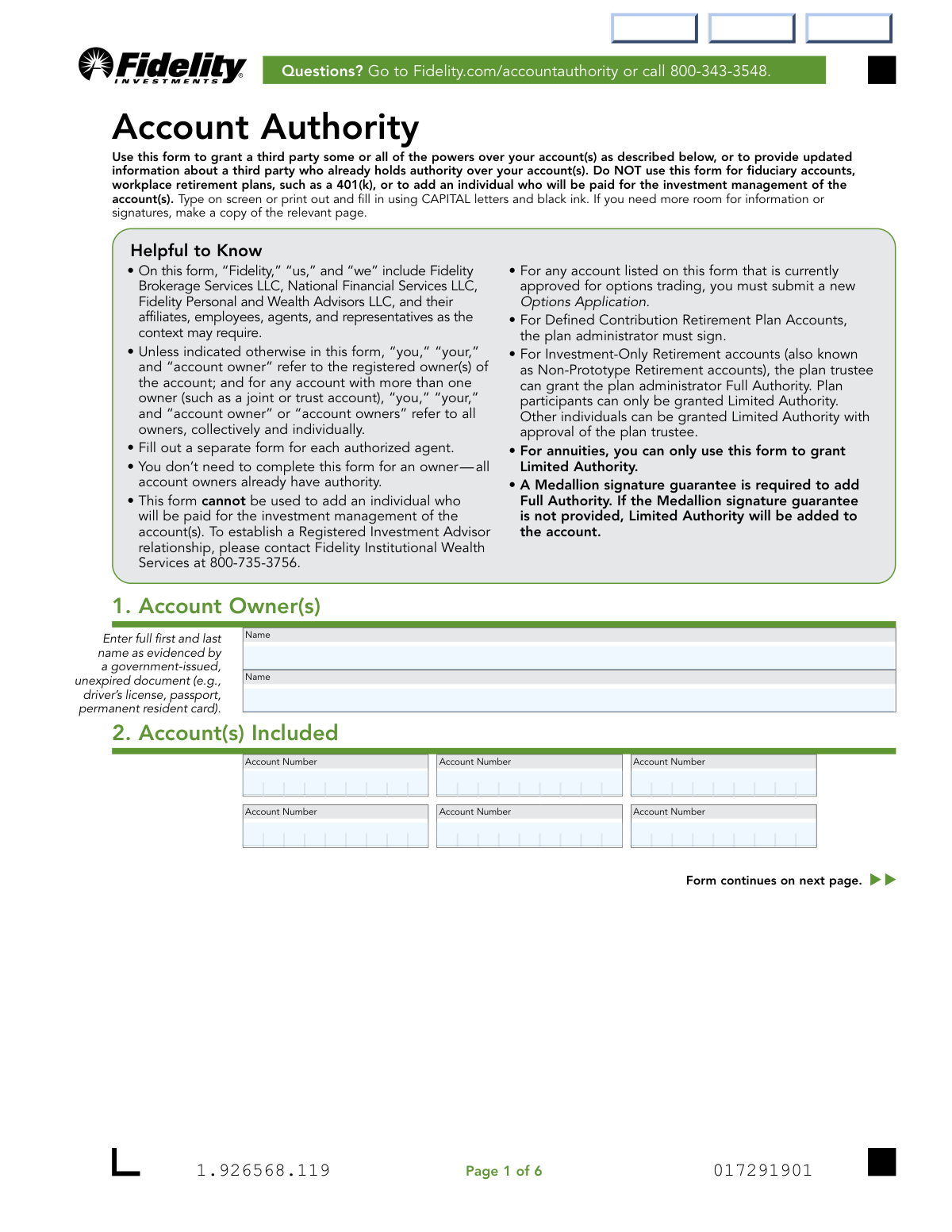
The Fidelity Investments Account Authority form is an official document used by Fidelity account owners to designate an authorized agent — a trusted third party — who is granted specific powers to act on one or more Fidelity accounts, ranging from viewing account information and placing trades (Limited Authority) to withdrawing funds and initiating IRA rollovers (Full Authority). The form is essential for individuals who want a family member, trusted associate, or plan administrator to manage their investments without transferring ownership of the account. It is not intended for fiduciary accounts, workplace retirement plans like 401(k)s, or paid investment advisors. Today, this form can be filled out quickly and accurately using AI-powered services like Instafill.ai, which can also convert non-fillable PDF versions into interactive fillable forms.
Our AI automatically handles information lookup, data retrieval, formatting, and form filling.
It takes less than a minute to fill out Fidelity Account Authority using our AI form filling.
Securely upload your data. Information is encrypted in transit and deleted immediately after the form is filled out.
Form specifications
| Form name: | Fidelity Investments Account Authority Form |
| Number of pages: | 1 |
| Filled form examples: | Form Fidelity Account Authority Examples |
| Language: | English |
Instafill Demo: filling out a legal form in seconds
How to Fill Out Fidelity Account Authority Online for Free in 2026
Are you looking to fill out a FIDELITY ACCOUNT AUTHORITY form online quickly and accurately? Instafill.ai offers the #1 AI-powered PDF filling software of 2026, allowing you to complete your FIDELITY ACCOUNT AUTHORITY form in just 37 seconds or less.
Follow these steps to fill out your FIDELITY ACCOUNT AUTHORITY form online using Instafill.ai:
- 1 Navigate to Instafill.ai and upload the Fidelity Account Authority form PDF or select it from the available form library to begin filling it out online.
- 2 Complete Section 1 by entering the account owner's full legal name(s) as shown on a government-issued, unexpired ID, and list all relevant Fidelity account numbers in Section 2.
- 3 Select the desired level of authority in Section 3 — either Limited Authority or Full Authority — keeping in mind that Full Authority requires a Medallion signature guarantee and is not available for all account types.
- 4 Complete Section 4 to indicate whether existing authorized agents should be kept, removed entirely, or selectively removed, then fill out Section 5 with the authorized agent's personal information, including name, Social Security/Tax ID number, date of birth, contact details, address, citizenship status, income source, and any broker-dealer associations or public company affiliations.
- 5 Have the authorized agent review and sign Section 6, affirming their agreement to all terms and conditions, including certifying they will not be paid for investment management of the account(s).
- 6 Have the account owner(s) sign Section 7, and if applicable, obtain a Medallion signature guarantee for Full Authority requests; if the account is a Defined Contribution Retirement Plan, also obtain the Plan Administrator's signature in Section 8.
- 7 Submit the completed and signed form by scanning or photographing the entire document and uploading it via Fidelity.com/upload-Account-Authority, or mail it to the appropriate Fidelity address if digital submission is not possible.
Our AI-powered system ensures each field is filled out correctly, reducing errors and saving you time.
Why Choose Instafill.ai for Your Fillable Fidelity Account Authority Form?
Speed
Complete your Fidelity Account Authority in as little as 37 seconds.
Up-to-Date
Always use the latest 2026 Fidelity Account Authority form version.
Cost-effective
No need to hire expensive lawyers.
Accuracy
Our AI performs 10 compliance checks to ensure your form is error-free.
Security
Your personal information is protected with bank-level encryption.
Frequently Asked Questions About Form Fidelity Account Authority
The Account Authority form is used to grant a third party (called an authorized agent) some or all powers over your Fidelity account(s). It can also be used to update information about a third party who already holds authority over your account(s).
Do not use this form for fiduciary accounts, workplace retirement plans such as a 401(k), or to add an individual who will be paid for investment management of the account(s). To establish a Registered Investment Advisor relationship, contact Fidelity Institutional Wealth Services at 800-735-3756.
Limited Authority allows the authorized agent to view your account online, access tax forms, buy and sell securities, trade options (if approved), incur margin debt (if approved), and deposit checks — but cannot remove money or assets from the account. Full Authority includes all Limited Authority powers plus the ability to remove cash or assets, initiate IRA rollovers, Roth IRA conversions, recharacterizations, and make tax elections.
A Medallion signature guarantee is required only if you are requesting Full Authority. If it is not provided, Limited Authority will be added instead. The guarantee is not required if the form is completed in person at a Fidelity Investor Center with all signers present. Note that a notary seal or stamp is NOT a substitute for a Medallion signature guarantee.
No. Full Authority is NOT available for Annuities, BrokerageLink, Roth IRA for Kids, and UGMA/UTMA accounts. For annuities, you can only use this form to grant Limited Authority.
Both the authorized agent (Section 6) and the account owner(s) (Section 7) must sign and date the form. For Defined Contribution Retirement Plan Accounts, the plan administrator must also sign in Section 8. For Mutual Fund Accounts (account numbers beginning with a 2 followed by two letters), all owners must sign.
The authorized agent must provide their full legal name, Social Security or Taxpayer ID number, date of birth, relationship to the account owner, mobile phone, email address, legal/residential address, citizenship status, and employment/income information. Foreign citizens must also provide government-issued ID details and attach a copy of their ID.
No. You must fill out a separate Account Authority form for each authorized agent you wish to add. If you have multiple authorized agents, each one can act independently (severally) without the consent of the others.
The authority remains in effect until Fidelity receives written notice from an account owner withdrawing the authority, written notice of resignation from the authorized agent, notice of the death or incapacity of the last surviving account owner or the authorized agent, or until Fidelity decides to remove the authorized agent for any reason.
For faster processing, complete and sign the form, then scan or photograph the entire form and any required documents, and upload them at Fidelity.com/upload-Account-Authority or by scanning the QR code on the form. If you cannot use the digital upload process, visit Fidelity.com/customer-service/mailing-address for mailing instructions.
Only an agent with Full Authority can remove money or assets from your account, and only by sending a check to your address of record or transferring cash to a bank account you have pre-authorized. An agent with Limited Authority cannot remove money or assets from your account under any circumstances.
Yes! Services like Instafill.ai use AI to auto-fill form fields accurately, saving you time and reducing errors. If you have a flat, non-fillable PDF version of this form, Instafill.ai can also convert it into an interactive fillable form so you can complete it digitally.
Visit Instafill.ai, upload your Fidelity Account Authority PDF, and the AI will guide you through filling in all required fields — including account owner details, authorized agent information, authority level, and signatures. Once complete, you can download the filled form and submit it to Fidelity via their digital upload portal or by mail.
If the authorized agent is employed by or associated with a broker-dealer, stock exchange, FINRA, or other financial institution, they must disclose the company's name and address in the Associations section. Fidelity will send duplicate copies of account confirmations and statements to the associated person's employer for compliance review.
No. Regardless of whether the authorized agent has Limited or Full Authority, they are never permitted to designate beneficiaries or establish a new IRA or retirement plan on behalf of the account owner.
Compliance Fidelity Account Authority
Validation Checks by Instafill.ai
1
Authorized Agent Full Legal Name Matches Government-Issued ID
Validates that the authorized agent's first and last name fields (AuthorizedAgent_First_Name and AuthorizedAgent_Last Name) are populated with the full legal name exactly as it appears on a government-issued, unexpired document such as a driver's license, passport, or permanent resident card. Abbreviated names, nicknames, or initials-only entries should be flagged as invalid. Failure to provide a full legal name may result in identity verification failure, which could prevent Fidelity from completing the required background check and ultimately block the authorized agent from being approved.
2
Authorized Agent Date of Birth Format and Validity
Validates that the Date of Birth field (5Date of Birth MM DD YYYY) is entered in the correct MM DD YYYY format and represents a logically valid date (e.g., month between 01–12, day within the valid range for the given month, and year that is not in the future). Additionally, the date must confirm that the authorized agent is at least 18 years old, as the form explicitly states the agent must be of full legal age. If the date of birth indicates the agent is a minor or the format is invalid, the submission must be rejected.
3
Social Security or Taxpayer ID Number Format Validation
Validates that the Social Security Number (SSN) or Individual Taxpayer Identification Number (ITIN) field (5Social Security or Taxpayer ID Number) contains exactly 9 digits and conforms to the standard SSN format (XXX-XX-XXXX) or ITIN format. The field should not contain all zeros, sequential digits (e.g., 123-45-6789), or other obviously invalid patterns. This information is required by federal regulation for identity verification, and an improperly formatted or missing ID number will prevent Fidelity from completing mandatory compliance checks.
4
At Least One Account Number Provided
Validates that at least one of the six account number fields (AccountNumber1 through AccountNumber6) is populated, as the form requires at least one account to be identified in Section 2 for the authority grant to be meaningful. Account numbers should be checked for expected Fidelity account number format and length. If no account number is provided, the form cannot be processed, as there is no account to which the authorized agent's authority can be applied.
5
Authority Level Selection is Made
Validates that exactly one authority level has been selected in the Authority field (Section 3), choosing either Limited Authority or Full Authority. The form instructs applicants to 'Choose only one level of authority,' and selecting both or neither is invalid. If no selection is made, the form defaults to Limited Authority per the instructions, but this default behavior should be flagged for confirmation to ensure the account owner's intent is accurately captured and not assumed.
6
Full Authority Requires Medallion Signature Guarantee
Validates that if Full Authority is selected in Section 3, the Medallion Signature Guarantee fields in Section 7 are completed and present for the account owner signature(s). The form explicitly states that a Medallion signature guarantee is required for Full Authority, and without it, only Limited Authority will be granted. If Full Authority is requested but no Medallion guarantee is provided, the system should flag this discrepancy and notify the submitter that the authority level will be downgraded to Limited Authority.
7
Full Authority Not Selected for Ineligible Account Types
Validates that Full Authority is not requested for account types that are explicitly ineligible, including Annuities, BrokerageLink, Roth IRA for Kids, and UGMA/UTMA accounts. If an account number associated with one of these account types is listed in Section 2 and Full Authority is selected in Section 3, the submission should be flagged as invalid. Granting Full Authority to ineligible account types is not permitted under the form's terms, and processing such a request could result in unauthorized account access.
8
Foreign Citizen Identification Fields Completeness
Validates that when 'Foreign citizen' is selected in the Citizenship field, all required foreign identification fields are completed, including Country of Citizenship, Foreign Status (Permanent U.S. resident, Nonpermanent U.S. resident, or Nonresident of U.S.), Government ID Number, Country of Issuance, ID Issuance Date, ID Expiration Date, and ID Type. These fields are mandatory for non-U.S. citizens per federal identity verification regulations. Missing any of these fields for a foreign citizen will prevent Fidelity from completing the required identity verification and may result in the application being rejected.
9
Government-Issued ID Expiration Date is Not in the Past
Validates that the ID Expiration Date field (ID Expiration Date MM DD YYYY) contains a date that is on or after the form submission date, confirming the government-issued identification document is currently valid and unexpired. The form explicitly requires an 'unexpired' ID for foreign citizens. An expired ID cannot be used for identity verification purposes, and submitting a form with an expired ID will result in the authorized agent's identity not being verifiable, causing the application to be rejected or delayed.
10
Employer Field Conditional Requirement Based on Employment Status
Validates that if the employment status is selected as 'Employed' (not Self-employed, Retired, or Not employed), the Employer name field and Employer Address fields are populated. Conversely, if 'Self-employed' is selected, the Employer field should be left blank as instructed. If 'Retired' or 'Not employed' is selected, the Source of Income field should be completed instead. Inconsistencies between employment status and employer information could indicate incomplete or inaccurate disclosures required by industry regulations.
11
Broker-Dealer Association Disclosure Completeness
Validates that if the authorized agent is employed by or associated with a broker-dealer, stock exchange, FINRA, or other financial institution (or is a household member of such a person), the Associations section fields (Entity Name, Entity Address, City, State/Province, ZIP/Postal Code, Country) are fully completed. By signing the form, the agent certifies that if this section is blank, they have no such associations. Incomplete association disclosures could result in regulatory compliance violations and may expose both the agent and Fidelity to legal liability.
12
Affiliate Disclosure Requires Both Company Name and Trading Symbol or CUSIP
Validates that if the Affiliations section is completed (i.e., the authorized agent, their spouse, or a household relative is a board member, 10% shareholder, or policy-making officer of a publicly traded company), both the Affiliate Company Name and the corresponding Trading Symbol or CUSIP are provided for each affiliate listed. Providing only one of the two fields is insufficient for compliance purposes. Incomplete affiliate disclosures may violate SEC Rule 144 reporting requirements and could result in regulatory penalties.
13
Authorized Agent Signature and Printed Name Are Both Present
Validates that both the Authorized Agent Signature field and the Print Authorized Agent Name field in Section 6 are completed, and that the signature date is provided in MM/DD/YYYY format. The form requires the named authorized agent to personally sign and date Section 6, and the printed name must match the name provided in Section 5. A missing signature, printed name, or date renders the form legally incomplete and means the agent has not formally consented to the terms and conditions of the Account Authority Agreement.
14
Account Owner Signature and Date Are Present
Validates that at least one account owner has provided a signature, printed name, and date in Section 7, with the date formatted as MM/DD/YYYY. For Mutual Fund Accounts (account numbers beginning with '2' followed by two letters), all owners must sign. The account owner's signature is the legal authorization granting authority to the agent, and without it, the form has no legal effect. A missing or undated owner signature will result in the form being rejected and the authority not being granted.
15
Plan Administrator Signature Required for Defined Contribution Retirement Plan Accounts
Validates that if any account listed in Section 2 is a Defined Contribution Retirement Plan Account, Section 8 is completed with the Plan Administrator or Employer's printed name, signature, and date. The form explicitly states this section is required only for such accounts, and the plan administrator must sign per the form's instructions. Omitting the plan administrator signature for a Defined Contribution Retirement Plan Account means the authority grant is not properly authorized under the plan's governance requirements and cannot be processed.
16
Mailing Address Fields Completeness When Different from Legal Address
Validates that if the 'Same as legal/residential address' checkbox is not selected for the Mailing Address section, all mailing address fields (Address_2, City_2, StateProvince_2, ZipPostal Code_2, Country_2) are fully populated. A partial mailing address entry (e.g., only a city and state without a street address or ZIP code) should be flagged as incomplete. An incomplete mailing address could result in account statements, trade confirmations, and other critical communications failing to reach the authorized agent, creating compliance and communication issues.
Common Mistakes in Completing Fidelity Account Authority
Many people attempt to use this form for fiduciary accounts, workplace retirement plans (such as 401(k)s), or to add a paid investment manager, all of which are explicitly prohibited. This happens because people assume a general account authority form covers all account types. Submitting the form for ineligible accounts will result in rejection and processing delays. Always verify your account type before submitting — for Registered Investment Advisor relationships, contact Fidelity Institutional Wealth Services at 800-735-3756 instead.
A very common mistake is requesting Full Authority without providing a Medallion signature guarantee in Section 7, which is a mandatory requirement. People often confuse a notary seal or stamp with a Medallion signature guarantee — these are not the same thing and a notary seal will not be accepted. Without the Medallion guarantee, Fidelity will automatically downgrade the authority to Limited, which may not meet the account owner's intentions. Obtain the guarantee from a bank, credit union, or other financial institution before submitting, or complete the form in person at a Fidelity Investor Center where all signers are present. Tools like Instafill.ai can flag this requirement during form completion so you don't overlook it.
People frequently enter a nickname, abbreviated name, or name that doesn't match their government-issued ID in Section 5. The form explicitly requires the full first and last name as evidenced by a government-issued, unexpired document such as a driver's license or passport. Inconsistencies between the printed name, the signature section, and the ID can cause the form to be rejected or processing to be delayed. Always use the exact legal name as it appears on your official identification documents.
Account owners often list multiple agents on a single form, not realizing the instructions clearly state that a separate form must be completed for each authorized agent. This mistake leads to incomplete processing where only one agent may be recognized, or the entire form may be rejected. If you need to grant authority to two or more individuals, print or download a separate copy of the form for each agent and complete all sections independently for each one.
Some filers either leave Section 3 blank or select a level of authority that doesn't match their intentions, not realizing that Limited Authority is the default if no choice is indicated. Others select Full Authority for account types where it is not permitted, such as Annuities, BrokerageLink, Roth IRA for Kids, and UGMA/UTMA accounts. Carefully review the authority levels and the eligible account types listed in Section 3 before making a selection. AI-powered tools like Instafill.ai can help validate your selection against the account type to prevent this error.
Section 5 requires the authorized agent's Social Security Number (or Individual Taxpayer ID Number) and date of birth, but these fields are frequently left blank because agents feel uncomfortable providing this sensitive information or assume it is optional. However, federal regulations require Fidelity to verify the identity of individuals authorized to make transactions on an account, and missing this information will cause the form to be rejected or the account to be restricted. Ensure the authorized agent completes all required fields in Section 5 before submission.
Non-U.S. citizens often skip or partially complete the citizenship section in Section 5, failing to specify their residency status (permanent U.S. resident, nonpermanent U.S. resident, or nonresident) and omitting required government ID details such as the ID number, country of issuance, and issuance/expiration dates. The form also requires a copy of the unexpired photo ID to be attached. Incomplete citizenship information for foreign nationals will result in processing delays or rejection. Foreign citizens should carefully complete every field in the citizenship subsection and attach a legible copy of their ID.
Authorized agents who are employed by or associated with a broker-dealer, stock exchange, FINRA, or other financial institution — or who are a spouse or immediate family member of such a person — are required to disclose this in the Associations section of Section 5. Many people skip this section assuming it doesn't apply to them without carefully reading the criteria, or they are unaware that spousal/household associations also trigger the requirement. Failure to disclose can result in compliance violations and potential account restrictions. Read the Associations criteria carefully and complete the section if any of the conditions apply.
The Affiliations section requires disclosure if the authorized agent, their spouse, or any relative living in the same household is a board member, 10% shareholder, or policy-making officer of a publicly traded company. This section is frequently skipped because people don't realize that relatives living in the same home are included in the disclosure requirement, or they underestimate their family member's role. Failing to disclose this information can lead to regulatory compliance issues. Review the full definition of 'Affiliate' in the form and disclose all applicable relationships, making a copy of the section if there are more than two affiliates.
A frequent error is having the account owner sign Section 6 (Authorized Agent Signature) instead of the authorized agent, or vice versa. The form clearly states that Sections 5 and 6 must be completed by the authorized agent, while Section 7 is reserved for account owner signatures. Mixing up these signatures invalidates the form and requires resubmission. Before signing, each party should confirm which section is designated for them — the authorized agent signs Section 6, and the account owner(s) sign Section 7.
Account owners who currently have options trading approved on any account listed in the form often overlook the requirement to submit a new Options Application alongside this form. This is noted in the 'Helpful to Know' section but is easy to miss. Failing to submit the Options Application means the authorized agent will not be able to trade or exercise options even if Full Authority is granted. Review all accounts listed in Section 2 and, if any are approved for options trading, obtain and submit the required Options Application at the same time.
The form requires dates in MM/DD/YYYY format in multiple sections, including the authorized agent's date of birth, ID issuance and expiration dates, and the signature dates in Sections 6, 7, and 8. People commonly enter dates in incorrect formats (e.g., DD/MM/YYYY or using only two digits for the year), leave date fields blank, or forget to date their signature. Incorrect or missing dates can cause the form to be rejected or returned for correction. Double-check all date fields before submission to ensure they follow the MM/DD/YYYY format. AI-powered form tools like Instafill.ai can automatically format dates correctly to prevent this common error.
Saved over 80 hours a year
“I was never sure if my IRS forms like W-9 were filled correctly. Now, I can complete the forms accurately without any external help.”
Kevin Martin Green
Your data stays secure with advanced protection from Instafill and our subprocessors
Robust compliance program
Transparent business model
You’re not the product. You always know where your data is and what it is processed for.
ISO 27001, HIPAA, and GDPR
Our subprocesses adhere to multiple compliance standards, including but not limited to ISO 27001, HIPAA, and GDPR.
Security & privacy by design
We consider security and privacy from the initial design phase of any new service or functionality. It’s not an afterthought, it’s built-in, including support for two-factor authentication (2FA) to further protect your account.
Fill out Fidelity Account Authority with Instafill.ai
Worried about filling PDFs wrong? Instafill securely fills fidelity-investments-account-authority-form forms, ensuring each field is accurate.