Yes! You can use AI to fill out Form 8606, Nondeductible IRAs
Form 8606, Nondeductible IRAs, is a tax form filed with the IRS to report and track after-tax contributions to your Individual Retirement Arrangements (IRAs). It's crucial for calculating the taxable portion of your distributions and for reporting conversions to a Roth IRA, ensuring you don't pay tax twice on the same money. Today, this form can be filled out quickly and accurately using AI-powered services like Instafill.ai, which can also convert non-fillable PDF versions into interactive fillable forms.
Rather not fill this in by hand? Instafill is an online form filler that completes PDF forms automatically — upload the blank form, answer a few questions, and the AI fills every field.
Form specifications
| Form name: | Form 8606, Nondeductible IRAs |
| Number of pages: | 1 |
| Language: | English |
Our AI automatically handles information lookup, data retrieval, formatting, and form filling.
It takes less than a minute to fill out Form 8606 using our AI form filling.
Securely upload your data. Information is encrypted in transit and deleted immediately after the form is filled out.
Instafill Demo: How to fill out PDF forms in seconds with AI
How to Fill Out Form 8606 Online for Free in 2026
Are you looking to fill out a FORM 8606 form online quickly and accurately? Instafill.ai offers the #1 AI-powered PDF filling software of 2026, allowing you to complete your FORM 8606 form in just 37 seconds or less.
Follow these steps to fill out your FORM 8606 form online using Instafill.ai:
- 1 Navigate to Instafill.ai and upload your PDF of Form 8606 or select it from the platform's template library.
- 2 Enter your personal details, including your full name and Social Security Number, as required at the top of the form.
- 3 Complete Part I by providing your total basis in traditional IRAs and detailing any nondeductible contributions for the year.
- 4 If you converted any amount from a traditional, SEP, or SIMPLE IRA to a Roth IRA, fill out the required calculations in Part II.
- 5 Use Part III to calculate the taxable amount of any distributions you took from traditional, SEP, SIMPLE, or Roth IRAs.
- 6 Review all the information populated by the AI for accuracy, make any necessary edits, and then sign and date the form.
- 7 Download your completed Form 8606 to attach to your Form 1040, 1040-SR, or 1040-NR tax return.
Our AI-powered system ensures each field is filled out correctly, reducing errors and saving you time.
Why Choose Instafill.ai for Your Fillable Form 8606 Form?
Speed
Complete your Form 8606 in as little as 37 seconds.
Up-to-Date
Always use the latest 2026 Form 8606 form version.
Cost-effective
No need to hire expensive lawyers.
Accuracy
Our AI performs 10 compliance checks to ensure your form is error-free.
Security
Your personal information is protected with bank-level encryption.
Frequently Asked Questions About Form 8606
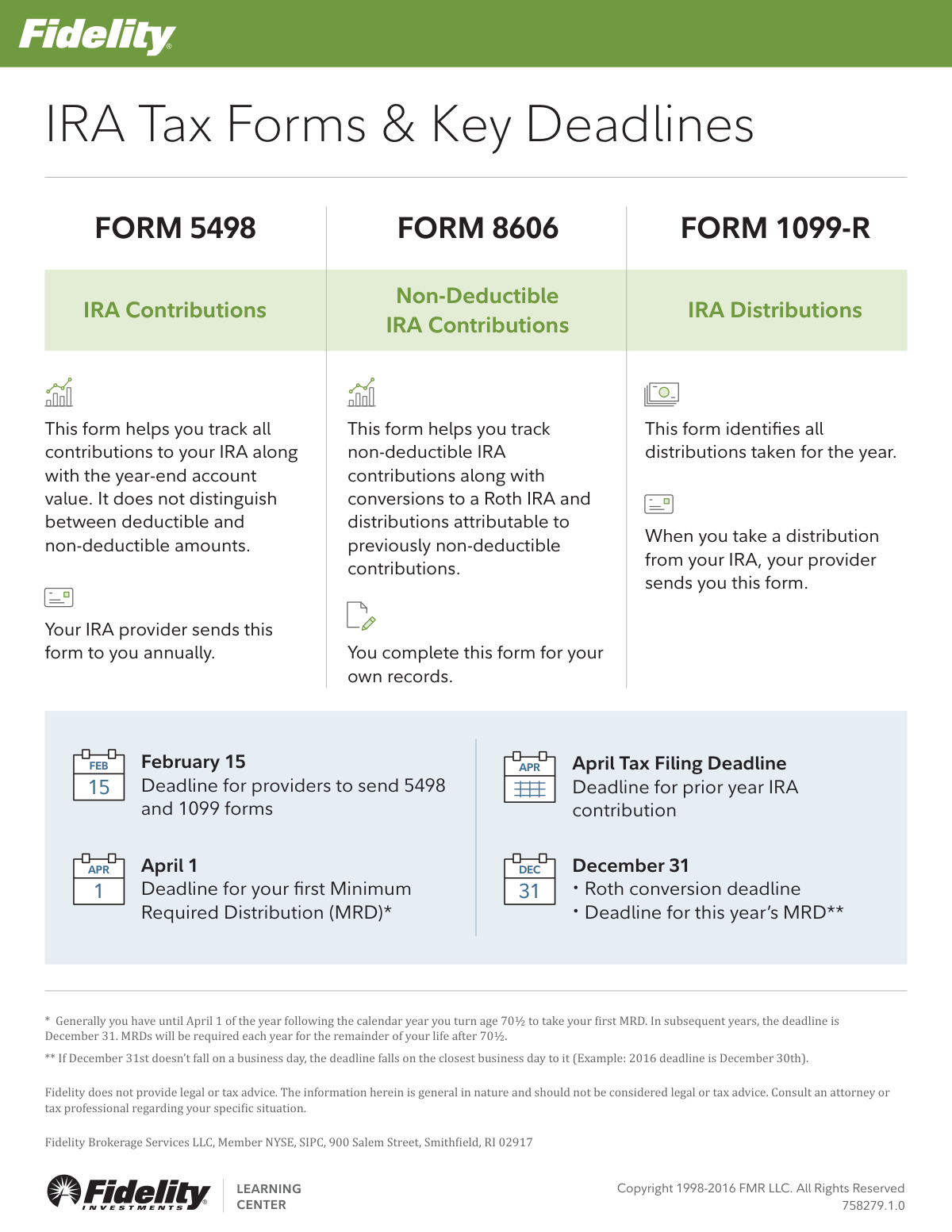
Form 5498 is sent by your IRA provider to help you track all contributions made to your IRA for the year, as well as the account's year-end value.
Your IRA provider sends you Form 1099-R when you take a distribution from your IRA. This form identifies all the distributions you have taken for the year.
You must complete Form 8606 for your own records. This form is used to track non-deductible IRA contributions, conversions to a Roth IRA, and certain distributions.
Your IRA provider must send you Form 5498 and Form 1099-R by February 15.
The deadline for making a prior-year IRA contribution is the April tax filing deadline.
You generally have until April 1 of the year following the calendar year you turn age 70½ to take your first MRD. Subsequent MRDs are due by December 31 each year.
The deadline to complete a Roth conversion for the current year is December 31.
Form 5498 is sent by your provider to report all contributions, while Form 8606 is a form you complete yourself to report specific non-deductible contributions and Roth conversions.
The deadline for providers to send these forms is February 15. If you have not received them shortly after this date, you should contact your IRA provider directly.
Yes, services like Instafill.ai use AI to auto-fill form fields accurately and save time, which can be very helpful for completing tax forms like Form 8606.
You can use a service like Instafill.ai to easily fill out your forms online. Simply upload the form, and the AI-powered tool will help you complete the necessary fields quickly.
Tools like Instafill.ai can convert flat, non-fillable PDFs into interactive forms. You can upload the document to make it fillable and complete it on your computer.
No, Form 5498 tracks total contributions but does not distinguish between deductible and non-deductible amounts. You must track non-deductible contributions yourself using Form 8606.
Compliance Form 8606
Validation Checks by Instafill.ai
1
First MRD Deadline Compliance
This check verifies that a taxpayer's first Minimum Required Distribution (MRD) is taken by April 1 of the year following the one in which they turn age 70½. It is crucial for avoiding significant tax penalties for missed distributions. If the distribution date is after this deadline, the system should flag the transaction for review and alert the user to potential IRS penalties.
2
Subsequent MRD Deadline Compliance
This validation ensures that for all years after the first MRD, the required distribution is taken by December 31. This rule is critical for ongoing annual compliance with IRS regulations. A failure to meet this deadline results in a substantial excise tax on the amount not distributed, so the system must flag any accounts that are not in compliance as the year-end approaches.
3
Prior-Year Contribution Deadline Adherence
This check validates that any IRA contributions designated for the prior tax year are made on or before the official April tax filing deadline of the current year. This allows taxpayers to maximize their retirement savings for the previous year up until they file their taxes. The system should reject any prior-year contribution attempts made after this date to prevent incorrect tax reporting.
4
Roth Conversion Deadline Verification
This validation confirms that any Roth IRA conversion is completed by the December 31 deadline. The transaction date determines which tax year the income from the conversion is reported in. A failed validation would mean the conversion is processed for the next tax year, which could have significant tax planning implications for the user.
5
Form 1099-R Taxable Amount Logic
This check ensures that the 'taxable amount' reported on Form 1099-R is not greater than the 'gross distribution' amount. The taxable portion can be equal to or less than the total distribution, but can never exceed it. This fundamental check prevents logical errors and incorrect tax reporting that would lead to IRS inquiries and amended returns.
6
Form 8606 Filing Trigger for Non-Deductible Events
This validation verifies that Form 8606 is generated or filed when a user makes a non-deductible IRA contribution, performs a Roth conversion, or takes a distribution from an IRA containing non-deductible basis. Filing this form is mandatory in these situations to correctly track the after-tax basis and calculate the taxable portion of distributions. Failure to file can result in penalties and the entire distribution being taxed.
7
Consistency Between Form 1099-R and Form 8606
This check cross-references the total distributions reported on Form 1099-R with the distribution amounts entered on Form 8606 for a given tax year. The amounts must match to ensure the pro-rata calculation for the taxable portion of a distribution is performed correctly. Discrepancies can lead to incorrect tax calculations and potential audits.
8
Provider Form Issuance Deadline (Feb 15)
This system check validates that the financial institution (provider) sends Form 5498 (IRA Contribution Information) and Form 1099-R (Distributions) to the recipient by the February 15 deadline. This is crucial so that taxpayers have the necessary documents in a timely manner to prepare their tax returns. A failure would indicate a compliance issue for the provider and could inconvenience the customer.
9
Age Verification for MRD Trigger
This check validates the IRA owner's age based on their date of birth to determine if they have reached the age of 70½ (or the updated age per current law) during the tax year. This is the primary trigger for the Minimum Required Distribution (MRD) rule. An incorrect age calculation could lead to either a premature or a missed MRD, both of which have negative consequences for the account holder.
10
Form 8606 Basis Non-Negativity
This validation ensures that the calculated basis in non-deductible IRAs on Form 8606 is never a negative number. A negative basis is logically impossible, as it would imply that more after-tax money was withdrawn than was ever contributed. This check prevents calculation errors that would invalidate the tax form and lead to incorrect reporting of taxable income.
11
Weekend/Holiday Deadline Adjustment Logic
This check verifies that transaction deadlines, such as the December 31 MRD and Roth conversion deadline, are adjusted to the last business day if the date falls on a weekend or holiday. The text explicitly notes this rule, making it a key compliance point. The system must correctly identify the true final transaction day for a given year to prevent users from inadvertently missing a critical deadline.
12
Form 5498 Fair Market Value (FMV) Validity
This validation ensures the year-end Fair Market Value (FMV) reported on Form 5498 is a valid, non-negative monetary value. The FMV is a critical component for calculating the subsequent year's MRD. A missing or invalid FMV would halt essential tax calculations and indicates a data integrity problem from the provider.
Common Mistakes in Completing Form 8606
Many people expect their IRA provider to send them a completed Form 8606, similar to a 1099-R. However, the taxpayer is responsible for completing and filing Form 8606 to report non-deductible contributions, Roth conversions, and distributions of after-tax amounts. Failing to file can result in double taxation on withdrawals and potential penalties. To avoid this, remember to obtain and file Form 8606 with your tax return yourself whenever you make these types of transactions.
A frequent point of confusion is the deadline for making an IRA contribution for the previous tax year. Taxpayers often assume the deadline is December 31, but it is actually the April tax filing deadline of the current year. Missing this deadline means losing a valuable opportunity to contribute for the prior year, which can impact tax deductions and retirement savings growth. Always remember you have until Tax Day to fund the previous year's IRA.
The deadline for your first Minimum Required Distribution (MRD) is April 1 of the year after you reach the required age, but for all subsequent years, it is December 31. This can cause a person to take their first MRD in March and forget they must take their second MRD by December 31 of that same year. Missing an MRD deadline results in a substantial tax penalty, often 25-50% of the amount that should have been withdrawn. Set calendar reminders for both deadlines to avoid this costly error.
The Form 5498 provided by your institution does not differentiate between deductible and non-deductible contributions. It is the taxpayer's sole responsibility to track this 'basis' on Form 8606 each year a non-deductible contribution is made. If you fail to track your basis, you will pay taxes on that money again when you withdraw it, effectively erasing its tax-free status. Using a tool like Instafill.ai can help you consistently track and apply your basis across tax years, preventing over-taxation.
Unlike contributions, which have a deadline in April of the following year, Roth conversions must be fully completed by December 31 to count for the current tax year. People often mistakenly believe they have until the tax filing deadline, causing them to miss the window and unintentionally push the taxable event into the next year. This can disrupt tax planning, so ensure any funds for conversion are moved to the Roth account before the end of the calendar year.
Form 1099-R uses distribution codes in Box 7 to explain the nature of a withdrawal, such as an early distribution, a rollover, or a normal distribution. Taxpayers often overlook these codes, leading to incorrect reporting on their tax returns and potentially triggering unnecessary taxes or penalties. Always verify the code on your 1099-R to ensure you are reporting the distribution correctly. AI-powered tools like Instafill.ai can automatically interpret these codes and ensure the data is entered correctly on your tax forms.
A Roth conversion is a reportable tax event that must be documented on Form 8606, which calculates the taxable portion of the conversion. If you convert funds from a traditional IRA containing non-deductible basis and fail to file this form, the IRS may assume the entire amount is taxable. This results in paying more tax than necessary. Always file Form 8606 to accurately report the conversion and your cost basis.
Taxpayers sometimes delay filing their taxes because they haven't received Form 5498, which reports IRA contributions. However, this form is primarily for your records and is not required to be submitted with your tax return; you should already have records of your own contributions. Since providers have until February 15 or later to send it, waiting can cause a last-minute rush or even lead to late filing. You can file your return using your own contribution records without having the form in hand.
This document is an informational guide, not an actual tax form that can be filled out. A common error is for users to try and type directly into such a document, leading to frustration when they find it is a non-interactive, 'flat' PDF. To complete your tax obligations, you must obtain the official, fillable versions of forms like Form 8606 from the IRS website. For flat PDFs that are meant to be filled, tools like Instafill.ai can convert them into fillable versions, saving time and effort.
Saved over 80 hours a year
“I was never sure if my IRS forms like W-9 were filled correctly. Now, I can complete the forms accurately without any external help.”
Kevin Martin Green
Your data stays secure with advanced protection from Instafill and our subprocessors




Robust compliance program
Transparent business model
You’re not the product. You always know where your data is and what it is processed for.
ISO 27001, HIPAA, and GDPR
Our subprocesses adhere to multiple compliance standards, including but not limited to ISO 27001, HIPAA, and GDPR.
Security & privacy by design
We consider security and privacy from the initial design phase of any new service or functionality. It’s not an afterthought, it’s built-in, including support for two-factor authentication (2FA) to further protect your account.
Fill out Form 8606 with Instafill.ai
Worried about filling PDFs wrong? Instafill securely fills form-8606-nondeductible-iras forms, ensuring each field is accurate.
