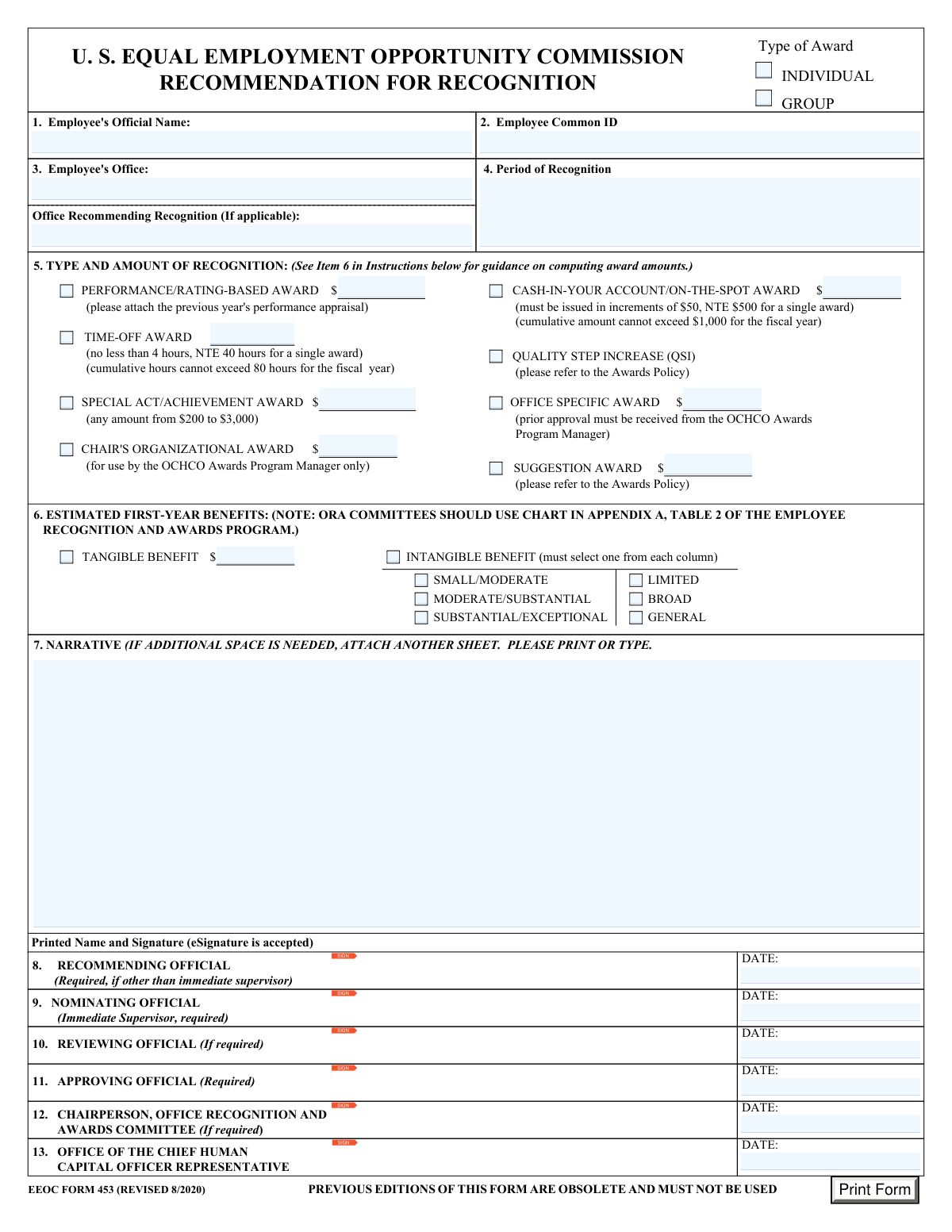
Yes! You can use AI to fill out U.S. Equal Employment Opportunity Commission (EEOC) Form 453, Recommendation for Recognition

EEOC Form 453 is an internal agency nomination and approval form used to recommend employee or group recognition under the EEOC Employee Recognition and Awards Program. It captures employee identifiers (name, ECI, office), the period of recognition, the type and amount of award requested, estimated first-year benefits (tangible or intangible), and a required narrative supporting the nomination, along with signatures/dates for nominating, recommending, reviewing, and approving officials. The form is important because it standardizes award requests, supports compliance with award policies and approval thresholds, and provides documentation for HR and awards program processing. Today, this form can be filled out quickly and accurately using AI-powered services like Instafill.ai, which can also convert non-fillable PDF versions into interactive fillable forms.
Our AI automatically handles information lookup, data retrieval, formatting, and form filling.
It takes less than a minute to fill out EEOC Form 453 using our AI form filling.
Securely upload your data. Information is encrypted in transit and deleted immediately after the form is filled out.

Form specifications

Form name: U.S. Equal Employment Opportunity Commission (EEOC) Form 453, Recommendation for Recognition
Number of pages: 1
Language: English
Categories: EEOC forms, employment forms, federal government forms, HR forms
main-image

Instafill Demo: filling out a legal form in seconds

How to Fill Out EEOC Form 453 Online for Free in 2026

Are you looking to fill out a EEOC FORM 453 form online quickly and accurately? Instafill.ai offers the #1 AI-powered PDF filling software of 2026, allowing you to complete your EEOC FORM 453 form in just 37 seconds or less.
Follow these steps to fill out your EEOC FORM 453 form online using Instafill.ai:
  1. 1 Go to Instafill.ai and upload EEOC Form 453 (Recommendation for Recognition) or select it from the form library.
  2. 2 Let the AI detect and map the form fields, then confirm the award type(s) being requested (individual/group, QSI, special act/achievement, on-the-spot, time-off, suggestion, performance/rating-based, etc.).
  3. 3 Enter employee and nomination details: employee’s official name, Employee Common ID (ECI), employee’s office, office recommending recognition (if applicable), and the period of recognition.
  4. 4 Provide award amounts/hours and benefits: input the requested dollar amount(s) or time-off hours, and complete estimated first-year benefits (tangible amount and/or intangible benefit selections for reach and impact).
  5. 5 Draft or paste the required narrative describing what the employee/group did, ensuring it addresses the specific award criteria and includes concrete examples; attach supporting documents if needed (e.g., prior year performance appraisal for rating-based awards).
  6. 6 Route for eSignatures and dates (nominating, recommending, reviewing, approving officials; committee chairperson and OCHCO representative if required), then validate entries against policy limits and required fields.
  7. 7 Download the completed, signed form as a PDF and submit it per your office’s awards process or store it for records.

Our AI-powered system ensures each field is filled out correctly, reducing errors and saving you time.

Why Choose Instafill.ai for Your Fillable EEOC Form 453 Form?

Speed

Complete your EEOC Form 453 in as little as 37 seconds.

Up-to-Date

Always use the latest 2026 EEOC Form 453 form version.

Cost-effective

No need to hire expensive lawyers.

Accuracy

Our AI performs 10 compliance checks to ensure your form is error-free.

Security

Your personal information is protected with bank-level encryption.

Frequently Asked Questions About Form EEOC Form 453

EEOC Form 453 is used to nominate an EEOC employee (or group) for an official recognition or award. It documents the type of award requested, the justification narrative, estimated benefits, and required approvals.

The immediate supervisor must complete/sign as the Nominating Official (required). Additional signatures may be required from a Recommending Official (if different from the supervisor), Reviewing Official (if required), Approving Official (required), the Office Recognition and Awards Committee Chairperson (if required), and an OCHCO representative.

No. The form states that previous editions are obsolete and must not be used; use EEOC Form 453 (Revised 8/2020).

You must enter the employee’s official (legal) name, Employee Common ID (ECI), the employee’s office, and the period of recognition. Do not use nicknames, and use the ECI instead of a Social Security number.

Check the “Group” box and enter “See Attached List” in the Employee’s Official Name field. Attach a list of names and ECIs (and any required hours/amounts, as applicable).

Enter the timeframe when the contribution occurred (for example, “4 hours on May 19, 2020,” “October–September 2020,” or a specific date range). The period should match what you describe in the narrative.

Yes. The instructions state that more than one option may be selected, but you should ensure the narrative supports the selected award criteria and follow the Awards Policy for any restrictions.

A Special Act/Achievement Award can be any amount from $200 to $3,000. An On-The-Spot award must be in $50 increments, not to exceed $500 for a single award, and cannot exceed $1,000 total in the fiscal year.

Time-Off Awards must be at least 4 hours and no more than 40 hours for a single award. Total time-off awards cannot exceed 80 hours in the fiscal year.

Tangible benefits are measurable (often cost savings) and use the tangible benefit scale based on estimated first-year benefits. Intangible benefits are non-monetary improvements (e.g., policy/service improvements) and require selecting one option from each column (reach: Limited/Broad/General and impact: Small/Moderate, Moderate/Substantial, Substantial/Exceptional).

Use the “Scale for Computing Awards for Tangible Benefits” based on estimated first-year benefits and round to the nearest $1. Note that awards are based on first-year benefits, and presidential approval is required for awards over $25,000.

Follow the three-step chart: select the contribution’s reach (Limited/Broad/General), select the benefit level (Small/Moderate, Moderate/Substantial, Substantial/Exceptional), then use the corresponding award range shown in the table. You must select one box from each column to classify the intangible benefit.

The narrative must be brief, specific, and written in clear, non-bureaucratic language describing what the employee did and how it meets the award criteria. Include concrete examples, and attach an additional sheet if you need more space.

If you select a Performance/Rating-Based Award, you must attach the previous year’s performance appraisal. For group awards, attach the list of group members (names/ECIs and any required hours/amounts).

Yes. The form indicates that eSignature is accepted for the printed name and signature fields.

Yes—AI tools like Instafill.ai can help auto-fill form fields accurately and save time by pulling the needed details (e.g., employee name/ECI, award type, dates, and amounts) from your inputs. To use it online, upload the PDF to Instafill.ai, answer the prompted questions (or paste your narrative and award details), review the populated fields for accuracy, then download the completed form for signature and submission.

If the PDF isn’t fillable, Instafill.ai can convert a flat, non-fillable PDF into an interactive fillable form so you can type directly into the fields. After conversion, you can auto-fill and export the completed version for signatures.

Compliance EEOC Form 453
Validation Checks by Instafill.ai

1
Validates Employee Official Name is present and uses legal name format
Checks that the Employee's Official Name field is not blank and appears to be a full legal name (e.g., contains at least first and last name, not initials only). This is important because the form explicitly instructs not to use nicknames and the award must be tied to the correct official personnel record. If validation fails, the submission should be rejected or routed back for correction to prevent misidentification and payroll/personnel processing errors.
2
Validates Employee Common ID (ECI) is present and not an SSN
Ensures the Employee Common ID is provided and matches the expected ECI pattern (e.g., numeric-only and correct length per agency rules) while also rejecting SSN-like formats (e.g., ###-##-#### or 9 digits flagged as potential SSN). This matters because the form requires ECI instead of SSN for security and privacy compliance. If validation fails, the system should block submission and prompt for the correct ECI to avoid PII exposure and incorrect employee matching.
3
Ensures exactly one recipient type is selected (Individual vs Group)
Validates that either 'Individual Type of Award' or 'Group Type of Award' is selected, but not both and not neither. This is critical because downstream processing, required attachments (e.g., group roster), and award distribution logic differ by recipient type. If validation fails, the form should not submit and should instruct the user to select exactly one recipient type.
4
Requires group roster indicator when Group award is selected
If 'Group Type of Award' is checked, verifies that the Employee Official Name field contains an allowed placeholder such as 'See Attached List' (or the system has an uploaded roster attachment) and that group member identifiers/amounts are provided via attachment or structured fields. This is important because group awards require a list of names/ECIs and distribution details to process correctly. If validation fails, the submission should be rejected until the roster is provided to prevent incomplete or misallocated awards.
5
Validates Employee Office is completed and uses an approved office value
Checks that the Employee's Office field is not empty and, where possible, matches a controlled list of valid EEOC offices (or passes a minimum format rule such as non-numeric, meaningful text). This matters because routing, approvals, and reporting depend on the employee’s organizational unit. If validation fails, the system should require correction to avoid misrouting and inaccurate organizational reporting.
6
Validates Office Recommending Recognition is provided when applicable and differs from Employee Office
If 'Office Recommending Recognition (If applicable)' is populated, validates it is a valid office name and (optionally) not identical to the Employee's Office unless policy allows. This is important because the form distinguishes between the employee’s home office and an outside recommending office for accountability and tracking. If validation fails, the system should prompt the user to clarify or remove the field to prevent conflicting office attribution.
7
Validates Period of Recognition is present and interpretable as a date range or specific period
Ensures the Period of Recognition field is not blank and conforms to an accepted pattern (e.g., start/end dates, a single date, or a clearly described period like 'Oct 2020–Sep 2021'). This is important because award justification and auditability require a defined timeframe for the contribution. If validation fails, the submission should be blocked until a valid period is entered to prevent unverifiable or non-auditable awards.
8
Requires at least one award type selection and enforces award-type/amount pairing
Checks that at least one award type checkbox is selected (e.g., QSI, Special Act/Achievement, On-the-Spot, Time-Off, Suggestion, Performance/Rating-Based, etc.). For each selected award type that requires an amount/hours, validates the corresponding amount/hours field is present; and for unselected award types, ensures the amount/hours field is empty (or ignored) to prevent accidental payments. If validation fails, the system should prevent submission and highlight missing or extraneous amount/hours entries.
9
Validates Special Act/Achievement Award amount is within $200–$3,000
If Special Act/Achievement Award is selected, verifies the amount is numeric, in dollars, and between $200 and $3,000 inclusive. This is important because the form specifies the allowable range and out-of-range values can violate policy and budget controls. If validation fails, the system should reject the entry and require a corrected amount within the permitted range.
10
Validates Cash-In-Your-Account/On-The-Spot Award amount rules (increments and caps)
If the On-the-Spot award is selected, checks the amount is numeric, issued in increments of $50, and does not exceed $500 for a single award. Where the system has fiscal-year history, it should also validate the employee’s cumulative total does not exceed $1,000 for the fiscal year. If validation fails, the system should block submission and explain whether the issue is increment, single-award cap, or fiscal-year cumulative cap.
11
Validates Time-Off Award hours rules (min/max and fiscal-year cumulative cap)
If Time-Off Award is selected, validates hours are numeric (whole or policy-allowed increments), at least 4 and no more than 40 for a single award. Where historical data is available, it should also ensure cumulative time-off award hours do not exceed 80 in the fiscal year. If validation fails, the system should prevent submission and require adjustment to comply with policy limits.
12
Validates Intangible Benefit selection requires one choice from each column
If Intangible Benefit is selected, enforces exactly one selection for reach (Limited/Broad/General) and exactly one selection for magnitude (Small/Moderate, Moderate/Substantial, Substantial/Exceptional). This is important because the award amount guidance depends on a two-dimensional classification and incomplete/multiple selections make the recommendation ambiguous. If validation fails, the system should require the user to correct the selections before proceeding.
13
Validates Tangible Benefit amount is numeric, non-negative, and consistent with award computation guidance
If Tangible Benefit is selected, checks that the estimated first-year tangible benefit amount is provided, numeric, and not negative, and (optionally) rounded to the nearest $1 as instructed. If the system computes a suggested award from the benefit amount, it should validate that any entered award aligns with the scale or is accompanied by justification/override approval. If validation fails, the system should block submission or require correction/justification to prevent incorrect benefit reporting and improper award sizing.
14
Validates Narrative is present, sufficiently specific, and within length limits
Ensures the Narrative field is not empty and meets minimum content requirements (e.g., a minimum character count) while staying within any maximum length constraints, and discourages placeholder text (e.g., 'N/A', 'see above'). This matters because the form requires a brief but specific justification tied to award criteria and examples for audit and approval decisions. If validation fails, the system should require the user to expand or correct the narrative before submission.
15
Validates Performance/Rating-Based Award requires prior-year appraisal attachment
If Performance/Rating-Based Award is selected, verifies that the previous year’s performance appraisal is attached (or an attachment indicator is present) and that an award amount is provided if required. This is important because the form explicitly requires the appraisal to substantiate the rating-based award and support compliance reviews. If validation fails, the system should block submission until the attachment is provided to prevent unsupported awards.
16
Validates required officials’ signatures/dates and enforces signature date sequencing
Checks that the Nominating Official (immediate supervisor) and Approving Official signature fields and dates are present, and that any conditional roles (Recommending Official if other than supervisor; Reviewing Official/Committee Chairperson if required; OCHCO Representative when applicable) are completed when triggered. It also validates that all dates are valid calendar dates and follow a logical order (e.g., nomination date on/before approval date; no future dates if policy disallows). If validation fails, the system should prevent final submission and identify missing/invalid signatures or inconsistent dates to ensure proper authorization and audit trail integrity.

Common Mistakes in Completing EEOC Form 453

Using a nickname or non-official employee name

People often enter the name the employee goes by day-to-day instead of the legal/official name required by the form. This can cause HR/payroll mismatches, delays in processing, or the award being recorded under the wrong person. Always use the employee’s official first and last name as it appears in agency records; for group awards, enter “See Attached List” and attach the required roster. AI-powered tools like Instafill.ai can pull the official name from authoritative sources and reduce name-format errors.

Entering SSN or leaving the Employee Common ID (ECI) blank

Because many forms historically used SSNs, submitters sometimes enter an SSN out of habit or omit the ECI entirely. This creates privacy/security risk and can result in the submission being rejected or returned for correction. Enter the Employee Common ID (ECI) only, and confirm it matches the agency-provided ECI list. Instafill.ai can help ensure the correct identifier is used and prevent sensitive data from being inserted into the wrong field.

Not clearly defining the Period of Recognition

A common issue is providing vague timeframes (e.g., “FY2020” or “last quarter”) or leaving the period blank. Ambiguity makes it hard for reviewers to validate eligibility and align the recognition with performance records, which can delay approval. Provide a specific date range or clearly described period (e.g., “Oct 2025–Dec 2025” or “4 hours on May 19, 2020”). Instafill.ai can prompt for missing start/end dates and standardize date formats.

Selecting the wrong award type or checking conflicting boxes

Submitters sometimes check multiple award types without intending to, or select an award type that doesn’t match the narrative (e.g., choosing QSI when requesting a cash amount). This can trigger policy conflicts, require rework, or route the form to the wrong approver. Review the Awards Policy and select only the award types that truly apply; if multiple are allowed, ensure each selected type has a corresponding amount/hours and justification. Instafill.ai can flag inconsistent selections (e.g., QSI checked but a cash amount entered) before submission.

Entering award amounts outside allowed ranges or increments

People frequently miss the constraints: Special Act/Achievement must be $200–$3,000; On-the-Spot must be in $50 increments and NTE $500 per award; Time-Off must be 4–40 hours per award. Out-of-range entries are a top reason forms are returned and can delay recognition. Double-check the specific limits printed on the form and round/format amounts correctly (including $50 increments where required). Instafill.ai can automatically validate ranges and enforce increment rules.

Ignoring cumulative fiscal-year caps for cash or time-off awards

Even when a single award is within limits, submitters often forget the cumulative caps (e.g., On-the-Spot cumulative amount cannot exceed $1,000 for the fiscal year; Time-Off cumulative hours cannot exceed 80). Exceeding caps can lead to denial, partial approval, or a request to revise the award type/amount. Before submitting, confirm prior awards in the same fiscal year and adjust the recommendation accordingly. Instafill.ai can help by tracking prior entries (when integrated with records) and warning when totals may exceed caps.

Incorrect tangible/intangible benefit selection and award computation

A frequent mistake is checking Tangible Benefit but not providing an estimated first-year benefit amount, or selecting Intangible Benefit without choosing one option from each required column (reach and significance). Another common error is misapplying the award scales, not rounding to the nearest $1, or using benefits beyond the first year. These errors can cause incorrect award amounts and require committee recalculation. Use estimated first-year benefits only, follow the provided tables, and ensure intangible benefits include one selection per column; Instafill.ai can guide the selection logic and compute/format values correctly.

Submitting an overlong or non-criteria-based narrative

Narratives often become generic, overly bureaucratic, or fail to address the specific award criteria with concrete examples. Weak narratives slow approvals because reviewers must request clarification or cannot justify the recommended amount. Keep the narrative brief and specific: what the employee did, measurable impact, and how it meets the chosen award criteria; attach an extra sheet if needed rather than shrinking text. Instafill.ai can help structure narratives with required elements and ensure key fields aren’t missing.

Missing required attachments (especially performance appraisal for rating-based awards)

For Performance/Rating-Based Awards, people commonly forget to attach the previous year’s performance appraisal or assume it’s already on file. Missing documentation can halt processing and force resubmission. Always include the required appraisal and any supporting documents referenced in the narrative, and label attachments clearly (employee name/ECI and award type). Instafill.ai can provide a checklist and prevent submission until required attachments are confirmed.

Incomplete signature chain, wrong official roles, or missing dates

Submissions often fail because the nominating official (immediate supervisor) is missing, the recommending official is filled when not applicable, or required approving signatures/dates are omitted. This creates routing confusion and delays, especially when “If required” roles (reviewing official, committee chairperson, OCHCO representative) are needed by local process but left blank. Confirm which roles are required for your office and ensure each signer provides both eSignature and date in the correct block. Instafill.ai can route fields to the right officials, enforce required signatures, and standardize date entry.

Using an obsolete version of the form or submitting a non-fillable scan

Because the form explicitly states previous editions are obsolete, people sometimes reuse an old saved copy or print/scan a version that loses fillable fields and signatures. This can lead to rejection and rework, and scanned text can be illegible or unsearchable for records. Always use EEOC Form 453 (Revised 8/2020) and submit the fillable version with eSignatures where accepted. If you only have a flat non-fillable PDF, Instafill.ai can convert it into a fillable version and help ensure the correct edition is used.
Saved over 80 hours a year

“I was never sure if my IRS forms like W-9 were filled correctly. Now, I can complete the forms accurately without any external help.”

Kevin Martin Green

Your data stays secure with advanced protection from Instafill and our subprocessors

Robust compliance program

Transparent business model

You’re not the product. You always know where your data is and what it is processed for.

ISO 27001, HIPAA, and GDPR

Our subprocesses adhere to multiple compliance standards, including but not limited to ISO 27001, HIPAA, and GDPR.

Security & privacy by design

We consider security and privacy from the initial design phase of any new service or functionality. It’s not an afterthought, it’s built-in, including support for two-factor authentication (2FA) to further protect your account.

Fill out EEOC Form 453 with Instafill.ai

Worried about filling PDFs wrong? Instafill securely fills us-equal-employment-opportunity-commission-eeoc-form-453-recommendation-for-recognition-1 forms, ensuring each field is accurate.