Yes! You can use AI to fill out Employee’s Frequently Asked Questions: Leave of Absence
This document is a crucial resource for Merakey employees planning or currently on a leave of absence, detailing procedures for applying for leave, maintaining benefits, and returning to work. It ensures employees understand their rights and responsibilities under company policy and laws like FMLA, covering topics from disability claims to benefit continuation. Today, any associated forms mentioned in this guide can be filled out quickly and accurately using AI-powered services like Instafill.ai, which can also convert non-fillable PDF versions into interactive fillable forms.
Leave of Absence FAQ is part of the
HR forms, employee forms, leave forms, employee leave forms and leave of absence forms categories on Instafill.
Rather not fill this in by hand? Instafill is an online form filler that completes PDF forms automatically — upload the blank form, answer a few questions, and the AI fills every field.
Form specifications
| Form name: | Employee’s Frequently Asked Questions: Leave of Absence |
| Number of pages: | 1 |
| Language: | English |
Our AI automatically handles information lookup, data retrieval, formatting, and form filling.
It takes less than a minute to fill out Leave of Absence FAQ using our AI form filling.
Securely upload your data. Information is encrypted in transit and deleted immediately after the form is filled out.
Instafill Demo: How to fill out PDF forms in seconds with AI
How to Fill Out Leave of Absence FAQ Online for Free in 2026
Are you looking to fill out a LEAVE OF ABSENCE FAQ form online quickly and accurately? Instafill.ai offers the #1 AI-powered PDF filling software of 2026, allowing you to complete your LEAVE OF ABSENCE FAQ form in just 37 seconds or less.
Follow these steps to fill out your LEAVE OF ABSENCE FAQ form online using Instafill.ai:
- 1 Navigate to Instafill.ai and upload the relevant leave of absence or disability form mentioned in the Merakey FAQ.
- 2 Use the AI assistant to automatically detect and label all the fields on your form, such as name, employee ID, dates of leave, and reason.
- 3 Securely provide your personal information, employment details, and supervisor's contact information as prompted by the AI.
- 4 Carefully review the information from the FAQ to accurately answer questions about the type of leave (e.g., FMLA, personal) and whether you'll be using accrued PTO.
- 5 If medical certification is required, attach the necessary documents from your healthcare provider directly within the platform.
- 6 Review the completed form for accuracy, e-sign it digitally, and then download or directly submit it to Merakey Leave Administration or the appropriate department as instructed in the FAQ.
Our AI-powered system ensures each field is filled out correctly, reducing errors and saving you time.
Why Choose Instafill.ai for Your Fillable Leave of Absence FAQ Form?
Speed
Complete your Leave of Absence FAQ in as little as 37 seconds.
Up-to-Date
Always use the latest 2026 Leave of Absence FAQ form version.
Cost-effective
No need to hire expensive lawyers.
Accuracy
Our AI performs 10 compliance checks to ensure your form is error-free.
Security
Your personal information is protected with bank-level encryption.
Frequently Asked Questions About Leave of Absence FAQ
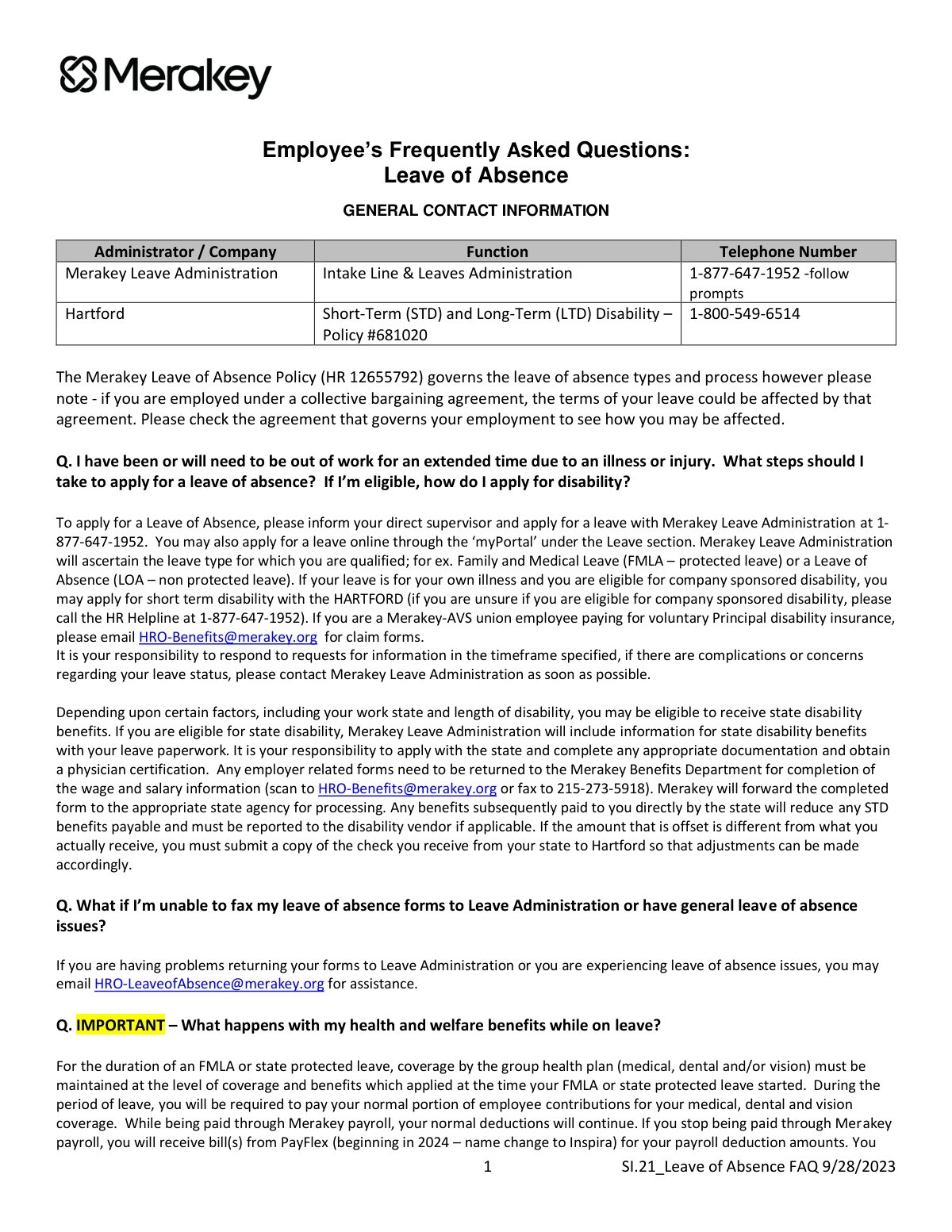
This document answers frequently asked questions for Merakey employees who need to take an extended leave of absence. It explains how to apply for leave, what happens to your benefits, and how to return to work.
You must first inform your direct supervisor about your need for leave. Then, you need to formally apply by calling Merakey Leave Administration at 1-877-647-1952 or through the 'myPortal' online.
During a protected leave like FMLA, your health benefits will continue as long as you pay your portion of the premium. If you are on a non-protected leave or your FMLA expires, your benefits will end, and you will be offered COBRA continuation coverage.
If your injury is work-related, you must inform your manager, complete the Workers' Compensation Packet, and also apply for a leave of absence with Merakey Leave Administration, as the leaves will run concurrently.
For payment purposes, pregnancy leave is treated like a regular disability, so you may apply for short-term disability benefits if eligible. You can also use your accrued paid time off for any unpaid portion of your leave.
Yes, Merakey requires you to use your available paid time off for any part of your leave not covered by disability payments. You must contact your manager to have this time entered into the timekeeping system.
You should contact Merakey Leave Administration immediately to understand the reason for the denial and discuss your options. Failure to resolve a denied leave may result in disciplinary action, up to and including termination.
Before your first day back, you must give your supervisor a completed Return to Work (RTW) Certification from your doctor. If you need job accommodations, submit this form as early as possible to allow for review.
To avoid defaulting on your loan, it is extremely important that you contact Empower at 1-855-756-4738 or visit their website to arrange for continued payments.
Yes, if you are having problems returning your forms or experiencing other leave-related issues, you can email [email protected] for assistance.
No, employees on a leave of absence do not accrue any time off, such as sick time, vacation, or personal days, and are not paid for holidays. Time off accrual will resume immediately once you return to an eligible position.
Yes, services like Instafill.ai use AI to accurately auto-fill form fields, which can save you time and help reduce errors on your paperwork.
Simply upload your leave of absence forms to the Instafill.ai platform. The AI will identify the fields and help you fill them out quickly and accurately online before you print and submit them.
You can use a service like Instafill.ai, which can convert flat, non-fillable PDFs into interactive, fillable forms. This allows you to type your information directly into the document for a cleaner and more professional submission.
Compliance Leave of Absence FAQ
Validation Checks by Instafill.ai
1
Ensures Return Date is After Start Date
This validation checks that the 'Expected Return Date' provided on a leave request form is chronologically after the 'Leave Start Date'. This is crucial for maintaining logical data integrity and preventing impossible leave durations. If the return date is before the start date, the form submission will be rejected with an error prompting the user to correct the dates.
2
Verifies Upload of Physician Certification for Medical Leave
This check ensures that a file has been uploaded in the 'Physician Certification' field when the reason for leave is medical, such as for FMLA or disability. This documentation is required to approve and process the leave request according to policy. Failure to upload a document will prevent form submission and display a message informing the user that medical certification is mandatory.
3
Validates Hartford Disability Policy Number
This validation confirms that the policy number entered for a Short-Term Disability (STD) claim matches the company's specific policy number with Hartford, which is #681020. This ensures the claim is routed and processed correctly under the company's group plan. An incorrect number would result in a validation error, preventing claim processing delays or rejections by the insurance provider.
4
Requires Description for Work Accommodations
On the Return to Work (RTW) form, if an employee indicates that job accommodations are required, this check ensures the corresponding text field explaining the necessary accommodations is not left blank. This is critical for the People Operations Partner to begin the interactive process of determining if restrictions can be accommodated. A failed validation would prevent submission until the specific needs are detailed.
5
Checks Intermittent Leave Reporting Against Approved Frequency
This validation compares the submitted intermittent leave dates and times against the frequency approved by the employee's physician (e.g., 'one day per week'). It prevents employees from reporting more leave than they are certified for, which could otherwise be considered unapproved absences. If the reported time exceeds the approved frequency, the system would flag the entry for review and potential denial.
6
Caps Accrued Time Usage at 100% of Weekly Pay
When an employee on disability opts to supplement their 60% disability payment with accrued time, this check ensures the total combined payment does not exceed 100% of their normal weekly earnings. This rule prevents overpayment and ensures compliance with company policy. If the requested accrued time results in more than 100% pay, the system will reject the entry and require the user to adjust the hours.
7
Enforces Hospital Co-Pay Reimbursement Limits
This check validates that a reimbursement request for an inpatient hospital co-pay adheres to the policy limits, which are the lesser of the plan deductible or $250 per day, up to a maximum of 5 days ($1,250). This prevents over-reimbursement and ensures fiscal control. Requests exceeding these limits would be flagged for manual review or automatically adjusted to the maximum allowable amount.
8
Confirms Inpatient Admission for ER Reimbursement
This validation requires confirmation that an emergency room visit resulted in an immediate inpatient hospital stay before an ER co-pay reimbursement request can be processed. This is a specific condition mentioned in the policy for eligibility. If the 'Resulted in Admission' checkbox is not selected or is 'No', the reimbursement request for the ER co-pay will be denied.
9
Mandates Supervisor Acknowledgment on Intermittent Time Forms
This check verifies that a supervisor's signature or digital acknowledgment is present on any submitted intermittent time tracking form. Supervisor sign-off confirms their awareness of the absence and is a required step in the reporting process. Forms submitted without this acknowledgment will be returned to the employee, potentially delaying the official recording of their FMLA time.
10
Validates Employee ID Number Format and Existence
This validation ensures the 'Employee ID' field is not empty, conforms to the expected format, and matches an existing employee record in the company's HR system. This is a fundamental check to correctly associate the form submission with the right employee profile and their benefits eligibility. An invalid or non-existent ID would result in an immediate error, blocking the submission.
11
Requires Selection of a Valid Leave Type
This check ensures that an employee selects a specific leave category (e.g., FMLA, LOA, State Protected Leave) from a predefined list when submitting a leave request. This is essential for determining the employee's rights, protections, and pay or benefit continuation options. A submission without a selected leave type would be invalid as the leave cannot be properly administered without this core information.
12
Ensures RTW Certification is Submitted for Personal Illness
This validation confirms that a 'Return to Work (RTW) Certification' form, completed by a healthcare provider, has been submitted for an employee returning from a leave taken for their own personal illness. The policy states an employee will not be allowed to return to active work without this form. The system would prevent the supervisor from marking the employee as 'Active' until this document is recorded as received.
Common Mistakes in Completing Leave of Absence FAQ
Employees often assume that notifying their direct supervisor is sufficient to start a leave of absence. However, the process requires two distinct steps: informing the supervisor and formally applying with Merakey Leave Administration. Failure to complete the official application can result in the absence being unexcused, leading to disciplinary action and a denial of leave protections.
A common misunderstanding is that applying for a leave of absence (FMLA/LOA) automatically triggers short-term disability (STD) payments. These are separate processes with different administrators (Merakey Leave Administration for leave, Hartford for disability). This oversight leads to a significant delay or complete lack of income replacement during the leave, causing financial hardship.
The leave process involves multiple forms with specific deadlines and destinations, such as state disability forms that must first go to the Merakey Benefits Department for wage information. Submitting forms late, incomplete, or to the wrong entity can cause significant processing delays or outright denial of benefits. To avoid this, carefully read the instructions on each document; AI-powered tools like Instafill.ai can also help by converting non-fillable PDFs into manageable forms and ensuring data is entered correctly.
When an employee is no longer receiving a paycheck, they will be billed directly by PayFlex/Inspira for their portion of health, dental, and vision insurance premiums. Many people mistakenly assume their benefits are fully covered during leave and ignore these bills. This leads to the termination of their health insurance coverage, potentially leaving them uninsured during a critical time.
The policy allows employees to use their accrued paid time off (PTO) to supplement disability payments and reach 100% of their normal pay. However, this is not automatic; the employee must explicitly notify their manager to enter the time into the system. Forgetting this step results in receiving only the 60% disability payment, causing an avoidable reduction in income.
When an injury is work-related, employees focus on the Workers' Compensation claim and often fail to also apply for a formal leave of absence (FMLA/LOA). Workers' Comp covers medical costs and wage replacement but does not provide the job protection offered by FMLA. This mistake can jeopardize an employee's position, as the absence is not officially protected under the company's leave policy.
For approved intermittent leave, employees must not only follow their department's standard call-in procedure but also submit a signed intermittent time tracking form within five business days. Failing to complete this secondary reporting step for each absence can cause the time off to be denied FMLA protection. This may result in the absence being counted against them under the standard attendance policy.
An employee cannot resume their duties after a personal medical leave without first providing their supervisor with a completed Return to Work (RTW) Certification from their doctor. Showing up for a shift without this documentation will result in being sent home and not being paid. To ensure a smooth transition, the RTW form should be submitted to the supervisor prior to the planned return date.
During an unpaid leave, payroll deductions for retirement plan loans stop, but the repayment obligation does not. The employee is responsible for contacting the retirement plan administrator (Empower) directly to arrange for payments. Overlooking this can cause the loan to default, which is considered a taxable distribution and may incur significant taxes and penalties.
Merakey offers a valuable benefit to reimburse employees for inpatient hospital co-pays, but it requires action from the employee. Many forget or are unaware they must submit a copy of the hospital bill directly to the Merakey Benefits Department to receive the payment. This oversight means employees needlessly pay hundreds or even thousands of dollars out-of-pocket that could have been covered by the company.
Saved over 80 hours a year
“I was never sure if my IRS forms like W-9 were filled correctly. Now, I can complete the forms accurately without any external help.”
Kevin Martin Green
Your data stays secure with advanced protection from Instafill and our subprocessors




Robust compliance program
Transparent business model
You’re not the product. You always know where your data is and what it is processed for.
ISO 27001, HIPAA, and GDPR
Our subprocesses adhere to multiple compliance standards, including but not limited to ISO 27001, HIPAA, and GDPR.
Security & privacy by design
We consider security and privacy from the initial design phase of any new service or functionality. It’s not an afterthought, it’s built-in, including support for two-factor authentication (2FA) to further protect your account.
Fill out Leave of Absence FAQ with Instafill.ai
Worried about filling PDFs wrong? Instafill securely fills employees-frequently-asked-questions-leave-of-absence forms, ensuring each field is accurate.
