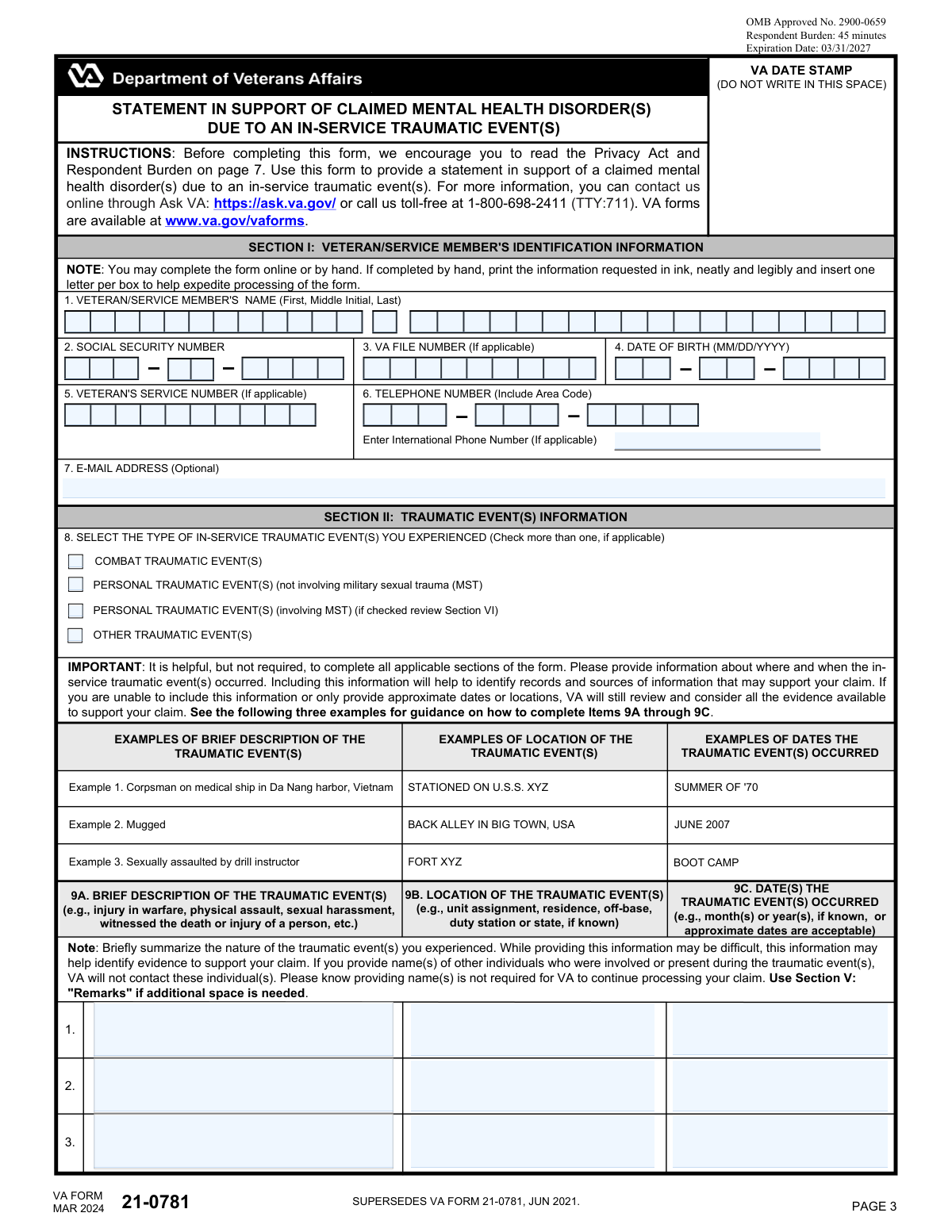
Yes! You can use AI to fill out VA Form 21-0781, Statement in Support of Claimed Mental Health Disorder(s) Due to an In-Service Traumatic Event(s)

VA Form 21-0781 is an optional supporting statement form that helps the Department of Veterans Affairs evaluate disability compensation claims for mental health disorders linked to an in-service traumatic event (combat, personal trauma including MST, or other traumatic events). It captures key facts such as what happened, where and when it occurred, whether an official report was filed, behavioral changes after the event, possible evidence sources, and related treatment information. Providing these details can help VA locate service records and other corroborating evidence to substantiate the stressor/trauma and its impact. Today, this form can be filled out quickly and accurately using AI-powered services like Instafill.ai, which can also convert non-fillable PDF versions into interactive fillable forms.
Our AI automatically handles information lookup, data retrieval, formatting, and form filling.
It takes less than a minute to fill out VA Form 21-0781 using our AI form filling.
Securely upload your data. Information is encrypted in transit and deleted immediately after the form is filled out.

Form specifications

Form name: VA Form 21-0781, Statement in Support of Claimed Mental Health Disorder(s) Due to an In-Service Traumatic Event(s)
Number of pages: 7
Language: English
Categories: VA forms, disability forms, veterans forms, medical claim forms, mental health forms
main-image

Instafill Demo: filling out a legal form in seconds

How to Fill Out VA Form 21-0781 Online for Free in 2026

Are you looking to fill out a VA FORM 21-0781 form online quickly and accurately? Instafill.ai offers the #1 AI-powered PDF filling software of 2026, allowing you to complete your VA FORM 21-0781 form in just 37 seconds or less.
Follow these steps to fill out your VA FORM 21-0781 form online using Instafill.ai:
  1. 1 Go to Instafill.ai and upload VA Form 21-0781 (or select it from the form library).
  2. 2 Let the AI detect and create fillable fields (or convert the PDF to an interactive form if needed).
  3. 3 Enter veteran/service member identification details (name, SSN, VA file number, date of birth, contact information).
  4. 4 Select the type(s) of in-service traumatic event(s) and provide brief descriptions, locations, and approximate dates for each event.
  5. 5 Complete additional trauma-related details, including behavioral changes, whether an official report was filed, and possible sources of supporting evidence (e.g., witnesses, medical/counseling records).
  6. 6 Add treatment information (where treated and approximate dates) and any extra remarks that support the claim.
  7. 7 Review for completeness, e-sign and date the certification, then download and submit with the appropriate claim form (e.g., VA Form 21-526EZ or VA Form 20-0995) and supporting documents.

Our AI-powered system ensures each field is filled out correctly, reducing errors and saving you time.

Why Choose Instafill.ai for Your Fillable VA Form 21-0781 Form?

Speed

Complete your VA Form 21-0781 in as little as 37 seconds.

Up-to-Date

Always use the latest 2026 VA Form 21-0781 form version.

Cost-effective

No need to hire expensive lawyers.

Accuracy

Our AI performs 10 compliance checks to ensure your form is error-free.

Security

Your personal information is protected with bank-level encryption.

Frequently Asked Questions About Form VA Form 21-0781

VA Form 21-0781 is used to provide a statement supporting a claim for a mental health condition (such as PTSD, depression, anxiety, or bipolar disorder) related to an in-service traumatic event. The details you provide help VA search military records and other sources for evidence to support your claim.

No. The form is optional and not required, but completing it can help VA understand what happened, when and where it occurred, and what evidence may exist to support your claim.

You must also submit the correct claim form for your situation: VA Form 21-526EZ for a new claim or increased disability compensation, or VA Form 20-0995 for a Supplemental Claim when you have new and relevant evidence after a prior decision.

You can report combat traumatic events, personal traumatic events (including MST such as sexual assault/harassment), and other traumatic events (such as accidents, disasters, or witnessing death or serious injury). You may check more than one category if applicable.

Provide a brief description of what happened, where it occurred (unit/duty station/off-base location if known), and when it occurred. Approximate dates and general locations are acceptable if you don’t remember exact details.

You can provide approximate dates (month/year or a time period like “summer 1970”) and the best location details you can recall. VA will still review and consider all available evidence even if some details are missing.

No, names are not required for VA to process your claim. If you do provide names, the form notes that VA will not contact those individuals based solely on you listing them.

In addition to service treatment/personnel records, VA may consider alternative evidence such as behavioral changes (work performance changes, substance use, social/economic changes, relationship issues, etc.). Lay/witness statements can also help support the occurrence of the event.

Use VA Form 21-10210 (Lay/Witness Statement) and attach it to your claim or send it to the appropriate VA intake address. If the witness is also a veteran, VA may request their DD Form 214 or other proof of service.

You can still file a claim and complete this form—VA recognizes that traumatic events may not have been reported or documented. In that situation, behavioral changes and other sources of evidence listed in Item 12 can be used to support your claim.

Restricted and unrestricted reporting options are Department of Defense reporting types for sexual assault, and identifying the type helps VA request the right records. If you’re unsure which type was filed, VA may follow up for more information; note that restricted/unrestricted reporting was not an option prior to 2005.

Treatment information in Section IV is optional, but it can help VA locate relevant records. If you don’t know the dates, you can check the “Don’t have date” box; for VA Medical Center/CBOC/MTF treatment from 2005 to present, dates are not required.

If you want VA to request private medical records (and VA Vet Center records), you must complete and sign VA Form 21-4142 and VA Form 21-4142a. VA can access many federal records (like VAMC/CBOC/MTF) without these releases, but private providers generally require your consent.

Mail it to: Department of Veterans Affairs, Evidence Intake Center, P.O. Box 4444, Janesville, WI 53547-4444. You can also apply and upload documents online at VA.gov.

Yes—AI tools can help organize your information and auto-fill form fields to save time; services like Instafill.ai use AI to accurately populate fields based on the details you provide. To use Instafill.ai, upload the PDF, answer the guided questions (event details, dates/locations, treatment, and evidence sources), review the filled form for accuracy, then download and submit it to VA online or by mail.

If the PDF is flat/non-fillable, you can still complete it by printing and writing neatly in ink, or use a tool like Instafill.ai to convert the flat PDF into an interactive fillable form. After conversion, you can type directly into the fields and export a completed version for submission.

Compliance VA Form 21-0781
Validation Checks by Instafill.ai

1
Validates Veteran/Service Member Name fields are complete and properly formatted
Checks that First Name and Last Name are present and contain only valid name characters (letters, spaces, hyphens, apostrophes), and that Middle Initial (if provided) is exactly one alphabetic character. This is important for identity matching and to prevent downstream record mismatches caused by punctuation-only or numeric entries. If validation fails, the submission should be rejected or flagged for correction with field-level error messages.
2
Validates Social Security Number (SSN) is complete, numeric, and not a known invalid pattern
Ensures SSN Part 1 is 3 digits, Part 2 is 2 digits, and Part 3 is 4 digits, all numeric, and that the combined SSN is not all zeros in any segment (e.g., 000-xx-xxxx, xxx-00-xxxx, xxx-xx-0000). This is critical for accurate claimant identification and to reduce fraud or accidental entry errors. If validation fails, block submission and prompt the user to re-enter the SSN.
3
Validates Date of Birth is a real date and within plausible claimant age bounds
Checks that DOB month/day/year form a valid calendar date (including leap-year rules) and that the date is not in the future. Optionally enforces a reasonable age range (e.g., 0–120 years) to catch transposed or mistyped years. If validation fails, the form should not be accepted until corrected because DOB is a key identity attribute.
4
Validates VA File Number and Service Number formats when provided
If a VA File Number is entered, validates it matches expected VA file number patterns (commonly 8–9 digits or other VA-accepted formats) and contains no illegal characters. If a Veteran’s Service Number is entered, validates it is alphanumeric and within a reasonable length range, rejecting obviously invalid entries (e.g., single character, special characters only). If validation fails, flag the field and require correction or allow blank if truly not applicable.
5
Validates phone number fields (US vs International) and requires at least one usable contact number
Ensures the US phone number is exactly 10 digits across area code + first three + last four, and rejects invalid patterns (e.g., all zeros). If an International Phone Number is provided, validates it against E.164-style rules (leading + optional, 7–15 digits) and disallows alphabetic characters. If neither a valid US nor international number is present, warn or block depending on business rules because contactability affects claim development.
6
Validates email address format when provided (optional field)
If an email is entered, checks it conforms to a standard email format (local@domain), has a valid domain structure, and contains no spaces or illegal characters. This reduces failed notifications and prevents data quality issues in correspondence systems. If validation fails, prompt correction but do not require an email if the field is optional.
7
Ensures at least one In-Service Traumatic Event type is selected (Item 8)
Checks that at least one checkbox is selected among Combat, Personal (MST), Personal (non-MST), or Other. This selection drives which sections are applicable (e.g., Section VI only for MST) and helps route the claim for appropriate development. If validation fails, block submission and require the claimant to select at least one event type.
8
Requires traumatic event details for each entered event (Description + Location + Date/Timeframe)
For each traumatic event line that has any data entered, validates that a brief description is present and that at least one of location or date/timeframe is provided (since approximate dates are acceptable). This is important because VA uses these details to search records and corroborate stressors; incomplete event entries reduce the ability to develop evidence. If validation fails, flag the specific event row and require missing minimum details or allow the user to remove the partial row.
9
Validates traumatic event date/timeframe entries accept allowed formats and are logically plausible
Validates that event dates/timeframes match allowed input patterns such as MM-YYYY, YYYY, or free-text approximations (e.g., 'Summer 1970') if the system supports it, and rejects impossible numeric dates (e.g., 13-2020). Also checks that event dates are not in the future and are not after the form signed date. If validation fails, prompt the user to correct the timeframe or mark it as approximate per allowed rules.
10
Behavioral changes section consistency (Item 10): checkbox-to-details alignment
If any behavioral change checkbox in Item 10A is selected, validates that the corresponding 'Additional Information' field (10B) contains at least some clarifying text or a timeframe/documentation reference, when applicable. This improves evidentiary value and reduces follow-up development letters. If validation fails, show a targeted warning (or require completion if policy mandates) indicating which selected changes need supporting details.
11
Official report filed logic (Item 11): dependent selections and required details
If 'Official Report Filed – Yes' is selected, requires at least one report type selection (Restricted/Unrestricted/Neither and/or Police Report/Other) consistent with the form design, and requires Police Report Location when Police Report is checked. If 'Other' is checked, requires 'Other Report Type Details' to be populated to identify the report source (e.g., CID/NCIS/JAG). If validation fails, block submission because missing report identifiers prevent VA from attempting to obtain the report.
12
Possible sources of evidence (Item 12): prevents contradictory selection of 'None' with other sources
Validates that 'None' is not selected at the same time as any other evidence source checkbox. If 'Other (Specify below)' is selected, requires the 'Other Source of Evidence' text field to be non-empty and sufficiently descriptive. If validation fails, require correction to avoid ambiguous evidence development instructions.
13
Treatment received branching (Item 13A): enforces completion of treatment details when 'Yes'
If 'Have you received treatment' is 'Yes', requires at least one treatment location checkbox in 13B and at least one treatment facility entry in 13C (name and location). This ensures VA can identify where records may exist and whether authorizations may be needed. If validation fails, block submission or flag as incomplete because treatment development cannot proceed without minimum provider information.
14
Treatment date fields validation (Item 13D/13E): MM-YYYY format and 'Don't have date' exclusivity
For each treatment line, validates that the date is either provided in MM-YYYY with a valid month (01–12) and reasonable year, or the corresponding 'Don't have date' checkbox is selected—but not both. Also checks that treatment dates are not in the future and are not before the claimant’s date of birth. If validation fails, require correction to prevent unusable or contradictory treatment timelines.
15
MST-only consent section gating and single-choice enforcement (Section VI / Item 15)
If 'Personal Traumatic Event(s) (involving MST)' is not selected in Item 8, ensures Section VI consent options are not selected (or are auto-cleared) to prevent inappropriate data capture. If MST is selected, enforces that exactly one of the four consent options (Consent / Do Not Consent / Revoke / Not Applicable) is chosen to avoid conflicting instructions to VBA/VHA. If validation fails, block submission and prompt the user to correct the consent selection.
16
Signature and date rules, including witness/alternate signer/POA conditional requirements
Validates that the Veteran/Service Member signature (16A) and signed date (16B) are present and that the signed date is a valid date not in the future. If the signature is an 'X' indicator, requires both witness signatures and printed names/addresses (Items 17–18). If Item 16A is blank, requires alternate signer and/or POA sections as applicable, and flags that alternate signer signatures require VA Form 21-0972 on file/attached and POA signatures require a valid VA Form 21-22/21-22a on record; if these conditions are not met, the submission should be rejected or routed for manual review.

Common Mistakes in Completing VA Form 21-0781

Submitting VA Form 21-0781 without the required primary claim/review form

Many people think VA Form 21-0781 is the actual claim, but it is an optional supporting statement and does not replace the required application/review form. If you don’t also submit the correct form (typically VA Form 21-526EZ for a new/increase claim or VA Form 20-0995 for a supplemental claim with new and relevant evidence), VA may not be able to establish the claim properly, causing delays or missed deadlines. Before mailing/uploading, confirm which claim lane you’re in and include the correct companion form. AI-powered tools like Instafill.ai can help ensure the right form set is included and reduce “wrong form” rejections.

Mixing up VA File Number, Service Number, and SSN (or leaving identifiers inconsistent)

Applicants often enter a VA File Number in the Service Number field, omit the VA File Number when they have one, or mistype the SSN because it’s split into three parts. Identifier mismatches can slow record matching, trigger follow-up development letters, or cause evidence to be associated with the wrong file. Use the SSN boxes exactly as labeled (first 3 / middle 2 / last 4) and only provide a service number or VA file number if applicable and known. Instafill.ai can validate identifier formats and reduce transposition errors.

Incorrect date formats (DOB, event dates, signature date, treatment dates)

This form uses multiple date formats (MM/DD/YYYY for DOB and signature; month/year or approximate dates for events; MM-YYYY for treatment), and people frequently enter the wrong format or partial dates in the wrong place. Incorrect formats can make the timeline unclear and may lead VA to request clarification, delaying the claim. Follow the format printed next to each field and use approximate dates when exact dates are unknown (e.g., “06/2007” or “Summer 1970” where allowed). Instafill.ai can automatically format dates correctly and flag missing components.

Choosing the wrong traumatic event type in Item 8 (especially MST vs non-MST personal trauma)

A common mistake is checking only “Other” or “Combat” when the event is actually a personal traumatic event, or checking MST-related personal trauma incorrectly (or not checking it when it applies). The event type drives which sections apply (e.g., Section VI MST notification option) and can affect what evidence VA looks for and how it develops the claim. Re-read the definitions and check all that apply; if the event involved sexual assault/harassment during service, select the MST option. Instafill.ai can guide selection logic and prevent incompatible section choices.

Providing a vague traumatic event description without searchable details (Item 9A–9C)

People often write a narrative that lacks the key “who/what/where/when” details VA needs to search records (unit/duty station, approximate month/year, location type, ship/base, training status). Vague entries can make it harder for VA to corroborate the stressor and may lead to additional requests or an unfavorable finding on verification. Keep the description brief but specific, and include unit assignment, base/ship, city/state/country, and an approximate date range if exact dates aren’t known. If you need more space, use Section V (Remarks) rather than squeezing text into the boxes.

Listing multiple events but leaving dates/locations blank or mismatched across lines

When applicants list more than one traumatic event, they sometimes provide a date for one event and a location for another, or leave the second/third event fields incomplete. This creates confusion about which details belong to which event and can cause VA to develop the claim for the wrong incident or request clarification. Treat each event line as a complete set: description + location + date(s) for that same event. Instafill.ai can help keep multi-event entries aligned and complete.

Skipping behavioral changes and evidence sources for personal trauma claims (Items 10–12)

For personal traumatic events (including MST), applicants often skip Item 10 behavioral changes and Item 12 sources of evidence because they assume “no report” means “no evidence.” VA specifically allows alternative evidence (performance changes, leave use, substance use changes, relationship changes, counseling, diaries, statements from others), and leaving these sections blank can weaken corroboration. Check all applicable behavioral changes and add approximate timing and where it could be documented (e.g., eval reports, counseling records). Instafill.ai can prompt for commonly missed corroboration fields and ensure you don’t overlook supportive evidence categories.

Answering Item 11 (official report) inconsistently or misunderstanding restricted vs unrestricted

Applicants sometimes check “Yes” but don’t select a report type, or they select restricted/unrestricted for incidents that occurred before 2005 (when those options didn’t exist), or they forget to provide the police report location. Inconsistencies can trigger follow-up letters and slow retrieval of investigative records. If you filed a report, specify the type as best you can; if unsure, choose the closest option and explain in Remarks, including approximate date and where it was reported. Instafill.ai can flag inconsistent combinations (e.g., pre-2005 with restricted/unrestricted) and request clarification before submission.

Indicating private/Vet Center treatment but not providing releases (VA Forms 21-4142 and 21-4142a)

A frequent issue is checking treatment sources like private providers or VA Vet Centers but not submitting the required authorization forms, assuming VA can automatically obtain everything. Without signed VA Forms 21-4142 and 21-4142a, VA may be unable to request those records, shifting the burden back to you and delaying the claim. If you want VA to request non-federal records (private providers) or Vet Center records, include both signed release forms and list provider names/locations and dates as best you can. Instafill.ai can remind you when releases are required and help package the correct supporting forms.

Leaving treatment facility details incomplete or using the wrong date approach in Section IV

People often write only a provider name without a location, omit date ranges, or forget they can check “Don’t have date” when dates are unknown. Incomplete treatment information can prevent VA from locating the correct records, especially when providers have multiple sites or when the veteran has moved. Provide facility name plus city/state (or full address if known) and use MM-YYYY for dates; if you truly don’t know, check the “Don’t have date” box rather than guessing wildly. Instafill.ai can standardize facility entries and ensure the MM-YYYY format is used.

Signature problems: missing signature/date, using an “X” without witnesses, or improper alternate signer/POA signing

Claims are commonly delayed because the veteran forgets to sign/date, signs in the wrong section, or uses an “X” but doesn’t complete the witness section. Another frequent error is having an alternate signer or POA sign without the required supporting documentation (e.g., VA Form 21-0972 for alternate signer, or a valid VA Form 21-22/21-22a on file for POA). Always sign and date in Item 16A/16B if you can; only use witnesses if signing with an “X,” and only use alternate signer/POA sections when Item 16A is blank and the required authorizations are attached or already of record. Instafill.ai can pre-check signature completeness and prevent submission with missing or invalid signature combinations.
Saved over 80 hours a year

“I was never sure if my IRS forms like W-9 were filled correctly. Now, I can complete the forms accurately without any external help.”

Kevin Martin Green

Your data stays secure with advanced protection from Instafill and our subprocessors

Robust compliance program

Transparent business model

You’re not the product. You always know where your data is and what it is processed for.

ISO 27001, HIPAA, and GDPR

Our subprocesses adhere to multiple compliance standards, including but not limited to ISO 27001, HIPAA, and GDPR.

Security & privacy by design

We consider security and privacy from the initial design phase of any new service or functionality. It’s not an afterthought, it’s built-in, including support for two-factor authentication (2FA) to further protect your account.

Fill out VA Form 21-0781 with Instafill.ai

Worried about filling PDFs wrong? Instafill securely fills va-form-21-0781-statement-in-support-of-claimed-mental-health-disorders-due-to-an-in-service-traumatic-events forms, ensuring each field is accurate.