Yes! You can use AI to fill out ADP Leave Management Application for Leave of Absence
The ADP Leave Management Application is a form and system used by employees to apply for various types of leave, such as medical, disability, or family leave, as part of their company's benefits program managed by ADP Total Absence Management. It is a crucial step for ensuring proper documentation, claim processing for benefits like short-term disability, and maintaining job protection under policies like FMLA. Today, this form can be filled out quickly and accurately using AI-powered services like Instafill.ai, which can also convert non-fillable PDF versions into interactive fillable forms.
ADP Leave Management Application is part of the
HR forms, ADP forms, leave forms and leave of absence forms categories on Instafill.
Rather not fill this in by hand? Instafill is an online form filler that completes PDF forms automatically — upload the blank form, answer a few questions, and the AI fills every field.
Form specifications
| Form name: | ADP Leave Management Application for Leave of Absence |
| Number of pages: | 1 |
| Language: | English |
Our AI automatically handles information lookup, data retrieval, formatting, and form filling.
It takes less than a minute to fill out ADP Leave Management Application using our AI form filling.
Securely upload your data. Information is encrypted in transit and deleted immediately after the form is filled out.
Instafill Demo: How to fill out PDF forms in seconds with AI
How to Fill Out ADP Leave Management Application Online for Free in 2026
Are you looking to fill out a ADP LEAVE MANAGEMENT APPLICATION form online quickly and accurately? Instafill.ai offers the #1 AI-powered PDF filling software of 2026, allowing you to complete your ADP LEAVE MANAGEMENT APPLICATION form in just 37 seconds or less.
Follow these steps to fill out your ADP LEAVE MANAGEMENT APPLICATION form online using Instafill.ai:
- 1 Navigate to Instafill.ai and upload or select the ADP Leave Management Application form.
- 2 Provide your personal and employment details, such as your name, employee ID, and contact information, allowing the AI to assist with pre-filling.
- 3 Specify the type of leave you are requesting (e.g., continuous, intermittent, FMLA) and the primary reason for the absence.
- 4 Enter the requested start date of your leave and the expected return-to-work date, if known.
- 5 Attach any required medical certifications or supporting documents from your healthcare provider as instructed in the application packet.
- 6 Carefully review all the information populated by the AI, make any necessary edits, and provide your electronic signature to certify the request.
- 7 Submit the completed application through the ADP portal or as directed by your HR department to initiate the leave review process.
Our AI-powered system ensures each field is filled out correctly, reducing errors and saving you time.
Why Choose Instafill.ai for Your Fillable ADP Leave Management Application Form?
Speed
Complete your ADP Leave Management Application in as little as 37 seconds.
Up-to-Date
Always use the latest 2026 ADP Leave Management Application form version.
Cost-effective
No need to hire expensive lawyers.
Accuracy
Our AI performs 10 compliance checks to ensure your form is error-free.
Security
Your personal information is protected with bank-level encryption.
Frequently Asked Questions About ADP Leave Management Application
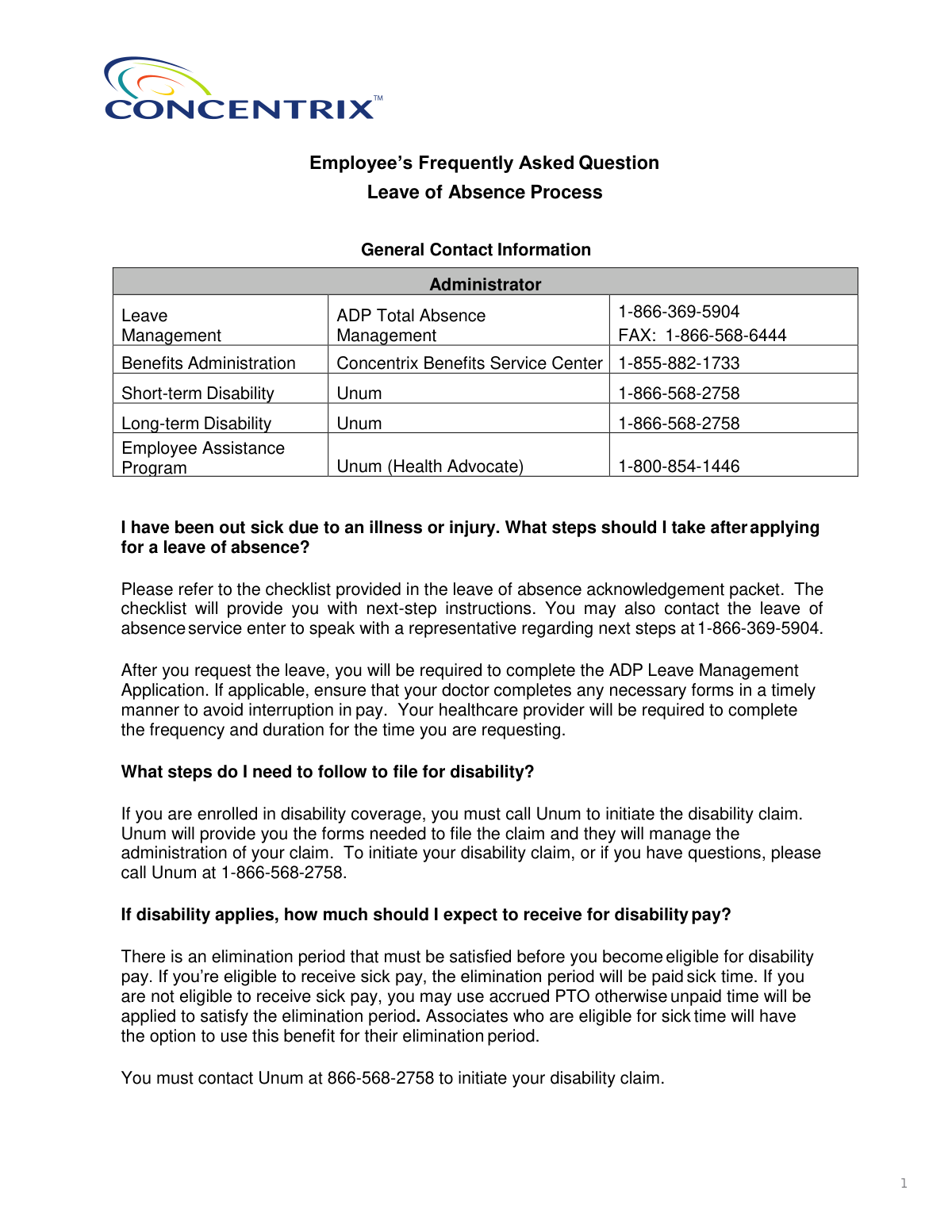
After requesting leave, you must complete the ADP Leave Management Application. It is also crucial to ensure your doctor completes any required medical forms in a timely manner to avoid any interruption in pay.
If you are enrolled in disability coverage, you must call Unum at 1-866-568-2758 to initiate your claim. Unum will provide the necessary forms and will manage the administration of your disability claim.
You are required to use all of your accrued, unused PTO before your leave status becomes unpaid. If you do not enter the time in Workday, the company will apply your available PTO balance for you.
No, PTO does not accrue while you are on leave, and you are not eligible for holiday pay if you are on a continuous leave of absence over a holiday. If you are receiving STD pay, holidays are paid as STD time.
To discuss your options for continuing health and welfare benefits, contact the Benefits Service Center at 1-855-882-1733. For questions regarding your 401(k), you should contact your 401(k) provider directly.
If you believe your injury is work-related, you must contact your manager and your local People Solutions Business Partner to begin the worker’s compensation process.
If your leave request is denied and you cannot return to work, contact ADP Leave Management at 866-369-5904. They can provide you with further information on any alternative leave options that may be available to you.
You must report intermittent absences within 72 hours by entering the time in the ADP Total Absence Management (TAM) system online or by calling their call center at 1-866-369-5904. You must also follow your company's normal call-in procedures.
You need to provide your manager with a Return to Work authorization form from your doctor that includes your expected return date. Be sure to follow the steps outlined in the Return to Work checklist.
Go to https://my.adp.com on a desktop or download the ADP Mobile app, then select 'Register Now' or 'New? Get Started'. You will need to follow the instructions to create an account using your email, mobile number, or a registration code.
Yes, services like Instafill.ai use AI to accurately auto-fill form fields with your saved information, which can save you time and help prevent errors on your application.
You can upload your leave of absence PDF forms to the Instafill.ai platform. The service allows you to fill them out interactively or use its AI-powered auto-fill feature to quickly populate fields with your information.
If you have a non-fillable PDF, you can use a tool like Instafill.ai to convert it into an interactive, fillable form. This makes it easy for you or your doctor to type information directly onto the document before submitting it.
Compliance ADP Leave Management Application
Validation Checks by Instafill.ai
1
Verifies Employee Identity Against HR Records
This check ensures that the combination of First Name, Last Name, Date of Birth, and the last 4 digits of the SSN or Employee ID entered during registration matches a unique employee record in the company's HR system. This is a critical security measure to prevent unauthorized access to sensitive personal and payroll information. If the information does not match an existing record, the user will be unable to create an account and must contact an administrator to verify their details.
2
Validates Password Complexity Requirements
Ensures the user's chosen password meets the specific security criteria: 8-10 characters in length, containing at least one numerical character and one special character. This policy strengthens account security against unauthorized access and common hacking attempts. Failure to meet these requirements will prevent account creation, and the user will be prompted with an error message to enter a new, compliant password.
3
Confirms Password Fields Match
This validation verifies that the entry in the 'Password' field is identical to the entry in the 'Confirm Password' field during account creation. This is a standard user experience check to prevent users from accidentally setting a mistyped password and getting locked out of their new account immediately after creating it. If the fields do not match, an error message will be displayed, and the user must re-enter their password in both fields.
4
Ensures Leave Start and End Date Logical Consistency
Validates that the requested 'Expected Return to Work Date' for a leave of absence occurs on or after the 'Leave Start Date'. This check maintains logical data integrity for the leave period, which is essential for accurate pay and benefits calculations. Submitting a return date that is before the start date is impossible, so the form will prevent submission until the dates are corrected.
5
Requires Medical Certification for Health-Related Leave
This validation checks if a file has been uploaded for medical certification when the reason for leave is a 'serious health condition' for the employee or a family member. The policy requires documentation from a doctor to approve the leave and avoid pay interruption. If the form is submitted without the required attachment, the request may be automatically denied or flagged for immediate follow-up, delaying the approval process.
6
Validates Date of Birth Format and Plausibility
This check ensures the Date of Birth (DOB) entered during registration is in a valid format (e.g., MM/DD/YYYY) and represents a realistic age for a member of the workforce (e.g., over 16 years old). A correct DOB is essential for identity verification against company records and for benefits administration. An invalid format or implausible date will trigger an error and block the registration process until corrected.
7
Validates SSN or Employee ID Format
When a user provides their Last 4 Digits of SSN or Employee/Associate ID for identity verification, this check ensures the input matches the expected format. The SSN portion must be exactly four numeric digits, while the Employee ID must conform to the company's defined format. This prevents data entry errors and ensures the system can successfully query the HR database; failure will halt the identity verification step.
8
Validates Email Address Structure
This check confirms that the email address entered during account registration follows the standard 'local-part@domain' format. A valid email is crucial for sending registration confirmations, password reset links, and important notifications about the leave status. If the format is invalid, the user will be prompted to correct it before proceeding, ensuring the company has a reliable method of electronic communication.
9
Requires Selection of Distinct Security Questions
During account setup, this validation ensures the user has selected three different security questions from the provided list and has supplied an answer for each. Using distinct questions enhances account recovery security, making it harder for an unauthorized person to guess the answers and compromise the account. The system will prevent the user from continuing if questions are duplicated or answers are left blank.
10
Checks Timeliness of Intermittent Leave Reporting
For employees on an approved intermittent leave, this validation checks if the reported absence date is being entered within the 72-hour window as required by policy. This is important for compliance, payroll accuracy, and tracking leave entitlement usage. An absence reported outside this window would be flagged and may be subject to denial or require additional justification from the employee.
11
Validates Intermittent Leave Frequency and Duration Entry
When an intermittent leave is requested, this check ensures that the 'frequency' and 'duration' fields, as determined by the healthcare provider, are completed in a structured format (e.g., '1' time(s) per 'week'). This data is critical for the system to correctly track leave usage against the approved amount. Incomplete or improperly formatted entries would prevent the submission of the leave request until the required details are provided.
12
Triggers Workflow for Work-Related Injury Claims
This is a business rule validation that checks if the reason for leave is marked as 'work-related.' If it is, the system should automatically trigger a notification workflow to the employee's manager and the designated People Solutions Business Partner. This ensures the mandatory worker’s compensation process is initiated promptly as per company policy, preventing compliance and procedural delays.
Common Mistakes in Completing ADP Leave Management Application
Employees often assume that applying for a leave of absence through ADP automatically initiates their short-term or long-term disability claim. However, these are separate processes managed by different vendors (ADP for leave, Unum for disability). This mistake leads to significant delays in receiving disability payments, causing financial hardship. To avoid this, you must explicitly call Unum at their dedicated number to start the disability claim process, in addition to completing the ADP leave application.
A common delay occurs when an employee's healthcare provider does not complete and return the required medical certification forms promptly. This can happen due to busy clinics or the employee not stressing the urgency. The direct consequence, as stated in the policy, is a potential 'interruption in pay' and a delay in the approval of the leave. To prevent this, hand-deliver the forms to your doctor's office, clearly explain the deadline, and follow up regularly until the forms are submitted to the leave administrator.
Medical forms are often rejected if the doctor provides vague information, such as writing 'as needed' for leave frequency. Leave administrators like ADP require specific details on the 'frequency and duration' of the condition (e.g., '1-2 absences per month, lasting 1-2 days each'). Vague information will delay the approval process as the administrator will require clarification. When giving the form to your doctor, emphasize that specific estimates are required for the leave to be approved.
For approved intermittent leave, employees must report each absence within 72 hours through the ADP system or call center. Forgetting to do so, or simply telling a manager, is not sufficient. Failure to report properly can lead to the absence being denied, meaning it won't be covered by protected leave and may be unpaid or result in disciplinary action. To avoid this, use the ADP mobile app to report time immediately after an absence or set a calendar reminder.
When registering for a MyADP account, entering a typo in your name, date of birth, or the last 4 digits of your SSN/Employee ID is a frequent error. The system uses this data to verify your identity against company records, and any mismatch will prevent you from creating an account. This blocks your ability to manage your leave online. Always double-check your information before submitting. Using an AI-powered tool like Instafill.ai can help prevent these typos by accurately auto-filling your personal data from a secure profile.
Many employees are surprised to learn that they are 'required to use all accrued, unused PTO' before their leave becomes unpaid. They may wish to save this time for a future vacation, not realizing the company policy mandates its use. This leads to confusion and an unexpectedly depleted PTO balance. To avoid surprises, carefully review the leave policy and plan for the fact that your available PTO will be automatically applied at the beginning of your leave.
The leave process involves multiple parties (ADP, Unum, Benefits Service Center, etc.), and employees often contact the wrong one, such as asking their manager about disability pay. This causes delays and frustration as they are redirected. To avoid this, keep the 'General Contact Information' list handy and refer to it to ensure you are calling the correct administrator for your specific question, whether it's about the leave itself, disability benefits, or health insurance.
Upon being cleared to return, some employees may think a verbal confirmation to their manager is sufficient. However, the policy requires a formal 'Return to Work authorization form' from the doctor to be submitted. Without this document, the company may not allow you to resume your duties, and in a worst-case scenario, failure to provide it could be interpreted as not returning from leave, potentially jeopardizing your employment. Always obtain this specific form from your doctor and provide it to your manager on or before your return date.
The instructions specify that hourly employees on intermittent leave must report their absence in two separate systems: the ADP Total Absence Management system for the leave itself, and the eSTART system for payroll purposes. Forgetting the second step in eSTART is a common oversight. This can lead to incorrect paychecks and may even trigger attendance-related disciplinary action if the time is not properly coded. Hourly employees should create a personal checklist to ensure they complete entries in both systems for every absence.
The ADP registration process offers two paths: 'Find Me' using an email/phone number or 'I Have A Registration Code'. Users may get stuck if they try the 'Find Me' option with an outdated phone number or personal email not on file with HR. This results in the system being unable to locate their record. To avoid this, first ensure you are using the contact information your employer has on file. If that fails, you should request the registration code from your administrator as an alternative path to creating your account.
Saved over 80 hours a year
“I was never sure if my IRS forms like W-9 were filled correctly. Now, I can complete the forms accurately without any external help.”
Kevin Martin Green
Your data stays secure with advanced protection from Instafill and our subprocessors




Robust compliance program
Transparent business model
You’re not the product. You always know where your data is and what it is processed for.
ISO 27001, HIPAA, and GDPR
Our subprocesses adhere to multiple compliance standards, including but not limited to ISO 27001, HIPAA, and GDPR.
Security & privacy by design
We consider security and privacy from the initial design phase of any new service or functionality. It’s not an afterthought, it’s built-in, including support for two-factor authentication (2FA) to further protect your account.
Fill out ADP Leave Management Application with Instafill.ai
Worried about filling PDFs wrong? Instafill securely fills adp-leave-management-application-for-leave-of-absence forms, ensuring each field is accurate.
