Yes! You can use AI to fill out U.S. Equal Employment Opportunity Commission (EEOC) Form 453, Recommendation for Recognition

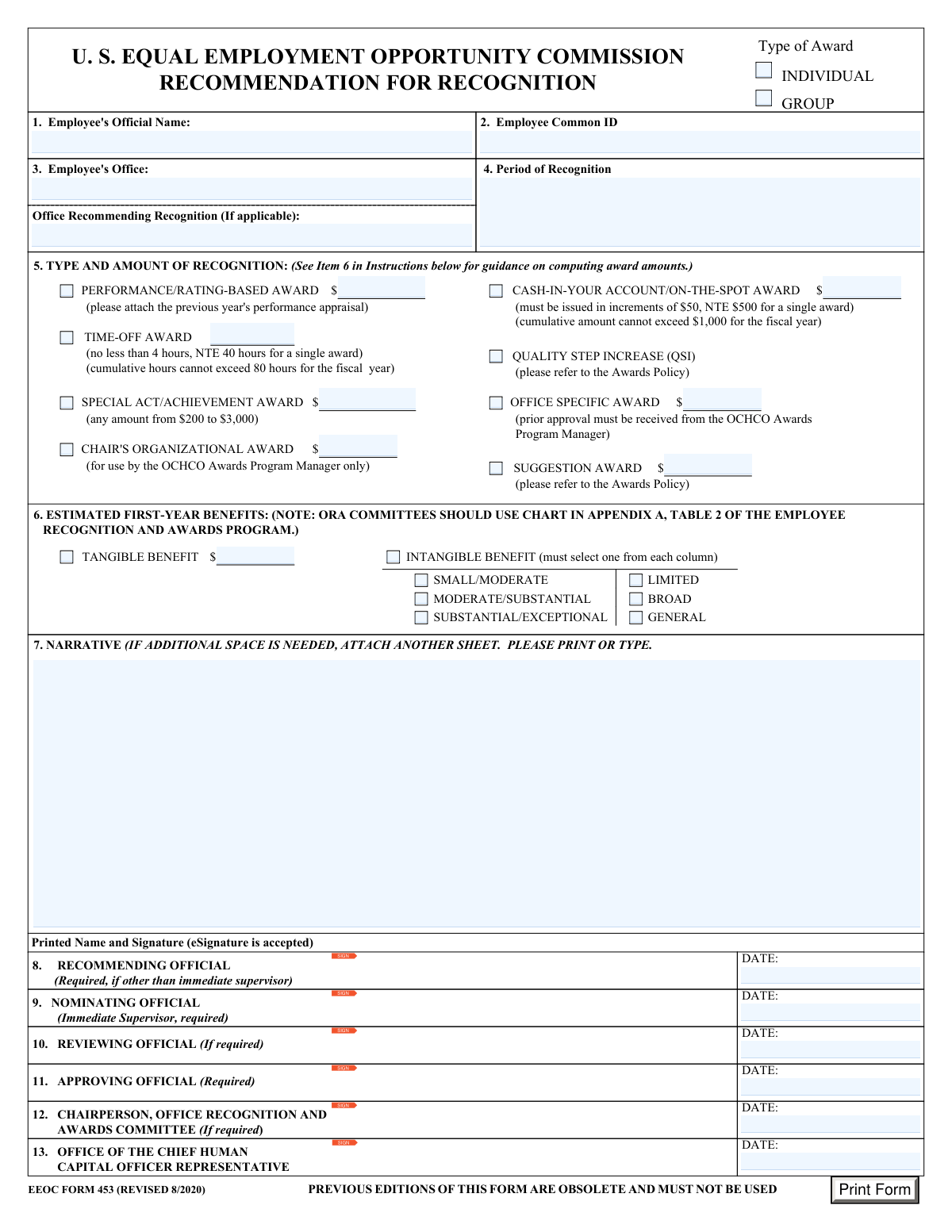
EEOC Form 453 is the agency’s official nomination and approval document for recommending employee recognition, including individual or group awards such as Special Act/Achievement Awards, Cash-In-Your-Account/On-the-Spot Awards, Time-Off Awards, QSIs, and other office or Chair-level awards. It captures the employee’s identifying information, the period of recognition, the award type and amount, estimated first-year benefits (tangible or intangible), and a required narrative justification aligned to award criteria, along with required signatures/dates from nominating, recommending, reviewing, and approving officials (and committee/OCHCO roles when applicable). The form is important because it standardizes how awards are justified, calculated, and approved in accordance with EEOC awards policy and benefit/award computation scales. Today, this form can be filled out quickly and accurately using AI-powered services like Instafill.ai, which can also convert non-fillable PDF versions into interactive fillable forms.
Our AI automatically handles information lookup, data retrieval, formatting, and form filling.
It takes less than a minute to fill out EEOC Form 453 using our AI form filling.
Securely upload your data. Information is encrypted in transit and deleted immediately after the form is filled out.

Form specifications

Form name: U.S. Equal Employment Opportunity Commission (EEOC) Form 453, Recommendation for Recognition
Number of pages: 1
Language: English
Categories: EEOC forms, employment forms, federal government forms, HR forms
main-image

Instafill Demo: filling out a legal form in seconds

How to Fill Out EEOC Form 453 Online for Free in 2026

Are you looking to fill out a EEOC FORM 453 form online quickly and accurately? Instafill.ai offers the #1 AI-powered PDF filling software of 2026, allowing you to complete your EEOC FORM 453 form in just 37 seconds or less.
Follow these steps to fill out your EEOC FORM 453 form online using Instafill.ai:
  1. 1 Go to Instafill.ai and upload EEOC Form 453 (Recommendation for Recognition) or select it from the form library.
  2. 2 Enter the employee or group details (employee official name or “See Attached List,” Employee Common ID, employee office, and period of recognition; add the recommending office if applicable).
  3. 3 Choose the award category (Individual or Group) and select the specific award type(s) being requested (e.g., QSI, Special Act/Achievement, Cash-In-Your-Account/On-the-Spot, Time-Off, Suggestion, Performance/Rating-Based, Office Specific, Chair’s Organizational).
  4. 4 Provide the requested award amount or hours for each selected award type, following the stated limits (e.g., dollar ranges, $50 increments, fiscal-year caps, and time-off hour minimum/maximum).
  5. 5 Complete the estimated first-year benefits section by selecting Tangible or Intangible benefit and, if intangible, selecting one option from each column (impact magnitude and scope) so the award range can be computed using the included scales.
  6. 6 Write or paste the Section 7 narrative describing what the employee did, the results/impact, and specific examples that meet the award criteria; attach supporting documents if required (e.g., prior year performance appraisal for performance/rating-based awards).
  7. 7 Route for eSignatures and dates for the nominating official (immediate supervisor), recommending official (if different), reviewing official (if required), approving official, committee chairperson (if required), and OCHCO representative; then export/download the completed form for submission.

Our AI-powered system ensures each field is filled out correctly, reducing errors and saving you time.

Why Choose Instafill.ai for Your Fillable EEOC Form 453 Form?

Speed

Complete your EEOC Form 453 in as little as 37 seconds.

Up-to-Date

Always use the latest 2026 EEOC Form 453 form version.

Cost-effective

No need to hire expensive lawyers.

Accuracy

Our AI performs 10 compliance checks to ensure your form is error-free.

Security

Your personal information is protected with bank-level encryption.

Frequently Asked Questions About Form EEOC Form 453

EEOC Form 453 is used to recommend an employee or group for an official EEOC recognition/award (cash, time-off, QSI, or other award types). It documents who is being recognized, the period of contribution, the award type/amount, and the justification narrative.

The immediate supervisor must complete/sign as the Nominating Official (Item 9). Additional signatures may be required from a Recommending Official (Item 8, if different from the supervisor), Reviewing Official (Item 10, if required), Approving Official (Item 11, required), and others as applicable (Items 12–13).

No. The form states that previous editions are obsolete and must not be used; use EEOC Form 453 (Revised 8/2020).

Select INDIVIDUAL when the award is for one employee. Select GROUP for a team award; for group awards, the instructions say to enter “See Attached List” for the name field and attach a list of names, ECIs, and hours/amounts.

You must provide the employee’s official (legal) name (no nicknames), the Employee Common ID (ECI) instead of an SSN, the employee’s office, and the period of recognition (specific date(s) or date range).

The ECI is a random number assigned to each employee when they join the agency. The form instructs using ECI rather than SSN because it is more secure.

Check the box for the award type(s) being requested and complete the corresponding amount/hours field. For example, Special Act/Achievement Awards are $200–$3,000; Cash-In-Your-Account/On-the-Spot awards must be in $50 increments (max $500 per award and $1,000 per fiscal year); Time-Off Awards are 4–40 hours per award (max 80 hours per fiscal year).

Yes. The instructions state that more than one option may be selected, but you should follow the Awards Policy and complete each selected award’s required amount/hours fields.

If the benefit is measurable in dollars, check “Tangible Benefit” and enter the estimated first-year benefit amount. Use the tangible benefit scale on the form to compute the award amount and round benefits/awards to the nearest $1.

Check “Intangible Benefit,” then select one option for scope (Limited/Broad/General) and one option for magnitude (Small/Moderate, Moderate/Substantial, or Substantial/Exceptional). Use the Step 3 chart to identify the recommended award range based on your selections.

The narrative must be brief and specific, describing what the employee did and how it meets the award criteria. Include concrete examples, dates/period of performance, and results/impact to support the nomination; attach an extra sheet if needed.

Yes. If you select the Performance/Rating-Based Award, the form instructs you to attach the previous year’s performance appraisal.

Yes. The form notes that Presidential approval is required for awards over $25,000, and that an award over $10,000 may be granted only with approval of the Office of Personnel Management (OPM). It also states the award amount should not exceed the recipient’s annual salary.

Yes. The form indicates that eSignature is accepted for the printed name and signature fields.

Yes—AI tools can help by extracting your information and placing it into the correct fields; services like Instafill.ai use AI to auto-fill form fields accurately and save time. If your PDF is flat/non-fillable, Instafill.ai can convert it into an interactive fillable form, then you can upload the form, answer prompts (employee info, award type, amounts/hours, narrative), and review before exporting for signature and submission.

Compliance EEOC Form 453
Validation Checks by Instafill.ai

1
Validates Employee Official Name is present and uses legal/official format (no nicknames)
Checks that the Employee's Official Name field is not blank and appears to be a full legal name (e.g., contains at least first and last name) rather than a nickname or placeholder. This is important because the form is used for official personnel and awards processing and must match personnel records. If validation fails, the submission should be rejected or routed back for correction to prevent misidentification and payroll/personnel posting errors.
2
Validates Employee Common ID (ECI) is present and not an SSN
Ensures the Employee Common ID field is completed and matches the expected ECI pattern (e.g., numeric-only and correct length per agency standard) while explicitly rejecting SSN-like formats (e.g., ###-##-#### or 9-digit values flagged as SSN). This matters because the instructions require ECI instead of SSN for security and privacy compliance. If validation fails, block submission and prompt the user to enter the ECI and remove any SSN content.
3
Ensures exactly one recipient type is selected (INDIVIDUAL vs GROUP)
Checks that either INDIVIDUAL or GROUP is selected, but not both and not neither. This is critical because downstream processing, required attachments, and how names/IDs are provided differ for individual versus group awards. If validation fails, require the user to choose exactly one option before continuing.
4
Group award requires attached roster or placeholder text in name field
If GROUP is selected, validates that the Employee's Official Name field contains an allowed placeholder such as "See Attached List" and that a group roster attachment is present (names, ECI, and hours/amounts as applicable). This prevents incomplete identification of recipients and ensures correct distribution of award amounts/hours. If validation fails, the form should be returned for the missing roster/attachment or corrected name entry.
5
Validates Employee Office is completed and uses an allowed office naming convention
Ensures Employee's Office is not blank and matches a controlled list or acceptable format (e.g., recognized office codes/names). This is important for routing approvals, committee review, and reporting by organizational unit. If validation fails, prompt for a valid office selection/value and prevent submission until corrected.
6
Validates Period of Recognition is provided and is a coherent date or date range
Checks that Period of Recognition is not empty and can be parsed as either a single date, a date range (start/end), or an allowed descriptive period (e.g., "October thru September 2020") per policy. This matters because the period supports eligibility, auditability, and prevents duplicate recognition for the same work. If validation fails, require a standardized date/date-range entry or an approved descriptive format.
7
Requires at least one award type selection and enforces award-type-specific amount/hour fields
Validates that at least one award type checkbox is selected (e.g., QSI, Special Act/Achievement, Cash-In-Your Account, Time-Off, etc.). For each selected award type, the corresponding amount/hours field must be present; for unselected award types, the corresponding amount/hours field must be blank to avoid ambiguity. If validation fails, block submission and highlight missing or extraneous amount/hour entries.
8
Special Act/Achievement Award amount is within $200–$3,000 and is a valid currency value
If Special Act/Achievement Award is selected, checks that the amount is numeric, non-negative, and between $200 and $3,000 inclusive, with no invalid characters. This is required by the form’s stated limits and prevents unauthorized award levels. If validation fails, reject the amount and require correction to an in-range value.
9
Cash-In-Your Account/On-The-Spot amount is in $50 increments and does not exceed single-award cap
If Cash-In-Your Account/On-The-Spot is selected, validates the amount is numeric, between $0 and $500 inclusive, and divisible by $50 (e.g., 50, 100, 150). This ensures compliance with the increment rule and the single-award maximum. If validation fails, require an amount that meets both increment and cap rules.
10
Time-Off Award hours meet minimum/maximum and are whole or half-hour per policy
If Time-Off Award is selected, checks that hours are numeric and within 4 to 40 hours for a single award, and optionally enforces an allowed increment (commonly whole hours, or half-hours if policy allows). This prevents invalid leave awards and ensures payroll/leave systems can process the request. If validation fails, block submission and request corrected hours within allowed bounds.
11
Performance/Rating-Based Award requires amount and performance appraisal attachment
If Performance/Rating-Based Award is selected, validates that an award amount is entered and that the previous year’s performance appraisal is attached (or a verified reference is provided if the system supports it). This is important because the form explicitly requires the appraisal to substantiate rating-based awards. If validation fails, prevent submission until the attachment is provided and the amount is completed.
12
Estimated First-Year Benefits selection is mutually exclusive (Tangible vs Intangible) and complete
Validates that Tangible Benefit and Intangible Benefit are not both selected, and that at least one is selected when benefits are required for the chosen award type. For Tangible, a dollar amount must be provided; for Intangible, one option must be selected from each column (magnitude: Small/Moderate vs Moderate/Substantial vs Substantial/Exceptional; scope: Limited vs Broad vs General). If validation fails, require a single benefits type and complete the dependent fields.
13
Tangible Benefit amount is valid currency and aligns with award computation guidance
If Tangible Benefit is selected, checks that the estimated first-year benefit amount is a valid non-negative currency value and is rounded to the nearest $1 (no cents) as instructed. Optionally, the system can compute an expected award range using the provided scale and flag submissions where the requested award is inconsistent with the computed guidance. If validation fails, require correction of the benefit amount format and/or route for review when computed guidance is exceeded.
14
Narrative is present, sufficiently specific, and not a placeholder
Ensures the Narrative field is not blank and is not generic placeholder text (e.g., "See employee’s performance appraisal" only) and includes enough detail to support the award criteria (actions, impact, examples, and timeframe). This is important because the narrative is the primary justification for approval and audit. If validation fails, return the form for a more complete narrative before routing for signatures.
15
Signature/date completeness and role-based requirements are satisfied
Validates that required officials are identified and have provided eSignature and date fields as applicable: Nominating Official (required), Approving Official (required), and Recommending Official only if other than immediate supervisor; Reviewing Official/Committee Chair/OCHCO Representative only when required by policy or selected award type. Also checks that each provided date is a valid date format and not in the future beyond an allowed tolerance. If validation fails, prevent final submission and indicate which role signatures/dates are missing or invalid.
16
Signature date sequence is logically consistent with the approval workflow
Checks that signature dates follow a reasonable order (e.g., Nominating Official date on/before Approving Official date; committee/review dates not preceding nomination) and that all dates fall on or after the Period of Recognition end date when applicable. This matters for audit trails and ensures approvals were not recorded before the nomination existed. If validation fails, flag for correction or require an explanation/override with audit logging.

Common Mistakes in Completing EEOC Form 453

Using a nickname or non-official employee name

People often enter the name the employee goes by day-to-day (or include middle names/initials inconsistently) instead of the legal/official name on personnel records. This can cause HR processing delays, mismatched records, or the award being routed back for correction. Always copy the employee’s official first and last name exactly as it appears in HR systems; for group awards, enter “See Attached List” and attach the required roster. AI-powered form filling tools like Instafill.ai can pull the correct legal name from authoritative sources and keep formatting consistent.

Entering an SSN instead of the Employee Common ID (ECI)

Because many legacy forms historically used SSNs, submitters sometimes type an SSN out of habit or paste it from another document. This creates a privacy/security issue and may violate agency guidance, leading to rejection or the need to resubmit. Use the Employee Common ID (ECI) only, and confirm it matches the agency-provided ECI list. Instafill.ai can help prevent this by validating that the ID matches the expected ECI format and flagging SSN-like entries.

Not clearly selecting INDIVIDUAL vs GROUP (or mixing both without support)

Submitters sometimes forget to check whether the award is for an individual or a group, or they check both without providing the required group attachment. This creates confusion about who the recipient is and can delay approval and payment/time-off processing. Select exactly one (INDIVIDUAL or GROUP) unless the policy explicitly allows otherwise, and for GROUP include an attached list of names/ECIs and any required hours/amount allocations. Instafill.ai can prompt for the attachment when GROUP is selected and prevent submission when the recipient type is ambiguous.

Choosing an award type but leaving the amount/hours blank (or filling amounts without checking the box)

A common error is checking an award type (e.g., Special Act/Achievement, Time-Off Award) but not entering the required dollar amount or hours, or entering an amount while forgetting to check the corresponding award box. This results in incomplete requests that cannot be processed and are often returned for correction. Always ensure the selected award type has its required amount/hours completed, and leave unrelated amount fields blank. Instafill.ai can enforce conditional logic so the amount/hours field is required only when the matching award type is selected.

Violating award amount rules (min/max, increments, or fiscal-year caps)

People frequently miss constraints like Special Act/Achievement ($200–$3,000), Cash-In-Your-Account increments of $50 and NTE $500 per award with $1,000 fiscal-year cumulative cap, and Time-Off Award minimum 4 hours/NTE 40 per award with 80-hour fiscal-year cap. Noncompliant entries can trigger rejection, require recalculation, or force re-approval. Double-check the specific limits for the selected award type and confirm the employee’s prior awards/time-off usage for the fiscal year when caps apply. Instafill.ai can automatically validate ranges, enforce $50 increments, and flag potential cap issues before submission.

Misclassifying benefits as Tangible vs Intangible (or selecting both)

Submitters sometimes check Tangible Benefit when they don’t have a measurable dollar benefit, or they check Intangible Benefit but still enter a tangible dollar figure (or select both). This leads to incorrect award computations and inconsistent justification during committee review. Choose Tangible only when you can estimate first-year dollar benefits; otherwise choose Intangible and follow the two-column selection requirement (one from each column). Instafill.ai can guide the selection flow and prevent incompatible combinations.

Incomplete Intangible Benefit selections (not choosing one from each column)

The form requires selecting one option for scope (Limited/Broad/General) and one for magnitude (Small/Moderate, Moderate/Substantial, Substantial/Exceptional), but people often select only one checkbox or select multiple in a column. This makes the award range indeterminable and can stall committee review. Select exactly one scope and exactly one magnitude, then ensure the narrative supports those choices. Instafill.ai can enforce “one-per-column” rules and highlight missing selections.

Incorrect estimated first-year benefits or award computation (rounding and thresholds)

Many submitters misread the computation tables, use total multi-year savings instead of first-year benefits, forget to round to the nearest $1, or apply the wrong tier (e.g., mixing the 10% rule with the $1,000 + 3% over $10,000 rule). Incorrect calculations can cause over/under-awarding and may require re-approval or correction by the awards program manager/committee. Use estimated first-year benefits only, apply the correct table for tangible vs intangible, and round awards/benefits to the nearest $1 as instructed. Instafill.ai can calculate and format these values consistently and reduce math/threshold errors.

Missing required attachments (performance appraisal or group roster)

Performance/Rating-Based Awards require attaching the previous year’s performance appraisal, and group awards require an attached list of names/ECIs (and often allocation details). People often reference the appraisal in the narrative (“See employee’s FY 2025 performance appraisal”) but forget to actually attach it, causing processing delays. Before submitting, confirm all required supporting documents are included and clearly labeled. Instafill.ai can remind users to upload required attachments based on selected award type and recipient type.

Weak or non-compliant narrative (too vague, too long, or not tied to criteria)

Narratives are often written in generic or bureaucratic language, omit specific examples/results, or fail to address the award criteria and the stated period of recognition. This can lead to downgrading of the award amount, requests for clarification, or denial due to insufficient justification. Keep the narrative brief and specific: what the employee did, when, measurable impact (or clear intangible impact), and why it meets the chosen award category. Instafill.ai can help structure narratives with prompts (action, impact, timeframe) and ensure key fields (dates, outcomes) are not omitted.

Signature/date routing errors across officials (missing required signers or inconsistent dates)

Submitters frequently miss required signatures (e.g., Nominating Official/immediate supervisor and Approving Official), obtain signatures in the wrong order, or leave dates blank/mismatched. This can invalidate the approval chain and force re-routing, delaying recognition and payment/time-off. Verify which roles are required in your situation (e.g., Recommending Official only if different from immediate supervisor; Reviewing/Committee Chair if required) and ensure each signature has a corresponding date. Instafill.ai can track required approvers, prevent submission with missing dates, and standardize date formatting.
Saved over 80 hours a year

“I was never sure if my IRS forms like W-9 were filled correctly. Now, I can complete the forms accurately without any external help.”

Kevin Martin Green

Your data stays secure with advanced protection from Instafill and our subprocessors

Robust compliance program

Transparent business model

You’re not the product. You always know where your data is and what it is processed for.

ISO 27001, HIPAA, and GDPR

Our subprocesses adhere to multiple compliance standards, including but not limited to ISO 27001, HIPAA, and GDPR.

Security & privacy by design

We consider security and privacy from the initial design phase of any new service or functionality. It’s not an afterthought, it’s built-in, including support for two-factor authentication (2FA) to further protect your account.

Fill out EEOC Form 453 with Instafill.ai

Worried about filling PDFs wrong? Instafill securely fills us-equal-employment-opportunity-commission-eeoc-form-453-recommendation-for-recognition forms, ensuring each field is accurate.