Yes! You can use AI to fill out VA Form 21-0788, Information Regarding Apportionment of Beneficiary's Award

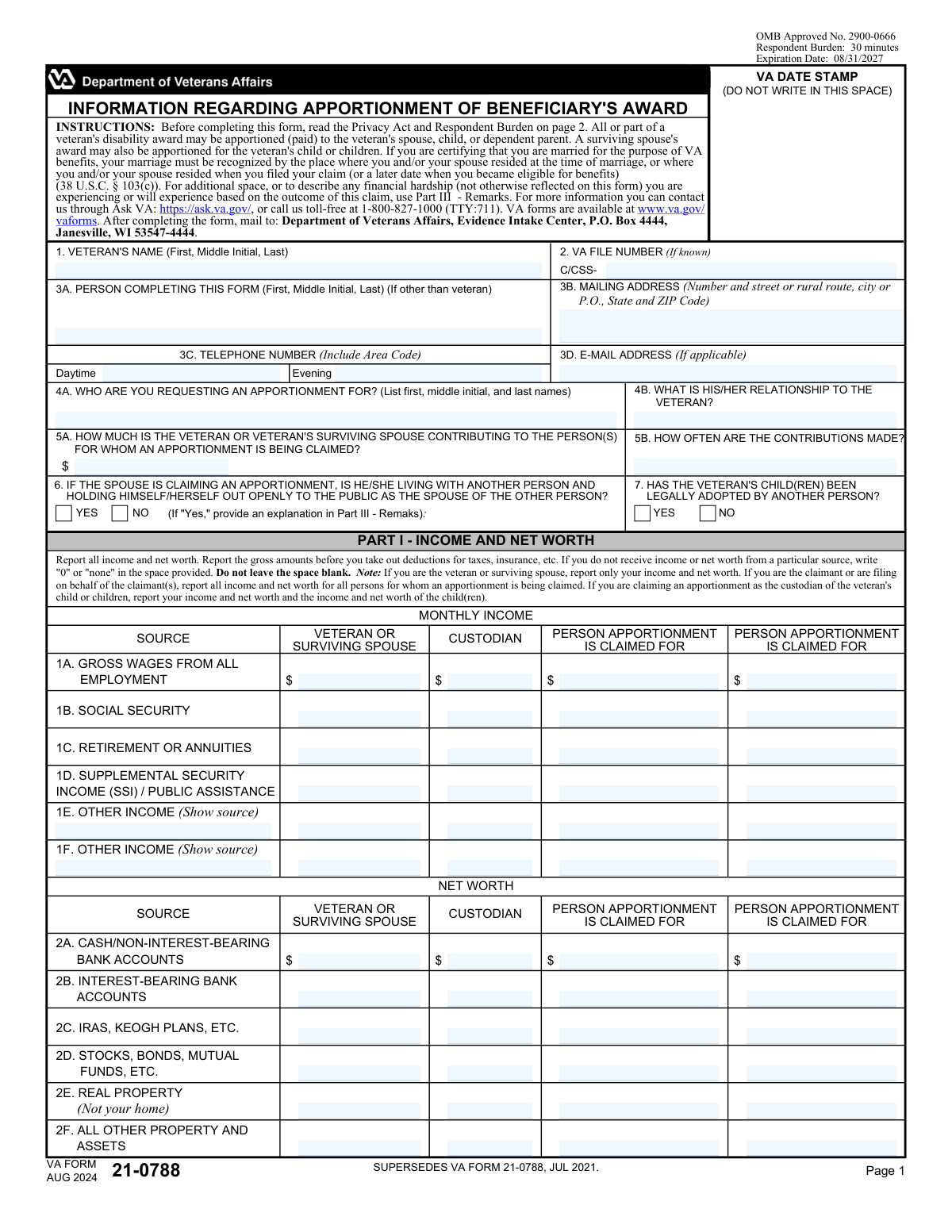
VA Form 21-0788 is a Department of Veterans Affairs form used in apportionment claims, where all or part of a veteran’s disability award (or a surviving spouse’s award) may be paid directly to a spouse, child, or dependent parent. The form collects identifying information and detailed financial data (monthly income, net worth, and monthly living expenses) for the veteran/surviving spouse and, when applicable, the custodian and the person(s) for whom apportionment is requested. VA uses this information to evaluate need, contributions being made, and other eligibility factors (such as relationship status and adoption status) when determining whether an apportionment is warranted. Today, this form can be filled out quickly and accurately using AI-powered services like Instafill.ai, which can also convert non-fillable PDF versions into interactive fillable forms.
Our AI automatically handles information lookup, data retrieval, formatting, and form filling.
It takes less than a minute to fill out VA Form 21-0788 using our AI form filling.
Securely upload your data. Information is encrypted in transit and deleted immediately after the form is filled out.

Form specifications

Form name: VA Form 21-0788, Information Regarding Apportionment of Beneficiary's Award
Number of pages: 2
Filled form examples: Form VA Form 21-0788 Examples
Language: English
Categories: beneficiary forms
main-image

Instafill Demo: filling out a legal form in seconds

How to Fill Out VA Form 21-0788 Online for Free in 2026

Are you looking to fill out a VA FORM 21-0788 form online quickly and accurately? Instafill.ai offers the #1 AI-powered PDF filling software of 2026, allowing you to complete your VA FORM 21-0788 form in just 37 seconds or less.
Follow these steps to fill out your VA FORM 21-0788 form online using Instafill.ai:
  1. 1 Go to Instafill.ai and upload VA Form 21-0788 (or select it from the form library) to start an AI-guided fill session.
  2. 2 Enter veteran identification details (veteran’s name and VA file number, if known) and the contact information for the person completing the form (name, address, phone(s), and email).
  3. 3 Provide apportionment claim details for each claimant (name, relationship to the veteran, contribution amount and frequency) and answer the applicable eligibility questions (spouse living with another person; child legally adopted by another person).
  4. 4 Complete Part I (Income and Net Worth) by entering gross monthly income amounts and current asset values for the relevant parties (veteran/surviving spouse, custodian if applicable, and the person(s) claimed for).
  5. 5 Complete Part II (Monthly Living Expenses) by entering monthly expenses for the relevant parties, including rent/house payment, food, utilities, telephone, clothing, medical, school, and any other listed expenses with sources.
  6. 6 Use Part III (Remarks) to add explanations (e.g., hardship details, adoption explanation, unusual expenses, or clarifying information) and let Instafill.ai validate totals and check for missing required fields (including “0/none” where appropriate).
  7. 7 E-sign and date the certification, then download the completed form for submission (or follow Instafill.ai’s instructions to print/mail to the VA Evidence Intake Center as directed on the form).

Our AI-powered system ensures each field is filled out correctly, reducing errors and saving you time.

Why Choose Instafill.ai for Your Fillable VA Form 21-0788 Form?

Speed

Complete your VA Form 21-0788 in as little as 37 seconds.

Up-to-Date

Always use the latest 2026 VA Form 21-0788 form version.

Cost-effective

No need to hire expensive lawyers.

Accuracy

Our AI performs 10 compliance checks to ensure your form is error-free.

Security

Your personal information is protected with bank-level encryption.

Frequently Asked Questions About Form VA Form 21-0788

VA Form 21-0788 is used to request an apportionment of a veteran’s disability award (or a surviving spouse’s award) so that part of the benefit can be paid to an eligible dependent, such as a spouse, child, or dependent parent.

The veteran, the veteran’s surviving spouse, the person requesting the apportionment (claimant), or someone filing on the claimant’s behalf (such as a custodian for a child) can complete the form, depending on who is making the request.

Mail the completed form to: Department of Veterans Affairs, Evidence Intake Center, P.O. Box 4444, Janesville, WI 53547-4444.

The estimated respondent burden is about 30 minutes, though it may take longer if you need to gather income, asset, and expense information for multiple people.

You’ll need the veteran’s name and (if known) VA file number, plus detailed monthly income, net worth (assets), and monthly living expenses for the required person(s) based on your role (veteran/surviving spouse, claimant, and/or custodian).

Yes. The form instructs you to write “0” or “none” for any income, net worth, or expense category that does not apply—do not leave blanks.

If you are the veteran or surviving spouse, report only your own income and net worth. If you are the claimant or filing for the claimant(s), report income and net worth for all persons you’re claiming an apportionment for; if you’re a custodian for a child, report both your and the child(ren)’s income and net worth.

In 4A, list the full name of the person you want to receive an apportionment. In 4B, state the relationship to the veteran (for example, spouse, child, or dependent parent), since it affects which follow-up questions apply.

In 5A, enter the amount the veteran or surviving spouse currently contributes to the person you’re claiming for. In 5B, state how often those contributions are made (for example, weekly, monthly, annually, or one-time).

Only answer Question 6 if the person requesting the apportionment is the veteran’s spouse (i.e., 4B is “Spouse”). Check “Yes” or “No” based on whether the spouse is living with someone else and publicly presenting as that person’s spouse.

Only answer Question 7 if the apportionment is being claimed for the veteran’s child(ren) (i.e., 4B is “Child”). If you check “Yes,” provide an explanation in Part III (Remarks).

Net worth includes cash, bank accounts, retirement accounts (IRAs/Keogh), investments (stocks/bonds/mutual funds), real property other than your home, and other property/assets. Use current values and report them in the correct column (veteran/surviving spouse, custodian, and/or person claimed for).

List monthly amounts for rent/mortgage, food, utilities, telephone, clothing, medical, school, and any other expenses (with a brief description). Report expenses for the correct person(s) based on the form’s notes, and enter “0” or “none” where not applicable.

Use Part III to explain “Yes” answers that require details (such as adoption in Question 7) and to provide extra information, including financial hardship or anything not fully captured in the income/expense sections.

Yes—AI tools like Instafill.ai can help auto-fill form fields accurately using the information you provide, saving time and reducing missed fields. If your PDF is flat/non-fillable, Instafill.ai can convert it into an interactive fillable form and then guide you through completing it online.

Compliance VA Form 21-0788
Validation Checks by Instafill.ai

1
Veteran Full Name Completeness and Character Validation
Validates that the Veteran’s Name is present and includes at least a first and last name, with an optional middle initial, and contains only reasonable name characters (letters, spaces, hyphens, apostrophes). This is important to correctly associate the apportionment request with the correct beneficiary record and avoid misidentification. If the name is missing or contains invalid characters (e.g., numbers or symbols), the submission should be rejected or routed for manual review with a request for correction.
2
VA File Number Format and Allowed Characters
Checks that the VA File Number, if provided, matches expected formatting rules (e.g., alphanumeric with optional dashes/prefixes) and does not contain disallowed characters or excessive length. This helps prevent downstream matching failures and data-entry errors that can delay claim processing. If the value fails format validation, the system should flag the field and require correction or allow submission only with the field cleared (since it is 'if known').
3
Person Completing Form Required When Not Veteran
Ensures the 'Person Completing This Form (3A)' is completed when the submitter indicates they are not the veteran (or when the workflow context indicates a third party is filing). This is necessary for accountability and follow-up if VA needs clarification. If missing, the submission should fail validation and prompt the user to provide the preparer’s full name.
4
Mailing Address Completeness and USPS-Style Validation
Validates that the mailing address includes required components: street/rural route or P.O. box, city, state, and ZIP code, and that state is a valid US state/territory abbreviation and ZIP is 5 digits (or ZIP+4). A complete, standardized address is critical for correspondence and time-sensitive notices. If incomplete or malformed, the system should block submission and request a corrected address.
5
Telephone Number Format (Daytime/Evening) and Minimum Contact Requirement
Checks that any provided phone number (daytime and/or evening) conforms to a valid NANP format (10 digits, allowing common punctuation) and is not an obvious placeholder (e.g., 0000000000). Additionally, enforces that at least one reliable contact method is provided (phone or email) to support follow-up. If numbers are invalid or no contact method is provided, validation should fail and prompt for correction.
6
Email Address Syntax Validation (If Provided)
Validates that the email address, if entered, follows standard email syntax (local-part@domain) and does not contain spaces or invalid characters. This reduces bounced communications and ensures the claimant can receive electronic updates when applicable. If invalid, the system should flag the field and require correction or removal before submission.
7
Claimant Identity Required for Apportionment Request
Ensures that '4A. Claimant’s Name' is provided when an apportionment is being requested and that it meets basic name validation (not blank, not only initials, no numeric-only values). The apportionment cannot be adjudicated without identifying who the requested apportionment is for. If missing or clearly invalid, the submission should be rejected and the user prompted to provide the claimant’s full name.
8
Relationship to Veteran Required and Restricted to Allowed Values
Validates that '4B. Relationship to Veteran' is present and matches an allowed set (e.g., Spouse, Child, Dependent Parent) or a controlled vocabulary used by the system. Relationship drives eligibility rules and determines which conditional questions (Q6/Q7) apply. If the relationship is missing or outside allowed values, the system should block submission and request a valid selection.
9
Conditional Question 6 Enforcement (Spouse Living With Another Person)
If 'Relationship to Veteran' is 'Spouse', validates that exactly one of Q6 Yes/No is selected, and if relationship is not 'Spouse', ensures Q6 is not answered. This prevents contradictory or irrelevant responses and supports correct application of VA rules regarding spouse status. If both boxes are checked, neither is checked when required, or it is answered when not applicable, validation should fail.
10
Conditional Question 7 Enforcement (Child Legally Adopted by Another Person)
If 'Relationship to Veteran' is 'Child', validates that exactly one of Q7 Yes/No is selected, and if relationship is not 'Child', ensures Q7 is not answered. Adoption status can materially affect entitlement and must be captured consistently. If the condition is violated (missing, both selected, or answered when not applicable), the system should block submission and request correction.
11
Remarks Required When Adoption Question is 'Yes'
When Q7 indicates the child has been legally adopted by another person, validates that Part III Remarks contains an explanation (non-empty and above a minimal length threshold). The form explicitly instructs the filer to provide an explanation, and adjudication may depend on those details. If missing, the system should fail validation and prompt the user to add the required explanation.
12
Contribution Amount and Frequency Pairing (5A/5B) and Numeric Rules
If a claimant (4A) is provided, validates that 5A (contribution amount) and 5B (frequency) are both completed, and that 5A is a valid currency amount (non-negative, two-decimal precision allowed, reasonable max). Frequency must be a recognized value (e.g., weekly, monthly, annually, one-time) to interpret the amount correctly. If one is missing, amount is non-numeric/negative, or frequency is unrecognized, validation should fail.
13
Income Fields Must Not Be Blank (Zero/None Allowed) and Must Be Numeric
Validates that each monthly income line item for each applicable column (Veteran/Surviving Spouse, Custodian, and each Person Apportionment claimed for) is populated with a numeric value or an accepted zero indicator (e.g., '0' or 'none' mapped to 0). The form instructions explicitly state not to leave spaces blank, and blanks create ambiguity in financial calculations. If blanks are detected, the system should require completion or auto-normalize 'none' to 0 and still flag if truly missing.
14
Other Income Source Required When Other Income Amount > 0
For 'Other Income' lines (1E/1F) in any column, validates that when an amount is greater than 0, a corresponding source/description is provided and is not 'none/0'. This is important for auditability and to distinguish recurring income types that may be treated differently. If amount > 0 and source is missing or invalid, validation should fail and prompt for the source.
15
Net Worth Fields Must Not Be Blank (Zero/None Allowed) and Must Be Non-Negative
Validates that each net worth line item (2A–2F) for each applicable column is completed with a numeric value or accepted zero indicator, and that values are not negative. The form requires explicit reporting of assets, and negative asset values typically indicate data entry errors (liabilities are not captured in these fields). If blanks or negative values are found, the system should block submission and request corrected entries.
16
Monthly Living Expenses Must Not Be Blank and 'Other Expenses' Source/Amount Consistency
Validates that each monthly living expense category (rent, food, utilities, telephone, clothing, medical, school) is completed with a numeric value or accepted zero indicator for each applicable column. Additionally, for 'Other Expenses' (1H/1I), if an amount is greater than 0 then a source/description must be provided; if the amount is 0/none, the source should be blank or 'none' and not a substantive label. If any required expense field is blank or other-expense source/amount are inconsistent, validation should fail.
17
Signature Presence and Digital Signature Integrity
Ensures the required signature field (Veteran or Claimant) is present, captured, and passes digital signature integrity checks (e.g., not empty, not a default placeholder, and meets platform signing requirements). A valid signature is required to certify the truthfulness of statements and is essential for legal acceptance of the submission. If missing or invalid, the system must block submission until a valid signature is provided.
18
Date Signed Format and Logical Validity (MM/DD/YYYY)
Validates that the Date Signed is provided, matches MM/DD/YYYY format, represents a real calendar date, and is not in the future relative to the submission timestamp (allowing minimal clock skew if needed). This supports enforceable certification timing and prevents backdating/forward-dating errors that can affect processing. If the date is missing, malformed, or illogical, the system should reject the submission and request correction.

Common Mistakes in Completing VA Form 21-0788

Leaving income, net worth, or expense fields blank instead of entering “0” or “none”

This form repeatedly instructs applicants not to leave spaces blank, but many people skip lines that don’t apply. Blank fields can look like missing information and often trigger VA follow-up requests or delays because the reviewer can’t tell whether the amount is truly zero or simply omitted. To avoid this, enter “0” or “none” for every non-applicable income, asset, and expense line in Parts I and II. AI-powered form filling tools like Instafill.ai can help by auto-populating zeros and flagging any required fields left empty.

Reporting net (take-home) pay instead of gross monthly income

Applicants commonly enter what hits their bank account after taxes/insurance, even though the form requires gross amounts before deductions. Using net figures can understate income and distort the hardship/apportionment analysis, potentially affecting the decision or causing requests for clarification. Use pay stubs/award letters and convert to a monthly gross amount (e.g., weekly × 4.33, biweekly × 2.167) when needed. Instafill.ai can help validate that entries are monthly and prompt you when amounts look like net pay.

Mixing up who should be reported in each column (Veteran/Surviving Spouse vs Custodian vs Person Apportionment is Claimed For)

Because the same income/asset/expense categories repeat across multiple columns, people often enter the claimant’s numbers under the veteran column (or vice versa), especially when a custodian is involved. Misallocated figures can make the financial picture inaccurate and may lead to an incorrect apportionment determination or additional development by VA. Before entering numbers, confirm your role (veteran/surviving spouse, claimant, or custodian) and ensure each person’s amounts go in the correct column. Instafill.ai can reduce this error by mapping data to the correct column based on the role you select.

Failing to list all people being claimed for in Question 4A (or not matching them to the correct “Person 1/Person 2” sections)

When requesting apportionment for multiple dependents, applicants sometimes list only one name in 4A but fill out multiple “Person apportionment is claimed for” columns, or they list multiple names but only complete one person’s financial details. This mismatch can cause confusion about who the apportionment request covers and may delay processing while VA seeks clarification. List each person clearly (first, middle initial, last) and ensure the corresponding income/net worth/expenses are completed for each person consistently. Instafill.ai can help keep names and person-specific sections aligned and warn you when a person is listed but their financial sections are incomplete.

Incorrectly answering conditional Yes/No questions (Question 6 and Question 7) when the relationship doesn’t apply

Question 6 applies only if the claimant’s relationship (4B) is “Spouse,” and Question 7 applies only if the relationship is “Child,” but many people check a box anyway because they think every Yes/No must be answered. Answering these when they don’t apply can create contradictory statements and may prompt VA to request explanations or supporting documents. Only answer Question 6 if 4B is Spouse, and only answer Question 7 if 4B is Child; otherwise leave those specific items untouched per the form logic. Instafill.ai can enforce conditional logic so only the relevant questions are presented/filled.

Omitting the required explanation in Remarks for “Yes” answers (especially adoption in Question 7)

The form explicitly says that if Question 7 is “Yes,” you must provide an explanation in Part III (Remarks), but applicants often forget to add details. Missing explanations can stall the claim because VA may need the adoption circumstances, dates, and who adopted the child to determine eligibility. If you check “Yes,” immediately add a clear narrative in Remarks (who, when, where, and any supporting documentation you have). Instafill.ai can prompt for a required Remarks entry when a “Yes” answer triggers an explanation requirement.

Entering contribution amount/frequency inconsistently (Questions 5A and 5B)

People often enter a dollar amount in 5A but forget to specify how often it’s paid in 5B, or they enter a monthly amount but mark the frequency as weekly (or vice versa). Inconsistent contribution details can lead VA to misinterpret the level of support being provided and affect the apportionment calculation. Always pair 5A with 5B and ensure the amount matches the stated frequency (e.g., $200 weekly is not the same as $200 monthly). Instafill.ai can cross-check amount and frequency and flag mismatches before submission.

Misreporting real property by including the primary home in Net Worth (2E)

Line 2E specifies real property “(Not your home),” but many applicants include their primary residence value because they assume all property must be listed. Including the home can inflate net worth and may change how VA views financial need or hardship, potentially impacting the outcome. Only list real property that is not the primary home (e.g., rental property, land, second home) and use current estimated value. Instafill.ai can highlight the “not your home” rule and prompt you to confirm the property type before including it.

Using annual totals or one-time amounts in monthly fields

Parts I and II are structured around monthly income and monthly living expenses, but applicants frequently paste annual figures from tax returns or list one-time payments (bonuses, lump sums) as if they recur monthly. This can significantly distort the financial snapshot and lead to incorrect hardship conclusions or follow-up requests. Convert annual amounts to monthly equivalents and describe one-time or irregular payments in “Other Income (Show source)” or Remarks with frequency details. Instafill.ai can detect unusually large “monthly” entries and ask whether the amount is annual or one-time, then help convert/format it correctly.

Providing incomplete identification/contact information (VA file number, address, phone, email)

Applicants often leave out the VA file number “if known,” omit apartment/unit numbers, or provide a phone number without area code, which makes it harder for VA to match the form to the correct record or contact the filer quickly. These issues can cause processing delays, misfiled evidence, or missed requests for information. Enter the VA file number exactly as issued (including letters/dashes), provide a complete mailing address, and include area code for daytime/evening numbers. Instafill.ai can standardize address/phone formats and validate that identifiers match expected patterns.

Missing or improperly formatted signature/date (Part IV)

A common rejection reason is a missing signature or a date not in the required MM/DD/YYYY format, especially when people print/scan or use an electronic workflow incorrectly. Without a valid signature and date, VA may treat the submission as incomplete and request resubmission, delaying the claim. Ensure the veteran or claimant signs in the required signature field and enters the date in MM/DD/YYYY. If you’re working from a flat, non-fillable PDF, Instafill.ai can convert it into a fillable version and help ensure the signature/date fields are completed correctly.
Saved over 80 hours a year

“I was never sure if my IRS forms like W-9 were filled correctly. Now, I can complete the forms accurately without any external help.”

Kevin Martin Green

Your data stays secure with advanced protection from Instafill and our subprocessors

Robust compliance program

Transparent business model

You’re not the product. You always know where your data is and what it is processed for.

ISO 27001, HIPAA, and GDPR

Our subprocesses adhere to multiple compliance standards, including but not limited to ISO 27001, HIPAA, and GDPR.

Security & privacy by design

We consider security and privacy from the initial design phase of any new service or functionality. It’s not an afterthought, it’s built-in, including support for two-factor authentication (2FA) to further protect your account.

Fill out VA Form 21-0788 with Instafill.ai

Worried about filling PDFs wrong? Instafill securely fills va-form-21-0788-information-regarding-apportionment-of-beneficiarys-award forms, ensuring each field is accurate.