Yes! You can use AI to fill out ADP Retirement Services Beneficiary Designation Form
The ADP Beneficiary Designation Form is a crucial document for managing your retirement plan, allowing you to officially name the individuals or entities who will inherit your savings. Keeping this information current is vital for ensuring your assets are distributed according to your wishes, especially after significant life events. Today, this form can be filled out quickly and accurately using AI-powered services like Instafill.ai, which can also convert non-fillable PDF versions into interactive fillable forms.
ADP Beneficiary Designation is part of the
HR forms, ADP forms and beneficiary designation forms categories on Instafill.
Rather not fill this in by hand? Instafill is an online form filler that completes PDF forms automatically — upload the blank form, answer a few questions, and the AI fills every field.
Form specifications
| Form name: | ADP Retirement Services Beneficiary Designation Form |
| Number of pages: | 1 |
| Language: | English |
Our AI automatically handles information lookup, data retrieval, formatting, and form filling.
It takes less than a minute to fill out ADP Beneficiary Designation using our AI form filling.
Securely upload your data. Information is encrypted in transit and deleted immediately after the form is filled out.
Instafill Demo: How to fill out PDF forms in seconds with AI
How to Fill Out ADP Beneficiary Designation Online for Free in 2026
Are you looking to fill out a ADP BENEFICIARY DESIGNATION form online quickly and accurately? Instafill.ai offers the #1 AI-powered PDF filling software of 2026, allowing you to complete your ADP BENEFICIARY DESIGNATION form in just 37 seconds or less.
Follow these steps to fill out your ADP BENEFICIARY DESIGNATION form online using Instafill.ai:
- 1 Navigate to Instafill.ai and upload or select the ADP Beneficiary Designation Form.
- 2 Provide your personal and retirement account identification details as prompted by the AI assistant.
- 3 Enter your current marital status. If you are married and designating a non-spousal beneficiary, acknowledge the requirement for spousal consent.
- 4 Add the full legal names, relationship, and contact information for each primary and contingent beneficiary you wish to designate.
- 5 Specify the percentage of assets each beneficiary should receive, ensuring the total allocation equals 100% for each category.
- 6 Review all the information entered for accuracy, then digitally sign and date the form to certify your designations.
- 7 Download the completed form and submit it to ADP Retirement Services, noting any requirements for physical signatures or spousal consent.
Our AI-powered system ensures each field is filled out correctly, reducing errors and saving you time.
Why Choose Instafill.ai for Your Fillable ADP Beneficiary Designation Form?
Speed
Complete your ADP Beneficiary Designation in as little as 37 seconds.
Up-to-Date
Always use the latest 2026 ADP Beneficiary Designation form version.
Cost-effective
No need to hire expensive lawyers.
Accuracy
Our AI performs 10 compliance checks to ensure your form is error-free.
Security
Your personal information is protected with bank-level encryption.
Frequently Asked Questions About ADP Beneficiary Designation
Designating a beneficiary ensures that the assets from your retirement savings account are distributed to the person, people, or entity you want to receive them upon your death. It is an important part of your overall financial wellness plan.
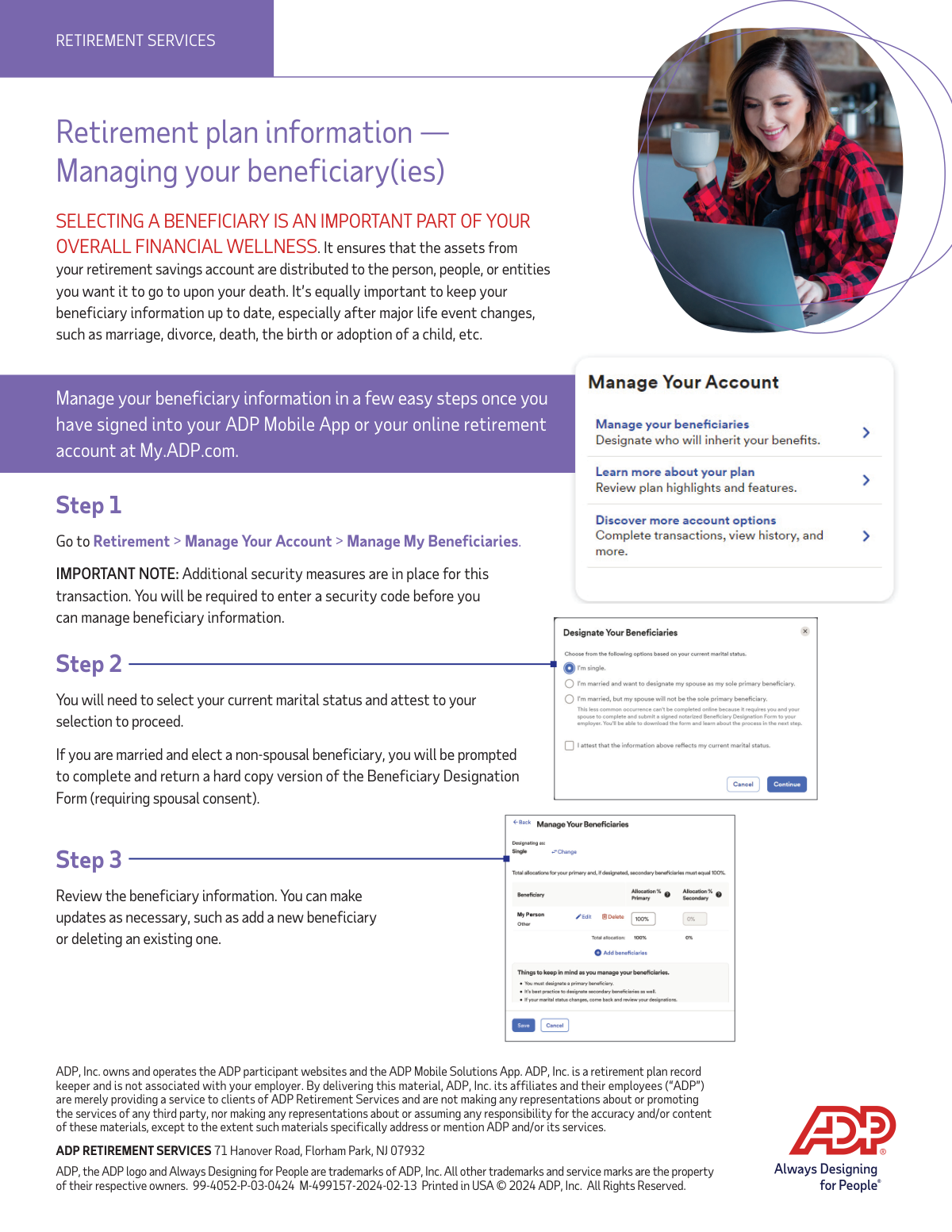
You can manage your beneficiary information by signing into your ADP Mobile App or your online retirement account at My.ADP.com. From there, navigate to Retirement > Manage Your Account > Manage My Beneficiaries.
ADP requires a security code as an additional security measure for this transaction. This helps protect your account and ensures that only authorized individuals can change your beneficiary information.
Your marital status determines the rules for beneficiary designation, especially concerning spousal consent rights. You must attest to your current marital status to proceed with making any changes.
If you are married and choose a non-spousal beneficiary, you will be required to complete and return a hard copy Beneficiary Designation Form. This form will require your spouse's written consent.
It is important to keep your beneficiary information up to date, especially after major life events. You should review your designations after a marriage, divorce, death, or the birth or adoption of a child.
After logging in, go to the 'Manage My Beneficiaries' section, enter a security code, and attest to your marital status. You can then review your current information and add a new beneficiary or delete an existing one as needed.
This is a physical paper form that must be completed and returned when spousal consent is legally required for your beneficiary choice. It cannot be completed entirely online in that specific scenario.
Yes, services like Instafill.ai use AI to accurately auto-fill form fields on PDF documents. This can help you save time and reduce errors when completing the form before you print it for signatures.
You can use a service like Instafill.ai to fill out the form online. Simply upload the PDF to the platform, and it will become an interactive form that you can type into directly.
If you have a non-fillable or 'flat' PDF, you can use a tool like Instafill.ai to convert it into an interactive, fillable form. This allows you to easily complete it on your computer before printing.
ADP, Inc. serves as the record keeper for your retirement plan and operates the participant websites and mobile app. ADP is a service provider and is not your employer.
Compliance ADP Beneficiary Designation
Validation Checks by Instafill.ai
Common Mistakes in Completing ADP Beneficiary Designation
People often forget to update their beneficiary information after events like marriage, divorce, the birth of a child, or the death of a named beneficiary. This oversight can lead to assets being distributed to an unintended person, such as an ex-spouse, causing significant legal and emotional distress for the family. To avoid this, set an annual calendar reminder to review your designations and update them immediately after any major life event.
A married participant naming a non-spouse as a beneficiary often overlooks the prompt requiring a separate, physical form with spousal consent. They might complete the online steps and assume the process is finished, but federal law often requires the spouse's written, notarized consent to waive their rights. Without this hard copy form, the designation is invalid, and the plan will likely pay the entire benefit to the surviving spouse by default.
When adding a beneficiary, people may omit crucial details like a Social Security number, date of birth, or full legal name, or use vague terms like 'my children'. This happens when the information isn't readily available or they misunderstand the need for specificity. Incomplete data can make it difficult for the plan administrator to locate and verify the beneficiary, causing long delays in payment and potential legal challenges.
It's common to enter a beneficiary's nickname (e.g., 'Mike' instead of 'Michael') or an informal name out of habit. This creates ambiguity and forces the beneficiary to provide additional documentation to prove their identity when claiming the assets. To prevent delays and complications, always use the person's full legal name as it appears on their government-issued identification.
Many people only name primary beneficiaries and neglect to add contingent (secondary) ones. They don't consider what happens if the primary beneficiary dies before them or at the same time. If there is no living primary or contingent beneficiary, the assets will go into the deceased's estate and be subject to the costly and time-consuming probate process, defeating the purpose of the designation.
A frequent data entry error is assigning percentages that do not add up to exactly 100% for all primary beneficiaries. This often occurs due to simple miscalculation, especially when dividing assets among three or more people. An incorrect total will cause the form submission to be rejected, delaying the process until the math is corrected. AI-powered form filling tools like Instafill.ai can help prevent this by automatically validating percentage totals before submission.
Users may accidentally select the wrong marital status or misunderstand the legal definitions of 'married,' 'single,' or 'legally separated.' Because the form's workflow, particularly the spousal consent rule, depends on this selection, an error can invalidate the entire designation. It is critical to carefully read and attest to the correct status to ensure the proper legal requirements are met.
While well-intentioned, naming a minor child directly as a beneficiary creates significant legal problems, as minors cannot legally control financial assets. This forces the court to appoint a legal guardian to manage the money, a process that is public, expensive, and may not align with the parent's wishes. To avoid this, you should establish a trust for the child or name a custodian under the Uniform Transfers to Minors Act (UTMA) and consult a legal professional.
A widespread misconception is that a will dictates the distribution of all assets, including retirement accounts. However, a beneficiary designation is a legal contract that supersedes a will. The assets in the ADP account will be paid to the beneficiary listed on this form, regardless of what the will states, which can lead to assets being distributed against your most current wishes.
The process involves multiple steps, including security code verification and final confirmation. Users may get distracted and abandon the process midway, incorrectly assuming their changes were saved automatically. If the final 'submit' or 'confirm' step is not completed, the old beneficiary information remains in effect, completely nullifying the intended updates.
When spousal consent is needed, the online designation is only provisional until a signed hard copy form is received. People often fail to print, sign, notarize, and mail this document, assuming the online part was sufficient. This inaction renders the beneficiary choice invalid. If the form is a flat PDF, tools like Instafill.ai can convert it to a fillable version to simplify completion before printing and mailing.
Saved over 80 hours a year
“I was never sure if my IRS forms like W-9 were filled correctly. Now, I can complete the forms accurately without any external help.”
Kevin Martin Green
Your data stays secure with advanced protection from Instafill and our subprocessors




Robust compliance program
Transparent business model
You’re not the product. You always know where your data is and what it is processed for.
ISO 27001, HIPAA, and GDPR
Our subprocesses adhere to multiple compliance standards, including but not limited to ISO 27001, HIPAA, and GDPR.
Security & privacy by design
We consider security and privacy from the initial design phase of any new service or functionality. It’s not an afterthought, it’s built-in, including support for two-factor authentication (2FA) to further protect your account.
Fill out ADP Beneficiary Designation with Instafill.ai
Worried about filling PDFs wrong? Instafill securely fills adp-retirement-services-beneficiary-designation-form-1 forms, ensuring each field is accurate.
