Yes! You can use AI to fill out SIMPLE IRA Contribution Transmittal Form

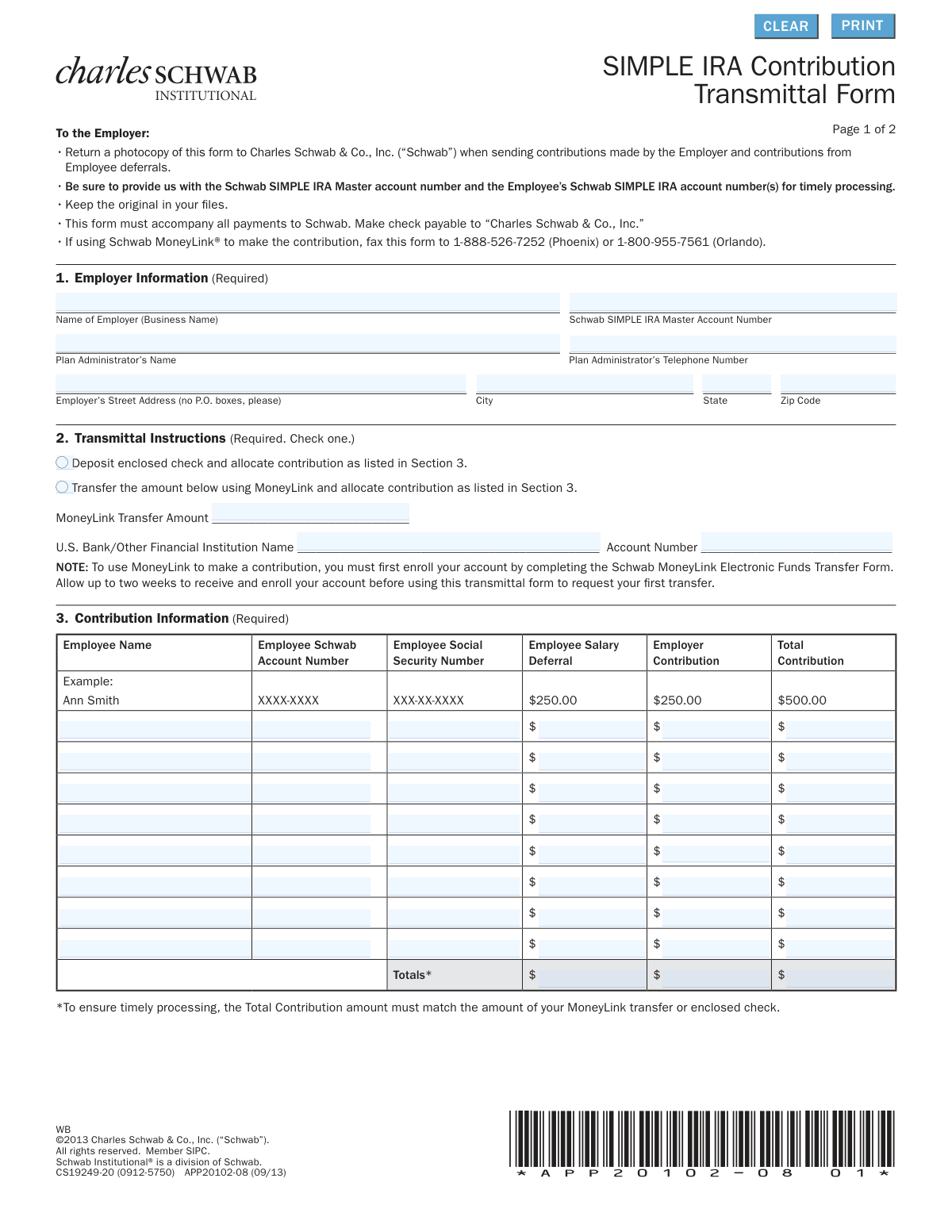
This form is a transmittal document for employers to detail and submit contributions to their employees' SIMPLE IRA accounts managed by Charles Schwab. It specifies employer and employee contribution amounts for each participating employee and must accompany payments made by check or authorize electronic transfers via Schwab MoneyLink®. Today, this form can be filled out quickly and accurately using AI-powered services like Instafill.ai, which can also convert non-fillable PDF versions into interactive fillable forms.
Our AI automatically handles information lookup, data retrieval, formatting, and form filling.
It takes less than a minute to fill out APP20102-08 using our AI form filling.
Securely upload your data. Information is encrypted in transit and deleted immediately after the form is filled out.

Form specifications

Form name: SIMPLE IRA Contribution Transmittal Form
Number of pages: 1
Language: English
main-image

Instafill Demo: How to fill out PDF forms in seconds with AI

How to Fill Out APP20102-08 Online for Free in 2026

Are you looking to fill out a APP20102-08 form online quickly and accurately? Instafill.ai offers the #1 AI-powered PDF filling software of 2026, allowing you to complete your APP20102-08 form in just 37 seconds or less.
Follow these steps to fill out your APP20102-08 form online using Instafill.ai:
  1. 1 Navigate to Instafill.ai and upload or select the SIMPLE IRA Contribution Transmittal Form.
  2. 2 Use the AI assistant to automatically fill in the Employer Information section, including business name and Schwab SIMPLE IRA Master Account Number.
  3. 3 Indicate the transmittal instructions by checking whether the contribution is via an enclosed check or a Schwab MoneyLink® transfer.
  4. 4 Input the contribution information for each employee, including their name, account number, salary deferral, and employer contribution amount.
  5. 5 Allow the AI to automatically calculate the total contribution for each employee and the grand total for all contributions, ensuring it matches your payment.
  6. 6 Review all the information entered by the AI for accuracy, making any necessary corrections.
  7. 7 Provide the employer authorization with a digital signature, print name, and date, then download the completed form to fax or mail to Charles Schwab.

Our AI-powered system ensures each field is filled out correctly, reducing errors and saving you time.

Why Choose Instafill.ai for Your Fillable APP20102-08 Form?

Speed

Complete your APP20102-08 in as little as 37 seconds.

Up-to-Date

Always use the latest 2026 APP20102-08 form version.

Cost-effective

No need to hire expensive lawyers.

Accuracy

Our AI performs 10 compliance checks to ensure your form is error-free.

Security

Your personal information is protected with bank-level encryption.

Frequently Asked Questions About Form APP20102-08

This form is used by employers to detail and submit contributions to their employees' Schwab SIMPLE IRA accounts. It must accompany every payment to ensure funds are allocated correctly to each employee.

The employer or the designated Plan Administrator is responsible for completing and submitting this form. It is not filled out by individual employees.

You must provide the business name, the Schwab SIMPLE IRA Master Account Number, the Plan Administrator's name and phone number, and the employer's physical street address.

You can pay via a check made payable to 'Charles Schwab & Co., Inc.' or by an electronic transfer using Schwab MoneyLink®. You must select your payment method in Section 2 of the form.

Schwab MoneyLink® is an electronic funds transfer service. To use it, you must first enroll by submitting the Schwab MoneyLink Electronic Funds Transfer Form and allow up to two weeks for setup before your first transfer.

If paying by check, mail a photocopy of the form with your payment. If using Schwab MoneyLink®, you must fax the form to 1-888-526-7252 (Phoenix) or 1-800-955-7561 (Orlando).

For each contributing employee, you must list their full name, their individual Schwab account number, their Social Security Number, the employee salary deferral amount, and the employer contribution amount.

A common reason for delays is when the 'Total Contribution' amount in Section 3 does not exactly match the amount of the enclosed check or MoneyLink transfer. Always double-check that these figures are identical.

Yes, the instructions state that you should keep the original signed form for your business records and send a photocopy to Schwab with your contribution.

Yes, services like Instafill.ai use AI to auto-fill form fields accurately and save time. This can help reduce errors and streamline the process of completing repetitive forms.

You can use a service like Instafill.ai to easily fill out the form online. Simply upload the PDF, and the platform will make it interactive so you can type your information directly into the fields.

If you have a non-fillable or 'flat' PDF, you can upload it to a service like Instafill.ai. The platform can convert it into an interactive, fillable form that you can complete, save, and print.

The form must be signed and dated by the employer or an authorized representative of the employer to authorize Schwab to deposit the funds as instructed.

No, the form explicitly states that you must use a street address for the employer in Section 1. P.O. boxes are not permitted.

Compliance APP20102-08
Validation Checks by Instafill.ai

1
Employer Information Completeness
This check verifies that all fields in Section 1, 'Employer Information', have been filled out. This information is critical for identifying the employer's plan and ensuring proper communication and record-keeping. A failure to provide complete information will result in the form being rejected, delaying the processing of all contributions.
2
Exclusive Transmittal Instruction Selection
Validates that exactly one of the two checkboxes in Section 2, 'Transmittal Instructions', is selected. The form requires a single, unambiguous instruction for how the funds are being provided (either by check or MoneyLink). If zero or both options are selected, the system cannot determine the payment method, and the transaction will be halted pending clarification.
3
MoneyLink Conditional Field Requirement
If the 'Transfer using MoneyLink' option is selected in Section 2, this check ensures that the 'MoneyLink Transfer Amount', 'U.S. Bank/Other Financial Institution Name', and 'Account Number' fields are all completed. These details are necessary to execute the electronic funds transfer. Missing information will cause the MoneyLink transfer to fail and prevent the contributions from being processed.
4
Grand Total Contribution Consistency
This validation ensures the 'Totals' amount in the 'Total Contribution' column of Section 3 matches the 'MoneyLink Transfer Amount' from Section 2 or the amount of the enclosed check. This is a crucial reconciliation step to ensure the funds received match the intended allocation amounts. A mismatch will place a hold on the entire transaction until the discrepancy is resolved.
5
Row-Level Contribution Calculation
For each employee row in Section 3, this check verifies that the 'Employee Salary Deferral' plus the 'Employer Contribution' equals the 'Total Contribution' for that employee. This ensures the mathematical accuracy of each individual's contribution breakdown. An incorrect sum for any employee will cause the form to be flagged for review and correction, delaying deposits for all listed employees.
6
Column-Level Totals Calculation
This check confirms that the sum of all values in the 'Employee Salary Deferral' column equals the 'Totals' field for that column, and does the same for the 'Employer Contribution' and 'Total Contribution' columns. This serves as a secondary verification of the overall arithmetic on the form. If the column totals do not add up correctly, it indicates a calculation error that must be fixed before processing.
7
Employee Social Security Number Format
Validates that each 'Employee Social Security Number' in Section 3 is entered in the standard XXX-XX-XXXX format and contains only digits and hyphens. The SSN is a unique identifier essential for correct tax reporting and account allocation. An improperly formatted SSN could lead to misapplied funds or IRS reporting errors, requiring manual intervention to correct.
8
Employee Schwab Account Number Validation
This check verifies that the 'Employee Schwab Account Number' follows the expected format (e.g., XXXX-XXXX) and corresponds to a valid, open SIMPLE IRA account under the employer's master plan. This is critical for ensuring contributions are deposited into the correct employee's account. An invalid or mismatched account number will cause the contribution for that specific employee to fail.
9
Employer Address P.O. Box Prohibition
This validation enforces the rule that the 'Employer’s Street Address' in Section 1 cannot be a P.O. box. Many financial regulations and internal policies require a physical address for business entities. Submitting a P.O. box will result in a validation error and require the user to provide a valid physical street address.
10
Contribution Table Population Check
Ensures that at least one employee row in Section 3, 'Contribution Information', is filled out with contribution data. A transmittal form with no employee contributions listed is an empty submission and serves no purpose. The form would be rejected as incomplete, as there are no instructions to process.
11
Authorization Date Format and Validity
This check verifies that the 'Date' field in Section 4 is present, follows the 'mm/dd/yyyy' format, and represents a valid, non-future date. The signature date is a legal requirement that documents when the employer authorized the transaction. An invalid, future, or missing date can render the authorization void and will halt the processing of the form.
12
Plan Administrator's Telephone Number Format
Validates that the 'Plan Administrator’s Telephone Number' in Section 1 is a valid 10-digit U.S. phone number, allowing for common formats like (XXX) XXX-XXXX. This contact information is essential if Schwab needs to reach the administrator to resolve any issues with the transmittal. An invalid number would hinder communication and delay problem resolution.
13
Non-Negative Contribution Amounts
This check ensures that all monetary values entered in the 'Employee Salary Deferral' and 'Employer Contribution' fields are zero or positive numbers. Negative contribution amounts are not logically possible and would indicate a data entry error. Any row with a negative value will be flagged as an error, preventing the processing of that employee's contribution.
14
State and Zip Code Validation
This check verifies that the 'State' field is a valid two-letter postal abbreviation and the 'Zip Code' is a valid 5-digit or 9-digit code. It may also cross-reference that the zip code is valid for the entered city and state. Correct address information is necessary for mailing, record-keeping, and identity verification.

Common Mistakes in Completing APP20102-08

Mismatched Contribution and Payment Totals

This occurs when the 'Totals' amount at the bottom of Section 3 does not exactly match the amount of the enclosed check or the MoneyLink transfer amount specified in Section 2. This is a critical error as the payment and allocation instructions do not reconcile, forcing Schwab to halt the entire transaction. To prevent this, always double-check that the sum of all individual contributions equals the total payment amount before submitting the form.

Incorrect Employee-Level Calculations

In Section 3, the sum of an employee's 'Salary Deferral' and the 'Employer Contribution' does not equal the figure entered in their 'Total Contribution' column. This is a common manual calculation error that creates a discrepancy and will delay the deposit for that employee, and potentially the entire batch, until it is clarified. Using a spreadsheet or calculator to verify each line item can prevent this mistake.

Missing or Invalid Schwab Master Account Number

The employer's 'Schwab SIMPLE IRA Master Account Number' in Section 1 is left blank, is illegible, or contains transposed digits. This account number is the primary identifier for the entire plan, and without it, Schwab cannot associate the funds with the correct employer. This mistake guarantees a processing failure and requires resubmission, causing significant delays in funding employee accounts.

Incorrect Employee Schwab Account Number

An individual employee's Schwab account number in Section 3 is entered incorrectly. This is a frequent data entry error that leads to the contribution being rejected or, in a worse case, misapplied to another person's account. It is crucial to copy these numbers carefully from official plan records for each submission to ensure funds are deposited correctly.

Incomplete Transmittal Instructions

In Section 2, the submitter fails to check one of the two required boxes to indicate the payment method (check or MoneyLink). This ambiguity leaves Schwab without clear instructions on how to source the funds for the contribution. This will cause a processing delay while Schwab contacts the Plan Administrator for clarification.

Unsigned or Undated Authorization Section

The form is submitted without a signature or date in Section 4. An unsigned form is not a valid legal instruction, and Schwab is prohibited from processing the transaction. This oversight will cause the form to be immediately rejected and returned, delaying all contributions until a properly executed form is provided.

Attempting an Unenrolled MoneyLink Transfer

The employer selects the MoneyLink transfer option in Section 2 but has not yet completed the required Schwab MoneyLink enrollment form for that bank account. As the form notes, enrollment takes time, so the transfer request will fail. This results in a delay and requires the employer to resubmit the form and send a physical check, negating the convenience of the electronic transfer.

Using a P.O. Box for the Employer Address

A Post Office Box number is entered in the 'Employer’s Street Address' field in Section 1, despite the form's explicit instruction to avoid them. Financial institutions often require a physical address for compliance and identity verification purposes. Using a P.O. Box can lead to the form being flagged for review or rejected, delaying the process.

Illegible or Missing Printed Name and Title

In Section 4, the printed name and title of the authorized signer are either unreadable or omitted entirely. The signature alone may not be sufficient for Schwab to verify the authority of the person signing on behalf of the employer. This can lead to follow-up calls and processing delays while Schwab confirms the signer's identity and role.

Inconsistent Employee Name or SSN

The employee's name or Social Security Number in Section 3 does not perfectly match the information on file for the associated Schwab account number. This can happen due to typos, using a nickname instead of a legal name, or an unrecorded name change. This mismatch will cause the contribution for that specific employee to be put on hold until the identity can be verified, delaying their investment.
Saved over 80 hours a year

“I was never sure if my IRS forms like W-9 were filled correctly. Now, I can complete the forms accurately without any external help.”

Kevin Martin Green

Your data stays secure with advanced protection from Instafill and our subprocessors

Robust compliance program

Transparent business model

You’re not the product. You always know where your data is and what it is processed for.

ISO 27001, HIPAA, and GDPR

Our subprocesses adhere to multiple compliance standards, including but not limited to ISO 27001, HIPAA, and GDPR.

Security & privacy by design

We consider security and privacy from the initial design phase of any new service or functionality. It’s not an afterthought, it’s built-in, including support for two-factor authentication (2FA) to further protect your account.

Fill out APP20102-08 with Instafill.ai

Worried about filling PDFs wrong? Instafill securely fills simple-ira-contribution-transmittal-form forms, ensuring each field is accurate.