Yes! You can use AI to fill out Meritain Health Claim Form (Health Claim Form)

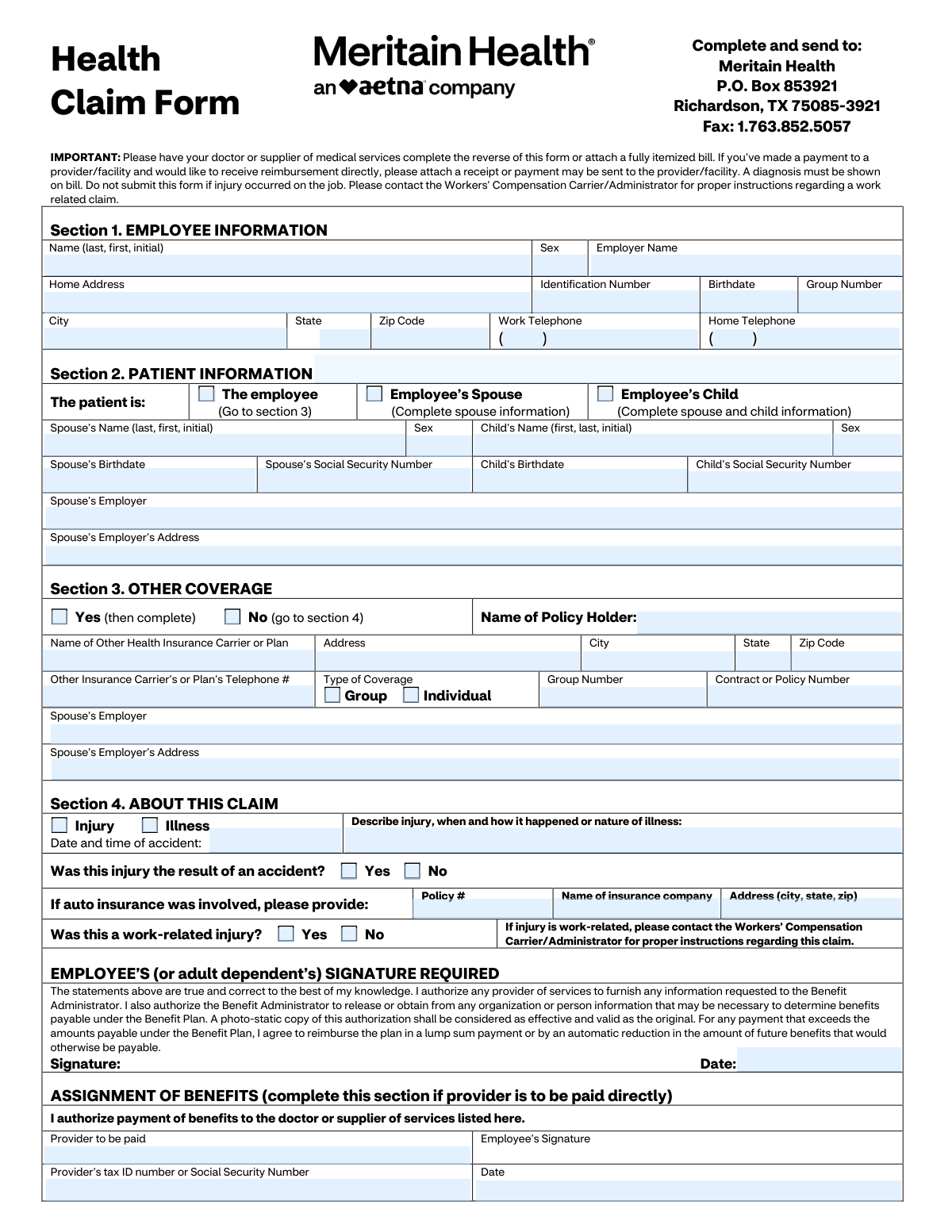
The Meritain Health Claim Form is a member-submitted health insurance claim document used to provide employee/patient details, other coverage information, and claim circumstances (injury/illness) so Meritain Health can process benefits. It also includes a provider/physician section (often completed by the doctor or supplier) to document diagnosis, dates of service, procedure codes, charges, and provider identification for proper adjudication. The form is important because incomplete information (such as missing diagnosis, itemized bill, or signatures) can delay processing or reimbursement, and it should not be used for work-related injuries that belong under workers’ compensation. Today, this form can be filled out quickly and accurately using AI-powered services like Instafill.ai, which can also convert non-fillable PDF versions into interactive fillable forms.
Our AI automatically handles information lookup, data retrieval, formatting, and form filling.
It takes less than a minute to fill out Meritain Health Claim Form using our AI form filling.
Securely upload your data. Information is encrypted in transit and deleted immediately after the form is filled out.

Form specifications

Form name: Meritain Health Claim Form (Health Claim Form)
Number of pages: 2
Language: English
Categories: insurance forms, health insurance forms, Meritain Health forms, medical claim forms, VA claim forms
main-image

Instafill Demo: filling out a legal form in seconds

How to Fill Out Meritain Health Claim Form Online for Free in 2026

Are you looking to fill out a MERITAIN HEALTH CLAIM FORM form online quickly and accurately? Instafill.ai offers the #1 AI-powered PDF filling software of 2026, allowing you to complete your MERITAIN HEALTH CLAIM FORM form in just 37 seconds or less.
Follow these steps to fill out your MERITAIN HEALTH CLAIM FORM form online using Instafill.ai:
  1. 1 Go to Instafill.ai and upload the Meritain Health Claim Form (or select it from the form library).
  2. 2 Use Instafill.ai to auto-detect fields, then enter Section 1 employee information (name, ID number, employer, address, birthdate, group number, and phone numbers).
  3. 3 Complete Section 2 patient information by selecting the patient relationship (employee/spouse/child) and entering any required dependent details (SSN, birthdate, employer/address where applicable).
  4. 4 Fill Section 3 other coverage by indicating whether other insurance exists and, if yes, providing the other carrier/plan details, policy/group numbers, and contact information.
  5. 5 Complete Section 4 claim details by selecting injury or illness, describing what happened, answering accident/auto/work-related questions, and adding auto insurance details if applicable.
  6. 6 Upload supporting documentation in Instafill.ai (itemized bill showing diagnosis, receipts if requesting reimbursement, and any related records), and have the provider complete the reverse/provider section or attach the completed provider statement.
  7. 7 E-sign where required (employee/adult dependent signature and assignment of benefits if paying the provider directly), then submit by printing/mailing or faxing to Meritain Health using the addresses/fax number shown on the form.

Our AI-powered system ensures each field is filled out correctly, reducing errors and saving you time.

Why Choose Instafill.ai for Your Fillable Meritain Health Claim Form Form?

Speed

Complete your Meritain Health Claim Form in as little as 37 seconds.

Up-to-Date

Always use the latest 2026 Meritain Health Claim Form form version.

Cost-effective

No need to hire expensive lawyers.

Accuracy

Our AI performs 10 compliance checks to ensure your form is error-free.

Security

Your personal information is protected with bank-level encryption.

Frequently Asked Questions About Form Meritain Health Claim Form

This form is used to request benefits for medical services under your Meritain Health plan, typically when a provider did not submit the claim for you or when you’re seeking reimbursement for out-of-pocket payments.

You (the employee or adult dependent) complete Sections 1–4 and sign the authorization. Your doctor or medical supplier must complete the provider section on the reverse side or you must attach a fully itemized bill that includes the required details.

Mail it to Meritain Health, P.O. Box 853921, Richardson, TX 75085-3921, or fax it to 1.763.852.5057.

Attach a fully itemized bill (or have the provider complete the reverse side) and make sure a diagnosis is shown on the bill. If you paid the provider and want reimbursement, attach a receipt or proof of payment.

No. If the injury occurred on the job or is employment-related, do not submit this form—contact your Workers’ Compensation Carrier/Administrator for instructions.

Check the appropriate box (spouse or child) and fill in the spouse/child details requested (name, sex, birthdate, Social Security Number, and spouse employer information where applicable). If the patient is the employee, check “The employee” and proceed to Section 3.

“Other Coverage” means any additional health insurance plan covering the patient (such as a spouse’s plan). If you have other coverage, check “Yes” and provide the other carrier’s details; if not, check “No” and go to Section 4.

Indicate whether the claim is for an injury or illness, provide the date/time of the accident (if applicable), and describe what happened. If auto insurance was involved, include the auto policy number and insurer information.

Complete Assignment of Benefits only if you want Meritain Health to pay the provider directly. If you want reimbursement sent to you (and you paid), leave it blank and include your receipt/proof of payment.

The provider should include diagnosis (ICD-10 or description), dates of service, place of service, procedure codes (CPT or description), charges, and their Tax ID/SSN and signature. Hospitalization dates, lab details, and referral information should be included when applicable.

They indicate where care was provided (e.g., 11 = physician’s office, 21 = inpatient hospital, 23 = emergency room). Your provider typically supplies these codes on the claim or itemized bill.

Yes—an employee (or adult dependent) signature is required. Your signature authorizes providers to release information needed to process the claim and allows the plan to obtain/release information to determine benefits.

Processing times can vary based on claim complexity and whether all required documentation is included. Submitting a complete itemized bill with diagnosis and accurate member information helps prevent delays.

Yes. AI form-filling services like Instafill.ai can help auto-fill fields from your information and documents, reducing manual typing and common errors while you review before submitting.

Upload the PDF to Instafill.ai, add your details (and optionally upload supporting documents like an itemized bill), and let it map and auto-fill the fields for review. If the PDF is flat/non-fillable, Instafill.ai can convert it into an interactive fillable form so you can complete and export it for mailing or faxing.

Compliance Meritain Health Claim Form
Validation Checks by Instafill.ai

1
Employee identity fields completeness (Section 1 required set)
Validates that the core employee fields needed to locate eligibility are present: Employee Name, Identification Number, Birthdate, Employer Name, and Group Number. These fields are essential to match the claim to the correct member and plan. If any are missing, the submission should be flagged as incomplete and routed for correction before adjudication.
2
Name format validation (Employee/Spouse/Child/Patient/Physician)
Checks that all name fields follow the expected structure (last, first, middle initial where requested) and contain only valid characters (letters, spaces, hyphens, apostrophes). This reduces mismatches during member/provider matching and prevents downstream system rejections due to malformed names. If validation fails, the system should request corrected formatting and/or split the name into components if supported.
3
Sex field allowed values and conditional requirement
Ensures Sex fields (employee/spouse/child) contain an allowed value (e.g., M/F or Male/Female) and are provided when the corresponding person record is required by the selected patient type. Consistent sex values support eligibility checks and pregnancy logic. If invalid or missing when required, the claim should be pended for correction.
4
Date format and plausibility validation (all date fields)
Validates that all dates (birthdates, accident date/time, first treatment date, injury date, hospitalization admit/discharge, expected delivery, signature dates, service dates) are in an accepted format and represent real calendar dates. Also checks plausibility (e.g., not in the far future, not before 1900, and birthdate not after service date). Failures should trigger a hard error for impossible dates and a soft/pend error for implausible ones.
5
Patient type selection exclusivity and dependent info completeness
Ensures exactly one patient type is selected (Employee vs Spouse vs Child) and that the required dependent fields are completed accordingly. If Spouse is selected, spouse name/sex/birthdate/SSN (as required by business rules) must be present; if Child is selected, child name/sex/birthdate/SSN must be present and spouse information must be completed if the form requires it. If the selection is missing, multiple, or dependent fields are incomplete, the claim should be returned for completion.
6
SSN format validation for spouse/child and duplication check
Checks that Social Security Numbers are 9 digits (optionally formatted with dashes) and are not all zeros or otherwise invalid patterns. Also checks that spouse SSN and child SSN are not identical to each other or obviously copied from another field. If invalid or duplicated, the system should reject or pend the claim to prevent misidentification and privacy/compliance issues.
7
Phone number format validation (employee and other carrier/provider)
Validates that phone numbers include a 3-digit area code and a 7-digit local number (allowing standard punctuation) and that extensions, if present, are in an acceptable format. This is important for coordination of benefits (COB) follow-up and provider contact. If invalid, the claim can proceed but should be flagged for correction if the phone is required for the selected section (e.g., other coverage = Yes).
8
Address completeness and US state/ZIP validation (employee, spouse employer, other carrier, provider)
Ensures addresses include street, city, state, and ZIP where applicable, and validates state as a US postal abbreviation and ZIP as 5 digits (or ZIP+4). Correct addresses are needed for correspondence, COB, and provider identification. If state/ZIP are invalid or required address components are missing, the submission should be pended for correction.
9
Other coverage (COB) Yes/No exclusivity and required fields when Yes
Checks that exactly one of 'Yes (then complete)' or 'No (go to section 4)' is selected. If Yes is selected, validates that policy holder name, carrier/plan name, address (city/state/ZIP), telephone, and contract/policy number are provided; if Group coverage is selected, group number must be present. If these conditions fail, the claim should be pended because COB cannot be performed reliably.
10
Other coverage type selection rules (Group vs Individual)
Validates that the Type of Coverage selection is consistent: either Group or Individual is selected (not both), and that Group Number is only required/present when Group is selected. This prevents contradictory COB data that can cause incorrect payer order. If inconsistent, the system should request clarification and hold COB processing.
11
Claim type logic (Injury vs Illness) and accident details consistency
Ensures exactly one of Injury or Illness is selected and that related fields align: accident date/time and accident question should be completed when Injury is selected, while first treatment date should be completed when Illness is selected. Also requires a narrative description of the injury/illness in all cases. If inconsistent (e.g., Illness selected but only accident details provided), the claim should be pended for clarification.
12
Work-related injury cross-check and workers’ compensation exclusion
Cross-validates the employee section 'Was this a work-related injury?' with the provider section 'Is this condition the result of an injury arising from patient’s employment?'. If either indicates Yes, the form instructions state the claim should not be submitted as a standard health claim; it should be redirected to Workers’ Compensation handling. If a work-related indicator is present, the system should stop standard adjudication and route to the appropriate workflow.
13
Auto insurance involvement completeness when applicable
If the injury is marked as accident-related and auto insurance is involved (or auto fields are partially filled), validates that auto policy number, insurer name, and insurer address (city/state/ZIP) are complete. This supports proper coordination with auto/medical payments coverage and subrogation. If auto involvement is implied but details are missing, the claim should be pended for additional information.
14
Provider/physician authentication completeness (signature, date, identifiers)
Validates that the physician section includes physician printed name, signature, completion date, and provider Tax ID/SSN, plus a contact phone and address. These elements are needed to authenticate the clinical/billing information and to contact the provider for records. If missing, the claim should be pended or rejected depending on whether an itemized bill is attached and acceptable as a substitute.
15
Diagnosis presence and ICD-10/diagnosis code format validation
Ensures at least one diagnosis/current condition is provided and that any diagnosis codes entered match expected ICD-10 formatting (e.g., alphanumeric with valid length and optional decimal). Also checks that each service line diagnosis code is present and corresponds to one of the listed diagnoses when the system enforces linkage. If diagnosis is missing or malformed, the claim should be rejected/pended because benefits cannot be determined without a diagnosis.
16
Service line integrity (dates, POS codes, procedure codes, charges)
For each populated service line, validates that Date of Service From/To are present and ordered correctly (From <= To), Place of Service is one of the allowed codes (e.g., 11, 12, 21, 22, 23, 81), procedure code is present, and charges are numeric and non-negative with valid currency precision. This prevents adjudication errors and ensures the claim can be priced correctly. If any required element is missing on a populated line, that line (or the entire claim, per policy) should be pended for correction.

Common Mistakes in Completing Meritain Health Claim Form

Submitting the claim without an itemized bill and diagnosis

People often mail the form alone or attach a summary statement that doesn’t list CPT/procedure codes, dates of service, and line-item charges, or they forget that a diagnosis must be shown on the bill. This commonly results in delays, requests for more information, or outright denial because the administrator can’t validate medical necessity and pricing. Always attach a fully itemized bill (or have the provider complete the reverse side) and confirm the diagnosis/ICD-10 is present. AI-powered tools like Instafill.ai can help ensure required attachments and key fields (like diagnosis) are not missed and that data is formatted consistently.

Filing a work-related injury claim on this form

Claimants sometimes check “work-related injury: Yes” (or the provider marks the condition as employment-related) and still submit the health claim form, not realizing it should go through Workers’ Compensation. This can lead to denial and significant delays while the claim is rerouted or refiled. If the injury/condition arose from employment, stop and contact the Workers’ Compensation Carrier/Administrator for the correct process. Instafill.ai can flag conflicting answers (e.g., work-related = Yes) before submission to prevent misrouting.

Not selecting the correct patient type (employee vs spouse vs child)

A frequent error is checking the wrong box in Section 2 or leaving it blank, then filling the wrong dependent fields (or skipping required spouse info when the patient is a child). This causes eligibility verification problems and can delay processing because the plan can’t match the patient to the correct covered person. Carefully select exactly one patient category and complete only the fields required for that selection (spouse info for spouse; spouse + child info for child). Instafill.ai can guide conditional logic so the right dependent fields appear and required ones are completed.

Using the wrong ID numbers (member ID vs group number vs SSN)

People often confuse the Identification Number, Group Number, and Social Security Number fields, or they enter an employer payroll ID instead of the plan/member ID. Incorrect identifiers prevent the claim from matching the correct plan and member record, leading to rework and delays. Copy the member ID and group number exactly as shown on the insurance card/benefits portal, and only use SSNs where explicitly requested (spouse/child SSN fields). Instafill.ai can validate typical ID formats and reduce mix-ups by mapping data from insurance cards correctly.

Incorrect or inconsistent name and date-of-birth formatting

Common issues include entering names in the wrong order (first/last swapped), omitting the middle initial when the plan has it on file, or using inconsistent DOB formats across sections (employee vs patient vs provider side). These mismatches can trigger manual review because the system may not confidently match the claim to the covered person. Follow the form’s requested format (last, first, initial) and use a consistent date format (e.g., MM/DD/YYYY) everywhere. Instafill.ai can standardize names and dates and keep them consistent across all sections.

Leaving Section 3 (Other Coverage) incomplete or contradictory

Many people check “Yes” for other coverage but don’t provide the other carrier name, policy/contract number, group number, or phone—often because they don’t have the card handy. This can cause coordination-of-benefits delays or denials until the missing information is provided. If other coverage exists, complete every field you can and attach a copy of the other insurance card if available; if none exists, clearly check “No.” Instafill.ai can prompt for the minimum COB fields and format carrier phone numbers and policy IDs correctly.

Accident/auto insurance details missing when the claim involves an accident

When an injury is accident-related, people frequently forget to complete the accident date/time, accident description, and auto insurance information (policy number, insurer name, address) when applicable. Missing accident details can delay liability determination and coordination with auto/medical payments coverage. Provide a clear narrative of what happened, include the exact date/time if known, and complete auto insurance fields whenever a vehicle was involved. Instafill.ai can detect “Injury/Accident = Yes” and ensure the related accident/auto fields are completed.

Missing required signatures, dates, or assignment-of-benefits completion

A very common rejection reason is a missing employee/adult dependent signature or signature date, or completing the Assignment of Benefits section incorrectly (e.g., requesting provider payment but not signing that section or omitting the provider tax ID). Without authorization, the administrator may be unable to process or pay the claim as requested. Always sign and date the main authorization, and only complete Assignment of Benefits if you want the provider paid directly—then include provider name, tax ID/SSN, and the assignment date. Instafill.ai can flag missing signatures/dates and help ensure the correct payment preference section is completed.

Provider side (reverse) left blank or completed with non-standard codes

Patients sometimes don’t realize the provider must complete the reverse side (or an equivalent itemized bill must be attached), and providers sometimes omit key coding like ICD-10 diagnosis codes, CPT/procedure codes, place-of-service codes, or dates of service. Missing or non-standard coding forces manual follow-up and can lead to underpayment or denial. Ask the provider to complete all fields (diagnosis, CPT, POS, dates, charges) and ensure the provider signs and includes their tax ID and phone number. If the form is only available as a flat non-fillable PDF, Instafill.ai can convert it into a fillable version and help validate that required coding fields are present before submission.

Service line errors: dates, place-of-service codes, and charges don’t align

People often enter a single date for a multi-day service, reverse “From/To” dates, use the wrong POS code (e.g., 21 inpatient vs 22 outpatient), or list charges that don’t match the itemized bill. These inconsistencies can cause claim edits, requests for corrected bills, or payment delays. Copy service lines directly from the itemized statement, ensure date ranges are accurate, use the correct POS codes (11/12/21/22/23/81 as applicable), and verify totals match the bill. Instafill.ai can automatically format dates, validate POS codes, and cross-check numeric charge formatting to reduce these errors.
Saved over 80 hours a year

“I was never sure if my IRS forms like W-9 were filled correctly. Now, I can complete the forms accurately without any external help.”

Kevin Martin Green

Your data stays secure with advanced protection from Instafill and our subprocessors

Robust compliance program

Transparent business model

You’re not the product. You always know where your data is and what it is processed for.

ISO 27001, HIPAA, and GDPR

Our subprocesses adhere to multiple compliance standards, including but not limited to ISO 27001, HIPAA, and GDPR.

Security & privacy by design

We consider security and privacy from the initial design phase of any new service or functionality. It’s not an afterthought, it’s built-in, including support for two-factor authentication (2FA) to further protect your account.

Fill out Meritain Health Claim Form with Instafill.ai

Worried about filling PDFs wrong? Instafill securely fills meritain-health-claim-form-health-claim-form forms, ensuring each field is accurate.