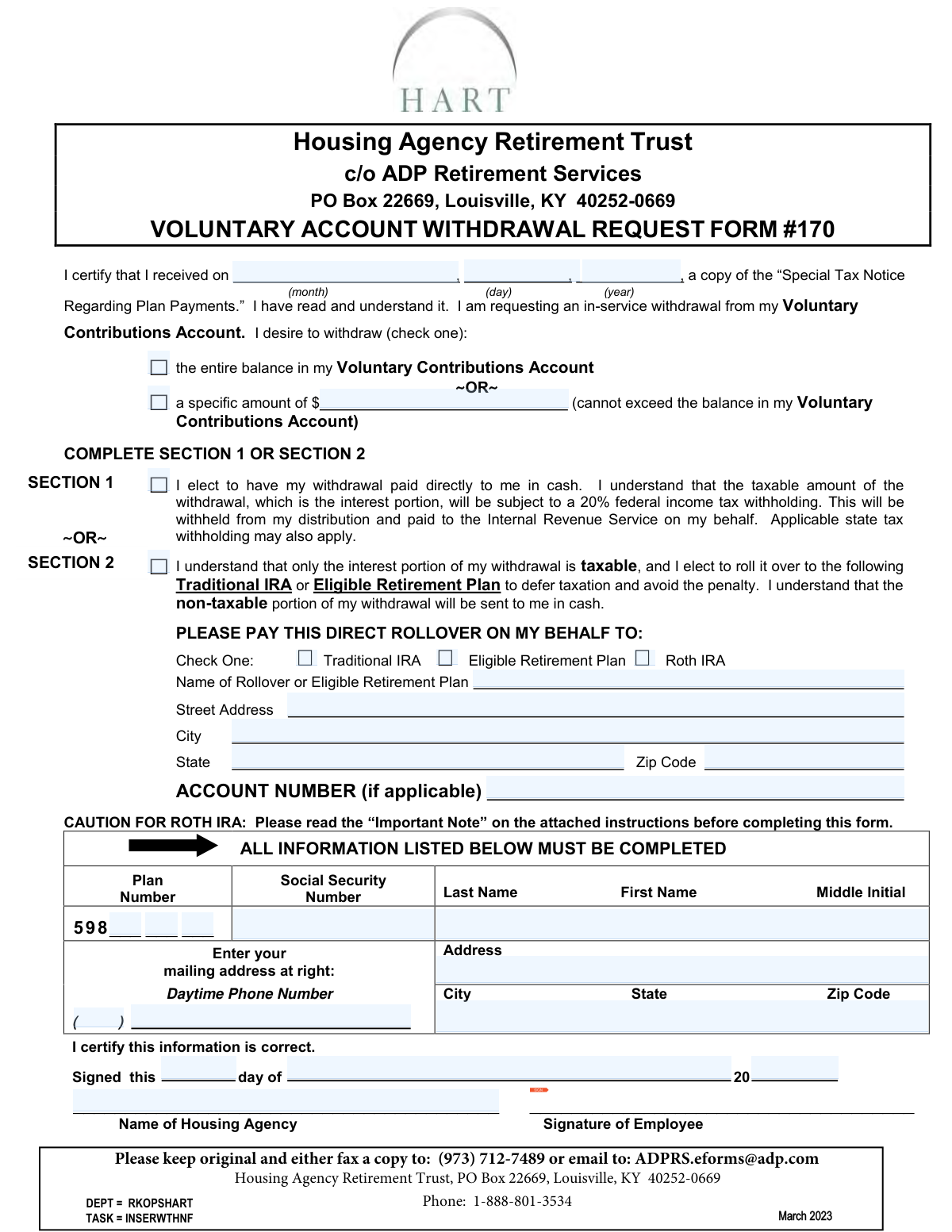
Yes! You can use AI to fill out Form #170, Voluntary Account Withdrawal Request Form
Form #170 is a Voluntary Account Withdrawal Request for participants in the Housing Agency Retirement Trust (HART). It allows individuals to withdraw funds from their Voluntary Contributions Account, either as a direct cash payment or as a rollover to another retirement plan like a Traditional or Roth IRA. This form is crucial for accessing voluntary retirement savings while still employed, and it outlines the tax implications of the withdrawal. Today, this form can be filled out quickly and accurately using AI-powered services like Instafill.ai, which can also convert non-fillable PDF versions into interactive fillable forms.
Our AI automatically handles information lookup, data retrieval, formatting, and form filling.
It takes less than a minute to fill out Form #170 using our AI form filling.
Securely upload your data. Information is encrypted in transit and deleted immediately after the form is filled out.
Form specifications
| Form name: | Form #170, Voluntary Account Withdrawal Request Form |
| Number of pages: | 1 |
| Language: | English |
Instafill Demo: How to fill out PDF forms in seconds with AI
How to Fill Out Form #170 Online for Free in 2026
Are you looking to fill out a FORM #170 form online quickly and accurately? Instafill.ai offers the #1 AI-powered PDF filling software of 2026, allowing you to complete your FORM #170 form in just 37 seconds or less.
Follow these steps to fill out your FORM #170 form online using Instafill.ai:
- 1 Navigate to Instafill.ai and upload or select the Voluntary Account Withdrawal Request Form #170.
- 2 Use the AI assistant to automatically populate your personal information, including your name, Social Security Number, and mailing address.
- 3 Indicate the withdrawal amount by selecting either the entire account balance or specifying a specific dollar amount.
- 4 Choose your payment method by completing either Section 1 for a direct cash payment or Section 2 for a rollover to another retirement account.
- 5 If you selected a rollover in Section 2, provide the details of the destination Traditional IRA, Eligible Retirement Plan, or Roth IRA.
- 6 Review all the information entered by the AI and yourself for accuracy, then electronically sign and date the form in the designated fields.
- 7 Download the completed, signed form and submit it by fax or mail to ADP Retirement Services as per the form's instructions.
Our AI-powered system ensures each field is filled out correctly, reducing errors and saving you time.
Why Choose Instafill.ai for Your Fillable Form #170 Form?
Speed
Complete your Form #170 in as little as 37 seconds.
Up-to-Date
Always use the latest 2026 Form #170 form version.
Cost-effective
No need to hire expensive lawyers.
Accuracy
Our AI performs 10 compliance checks to ensure your form is error-free.
Security
Your personal information is protected with bank-level encryption.
Frequently Asked Questions About Form Form #170
This form is used by participants of the Housing Agency Retirement Trust (HART) to request an in-service withdrawal from their Voluntary Contributions Account.
You only pay taxes on the interest earned, not your original after-tax contributions. If you take the withdrawal as cash, 20% of the taxable interest portion will be automatically withheld for federal taxes.
Yes, if you are under age 59 ½, a 10% penalty tax generally applies to the taxable (interest) portion of your withdrawal. You can avoid this penalty by rolling the interest over to an IRA or another eligible plan.
Complete Section 1 to receive the full withdrawal as a cash payment, with taxes withheld from the interest. Complete Section 2 to roll over the taxable interest portion to another retirement account, which defers taxes and avoids penalties.
Requests are processed daily, and a check is typically mailed within 2 to 3 business days. Please allow an additional 3 to 5 business days for mail delivery via US Mail.
You can submit the signed form by fax to (973) 712-7489, by email to [email protected], or by mailing it to the ADP Retirement Services address listed at the top of the form.
You will need your Social Security Number, personal contact information, and the name of your housing agency. For a rollover (Section 2), you must also provide the name, address, and account number for the receiving financial institution.
Yes, the form allows you to choose between withdrawing the entire balance in your Voluntary Contributions Account or a specific dollar amount.
A direct rollover to a Roth IRA is a taxable event in the current year, and you will be responsible for paying the income tax on the interest portion later. It is highly recommended to consult a tax advisor before selecting this option.
The Special Tax Notice explains your options for receiving payments, the tax implications of a withdrawal, and how you can defer taxes and avoid penalties by using a direct rollover.
Yes, services like Instafill.ai use AI to help you accurately auto-fill form fields with your saved information, which saves time and reduces the chance of errors.
You can use a service like Instafill.ai to upload the PDF and fill it out on your computer. This allows you to type your information, add a digital signature, and download the completed form for easy submission.
If you have a non-fillable PDF, you can use a tool like Instafill.ai to instantly convert it into an interactive, fillable form. This lets you easily type your information into the correct fields.
Compliance Form #170
Validation Checks by Instafill.ai
1
Ensures Exclusive Selection of Withdrawal Amount
Validates that the participant has selected only one option for the withdrawal amount: either the checkbox for the 'entire balance' or the checkbox for a 'specific amount'. This is crucial to prevent ambiguity in processing the withdrawal request. If both or neither are selected, the form submission should be rejected with an error message prompting the user to choose exactly one option.
2
Verifies Specific Withdrawal Amount Does Not Exceed Account Balance
This is a critical business rule validation that checks the entered 'specific amount' against the participant's actual Voluntary Contributions Account balance. This prevents overdrafts and ensures compliance with plan rules as stated on the form. If the requested amount is greater than the available balance, the submission must be rejected, and the user should be informed of the maximum withdrawable amount.
3
Ensures Exclusive Selection of Withdrawal Method
Validates that the participant has selected either Section 1 ('paid directly to me in cash') or Section 2 ('roll it over'), but not both. This choice determines the entire payment and tax withholding logic for the request. An invalid submission where both or neither are checked would make the request impossible to process and must be flagged for correction.
4
Conditional Requirement for Rollover Information
If the participant elects to roll over the taxable portion by checking the box for Section 2, this validation ensures that all subsequent required fields are completed. This includes the rollover type, the name of the receiving plan/institution, and its full address. Failure to provide this information would prevent the direct rollover from being processed correctly.
5
Ensures Single Rollover Type Selection in Section 2
When a participant chooses a rollover (Section 2), they must specify the destination account type by checking exactly one box: 'Traditional IRA,' 'Eligible Retirement Plan,' or 'Roth IRA'. This selection is vital for determining tax implications and proper fund transfer. The form should be rejected if zero or more than one option is selected.
6
Validates Social Security Number Format and Presence
This check ensures the Social Security Number field is not empty and conforms to the standard 9-digit format (e.g., XXX-XX-XXXX or XXXXXXXXX). The SSN is the primary identifier for the participant's account and is required for tax reporting purposes. An invalid or missing SSN would prevent the system from locating the correct account and processing the withdrawal.
7
Ensures Participant's Full Name is Provided
Verifies that both the 'Last Name' and 'First Name' fields are completed. A full name is essential for identity verification, check printing, and official record-keeping. A submission with a missing first or last name should be considered incomplete and returned to the user for correction.
8
Validates Completeness of Mailing Address for Check Delivery
This check ensures that the participant's mailing address (Address, City, State, Zip Code) is fully populated. This is critical because a physical check is mailed for cash withdrawals (Section 1) or for the non-taxable portion of a rollover (Section 2). An incomplete or invalid address would result in a failed delivery, delaying the participant's access to their funds.
9
Validates ZIP Code Format
This validation confirms that any entered ZIP Code, for either the participant's mailing address or the rollover institution's address, follows the standard 5-digit (NNNNN) or 9-digit (NNNNN-NNNN) format. Correct ZIP codes are essential for the US Postal Service to deliver checks and correspondence accurately. An incorrectly formatted ZIP code should trigger an error.
10
Validates Daytime Phone Number Format
Checks that the provided daytime phone number consists of 10 digits, which can be entered in various common formats like (XXX) XXX-XXXX or XXX-XXX-XXXX. A valid phone number is important so that the plan administrator can contact the participant if there are any questions or issues with the withdrawal request. The system should prompt for correction if the format is invalid.
11
Verifies Presence of Employee Signature
Confirms that the 'Signature of Employee' field contains a signature. A signature is a legal requirement, certifying that the information provided is correct and that the participant authorizes the transaction. A form submitted without a signature is not legally binding and cannot be processed.
12
Ensures Signature Date is Complete and Valid
Validates that the date of signature is fully entered, including the day and year, and represents a valid calendar date. This date establishes when the request was officially made, which is important for record-keeping and compliance. An incomplete or nonsensical date (e.g., a future date) would make the form invalid.
13
Validates Tax Notice Acknowledgment Date
This check ensures the participant has entered a complete and valid date (month, day, year) to certify their receipt of the 'Special Tax Notice.' The date must be a real calendar date and should logically be on or before the signature date. This acknowledgment is a compliance requirement to ensure participants are informed of their tax options before making a withdrawal.
14
Ensures Housing Agency Name is Provided
This validation checks that the participant has entered the name of their employer, the 'Name of Housing Agency.' This information is crucial for cross-referencing the participant's employment status and plan eligibility. A missing agency name could complicate or halt the verification process required to approve the withdrawal.
Common Mistakes in Completing Form #170
The form requires selecting either a direct cash payout (Section 1) or a rollover (Section 2), but not both. Applicants sometimes fill out portions of both sections, creating ambiguous instructions that halt the process. This forces the plan administrator to contact the participant for clarification, significantly delaying the withdrawal. To avoid this, carefully decide on your preferred withdrawal method and complete only the single corresponding section.
When completing Section 2 for a rollover, people often omit the full name of the receiving institution, its complete address, or the specific account number. Without this data, ADP cannot process the direct rollover, as they have no valid destination for the funds. This error guarantees processing delays and requires follow-up communication to correct the form. Before starting, gather the precise rollover instructions and account details from your new IRA or retirement plan provider.
An employee signature and date are required to certify the information and authorize the transaction, but they are frequently missed at the bottom of the form. An unsigned or undated form is legally invalid and will be immediately rejected, forcing the applicant to resubmit the paperwork and restart the entire process. Always perform a final review of the form, paying special attention to the signature and date fields before faxing or mailing it.
The form contains a strong caution about Roth IRA rollovers, advising participants to call the administrator before making this election. Many people ignore this warning, not realizing that the taxable portion of the rollover becomes immediate income for the current tax year, which can create a large, unexpected tax bill. To prevent this costly surprise, you should always consult a tax advisor and follow the form's instruction to call the plan administrator before selecting the Roth IRA option.
The very first action on the form is to enter the date certifying receipt of the 'Special Tax Notice,' a step that is easy to overlook. This date is a compliance requirement for the plan administrator, and leaving it blank can cause the form to be flagged as incomplete. This simple omission can lead to unnecessary processing delays. To prevent this, fill in the current date to acknowledge you have received and can review the important tax information provided.
Participants must clearly choose between withdrawing the 'entire balance' or a 'specific amount.' Common mistakes include checking both boxes, writing an illegible number, or requesting a specific amount that exceeds the available account balance. Any ambiguity or invalid request will stop the process until the administrator can get clarification, delaying access to your funds. Decide exactly how much you wish to withdraw and clearly indicate your choice in only one of the designated options.
The bottom section of the form requires key personal details like Social Security Number, mailing address, and the 'Name of Housing Agency.' Forgetting any of these fields, especially the SSN or Housing Agency name, makes it difficult for the administrator to identify the correct account. This leads to verification delays. Using an AI-powered form filler like Instafill.ai can help prevent this by auto-filling saved personal data and flagging empty required fields before submission.
When choosing a cash payout in Section 1, many are surprised when their check is for a lower amount than anticipated. This is due to the mandatory 20% federal income tax withholding on the taxable (interest) portion of the withdrawal, which is clearly stated on the form. Failing to read the instructions or the 'Special Tax Notice' leads to this misunderstanding and can disrupt financial plans. Always account for this withholding and any potential early withdrawal penalties when planning a cash distribution.
This form is a non-fillable PDF, requiring information to be handwritten. Illegible writing, especially for the Social Security Number, address, or rollover account number, can lead to misinterpretation and serious errors. This can result in a rejected form, a check sent to the wrong address, or a failed rollover deposit. To avoid this, print clearly in block letters. Alternatively, tools like Instafill.ai can convert flat PDFs into fillable forms, allowing you to type information for perfect clarity.
Saved over 80 hours a year
“I was never sure if my IRS forms like W-9 were filled correctly. Now, I can complete the forms accurately without any external help.”
Kevin Martin Green
Your data stays secure with advanced protection from Instafill and our subprocessors

Robust compliance program
Transparent business model
You’re not the product. You always know where your data is and what it is processed for.
ISO 27001, HIPAA, and GDPR
Our subprocesses adhere to multiple compliance standards, including but not limited to ISO 27001, HIPAA, and GDPR.
Security & privacy by design
We consider security and privacy from the initial design phase of any new service or functionality. It’s not an afterthought, it’s built-in, including support for two-factor authentication (2FA) to further protect your account.
Fill out Form #170 with Instafill.ai
Worried about filling PDFs wrong? Instafill securely fills form-170-voluntary-account-withdrawal-request-form forms, ensuring each field is accurate.