Yes! You can use AI to fill out Form WH-347, Davis-Bacon and Related Acts Weekly Certified Payroll Form
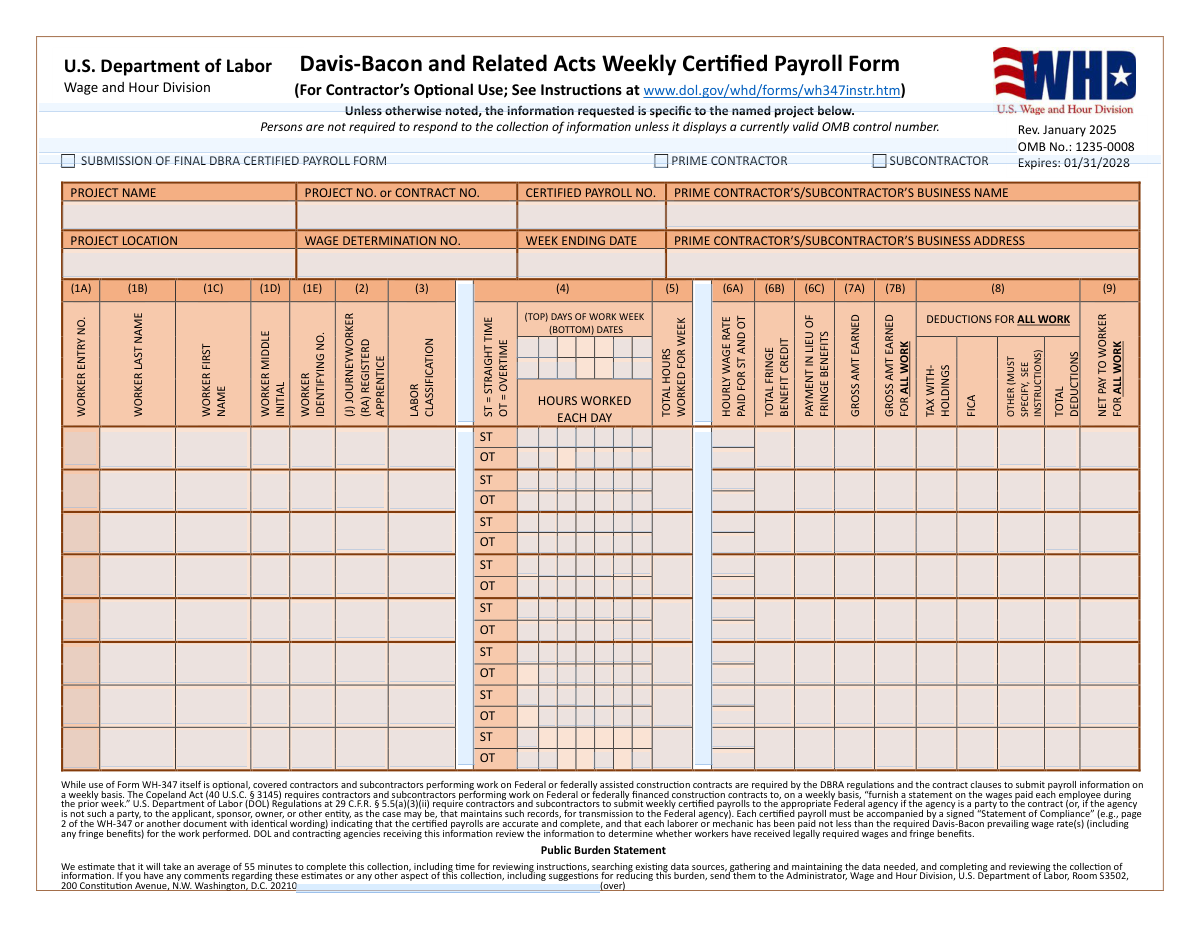
Form WH-347 is an optional but widely used U.S. Department of Labor Wage and Hour Division form that enables contractors and subcontractors performing work on federal or federally assisted construction contracts to fulfill their weekly certified payroll reporting obligations under the Davis-Bacon and Related Acts (DBRA) and the Copeland Act (40 U.S.C. § 3145). The form captures detailed worker information including hours worked, wage rates, fringe benefits, deductions, and net pay, and must be accompanied by a signed Statement of Compliance certifying that all workers have been paid at least the applicable prevailing wage rates. Accurate completion is critical, as willful falsification can result in civil or criminal prosecution and debarment from future federal contracts. Today, contractors can fill out Form WH-347 quickly and accurately using AI-powered services like Instafill.ai, which can also convert non-fillable PDF versions into interactive fillable forms.
Our AI automatically handles information lookup, data retrieval, formatting, and form filling.
It takes less than a minute to fill out WH-347 using our AI form filling.
Securely upload your data. Information is encrypted in transit and deleted immediately after the form is filled out.
Form specifications
| Form name: | Form WH-347, Davis-Bacon and Related Acts Weekly Certified Payroll Form |
| Number of pages: | 2 |
| Language: | English |
| Categories: | payroll forms |
Instafill Demo: filling out a legal form in seconds
How to Fill Out WH-347 Online for Free in 2026
Are you looking to fill out a WH-347 form online quickly and accurately? Instafill.ai offers the #1 AI-powered PDF filling software of 2026, allowing you to complete your WH-347 form in just 37 seconds or less.
Follow these steps to fill out your WH-347 form online using Instafill.ai:
- 1 Navigate to Instafill.ai and search for or upload Form WH-347 (Davis-Bacon and Related Acts Weekly Certified Payroll Form) to begin filling it out online.
- 2 Complete the project header information, including the project name, project or contract number, certified payroll number, contractor or subcontractor business name and address, project location, wage determination number, and week ending date.
- 3 For each worker, enter their identifying information (name, identifying number, journeyworker or apprentice status, and labor classification), then record straight time and overtime hours worked for each day of the work week.
- 4 Enter each worker's hourly wage rates for straight time and overtime, total fringe benefit credits or payments in lieu of fringe benefits, gross amounts earned, and all deductions (tax withholdings, FICA, and other specified deductions) to calculate net pay.
- 5 Complete the fringe benefit hourly credit section on page 2 for any workers with fringe benefit plan credits, listing each plan's name, type, plan number, funded/unfunded status, and hourly credit amounts.
- 6 Fill out the apprenticeship program information if any workers were paid as apprentices, including the program name, OA or SAA registration status, and labor classification.
- 7 Review all entries for accuracy, sign and date the Statement of Compliance as the certifying official, and submit the completed form to the appropriate federal agency or contracting entity.
Our AI-powered system ensures each field is filled out correctly, reducing errors and saving you time.
Why Choose Instafill.ai for Your Fillable WH-347 Form?
Speed
Complete your WH-347 in as little as 37 seconds.
Up-to-Date
Always use the latest 2026 WH-347 form version.
Cost-effective
No need to hire expensive lawyers.
Accuracy
Our AI performs 10 compliance checks to ensure your form is error-free.
Security
Your personal information is protected with bank-level encryption.
Frequently Asked Questions About Form WH-347
Form WH-347 is the Davis-Bacon and Related Acts (DBRA) Weekly Certified Payroll Form issued by the U.S. Department of Labor's Wage and Hour Division. It is used by contractors and subcontractors to report weekly payroll information for workers on Federal or federally assisted construction contracts, ensuring that workers are paid at least the prevailing wage rates required by law.
All contractors and subcontractors performing work on Federal or federally financed construction contracts covered by the Davis-Bacon and Related Acts are required to submit weekly certified payroll information. Both prime contractors and subcontractors must submit their own separate payroll forms for their respective employees.
While use of Form WH-347 itself is optional, submitting weekly certified payroll information is mandatory under the Copeland Act (40 U.S.C. § 3145) and DOL regulations at 29 C.F.R. § 5.5(a)(3)(ii). Contractors may use an alternative format as long as it contains all the required information and is accompanied by a signed Statement of Compliance.
Certified payrolls must be submitted to the appropriate Federal agency if the agency is a party to the contract. If the Federal agency is not a direct party, the form should be submitted to the applicant, sponsor, owner, or other entity that maintains such records for transmission to the Federal agency. Check your specific contract documents for submission instructions.
The Statement of Compliance (found on page 2 of the WH-347) is a signed certification by an authorized official stating that the payroll information is accurate and complete, and that all workers have been paid at least the required Davis-Bacon prevailing wage rates including fringe benefits. Each weekly certified payroll submission must be accompanied by this signed statement, and willful falsification can result in civil or criminal prosecution and debarment from future federal contracts.
For each worker, you must provide their name (last, first, middle initial), an identifying number, labor classification, journeyworker or registered apprentice status (J or RA), hours worked each day (straight time and overtime), hourly wage rates, total fringe benefit credits, payment in lieu of fringe benefits, gross amounts earned, deductions (tax withholdings, FICA, and other), total deductions, and net pay.
Fringe benefits can be reported in two ways: as a payment in lieu of fringe benefits (column 6C) paid directly to the worker, or as a fringe benefit credit (column 6B) for contributions to bona fide fringe benefit plans. If claiming an hourly credit for fringe benefit plan contributions, you must complete the Hourly Credit for Fringe Benefits table on page 2, listing each plan's name, type, plan number, whether it is funded or unfunded, and the hourly credit claimed for each worker.
Workers paid as apprentices must be marked as 'RA' (Registered Apprentice) in the worker status column. On page 2, you must certify that any apprentices are duly registered in a bona fide apprenticeship program registered with the Office of Apprenticeship (OA) or a State Apprenticeship Agency (SAA) recognized by the DOL, and provide the apprenticeship program name, registration type, and labor classification.
The worker identifying number is typically the last four digits of the worker's Social Security Number or another unique identifier used to distinguish workers while protecting their privacy. Refer to the official instructions at www.dol.gov/whd/forms/wh347instr.htm for the most current guidance on acceptable identifying numbers.
Permissible deductions include tax withholdings, FICA (Social Security and Medicare taxes), and other deductions as defined in 29 CFR Part 3. Any 'other' deductions must be specifically identified on the form. The form certifies that no unauthorized rebates or deductions have been or will be made from workers' wages.
The U.S. Department of Labor estimates it takes an average of 55 minutes to complete the WH-347 form, including time for reviewing instructions, gathering data, and completing and reviewing the information. The time may vary depending on the number of workers and the complexity of fringe benefit arrangements.
Yes, AI-powered services like Instafill.ai can help you accurately auto-fill the WH-347 form fields, saving significant time especially when reporting payroll for multiple workers across multiple weeks. These tools can reduce errors and streamline the process of completing complex payroll forms.
You can use Instafill.ai to fill out the WH-347 form online by uploading the form to the platform, entering your payroll data, and letting the AI automatically populate the appropriate fields including worker details, hours, wages, deductions, and fringe benefit information. Once completed, you can review, sign, and download or submit the form.
If you have a flat, non-fillable PDF version of the WH-347 form, Instafill.ai can convert it into an interactive fillable form, allowing you to type directly into the fields rather than printing and filling it out by hand. This makes the process faster and produces a cleaner, more professional document.
Willful falsification of any statements on the WH-347 form can subject the contractor or subcontractor to civil or criminal prosecution under Section 1001 of Title 18 and Section 3729 of Title 31 of the United States Code, as well as debarment from future Federal and federally-assisted contracts. Additionally, information reported in certified payrolls may be subject to disclosure in response to a Freedom of Information Act (FOIA) request.
Compliance WH-347
Validation Checks by Instafill.ai
1
Contractor Type Selection is Mutually Exclusive
Validates that exactly one of 'Prime Contractor' or 'Subcontractor' checkboxes is selected, but not both and not neither. This distinction is critical for compliance tracking under the Davis-Bacon and Related Acts, as prime contractors and subcontractors have different reporting obligations. If neither or both are selected, the form cannot be properly attributed to the correct entity type, which may result in rejection by the contracting agency.
2
Week Ending Date Format and Validity
Validates that the Week Ending Date fields on both pages of the form contain a valid calendar date in MM/DD/YYYY format and that the dates on both pages match each other exactly. The week ending date establishes the specific payroll period being certified, and inconsistencies between pages could indicate data entry errors or fraudulent alterations. An invalid or mismatched date will cause the certified payroll to be rejected as it cannot be reconciled with the project timeline.
3
Required Project Header Fields Are Populated
Validates that all mandatory project identification fields are completed, including Project Name, Project or Contract Number, Certified Payroll Number, Contractor's Business Name, Project Location, and Wage Determination Number. These fields are required by 29 C.F.R. § 5.5(a)(3)(ii) to properly identify the contract and payroll period being reported. Missing any of these fields renders the certified payroll incomplete and non-compliant with DBRA regulations, potentially exposing the contractor to penalties.
4
Worker Name Fields Are Not Left Blank for Populated Rows
Validates that for every worker row where any payroll data (hours, wages, deductions) has been entered, the Worker Last Name and Worker First Name fields are also populated. Worker identification is a fundamental requirement of the certified payroll under the Copeland Act, as the form must document wages paid to each named employee. A row with payroll data but no worker name is incomplete and may suggest an attempt to obscure worker identities.
5
Worker Identifying Number Format Validation
Validates that the Worker Identifying Number field for each worker entry contains a value in an acceptable format, typically the last four digits of a Social Security Number or another approved identifier, and is not left blank for any row containing payroll data. Per DOL instructions, contractors must include a worker identifying number to distinguish workers with similar names and to facilitate wage compliance audits. An improperly formatted or missing identifying number may prevent the DOL or contracting agency from verifying that the correct worker was paid.
6
Journeyworker or Apprentice Status is Specified for Each Worker
Validates that the worker status field for each populated worker row contains either 'J' (Journeyworker) or 'RA' (Registered Apprentice), and that no other values are entered. This classification determines the applicable prevailing wage rate under the Davis-Bacon Act, as apprentices may be paid at a lower rate only if they are duly registered in an approved program. An invalid or missing status code makes it impossible to verify wage compliance and may trigger a compliance investigation.
7
Apprentice Workers Have Corresponding Apprenticeship Program Information
Validates that for every worker identified with 'RA' (Registered Apprentice) status on page 1, a corresponding entry exists in the Apprenticeship Program section on page 2, including the program name, labor classification, and a selection of either OA or SAA registration. The certifying official must verify and attest to the registered apprenticeship program details for all apprentices, as required by the Statement of Compliance. Failure to provide this information invalidates the certification for those workers and may constitute a false statement under 18 U.S.C. § 1001.
8
Total Deductions Equal Sum of Individual Deduction Components
Validates that for each worker, the Total Deductions field equals the arithmetic sum of Tax Withholdings, FICA Deductions, and Other Deductions. This mathematical consistency check ensures the accuracy of the payroll records being certified under penalty of law. A discrepancy between the sum of individual deductions and the total deductions field indicates a data entry error or potential manipulation of payroll figures, which could result in underpayment of net wages to workers.
9
Net Pay Equals Gross Amount Earned Minus Total Deductions
Validates that for each worker, the Net Pay field equals the Gross Amount Earned for All Work minus the Total Deductions. This fundamental payroll arithmetic check ensures that workers are receiving the correct take-home pay as reported on the certified payroll. If net pay does not reconcile with gross earnings and deductions, it may indicate an error in reporting or an impermissible deduction under 29 C.F.R. Part 3, which prohibits kickbacks from wages.
10
Overtime Hourly Wage Rate is at Least 1.5 Times the Straight Time Rate
Validates that for each worker where overtime hours are recorded, the Overtime Hourly Wage Rate is at least 1.5 times the Straight Time Hourly Wage Rate for that worker. Under the Contract Work Hours and Safety Standards Act (CWHSSA), laborers and mechanics on covered contracts must receive overtime compensation at no less than one and one-half times their basic rate of pay for hours worked over 40 in a workweek. A failure of this check indicates a potential wage violation that must be corrected before the certified payroll can be submitted.
11
Fringe Benefit Credit Total Matches Sum of Individual Plan Credits
Validates that for each worker listed in the Hourly Credit for Fringe Benefits section on page 2, the Total Hourly Credit field equals the sum of all individual fringe benefit plan hourly credit amounts entered for that worker. Accurate fringe benefit credit reporting is required to verify that workers are receiving the full prevailing wage, which includes both the basic hourly rate and applicable fringe benefits. A mismatch in these totals suggests a calculation error that could result in underpayment of the prevailing wage.
12
Fringe Benefit Plan Funded or Unfunded Status is Selected
Validates that for each fringe benefit plan listed in the Hourly Credit for Fringe Benefits section, exactly one of the 'Funded' or 'Unfunded' checkboxes is selected, and that neither both nor neither are checked. The funded or unfunded status of a fringe benefit plan affects how the DOL evaluates the legitimacy of the fringe benefit credit claimed by the contractor. Leaving this field blank or selecting both options makes the fringe benefit claim ambiguous and non-compliant with reporting requirements.
13
Certified Payroll Number is Sequential and Numeric
Validates that the Certified Payroll Number is a positive integer and that it is consistent with the expected sequential numbering for the project (i.e., it should be one greater than the previously submitted payroll number for the same project and contractor). Sequential payroll numbering is required to ensure a complete and unbroken record of weekly payroll submissions for the duration of the project. A non-numeric value, a duplicate number, or a gap in the sequence may indicate missing payroll submissions, which is a violation of the weekly reporting requirement under the Copeland Act.
14
Certifying Official Signature, Date, and Contact Information Are Present
Validates that the Signature of Certifying Official, Certification Date, Telephone Number, and Email Address fields on page 2 are all populated and that the telephone number matches the format (XXX) XXX-XXXX. The Statement of Compliance must be signed by a person who supervised or paid the workers, and the contact information is required for the contracting agency to follow up on any discrepancies. An unsigned or incomplete Statement of Compliance renders the entire certified payroll submission invalid under 29 C.F.R. § 5.5(a)(3)(ii).
15
Project Header Information is Consistent Across Both Pages
Validates that the Project Name, Project or Contract Number, Payroll Number, Contractor's Business Name, Project Location, and Week Ending Date entered on page 2 (Statement of Compliance) exactly match the corresponding fields entered on page 1 of the form. Both pages constitute a single certified payroll submission, and any discrepancy between the identifying information on the two pages suggests a data entry error or that the pages may have been mismatched from different submissions. Inconsistent header information will cause the submission to be rejected as it cannot be verified as a complete and accurate record.
16
Other Deductions Must Have a Specified Description
Validates that for any worker where an amount greater than zero is entered in the 'Other Deductions' field, a corresponding description or specification of the deduction type is also provided, as required by the form instructions. Under 29 C.F.R. Part 3, only permissible deductions may be taken from workers' wages, and unspecified deductions cannot be evaluated for compliance. Failing to describe other deductions prevents the DOL and contracting agencies from determining whether the deductions are lawful, which may constitute a violation of the Copeland Anti-Kickback Act.
Common Mistakes in Completing WH-347
Many filers forget to check whether they are submitting as a Prime Contractor or Subcontractor, or accidentally check the wrong box. This distinction is legally significant because it determines the chain of responsibility for compliance under the Davis-Bacon and Related Acts. Always verify your role on the contract before submitting, and ensure the business name entered matches the entity type selected. Tools like Instafill.ai can help pre-populate and validate this field based on your stored contractor profile.
Contractors frequently omit the Wage Determination Number or enter an outdated one, which is a critical compliance error under DBRA regulations. The wage determination number specifies the prevailing wage rates applicable to the project, and using the wrong one can result in underpayment of workers and potential debarment. Always obtain the current wage determination from the contracting agency or SAM.gov before completing the form. Instafill.ai can help flag this field as required and remind users to verify the number against the contract documents.
A common and serious mistake is incorrectly designating a worker's status in the J/RA field — either labeling an apprentice as a journeyworker to justify a higher wage rate, or failing to verify that an apprentice is actually registered with the Office of Apprenticeship (OA) or a recognized State Apprenticeship Agency (SAA). Misclassification can lead to wage violations, back pay obligations, and debarment from future federal contracts. Verify each worker's registration status before completing the form, and ensure apprenticeship program details are accurately filled in on page 2. Instafill.ai can help validate that apprentice entries on page 1 are matched with corresponding program information on page 2.
Many contractors fail to properly separate straight time (ST) and overtime (OT) hours, or apply the wrong overtime rate. Under the Contract Work Hours and Safety Standards Act, overtime must be paid at 1.5 times the basic rate of pay for all hours over 40 in a workweek on covered contracts. Entering only a single hourly rate without distinguishing ST and OT rates, or failing to check the correct day checkboxes for overtime, leads to inaccurate payroll records and potential wage violations. Always record ST and OT hours separately for each day and verify that the OT rate is correctly calculated.
Contractors often forget to assign a sequential certified payroll number or restart numbering incorrectly mid-project, making it difficult for contracting agencies to track submission completeness. Each weekly payroll submission must be numbered sequentially starting from '1' for the first week work begins, and the numbering must be consistent across all submissions for the same project. Missing or duplicate payroll numbers can trigger compliance audits and requests for resubmission. Instafill.ai can help track and auto-increment payroll numbers to prevent this error.
A very common oversight is submitting page 1 of the WH-347 without a properly completed and signed Statement of Compliance on page 2. The Copeland Act and 29 C.F.R. § 5.5(a)(3)(ii) require that each certified payroll be accompanied by a signed statement confirming accuracy and compliance with prevailing wage requirements. Leaving the certifying official's name, title, signature, date, telephone number, or email address blank renders the submission incomplete and non-compliant. Ensure all certification fields on page 2 are fully completed and signed by an authorized official before submission.
Contractors frequently confuse column 6A (Total Fringe Benefit Credit) with column 6B (Payment in Lieu of Fringe Benefits), or fail to complete the Hourly Credit for Fringe Benefits table on page 2 when claiming a fringe benefit credit. If a contractor pays fringe benefits in cash directly to the worker, the amount goes in column 6B; if contributions are made to a bona fide plan, the hourly credit must be detailed in the fringe benefit table on page 2 with the plan name, type, number, and funded/unfunded status. Omitting or misreporting fringe benefit information can result in apparent underpayment of prevailing wages. Instafill.ai can help ensure that fringe benefit entries on page 1 are consistently reflected in the detailed table on page 2.
Manual calculation errors are extremely common when computing gross amounts earned (column 7A and 7B), total deductions (tax withholdings + FICA + other), and net pay. A mismatch between gross pay minus total deductions and the net pay figure will immediately flag the payroll as inaccurate during agency review. These errors often occur when overtime hours are not properly factored into gross pay or when deductions are estimated rather than taken from actual payroll records. Using payroll software or AI-powered tools like Instafill.ai can automatically calculate and cross-validate these figures to eliminate arithmetic mistakes.
Contractors sometimes enter vague, abbreviated, or non-standard labor classifications (e.g., 'laborer' instead of the specific classification listed in the wage determination, such as 'Laborer, Group 1'). The labor classification entered must exactly match one of the classifications listed in the applicable wage determination incorporated into the contract, as this determines the required prevailing wage rate. Using an incorrect classification can result in underpayment of wages and compliance violations. Always cross-reference the wage determination document when entering labor classifications, and Instafill.ai can help validate classifications against known wage determination data.
Many contractors forget to check the 'Submission of Final DBRA Certified Payroll Form' checkbox when submitting the last payroll for a project, leaving contracting agencies uncertain about whether all required payrolls have been received. This can delay project closeout, final payment, and contract completion. Always review whether the current submission is the last one for the project before submitting, and check this box accordingly. Instafill.ai can prompt users to confirm whether this is the final submission when the project end date is approaching.
Some contractors enter a worker's full Social Security Number as the Worker Identifying Number, which creates significant privacy and data security risks since certified payrolls may be subject to Freedom of Information Act (FOIA) disclosure. The DOL instructions specify that only the last four digits of the SSN or another unique identifying number should be used. Using a full SSN exposes workers to identity theft risk and may violate privacy regulations. Always use only the last four digits of the SSN or an employer-assigned identifier, and be aware that submitted payrolls may be publicly disclosed.
When a worker is designated as a Registered Apprentice (RA) on page 1, contractors frequently forget to complete the corresponding apprenticeship program section on page 2, including the program name, whether it is registered with OA or SAA, and the labor classification name. The certifying official must verify and attest to the accuracy of this information as part of the Statement of Compliance. Omitting this information makes the certification incomplete and may indicate that the apprentice is not properly registered, which is a compliance violation. Instafill.ai can automatically flag missing apprenticeship program details whenever an RA designation is entered on page 1.
Saved over 80 hours a year
“I was never sure if my IRS forms like W-9 were filled correctly. Now, I can complete the forms accurately without any external help.”
Kevin Martin Green
Your data stays secure with advanced protection from Instafill and our subprocessors
Robust compliance program
Transparent business model
You’re not the product. You always know where your data is and what it is processed for.
ISO 27001, HIPAA, and GDPR
Our subprocesses adhere to multiple compliance standards, including but not limited to ISO 27001, HIPAA, and GDPR.
Security & privacy by design
We consider security and privacy from the initial design phase of any new service or functionality. It’s not an afterthought, it’s built-in, including support for two-factor authentication (2FA) to further protect your account.
Fill out WH-347 with Instafill.ai
Worried about filling PDFs wrong? Instafill securely fills form-wh-347-davis-bacon-and-related-acts-weekly-certified-payroll-form forms, ensuring each field is accurate.




