
Yes! You can use AI to fill out Shoulder and Arm Conditions Disability Benefits Questionnaire
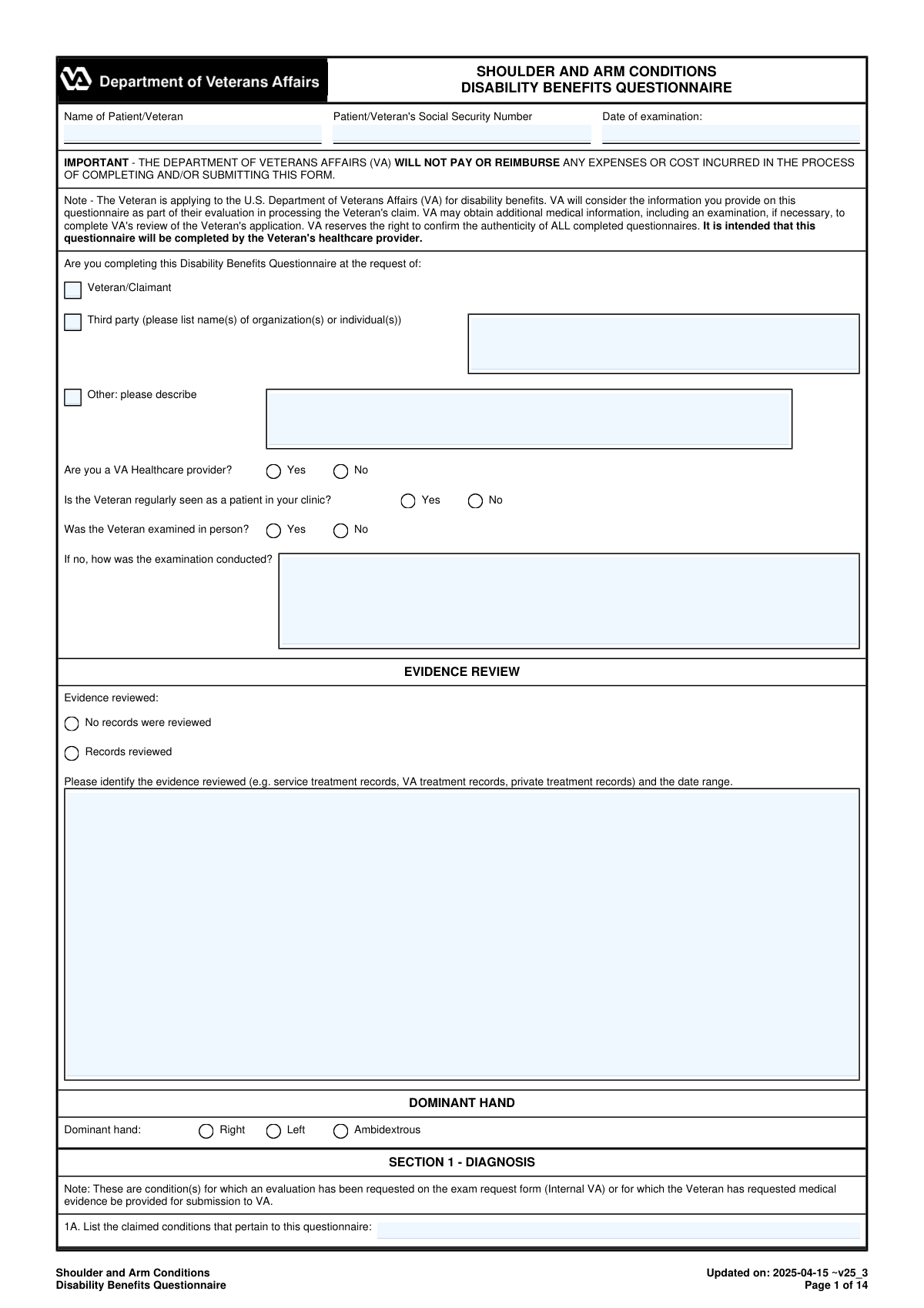
Don't type 788 fields by hand. Tell our AI about yourself, or upload a document you already have, and it fills every field in seconds. You check it, then download, print or sign.
The AI does the filling. You just check it.
No typing into boxes, nothing to install.
What this form asks for
The AI fills all of it, from your answers or your documents.
The AI checks your answers before you download
16 checks built for this form, so a wrong date or a missing answer is caught before anyone else sees it.
Validates that the Patient/Veteran name and Social Security Number (SSN) fields are not blank and that the SSN is exactly 9 digits (optionally allowing standard hyphen formatting XXX-XX-XXXX). These identifiers are required to correctly associate the DBQ with the correct claimant and prevent misfiling. If validation fails, the submission should be rejected or routed to an exception queue for manual resolution before it can be used for a claim decision.
Checks that 'Date of examination' and 'Date Signed' are present, are valid calendar dates, and follow the expected format (e.g., YYYY-MM-DD or MM/DD/YYYY per system standard). It also verifies that the signature date is on or after the examination date and not in the future. If invalid or inconsistent, the form should be flagged because it undermines the legal/clinical timeliness and authenticity of the report.
Ensures exactly one requestor type is selected (Veteran/Claimant, Third party, or Other). If 'Third party' is selected, at least one organization/individual name must be provided; if 'Other' is selected, a description must be provided. If this validation fails, the submission should be returned for completion because the provenance of the DBQ request affects auditability and potential conflicts of interest.
Validates that 'Are you a VA Healthcare provider?' and 'Is the Veteran regularly seen as a patient in your clinic?' are answered and are logically consistent with the context of the exam. For example, if the provider indicates they are not a VA provider but the system requires VA-only submissions for a workflow, it should be flagged; similarly, missing answers reduce credibility and completeness. Failures should trigger a completeness error and require correction before acceptance.
Checks that 'Was the Veteran examined in person?' is answered, and if 'No' is selected, the method of examination (telehealth, records review, etc.) is provided in the follow-up field. This is important because VA adjudication may weigh in-person objective findings differently than remote assessments. If missing, the form should be marked incomplete and prevented from final submission.
Ensures the evidence review section is internally consistent: either 'No records were reviewed' is selected, or 'Records reviewed' is selected with a non-empty description of evidence types and a date range. If records were reviewed, the date range must be parseable (start and end dates) and the start date must be on/before the end date. If validation fails, the submission should be flagged because the basis for medical opinions and estimates (e.g., flare-up ROM estimates) becomes unclear.
And 10 more checks
- Dominant Hand Selection Required
- Diagnosis Selection Requires Side, ICD Code, and Diagnosis Date
- No Current Diagnosis Requires Remarks Explanation
- ROM Measurement Completeness When Testing Is Performed
- ROM Numeric Range and Unit Validation
- Unable/Not Indicated ROM Requires Explanation
- Pain Evidence and Functional Loss Consistency
- Repetitive-Use Testing Logic and Required Follow-Ups
- Repeated Use Over Time / Flare-Up Estimates or Feasibility Explanation
- Examiner Credentialing and Contact Information Format Validation
Let AI fill out your VA DBQ (Shoulder and Arm Conditions)
No typing. Every field filled in seconds, checked, ready to sign.
How to Fill Out VA DBQ (Shoulder and Arm Conditions) Online for Free in 2026
What the AI walks you through.
- Enter Veteran/patient identifiers and exam details (name, SSN, date of exam), and indicate who requested the DBQ and whether the exam was in-person or remote (and how conducted).
- Complete the Evidence Review and Dominant Hand sections, listing records reviewed (types and date ranges) and selecting the Veteran’s dominant hand.
- Document Section 1 (Diagnosis) by listing claimed conditions, selecting all applicable diagnoses, specifying side affected (right/left/both), and adding ICD codes and diagnosis dates; add any “other” diagnoses as needed.
- Fill out Medical History (Section 2) including onset/course, flare-ups (frequency, duration, triggers, relief), and the Veteran’s reported functional loss after repeated use over time.
- Record Range of Motion and functional limitation (Section 3) for each shoulder: active and passive ROM values, pain with motion (active/passive, weight-bearing/nonweight-bearing), repetitive-use testing results, and estimated ROM during repeated use over time and flare-ups with supporting rationale.
- Complete remaining clinical sections as applicable (muscle atrophy, ankylosis, rotator cuff tests, instability/labral pathology, clavicle/scapula/AC joint issues, humerus impairments, surgeries, scars/other findings, assistive devices, remaining effective function, and diagnostic testing/imaging).
- Describe Functional Impact (Section 15), add any Remarks (Section 16), then finalize with Examiner Certification and Signature (Section 17) including credentials, specialty, contact info, NPI, license details, and address before generating the final submission-ready form.
Common Mistakes in Completing VA DBQ (Shoulder and Arm Conditions)
The ones the AI is built to catch.
Missing or inconsistent patient identifiers (name/SSN/exam date)
Not specifying who requested the DBQ (Veteran vs third party vs other)
Contradictory exam modality answers (in-person vs not in-person) without explanation
Evidence review section left blank or too generic (no record types/date ranges)
Dominant hand not completed or mismatched with side affected
Diagnosis section errors: checking “no current diagnosis” while listing conditions/ICD codes
Side affected confusion (Right/Left/Both) and mixing shoulder vs arm findings
Range of motion values missing, not in degrees, or exceeding normal limits
Not addressing required pain testing contexts (active/passive; weight-bearing/nonweight-bearing)
Repetitive-use and flare-up sections completed without estimates or with “cannot determine” boilerplate
Surgery, imaging, and arthritis documentation incomplete (missing dates/results/sides)
Examiner certification details missing (signature, credentials, NPI/license/state, contact info)
Frequently Asked Questions About VA DBQ (Shoulder and Arm Conditions)
Is it really free for 7 days?
Can I fill other forms too?
How do I cancel?
How does the AI fill out VA DBQ (Shoulder and Arm Conditions)?
What happens to my information?
How complex is VA DBQ (Shoulder and Arm Conditions) to fill out?
What is the Shoulder and Arm Conditions Disability Benefits Questionnaire (DBQ) used for?
Who is supposed to complete and sign this DBQ?
Can a non-VA (private) clinician complete this form?
Will VA pay or reimburse my provider for completing this DBQ?
Does the Veteran have to be examined in person to complete the DBQ?
What records should the examiner review, and where is that documented?
Why does the form ask for the Veteran’s dominant hand?
What if the Veteran has shoulder pain but no clear diagnosis?
How do I document which shoulder is affected (right, left, or both)?
What range of motion (ROM) measurements are required in Section 3?
What if ROM testing cannot be performed or would cause severe pain or risk of injury?
How should flare-ups and repeated use over time be addressed if they are not observed during the exam?
What is “observed repetitive-use testing,” and what is required?
Do imaging studies have to be included, especially for arthritis?
What information is required in the Examiner’s Certification section (Section 17)?
Get your VA DBQ (Shoulder and Arm Conditions) filled out by AI
$0 today. Cancel before Oct 31 and you pay nothing.
Other forms like this one
VA forms: Ankle Conditions Disability Benefits Questionnaire, VA Form 10-7959f-2, Foreign Medical Program (FMP) Claim Cover Sheet, VA Form 21-0781a, Statement in Support of Claim for Service Connection for Post-Traumatic Stress Disorder (PTSD) Secondary to Personal Assault, VA Form 21-0788, Information Regarding Apportionment of Beneficiary's Award, VA Form 21-4138, Statement in Support of Claim, Wrist Conditions Disability Benefits Questionnaire (DBQ), VA Form 21-0781, Statement in Support of Claimed Mental Health Disorder(s) Due to an In-Service Traumatic Event(s), VA Form 29-357, Claim for Disability Insurance Benefits (Government Life Insurance), VA Form 21-686c, Declaration of Status of Dependents, Form #170, Voluntary Account Withdrawal Request Form, Meritain Health Claim Form (Health Claim Form), Form 4852, Substitute for Form W-2 or 1099-R, Meritain Health Claim Form (Health Claim Form), PSA Form/K/II/052025 - Formulir Pembukaan Rekening / Account Opening Form, Form WH-347, Davis-Bacon and Related Acts Weekly Certified Payroll Form, Vanguard IRA Distribution Kit (including IRA Distribution Form RRDFT and Form W-4R), Davis-Bacon and Related Acts Weekly Certified Payroll Form (Form WH-347), Uniform Underwriting and Transmittal Summary (Fannie Mae Form 1008 / Freddie Mac Form 1077), Form 5385BSP, Behavioral Health Utilization Management Applied Behavioral Analysis (ABA) Initial Request Form, Applied Behavioral Analysis (ABA) Authorization Form, Louisiana Health Connect (BRO-DP-ABA FORM-0822)
disability forms: Form SSA-3368-BK, Disability Report - Adult, Form SSA-16, Application for Disability Benefits, Form SSA-3820-BK, Disability Report - Child, Form SSA-454-BK, Continuing Disability Review, Form 21-526EZ, Application for Disability Compensation, Form N-648, Medical Certification for Disability Exceptions, Form DBQ, Knee and Lower Leg Disability Benefits, Form DBQ, Heart Conditions Disability Benefits, Form DBQ, Hypertension Disability Benefits, Form DBQ, Scars/Disfigurement Disability Benefits, Form DBQ, Diabetes Mellitus Disability Benefits Questionnaire, Form DBQ, Endocrine Diseases Disability Benefits, Form DBQ, Diabetes Mellitus Disability Benefits Questionnaire, Back (Thoracolumbar Spine) Conditions Disability Benefits Questionnaire, Ankle Conditions Disability Benefits Questionnaire, Back (Thoracolumbar Spine) Conditions Disability Benefits Questionnaire, Elbow and Forearm Conditions Disability Benefits Questionnaire, Foot Conditions, Including Flatfoot (Pes Planus) Disability Benefits Questionnaire, Hip and Thigh Conditions Disability Benefits Questionnaire, Knee and Lower Leg Disability Benefits Questionnaire
benefit forms: Form SSA-16, Application for Disability Benefits, Form SSA-1-BK, Application for Retirement Benefits, Form SSA-2-BK, Application for Spouse's Benefits, Form SSA-4-BK, Application for Child's Insurance Benefits, Form SSA-10, Application for Widow's or Widower's Insurance Benefits, Form SSA-10, Widow's or Widower's Benefits, Form SSA-4-BK, Application for Social Security Benefits, Form SSA-5-BK, Application for Mother's or Father's Benefits, Form DBQ, Knee and Lower Leg Disability Benefits, Form DBQ, Heart Conditions Disability Benefits, Form DBQ, Hypertension Disability Benefits, Form DBQ, Scars/Disfigurement Disability Benefits, Form DBQ, Diabetes Mellitus Disability Benefits Questionnaire, Form DBQ, Endocrine Diseases Disability Benefits, Form DBQ, Diabetes Mellitus Disability Benefits Questionnaire, Back (Thoracolumbar Spine) Conditions Disability Benefits Questionnaire, Ankle Conditions Disability Benefits Questionnaire, Back (Thoracolumbar Spine) Conditions Disability Benefits Questionnaire, Elbow and Forearm Conditions Disability Benefits Questionnaire, Foot Conditions, Including Flatfoot (Pes Planus) Disability Benefits Questionnaire
disability benefits forms: Form SSA-769, Request for Change in Time/Place of Disability Hearing, Form SSA-16, Application for Disability Benefits, Form DBQ, Knee and Lower Leg Disability Benefits, Form DBQ, Heart Conditions Disability Benefits, Form DBQ, Hypertension Disability Benefits, Form DBQ, Scars/Disfigurement Disability Benefits, Form DBQ, Diabetes Mellitus Disability Benefits Questionnaire, Form DBQ, Endocrine Diseases Disability Benefits, Back (Thoracolumbar Spine) Conditions Disability Benefits Questionnaire, Ankle Conditions Disability Benefits Questionnaire, Back (Thoracolumbar Spine) Conditions Disability Benefits Questionnaire, Elbow and Forearm Conditions Disability Benefits Questionnaire, Foot Conditions, Including Flatfoot (Pes Planus) Disability Benefits Questionnaire, Hip and Thigh Conditions Disability Benefits Questionnaire, Knee and Lower Leg Disability Benefits Questionnaire, Neck (Cervical Spine) Conditions Disability Benefits Questionnaire, Wrist Conditions Disability Benefits Questionnaire (DBQ), Back (Thoracolumbar Spine) Conditions Disability Benefits Questionnaire, Back (Thoracolumbar Spine) Conditions Disability Benefits Questionnaire, Ankle Conditions Disability Benefits Questionnaire (DBQ)
Let AI fill out your VA DBQ (Shoulder and Arm Conditions)
Your trial starts once a card is added. You pay nothing before Oct 31.
Our AI already knows this form, all 788 fields of it. Skip the typing: tell it about yourself, or upload what you have, and it fills the whole form in seconds.
- AI fills every field on all 14 pages, tables and checkboxes included
- No typing into boxes: answer a few questions, or upload a document you already have, an old copy of this form, a photo of a document
- The AI checks the answers; you review and change anything before you download
- Download the finished PDF, print it, or sign it online
- Encrypted, and never used to train AI
Cancel before Oct 31 and you pay nothing.
A card is needed to start the trial. Cancel in two clicks from your account.
Terms · Privacy