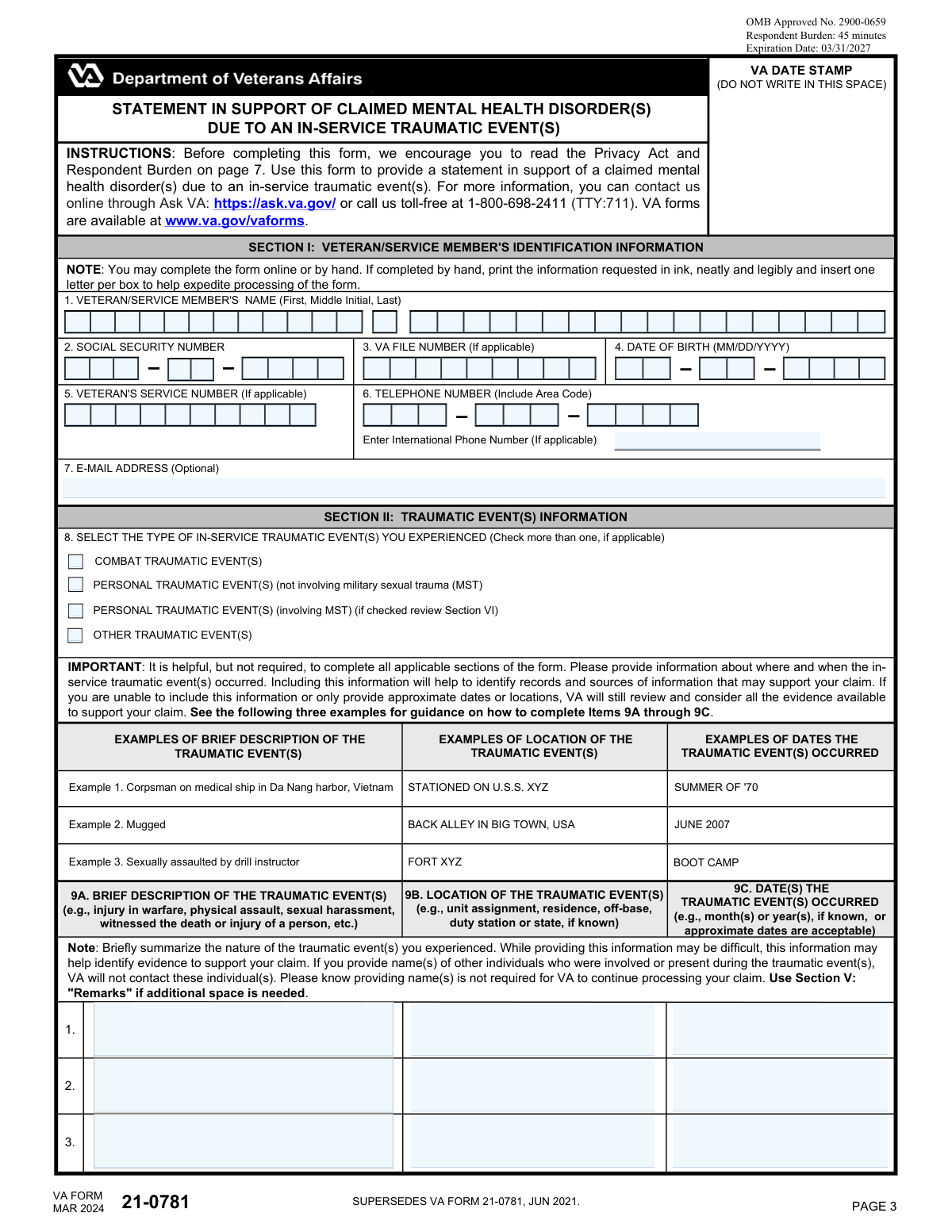
Yes! You can use AI to fill out VA Form 21-0781a, Statement in Support of Claim for Service Connection for Post-Traumatic Stress Disorder (PTSD) Secondary to Personal Assault
VA Form 21-0781a is a Department of Veterans Affairs statement form that helps a veteran/service member document personal-assault-related traumatic events (including MST, if applicable), identify dates/locations, and describe behavioral changes and potential evidence sources. VA uses this information to research and corroborate stressors and to evaluate entitlement to service connection for PTSD (or related mental health conditions) tied to the reported events. Completing it thoroughly can strengthen a claim by pointing VA to witnesses, reports, treatment facilities, and other corroborating records. Today, this form can be filled out quickly and accurately using AI-powered services like Instafill.ai, which can also convert non-fillable PDF versions into interactive fillable forms.
Our AI automatically handles information lookup, data retrieval, formatting, and form filling.
It takes less than a minute to fill out VA Form 21-0781a using our AI form filling.
Securely upload your data. Information is encrypted in transit and deleted immediately after the form is filled out.
Form specifications
| Form name: | VA Form 21-0781a, Statement in Support of Claim for Service Connection for Post-Traumatic Stress Disorder (PTSD) Secondary to Personal Assault |
| Number of pages: | 7 |
| Language: | English |
| Categories: | VA forms, VA claim forms, disability claim forms, SSA forms |
Instafill Demo: filling out a legal form in seconds
How to Fill Out VA Form 21-0781a Online for Free in 2026
Are you looking to fill out a VA FORM 21-0781A form online quickly and accurately? Instafill.ai offers the #1 AI-powered PDF filling software of 2026, allowing you to complete your VA FORM 21-0781A form in just 37 seconds or less.
Follow these steps to fill out your VA FORM 21-0781A form online using Instafill.ai:
- 1 Go to Instafill.ai and upload the VA Form 21-0781a PDF (or select it from the form library).
- 2 Enter veteran identification details (name, VA file number, Social Security number, date of birth, and contact information).
- 3 Select the type(s) of in-service traumatic event(s) (combat, personal non-MST, personal involving MST, or other) and complete the traumatic event rows with descriptions, locations, and dates (approximate if needed).
- 4 Complete the behavioral change section by checking applicable changes (healthcare visits, duty changes, leave use, performance changes, anxiety/depression, medication/alcohol use, legal issues, eating/weight changes) and add the required details for each checked item.
- 5 Identify possible sources of evidence and treatment locations/facilities, including any reports (e.g., police/incident/JAG/CID/NCIS) and where/when treatment occurred (or indicate if dates are unknown).
- 6 If applicable (MST-related claims), choose your consent option for VBA to notify VHA about upcoming claim events, then add any additional remarks in the remarks section.
- 7 Review Instafill.ai’s validation checks, e-sign and date the form (and witness/representative sections if needed), then download and submit it to VA with your claim or as supporting evidence.
Our AI-powered system ensures each field is filled out correctly, reducing errors and saving you time.
Why Choose Instafill.ai for Your Fillable VA Form 21-0781a Form?
Speed
Complete your VA Form 21-0781a in as little as 37 seconds.
Up-to-Date
Always use the latest 2026 VA Form 21-0781a form version.
Cost-effective
No need to hire expensive lawyers.
Accuracy
Our AI performs 10 compliance checks to ensure your form is error-free.
Security
Your personal information is protected with bank-level encryption.
Frequently Asked Questions About Form VA Form 21-0781a
This form is used to provide VA with details about in-service traumatic event(s) and related behavioral changes to support a benefits claim (often for mental health conditions such as PTSD). It helps VA understand what happened, when/where it occurred, and what evidence may exist.
The veteran/service member should complete and sign the form whenever possible. If the veteran cannot sign, an alternate signer or an authorized representative (POA) may sign in the designated signature sections, and witness information may be required.
Youâll need the veteranâs full name, VA file number, Social Security Number (split into three parts), date of birth (MM/DD/YYYY fields), and contact information (phone and optional email). Enter everything exactly as it appears on official VA or military records, including leading zeros.
Provide the VA File Number if you have it, and also complete the Social Security Number fields as requested on the form. If youâre unsure of your VA File Number, check VA letters/decisions or your VA.gov profile.
For a U.S. number, split it into Area Code (3 digits), Prefix/Exchange (3 digits), and Line Number (4 digits). If you have an international number, use the international telephone field and include the country code (and a leading â+â if you normally use it).
Check the box(es) that best match the event(s): combat-related, personal (non-MST), personal involving MST, or other. If the event involved MST, select the MST option and be sure to review and complete Section VI as instructed.
Keep it brief but specific: what happened, where it happened, and when it happened (exact date if known, or an approximate month/year). Include identifying details like unit, base/ship, city/country, or facility so VA can help verify the event.
You can provide an approximate date range (for example, âSpring 2009â or âJuneâAugust 2011â) in the date fields. Add clarifying details in the description or remarks to help narrow the timeframe.
Only check behavioral change items that apply to you (for example, changes in performance, leave use, anxiety/panic, substance use, legal issues). If you check a behavioral change box, you should also complete the corresponding âDetails/Additional Informationâ field for that item.
List any sources that could support your report, such as counseling/health clinics, chaplains/clergy, fellow service members, family/roommates, civilian police reports, medical reports, or personal diaries/journals. If someone can provide a statement, VA Form 21-10210 (Lay Witness Statement) may be used.
Use the lines provided to list the name and location of each facility (VA, Vet Center, private provider, DoD MTF, or Community Care). If you donât have the dates of treatment, check the box indicating you do not have the date(s) and provide the best estimate you can in remarks.
Section VI applies only if you checked that the traumatic event involved MST and you are enrolled/registered in VHA care. Your choice to consent, not consent, or revoke consent for VBA to notify VHA about upcoming claim events does not affect the status or outcome of your claim.
NoâRemarks are optional. Use it if you need extra space to explain an event, clarify dates/locations, list additional behavioral changes, or provide any other information you believe supports your claim.
YesâAI tools can help organize your information and auto-fill fields to reduce errors and save time. Services like Instafill.ai can extract your answers and place them into the correct form fields while you review before submitting.
Upload the PDF to Instafill.ai, answer the guided questions (or paste your notes), and the AI will map your responses into the correct fields for review and download. If the PDF is flat/non-fillable, Instafill.ai can convert it into an interactive fillable form so you can complete it electronically.
Compliance VA Form 21-0781a
Validation Checks by Instafill.ai
1
Veteran name fields are present and contain valid characters
Validates that Veteran First Name and Veteran Last Name are not blank and contain only expected name characters (letters, spaces, hyphens, apostrophes) and do not include numbers or control characters. Middle Initial/Name is optional but, if provided, must follow the same character rules and reasonable length limits. This prevents identity mismatches and downstream indexing/search failures. If validation fails, block submission and prompt the user to correct the name fields.
2
VA File Number format and length validation
Checks that the VA File Number is present (if required by the workflow) and matches allowed patterns (commonly alphanumeric with possible leading zeros/letters) and does not contain disallowed symbols. Also enforces a reasonable length range to catch truncation or pasted paragraphs. Correct VA file numbers are critical for routing the claim to the correct record. If validation fails, reject the value and request re-entry exactly as shown on VA correspondence.
3
SSN groups are numeric and correct lengths (3-2-4) and recombine consistently
Validates that SSN First Group is exactly 3 digits, Middle Group exactly 2 digits, and Last Group exactly 4 digits, with digits only. Also validates that the three parts can be concatenated into a 9-digit SSN without missing groups or extra characters. This reduces identity errors and prevents malformed identifiers from entering adjudication systems. If validation fails, prevent submission and highlight the specific SSN segment(s) needing correction.
4
SSN plausibility rules (disallow known invalid patterns)
Applies basic plausibility checks such as disallowing all-zero groups (e.g., 000-xx-xxxx, xxx-00-xxxx, xxx-xx-0000) and optionally disallowing obviously invalid sequences (e.g., 123-45-6789) if your policy permits. These checks reduce accidental entry of placeholders and improve match rates with official records. If validation fails, require the user to confirm/correct the SSN before continuing.
5
Date of Birth is a valid calendar date and within reasonable range
Validates that DOB Month is 01-12, Day is valid for the given month/year (including leap years), and Year is four digits. Also checks DOB is not in the future and is within a reasonable human range (e.g., not earlier than 1900 unless explicitly allowed). This prevents invalid dates that break eligibility logic and identity matching. If validation fails, block submission and request a corrected DOB.
6
US phone number parts are numeric and correct lengths (area/prefix/line)
If the domestic phone fields are used, validates Area Code and Prefix are exactly 3 digits and Line Number is exactly 4 digits, digits only. Optionally disallow invalid NANP values such as area code/prefix starting with 0 or 1 if your system enforces NANP rules. This ensures contact numbers can be dialed and stored consistently. If validation fails, require correction or allow the user to provide an international number instead (per your form rules).
7
International telephone number conforms to E.164-style expectations when provided
If International Telephone Number is provided, validates it contains a country code and only allowed characters (leading '+', digits, spaces, hyphens, parentheses) and meets a minimum/maximum digit count (commonly 8-15 digits excluding separators). Also checks it is not simultaneously conflicting with a fully populated US phone triplet unless dual numbers are explicitly allowed. This prevents unusable contact data and formatting issues in outbound communications. If validation fails, prompt the user to correct the international number format.
8
At least one traumatic event type checkbox selected when traumatic event details are provided
Validates logical consistency between the traumatic event type checkboxes (Combat/Personal non-MST/Personal MST/Other) and the presence of any traumatic event row details. If any event description/location/date is filled, at least one event type must be checked to categorize the claim. This ensures the narrative is properly routed and evaluated under the correct evidentiary standards. If validation fails, require the user to select an applicable event type or clear the event details.
9
Traumatic event row completeness (Description + Location + Date) for each populated row
For each traumatic event row (1-3), if any of the three fields is present, require the other two to be present as well (or explicitly allow partials only if the form policy permits). Enforce minimum content thresholds (e.g., description not just 'N/A', location not blank, date not empty) to avoid unusable entries. This improves adjudicator ability to corroborate events and request records. If validation fails, flag the specific row and require completion or removal of partial data.
10
Traumatic event date(s) occurred format validation (supports approximate dates)
Validates that traumatic event date fields accept either a full date (MM/DD/YYYY), month/year (MM/YYYY), or year-only (YYYY), and rejects ambiguous or non-date text unless explicitly allowed. Also checks that provided dates are not in the future and are not before the veteranâs date of birth. This prevents invalid timelines and improves evidence searches. If validation fails, prompt the user to enter an acceptable date format or mark as approximate per allowed patterns.
11
Behavioral change details required when corresponding checkbox is selected
For each behavioral change item (Rows 1-10), if the checkbox is selected, the associated 'Details/Additional Information' field must be non-empty and meet a minimum length to be meaningful. This ensures the checkbox selection is supported by narrative information that can be evaluated and corroborated. If validation fails, block submission and direct the user to provide the required details for each selected behavioral change.
12
Evidence sources selection consistency (None cannot be combined with other sources)
Validates that in 'Possible Sources of Evidence' the 'None' checkbox is mutually exclusive with all other evidence source checkboxes. If 'Other (Specify below)' is checked, the 'Other (Specify below)' text field must be populated with a description. This prevents contradictory evidence declarations and ensures 'Other' is actionable. If validation fails, require the user to either select 'None' alone or provide consistent selections and required text.
13
Treatment facility lines: name/location required and date-of-treatment logic enforced
For each treatment facility line (up to 3), if any part of the facility name/location is entered, require at least one non-empty line and validate it is not just whitespace. For the corresponding date-of-treatment fields, require either a valid month/year pair or the 'I do not have date(s) of treatment' checkbox for that line; do not allow both. This ensures treatment evidence can be requested without contradictory date information. If validation fails, highlight the specific line and require completion or correction.
14
MST Section VI gating: consent options only allowed/required when MST event type is selected
If 'Personal Traumatic Event(s) (involving MST)' is checked, require the user to make a single selection among the Section VI consent options (Do not consent / Revoke prior consent / Not applicable-not enrolled), and enforce mutual exclusivity. If MST is not selected, Section VI fields should be blank/ignored and not trigger errors. This prevents collecting sensitive consent data when not applicable and ensures a clear consent directive when it is applicable. If validation fails, require a valid single consent choice or clear Section VI entries.
15
Signature and date signed completeness and chronology checks
Validates that the Veteran/Service Member signature is present and that the Date Signed fields form a valid calendar date (MM/DD/YYYY). Also checks the signature date is not in the future and is reasonably after the veteranâs date of birth; if witness/alternate signer/representative signatures are provided, their dates must also be valid and not precede the veteranâs signature date when the workflow requires that order. This ensures legal attestation is complete and time-consistent. If validation fails, block submission until missing signatures/dates are provided or invalid dates corrected.
16
Representative/POA accreditation number and related date fields validation
If a POA/Authorized Representative signature is provided, validate that the Accreditation Number is present and matches expected format (typically numeric or alphanumeric per VA accreditation standards) and that the 'Date last VA Form 21-22/21-22A was submitted' (if provided) is a valid date. Also ensure representative fields are not partially filled (e.g., signature without date). This supports verification of representation authority and prevents processing delays. If validation fails, require completion of the representative block or removal if not applicable.
Common Mistakes in Completing VA Form 21-0781a
People often enter nicknames, omit a middle initial, or use a married/previous last name that doesnât match VA or military records. This can cause identity mismatches, delays, or requests for clarification. Copy the veteranâs first, middle (initial or full), and last name exactly as shown on VA correspondence, DD-214, or other official documents. AI-powered tools like Instafill.ai can help by standardizing name formatting and reducing typos.
Applicants frequently confuse the VA file number with another identifier, drop leading zeros, or omit letters that appear on VA correspondence. An incorrect file number can misroute the claim or slow processing because the VA canât reliably match the form to the correct record. Enter the VA file number exactly as printed on VA letters, including any leading zeros and any letters. Instafill.ai can validate expected patterns and preserve leading characters that are commonly lost during manual entry.
Because the SSN is split into three separate fields (first 3, middle 2, last 4), people often swap groups, type all 9 digits into one box, or accidentally omit digits. This can create serious identification issues and may trigger follow-up requests or rejection for incomplete/invalid data. Carefully enter each SSN segment in the correct field and double-check digit counts (3-2-4). Instafill.ai can automatically split and validate SSNs to prevent grouping and length errors.
Users commonly enter single-digit months/days (e.g., 1 instead of 01), use a two-digit year, or mix up month/day orderâespecially if theyâre used to non-U.S. date formats. Incorrect DOB can cause record mismatches and delays in verifying eligibility. Use two digits for month and day and four digits for year (MM, DD, YYYY) exactly as requested. Instafill.ai can enforce the correct date format and catch invalid dates (e.g., 13 for month).
This form includes separate U.S.-style phone components (area code/prefix/line) and a separate international telephone field, which leads people to duplicate numbers, put the country code into the area code box, or include parentheses/dashes where not expected. The result can be an unusable contact number and missed VA outreach. If you have a U.S. number, enter only digits into area code/prefix/line as instructed; if you have an international number, use the international field with country code (including â+â if applicable). Instafill.ai can format phone numbers correctly and prevent mixing country codes into U.S. segmented fields.
Many veterans donât have a service number (or confuse it with SSN), while others have one that includes letters or leading zeros that get dropped. Providing the wrong identifier can create confusion and slow verification. Only complete the service number field if it truly applies, and copy it exactly from military records including letters and leading zeros. Instafill.ai can help by flagging likely mismatches (e.g., a 9-digit SSN mistakenly placed as a service number).
Applicants sometimes check multiple categories without intending to, select âOtherâ when a specific category fits, or forget to check any category while still describing events. This can lead to inconsistent sections, missing required follow-ups, or requests for clarification. Select the checkbox(es) that best match the event(s) and ensure the event descriptions align with the selected type(s). Instafill.ai can prompt for required follow-up sections based on checkbox selections.
People often write a narrative but leave out the location, unit/duty station, or any date rangeâespecially when exact dates arenât known. Missing time/place details can make it difficult for VA to corroborate the stressor and may delay development of the claim. Provide at least an approximate month/year and a specific location identifier (base, ship, city/country, unit) for each event row you complete. Instafill.ai can remind you to complete the paired fields (description + location + date) whenever an event row is started.
This form lists traumatic event fields in multiple places (e.g., âTraumatic Event Row 1/2/3â and âSection II: Traumatic Event(s) Row 1/2/3â), which leads to duplicated content that doesnât match or one section being left blank. Conflicting dates/locations across sections can trigger follow-up questions and reduce clarity of the record. Use consistent wording, dates, and locations across all event sections, and ensure each row is complete wherever it appears. Instafill.ai can reuse the same validated event data across repeated sections to keep entries consistent.
Applicants often check a behavioral change (e.g., increased leave, depression/anxiety, legal difficulties) but forget to fill the corresponding âDetails/Additional Informationâ field that is required when the box is âYes.â Conversely, some provide details but forget to check the box, causing the information to be overlooked. This can weaken the evidence narrative and lead to VA requests for more information. If you check any behavioral change item, complete its matching details field with timeframe, examples, and any records/witnesses; if you provide details, ensure the checkbox is also selected. Instafill.ai can enforce conditional logic so detail fields are completed whenever a related checkbox is selected.
When âPersonal Traumatic Event(s) (involving MST)â is checked, applicants sometimes miss the instruction to review/complete Section VI, or they select multiple consent options (consent, do not consent, revoke) at once. This creates ambiguity and may require clarification. If MST is selected, complete Section VI by choosing the single option that reflects your intent (consent, do not consent, revoke prior consent, or not applicable/not enrolled). Instafill.ai can guide you to the correct follow-up section and prevent mutually exclusive selections.
Saved over 80 hours a year
âI was never sure if my IRS forms like W-9 were filled correctly. Now, I can complete the forms accurately without any external help.â
Kevin Martin Green
Your data stays secure with advanced protection from Instafill and our subprocessors

Robust compliance program
Transparent business model
Youâre not the product. You always know where your data is and what it is processed for.
ISO 27001, HIPAA, and GDPR
Our subprocesses adhere to multiple compliance standards, including but not limited to ISO 27001, HIPAA, and GDPR.
Security & privacy by design
We consider security and privacy from the initial design phase of any new service or functionality. Itâs not an afterthought, itâs built-in, including support for two-factor authentication (2FA) to further protect your account.
Fill out VA Form 21-0781a with Instafill.ai
Worried about filling PDFs wrong? Instafill securely fills va-form-21-0781a-statement-in-support-of-claim-for-service-connection-for-post-traumatic-stress-disorder-ptsd-secondary forms, ensuring each field is accurate.