
Yes! You can use AI to fill out Fidelity Investments Earnings Automatic Withdrawal Plan — IRA
Don't type 61 fields by hand. Tell our AI about yourself, or upload a document you already have, and it fills every field in seconds. You check it, then download, print or sign.
The AI does the filling. You just check it.
No typing into boxes, nothing to install.
What this form asks for
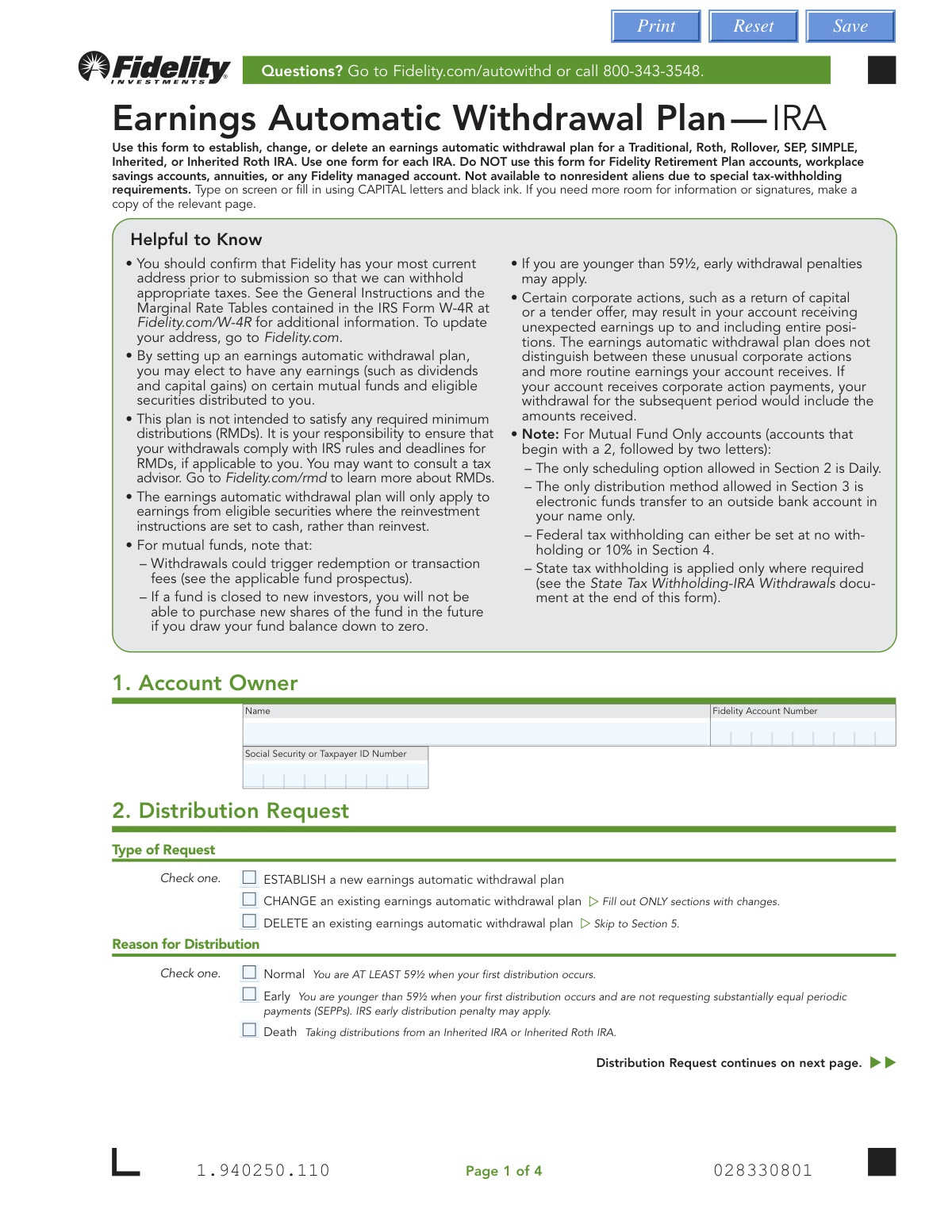
The AI fills all of it, from your answers or your documents.
The AI checks your answers before you download
14 checks built for this form, so a wrong date or a missing answer is caught before anyone else sees it.
Validates that the combination of Account Owner Name, Fidelity Account Number, and Social Security/Taxpayer ID Number in Section 1 corresponds to a valid, eligible IRA account. This check is crucial for security and to ensure the request is applied to the correct account. If the details do not match an existing eligible account, the form submission will be rejected to prevent fraud or processing errors.
Verifies the account holder's status is not 'nonresident alien' based on Fidelity's client records. The form explicitly states this plan is not available to nonresident aliens due to special tax-withholding requirements. A failed check would result in an error message indicating ineligibility for the plan and blocking the submission.
If the account number from Section 1 is identified as a 'Mutual Fund Only' account, this check enforces several specific constraints. It ensures Frequency (Section 2) is 'Daily', Distribution Method (Section 3) is 'EFT to your bank account', and Federal Tax Withholding (Section 4) is either '0%' or '10%'. This prevents the user from selecting options incompatible with their account type, avoiding rejection and reprocessing.
Ensures the form's workflow follows the 'Type of Request' selected in Section 2. If 'DELETE' is chosen, the system should lock or hide other sections and only require a signature. If 'ESTABLISH' is chosen, it validates that all required fields for a new plan are completed. This prevents incomplete submissions and ensures the user's intent is processed correctly.
Checks that the 'Social Security or Taxpayer ID Number' field in Section 1 contains a number in a valid format (e.g., 9 digits, formatted as XXX-XX-XXXX or as a raw number). This is a fundamental data integrity check to ensure the number is syntactically correct for matching against backend records. An invalid format would trigger an immediate field-level error, prompting the user to correct it before submission.
If the 'Customized Schedule (X)' frequency option is selected in Section 2, this validation ensures that the user has selected at least one month and entered at least one valid day (a number from 1 to 31). This prevents the creation of an invalid or non-actionable schedule. If the condition is not met, an error message will prompt the user to complete the schedule details.
And 8 more checks
- Daily Frequency and Mailed Check Incompatibility
- EFT Information Completeness and Validity
- Tax Withholding Percentage Format
- Medallion Signature Guarantee Requirement Flag
- State and Federal Tax Withholding Consistency
- Age and Reason for Distribution Consistency
- Reinvestment Instruction Conflict
- Signature and Date Completion
Let AI fill out your 1.940250.110
No typing. Every field filled in seconds, checked, ready to sign.
How to Fill Out 1.940250.110 Online for Free in 2026
What the AI walks you through.
- Navigate to Instafill.ai and upload or select the Fidelity Earnings Automatic Withdrawal Plan — IRA form.
- Provide your personal details in Section 1, including your full name, Fidelity account number, and Social Security Number.
- In Section 2, specify the type of request (establish, change, or delete), the reason for distribution, and the desired payment frequency.
- Choose your preferred distribution method in Section 3, such as direct deposit to a Fidelity or bank account, or receiving a check by mail.
- Complete Section 4 to indicate your federal and state tax withholding preferences for the withdrawals.
- Carefully review all the information auto-filled by the AI for accuracy, then proceed to Section 5 to provide your digital signature and date.
- Submit the completed and signed form directly through the platform to Fidelity Investments for processing.
Common Mistakes in Completing 1.940250.110
The ones the AI is built to catch.
Confusing an Earnings Plan with a Fixed-Dollar Withdrawal
Believing This Plan Satisfies RMD Requirements
Forgetting to Change Reinvestment Instructions to 'Cash'
Missing the Required Medallion Signature Guarantee
Entering an Invalid Tax Withholding Percentage
Choosing an Invalid Schedule for a 'Mutual Fund Only' Account
Submitting an Incomplete 'Customized Schedule' Request
Forgetting to Attach Bank Documentation for New EFTs
Using the Form for an Ineligible Account Type
Forgetting to Sign and Date the Form
Frequently Asked Questions About 1.940250.110
Is it really free for 7 days?
Can I fill other forms too?
How do I cancel?
How does the AI fill out 1.940250.110?
What happens to my information?
How complex is 1.940250.110 to fill out?
What is the purpose of the Earnings Automatic Withdrawal Plan form?
Who should use this form?
Can I use this plan to take my Required Minimum Distributions (RMDs)?
What happens if I set up this plan and I'm younger than 59½?
How do I choose my tax withholding for these withdrawals?
How often can I receive my earnings payments?
Where can the withdrawn money be sent?
What is a Medallion signature guarantee and when do I need one?
What do I need to do with my investment settings for this plan to work?
How do I submit the completed form?
Can AI tools help me fill out this form?
How can I fill out this Fidelity IRA form online?
The PDF I downloaded is not fillable. What can I do?
Are there special rules for Mutual Fund Only accounts?
Get your 1.940250.110 filled out by AI
$0 today. Cancel before Nov 1 and you pay nothing.
Other forms like this one
investment forms: Form 3468, Investment Credit, Form 8960, Net Investment Income Tax, How to Transfer Assets from Morgan Stanley to Fidelity Investments (Fidelity Stock Plan Services Guide), Fidelity Investments Transfer/Rollover/Exchange Form, Fidelity Investments Standing Transfer Instructions Form, One-Time Withdrawal – IRA, Fidelity Investments, Fidelity Investments Transfer/Rollover Form, Special Tax Notice: Your Rollover Options - Fidelity Investments, Fidelity Investment-Only (Non-Prototype) Retirement Account Application, Fidelity Investments® Beneficiary Distribution Form, Fidelity Investments Distribution Form, One-Time Withdrawal – Investment-Only (Non-Prototype) Retirement Account, Fidelity Investments Withdrawal — One-Time, Fidelity Investments Withdrawals—529 College Savings Plan, Fidelity Investments Change of Account Ownership — Mutual Fund Only Accounts, Fidelity Investments 403(b) Beneficiary Designation, Fidelity Investments Qualified Plan Beneficiary Designation, Fidelity Investments 403(b)/401(a) Beneficiary Designation, Fidelity Investments Qualified Plan Beneficiary Designation, HSA Bank Investment Account Transfer Form
IRA forms: Form 5498, IRA Contribution Information, SIRA Allied health treatment request (Catalogue no. SIRA09191), Transfer Due to Divorce — IRA/HSA/529, One-Time Withdrawal – IRA, Fidelity Investments, Fidelity Advisor IRA Distribution Request for Automatic Rollover Accounts, Fidelity Beneficiaries — IRA /HSA, Fidelity Advisor IRA Beneficiary Designation, IRA/HSA Beneficiary Designation, Fidelity IRA Beneficiary Distribution — Charity, Foundation, or a University, Form 8606, Nondeductible IRAs, Inherited IRA Application for Individual Beneficiaries, SIMPLE IRA Contribution Transmittal Form, IRA Distribution Form, Open a Schwab IRA, New York State Deferred Compensation Plan Direct Rollover to a Roth IRA, Charles Schwab IRA Distribution Form, Sample IRA Distribution Letter for a Qualified Charitable Distribution (QCD), Beneficiary Designation Form For IRA and 403(b)(7) Accounts, IRA Beneficiary Designation Form, Schwab IRA Account Application
withdrawal forms: Empower Disability Withdrawal Request Form, One-Time Withdrawal – IRA, Fidelity Investments, One-Time Withdrawal — Defined Contribution Retirement Plan, Fidelity One-Time Withdrawal Form — Nonretirement, One-Time Withdrawal – Investment-Only (Non-Prototype) Retirement Account, Fidelity Investments Withdrawal — One-Time, Automatic Withdrawals—Defined Contribution Retirement Plan, Fidelity Investments Withdrawals—529 College Savings Plan, Fidelity Growth and Guaranteed Income Partial Withdrawal/Full Surrender Form, Fidelity Automatic Withdrawals — Nonretirement, The Vanguard 529 College Savings Plan: Withdrawal Request Form, Vanguard Personal Investor Withdrawal form, Empower Retirement Plan Withdrawal Request Form, Hardship Withdrawal Request - Empower, Hardship Withdrawal Request 401(a) Plan, Separation from Employment Withdrawal Form, MassMutual Application for Hardship Withdrawal, Beneficiary Account Withdrawal Request Governmental 457(b) Plan, Separation from Employment Withdrawal Form for East Bay Regional Park District 457(b) Deferred Compensation Plan, Separation from Employment Withdrawal Kit
investment withdrawal forms: 403(b) Distribution Form - Davis Funds, One-Time Withdrawal – IRA, Fidelity Investments, One-Time Withdrawal – Investment-Only (Non-Prototype) Retirement Account, Fidelity Investments Withdrawal — One-Time, Fidelity Investments Withdrawals—529 College Savings Plan, Form F11323, Cash Withdrawal From Your Retirement Investments, Form F11610, Cash Withdrawal from your Retirement Investments for Plans Not Subject to QJSA, Automatic Withdrawals — Inherited IRA - Fidelity Investments, IRA Periodic Distribution Request Form, NextGen 529 Client Direct Series Withdrawal Request Form, IRA/ESA Distribution Request Instructions
IRA withdrawal forms: Distribution — RMD Annual One-Time Payment, One-Time Withdrawal – IRA, Fidelity Investments, Automatic Withdrawals — Inherited IRA - Fidelity Investments
UK investment forms: Triple Point Venture VCT plc | Investor Application Form, Form 3468, Investment Credit, Form 8960, Net Investment Income Tax, How to Transfer Assets from Morgan Stanley to Fidelity Investments (Fidelity Stock Plan Services Guide), Fidelity Investments Transfer/Rollover/Exchange Form, Fidelity Investments Standing Transfer Instructions Form, One-Time Withdrawal – IRA, Fidelity Investments, Fidelity Investments Transfer/Rollover Form, Special Tax Notice: Your Rollover Options - Fidelity Investments, Fidelity Investment-Only (Non-Prototype) Retirement Account Application, Fidelity Investments® Beneficiary Distribution Form, Fidelity Investments Distribution Form, One-Time Withdrawal – Investment-Only (Non-Prototype) Retirement Account, Fidelity Investments Withdrawal — One-Time, Fidelity Investments Withdrawals—529 College Savings Plan, Fidelity Investments Change of Account Ownership — Mutual Fund Only Accounts, Fidelity Investments 403(b) Beneficiary Designation, Fidelity Investments Qualified Plan Beneficiary Designation, Fidelity Investments 403(b)/401(a) Beneficiary Designation, Fidelity Investments Qualified Plan Beneficiary Designation
Let AI fill out your 1.940250.110
Your trial starts once a card is added. You pay nothing before Nov 1.
Our AI already knows this form, all 61 fields of it. Skip the typing: tell it about yourself, or upload what you have, and it fills the whole form in seconds.
- AI fills every field on all 4 pages, checkboxes included
- No typing into boxes: answer a few questions, or upload a document you already have, an old copy of this form, a photo of a document
- The AI checks the answers; you review and change anything before you download
- Download the finished PDF, print it, or sign it online
- Encrypted, and never used to train AI
Cancel before Nov 1 and you pay nothing.
A card is needed to start the trial. Cancel in two clicks from your account.
Terms · Privacy