Yes! You can use AI to fill out Hardship Withdrawal Request - Empower
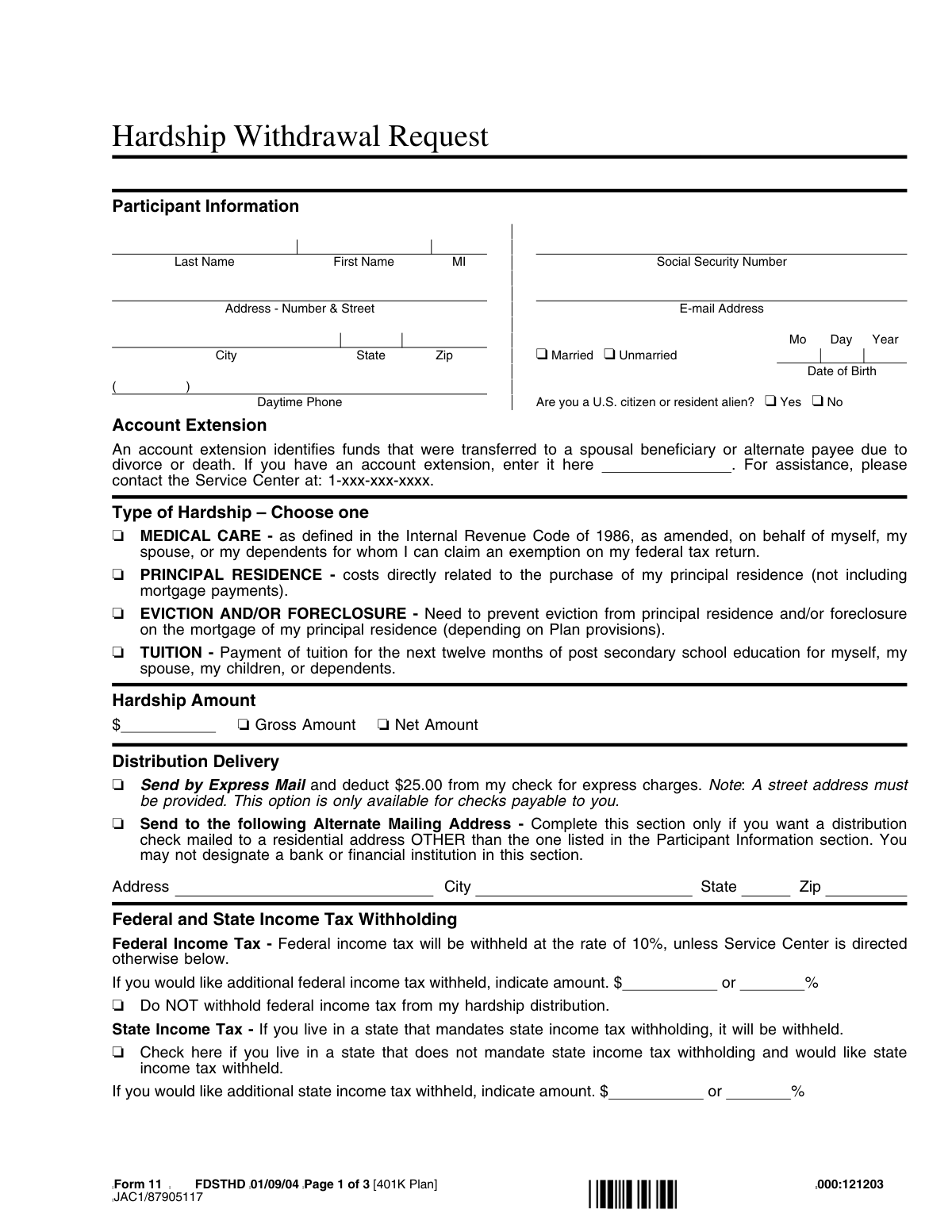
This form is a formal application for a participant in an employer-sponsored retirement plan, such as a 401(k), to withdraw funds before retirement age due to an immediate and heavy financial need. It is important because it provides a way to access retirement savings for specific, IRS-approved emergencies like medical expenses, tuition payments, or preventing foreclosure, though it may come with tax consequences and penalties. Today, this form can be filled out quickly and accurately using AI-powered services like Instafill.ai, which can also convert non-fillable PDF versions into interactive fillable forms.
Form 11 is part of the
Empower forms, withdrawal forms, hardship withdrawal forms, hardship forms and withdrawal request forms categories on Instafill.
Rather not fill this in by hand? Instafill is an online form filler that completes PDF forms automatically — upload the blank form, answer a few questions, and the AI fills every field.
Form specifications
| Form name: | Hardship Withdrawal Request - Empower |
| Number of pages: | 1 |
| Language: | English |
Our AI automatically handles information lookup, data retrieval, formatting, and form filling.
It takes less than a minute to fill out Form 11 using our AI form filling.
Securely upload your data. Information is encrypted in transit and deleted immediately after the form is filled out.
Instafill Demo: How to fill out PDF forms in seconds with AI
How to Fill Out Form 11 Online for Free in 2026
Are you looking to fill out a FORM 11 form online quickly and accurately? Instafill.ai offers the #1 AI-powered PDF filling software of 2026, allowing you to complete your FORM 11 form in just 37 seconds or less.
Follow these steps to fill out your FORM 11 form online using Instafill.ai:
- 1 Navigate to Instafill.ai and upload or select the Hardship Withdrawal Request form.
- 2 Use the AI assistant to automatically fill in your Participant Information, including your name, address, Social Security Number, and date of birth.
- 3 Select the specific type of hardship you are claiming from the list, such as medical care, purchase of a principal residence, or tuition payments.
- 4 Enter the desired withdrawal amount and specify your federal and state income tax withholding preferences.
- 5 If applicable, complete the Spousal Consent section, which requires a spouse's signature and may need to be notarized.
- 6 Carefully review all the information for accuracy, then electronically sign and date the 'Your Consent and Signature' section.
- 7 Submit the completed form to your Plan Administrator as instructed for authorization and processing.
Our AI-powered system ensures each field is filled out correctly, reducing errors and saving you time.
Why Choose Instafill.ai for Your Fillable Form 11 Form?
Speed
Complete your Form 11 in as little as 37 seconds.
Up-to-Date
Always use the latest 2026 Form 11 form version.
Cost-effective
No need to hire expensive lawyers.
Accuracy
Our AI performs 10 compliance checks to ensure your form is error-free.
Security
Your personal information is protected with bank-level encryption.
Frequently Asked Questions About Form 11
This form is used to request a withdrawal from your 401(k) plan due to an immediate and heavy financial need. It should only be completed if you meet one of the specific hardship criteria allowed by your plan and the IRS.
Any plan participant who is experiencing a qualifying financial hardship and wishes to withdraw funds from their 401(k) account before retirement age needs to complete this form. Your request is also subject to approval by your Plan Administrator.
You can request a withdrawal for specific reasons such as certain medical expenses, costs to purchase a principal residence, preventing eviction or foreclosure, and paying for post-secondary education tuition. You must select one of these reasons on the form.
A 'Gross Amount' is the total withdrawal before any taxes are taken out, while a 'Net Amount' is the specific amount you wish to receive after taxes and fees have been deducted. Requesting a net amount will result in a larger total withdrawal from your account to cover the withholdings.
Federal income tax is automatically withheld at a 10% rate unless you check the box to opt out or request a different withholding amount. State tax withholding may also be mandatory depending on where you live.
If you are married, your spouse's signature is required to consent to the withdrawal, as they are waiving their right to receive survivor benefits from these funds. This consent must be witnessed and signed by a Notary Public.
You must sign the form and return it to your Plan Administrator, who is typically your employer. Your employer will then sign and submit the authorized form to the service center for processing.
Taking a hardship withdrawal has significant consequences, including potential income taxes and early withdrawal penalties. Additionally, your plan may suspend your ability to make contributions to your 401(k) for at least six months after the distribution.
If you are a non-resident alien, you must attach a completed IRS Form W-8BEN to your request. Your withdrawal will generally be subject to a 30% withholding tax unless a tax treaty allows for a reduced rate.
The Plan Administrator is typically your employer or a designated person within your company's HR department. They must sign the form to certify that your request complies with the plan's rules before it can be processed.
Yes, you can specify an 'Alternate Mailing Address' for the check, but it must be a residential address. You cannot have the check sent directly to a bank or financial institution.
Yes, services like Instafill.ai use AI to accurately auto-fill form fields with your personal information, which can save you time and help prevent errors. You are still responsible for selecting the hardship reason and ensuring all information is correct.
You can use a service like Instafill.ai to fill out this form online. Simply upload the PDF, and the tool will make it fillable, allowing you to type your information directly into the fields and securely save the completed document.
If your PDF is a flat, non-fillable scan, you can use a tool like Instafill.ai to convert it into an interactive, fillable form. This allows you to easily type in your information instead of having to print and fill it out by hand.
Compliance Form 11
Validation Checks by Instafill.ai
1
Social Security Number Format and Completeness
This check verifies that the Social Security Number (SSN) field is not empty and that the provided number conforms to the standard 9-digit format (XXX-XX-XXXX or XXXXXXXXX). The SSN is a critical unique identifier for tax reporting and account verification. If the SSN is missing or invalid, the form cannot be processed, and the request will be rejected pending correction.
2
Participant Information Completeness
Ensures all mandatory fields in the 'Participant Information' section are filled out, including Last Name, First Name, full Address (Street, City, State, Zip), Date of Birth, and Marital Status. This information is essential for identity verification, communication, and determining legal requirements like spousal consent. An incomplete section will halt processing until all required data is provided.
3
Hardship Type Selection Requirement
This validation confirms that the participant has selected exactly one option from the 'Type of Hardship' list. Selecting a reason is a legal requirement to justify the withdrawal under IRS rules. Failure to select a single, valid reason will result in the request being considered incomplete and returned to the participant.
4
Hardship Amount Specification
Verifies that a positive, numeric dollar amount is entered in the 'Hardship Amount' field and that one of the corresponding checkboxes ('Gross Amount' or 'Net Amount') is selected. This clarifies the exact withdrawal sum and its tax basis. Without a clear, valid amount and type, the financial transaction cannot be executed, and the form will be rejected.
5
Logical Consistency of Marital Status and Spousal Consent
This check cross-references the 'Marital Status' and 'Spousal Consent' sections. If the participant checks 'Married', the system verifies that the 'Spousal Consent' section is fully completed with a spouse's signature, date, and a notary's signature. This is a crucial legal safeguard to protect spousal rights to retirement assets, and its absence for a married participant will prevent the withdrawal from being processed.
6
Participant Signature and Date Requirement
Confirms that the 'Participant Signature' and 'Date' fields in the 'Your Consent and Signature' section are both completed. The signature legally affirms the participant's understanding and the truthfulness of the provided information. A missing signature or date invalidates the entire request, as it lacks legal attestation from the participant.
7
U.S. Citizenship Status and Form W-8BEN Requirement
This validation checks the response to 'Are you a U.S. citizen or resident alien?'. If the participant answers 'No', the system flags that an IRS Form W-8BEN must be attached to the submission. This is necessary to apply the correct tax withholding rules for non-resident aliens. Failure to provide the required W-8BEN will delay processing until it is received.
8
Alternate Mailing Address Completeness
If the participant opts to use an 'Alternate Mailing Address', this check ensures that all fields within that section (Address, City, State, Zip) are fully completed. This is critical for ensuring the distribution check is mailed to the correct location. Incomplete alternate address information will cause the request to be paused until a valid, complete address is provided.
9
Express Mail Address Validation
If the 'Send by Express Mail' option is selected, this validation verifies that the designated mailing address (either primary or alternate) is a physical street address and not a P.O. Box. Express carriers typically cannot deliver to P.O. Boxes. If a P.O. Box is provided with this option, the request will be flagged for correction to ensure successful delivery.
10
Federal Tax Withholding Logic
Ensures the federal tax withholding instructions are logical and not contradictory. The user can specify an additional withholding amount (as a dollar value or a percentage, but not both) OR check 'Do NOT withhold federal income tax'. The system validates that the user has not, for example, checked the 'Do NOT withhold' box while also providing an additional withholding amount. Contradictory instructions will require clarification before processing.
11
Date of Birth Validity
This check validates that the 'Date of Birth' is a real calendar date and suggests the participant is of a plausible age to have a 401(k) account (e.g., over 18). This serves as a basic identity verification and sanity check. An invalid or nonsensical date (e.g., a future date) would cause the form to be rejected for correction.
12
Email Address Format Validation
Verifies that the value entered in the 'E-mail Address' field follows the standard internet email address format (e.g., '[email protected]'). A valid email is important for electronic communication regarding the status of the withdrawal request. While often not a blocking error, an invalid format would trigger a warning or prevent submission to ensure contact information is accurate.
Common Mistakes in Completing Form 11
Participants often misunderstand the difference between 'Gross Amount' and 'Net Amount'. They might request a 'Net Amount' but enter the pre-tax value, leading to a smaller-than-expected check after mandatory taxes are withheld. To avoid this, calculate the total amount needed for your hardship, add an estimate for taxes, and request that total as the 'Gross Amount' to ensure the final net payment is sufficient.
If the participant is married, failing to have their spouse sign the consent form in the presence of a notary public is a critical error that will halt the application. This is a legal requirement to waive the spouse's right to survivor benefits. An application missing a valid, notarized spousal signature will be immediately rejected, causing significant processing delays. Always verify if this section applies and complete it before a licensed Notary Public if you are married.
Participants may check 'Do NOT withhold federal income tax' to maximize their immediate cash payout, without understanding the long-term consequences. This action does not eliminate the tax liability; it defers it, which can result in a large, unexpected tax bill and underpayment penalties when filing annual taxes. It is crucial to understand that hardship withdrawals are taxable income, and you should consult a tax professional before opting out of the default withholding.
The form explicitly requires a street address for the 'Express Mail' option, yet people often provide a PO Box. Express carriers cannot deliver to PO Boxes, which will cause the delivery to fail and the check to be returned, delaying access to urgently needed funds. To prevent this, always provide a complete physical street address if you select the express delivery option.
Because this form is a non-fillable PDF, submissions are often handwritten and can be illegible. Simple errors like an unreadable Social Security Number, an incomplete address, or a missing date of birth can lead to processing delays or outright rejection. To prevent this, it is best to type the information. AI-powered tools like Instafill.ai can convert non-fillable PDFs into fillable versions, ensuring all information is typed, legible, and validated for correct formatting.
Applicants sometimes select a hardship reason that does not accurately match their situation, such as choosing 'Principal Residence' for mortgage payments, which the form explicitly excludes. This happens from not reading the fine print for each category. A mismatch between the selected reason and supporting documentation will lead to denial, so you must carefully read the description for each hardship type to ensure your situation qualifies.
The form states that non-resident aliens must attach IRS Form W-8BEN to potentially claim a reduced tax withholding rate. Overlooking this instruction is common and results in a default 30% tax withholding on the distribution, significantly reducing the net amount received. If you are a non-resident alien, you must obtain and attach a completed Form W-8BEN to avoid excessive, mandatory tax withholding.
In their haste, participants sometimes mistakenly sign on the line reserved for the 'Authorized Plan Administrator'. This simple error invalidates the form, as the administrator's signature is a required certification from the employer that cannot be completed by the participant. Always double-check that you are signing only in the 'Participant Signature' box before submitting the form to your employer for their authorization.
This field is critical for spousal beneficiaries or alternate payees who received funds due to a death or divorce, but it is often missed because it doesn't apply to most primary participants. Failing to enter the correct account extension will cause processing to fail, as the system cannot locate the correct sub-account. If you are a beneficiary or alternate payee, you must enter your specific account extension and contact the service center if you are unsure what it is.
The certification section states that the requested amount may not exceed the amount of the financial need, plus any anticipated taxes. Participants may be tempted to withdraw extra funds, but this violates IRS regulations and the plan's terms. If the plan administrator or IRS requests documentation, you must be able to prove the amount requested corresponds directly to the hardship. Only request the specific amount required to satisfy the immediate financial need.
Saved over 80 hours a year
“I was never sure if my IRS forms like W-9 were filled correctly. Now, I can complete the forms accurately without any external help.”
Kevin Martin Green
Your data stays secure with advanced protection from Instafill and our subprocessors




Robust compliance program
Transparent business model
You’re not the product. You always know where your data is and what it is processed for.
ISO 27001, HIPAA, and GDPR
Our subprocesses adhere to multiple compliance standards, including but not limited to ISO 27001, HIPAA, and GDPR.
Security & privacy by design
We consider security and privacy from the initial design phase of any new service or functionality. It’s not an afterthought, it’s built-in, including support for two-factor authentication (2FA) to further protect your account.
Fill out Form 11 with Instafill.ai
Worried about filling PDFs wrong? Instafill securely fills hardship-withdrawal-request-empower forms, ensuring each field is accurate.
