
Yes! You can use AI to fill out Fidelity Investments Change of Account Ownership — Mutual Fund Only Accounts
Don't type 84 fields by hand. Tell our AI about yourself, or upload a document you already have, and it fills every field in seconds. You check it, then download, print or sign.
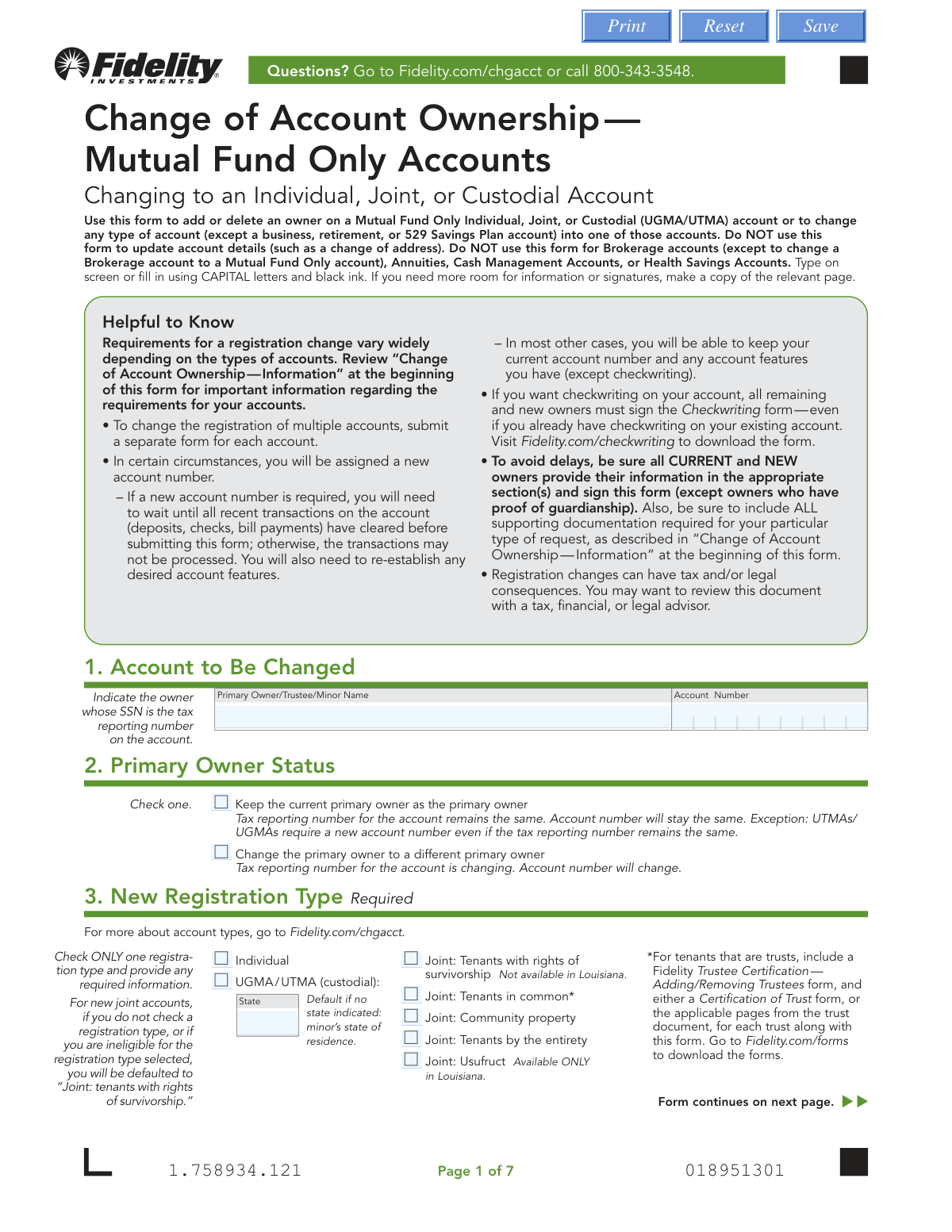
The AI does the filling. You just check it.
No typing into boxes, nothing to install.
What this form asks for
The AI fills all of it, from your answers or your documents.
The AI checks your answers before you download
14 checks built for this form, so a wrong date or a missing answer is caught before anyone else sees it.
This check ensures that all required parties have signed the form in the correct section (7a for removed owners, 7b for new/remaining owners). The required signers are determined by the matrix on pages 1-3 of the form instructions, based on the original and new account types. Failure to obtain all necessary signatures will result in the rejection of the form, as authorization for the change is incomplete.
This validation confirms that a Medallion Signature Guarantee is provided when required by the transaction rules. For example, it's needed for current owners if an account over $100,000 is being changed, or for a resigning custodian if an UGMA/UTMA account is over $10,000. Missing a required guarantee is a critical failure that stops processing to prevent unauthorized high-value transfers.
This check verifies that the Social Security Number (SSN), Individual Taxpayer Identification Number (ITIN), or Entity ID/Taxpayer Identification Number (TIN) is in the correct 9-digit format. It also ensures that individuals provide an SSN/ITIN while entities (like trusts) provide an Entity ID/TIN. An invalid or mismatched Tax ID number will cause tax reporting errors and prevent account setup.
If an owner indicates they are a 'Foreign citizen' in Section 4 or 5, this validation ensures all subsequent fields are completed, including Country of Citizenship, residency status, and Government Identification Number details. Incomplete information prevents the firm from meeting federal requirements for identifying customers. The form submission will be considered incomplete and returned.
For any owner identified as a foreign citizen, this check confirms that the provided government ID's expiration date has not passed. The form explicitly requires an unexpired ID. Submitting a form with an expired ID will lead to rejection, as it fails to meet identity verification standards.
This check ensures that exactly one checkbox is selected in Section 3, 'New Registration Type.' This selection is fundamental to defining the new ownership structure of the account. If zero or multiple options are selected, the firm cannot know how to re-register the account, and the request will be rejected for clarification.
And 8 more checks
- Enforces State-Specific Registration Restrictions
- Verifies Presence of Required Supporting Documents
- Validates Date of Birth Format and Plausibility
- Checks for Mandatory Contact Information
- Validates Signature Date Presence and Correctness
- Verifies Court Appointment Document Freshness
- Confirms Primary Owner Status Selection
- Validates Account Number and Owner Match
Let AI fill out your Fidelity Form 592525.10.0
No typing. Every field filled in seconds, checked, ready to sign.
How to Fill Out Fidelity Form 592525.10.0 Online for Free in 2026
What the AI walks you through.
- Navigate to Instafill.ai and upload or select the Fidelity Change of Account Ownership form.
- Provide the current account number and primary owner's name in Section 1.
- Specify the new account registration type (e.g., Individual, Joint, Custodial) in Section 3.
- Enter the required personal information for the primary owner (Section 4) and any new or remaining additional owners (Section 5), including names, addresses, and Taxpayer ID Numbers.
- Review the AI-populated form to ensure all information for current, removed, and new owners is accurate.
- Download the completed form, then have all required parties sign in Section 7. Obtain a Medallion Signature Guarantee if the account value meets the specified thresholds.
- Submit the entire signed form along with any required supporting documentation (like a death certificate or marriage certificate) to Fidelity via mail.
Common Mistakes in Completing Fidelity Form 592525.10.0
The ones the AI is built to catch.
Misinterpreting the Requirements Matrix
Failing to Obtain a Medallion Signature Guarantee
Incomplete or Incorrect Signatures
Forgetting Required Supporting Documents
Incorrectly Selecting the New Registration Type
Mismatching Name with Government ID
Using a P.O. Box as a Residential Address
Submitting an Incomplete Form Packet
Misunderstanding the Checkwriting Feature Process
Incomplete Information for Foreign Citizens
Frequently Asked Questions About Fidelity Form 592525.10.0
Is it really free for 7 days?
Can I fill other forms too?
How do I cancel?
How does the AI fill out Fidelity Form 592525.10.0?
What happens to my information?
How complex is Fidelity Form 592525.10.0 to fill out?
What is the purpose of the Change of Account Ownership form?
Are there any account types I cannot change with this form?
Who needs to sign this form to authorize a change?
Do I need a Medallion Signature Guarantee?
What is the difference between a Medallion Signature Guarantee and a notary stamp?
I'm adding my spouse to my individual account. What documents are required?
An account owner has passed away. Can I use this form?
What happens if I submit the form with missing information or documents?
Where do I mail the completed form?
What happens if I don't select a registration type for a new joint account in Section 3?
Will my account number change?
Can I use an AI tool to help me fill out this form?
How can I fill out this Fidelity form online?
The PDF I downloaded from Fidelity is not fillable. What can I do?
Get your Fidelity Form 592525.10.0 filled out by AI
$0 today. Cancel before Nov 2 and you pay nothing.
Other forms like this one
investment forms: Form 3468, Investment Credit, Form 8960, Net Investment Income Tax, How to Transfer Assets from Morgan Stanley to Fidelity Investments (Fidelity Stock Plan Services Guide), Fidelity Investments Transfer/Rollover/Exchange Form, Fidelity Investments Standing Transfer Instructions Form, One-Time Withdrawal – IRA, Fidelity Investments, Fidelity Investments Transfer/Rollover Form, Special Tax Notice: Your Rollover Options - Fidelity Investments, Fidelity Investment-Only (Non-Prototype) Retirement Account Application, Fidelity Investments® Beneficiary Distribution Form, Fidelity Investments Distribution Form, One-Time Withdrawal – Investment-Only (Non-Prototype) Retirement Account, Fidelity Investments Withdrawal — One-Time, Fidelity Investments Withdrawals—529 College Savings Plan, Fidelity Investments 403(b) Beneficiary Designation, Fidelity Investments Qualified Plan Beneficiary Designation, Fidelity Investments 403(b)/401(a) Beneficiary Designation, Fidelity Investments Qualified Plan Beneficiary Designation, Fidelity Investments Earnings Automatic Withdrawal Plan — IRA, HSA Bank Investment Account Transfer Form
investment account forms: Fidelity Investment-Only (Non-Prototype) Retirement Account Application, One-Time Withdrawal – Investment-Only (Non-Prototype) Retirement Account, HSA Bank Investment Account Transfer Form, Fidelity Investment-Only (Non-Prototype) Retirement Account Application, Voya Investment Management Traditional, Roth, Rollover, and SEP Individual Retirement Account (IRA) Application and Adoption Agreement, Voya Investment Management Account Maintenance Form (Includes Substitute Form W-9), U.S. Bancorp Investments Account Transfer Form, Fidelity Investments Account Application/Enrollment Form and Beneficiary Designation, Fidelity Investments 403(b) Custodial Account Application, New York Life Investments Funds Individual Retirement Account Application and NYLIFE Securities LLC Investor Profile, 529 Plan Account Application, 529 Plan Account Transfer Form, Account Application for Merrill West Virginia Residents - The Hartford SMART529, Account Opening Form for Professional Clients (Institutions, Companies, Intermediaries and Eligible Counterparties), Action Required Letter of Authorization - Merrill Lynch, AwardChoice Limited Individual Investor Account Form, Beneficiary Designation Form - Merrill Lynch, BlackRock IRA Rollover Certification Form, BlackRock New Account Application For Non-Retirement Accounts, Bolton Global Capital Journal Request (Form AS0020)
Fidelity forms: Fidelity Funds Account Transfer of Assets Form, Fidelity Stock Plan Services (SPS) Transfer Request Form, How to Transfer Assets from Morgan Stanley to Fidelity Investments (Fidelity Stock Plan Services Guide), Fidelity Investments Transfer/Rollover/Exchange Form, Fidelity Investments Standing Transfer Instructions Form, Fidelity Charitable 144/145 Contribution Form, One-Time Withdrawal – IRA, Fidelity Investments, Fidelity Investments Transfer/Rollover Form, Fidelity Advisor 403(b) Distribution Request Form, Fidelity Advisor IRA Distribution Request for Automatic Rollover Accounts, Special Tax Notice: Your Rollover Options - Fidelity Investments, Fidelity Charitable Letter of Authorization, Fidelity Advisor Trading Authorization and Indemnification, Fidelity Investment-Only (Non-Prototype) Retirement Account Application, Fidelity NetBenefits Send a Document Form, Fidelity NetBenefits Auditor's Guide: An Overview of Fidelity's 2024 Plan Year Reporting Package, Fidelity NetBenefits Distribution - Recurring Payments, Fidelity Investments® Beneficiary Distribution Form, Fidelity Investments Distribution Form, Fidelity One-Time Withdrawal Form — Nonretirement
mutual fund forms: Fidelity Change of Account Ownership — Mutual Fund Only Accounts (Changing to a Trust, Estate, Guardian, or Conservator Account), Irrevocable Stock, Bond, or Mutual Fund Power and Authorization to Remove All Stops, Fidelity Mutual Fund Account Application, Application Form Franklin Templeton Investment Funds, Application Form: JPMorgan Liquidity Funds, BlackRock Fund Application Pack, Dividend and/or Capital Gain Distributions Authorization Form (G27569-13), Manning & Napier Fund, Inc. UGMA/UTMA Successor Custodian Designation Form, Thrivent Funds Transfer of Assets, Form MF11502
account ownership forms: Fidelity Change of Account Ownership — Mutual Fund Only Accounts (Changing to a Trust, Estate, Guardian, or Conservator Account), Custodial Account – Transfer of Ownership Form
fund investment forms: Pomona Investment Fund Investor Initial Application (Class A & Class I Shares), BlackRock Private Investments Fund Subscription Agreement and Application, Pomona Investment Fund Investor Subsequent Application (Class A & Class I Shares), Investment Funds Distributor Due Diligence Questionnaire, Hedge Fund Portfolios Additional Investment Form, Application Form Franklin Templeton Investment Funds, New York Life Investments Funds Individual Retirement Account Application and NYLIFE Securities LLC Investor Profile, Investor Application and Subscription Agreement for The Wyoming Reserve Opportunity Zone Fund Corporation, FundRock Additional Subscription Form, Electronic Funds Transfer (EFT) Authorization
investment fund forms: Alpine SPRIM™ Private Markets Fund Subscription Agreement and Power of Attorney, Pomona Investment Fund Investor Initial Application (Class A & Class I Shares), BlackRock Private Investments Fund Subscription Agreement and Application, Pomona Investment Fund Investor Subsequent Application (Class A & Class I Shares), Investment Funds Distributor Due Diligence Questionnaire, Hedge Fund Portfolios Additional Investment Form, Application Form Franklin Templeton Investment Funds, New York Life Investments Funds Individual Retirement Account Application and NYLIFE Securities LLC Investor Profile, Application Form: Individual Investor | Qualified Investor Hedge Fund, Application Form: Legal Entities | Qualified Investor Hedge Fund, Application Form: Legal Entities | Retail Hedge Fund - Fundrock, Fundrock Application Form: Individual Investor | Monthly Liquidity – Qualified Investor Hedge Fund, Fundrock Application Form: Legal Entities | Monthly Liquidity – Qualified Investor Hedge Fund, Fundrock Application Form: Legal Entities | Monthly Liquidity – Retail Hedge Fund, Investor Application and Subscription Agreement for Shares of Common Stock in Oxford Park Income Fund, Inc., Electronic Funds Transfer (EFT) Authorization
UK investment forms: Triple Point Venture VCT plc | Investor Application Form, Form 3468, Investment Credit, Form 8960, Net Investment Income Tax, How to Transfer Assets from Morgan Stanley to Fidelity Investments (Fidelity Stock Plan Services Guide), Fidelity Investments Transfer/Rollover/Exchange Form, Fidelity Investments Standing Transfer Instructions Form, One-Time Withdrawal – IRA, Fidelity Investments, Fidelity Investments Transfer/Rollover Form, Special Tax Notice: Your Rollover Options - Fidelity Investments, Fidelity Investment-Only (Non-Prototype) Retirement Account Application, Fidelity Investments® Beneficiary Distribution Form, Fidelity Investments Distribution Form, One-Time Withdrawal – Investment-Only (Non-Prototype) Retirement Account, Fidelity Investments Withdrawal — One-Time, Fidelity Investments Withdrawals—529 College Savings Plan, Fidelity Investments 403(b) Beneficiary Designation, Fidelity Investments Qualified Plan Beneficiary Designation, Fidelity Investments 403(b)/401(a) Beneficiary Designation, Fidelity Investments Qualified Plan Beneficiary Designation, Fidelity Investments Earnings Automatic Withdrawal Plan — IRA
Let AI fill out your Fidelity Form 592525.10.0
Your trial starts once a card is added. You pay nothing before Nov 2.
Our AI already knows this form, all 84 fields of it. Skip the typing: tell it about yourself, or upload what you have, and it fills the whole form in seconds.
- AI fills every field on all 10 pages, checkboxes included
- No typing into boxes: answer a few questions, or upload a document you already have, an old copy of this form, a photo of a document
- The AI checks the answers; you review and change anything before you download
- Download the finished PDF, print it, or sign it online
- Encrypted, and never used to train AI
Cancel before Nov 2 and you pay nothing.
A card is needed to start the trial. Cancel in two clicks from your account.
Terms · Privacy