Yes! You can use AI to fill out MassMutual Application for Hardship Withdrawal
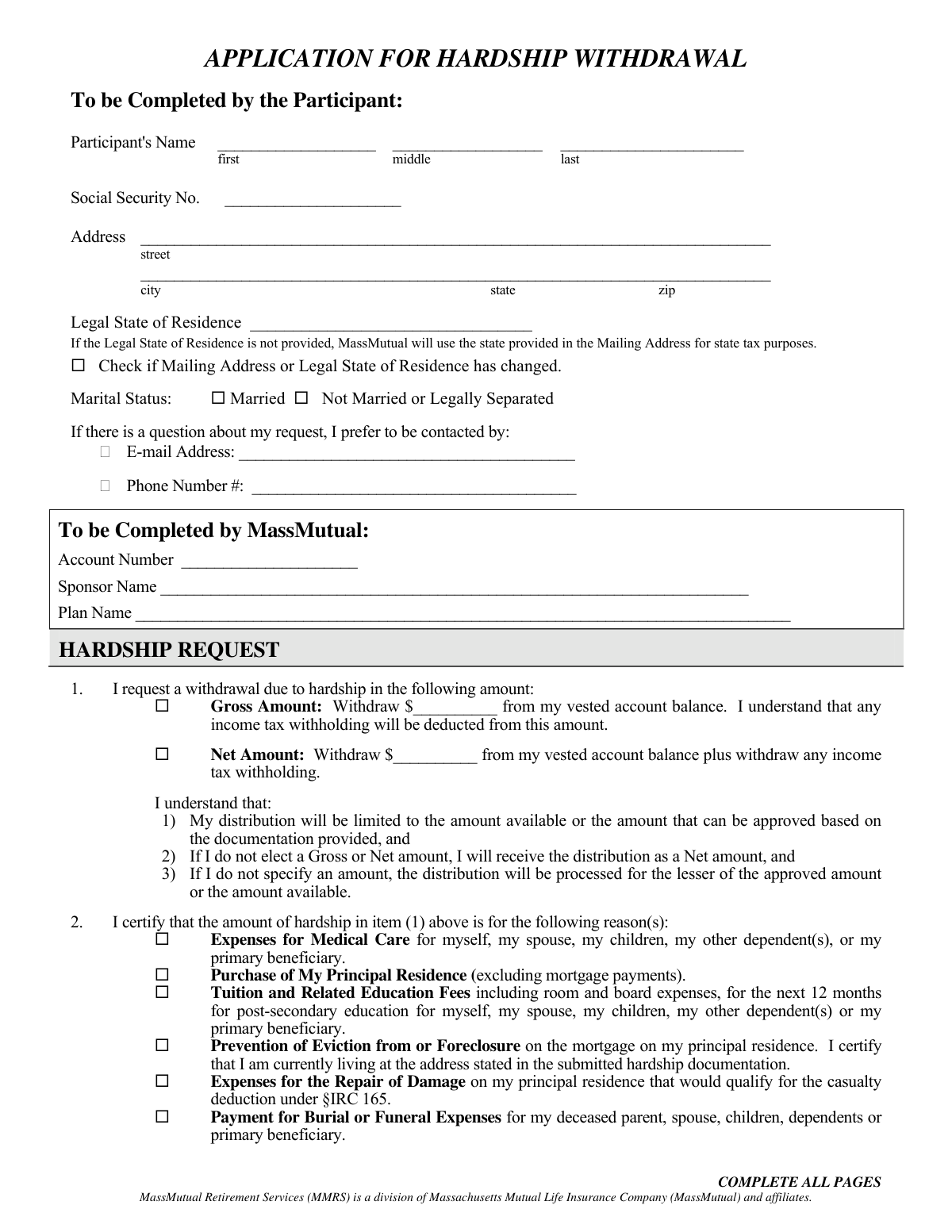
This form is an application for participants in a MassMutual retirement plan to request a withdrawal from their vested account balance due to a financial hardship. The applicant must certify the reason for the withdrawal, such as medical expenses, purchase of a principal residence, tuition fees, or prevention of eviction. Today, this form can be filled out quickly and accurately using AI-powered services like Instafill.ai, which can also convert non-fillable PDF versions into interactive fillable forms.
MassMutual Hardship Withdrawal Application is part of the
withdrawal forms, hardship withdrawal forms, hardship forms and MassMutual forms categories on Instafill.
Rather not fill this in by hand? Instafill is an online form filler that completes PDF forms automatically — upload the blank form, answer a few questions, and the AI fills every field.
Form specifications
| Form name: | MassMutual Application for Hardship Withdrawal |
| Number of pages: | 1 |
| Language: | English |
Our AI automatically handles information lookup, data retrieval, formatting, and form filling.
It takes less than a minute to fill out MassMutual Hardship Withdrawal Application using our AI form filling.
Securely upload your data. Information is encrypted in transit and deleted immediately after the form is filled out.
Instafill Demo: How to fill out PDF forms in seconds with AI
How to Fill Out MassMutual Hardship Withdrawal Application Online for Free in 2026
Are you looking to fill out a MASSMUTUAL HARDSHIP WITHDRAWAL APPLICATION form online quickly and accurately? Instafill.ai offers the #1 AI-powered PDF filling software of 2026, allowing you to complete your MASSMUTUAL HARDSHIP WITHDRAWAL APPLICATION form in just 37 seconds or less.
Follow these steps to fill out your MASSMUTUAL HARDSHIP WITHDRAWAL APPLICATION form online using Instafill.ai:
- 1 Navigate to Instafill.ai and upload the MassMutual Application for Hardship Withdrawal form or select it from their template library.
- 2 Provide your personal details, including your full name, Social Security Number, address, and marital status, by letting the AI guide you through the fields.
- 3 Specify the withdrawal amount (Gross or Net) and check the box corresponding to your reason for the hardship request.
- 4 Complete the 'Income Tax Withholding' section by making your elections for both federal and state taxes.
- 5 Select your preferred 'Method of Payment' (Direct Deposit or Check) and provide your banking information if choosing direct deposit.
- 6 Carefully review all the information you've entered for accuracy, then digitally sign and date the form.
- 7 Download, print, or email the completed form to submit it to MassMutual via mail, fax, or email as per the instructions on the document.
Our AI-powered system ensures each field is filled out correctly, reducing errors and saving you time.
Why Choose Instafill.ai for Your Fillable MassMutual Hardship Withdrawal Application Form?
Speed
Complete your MassMutual Hardship Withdrawal Application in as little as 37 seconds.
Up-to-Date
Always use the latest 2026 MassMutual Hardship Withdrawal Application form version.
Cost-effective
No need to hire expensive lawyers.
Accuracy
Our AI performs 10 compliance checks to ensure your form is error-free.
Security
Your personal information is protected with bank-level encryption.
Frequently Asked Questions About MassMutual Hardship Withdrawal Application
This form is used to request a withdrawal from your MassMutual retirement account due to an immediate and significant financial need, as defined by IRS-approved hardship reasons.
You are eligible if you are a participant in the plan and are experiencing one of the specific financial hardships listed, such as medical expenses or preventing eviction. You must also certify that you have already taken all other available loans and distributions from your employer's plans.
A 'Gross Amount' is the total to be withdrawn, and taxes will be deducted from it, reducing the final payment you receive. A 'Net Amount' is the specific amount of money you want to receive, and the required taxes will be withdrawn in addition to this amount.
If you do not select either option, your request will be processed as a 'Net Amount' by default. This means taxes will be withdrawn in addition to the dollar figure you requested.
You must provide supporting documentation that proves the financial need for your hardship request. The form states that failure to produce this documentation will result in the denial of your application.
Yes, if your hardship withdrawal is approved, you will be suspended from making any contributions to your employer-sponsored retirement plans for at least six months after you receive the funds.
You can elect to have federal and state taxes withheld. If you make no federal election, 10% will be withheld by default, and state withholding will be based on your state's requirements.
You can choose direct deposit, which takes about 3 business days after processing, or a mailed check, which can take up to 10 business days for postal delivery. If your direct deposit information is invalid, a check will be mailed.
You can submit the completed form and all required documentation via standard mail, overnight mail, fax, or email. The specific addresses and fax number are listed at the bottom of the form.
Yes, the form indicates that a fee may be deducted from your account for the hardship review service. This fee is charged whether your request is approved or denied.
Empower Retirement acquired MassMutual's retirement business, so Empower is now the administrator for your plan. The contact information provided on the form is for the correct processing center.
Yes, services like Instafill.ai use AI to accurately auto-fill form fields with your personal information, which can save you time and help reduce errors.
Simply upload the PDF to the Instafill.ai platform, and its AI will identify the fields and help you fill them in. You can then review the information, make any necessary edits, and download the completed form.
If you have a non-fillable or 'flat' PDF, you can use a service like Instafill.ai to convert it into an interactive, fillable form. This allows you to easily type your information directly into the fields before printing.
Compliance MassMutual Hardship Withdrawal Application
Validation Checks by Instafill.ai
Common Mistakes in Completing MassMutual Hardship Withdrawal Application
Applicants often fail to select either 'Gross Amount' or 'Net Amount' or misunderstand the difference. Selecting 'Gross' means taxes are deducted from the requested amount, reducing the final payout, while 'Net' means taxes are withdrawn in addition to the requested amount. This mistake can lead to receiving significantly less cash than needed or withdrawing more from the retirement account than intended. To avoid this, carefully read the definitions and select the option that matches your financial need.
Entering an incorrect bank routing or account number is a frequent error that will cause the direct deposit to fail. Applicants also commonly forget to attach the required voided check or bank specification sheet for validation. These mistakes result in the payment defaulting to a paper check, which can delay access to funds by up to 10 business days or more. AI-powered tools like Instafill.ai can help by securely storing and accurately populating this information, reducing the risk of typos.
A missing signature is one of the most common reasons for immediate rejection of a form. An unsigned application is legally invalid and cannot be processed. Forgetting to write the date can also cause processing delays or compliance issues. Always double-check the signature line on the final page before submitting the form to ensure it is signed and dated correctly.
The form explicitly states that failure to produce substantiating documentation for the hardship reason will result in denial. Applicants often forget to include or provide incomplete documents like medical bills, eviction notices, or purchase agreements. This is a critical failure that stops the application from being approved. Ensure you have gathered all necessary proof as outlined in the 'Permissible Hardship Expenses and Supporting Documentation' guide before submission.
The federal and state tax withholding sections are complex and often filled out incorrectly. Applicants may forget to make an election, not understand the consequences of waiving withholding (leading to a large future tax bill), or be unaware of their state's specific requirements. An incorrect election can lead to the processor applying a default rate that may not be ideal for the applicant's financial situation. It is crucial to review the tax information documents and consult a tax advisor if unsure.
Many people leave the 'Legal State of Residence' field blank, assuming their mailing address is sufficient. However, these can be different, and this field is critical for determining the correct state tax withholding. If left blank, the form defaults to the mailing address state, which could lead to incorrect tax calculations and potential penalties. Always specify your legal residence for tax purposes, even if it's the same as your mailing address.
Applicants sometimes forget to write in the specific dollar amount they are requesting in section 1. While the form has a default procedure, not specifying an amount creates ambiguity and will likely cause a processor to halt the application and contact you for clarification. This significantly delays the process of receiving urgently needed funds. Always clearly write the exact dollar amount you wish to withdraw.
A typographical error in the Social Security Number is a critical mistake that will prevent the application from being processed. Since the SSN is the primary identifier for your account, even a single wrong digit will cause a mismatch and an identity verification failure. This form appears to be a non-fillable PDF, which increases the risk of handwriting errors. Using a tool like Instafill.ai can convert the PDF into a fillable version and populate your SSN accurately, preventing such errors.
The application cannot be approved without a valid reason for the hardship withdrawal. Applicants must check one of the boxes in section 2, such as 'Expenses for Medical Care' or 'Prevention of Eviction'. Overlooking this step or failing to check a box will lead to an automatic request for more information or an outright denial, delaying the entire process. Ensure you select the one category that best fits your situation and for which you have supporting documentation.
The signature section mentions that a married applicant may need to provide a 'Waiver of Preretirement Survivor Annuity form' if the plan requires spousal consent. Many applicants are unaware of this requirement or forget to obtain their spouse's signature and attach the necessary waiver. This omission will halt the processing of the withdrawal until the proper consent is received, causing significant delays. It is vital to check your specific plan's rules regarding spousal consent before submitting the application.
Saved over 80 hours a year
“I was never sure if my IRS forms like W-9 were filled correctly. Now, I can complete the forms accurately without any external help.”
Kevin Martin Green
Your data stays secure with advanced protection from Instafill and our subprocessors




Robust compliance program
Transparent business model
You’re not the product. You always know where your data is and what it is processed for.
ISO 27001, HIPAA, and GDPR
Our subprocesses adhere to multiple compliance standards, including but not limited to ISO 27001, HIPAA, and GDPR.
Security & privacy by design
We consider security and privacy from the initial design phase of any new service or functionality. It’s not an afterthought, it’s built-in, including support for two-factor authentication (2FA) to further protect your account.
Fill out MassMutual Hardship Withdrawal Application with Instafill.ai
Worried about filling PDFs wrong? Instafill securely fills massmutual-application-for-hardship-withdrawal forms, ensuring each field is accurate.
