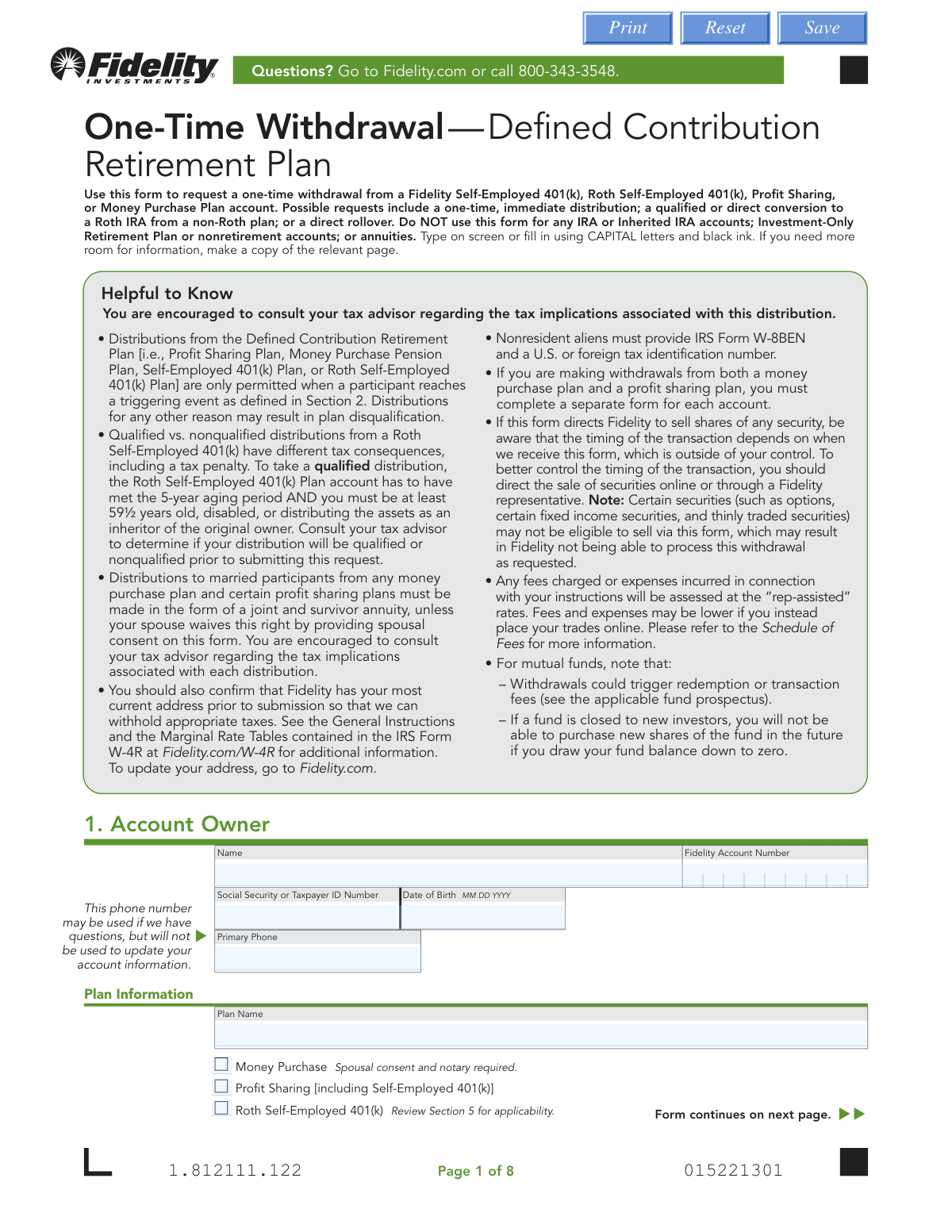
Yes! You can use AI to fill out One-Time Withdrawal — Defined Contribution Retirement Plan
This form is used to request a one-time withdrawal from a Fidelity Self-Employed 401(k), Roth Self-Employed 401(k), Profit Sharing, or Money Purchase Plan account. It allows account owners to request an immediate distribution, a direct rollover, or a conversion to a Roth IRA. It is crucial to use this form for the correct account types to avoid processing delays or plan disqualification. Today, this form can be filled out quickly and accurately using AI-powered services like Instafill.ai, which can also convert non-fillable PDF versions into interactive fillable forms.
Our AI automatically handles information lookup, data retrieval, formatting, and form filling.
It takes less than a minute to fill out Fidelity 1.812111.122 using our AI form filling.
Securely upload your data. Information is encrypted in transit and deleted immediately after the form is filled out.
Form specifications
| Form name: | One-Time Withdrawal — Defined Contribution Retirement Plan |
| Number of pages: | 1 |
| Language: | English |
Instafill Demo: How to fill out PDF forms in seconds with AI
How to Fill Out Fidelity 1.812111.122 Online for Free in 2026
Are you looking to fill out a FIDELITY 1.812111.122 form online quickly and accurately? Instafill.ai offers the #1 AI-powered PDF filling software of 2026, allowing you to complete your FIDELITY 1.812111.122 form in just 37 seconds or less.
Follow these steps to fill out your FIDELITY 1.812111.122 form online using Instafill.ai:
- 1 Navigate to Instafill.ai and upload or select the Fidelity One-Time Withdrawal form.
- 2 Use the AI assistant to accurately fill in your personal and plan information in Section 1, including your name, account number, and plan type.
- 3 In Section 2, select the reason for your withdrawal, such as reaching age 59½, disability, or separation from service.
- 4 Provide detailed distribution instructions in Section 3, specifying whether you want to withdraw the entire account value or specific securities and amounts.
- 5 Choose your preferred distribution method in Section 4, such as a direct rollover to another IRA, an electronic funds transfer (EFT) to your bank, or a check by mail.
- 6 Complete the tax withholding section (Section 6), indicating your preferences for federal and state tax withholding based on your distribution type.
- 7 Review all entered information for accuracy, then provide the required signatures from the Plan Administrator and Plan Participant in Section 7, obtaining spousal consent or a Medallion signature guarantee if required.
Our AI-powered system ensures each field is filled out correctly, reducing errors and saving you time.
Why Choose Instafill.ai for Your Fillable Fidelity 1.812111.122 Form?
Speed
Complete your Fidelity 1.812111.122 in as little as 37 seconds.
Up-to-Date
Always use the latest 2026 Fidelity 1.812111.122 form version.
Cost-effective
No need to hire expensive lawyers.
Accuracy
Our AI performs 10 compliance checks to ensure your form is error-free.
Security
Your personal information is protected with bank-level encryption.
Frequently Asked Questions About Form Fidelity 1.812111.122
This form is used to request a one-time withdrawal from a Fidelity Self-Employed 401(k), Roth Self-Employed 401(k), Profit Sharing, or Money Purchase Plan. It can be used for an immediate distribution, a direct rollover, or a conversion to a Roth IRA. It should not be used for any IRA or annuity accounts.
Account owners of eligible Fidelity defined contribution retirement plans who have experienced a qualifying 'triggering event' should use this form. These events include reaching age 59½, disability, separation from service, or plan termination, among others listed in Section 2.
You will need your personal information (name, SSN, date of birth), your Fidelity account number, and your plan's name. Depending on your request, you may also need bank account details for a wire or EFT, or the receiving account information for a rollover.
Yes, you can request your RMD by checking the appropriate box in Section 2. Please note that IRS rules prohibit rolling over an RMD, so you must choose a direct payment method like a check, EFT, or wire for that amount.
Spousal consent is required if you are married and withdrawing from a Money Purchase Plan or certain Profit Sharing plans and not taking a joint and survivor annuity. If required, your spouse must sign Section 7c in the presence of a U.S. Notary Public, who must then complete the notarization section.
A Medallion signature guarantee is a special stamp that verifies your identity and signature, which you can get from most banks or financial institutions. It is required for transactions over $100,000, all bank wire requests, or if the payment is being sent to an alternate address or payee.
If your distribution is eligible for a rollover but you choose to receive it directly, Fidelity must withhold 20% for federal taxes. For other distributions, the default withholding is 10%, but you can elect a different percentage or no withholding in Section 6.
Once received in good order, trades to fund your withdrawal can take up to five business days. You can mail the completed form to the address in Cincinnati, OH, for regular mail or Covington, KY, for overnight mail, as detailed on page 8.
A direct rollover moves pre-tax money to another pre-tax retirement account (like a Traditional IRA) and is generally not a taxable event. A conversion moves pre-tax money to a Roth IRA, which is a taxable event that requires you to pay income tax on the amount converted.
The form must be signed and dated by both the Plan Administrator and the Plan Participant (or inherited account owner). Depending on your plan type and marital status, a notarized signature from your spouse may also be required.
Yes, services like Instafill.ai use AI to help you accurately auto-fill form fields with your saved information. This can save time and help prevent common errors on complex financial forms.
You can use a service like Instafill.ai to complete the form digitally. Simply upload the PDF to their platform, and the AI-powered tool will guide you through filling out the fields before you print the form for signing and submission.
If you have a non-fillable or 'flat' PDF, you can use a tool like Instafill.ai to instantly convert it into an interactive, fillable form. This allows you to type your information directly into the fields for a clean and legible document.
Compliance Fidelity 1.812111.122
Validation Checks by Instafill.ai
1
SSN/TIN Format Validation
This check ensures the Social Security or Taxpayer ID Number in Section 1 is entered in a valid 9-digit format (XXX-XX-XXXX or XX-XXXXXXX). This is critical for correct tax reporting to the IRS and for verifying the identity of the account owner. A failure in this validation would prevent form submission until a correctly formatted number is provided, avoiding processing delays and potential tax penalties.
2
Age and Withdrawal Reason Consistency
This validation cross-references the Date of Birth in Section 1 with the 'Request Reason' in Section 2. If the 'Normal' reason is selected, the system verifies the account owner is at least 59½ years old. This is important because withdrawals before this age may be subject to a 10% early withdrawal penalty unless another exception applies. If the age and reason do not align, the form would be rejected to prevent an incorrect and potentially penalized distribution.
3
Spousal Consent Requirement for Money Purchase Plans
This check determines if spousal consent is mandatory. If the plan type selected in Section 1 is 'Money Purchase' and the marital status in Section 7 is 'Married', the system verifies that Section 7c, 'Spousal Consent,' is fully completed, signed, and notarized. This is a legal requirement to protect spousal rights to annuity benefits. Failure to provide the required consent will halt the withdrawal request until the form is properly completed.
4
RMD and Rollover Method Conflict
This validation ensures compliance with IRS rules regarding Required Minimum Distributions (RMDs). If the RMD checkbox is checked in Section 2, the system confirms that the selected distribution method in Section 4 is not a rollover or conversion (options 4b or 4c). IRS regulations prohibit rolling over RMD amounts. An invalid selection would cause the form to be rejected, forcing the user to choose a valid payment method for the RMD, such as a check or EFT.
5
Medallion Signature Guarantee Trigger
This check identifies transactions that require a Medallion signature guarantee for fraud prevention. The system flags the request if a bank wire (Section 4e) is chosen, if a check is mailed to an alternate address (Section 4g), or if the total transaction value exceeds $100,000. If any of these conditions are met, the validation ensures the Medallion guarantee section (7b) is properly stamped and signed. A missing guarantee will cause the request to be deemed 'not in good order' and rejected.
6
In-Kind Distribution Destination Restriction
This validation enforces a rule specific to distributing securities. If the user selects to 'Distribute as shares (in kind)' in Section 3, this check confirms that the destination account selected in Section 4 is a Fidelity account (options 4a or 4b). The form explicitly prohibits in-kind transfers to external, non-Fidelity accounts. An attempt to do so would result in a validation error, requiring the user to either liquidate the securities or choose a valid Fidelity destination.
7
Cash Withdrawal Amount vs. Available Balance
This check prevents overdrafts on the account's cash position. If the user chooses to withdraw 'ONLY the following amount of cash' in Section 3, the system compares the requested dollar amount against the available core cash balance in the specified Fidelity account. Requesting more cash than is available will trigger a validation failure, as stated on the form. This prevents transaction rejections and ensures the request is processable.
8
Bank Wire Information Completeness
This validation ensures that a bank wire transfer can be successfully executed. If 'Bank wire' (Section 4e) is selected as the distribution method, the system verifies that all mandatory fields, including Bank Routing/ABA Number, Bank Name, Account Number, and Account Owner Name(s), are populated. Incomplete or missing information would cause the wire to fail. This check prevents processing delays and returned funds by ensuring all necessary data is present before submission.
9
Mandatory Signature and Date Presence
This check verifies that the form is legally authorized and complete. It ensures that both the Plan Administrator signature and date (Section 7a) and the Plan Participant signature and date (Section 7b) are present. These signatures are required to authorize Fidelity to act on the instructions. A form missing either signature is considered incomplete and will be rejected immediately.
10
Tax Withholding Percentage Format
This validation ensures that tax withholding instructions are entered in a usable format. If the user elects a custom withholding rate in Section 6, the system checks that the value entered is a whole number without any percentage signs, decimal points, or dollar amounts. Incorrectly formatted data can cause calculation errors in the processing system. This check ensures the user's withholding preference is captured accurately for tax payment purposes.
11
Domestic Abuse Reason and Plan Type Eligibility
This is a logical consistency check based on plan rules. If the 'Domestic abuse' reason is selected in Section 2, this validation confirms that the plan type indicated in Section 1 is not a 'Money Purchase Plan'. The form explicitly states this withdrawal reason is not available for Money Purchase Plans. A mismatch would result in an error, preventing the submission of an ineligible request and ensuring compliance with plan provisions.
12
Required Field Selection for Core Sections
This check ensures the form is fundamentally complete by verifying that choices have been made in critical sections. It validates that exactly one checkbox is selected in Section 2 ('Request Reason') and exactly one checkbox is selected in Section 3 ('Distribution Instructions'). Failure to make a selection in these required areas makes the user's intent ambiguous and the form unprocessable. The validation would halt submission until these mandatory choices are made.
Common Mistakes in Completing Fidelity 1.812111.122
This form requires signatures from both the Plan Administrator and the Plan Participant in Section 7. For certain plans like a Money Purchase Plan, notarized spousal consent is also mandatory. Applicants often miss one of the required signatures or fail to have the spousal consent section properly notarized, which renders the form invalid. This mistake immediately halts the withdrawal process, requiring the applicant to resubmit the entire form, causing significant delays in accessing their funds.
The form explicitly requires a Medallion Signature Guarantee for high-risk transactions like wire transfers, distributions over $100,000, or sending funds to an alternate address (Section 7b). Many people mistakenly obtain a standard notary stamp, which is not a substitute. A Medallion Signature Guarantee is a special signature guarantee for transferring securities and is provided by a financial institution that assumes liability for any forgery. Submitting a form with a notary stamp instead of the required Medallion guarantee will result in automatic rejection.
In Section 3, applicants must specify exactly how assets should be distributed, but the options are complex and mutually exclusive. A common error is selecting multiple conflicting options, such as checking both 'ENTIRE VALUE of your account in cash' and also trying to specify individual securities to sell. Another frequent mistake is providing an incomplete security name or symbol, making it impossible for Fidelity to execute the instruction. These ambiguities force Fidelity to reject the request or contact the applicant for clarification, delaying the distribution.
When requesting a direct rollover to a non-Fidelity account (Section 4c), applicants must provide the complete name of the receiving institution, their full address, and the new account number. It is very common for people to omit information like the 'For Benefit Of/Attention' line or the full mailing address of the custodian. Without this complete and accurate information, Fidelity cannot initiate the direct rollover, leading to processing delays or the funds being sent back.
Section 6 on tax withholding is a major point of confusion. Applicants often don't understand that a 20% federal withholding is mandatory for most rollover-eligible distributions not sent directly to another retirement account. They may incorrectly try to elect 0% withholding or enter a dollar amount instead of a whole percentage. This can lead to the form being rejected or, worse, an unexpected tax liability and underpayment penalties from the IRS at the end of the year.
The rules for RMDs are strict, and mistakes are common. Applicants in Section 2 may forget to check the RMD box, or they may check it but fail to understand that the RMD amount cannot be rolled over and must be distributed separately. This can lead to an improper rollover and result in significant tax penalties from the IRS for failing to take the RMD correctly. The form's complexity in handling a combined RMD and rollover request often leads to errors.
When requesting a bank wire in Section 4e, every detail must be perfect, but applicants often make mistakes. Common errors include providing a bank's ACH routing number instead of its specific wire routing number, omitting the name(s) on the receiving account, or failing to include necessary correspondent bank information for smaller banks or international wires. A single incorrect digit can cause the wire to fail or be sent to the wrong account, resulting in delays and potential loss of funds.
The form's instructions clearly state it is for specific Defined Contribution Retirement Plans and should NOT be used for IRAs, Inherited IRAs, or nonretirement accounts. However, people often search for a 'Fidelity withdrawal form' and use the first one they find without verifying its applicability to their specific account type. Submitting this form for an ineligible account results in an immediate rejection and lost time, forcing the user to start the entire process over with the correct paperwork.
In Section 1, the applicant must check the box corresponding to their specific plan (e.g., Money Purchase, Profit Sharing). Many people are unsure of their exact plan type and either guess or leave it blank. This is a critical error because different plan types have different rules; for example, Money Purchase Plans require spousal consent for most distributions. An incorrect selection leads to the application of the wrong rules, causing the form to be rejected for being incomplete or non-compliant.
Section 5 is highly specialized and applies only to Roth Self-Employed 401(k) plans with prior in-plan conversions. Applicants may fill this section out by mistake when it doesn't apply to them, or more critically, fail to complete it when it is required. The form warns that failure to complete this section correctly will result in inaccurate tax reporting (Form 1099-R). This can lead to significant tax consequences and complications when filing taxes. AI-powered tools like Instafill.ai can help by using conditional logic to guide users through complex sections like this, ensuring they are only filled out when applicable.
Saved over 80 hours a year
“I was never sure if my IRS forms like W-9 were filled correctly. Now, I can complete the forms accurately without any external help.”
Kevin Martin Green
Your data stays secure with advanced protection from Instafill and our subprocessors

Robust compliance program
Transparent business model
You’re not the product. You always know where your data is and what it is processed for.
ISO 27001, HIPAA, and GDPR
Our subprocesses adhere to multiple compliance standards, including but not limited to ISO 27001, HIPAA, and GDPR.
Security & privacy by design
We consider security and privacy from the initial design phase of any new service or functionality. It’s not an afterthought, it’s built-in, including support for two-factor authentication (2FA) to further protect your account.
Fill out Fidelity 1.812111.122 with Instafill.ai
Worried about filling PDFs wrong? Instafill securely fills one-time-withdrawal-defined-contribution-retirement-plan forms, ensuring each field is accurate.