
Yes! You can use AI to fill out Electronic Funds Transfer (EFT) Authorization
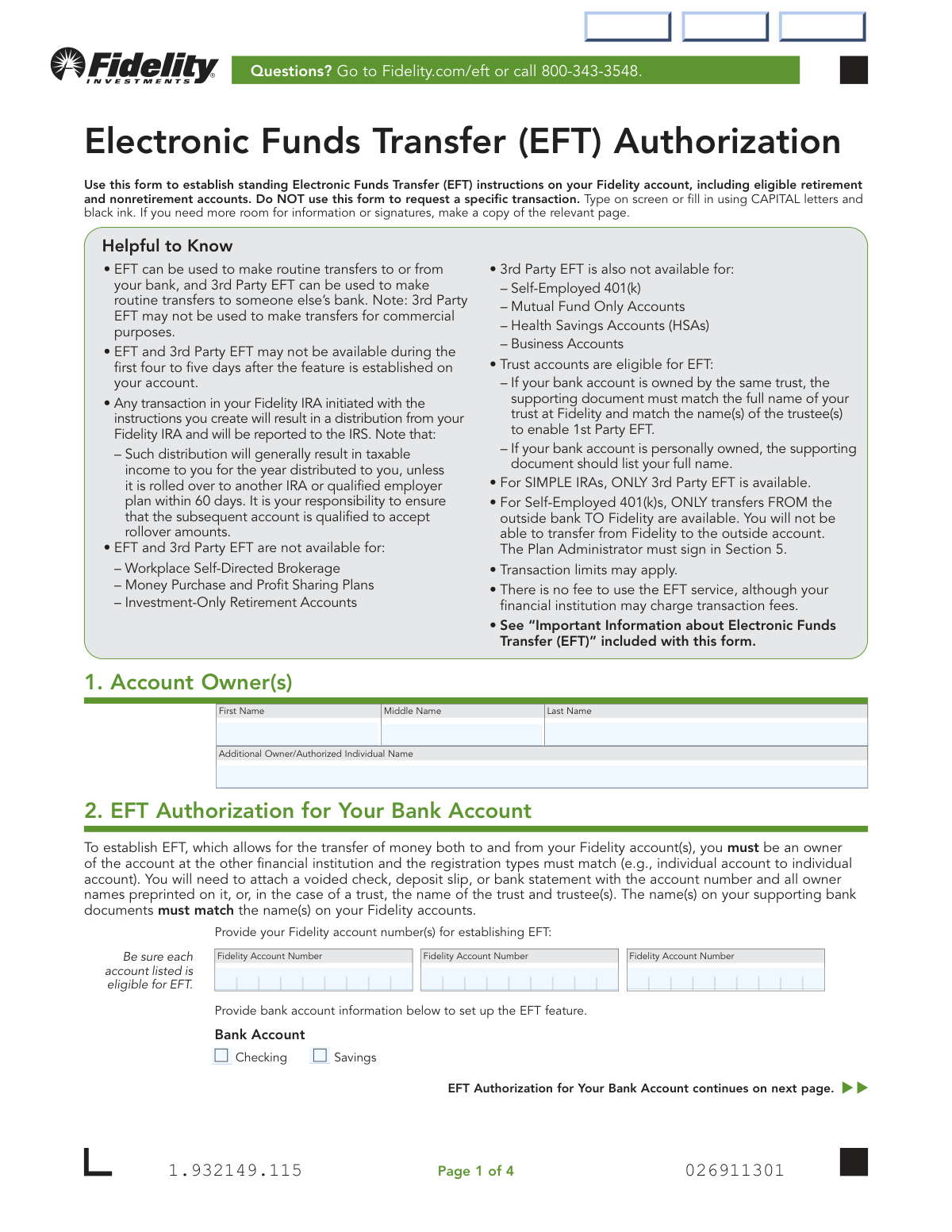
Don't type 29 fields by hand. Tell our AI about yourself, or upload a document you already have, and it fills every field in seconds. You check it, then download, print or sign.
The AI does the filling. You just check it.
No typing into boxes, nothing to install.
What this form asks for
The AI fills all of it, from your answers or your documents.
The AI checks your answers before you download
12 checks built for this form, so a wrong date or a missing answer is caught before anyone else sees it.
This check verifies that at least one signature and a corresponding date are provided in Section 5. The form cannot be processed without authorization, which is legally established by the signature and date. If a signature or date is missing, the form is considered incomplete and will be rejected, delaying the setup of the EFT service.
This validation ensures that the Bank Routing/ABA Number entered in Section 2 or 3 is a valid 9-digit number. This number is critical for correctly identifying the financial institution in the ACH network for electronic transfers. An incorrect or improperly formatted routing number will cause the transaction to fail and must be corrected before the EFT can be established.
This check confirms that for any bank account information provided in Section 2 or 3, exactly one box ('Checking' or 'Savings') has been selected. This designation is required to process EFT transactions correctly, as the transaction codes can differ between account types. Failure to select one and only one option will result in an ambiguous instruction and rejection of the form.
This validation confirms that if Section 3 (3rd Party EFT Authorization) is completed, a Medallion signature guarantee is present in Section 5. This guarantee is a special stamp that verifies the identity and signature of the account owner, protecting against fraudulent transfers to an external party's account. A missing Medallion guarantee for a 3rd party request will cause the form to be rejected due to the high security risk.
This check verifies that a supporting document, such as a voided check, preprinted deposit slip, or bank statement, has been attached or uploaded with the form. This document is required to visually confirm the bank account ownership, routing number, and account number. Without this proof, Fidelity cannot verify the bank account details, and the EFT setup will be denied.
This validation ensures that the owner name(s) listed for the bank account in Section 2 exactly match the Fidelity account owner name(s) listed in Section 1. This is a fundamental security measure to ensure funds are being transferred between accounts owned by the same entity or individual. A mismatch in names indicates a potential 3rd party transfer being incorrectly submitted as a 1st party transfer, and will result in rejection.
And 6 more checks
- Date Format and Validity
- Mutual Fund Account Signature Rule
- Fidelity Account Eligibility for EFT
- EFT Section Completeness
- SIMPLE IRA EFT Type Restriction
- Conditional W-8 Reason Requirement
Let AI fill out your Fidelity EFT Authorization
No typing. Every field filled in seconds, checked, ready to sign.
How to Fill Out Fidelity EFT Authorization Online for Free in 2026
What the AI walks you through.
- Navigate to Instafill.ai and upload your Fidelity EFT Authorization form or select it from the available templates.
- Provide your personal details and the relevant Fidelity account numbers in the Account Owner section.
- Complete the EFT Authorization section with your bank account details, including routing and account numbers, for transfers to and from your own account.
- If applicable, fill out the 3rd Party EFT Authorization section for transfers from your Fidelity account to someone else's bank account.
- Carefully review all entered information for accuracy, ensuring names and account numbers match your banking documents precisely.
- Sign and date the form in the designated signature section. A Medallion signature guarantee may be required for 3rd party authorizations.
- Download the completed form and submit it to Fidelity through their digital upload portal or by mail as instructed on the form.
Common Mistakes in Completing Fidelity EFT Authorization
The ones the AI is built to catch.
Confusing 1st Party and 3rd Party EFT
Mismatched Account Owner Names
Forgetting to Attach Required Bank Documentation
Submitting an Invalid Supporting Document
Using a Notary Stamp Instead of a Medallion Guarantee
Incorrectly Transcribing Bank Routing and Account Numbers
Missing Required Signatures
Attempting to Set Up EFT for an Ineligible Account
Misunderstanding Rules for Retirement Accounts
Using Illegible Handwriting
Frequently Asked Questions About Fidelity EFT Authorization
Is it really free for 7 days?
Can I fill other forms too?
How do I cancel?
How does the AI fill out Fidelity EFT Authorization?
What happens to my information?
How complex is Fidelity EFT Authorization to fill out?
What is the purpose of the Electronic Funds Transfer (EFT) Authorization form?
What is the difference between Section 2 (EFT Authorization) and Section 3 (3rd Party EFT)?
What documents do I need to provide with this form?
When is a Medallion signature guarantee required?
How long does it take for the EFT service to become active?
How do I submit the completed form?
Are there any fees for using Fidelity's EFT service?
Are there limits on how much I can transfer?
Can I set up EFT for any Fidelity account?
What if I am filling this out for a trust account?
Can I use AI to help me fill out this form?
How can I fill out this PDF form on my computer?
The PDF I have is not fillable. What should I do?
What happens if I make a distribution from my IRA using EFT?
Get your Fidelity EFT Authorization filled out by AI
$0 today. Cancel before Nov 1 and you pay nothing.
Other forms like this one
investment forms: Form 3468, Investment Credit, Form 8960, Net Investment Income Tax, How to Transfer Assets from Morgan Stanley to Fidelity Investments (Fidelity Stock Plan Services Guide), Fidelity Investments Transfer/Rollover/Exchange Form, Fidelity Investments Standing Transfer Instructions Form, One-Time Withdrawal – IRA, Fidelity Investments, Fidelity Investments Transfer/Rollover Form, Special Tax Notice: Your Rollover Options - Fidelity Investments, Fidelity Investment-Only (Non-Prototype) Retirement Account Application, Fidelity Investments® Beneficiary Distribution Form, Fidelity Investments Distribution Form, One-Time Withdrawal – Investment-Only (Non-Prototype) Retirement Account, Fidelity Investments Withdrawal — One-Time, Fidelity Investments Withdrawals—529 College Savings Plan, Fidelity Investments Change of Account Ownership — Mutual Fund Only Accounts, Fidelity Investments 403(b) Beneficiary Designation, Fidelity Investments Qualified Plan Beneficiary Designation, Fidelity Investments 403(b)/401(a) Beneficiary Designation, Fidelity Investments Qualified Plan Beneficiary Designation, Fidelity Investments Earnings Automatic Withdrawal Plan — IRA
authorization forms: Form I-765, Application for Employment Authorization, Form CMS-588, EFT Authorization Agreement, Form 8821, Tax Information Authorization, Form 8879, IRS e-file Signature Authorization, Form SSA-827, Authorization to Disclose Information, Form I-905, Application for Authorization to Issue Certification for Health Care Workers, Form G-1650, Authorization for ACH Transactions, Arizona Form 285, General Disclosure/Representation Authorization Form, Arizona Form 285-I, Individual Income Tax Disclosure/Representation Authorization Form, The Department of Medical Assistance Services Applied Behavior Analysis Preservice Service Authorization Request Form (Effective Dates of Service 09/01/2025 and after), Form CH-006: PA-BH-Res-PCS, Oregon Behavioral Health Support Program Plan of Care Authorization (Plan of Care Request for Behavioral Health Residential or Personal Care Services), Continental American Insurance Company (CAIC) / Aflac Group Critical Illness Claim Form (with Attending Physician’s Statement, HIPAA Authorization to Obtain Information, and Electronic Funds Transaction Authorization), HIPAA Authorization Form, Authorization for the Release of Protected Health Information, Form G-1450, Authorization for Credit Card Transactions, Prior Authorization (PA) Request Form – Adult Palliative Care (Alameda Alliance for Health), Alameda Alliance for Health Prior Authorization (PA) Request Form – Adult Palliative Care, Manulife Group Benefits Drug Prior Authorization Form – Mounjaro (Tirzepatide) (GL5197E), Manulife Group Benefits Drug Prior Authorization Form (Ozempic/Semaglutide) – GL5197E, Out-of-Network Pre-Authorization and Exception Request Form, Form SSA-827 (06-2024), Authorization to Disclose Information to the Social Security Administration (SSA)
investment transfer forms: How to Transfer Assets from Morgan Stanley to Fidelity Investments (Fidelity Stock Plan Services Guide), Fidelity Investments Transfer/Rollover/Exchange Form, Fidelity Investments Standing Transfer Instructions Form, Fidelity Investments Transfer/Rollover Form, HSA Bank Investment Account Transfer Form, TIAA 1035 Exchange Authorization to Alternate Investment Company Transfer Payout Annuity for ATRA, U.S. Bancorp Investments Account Transfer Form, Computershare Alternative Investment Product Transfer Request, Pershing LLC Account Transfer Form, Thrivent Funds Transfer of Assets, Form MF11502, Fidelity Transfer/Rollover/Exchange Form, Fidelity Transfer/Rollover/Exchange Form
Fidelity forms: Fidelity Funds Account Transfer of Assets Form, Fidelity Stock Plan Services (SPS) Transfer Request Form, How to Transfer Assets from Morgan Stanley to Fidelity Investments (Fidelity Stock Plan Services Guide), Fidelity Investments Transfer/Rollover/Exchange Form, Fidelity Investments Standing Transfer Instructions Form, Fidelity Charitable 144/145 Contribution Form, One-Time Withdrawal – IRA, Fidelity Investments, Fidelity Investments Transfer/Rollover Form, Fidelity Advisor 403(b) Distribution Request Form, Fidelity Advisor IRA Distribution Request for Automatic Rollover Accounts, Special Tax Notice: Your Rollover Options - Fidelity Investments, Fidelity Charitable Letter of Authorization, Fidelity Advisor Trading Authorization and Indemnification, Fidelity Investment-Only (Non-Prototype) Retirement Account Application, Fidelity NetBenefits Send a Document Form, Fidelity NetBenefits Auditor's Guide: An Overview of Fidelity's 2024 Plan Year Reporting Package, Fidelity NetBenefits Distribution - Recurring Payments, Fidelity Investments® Beneficiary Distribution Form, Fidelity Investments Distribution Form, Fidelity One-Time Withdrawal Form — Nonretirement
transfer forms: Form REG 227, Application for Replacement or Transfer of Title, City of Harvey Real Estate Transfer Declaration & Application (with Certificate for Exemption), DBPR ABT-6002 – Application for Transfer of Ownership of an Alcoholic Beverage License, DBPR ABT-6002, Division of Alcoholic Beverages and Tobacco Application for Transfer of Ownership of an Alcoholic Beverage License, Request for Transfer of Records (Adelaide Health Care) – AHC-0013-05-PS (Version 2), DBPR Form ABT-6002, Division of Alcoholic Beverages and Tobacco Application for Transfer of Ownership of an Alcoholic Beverage License, Pfändungs- und Überweisungsbeschluss (Garnishment and Transfer Order) – German Civil Enforcement Court Form, Fidelity Funds Account Transfer of Assets Form, Fidelity Stock Plan Services (SPS) Transfer Request Form, How to Transfer Assets from Morgan Stanley to Fidelity Investments (Fidelity Stock Plan Services Guide), Transfer Due to Divorce — IRA/HSA/529, Fidelity Investments Transfer/Rollover/Exchange Form, Fidelity Investments Standing Transfer Instructions Form, Fidelity Investments Transfer/Rollover Form, Group Transfer Form Fidelity Health Savings Account (HSA), Plan–to-Plan Transfer, Plan Exchange, or Service Credit Authorization Form, Beneficiaries — Nonretirement Transfer on Death, Transfer Shares as a Gift — Nonretirement, Form APP13017-29, Transfer Your Account to Schwab, Transfer of Assets Out - Partial Account or Charitable Gift Transfers
funds transfer forms: Fidelity Funds Account Transfer of Assets Form, Easy Transfer Form: Moving Funds to an Employer-Sponsored Retirement Plan at TIAA, Merrill Funds Transfer Service Enrollment Form, Funds Transfer Service Enrollment Form, Authorization to transfer funds from a bank retirement account, ACH and Electronic Funds Transfer Instructions and Agreement, Thrivent Funds Transfer of Assets, Form MF11502, Form CMS-588, Electronic Funds Transfer (EFT) Authorization Agreement, Electronic Funds Transfer (EFT) Form, eMedNY Electronic Funds Transfer Authorization Form (EMEDNY-701101), CMS-588 Electronic Funds Transfer (EFT) Authorization Agreement Checklist, Form CMS-588, Electronic Funds Transfer (EFT) Authorization Agreement for Accountable Care Organizations, Schwab MoneyLink® Electronic Funds Transfer Form (12/15), Schwab MoneyLink® Electronic Funds Transfer Form (09/20)
electronic funds transfer forms: ACH and Electronic Funds Transfer Instructions and Agreement, Form CMS-588, Electronic Funds Transfer (EFT) Authorization Agreement, Electronic Funds Transfer (EFT) Form, eMedNY Electronic Funds Transfer Authorization Form (EMEDNY-701101), CMS-588 Electronic Funds Transfer (EFT) Authorization Agreement Checklist, Form CMS-588, Electronic Funds Transfer (EFT) Authorization Agreement for Accountable Care Organizations, Schwab MoneyLink® Electronic Funds Transfer Form (12/15), Schwab MoneyLink® Electronic Funds Transfer Form (09/20)
fund investment forms: Fidelity Investments Change of Account Ownership — Mutual Fund Only Accounts, Pomona Investment Fund Investor Initial Application (Class A & Class I Shares), BlackRock Private Investments Fund Subscription Agreement and Application, Pomona Investment Fund Investor Subsequent Application (Class A & Class I Shares), Investment Funds Distributor Due Diligence Questionnaire, Hedge Fund Portfolios Additional Investment Form, Application Form Franklin Templeton Investment Funds, New York Life Investments Funds Individual Retirement Account Application and NYLIFE Securities LLC Investor Profile, Investor Application and Subscription Agreement for The Wyoming Reserve Opportunity Zone Fund Corporation, FundRock Additional Subscription Form
investment fund forms: Alpine SPRIM™ Private Markets Fund Subscription Agreement and Power of Attorney, Fidelity Investments Change of Account Ownership — Mutual Fund Only Accounts, Pomona Investment Fund Investor Initial Application (Class A & Class I Shares), BlackRock Private Investments Fund Subscription Agreement and Application, Pomona Investment Fund Investor Subsequent Application (Class A & Class I Shares), Investment Funds Distributor Due Diligence Questionnaire, Hedge Fund Portfolios Additional Investment Form, Application Form Franklin Templeton Investment Funds, New York Life Investments Funds Individual Retirement Account Application and NYLIFE Securities LLC Investor Profile, Application Form: Individual Investor | Qualified Investor Hedge Fund, Application Form: Legal Entities | Qualified Investor Hedge Fund, Application Form: Legal Entities | Retail Hedge Fund - Fundrock, Fundrock Application Form: Individual Investor | Monthly Liquidity – Qualified Investor Hedge Fund, Fundrock Application Form: Legal Entities | Monthly Liquidity – Qualified Investor Hedge Fund, Fundrock Application Form: Legal Entities | Monthly Liquidity – Retail Hedge Fund, Investor Application and Subscription Agreement for Shares of Common Stock in Oxford Park Income Fund, Inc.
fund transfer forms: Authorization to transfer funds from a bank retirement account, Fidelity Funds Account Transfer of Assets Form, Schwab Charitable Fund Transfer of Assets, Easy Transfer Form: Moving Funds to an Employer-Sponsored Retirement Plan at TIAA, Merrill Funds Transfer Service Enrollment Form, Funds Transfer Service Enrollment Form, ACH and Electronic Funds Transfer Instructions and Agreement, Thrivent Funds Transfer of Assets, Form MF11502, Form CMS-588, Electronic Funds Transfer (EFT) Authorization Agreement, Electronic Funds Transfer (EFT) Form, eMedNY Electronic Funds Transfer Authorization Form (EMEDNY-701101), CMS-588 Electronic Funds Transfer (EFT) Authorization Agreement Checklist, Form CMS-588, Electronic Funds Transfer (EFT) Authorization Agreement for Accountable Care Organizations, Schwab MoneyLink® Electronic Funds Transfer Form (12/15), Schwab MoneyLink® Electronic Funds Transfer Form (09/20)
EFT authorization forms: CMS-588 Electronic Funds Transfer (EFT) Authorization Agreement Checklist, Form CMS-588, EFT Authorization Agreement, Form CMS-588, Electronic Funds Transfer (EFT) Authorization Agreement, Form CMS-588, Electronic Funds Transfer (EFT) Authorization Agreement for Accountable Care Organizations, TANN Corporation ACH/EFT Payment Authorization Form
EFT forms: Electronic Funds Transfer (EFT) Form, Form CMS-588, EFT Authorization Agreement, Form 4506-F, Identity Theft Victim’s Request, Form CMS-588, Electronic Funds Transfer (EFT) Authorization Agreement, CMS-588 Electronic Funds Transfer (EFT) Authorization Agreement Checklist, Form CMS-588, Electronic Funds Transfer (EFT) Authorization Agreement for Accountable Care Organizations
investment authorization forms: Form AOB-03, Private Equity Investment Authorization, Alternative Investment Letter of Authorization, TIAA 1035 Exchange Authorization to Alternate Investment Company Transfer Payout Annuity for ATRA, IRA-5054 Private Equity Investment Authorization
UK investment forms: Triple Point Venture VCT plc | Investor Application Form, Form 3468, Investment Credit, Form 8960, Net Investment Income Tax, How to Transfer Assets from Morgan Stanley to Fidelity Investments (Fidelity Stock Plan Services Guide), Fidelity Investments Transfer/Rollover/Exchange Form, Fidelity Investments Standing Transfer Instructions Form, One-Time Withdrawal – IRA, Fidelity Investments, Fidelity Investments Transfer/Rollover Form, Special Tax Notice: Your Rollover Options - Fidelity Investments, Fidelity Investment-Only (Non-Prototype) Retirement Account Application, Fidelity Investments® Beneficiary Distribution Form, Fidelity Investments Distribution Form, One-Time Withdrawal – Investment-Only (Non-Prototype) Retirement Account, Fidelity Investments Withdrawal — One-Time, Fidelity Investments Withdrawals—529 College Savings Plan, Fidelity Investments Change of Account Ownership — Mutual Fund Only Accounts, Fidelity Investments 403(b) Beneficiary Designation, Fidelity Investments Qualified Plan Beneficiary Designation, Fidelity Investments 403(b)/401(a) Beneficiary Designation, Fidelity Investments Qualified Plan Beneficiary Designation
Let AI fill out your Fidelity EFT Authorization
Your trial starts once a card is added. You pay nothing before Nov 1.
Our AI already knows this form, all 29 fields of it. Skip the typing: tell it about yourself, or upload what you have, and it fills the whole form in seconds.
- AI fills every field on all 4 pages, checkboxes included
- No typing into boxes: answer a few questions, or upload a document you already have, an old copy of this form, a photo of a document
- The AI checks the answers; you review and change anything before you download
- Download the finished PDF, print it, or sign it online
- Encrypted, and never used to train AI
Cancel before Nov 1 and you pay nothing.
A card is needed to start the trial. Cancel in two clicks from your account.
Terms · Privacy