Yes! You can use AI to fill out Fidelity Investments Transfer/Rollover/Exchange Form
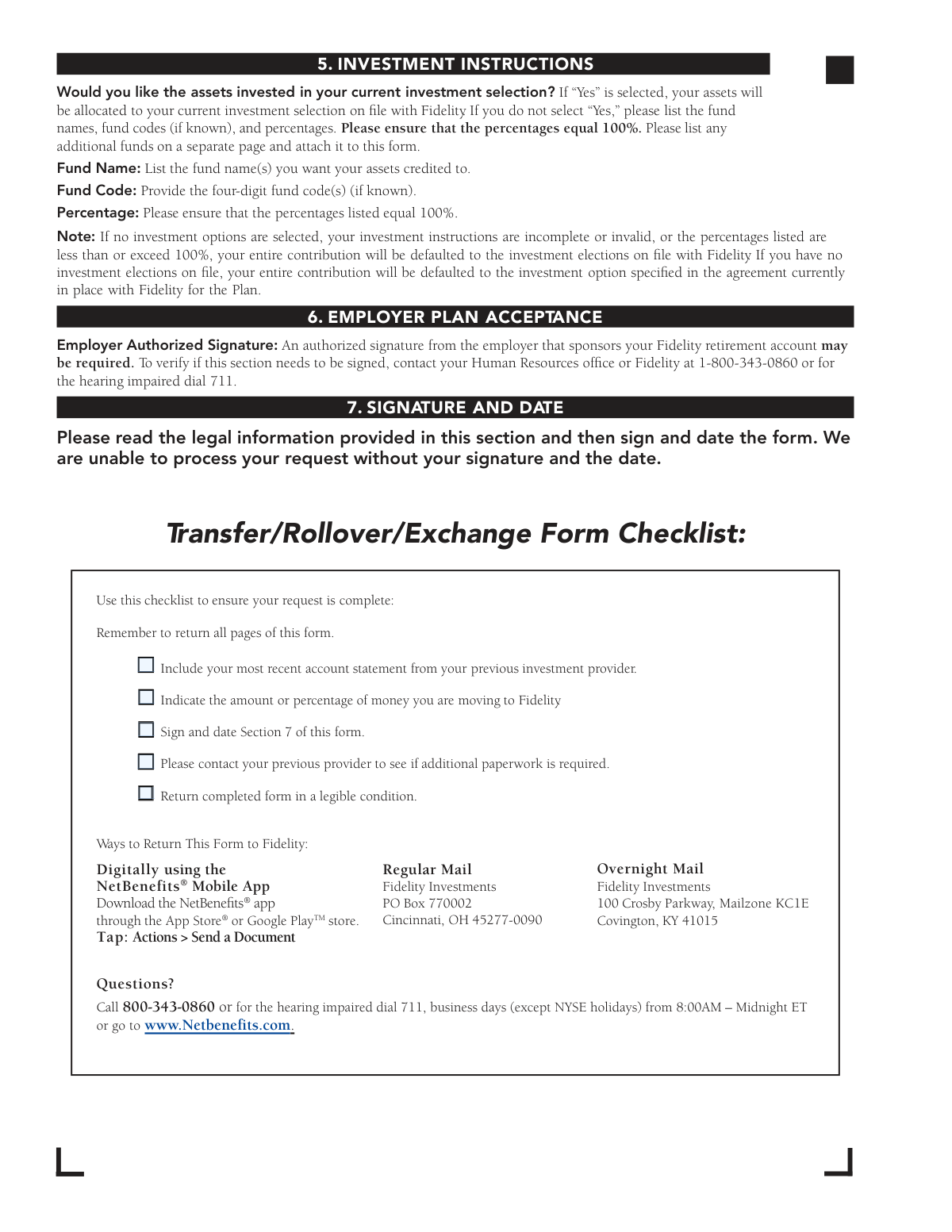
The Fidelity Transfer/Rollover/Exchange Form is an official document that allows individuals to transfer, roll over, or exchange retirement assets—such as 401(a)/(k), 403(b), 457(b), or IRA funds—from a previous investment provider into a Fidelity employer-sponsored retirement account. It is a critical form for consolidating retirement savings and ensuring assets are properly credited to the correct plan type and investment elections. Completing this form accurately is essential to avoid delays, tax complications, or misdirected funds. Today, this form can be filled out quickly and accurately using AI-powered services like Instafill.ai, which can also convert non-fillable PDF versions into interactive fillable forms.
Our AI automatically handles information lookup, data retrieval, formatting, and form filling.
It takes less than a minute to fill out Fidelity Transfer/Rollover/Exchange Form using our AI form filling.
Securely upload your data. Information is encrypted in transit and deleted immediately after the form is filled out.
Form specifications
| Form name: | Fidelity Investments Transfer/Rollover/Exchange Form |
| Number of pages: | 1 |
| Filled form examples: | Form Fidelity Transfer/Rollover/Exchange Form Examples |
| Language: | English |
Instafill Demo: filling out a legal form in seconds
How to Fill Out Fidelity Transfer/Rollover/Exchange Form Online for Free in 2026
Are you looking to fill out a FIDELITY TRANSFER/ROLLOVER/EXCHANGE FORM form online quickly and accurately? Instafill.ai offers the #1 AI-powered PDF filling software of 2026, allowing you to complete your FIDELITY TRANSFER/ROLLOVER/EXCHANGE FORM form in just 37 seconds or less.
Follow these steps to fill out your FIDELITY TRANSFER/ROLLOVER/EXCHANGE FORM form online using Instafill.ai:
- 1 Navigate to Instafill.ai and upload the Fidelity Transfer/Rollover/Exchange Form PDF or select it from the available form library to begin filling it out online.
- 2 Complete Section 1 (Your Information) by entering your Social Security number or Tax ID, date of birth, full name, mailing address, phone numbers, and email address.
- 3 Fill in Section 2 (Investment Provider You Are Moving Money From) with the name, address, and phone number of your previous investment provider, and attach a copy of your most recent account statement.
- 4 Complete Section 3 (Account(s) or Contract(s) to Move) by entering your account or contract number(s), selecting the account type (403(b), 401(a)/(k), 457(b), or IRA), indicating the source of the account, and specifying the liquidation amount (full or partial).
- 5 Fill in Section 4 (Your Fidelity Account Information) with your employer's name, city and state, employment status, and the plan type and plan number for your Fidelity retirement account.
- 6 Complete Section 5 (Investment Instructions) by indicating whether assets should follow your current investment selection or specifying fund names, fund codes, and percentages totaling 100%.
- 7 Obtain the required Employer Authorized Signature in Section 6 if applicable, then sign and date Section 7, and submit the completed form to Fidelity via the NetBenefits Mobile App, regular mail, or overnight mail.
Our AI-powered system ensures each field is filled out correctly, reducing errors and saving you time.
Why Choose Instafill.ai for Your Fillable Fidelity Transfer/Rollover/Exchange Form Form?
Speed
Complete your Fidelity Transfer/Rollover/Exchange Form in as little as 37 seconds.
Up-to-Date
Always use the latest 2026 Fidelity Transfer/Rollover/Exchange Form form version.
Cost-effective
No need to hire expensive lawyers.
Accuracy
Our AI performs 10 compliance checks to ensure your form is error-free.
Security
Your personal information is protected with bank-level encryption.
Frequently Asked Questions About Form Fidelity Transfer/Rollover/Exchange Form
This form is used to move retirement assets into your Fidelity employer-sponsored retirement account from a previous investment provider. You can also use it to consolidate multiple employer-sponsored retirement accounts currently held at Fidelity.
Anyone who wants to transfer, roll over, or exchange retirement assets from a previous investment provider (such as TIAA-CREF, Vanguard, Voya, or Lincoln) into their Fidelity employer-sponsored retirement account needs to complete this form. If you don't yet have a Fidelity retirement account, you must also complete an Account Application/Enrollment Form or enroll online at netbenefits.com/atwork.
You must include a copy of your most recent account statement from your previous investment provider. Additionally, you should contact your previous provider to find out if any additional paperwork is required on their end before the transfer can be processed.
This form supports transfers and rollovers from 403(b), 401(a)/(k), governmental 457(b), Traditional IRA, SEP IRA, and Rollover IRA accounts. Note that Roth IRAs, Coverdell IRAs, and nongovernmental 457(b) plans cannot be processed using this form.
You can choose either a full liquidation (100% of your balance) or a partial liquidation by specifying a dollar amount or percentage. If you do not specify an amount, Fidelity will default to moving 100% of your account balance.
An authorized employer signature in Section 6 may be required depending on your plan. To verify whether this is necessary, contact your Human Resources office or call Fidelity at 1-800-343-0860. The form cannot be fully processed without all required signatures.
If you don't select investment options or if your instructions are incomplete or the percentages don't add up to 100%, your assets will be defaulted to the investment elections currently on file with Fidelity. If no elections are on file, assets will be invested in the default option specified in the plan agreement with Fidelity.
You can submit the form digitally using the NetBenefits® Mobile App (tap Actions > Send a Document), by regular mail to Fidelity Investments, PO Box 770002, Cincinnati, OH 45277-0090, or by overnight mail to Fidelity Investments, 100 Crosby Parkway, Mailzone KC1E, Covington, KY 41015. Remember to return all pages of the form.
No, you must use a separate form for each investment provider you are moving money from. However, a single form does allow you to move up to two accounts or contracts from the same provider by completing both Section 3A and Section 3B.
A vendor or contract exchange applies to 403(b)-to-403(b) movements within the same employer. An in-plan transfer applies to movements between the same plan types (e.g., 401(k) to 401(k)) within the same employer. A rollover applies to movements from a previous employer's plan, a Rollover IRA, or a Traditional/SEP IRA into your current Fidelity plan.
Check your most recent account statement from your previous investment provider, or contact them directly to obtain the number. If you cannot provide the number, Fidelity will use your Social Security number or U.S. Tax Identification number to request the asset transfer.
Yes, AI-powered services like Instafill.ai can help you accurately auto-fill the form fields, saving you time and reducing the risk of errors. These tools guide you through each section and ensure all required information is entered correctly before submission.
You can upload the Transfer/Rollover/Exchange Form PDF to Instafill.ai, and the AI will automatically populate the form fields with your information. Once filled, you can review, finalize, and download the completed form ready for submission to Fidelity.
If you have a flat, non-fillable PDF version of this form, Instafill.ai can convert it into an interactive fillable form, allowing you to type directly into the fields digitally rather than printing and filling it out by hand.
You can call Fidelity Investments at 1-800-343-0860, Monday through Friday, 8 a.m. to midnight Eastern time (excluding NYSE holidays, except Good Friday). For the hearing impaired, dial 711. You can also visit www.netbenefits.com/atwork for additional assistance.
Compliance Fidelity Transfer/Rollover/Exchange Form
Validation Checks by Instafill.ai
1
Ensures Social Security Number or Tax ID Number is in Valid Format
This check verifies that the Social Security Number (SSN) or U.S. Tax Identification Number (TIN) entered in Section 1 follows the correct 9-digit format (XXX-XX-XXXX for SSN). The SSN/TIN is critical for identifying the account holder and, if no account or contract number is provided, is used to request the transfer of assets from the previous investment provider. If the format is invalid or the field is left blank, the form cannot be processed and the transfer request will be delayed or rejected.
2
Ensures Date of Birth is a Valid and Logical Date
This check confirms that the Date of Birth field in Section 1 is populated with a valid calendar date in the correct format (MM/DD/YYYY) and represents a realistic age for a retirement account holder (e.g., between 18 and 100 years old). The date of birth is used to verify the account holder's identity and may affect eligibility rules, such as early distribution penalties. An invalid, missing, or illogical date of birth (e.g., a future date) will cause processing delays or identity verification failures.
3
Ensures Required Personal Information Fields Are Fully Completed
This check verifies that all mandatory personal information fields in Section 1 — including First Name, Last Name, Mailing Address, City, State, and ZIP Code — are populated and not left blank. These fields are essential for identifying the account holder and ensuring correspondence and processed assets are directed to the correct individual. Missing any of these fields constitutes an incomplete form, which Fidelity explicitly states may delay the processing of the transfer request.
4
Ensures ZIP Code is in Valid 5-Digit or ZIP+4 Format
This check validates that the ZIP Code fields in both Section 1 (applicant's address) and Section 2 (previous investment provider's address) contain either a valid 5-digit numeric ZIP code or a ZIP+4 format (XXXXX-XXXX). Correct ZIP codes are necessary to ensure mail delivery and proper geographic identification of both the applicant and the previous provider. An invalid or missing ZIP code could result in returned mail or an inability to contact the previous investment provider.
5
Ensures Previous Investment Provider Name and Address Are Provided
This check confirms that Section 2 is fully completed with the name, street address, city, state, ZIP code, and phone number of the investment provider from which assets are being moved. This information is required for Fidelity to contact the previous provider and initiate the transfer or rollover. If the provider's name or contact information is missing or incomplete, Fidelity will be unable to process the request and the form will be considered not in good order.
6
Ensures at Least One Account Type is Selected for Each Account or Contract
This check verifies that at least one account or contract type (403(b), 401(a)/(k), 457(b) governmental, or IRA) is selected in Section 3A, and in Section 3B if a second account is being moved. The account type determines how the transaction is classified — as a rollover, in-plan transfer, or vendor/contract exchange — and governs applicable IRS rules. Failure to select an account type means Fidelity cannot determine the correct processing method, resulting in a delayed or rejected request.
7
Ensures Transaction Source is Selected and Previous Employer Name is Provided When Applicable
This check confirms that exactly one transaction source option is selected in Section 3A (and 3B if applicable) — either 'The Same Employer,' 'A Previous Employer,' 'A Rollover IRA,' or 'A Traditional IRA or SEP IRA.' Additionally, if 'A Previous Employer' is selected, this check ensures the Previous Employer Name field is populated, as this information is required to process the rollover correctly. Selecting multiple sources or omitting the employer name when required will result in processing ambiguity and form rejection.
8
Ensures Liquidation Amount is Specified or Defaults to Full Liquidation
This check verifies that for each account or contract in Sections 3A and 3B, either 'Full Liquidation/100%' is selected or a valid partial liquidation amount is provided as either a percentage (1–99%) or a specific dollar amount. If a partial liquidation is chosen, the check ensures that both a percentage and a dollar amount are not simultaneously entered, as only one should be specified. While the form defaults to 100% if no amount is specified, this check flags the omission to ensure the submitter's intent is explicitly confirmed and to prevent unintended full liquidations.
9
Ensures 457(b) Assets Are Moved to the Correct Plan Type
This check validates that if a 457(b) governmental account type is selected in Section 3, the corresponding Fidelity destination plan type in Section 4 is also a 457(b) governmental plan. Per IRS rules, governmental 457(b) assets must be moved into a governmental 457(b) plan, and nongovernmental 457(b) assets must be moved into a nongovernmental 457(b) plan. A mismatch between the source and destination plan types for 457(b) accounts would result in a non-compliant transaction that could trigger tax penalties for the account holder.
10
Ensures Fidelity Destination Plan Type is Selected for Each Account Being Transferred
This check confirms that a plan type (403(b), 401(a)/(k), or 457(b) governmental) is selected in Section 4A for the first account and in Section 4B for the second account if applicable. The destination plan type is required for Fidelity to credit the incoming assets to the correct account. Without a selected plan type, Fidelity cannot determine which account to credit, and the form instructions note that if there is a discrepancy between plan type and plan number, the plan type will take precedence.
11
Ensures Employer Sponsoring the Fidelity Account is Identified
This check verifies that the 'Employer Sponsoring Your Fidelity Retirement Account' field in Section 4 is completed with the full employer name as it appears on the Fidelity account statement or enrollment paperwork. The employer name is necessary to match the incoming transfer to the correct employer-sponsored plan held at Fidelity. If this field is blank or contains an unrecognizable name, Fidelity will be unable to identify the destination plan and the transfer cannot be completed.
12
Ensures Investment Instruction Percentages Sum to Exactly 100%
This check validates that when the 'No' option is selected in Section 5 (meaning the submitter wants to specify custom investment allocations rather than use existing elections), the percentages entered across all listed fund names sum to exactly 100%. The form explicitly states that if percentages are less than or exceed 100%, the entire contribution will be defaulted to the investment elections on file with Fidelity. This check prevents unintended default allocations by flagging any percentage total that does not equal 100%.
13
Ensures Fund Codes Are Four Digits When Provided in Section 5
This check verifies that any fund codes entered in Section 5 are exactly four digits in length, as specified in the form instructions. Fund codes are used to precisely identify the mutual funds or investment options into which the transferred assets should be allocated. An incorrectly formatted fund code (e.g., fewer or more than four digits) could result in the assets being allocated to the wrong fund or the investment instructions being deemed invalid, triggering a default allocation.
14
Ensures the Applicant's Signature and Date Are Present in Section 7
This check confirms that both the applicant's signature field and the corresponding date field in Section 7 are completed before the form is submitted. The form explicitly states that Fidelity is unable to process the request without the applicant's signature and the date, as the signature certifies the accuracy of the information provided and authorizes the transfer under IRS and plan rules. A missing signature or date renders the form legally incomplete and will result in the request being returned unprocessed.
15
Ensures Roth IRA and Coverdell IRA Are Not Selected as Source Account Types
This check validates that the source account type selected in Section 3 is not a Roth IRA or Coverdell IRA, as the form instructions explicitly state these account types cannot be accepted for transfer or rollover to a Fidelity employer-sponsored retirement account. Similarly, it checks that after-tax value is not being rolled from an IRA, which is also prohibited. If a prohibited account type is indicated, the form should be flagged immediately to prevent a non-compliant transaction that could have adverse tax consequences for the account holder.
16
Ensures Daytime Phone Number is in a Valid Format
This check verifies that the Daytime Phone number provided in Section 1 follows a valid U.S. telephone number format (e.g., XXX-XXX-XXXX or (XXX) XXX-XXXX) and contains exactly 10 digits. A valid daytime phone number is important so that Fidelity or the previous investment provider can contact the applicant if there are questions or issues with the transfer request. An improperly formatted or missing phone number may delay resolution of any processing issues that arise during the transfer.
Common Mistakes in Completing Fidelity Transfer/Rollover/Exchange Form
Many people accidentally transpose digits or leave this field blank, especially when they assume the provider already has this information on file. Since Fidelity uses the SSN/Tax ID as a fallback to locate assets when no account number is provided, an error here can cause significant delays or misdirected funds. Double-check every digit against your Social Security card or official tax documents before submitting. AI-powered form filling tools like Instafill.ai can help auto-populate and validate this field to prevent transcription errors.
Filers frequently check the wrong plan type (e.g., selecting 403(b) instead of 401(k), or confusing a governmental 457(b) with a nongovernmental one), which causes the transaction to be processed incorrectly or rejected entirely. This mistake often happens because people are unfamiliar with the specific plan type their previous employer offered. Always refer to your most recent account statement from the previous provider or call them directly to confirm the exact plan type before completing this section. Misidentifying the plan type can also result in tax penalties if assets are moved into an incompatible account.
One of the most common reasons this form is returned unprocessed is the absence of a recent statement from the previous investment provider. The statement is required to verify account details, provider address, and account balance. People often forget this requirement because it is easy to overlook the checklist at the end of the form. Always attach a copy of your most recent statement before mailing or submitting the form digitally through the NetBenefits Mobile App.
Choosing the wrong source category in Section 3 directly determines how Fidelity processes the transaction — as a vendor exchange, in-plan transfer, or rollover — and selecting the wrong option can trigger unintended tax consequences or processing errors. For example, selecting 'A Rollover IRA' when the funds are actually coming from a previous employer's 401(k) is a common mix-up. Carefully read the descriptions in the instructions for each of the four transaction types and match them to your specific situation. If unsure, contact Fidelity at 1-800-343-0860 before submitting.
The form explicitly states that Roth IRAs and Coverdell IRAs cannot be accepted, and that transfers from nongovernmental 457(b) plans are not supported on this form. People often attempt these transfers without realizing the restriction, leading to rejected submissions and delays. Additionally, after-tax value cannot be rolled from an IRA. Review the account type restrictions in Section 3 of the instructions carefully, and contact Fidelity directly if you have a nongovernmental 457(b) or Roth/Coverdell IRA to discuss alternative options.
When specifying custom fund allocations, filers frequently enter percentages that add up to more or less than 100% — for example, listing three funds at 40%, 40%, and 30% (totaling 110%). If the percentages are invalid or incomplete, Fidelity will default the entire contribution to the investment elections already on file, which may not reflect the filer's intentions. Carefully add up all percentages before submitting, and if you want assets invested in your current selection, simply check 'Yes' in Section 5 to avoid this issue entirely. Tools like Instafill.ai can automatically validate that percentages sum to 100%.
Many filers either skip Section 6 entirely or have it signed by someone who is not an authorized representative of the sponsoring employer, causing the form to be rejected. Whether this signature is required depends on the specific employer plan, and people often don't realize they need to verify this with their HR office before submitting. Contact your Human Resources department or call Fidelity at 1-800-343-0860 to confirm whether an employer signature is needed for your plan before finalizing the form.
The form explicitly states it cannot be processed without the participant's signature and date in Section 7, yet this is one of the most frequently missed steps. People often complete all other sections thoroughly and then forget to sign, especially when submitting digitally. The legal certifications in Section 7 are also important — by signing, you are certifying the accuracy of your SSN and the information provided. Always review the checklist at the end of the form before submission to confirm Section 7 is complete.
Filers sometimes enter a nickname, abbreviation, or outdated name for their previous provider (e.g., writing 'VALIC' instead of the current legal name 'AIG Retirement Services'), which can cause Fidelity's request for assets to be misdirected or delayed. The provider's correct name and address should be taken directly from your most recent account statement. Always cross-reference the provider information with your statement rather than relying on memory, and include the statement copy as required.
The instructions clearly state that a separate form must be used for each investment provider, but filers often try to list multiple providers on one form to save time. This results in the form being returned or only partially processed. If you are consolidating accounts from two different providers, complete two separate Transfer/Rollover/Exchange forms — one for each provider — and submit them together with the corresponding account statements.
Many previous investment providers require their own proprietary transfer or distribution forms in addition to Fidelity's form, and failing to obtain and submit these can stall or block the transfer entirely. Filers often assume that submitting Fidelity's form is sufficient and are surprised when the transfer is delayed. Always call your previous provider before submitting this form to ask whether they require additional documentation, signatures, or notarization on their end.
When a participant has multiple retirement accounts with Fidelity, entering the wrong plan number or selecting a plan type that doesn't match the plan number can cause assets to be credited to the wrong account. The form notes that if there is a discrepancy between plan type and plan number, the plan type selected will take precedence, which may still result in incorrect crediting. Verify your exact plan type and plan number by reviewing your Fidelity account statement or calling Fidelity at 1-800-343-0860 before completing Section 4.
Saved over 80 hours a year
“I was never sure if my IRS forms like W-9 were filled correctly. Now, I can complete the forms accurately without any external help.”
Kevin Martin Green
Your data stays secure with advanced protection from Instafill and our subprocessors

Robust compliance program
Transparent business model
You’re not the product. You always know where your data is and what it is processed for.
ISO 27001, HIPAA, and GDPR
Our subprocesses adhere to multiple compliance standards, including but not limited to ISO 27001, HIPAA, and GDPR.
Security & privacy by design
We consider security and privacy from the initial design phase of any new service or functionality. It’s not an afterthought, it’s built-in, including support for two-factor authentication (2FA) to further protect your account.
Fill out Fidelity Transfer/Rollover/Exchange Form with Instafill.ai
Worried about filling PDFs wrong? Instafill securely fills fidelity-investments-transferrolloverexchange-form forms, ensuring each field is accurate.